


A scheduled paging playlist is a paging system feature that automatically plays pre-arranged audio messages, tones, announcements, music clips, bell signals, reminders, or notification prompts according to a defined time schedule. Instead of requiring an operator to manually start every broadcast, the system follows a programmed playlist and sends the right audio to the right paging zone at the right time.
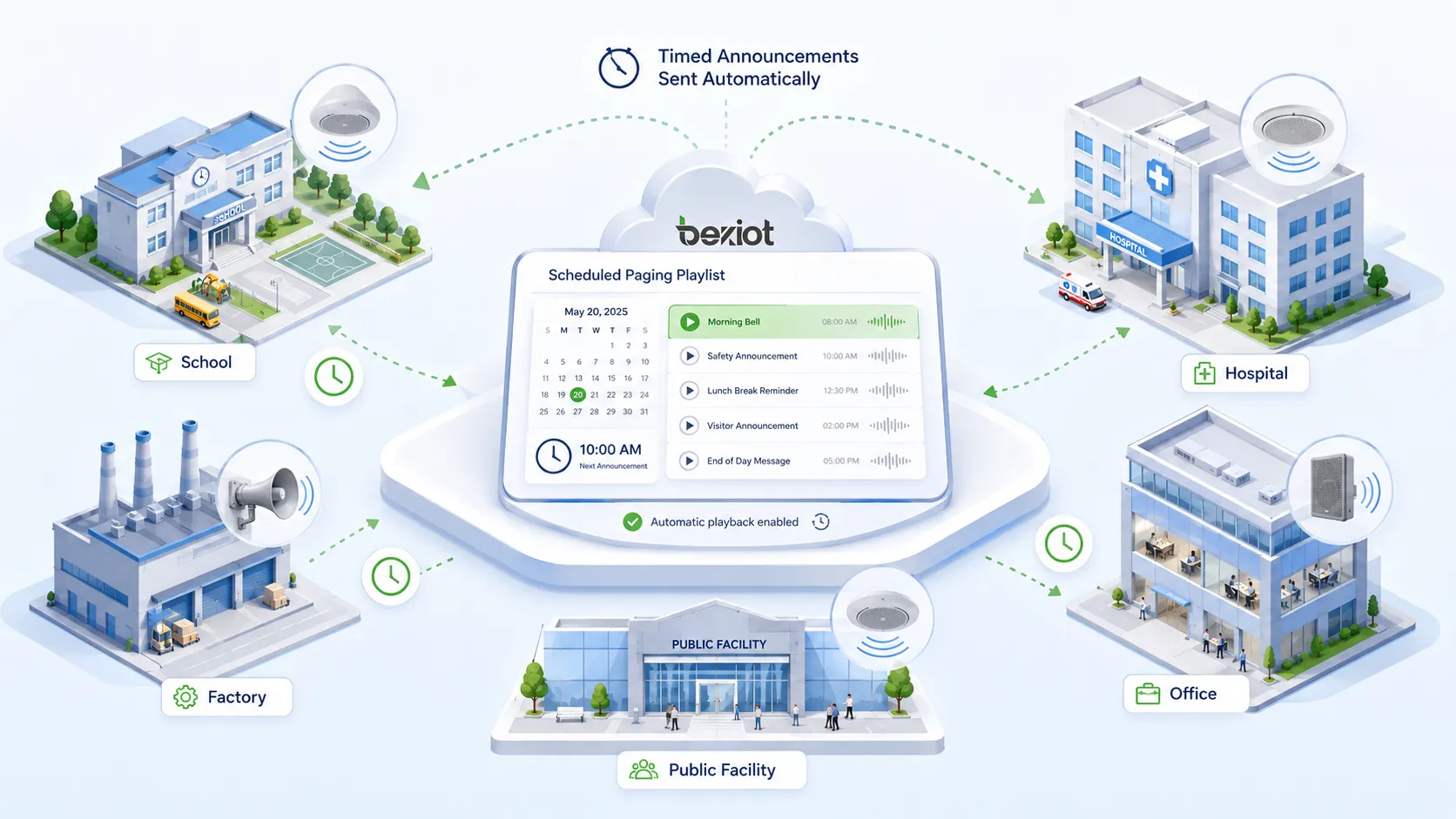
Scheduled paging playlists are widely used in schools, factories, hospitals, warehouses, transportation stations, campuses, office buildings, shopping centers, public facilities, industrial parks, hotels, and large commercial sites. They help organizations automate routine communication such as class bells, shift change reminders, safety notices, break-time signals, store opening messages, production schedule prompts, visitor announcements, and daily operational notifications.
In modern IP paging and public address systems, a scheduled playlist can be more than a simple timer. It may include multiple audio files, zone selection, calendar rules, recurrence settings, priority levels, holiday exceptions, volume control, emergency override, event logs, and remote management. This makes it a practical tool for improving communication consistency and reducing manual workload in daily facility operations.
What Is a Scheduled Paging Playlist?
Definition and Core Meaning
A scheduled paging playlist is a sequence of audio items configured to play automatically through a paging or public address system based on time, date, recurrence rule, or operational event. Each item in the playlist may be a recorded voice message, chime, bell, alarm tone, music segment, reminder prompt, or custom audio file.
The core meaning is automated timed broadcasting. The system stores audio content, organizes it into a playlist, associates it with a schedule, and then plays it to selected speakers or paging zones without requiring manual action every time. This is useful when the same announcements or tones need to play repeatedly and accurately.
A scheduled paging playlist can be configured for one zone, multiple zones, all zones, or different zones at different times. For example, a school may play a bell tone in classroom buildings, a factory may play a shift change message in production areas, and a hospital may play a quiet reminder in public waiting areas.
A scheduled paging playlist turns routine paging from a manual task into an automated communication workflow.
Why Scheduled Paging Playlists Matter
Scheduled paging playlists matter because many facilities need repeatable audio communication every day. When operators manually trigger every bell, announcement, or reminder, mistakes can happen. A message may be missed, played late, sent to the wrong zone, or repeated inconsistently across different shifts.
Automation reduces these problems. Once the playlist and schedule are configured correctly, the system can play messages at precise times. This helps keep daily operations organized, especially in environments where time signals and routine notifications affect many people.
Scheduled playlists also help standardize communication. Everyone hears the same approved message instead of different operators speaking in different ways. This improves consistency, clarity, and professionalism.
How a Scheduled Paging Playlist Works
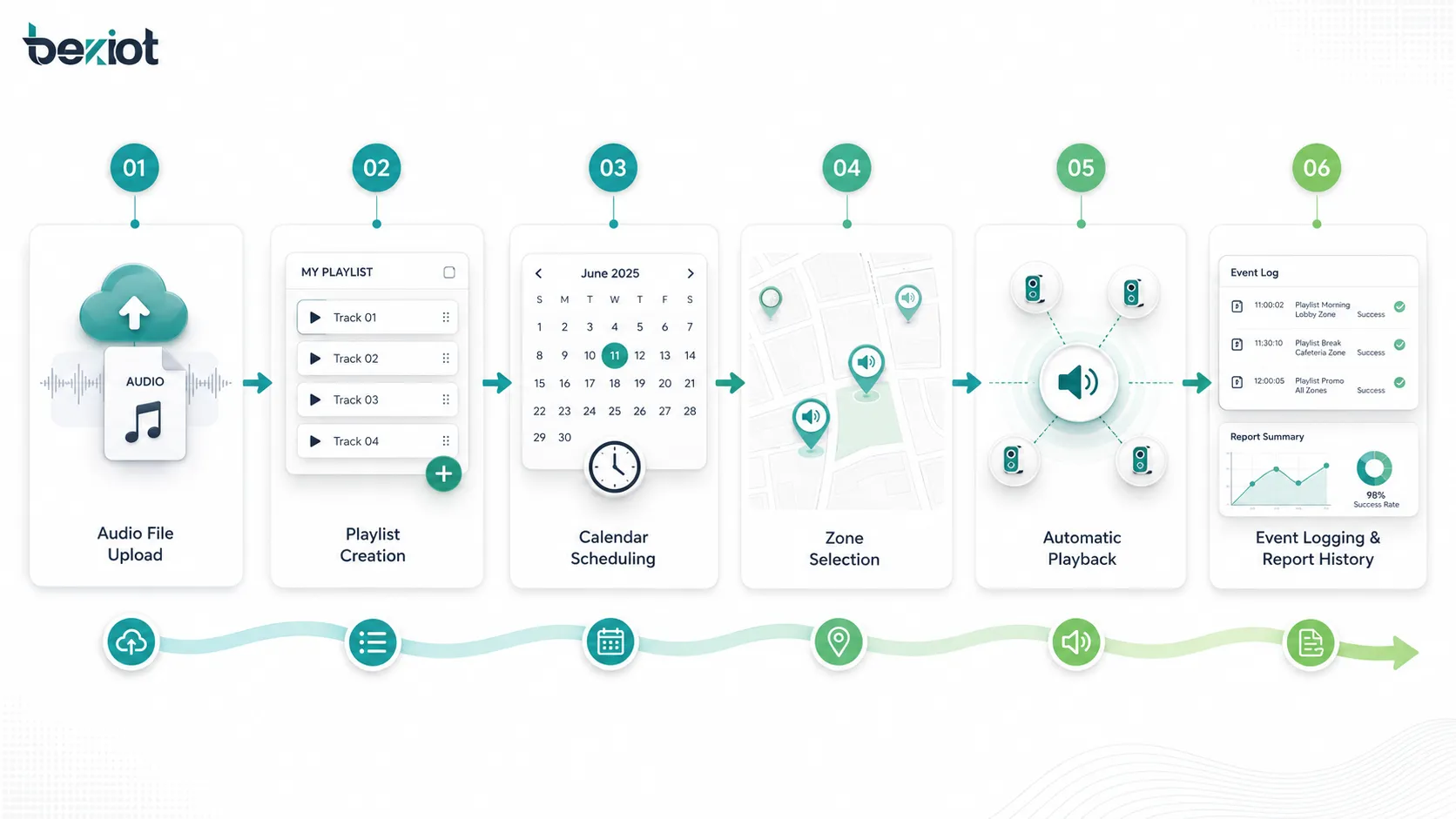
Audio File Preparation
The process usually begins with audio file preparation. Administrators upload or create audio files such as voice announcements, chimes, bells, music clips, warning tones, service prompts, or multilingual messages. These files should be clear, properly recorded, and suitable for the acoustic environment where they will be played.
Good audio preparation is important because paging speakers may be installed in noisy, reverberant, or open spaces. A message that sounds clear on a computer may not be clear in a factory workshop, school corridor, warehouse, or transportation hall. Voice prompts should be concise, well-paced, and recorded at a consistent volume.
File naming should also be organized. Names such as “Morning Opening Message,” “Shift Change Bell,” “Lunch Break Reminder,” or “Safety Notice Zone A” are easier to manage than unclear file names. Clear naming reduces mistakes when building playlists.
Playlist Creation
After the audio files are ready, the administrator creates a playlist. A playlist may contain one item or many items. It can be designed for a specific purpose, such as daily school bells, factory shift reminders, retail store announcements, hospital visiting-hour messages, or building closing notices.
The order of items matters when several audio clips are played together. For example, a short chime may play first to attract attention, followed by a voice message, then a closing tone. This structure helps listeners recognize that an announcement is starting and understand the message more clearly.
Some systems allow playlists to include silence intervals, repeated items, volume settings, fade-in or fade-out behavior, and priority levels. These options help the playlist fit different operational needs.
Schedule and Calendar Rules
The schedule defines when the playlist will play. It may be a specific time, repeated daily, repeated weekly, limited to weekdays, assigned to holidays, or activated only during a defined date range. More advanced systems may support school terms, production calendars, seasonal schedules, shift rotations, and special event days.
Calendar rules are important because organizations rarely follow one simple schedule all year. Schools have holidays and exam periods. Factories may run different shifts. Retail stores may change opening hours during holidays. Hospitals may use different announcement rules for day and night periods.
A good scheduled paging playlist system should allow administrators to configure normal schedules and exceptions. This prevents outdated or incorrect messages from playing at the wrong time.
Zone Selection and Playback
Zone selection determines where the playlist will be heard. A paging zone may be a classroom building, production line, warehouse section, public lobby, parking area, staff corridor, outdoor yard, platform, floor, department, or speaker group.
When the scheduled time arrives, the system sends the audio to the assigned zones. Depending on the system architecture, audio may be distributed through IP speakers, paging adapters, amplifiers, SIP speakers, network audio endpoints, analog speaker lines, or paging controllers.
Zone-based playback is useful because not every message needs to go everywhere. A lunch reminder for staff areas may not need to play in visitor spaces. A shift change signal may apply to one production zone but not another. Correct zoning prevents unnecessary disturbance.
Scheduled paging works best when audio content, schedule rules, and zone selection are planned together.
Main Features of Scheduled Paging Playlists
Automatic Timed Playback
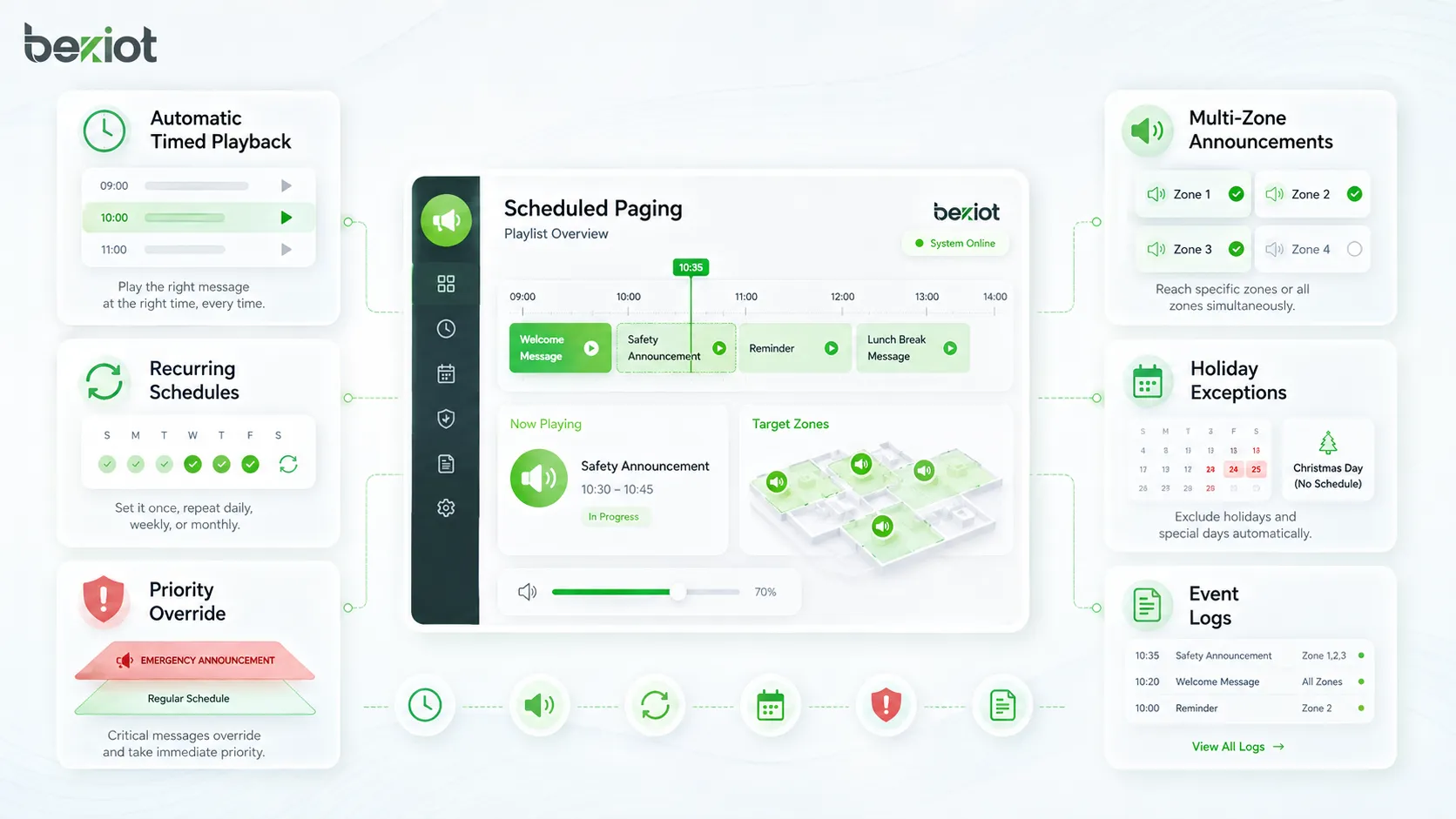
Automatic timed playback is the central feature of a scheduled paging playlist. Once a time rule is configured, the system plays the selected audio without requiring an operator to start it manually. This helps maintain accurate timing for routine announcements.
Timed playback is useful for events that must happen consistently, such as school class bells, factory shift starts, break reminders, store opening messages, office closing announcements, or daily safety reminders. Accurate timing helps people follow the same operational rhythm.
Automation also reduces operator workload. Staff can focus on higher-value tasks instead of manually playing repeated messages throughout the day.
Multi-Zone Broadcasting
Multi-zone broadcasting allows a playlist to play in selected areas instead of the entire site. This feature is important for large facilities where different departments, buildings, or operational zones follow different schedules.
For example, a factory may play a break signal in production zones but not in office areas. A school may play different bell schedules in primary and secondary buildings. A transportation site may send boarding messages to one platform while other zones remain quiet.
Multi-zone broadcasting improves relevance and reduces noise pollution. People hear the messages that matter to their area.
Recurring Schedules
Recurring schedules allow playlists to repeat automatically according to daily, weekly, monthly, or custom patterns. This is useful for routine communication that follows a predictable timetable.
A recurring schedule may play a morning message every weekday at 8:00 a.m., a safety reminder every Monday, a lunch break tone every day, or a closing announcement every evening. Administrators can configure the rule once and let the system repeat it.
Recurrence reduces setup time and helps maintain long-term communication consistency.
Priority and Override Control
Priority control determines what happens when two broadcasts overlap. In many paging systems, emergency announcements should override routine scheduled playlists. A fire alarm message, evacuation instruction, emergency dispatch page, or security alert must take priority over normal background music or daily reminders.
Scheduled playlists should therefore have a clear priority level. Routine messages may be low priority, operational reminders may be medium priority, and emergency messages may be high priority. When a higher-priority event occurs, the system can pause, stop, or override the scheduled playlist.
Priority control is essential in safety-critical environments because routine automation should never block urgent communication.
Holiday and Exception Management
Holiday and exception management allows administrators to prevent normal playlists from playing on special days. This is useful for public holidays, school vacations, maintenance shutdowns, seasonal hours, company events, exam periods, or temporary closures.
Without exception management, a school bell may play during holidays, a factory shift reminder may play during shutdown, or a retail announcement may play when the store is closed. These errors can confuse staff and visitors.
A practical scheduled paging system should make exceptions easy to configure and review.
Event Logs and Playback Records
Event logs record when a playlist was played, which zones received it, whether playback succeeded, and whether any errors occurred. These logs are useful for troubleshooting, compliance, maintenance, and operational review.
If staff report that a message did not play, administrators can check the event log. If an announcement was sent to the wrong zone, the log can help identify the schedule or configuration issue. In regulated or safety-sensitive settings, records can also show that required announcements were issued.
Logs turn scheduled paging into a trackable communication process rather than a hidden background function.
Benefits of Scheduled Paging Playlists
Consistent Communication
Scheduled playlists improve communication consistency. The same approved message plays at the same scheduled time, using the same wording, tone, and volume. This is more consistent than relying on different operators to speak live messages every day.
Consistency is important in schools, factories, hospitals, transportation sites, and public buildings because people rely on repeated signals to guide behavior. A consistent bell, tone, or announcement becomes part of the daily operating routine.
Standardized communication also reduces misunderstanding. Listeners hear clear and familiar messages rather than improvised announcements.
Reduced Manual Workload
Scheduled paging reduces manual workload for receptionists, security staff, teachers, operators, supervisors, and facility managers. Once the schedule is configured, the system can handle repeated broadcasts automatically.
This is especially useful in sites with many daily announcements. Manually playing every bell, reminder, or message can be time-consuming and easy to forget. Automation reduces repetitive work and lowers the risk of missed broadcasts.
Staff can still make live announcements when needed, but routine messages no longer depend on constant human action.
Improved Time Management
Many organizations use audio signals to manage time. School bells guide classes. Factory tones guide shifts and breaks. Warehouses use reminders for loading schedules. Public facilities use closing messages. Retail stores use opening and promotional announcements.
Scheduled paging playlists help keep these time-based activities aligned. When announcements are accurate and predictable, people can follow schedules more easily.
Better time management supports productivity, safety, service quality, and operational discipline.
Better Safety Awareness
Scheduled playlists can support safety awareness by playing routine safety reminders, PPE notices, hygiene messages, equipment inspection prompts, or evacuation drill announcements. These messages help reinforce safe behavior over time.
Routine safety messages should not replace emergency alerts, but they can support daily safety culture. For example, a factory may play a reminder before shift start, a hospital may play hygiene guidance, or a campus may play weather-related notices.
The messages should be concise and relevant. Too many repeated announcements can cause listener fatigue, so safety playlists should be planned carefully.
Flexible Zone-Based Operation
Zone-based scheduling allows different areas to follow different communication plans. This is important for large buildings, multi-site campuses, factories with several production lines, hospitals with quiet zones, and transport facilities with many platforms.
Different zones may need different volumes, languages, times, and message types. Scheduled playlists allow each area to receive communication that matches its own workflow.
Flexible zone operation helps reduce unnecessary noise and makes paging more useful to listeners.
Common Applications
Schools and Campuses
Schools and campuses use scheduled paging playlists for class bells, morning announcements, lunch signals, exam reminders, campus closing messages, activity notices, and emergency drill prompts. The system can play different schedules for different buildings or school levels.
A scheduled playlist helps keep classes and activities on time. It also reduces the need for staff to manually operate bells or announcement systems throughout the day.
Campus environments may also use playlists for multilingual announcements, weather notices, safety reminders, and special event schedules.
Factories and Industrial Facilities
Factories use scheduled paging playlists for shift changes, break times, safety reminders, production start signals, tool inspection notices, cleaning schedules, and operational updates. These messages help synchronize workers across large or noisy areas.
Industrial sites often have multiple zones with different schedules. One production line may start earlier than another. A warehouse may need separate loading dock reminders. A maintenance area may need scheduled inspection prompts.
Scheduled playlists support operational rhythm and can help reinforce daily safety procedures.
Hospitals and Healthcare Facilities
Hospitals and healthcare facilities may use scheduled playlists for visiting-hour messages, quiet-time reminders, hygiene announcements, staff shift notifications, waiting area messages, and public service guidance. In sensitive areas, volume and zone selection must be carefully controlled.
Healthcare announcements should be clear, calm, and appropriate for patients, visitors, and staff. Too many messages or excessive volume can disturb patient comfort, so playlists should be used thoughtfully.
Zone-based scheduling allows hospitals to send messages only where they are needed, such as lobbies, corridors, cafeterias, or staff areas.
Retail Stores and Shopping Centers
Retail stores and shopping centers use scheduled playlists for opening greetings, closing reminders, promotional messages, background music transitions, customer service announcements, lost-and-found prompts, and holiday messages.
Automation helps ensure that messages are played at the right time and with approved wording. This supports brand consistency and improves the customer experience.
Shopping centers may use different schedules for common areas, tenant zones, parking areas, and service corridors.
Transportation Facilities
Transportation sites such as airports, railway stations, bus terminals, metro systems, ports, and parking facilities may use scheduled playlists for service reminders, boarding guidance, closing notices, safety messages, maintenance alerts, and public information announcements.
In these environments, timing and zone accuracy are very important. A message intended for one platform or waiting area should not confuse passengers in another area.
Scheduled playlists should be integrated carefully with live announcements and emergency broadcasting so that routine messages do not interfere with urgent communication.
Office Buildings and Public Facilities
Office buildings and public facilities use scheduled paging playlists for opening and closing messages, visitor notices, lunch reminders, elevator maintenance announcements, safety drill prompts, and building service information.
Facility managers can use playlists to reduce repetitive announcements and keep occupants informed. Messages can be directed to lobbies, floors, parking areas, staff areas, or public service zones.
In public facilities, announcements should be accessible, concise, and easy to understand for different user groups.
How to Use a Scheduled Paging Playlist
Define the Communication Purpose
Before creating a playlist, administrators should define the communication purpose. Is the playlist used for time signals, safety reminders, visitor guidance, shift management, service announcements, or background messages? The purpose affects audio content, schedule, zone selection, priority, and volume.
A playlist without a clear purpose can become noisy or unnecessary. A well-planned playlist supports a specific operational need and helps listeners understand what to do.
The best scheduled paging messages are short, relevant, and repeated only when necessary.
Prepare Clear Audio Content
Audio content should be prepared before playlist configuration. Voice messages should use clear pronunciation, suitable pacing, and consistent volume. Bell tones and chimes should be recognizable but not uncomfortable. Safety tones should be distinct from routine tones.
Administrators should test audio in the actual environment. A message that sounds fine through headphones may become unclear through ceiling speakers in a reverberant corridor or horn speakers in a noisy workshop.
If the facility serves multilingual users, separate language versions may be needed. Messages should be approved before being uploaded to the system.
Create the Playlist Structure
The playlist structure defines which audio files play and in what order. A simple playlist may contain one bell tone. A more complex playlist may include an attention chime, a voice announcement, a repeated reminder, and an ending tone.
The structure should match listener behavior. If people need to stop and listen, an attention tone may help. If the message is routine, a short announcement may be enough. If the environment is noisy, the message may need to be repeated once.
Administrators should avoid overly long playlists unless the application truly requires them. Long announcements can be ignored or become disruptive.
Select Paging Zones
Zone selection controls where the playlist is played. Administrators should choose only the zones that need the message. Sending every message to all zones can create unnecessary noise and reduce the effectiveness of important announcements.
Zone planning should consider building layout, user groups, background noise, speaker coverage, and operational relevance. For example, an office closing message may play in public areas, while a production shift message may play only in workshop zones.
Correct zone selection improves listener relevance and reduces disturbance.
Set Time, Date, and Recurrence Rules
The schedule should define exactly when the playlist will play. Administrators can set the start time, date range, repeat pattern, weekdays, weekends, holidays, and special exceptions depending on system capability.
For routine schedules, recurrence rules reduce manual setup. For special events, temporary schedules may be created and then disabled after the event. For holidays, exception calendars should prevent normal messages from playing on closed days.
Schedules should be reviewed after configuration. A small time error can cause confusion across an entire facility.
Assign Priority and Conflict Rules
Priority settings determine how the playlist behaves when other broadcasts occur. Routine scheduled messages should normally have lower priority than live emergency announcements, fire alarm messages, security alerts, and critical operational pages.
Conflict rules may define whether the playlist pauses, skips, restarts, or cancels when interrupted. The correct behavior depends on the message type. A routine break-time tone may be skipped if an emergency broadcast is active. A compliance reminder may need to replay later.
Priority planning ensures that automation supports communication instead of blocking important messages.
Test Playback Before Activation
Testing should be done before the playlist is activated for real users. Administrators should confirm that the correct audio plays at the correct time, in the correct zone, at the correct volume, and with acceptable clarity.
Testing should include normal schedules, exceptions, multiple zones, priority interruptions, and playback logs. If the system supports remote management, administrators should also verify that changes are saved and applied correctly.
A short test period can prevent many operational mistakes.
Deployment Considerations
Speaker Coverage and Audio Clarity
Scheduled paging is only useful if people can hear and understand the message. Speaker placement, volume, acoustic environment, background noise, and audio file quality all affect clarity. A playlist should not be considered successful only because the system played the file.
Administrators should walk through the target zones and listen from real user positions. If messages are too quiet, too loud, distorted, or unclear, speaker levels and audio files should be adjusted.
For noisy industrial areas, visual alerts or repeated messages may be needed in addition to audio.
Network and System Reliability
IP paging systems depend on network connectivity, server availability, endpoint registration, and power supply. If the network fails, the playlist may not reach speakers. If endpoints are offline, some zones may miss announcements.
Reliability planning may include monitoring, redundant servers, backup power, network segmentation, Quality of Service, endpoint health checks, and event logs. Critical schedules should be tested regularly.
Scheduled communication should not be assumed reliable without monitoring and maintenance.
Content Governance
Content governance defines who can create, approve, upload, modify, or delete playlist audio files. This is important because paging messages are heard by many people and may affect safety, brand image, compliance, or public information.
Organizations should avoid allowing uncontrolled audio files to be added to the playlist. Messages should be accurate, approved, and appropriate for the audience.
For public or regulated environments, content governance may include version control, approval records, and retention of previous messages.
Volume and Noise Management
Volume management is important because scheduled messages repeat over time. A message that is too loud may disturb people, while a message that is too quiet may be missed. Different zones may require different volume levels.
In hospitals, offices, hotels, and public buildings, excessive volume can reduce comfort. In factories, warehouses, and transportation sites, higher volume may be needed to overcome background noise. The correct level depends on the environment.
Volume should be tested at actual playback times, because background noise may change throughout the day.
A scheduled paging playlist should be designed as a complete communication workflow, not only as a list of audio files and times.
Common Challenges
Outdated Audio Messages
Outdated audio messages are a common problem. A playlist may continue to announce old business hours, old safety instructions, old holiday schedules, or outdated service information if no one reviews it.
Administrators should review playlist content regularly and update messages when operations change. Temporary announcements should have expiration dates or reminders for removal.
Accurate content is essential for maintaining trust in the paging system.
Too Many Repeated Announcements
Too many repeated announcements can cause listener fatigue. When people hear frequent routine messages, they may begin to ignore all announcements, including important ones. This reduces the effectiveness of the paging system.
Playlists should be kept concise and relevant. Routine reminders should be scheduled only as often as needed. Safety messages should be rotated or refreshed if they are used regularly.
A good paging strategy balances information value with listener attention.
Wrong Zone Selection
Wrong zone selection can send messages to areas where they are not needed or fail to reach the areas where they are important. This can cause confusion, disturbance, or missed instructions.
Zone configuration should be checked whenever speakers are added, rooms are renamed, buildings are reorganized, or operations change. Administrators should use clear zone names to avoid mistakes.
Testing from real locations helps confirm that zone selection is correct.
Schedule Conflicts
Schedule conflicts occur when multiple playlists or broadcasts are set for the same time. Without priority rules, the system may play messages in the wrong order, skip important announcements, or overlap audio.
Administrators should review schedules across departments and zones. A central calendar view can help identify conflicts before they affect users.
Conflict management is especially important in large campuses and multi-zone facilities.
Maintenance and Operation Tips
Review Playlists Regularly
Scheduled paging playlists should be reviewed regularly. Administrators should check audio files, schedules, recurrence rules, zone assignments, priority settings, and exception calendars. This keeps the system aligned with current operations.
Review frequency depends on the environment. Schools may review schedules each term. Factories may review them when shifts change. Retail sites may review them before holiday seasons. Hospitals and public facilities may need more frequent checks.
Regular review helps prevent outdated or incorrect announcements.
Use Clear Naming Rules
Clear naming rules make playlist management easier. Audio files, playlists, schedules, and zones should use names that describe their purpose. This is especially important when multiple administrators manage the same paging system.
Names such as “Weekday Shift Change Zone 1,” “School Bell Monday to Friday,” or “Store Closing Message 21:30” are easier to understand than generic names such as “audio01” or “playlist2.”
Clear names reduce configuration errors and speed up troubleshooting.
Check Playback Logs
Playback logs should be checked when users report missed or incorrect announcements. Logs can show whether the playlist played, which zones were selected, whether endpoints were online, and whether another broadcast interrupted it.
Logs also help confirm compliance with required communication routines. For example, a safety reminder or scheduled public notice may need evidence that it was played.
Log review turns paging automation into a measurable operation.
Train Operators and Administrators
Operators and administrators should understand how scheduled playlists work. They should know how to activate, pause, edit, test, disable, and override playlists when needed. They should also know which broadcasts have priority.
Training is important because mistakes in paging systems are often very visible. A wrong message may be heard across an entire facility. Clear procedures reduce the risk of accidental broadcasts.
For safety-related systems, training should also include emergency override behavior and escalation procedures.
Scheduled Paging Playlist Versus Similar Features
Scheduled Playlist Versus Live Paging
Live paging is a real-time announcement made by an operator or user. A scheduled playlist is pre-recorded and plays automatically according to a schedule. Both functions are useful, but they serve different purposes.
Live paging is best for immediate, changing, or situation-specific messages. Scheduled playlists are best for routine, repeated, and predictable messages.
A complete paging system often uses both. Routine messages can be automated, while live paging remains available for unexpected needs.
Scheduled Playlist Versus Background Music
Background music provides continuous or semi-continuous audio for atmosphere, comfort, or customer experience. A scheduled paging playlist is more message-oriented and usually plays specific announcements or tones at defined times.
Some systems can combine both. A scheduled announcement may temporarily interrupt background music, play the message, and then resume music afterward.
Priority and volume rules are important when background music and scheduled paging share the same speakers.
Scheduled Playlist Versus Emergency Broadcast
Emergency broadcast is used for urgent safety communication such as evacuation, fire alarm, severe weather warning, security incident, or emergency instruction. Scheduled playlists are normally used for routine communication.
Emergency broadcasts should have higher priority than scheduled playlists. When an emergency message is triggered, routine scheduled audio should be interrupted or suppressed.
This distinction is critical because routine automation must never delay safety instructions.
Conclusion
A scheduled paging playlist is a paging system feature that automatically plays pre-arranged audio messages, tones, announcements, or reminders according to defined schedules. It helps organizations automate routine communication and send the right message to the right zone at the right time.
Its main features include timed playback, playlist creation, recurring schedules, zone selection, holiday exceptions, priority control, event logs, audio file management, and emergency override support. These features make scheduled paging useful for schools, factories, hospitals, warehouses, offices, retail stores, transportation sites, campuses, and public facilities.
To use a scheduled paging playlist effectively, administrators should prepare clear audio content, build purposeful playlists, assign accurate zones, configure recurrence rules, set priority levels, test playback, review logs, and maintain schedules over time. When managed properly, scheduled paging playlists reduce manual workload, improve communication consistency, support daily operations, and strengthen facility-wide information delivery.
FAQ
What is a scheduled paging playlist in simple terms?
A scheduled paging playlist is a set of audio messages, tones, or announcements that a paging system plays automatically at planned times.
It is used to automate routine broadcasts such as bells, reminders, opening messages, safety notices, and shift change announcements.
Where is a scheduled paging playlist commonly used?
It is commonly used in schools, factories, hospitals, warehouses, shopping centers, office buildings, campuses, hotels, public facilities, and transportation sites.
It is useful wherever repeated audio messages need to be played at specific times or in selected zones.
Can a scheduled paging playlist play different messages in different zones?
Yes. Many paging systems allow administrators to assign playlists to specific zones. This means one area can receive a shift reminder while another area receives a public announcement or no message at all.
Zone selection helps make announcements more relevant and reduces unnecessary noise.
Can emergency announcements override scheduled playlists?
In well-designed paging systems, emergency announcements should have higher priority than routine scheduled playlists. When an emergency broadcast is triggered, the system can stop, pause, or override scheduled audio.
Priority rules should be configured and tested before the system is used in real operation.
How should scheduled paging playlists be maintained?
Administrators should regularly review audio files, schedules, zones, holiday exceptions, volume settings, priority rules, and playback logs.
This prevents outdated messages, wrong-zone broadcasts, schedule conflicts, and missed announcements.







