


HLS, short for HTTP Live Streaming, is a widely used media delivery protocol for live video and video-on-demand services. It uses standard HTTP delivery, divides video into small media segments, and controls playback through an M3U8 playlist file. Because it works well across browsers, mobile devices, operating systems, and CDN environments, HLS is often selected when a project needs stable video playback on web pages, apps, monitoring platforms, and business systems.
A Practical Role in Modern Video Delivery
In many video integration projects, the main challenge is not only how to capture video, but how to deliver it to different users and systems in a compatible way. A video source may come from a camera, an NVR, a video management platform, a live broadcasting system, a conference system, or another media server. These sources often use different protocols, codecs, resolutions, and network environments.
HLS provides a practical delivery method for these scenarios. It is based on HTTP, so video can be distributed through ordinary web servers, reverse proxies, and content delivery networks. Instead of requiring a persistent real-time media connection, the player downloads playlist information and media segments in sequence. This makes HLS suitable for large-scale access, cross-platform playback, and stable video distribution over the public internet or private networks.
For solution design, HLS should be understood as a playback and distribution layer. It is especially useful when a video stream needs to be displayed in a browser, embedded in an application, sent to multiple users, or integrated into a management platform where compatibility and stability are more important than ultra-low latency.
How the Playback Chain Works
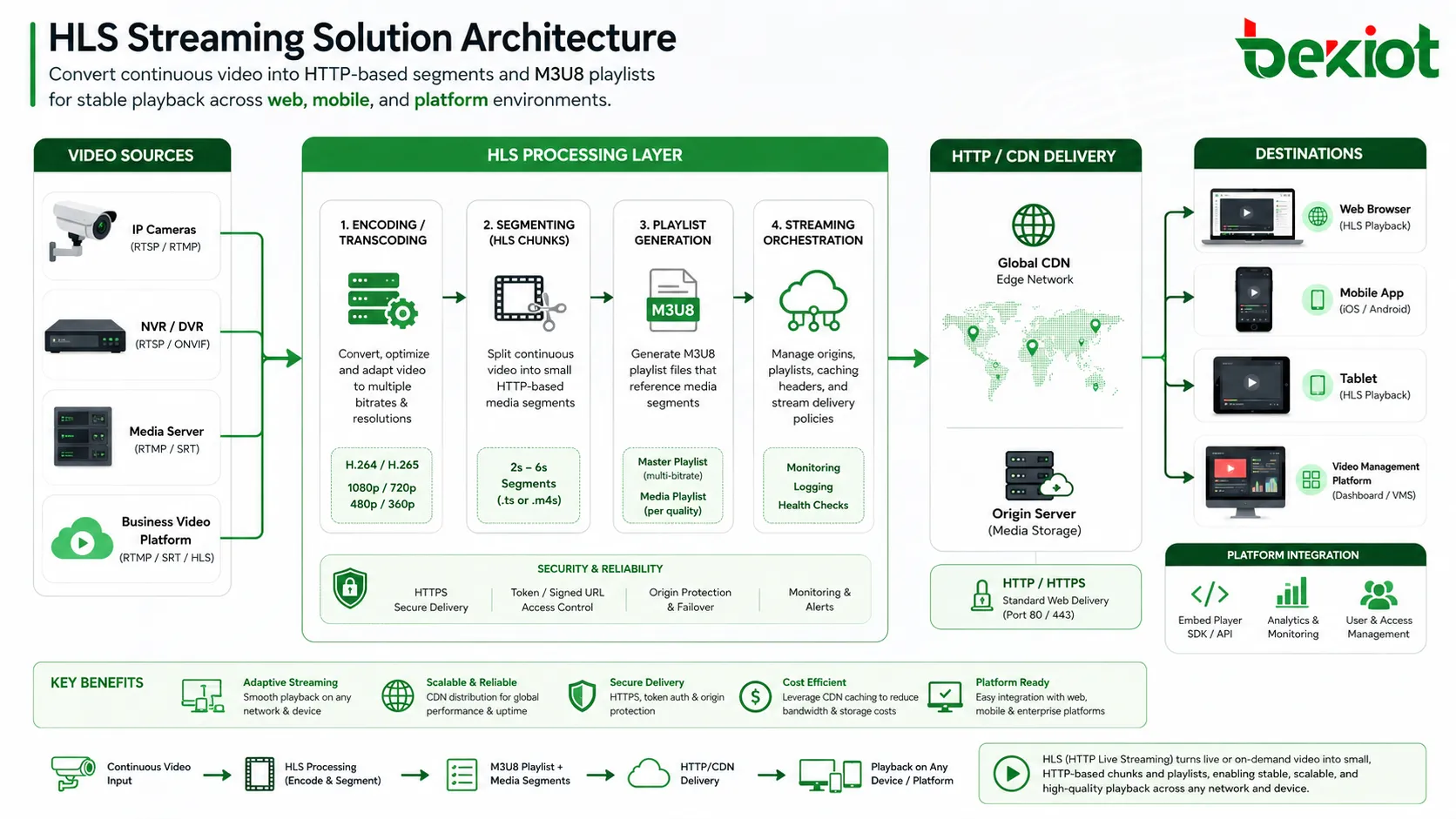
The basic workflow of HLS is straightforward. On the server side, the original video is encoded and divided into a series of small media files. These files are usually delivered together with an M3U8 playlist, which tells the player the order of the media segments, available bitrates, and playback information.
On the client side, the player first requests the M3U8 file. After reading the playlist, it downloads the corresponding media segments and plays them in order. During live streaming, the playlist is continuously refreshed so that new segments can be added. During video-on-demand playback, the playlist can describe the full media file from beginning to end.
This segmented delivery model gives HLS several advantages. It can work over standard HTTP ports, pass through common network infrastructure more easily, and reuse existing CDN and web caching resources. It also allows the playback system to adjust video quality according to network conditions, device capability, and available bandwidth.
Why It Fits Web and Mobile Environments
One of the strongest reasons to use HLS is its broad compatibility. It can be used across major device and operating system environments, including iOS, Android, Windows, macOS, and Linux. This makes it useful for projects that need to support both desktop users and mobile users without building separate playback systems for every terminal.
Another important advantage is adaptive bitrate playback. When multiple versions of the same video are prepared at different quality levels, the player can switch between them according to the viewer’s network condition. If the network becomes unstable, the player can reduce the video quality to maintain continuous playback. If the connection improves, the player can return to a higher-quality stream.
HLS also supports DVR-like playback in live scenarios. Depending on how the playlist and segment retention are configured, users may pause, seek backward, or replay recent live content. This is helpful for online events, education platforms, remote monitoring review, command center playback, and other scenarios where users need more than simple real-time viewing.
Compatible with mainstream web, mobile, and desktop environments.
Delivered through HTTP, making it easier to deploy with web servers and CDNs.
Supports adaptive bitrate for smoother viewing under changing network conditions.
Can support live playback, video-on-demand, and time-shifted viewing.
Suitable for multi-user access and large-scale content distribution.
Architecture for Surveillance and Business Video Integration
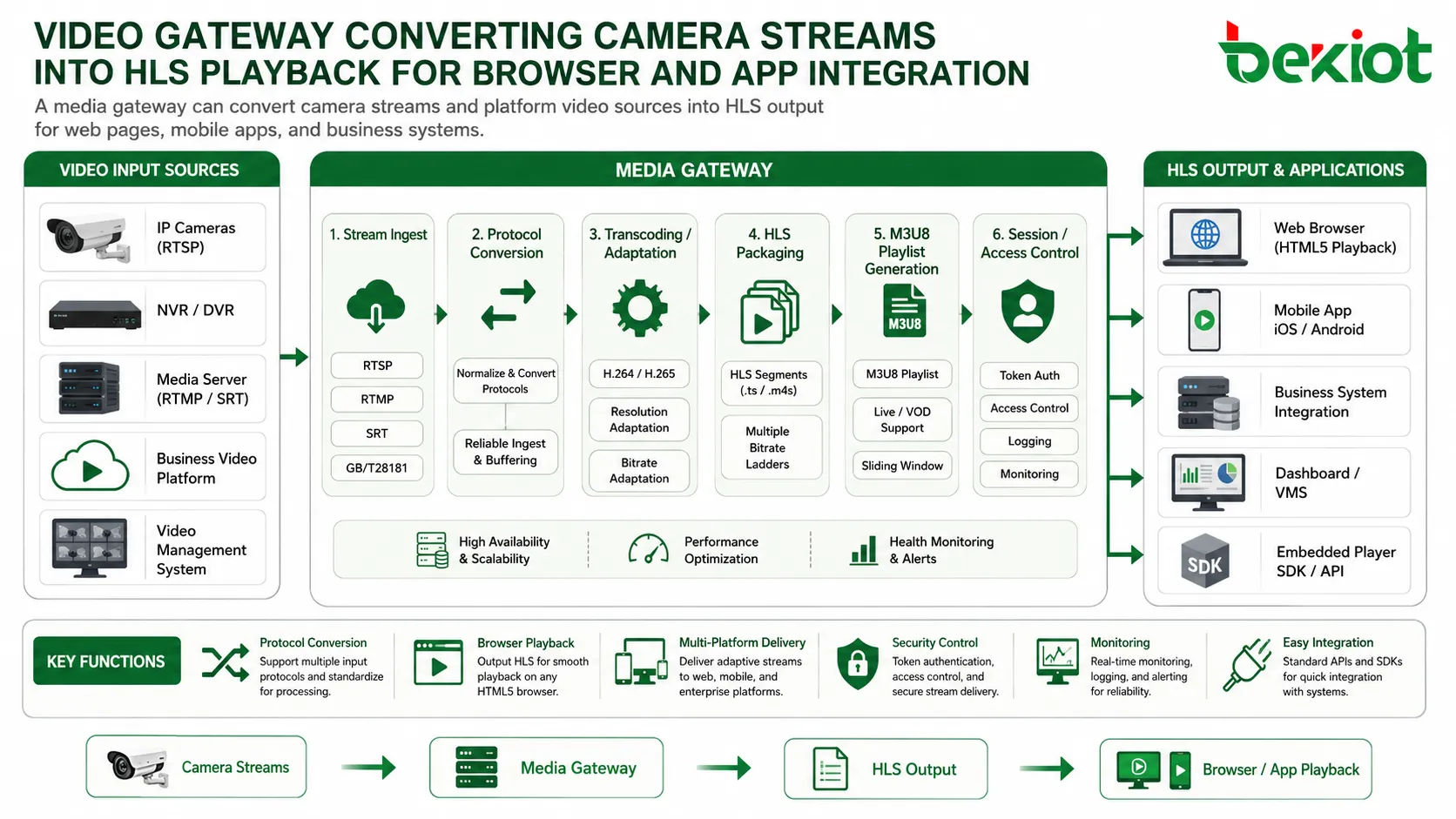
In real projects, many video surveillance systems and camera platforms do not directly provide HLS output. A camera may output RTSP, a monitoring platform may use GB/T28181, and a media system may use RTMP, RTP, FLV, WebRTC, or other formats. If the final application requires browser or app playback, a media processing layer is usually needed between the original video source and the HLS player.
This media processing layer can pull or receive the original stream, convert the protocol, adjust encoding parameters, generate HLS segments, and publish the M3U8 address for the application. In this structure, the front-end system does not need to directly handle every camera protocol. It only needs to request a playable HLS stream from the media service.
This approach is useful when existing video resources need to be reused in a new platform. For example, a web management system may need to display surveillance video, a mobile app may need to open a live camera view, or a dispatch platform may need to show video from multiple monitoring points. By converting different video inputs into a unified HLS output, the project can reduce integration complexity and improve playback compatibility.
Latency Considerations and Real-Time Limits
HLS is stable and highly compatible, but it is not always the best choice for ultra-low-latency communication. Traditional HLS workflows often divide video into segments of about 6 to 10 seconds. This alone can create a basic delay of several seconds. To maintain smooth playback, many players also buffer 3 to 4 segments before starting playback, which may add more than 10 seconds of delay.
Additional delay can also come from video encoding, segment generation, HTTP request and response time, CDN distribution, network transmission, and player buffering strategy. As a result, the total delay of a traditional HLS stream may range from a few seconds to tens of seconds, depending on system design and network conditions.
For many video viewing scenarios, this delay is acceptable. Examples include online education, public live streaming, remote monitoring preview, enterprise video portals, media distribution, and business system playback. However, for real-time command, emergency communication, remote control, two-way interaction, video conferencing, or low-latency dispatch, WebRTC or other real-time protocols may be more suitable.
Implementation Points for a Stable System
A reliable HLS solution should not only focus on whether the video can be played. It should also consider stream source compatibility, encoding format, bitrate strategy, segment duration, player behavior, network quality, access control, storage requirements, and monitoring.
Segment duration is one of the most important design factors. Longer segments can improve stability and reduce request frequency, but they usually increase latency. Shorter segments can reduce delay, but they may increase server pressure and require better network conditions. The final choice should depend on the project’s priority: smooth playback, low delay, large concurrency, or balanced performance.
Adaptive bitrate design is also important. If the system needs to serve users under different network conditions, multiple bitrate versions should be prepared. This helps the player switch quality levels instead of stopping playback when the network becomes unstable. For mobile users, this can significantly improve the viewing experience.
Security should also be included in the design. In business systems, HLS playback addresses should not be exposed without control. Token authentication, URL expiration, permission verification, HTTPS transmission, and access logs can help prevent unauthorized viewing and improve platform security.
Confirm the original video source protocol before integration.
Choose suitable encoding, resolution, frame rate, and bitrate settings.
Set segment duration according to latency and stability requirements.
Use adaptive bitrate when users have different network conditions.
Protect playback URLs with authentication and access control.
Monitor stream status, playback errors, and server resource usage.
Typical Use Cases
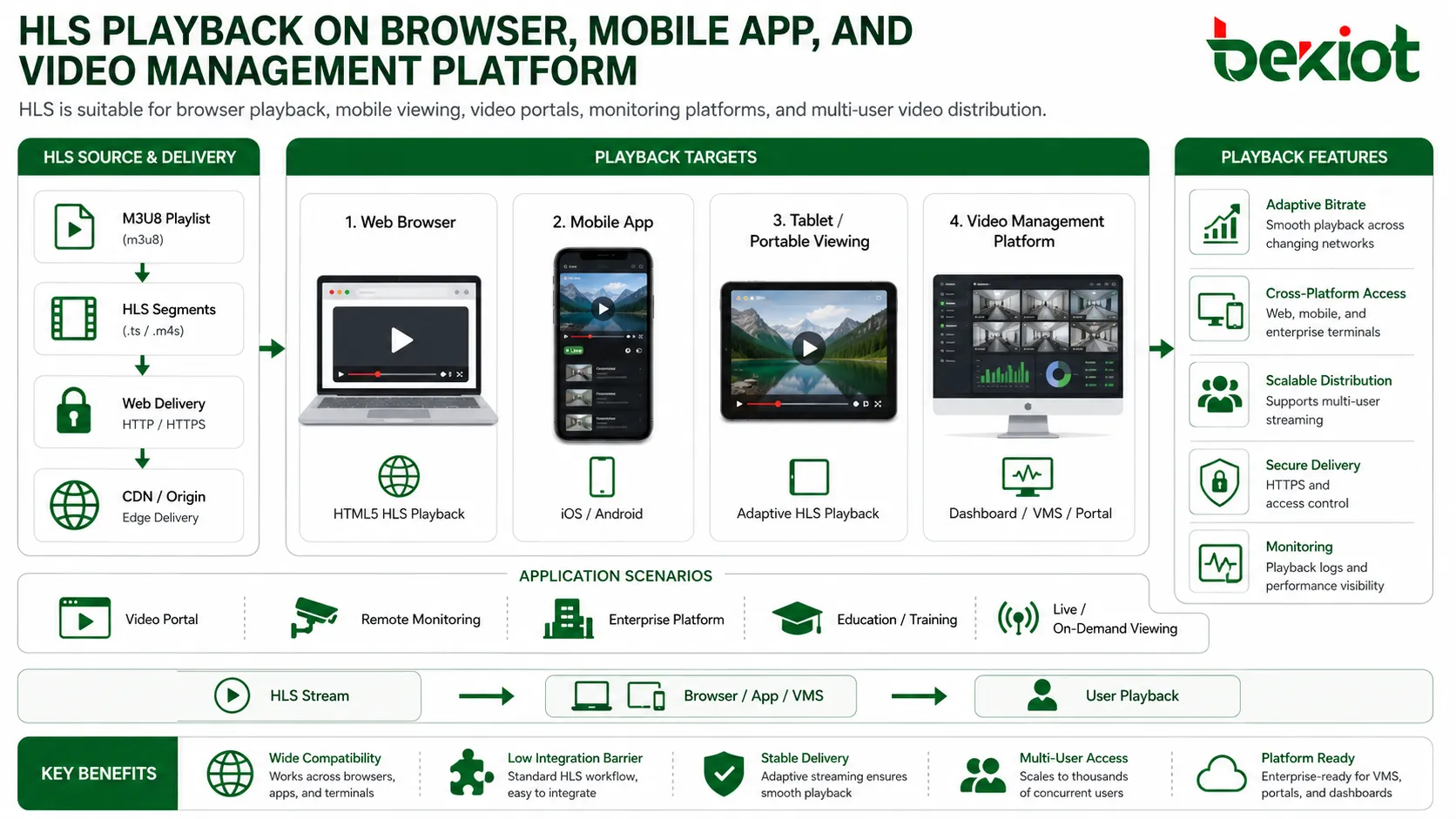
HLS can be used in many solution scenarios where reliable playback and device compatibility are required. In a surveillance integration project, HLS can help convert camera video into a format that is easier to display in a browser or mobile app. In an education platform, it can support recorded courses, live classes, and replay functions. In an enterprise system, it can provide video playback for management portals, training systems, operation platforms, and remote support tools.
For public live streaming, HLS is often used because it can be distributed through CDN infrastructure and handle large numbers of viewers. For video-on-demand platforms, it supports segmented delivery and adaptive quality switching. For command and monitoring systems, it can be used for non-critical preview, historical playback, large-screen display, or multi-terminal viewing.
The key is to match the protocol with the business requirement. If the project focuses on compatibility, stability, multi-device access, and scalable distribution, HLS is a strong option. If the project requires instant interaction and very low delay, it should be combined with or replaced by a real-time protocol such as WebRTC.
Choosing the Right Streaming Strategy
A good video solution does not rely on a single protocol for every scenario. HLS, WebRTC, RTSP, RTMP, FLV, and other protocols each have their own strengths. HLS is strong in compatibility and distribution. WebRTC is better for low-latency interaction. RTSP is common in IP cameras. RTMP is still used in some ingest and live streaming workflows. FLV may appear in web playback systems that need lower delay than traditional HLS.
For this reason, the recommended architecture is often a multi-protocol media service. The system can receive streams from cameras and platforms, process the video, and output the proper format for each application. HLS can serve web and mobile playback, while real-time protocols can serve interactive communication, emergency dispatch, or remote collaboration.
This layered approach makes the platform easier to expand. When new cameras, new terminals, or new business systems are added, the media layer handles adaptation instead of forcing every front-end application to rebuild its video logic.
Building a More Compatible Video Platform
HLS remains an important streaming protocol because it solves a practical problem: delivering video reliably to different devices and systems through standard HTTP. Its use of M3U8 playlists, segmented media files, adaptive bitrate, and broad platform support makes it suitable for many web, mobile, monitoring, education, enterprise, and live streaming projects.
At the same time, HLS should be selected with a clear understanding of its latency characteristics. Traditional segment-based delivery may introduce delays from several seconds to tens of seconds. For projects that need instant response or two-way real-time interaction, WebRTC or another low-latency solution should be considered.
For most video integration projects, the best result comes from a flexible architecture: use HLS where stable cross-platform playback is required, use real-time protocols where low latency is critical, and use a media gateway or streaming service to connect different video sources into one manageable platform.
FAQ
Can existing IP cameras be displayed through HLS?
Yes, but many IP cameras do not output HLS directly. A media service or video gateway is usually needed to pull the original camera stream, convert it, and publish an HLS address for browser or app playback.
Is HLS suitable for emergency command systems?
It can be used for monitoring preview, large-screen display, recording playback, and non-critical video viewing. For real-time command operations that require very low delay, WebRTC or another low-latency protocol is usually more suitable.
What does an M3U8 file do in the playback process?
The M3U8 file acts as the playlist. It tells the player where the media segments are located, how they should be played, and which bitrate options may be available.
How can HLS delay be reduced?
Delay can be reduced by shortening segment duration, optimizing encoder settings, reducing player buffer size, improving network quality, and using a low-latency HLS workflow where supported. The final result depends on the full system design.
Does HLS require special network infrastructure?
No special media transport network is required. Because HLS is based on HTTP, it can work with common web servers, reverse proxies, HTTPS services, and CDN distribution networks.







