


In many facilities, alarms are not isolated events. A fire alarm may require evacuation paging, video verification, access control linkage, dispatch notification, emergency call recording, and maintenance follow-up. A gas detection alarm may need to warn nearby workers, notify the control room, trigger ventilation checks, and create an incident record. A security alarm may need camera pop-up, patrol dispatch, gate control, and supervisor escalation. Alarm Integration is valuable because it connects these separate actions into one coordinated response process.
The system value of Alarm Integration lies in turning a single alarm signal into an actionable workflow. Instead of leaving operators to manually switch between alarm panels, video systems, phones, public address platforms, intercoms, access control systems, and maintenance tools, the integrated system can automatically identify the alarm source, display the location, notify the right people, trigger related devices, record the event, and guide the response. This improves response speed, reduces missed information, and makes emergency and operational management more traceable.
From isolated alarm signals to coordinated response
Traditional alarm handling often starts with a simple signal: an alarm light, a buzzer, a software pop-up, a dry contact input, or a status change from a sensor. The signal tells the operator that something abnormal has happened, but it may not provide enough context for fast decision-making. The operator still has to confirm where the alarm is located, what type of event it is, which camera to check, who should respond, whether a broadcast is needed, and how the event should be recorded.
Alarm Integration changes this process by linking alarm data with other systems. When an alarm occurs, the platform can associate it with a location, device name, alarm type, priority level, video channel, response group, paging zone, access control area, maintenance record, and escalation rule. The alarm is no longer just a signal; it becomes a structured event inside the system.
This shift is important because incidents often develop quickly. A delayed response may turn a small fault into a larger safety issue. An unclear alarm may cause the wrong team to be dispatched. A missing record may make later review difficult. Integrated alarm handling helps reduce these risks by making alarm response more direct, visible, and controlled.
The value is not limited to emergencies. Alarm Integration is also useful for routine equipment faults, environmental warnings, access events, service abnormalities, device offline alerts, and maintenance reminders. In all these cases, integration helps convert detection into response.
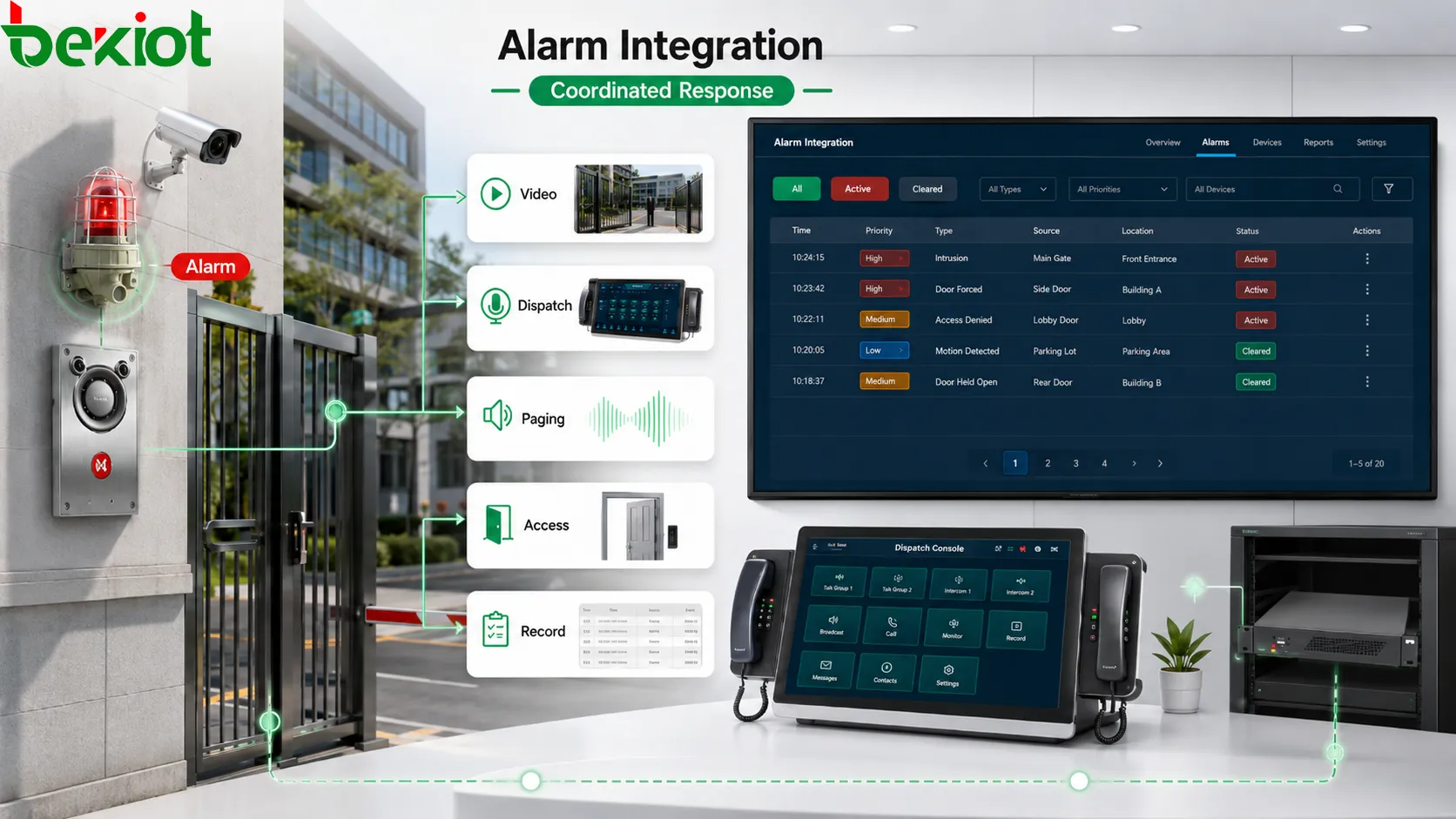
How Alarm Integration works in a system
Alarm source collection
Alarm Integration begins with collecting signals from different sources. These may include fire panels, gas detectors, emergency buttons, intrusion sensors, access control devices, door contacts, equipment controllers, environmental sensors, power systems, network monitoring tools, intercom terminals, video analytics, or building management systems. Each source produces alarm information in its own way.
The system must normalize these inputs. A dry contact signal, a network API event, a serial protocol message, a relay output, an SNMP trap, and a software webhook may all represent different technical formats. The integration layer converts them into alarm events that the platform can understand and process.
Event classification and priority
After an alarm is collected, the system classifies it. Classification may include event type, location, severity, source device, affected area, required response, and business category. A fire alarm, equipment fault, door forced-open event, help point call, temperature warning, gas detection event, and network offline alarm should not be treated in the same way.
Priority rules decide which event needs immediate interruption and which event can enter a normal maintenance process. High-priority alarms may trigger sound and visual alerts, emergency paging, supervisor notification, or automatic escalation. Low-priority alarms may create a ticket or appear in a monitoring list. Good priority design prevents both underreaction and alarm fatigue.
Rule engine and linkage action
The rule engine defines what happens after an alarm is recognized. It may trigger camera pop-up, send paging announcements, call duty personnel, open an incident form, activate warning lights, unlock or lock access doors, send SMS or app notifications, start recording, create a work order, or escalate to another command level after a timeout.
The rule should match the alarm scenario. A gas alarm may require different linkage from a gate alarm. A help point call may need dispatch and video, while a network device offline alarm may need a maintenance ticket. Alarm Integration is valuable only when linkage rules reflect real response needs.
Feedback and closure
Alarm handling should not stop after the first notification. A complete system should track whether the alarm was acknowledged, who handled it, what actions were taken, whether the alarm cleared, whether follow-up was required, and when the event was closed. This feedback loop turns alarm handling into a manageable process.
Closure records are important for review. If an alarm repeatedly occurs in the same area, maintenance teams can investigate root causes. If response is often delayed, procedures can be improved. If certain alarms are frequently false, detection rules may need adjustment.
Core system values
Faster response speed
The most direct value of Alarm Integration is faster response. When alarm data is automatically linked with location, video, paging, dispatch, and notification rules, operators do not need to manually search for related information. The system can present the event context immediately and trigger predefined actions.
For example, when an emergency button is pressed, the system can display the exact location, open the nearby camera, call the duty desk, start recording, and send a message to the response group. This reduces the time between detection and action. In safety and emergency environments, this time reduction can be critical.
Better situational awareness
Alarm Integration improves situational awareness by combining information from multiple systems. An operator can see not only that an alarm occurred, but also where it occurred, what device triggered it, which video feed is related, whether people are present nearby, whether doors are open, whether other alarms are active, and which response resources are available.
This broader view helps avoid wrong decisions. A temperature alarm in one equipment room may be less urgent than a combined temperature alarm, smoke signal, and power fault in the same area. Integrated information helps operators judge the real situation instead of treating each alarm as an isolated message.
Reduced manual operation
In a non-integrated environment, operators must switch between systems and perform repeated manual steps. They may check the alarm panel, find the camera, call a supervisor, activate paging, record notes, and create a maintenance ticket separately. Each step consumes time and introduces the possibility of error.
Alarm Integration automates many of these steps. The system can trigger the correct camera, notify the correct department, generate the event record, and apply the response rule automatically. Operators still make decisions, but they are supported by a structured workflow rather than scattered tools.
More consistent emergency procedures
Emergency response should follow defined procedures. However, during stress, people may forget steps or perform them in the wrong order. Alarm Integration helps standardize response by embedding procedure logic into the system. When a specific alarm occurs, the system can guide or trigger the required actions consistently.
This is useful for evacuation, fire response, hazardous gas warning, security lockdown, equipment shutdown, medical assistance, and public safety incidents. Integrated rules help ensure that important actions are not missed, especially during night shifts, high workload, or multi-site operation.
Stronger traceability and accountability
Integrated alarm systems can record the full event timeline: alarm trigger time, source device, location, operator acknowledgement, linkage actions, notifications sent, video access, paging broadcasts, dispatch tasks, response notes, clearance time, and closure result. This creates traceability.
Traceability supports accountability. Managers can review whether response was timely, whether the right people were notified, whether linkage actions worked, and whether the procedure was followed. It also supports training, compliance review, maintenance analysis, and incident investigation.
Lower risk of missed alarms
Missed alarms often happen when alarm information is hidden in separate systems or depends on one operator noticing one screen. Integrated systems can distribute alerts through multiple channels, such as software pop-up, audio prompt, mobile notification, dispatch console, paging message, or escalation call.
Escalation rules are especially valuable. If an alarm is not acknowledged within a defined time, the system can notify a supervisor or another team. This reduces dependence on a single person and improves response reliability.
Improved cross-system coordination
Many incidents require several systems to act together. A security event may need video, access control, intercom, patrol dispatch, and recording. An industrial alarm may need paging, maintenance ticketing, equipment monitoring, and supervisor notification. Alarm Integration coordinates these systems through one event logic.
This coordination reduces fragmentation. Instead of each system showing part of the event, the integrated platform can connect information and actions around one alarm record. The result is a more coherent operational process.
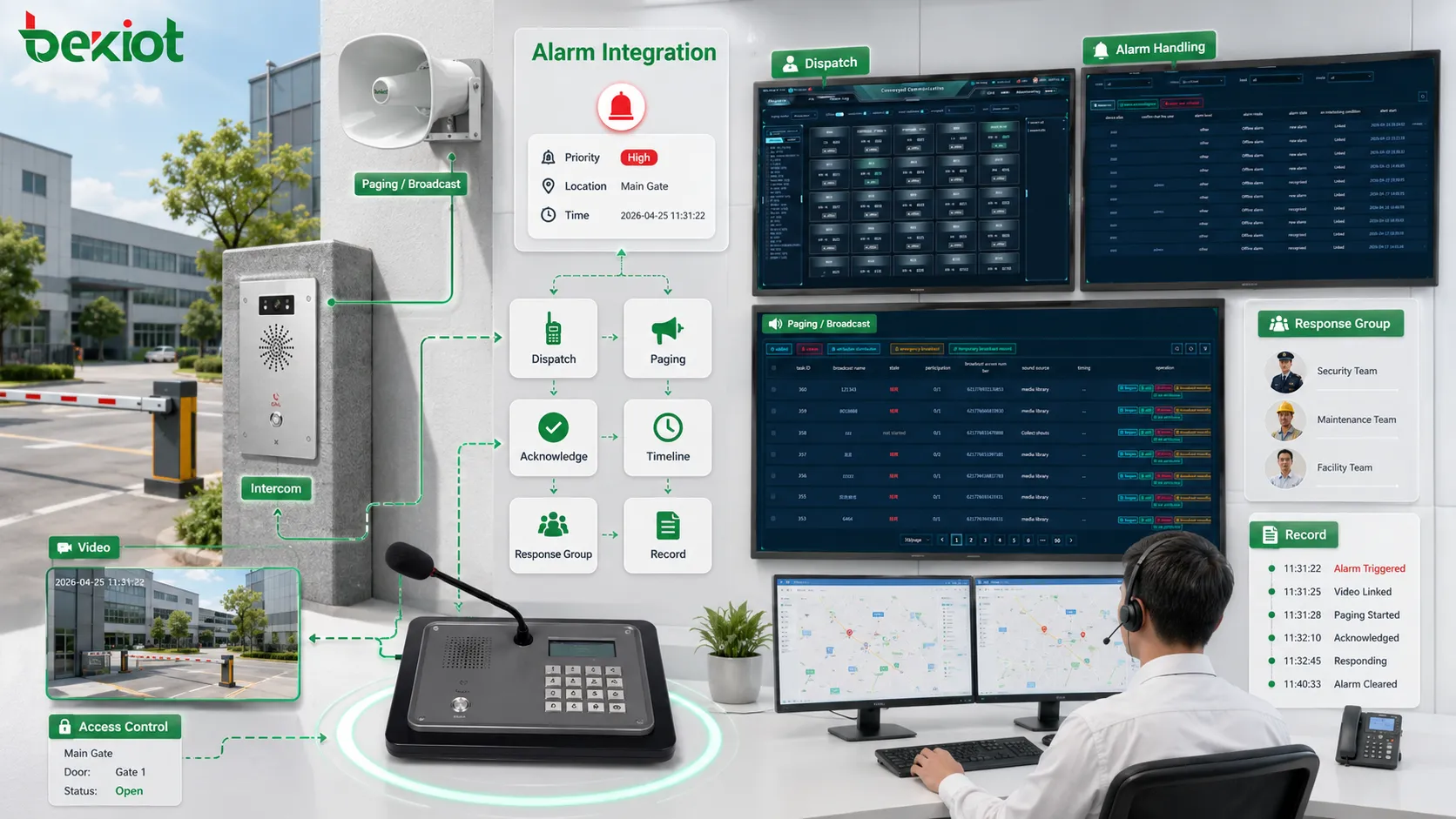
Application scenarios
Industrial production and equipment safety
Industrial sites use Alarm Integration for equipment faults, gas detection, temperature warnings, power abnormalities, emergency buttons, production line alarms, utility system alerts, and safety interlocks. When an alarm occurs, the system can notify the control room, page the affected zone, display equipment status, and create a maintenance task.
This helps reduce downtime and safety risk. A fault can be routed to the correct maintenance team more quickly. A hazardous alarm can trigger local warnings and operator notification. A repeated fault can be analyzed through historical alarm records. Integration makes industrial alarms more actionable.
Security and access control
In security systems, Alarm Integration connects intrusion alarms, door forced-open events, access denial records, perimeter sensors, visitor intercoms, emergency call points, and video surveillance. When an event occurs, the system can pop up the related camera, notify the security desk, start recording, and dispatch patrol staff.
The value is faster verification. Operators can see whether the alarm is a false trigger, an unauthorized entry, a suspicious behavior, or a real security incident. This reduces blind response and improves security decision-making.
Fire and emergency broadcast linkage
Fire and emergency scenarios often require immediate communication. Alarm Integration can link fire signals, smoke detection, manual call points, emergency buttons, paging zones, public address systems, and evacuation messages. When the correct conditions are met, the system can trigger emergency announcements or guide operators to activate them.
Emergency broadcast linkage must be designed carefully. Different zones may require different instructions. Routine audio should be overridden. Broadcast records should be kept. The purpose is not just to make noise, but to deliver clear instructions to the correct areas at the correct time.
Transportation and public facilities
Transportation sites such as railway stations, metro systems, airports, ports, tunnels, parking areas, and bus terminals use integrated alarms for crowd safety, equipment faults, access events, emergency help points, smoke detection, passenger assistance, and service disruption response.
Alarm Integration helps operators connect public safety events with video, announcements, staff dispatch, and incident records. In busy public environments, integrated response is valuable because many people may be affected quickly.
Healthcare, campus, and commercial buildings
Hospitals, campuses, office parks, hotels, shopping centers, and public buildings use Alarm Integration for emergency calls, access events, equipment rooms, elevator alarms, security alerts, fire signals, nurse or service calls, and facility maintenance warnings. These environments require both safety response and service continuity.
Integrated alarms help route events to the correct team. A facility fault may go to maintenance. A security event may go to guards. A public help request may go to service staff. A fire alarm may trigger emergency workflow. This avoids treating every alarm as the same type of event.
Integration with communication systems
Paging and public address linkage
Paging and public address systems are commonly linked with alarms because many events require audible notification. Alarm Integration can trigger zone announcements, warning tones, evacuation messages, staff calls, or service prompts. The system can select the correct paging zone according to the alarm location.
This is useful when visual alarms are not enough. Workers may not be watching screens. Visitors may not understand a local alarm light. Field personnel may be far from the control room. Paging linkage allows alarm information to reach people in the physical environment.
Intercom and emergency call linkage
Emergency call points and intercom terminals can become alarm sources. When a person presses a help button or initiates an emergency call, the integrated system can show the location, open related video, ring the control room, start recording, and create an event. This makes the call part of the alarm workflow.
Intercom linkage also supports two-way verification. Operators can speak with the person at the scene, confirm the situation, and decide whether to dispatch support, trigger paging, or escalate the event. This reduces uncertainty compared with one-way alarm signals.
Dispatch and notification linkage
Alarm Integration often connects with dispatch systems. When an alarm occurs, the system can assign a response task, notify duty personnel, call a team, send a mobile alert, or escalate to a supervisor. This turns alarm handling into an operational task rather than only a monitoring event.
Notification rules should match responsibility. A power alarm should go to electrical maintenance. A security event should go to guards. A medical assistance alarm should go to trained responders. Routing alarms to the wrong people wastes time and may delay real response.
Recording and audit linkage
Integrated alarm handling should include records. If the alarm triggers a call, paging message, video pop-up, dispatch action, or access control event, these actions should be linked to the alarm timeline. This helps later review.
Recording and audit linkage are important for emergency systems, security incidents, service disputes, and compliance management. The record should show not only that an alarm occurred, but also what the system and operators did after it occurred.
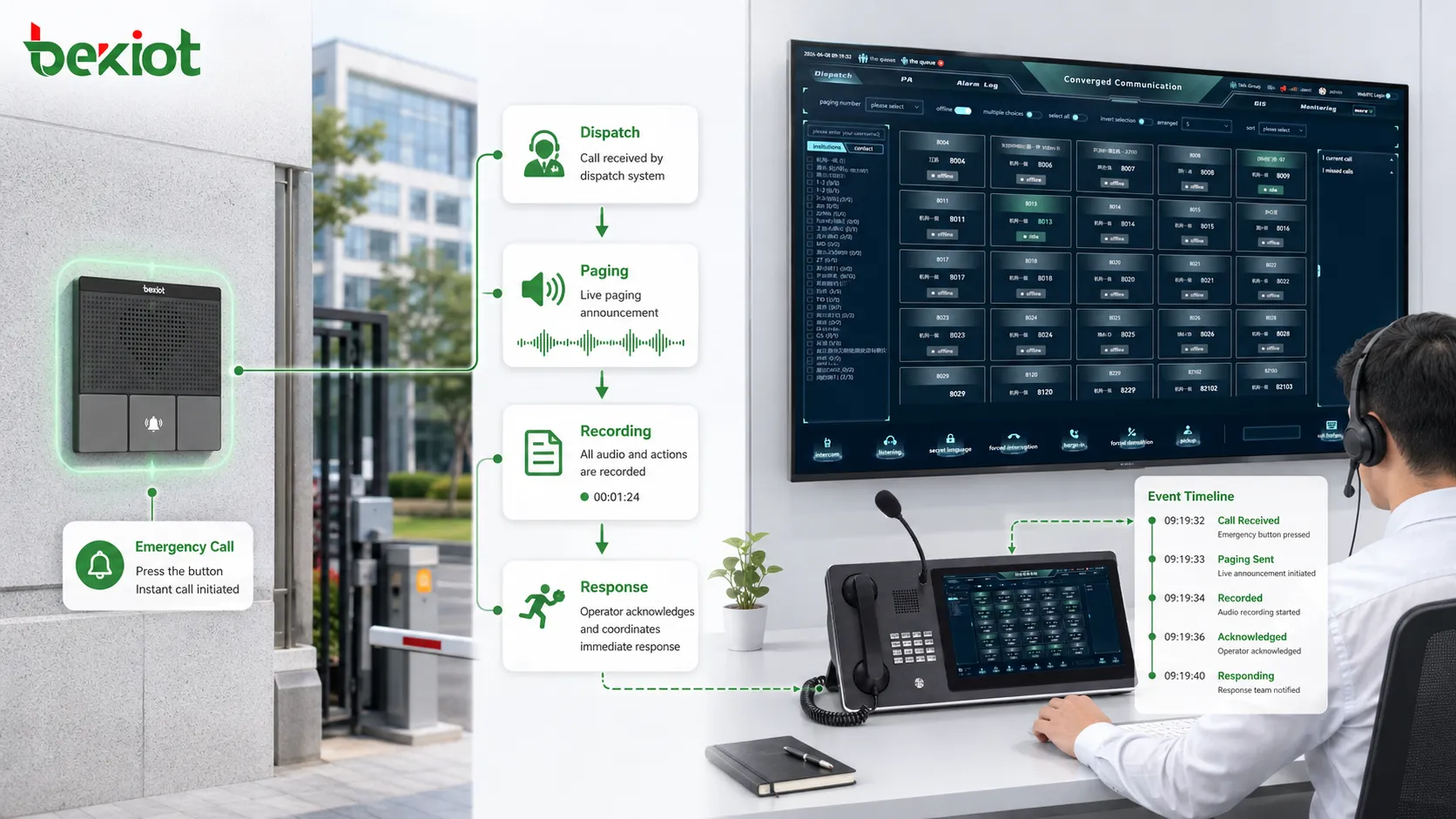
Deployment and design considerations
Alarm classification should be clear
A good integration design begins with alarm classification. Not every signal needs the same response. Events should be grouped by severity, source, location, business impact, and required action. Clear classification helps the system decide which alarms need immediate interruption and which alarms can follow normal maintenance workflow.
If classification is unclear, operators may face too many alerts with the same urgency. This can cause alarm fatigue. People may begin to ignore frequent low-value alarms and then miss important ones. Proper classification protects attention.
Linkage rules should match real procedures
Alarm linkage should be based on actual response procedures, not only technical possibility. Just because a system can trigger many actions does not mean it should. A good rule defines who needs to know, what device should respond, which zone should be notified, what priority applies, and what should happen if no one acknowledges the alarm.
Rules should be reviewed with operations, safety, security, maintenance, and management teams. Technical engineers may understand the interface, but field users understand the real response process. Both perspectives are needed.
False alarms and repeated alarms need control
False alarms can reduce trust in the system. If integration triggers loud announcements, repeated notifications, or unnecessary dispatch tasks too often, users may become less responsive. The system should support filtering, confirmation, delay logic, threshold settings, debounce rules, and alarm suppression where appropriate.
Repeated alarms should also be analyzed. A sensor that triggers many times may be faulty, poorly positioned, or detecting a real unresolved problem. Alarm Integration should help identify repeated patterns, not only send repeated alerts.
Security and permissions are necessary
Alarm Integration may connect to critical systems such as access control, paging, emergency broadcast, dispatch, and device control. Permissions must be carefully managed. Not every user should be allowed to change alarm rules, silence alarms, export records, or trigger linkage actions.
Role-based access helps protect system integrity. Operators may acknowledge events. Supervisors may close incidents. Administrators may configure rules. Maintenance staff may view equipment alarms. Emergency roles may have priority access. Clear permission boundaries reduce misuse.
Testing should include real scenarios
Alarm Integration should be tested with real devices, real network paths, real response users, and realistic alarm conditions. A software simulation is useful but not enough. The project should verify whether the correct camera opens, the correct zone receives audio, the correct team is notified, and the event record is complete.
Testing should also include abnormal cases. What happens if the camera is offline? What happens if the paging zone is busy? What happens if the operator does not acknowledge the alarm? What happens if the same alarm repeats? These questions determine whether the integrated system can handle real operating conditions.
Common mistakes in Alarm Integration
Connecting systems without defining response logic
One common mistake is focusing only on technical connection. The alarm platform can send data, the video platform can open cameras, and the paging system can broadcast audio, but the response logic is unclear. Integration without procedure can create confusion rather than value.
Before configuration, the project should define what each alarm means, who is responsible, which actions are required, and how the event is closed. The technology should support the procedure, not replace it with random linkage.
Triggering too many actions
Another mistake is making every alarm trigger too many devices and notifications. This may look powerful during demonstration, but it can overwhelm operators in daily use. A minor equipment warning should not necessarily trigger loud paging, supervisor calls, and multiple pop-ups.
Linkage should be proportional to severity. Critical alarms need strong action. Routine faults need orderly maintenance handling. Excessive linkage creates alarm fatigue and reduces system credibility.
Ignoring data naming and location accuracy
Alarm location must be clear. If an alarm only shows a device code that operators do not understand, response will be delayed. Device names, zone labels, floor numbers, room names, camera names, and paging areas should match real site language.
Location accuracy is especially important during emergencies. Operators should not waste time interpreting technical IDs. Alarm Integration should present information in a way that supports action.
No maintenance after deployment
Alarm Integration is not finished after commissioning. Sites change, devices move, departments reorganize, alarm thresholds change, and response teams update. If rules are not maintained, the system may trigger wrong actions or notify outdated contacts.
Regular review should check alarm rules, device status, contact lists, paging zones, camera links, access control links, and escalation procedures. Maintenance keeps integration aligned with the real site.
How to evaluate the system value
Response time improvement
The first evaluation point is whether Alarm Integration reduces response time. The system should help operators identify the event faster, verify it faster, notify the right people faster, and trigger the right actions faster. If integration adds complexity without improving speed, the design should be reviewed.
Information completeness
The second point is whether the alarm provides enough context. A useful integrated alarm should show location, type, severity, related devices, recommended action, response status, and event history where available. Complete context supports better decisions.
Operational consistency
The third point is whether similar alarms are handled consistently. If one operator responds correctly but another misses steps, the system should guide or automate the workflow. Integrated procedures should reduce dependence on individual memory.
Traceability and review value
The fourth point is whether the system records the full response process. Managers should be able to review when the alarm occurred, who acknowledged it, what linkage actions happened, which notifications were sent, and how the event was closed.
Long-term maintainability
The fifth point is whether rules, devices, contacts, zones, and records can be maintained over time. A system that is difficult to update may become inaccurate as the site changes. Practical maintainability is part of system value.
Closing Notes
Alarm Integration has system value because it connects detection, notification, verification, communication, dispatch, recording, and review into one coordinated workflow. It helps organizations move from passive alarm observation to active response management. This is especially important in environments where safety, uptime, public service, and operational accountability matter.
Its main values include faster response, better situational awareness, reduced manual operation, consistent emergency procedures, stronger traceability, lower missed-alarm risk, and improved cross-system coordination. These values appear across industrial production, security management, emergency broadcast, transportation, healthcare, campuses, commercial buildings, and public facilities.
A strong Alarm Integration design should be based on clear alarm classification, real response procedures, proper linkage rules, controlled permissions, accurate location data, false-alarm management, regular testing, and long-term maintenance. When these elements are handled carefully, alarm integration becomes a practical foundation for safer and more efficient system operation.
FAQ
What is the main purpose of Alarm Integration?
The main purpose is to connect alarm signals with related systems such as video, paging, dispatch, access control, notification, recording, and maintenance workflows so that alarms can trigger faster and more organized responses.
Does every alarm need automatic linkage?
No. Linkage should depend on alarm severity, location, response requirement, and operational policy. Critical alarms may need automatic action, while low-level warnings may only need logging or maintenance notification.
Why is alarm classification important?
Classification helps the system decide priority and response. Without classification, all alarms may appear equally urgent, causing alarm fatigue and making it harder for operators to focus on critical events.
What systems are commonly linked with alarms?
Common linked systems include video surveillance, paging and public address, intercom, dispatch consoles, access control, emergency call systems, mobile notifications, maintenance platforms, recording systems, and event management tools.
How should Alarm Integration be maintained?
Maintenance should include checking device status, alarm rules, contact lists, camera links, paging zones, access control actions, escalation logic, event records, and whether the response workflow still matches the current site operation.







