


An alarm system does not become active only because a warning light flashes or a siren starts. Before that visible response appears, a trigger event must be detected, verified, transmitted, interpreted, classified, and linked with the correct output action. A smoke detector, emergency button, door contact, gas sensor, temperature sensor, intercom call point, equipment controller, or software event may all become the starting point of the alarm process.
The alarm trigger is therefore the first active signal in the response chain. It tells the system that a predefined abnormal condition has occurred or that a user has requested emergency assistance. Once the trigger is recognized, the alarm system can activate sound and light devices, paging announcements, emergency notifications, video linkage, dispatch tasks, access control actions, event recording, and evacuation workflows according to configured rules.
Related solution: Intelligent Fire Alarm and Emergency Evacuation Solution
From trigger signal to system response
The basic working process begins when an alarm source changes state. This change may be physical, electrical, digital, or software-based. A manual panic button may close a circuit. A smoke detector may send an alarm signal. A gas sensor may exceed a threshold. A door contact may detect forced opening. A network device may report offline status. A control platform may generate an alarm event through an API or protocol message.
The alarm system receives this trigger and determines whether it matches a valid alarm condition. This step is important because not every signal change should activate a full alarm response. Some changes may be test signals, maintenance states, short electrical noise, repeated false triggers, or low-level warnings. The system must decide whether the event is valid, what type it belongs to, and what action should follow.
Once the trigger is accepted, the system activates the configured response logic. This may include local sirens, warning lights, paging broadcasts, operator pop-ups, emergency calls, mobile notifications, video pop-up, access control linkage, dispatch tasks, and event logs. In platforms such as the Becke Telcom BK-RCS alarm system, the practical value is that alarm triggers can be connected with centralized response management instead of remaining isolated signals.
The activation process is therefore not only an electrical reaction. It is a chain of detection, communication, decision, linkage, and recording. A reliable alarm system depends on every part of this chain working correctly.
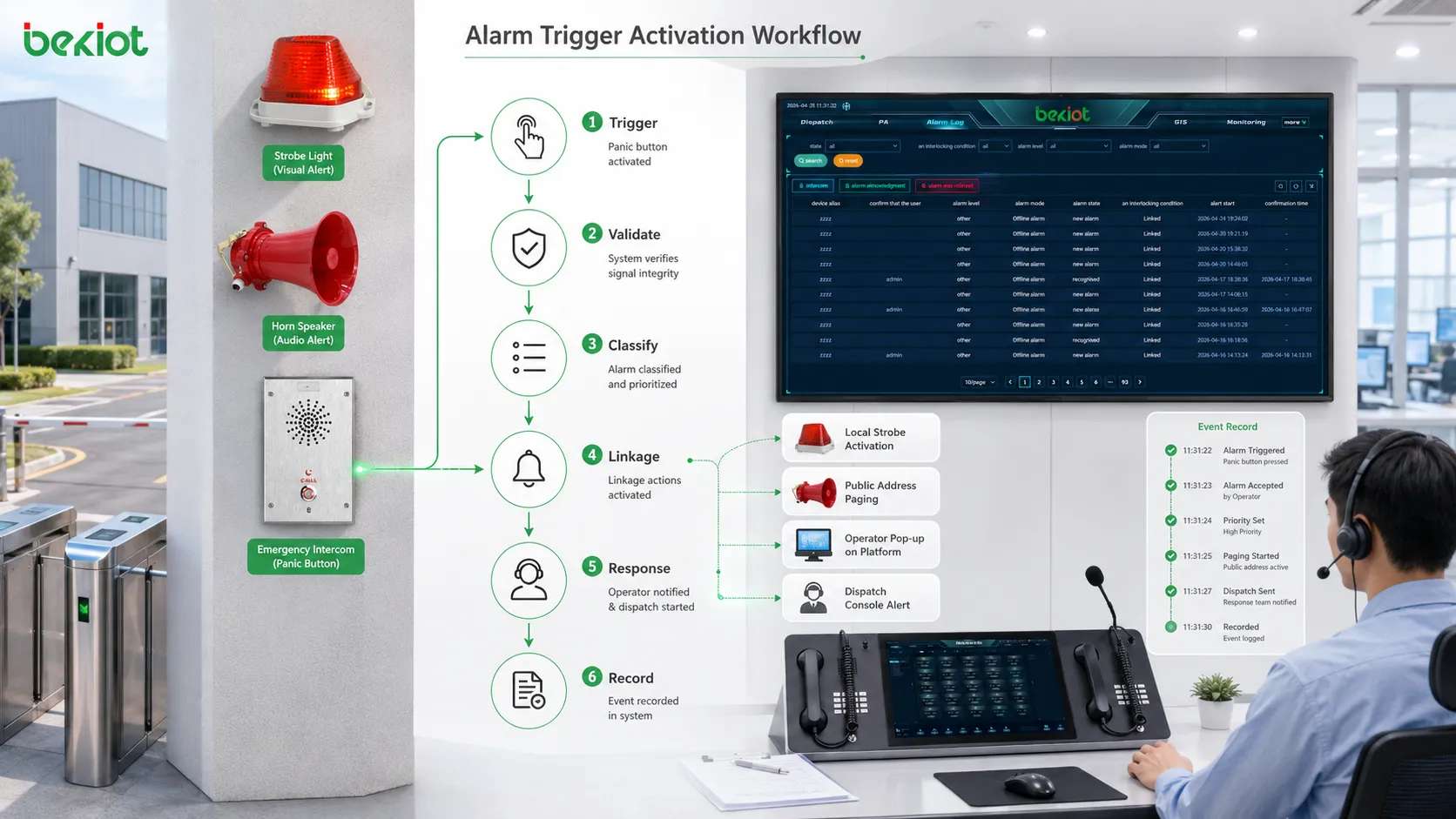
Common types of alarm triggers
Manual emergency triggers
Manual triggers are activated by people. They include panic buttons, emergency call boxes, pull stations, help points, wall-mounted emergency buttons, desk alarm buttons, and intercom emergency keys. Their purpose is to let a person request help immediately when danger, injury, intrusion, conflict, equipment failure, or public safety risk occurs.
Manual triggers are valuable because human judgment can detect situations that sensors may not understand. A person may see smoke before a detector confirms it, notice suspicious behavior, find an injured worker, or need urgent assistance in a remote area. Once pressed, the trigger should send a clear location and event signal to the alarm system.
Sensor-based triggers
Sensor-based triggers are activated by measured conditions. These may include smoke, heat, gas concentration, water leakage, vibration, motion, door status, temperature, pressure, humidity, power abnormality, equipment fault, or environmental change. When the measured value crosses a configured threshold, the sensor sends an alarm event.
These triggers are useful because they operate continuously. They can detect abnormal conditions even when no one is watching the site. However, thresholds must be configured carefully. A threshold that is too sensitive may create false alarms, while one that is too loose may delay response.
System and software triggers
Some alarm triggers come from software systems rather than physical devices. A video analytics platform may detect intrusion. A building management system may report equipment failure. A network monitoring platform may detect device offline status. A dispatch platform may create an emergency event. An access control system may report forced entry or repeated authentication failure.
Software triggers are important in integrated systems because many risks are discovered through data. They allow platforms to exchange alarm events through APIs, protocols, webhooks, relay signals, or middleware. This makes alarm activation part of a broader digital workflow.
Linked event triggers
A linked event trigger occurs when one event activates another response. For example, a fire alarm may trigger emergency paging. A panic button may trigger a camera pop-up. A gas alarm may trigger evacuation instructions. A door forced-open alarm may trigger security dispatch. A help point call may trigger recording and location display.
This type of trigger shows the value of integration. The alarm system is no longer waiting for operators to perform every step manually. It can activate related systems according to predefined rules and shorten response time.
Signal transmission methods
Dry contact and relay input
Dry contact and relay signals are common in alarm integration. A device changes circuit state, and the alarm controller detects the change. This method is simple, reliable, and widely used for emergency buttons, fire panels, door contacts, and equipment fault outputs.
The advantage is compatibility. Many devices can provide relay outputs even if they do not support advanced network protocols. The limitation is that a dry contact often carries limited information. It may show that an alarm occurred, but not provide detailed event type, device name, or diagnostic data unless additional mapping is configured.
Network protocol transmission
Network-based alarm transmission can carry richer data. Devices or platforms may send alarm events through TCP/IP protocols, HTTP APIs, MQTT, SNMP, Modbus TCP, BACnet, SIP event mechanisms, or proprietary protocols. These methods can include alarm type, source ID, timestamp, priority, location, and device status.
Network transmission is useful for modern alarm platforms because it supports centralized monitoring, remote management, data logging, and cross-system linkage. It also allows the alarm system to receive events from many distributed devices or subsystems.
Serial and fieldbus communication
Some industrial or building systems still use serial communication or fieldbus networks. Alarm events may be transmitted through RS-485, Modbus RTU, CAN, or other field-level communication methods. These are common in equipment control, industrial monitoring, building automation, and legacy integration.
Serial and fieldbus systems require correct addressing, polling, baud rate configuration, termination, and protocol mapping. They can be stable when designed properly, but integration must be tested carefully because incorrect mapping may cause alarm data to be misinterpreted.
Wireless and mobile trigger channels
Wireless triggers may use Wi-Fi, private wireless networks, cellular networks, radio links, or low-power wireless methods. They are useful when cabling is difficult, such as temporary sites, outdoor areas, remote points, mobile patrol, and distributed public assistance locations.
Wireless trigger channels should be evaluated for coverage, interference, power supply, battery life, latency, and reliability. A wireless alarm button that fails because of weak signal may create serious risk. Critical wireless triggers should be tested under real site conditions.
How the system verifies an alarm trigger
State confirmation
The system first confirms whether the trigger state is valid. For example, a normally open contact may close, a sensor value may exceed a threshold, or a software event may match an alarm rule. The system checks whether this state meets the configured condition for alarm activation.
State confirmation helps prevent random noise from becoming a full alarm. If the input changes briefly and then returns to normal, the system may treat it as a transient event depending on the configuration. This is especially important in electrical environments where interference can cause short pulses.
Debounce and delay logic
Debounce logic prevents repeated or unstable signals from triggering multiple alarms. A button press, relay bounce, unstable sensor, or noisy input may create several rapid changes. The system can ignore repeated changes within a short time window or require the signal to remain active for a defined period.
Delay logic can also be used. Some warnings should activate only after a condition continues for several seconds. Others, such as emergency buttons or fire alarms, may need immediate activation. The delay rule should match the alarm type and risk level.
Threshold and multi-condition judgment
Many sensor alarms rely on thresholds. A temperature sensor may trigger above a set value. A gas detector may trigger at a specific concentration. A water leak sensor may trigger when conductivity changes. The threshold should be based on site risk, equipment characteristics, and response requirements.
More advanced systems may use multi-condition judgment. For example, an alarm may require both smoke detection and temperature rise, or a security event may be treated as higher priority when motion detection and door forced-open occur together. Multi-condition logic can reduce false alarms and improve event accuracy.
Test, maintenance, and fault distinction
The system should distinguish between real alarms, test events, maintenance states, and device faults. If technicians are testing a detector, the system may need to log the event without activating full emergency response. If a device reports fault or offline status, the system should treat it differently from an actual emergency condition.
This distinction prevents unnecessary panic and improves maintenance accuracy. Operators should clearly see whether an alarm is real, simulated, under test, or caused by system fault.
Activation logic inside the alarm system
Event classification
After verification, the alarm event is classified. Classification may include fire alarm, security alarm, emergency help request, gas alarm, equipment fault, environmental alarm, communication fault, access alarm, or service warning. The category determines the next response path.
Classification also helps operators understand urgency. A critical evacuation alarm should not appear the same as a low-level maintenance alert. Color, sound, priority, icon, and workflow should reflect the severity of the event.
Priority assignment
Priority assignment decides how strongly the system responds. High-priority alarms may interrupt normal audio, trigger emergency paging, call supervisors, open video feeds, and require immediate acknowledgement. Lower-priority alarms may create records or maintenance tasks without disturbing all users.
Priority should be carefully designed. If too many alarms are high priority, operators may suffer alarm fatigue. If serious events are assigned low priority, response may be delayed. Good alarm priority reflects actual risk and operational procedure.
Linkage rule execution
Linkage rules define what the system should do after an alarm is classified. A rule may activate sirens, warning lights, paging zones, dispatch calls, video pop-ups, access control actions, mobile notifications, SMS messages, email alerts, recording, and work order creation.
In a centralized alarm platform such as Becke Telcom BK-RCS, these linkage rules can help connect alarm triggers with communication and response functions. For example, a panic button event can be associated with a location, response group, and notification path instead of only generating a local buzzer.
Acknowledgement and escalation
After activation, the alarm should be acknowledged by an authorized user or system process. Acknowledgement shows that the event has been noticed. It does not necessarily mean the event is resolved. The system may require further handling, field confirmation, or closure.
If no one acknowledges the alarm within a configured time, escalation may occur. The system can notify another operator, call a supervisor, trigger a wider alert, or send the event to a higher-level platform. Escalation reduces the risk of missed alarms.
Output actions after alarm activation
Sound and light warning
The most visible output is a sound and light warning. Sirens, buzzers, strobes, indicator lamps, alarm columns, or local panels can alert nearby people. This is useful when immediate local attention is needed, especially in noisy or visually complex environments.
Sound and light outputs should match the environment. A small office does not need the same output as a factory yard. A noisy workshop may need stronger audible warning. A hospital or school may need controlled levels and clear instructions rather than only loud sound.
Paging and evacuation announcement
Alarm triggers can activate paging or public address announcements. This is important when people need instructions, not only warning tones. An announcement can tell people where the event occurred, what action to take, which route to use, and whether evacuation is required.
Paging linkage should be zone-based. A local equipment alarm may only need a maintenance zone announcement. A fire evacuation event may need broader broadcast. A gas alarm may need warning in affected and nearby areas. The correct zone selection improves response and reduces unnecessary disturbance.
Video and location display
When an alarm occurs, the system can display related cameras, maps, floor plans, device locations, or GIS information. This helps operators verify the event quickly. A security alarm can show the gate camera. A help point alarm can show the exact location. A fire zone can appear on a building map.
Video and location linkage reduce uncertainty. Operators can see where to send staff and what the situation looks like. This is especially useful in large facilities, transport hubs, campuses, industrial plants, and public buildings.
Dispatch and notification
Alarm activation may notify duty personnel, maintenance teams, security staff, emergency commanders, or external response groups. Notifications may be sent through dispatch consoles, phone calls, mobile apps, SMS, email, radios, or third-party platforms.
Notification should be role-based. The right people should receive the right alarm. A power fault should go to electrical maintenance. A security event should go to security staff. A fire alarm should follow emergency procedures. Incorrect notification wastes time.
Recording and event logging
Alarm activation should create a record. The record may include trigger source, location, time, alarm type, priority, linkage actions, operator acknowledgement, dispatch response, video access, paging broadcast, and closure result. This record supports review and accountability.
Recording is valuable because alarm response may need to be analyzed later. Managers can check whether the system activated correctly, whether staff responded on time, and whether procedures were followed. Logs also help diagnose false alarms and equipment faults.
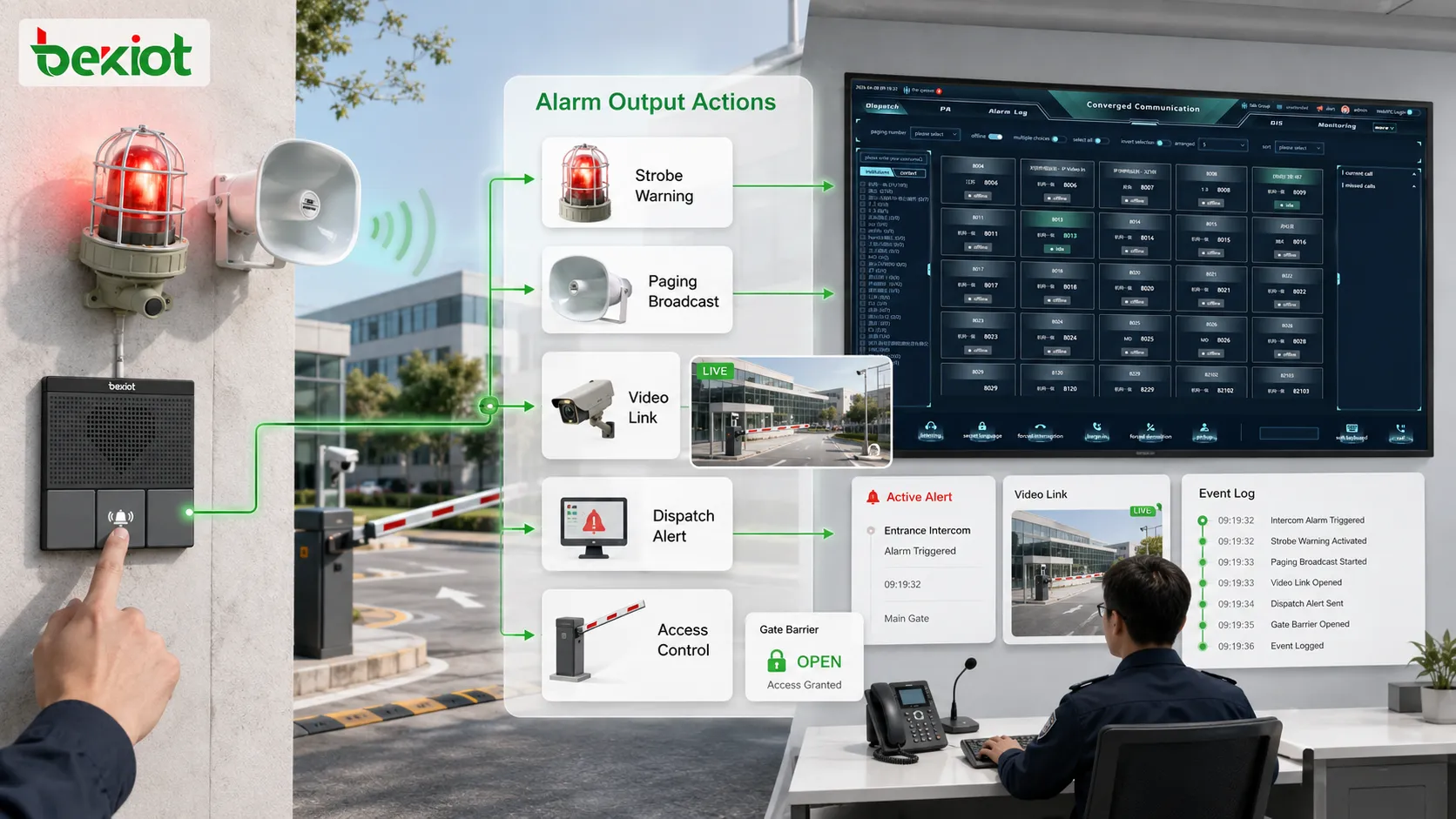
Application scenarios
Fire alarm and evacuation
In fire alarm and evacuation systems, triggers may come from smoke detectors, heat detectors, manual call points, fire panels, or emergency buttons. Once verified, the alarm system can activate evacuation announcements, warning lights, fire zone display, access control linkage, and operator notification.
The value of trigger activation is speed and clarity. People need to know that an emergency exists and what action to take. A well-designed system does not only sound an alarm; it connects the trigger with clear evacuation guidance and response records.
Industrial safety and equipment alarms
Industrial sites use alarm triggers for gas detection, equipment failure, high temperature, power abnormality, water leakage, emergency stop, and production line faults. The system can activate local warnings, notify maintenance staff, page affected zones, and create repair tasks.
This helps prevent small faults from becoming larger incidents. A trigger from a sensor or controller can reach the right team quickly and produce a traceable record of the response.
Security and access control
Security triggers may come from door forced-open events, intrusion sensors, perimeter alarms, panic buttons, intercom calls, access denial records, or video analytics. The alarm system can show camera views, notify guards, lock or unlock doors, and dispatch patrol staff.
Security response depends on fast verification. A triggered alarm without video or location context may slow the operator. Integrated activation gives the security team more information at the moment of response.
Public facilities and emergency help points
Campuses, hospitals, parks, parking lots, stations, tunnels, and commercial complexes may use emergency help buttons or call boxes. When triggered, the system can call the control room, show the location, start recording, activate nearby camera views, and notify responders.
This is useful because public users may not know who to contact. A simple trigger can activate a structured assistance workflow and reduce response delay.
Building and utility management
Building systems may trigger alarms for elevators, power rooms, pumps, HVAC faults, water tanks, temperature, humidity, drainage, or fire doors. Utility sites may trigger alarms from substations, pumping stations, pipelines, and remote equipment rooms.
In these cases, alarm activation is often linked with maintenance rather than evacuation. The system should classify the alarm correctly, notify the responsible team, and record repair handling. Not every trigger needs a siren, but every meaningful trigger needs a response path.
Design considerations for reliable activation
Clear trigger mapping
Every alarm trigger should have a clear mapping relationship. The system should know which device sent the signal, where it is located, what alarm type it represents, which priority it has, and what response rule applies. Without clear mapping, operators may see an alarm but not understand what to do.
Device names should match real site language. A code such as “DI-08” may be meaningful to engineers but not to operators. Labels should include location, area, function, and alarm purpose where possible.
False alarm reduction
False alarms reduce trust. The system should use proper thresholds, debounce logic, confirmation rules, maintenance modes, and filtering to reduce unnecessary activation. However, false alarm reduction should not delay serious events too much.
The correct balance depends on alarm type. A low-level environmental warning may allow confirmation delay. A panic button or emergency manual trigger may need immediate activation. The logic should reflect risk.
Priority and escalation design
Priority design ensures that critical triggers receive stronger response. A fire alarm, panic button, or hazardous gas event should not be handled like a minor equipment warning. Different priorities should control sound, display, notification, and escalation behavior.
Escalation ensures that alarms do not remain unnoticed. If an operator does not respond, the system can notify additional personnel or raise the alarm level. Escalation is important for night shifts, unmanned facilities, remote stations, and high-risk areas.
Power and communication reliability
Alarm trigger activation depends on power and communication paths. If the detector has no power, the button line is broken, the controller is offline, or the network path fails, the alarm may not reach the platform. Reliable activation requires protected wiring, backup power, communication monitoring, and fault reporting.
Critical trigger circuits should be tested regularly. A trigger that is never tested may appear normal but fail during a real emergency. Maintenance should include both device tests and linkage tests.
System integration testing
Testing should include the full chain: trigger device, input module, controller, platform, linkage rule, output device, notification path, record creation, and closure process. It is not enough to test only the button or only the software pop-up.
Realistic scenario testing helps reveal gaps. The team should verify whether the correct siren activates, whether the correct paging zone plays, whether the correct camera appears, whether BK-RCS or another central alarm platform records the event correctly, and whether the correct staff receive notifications.
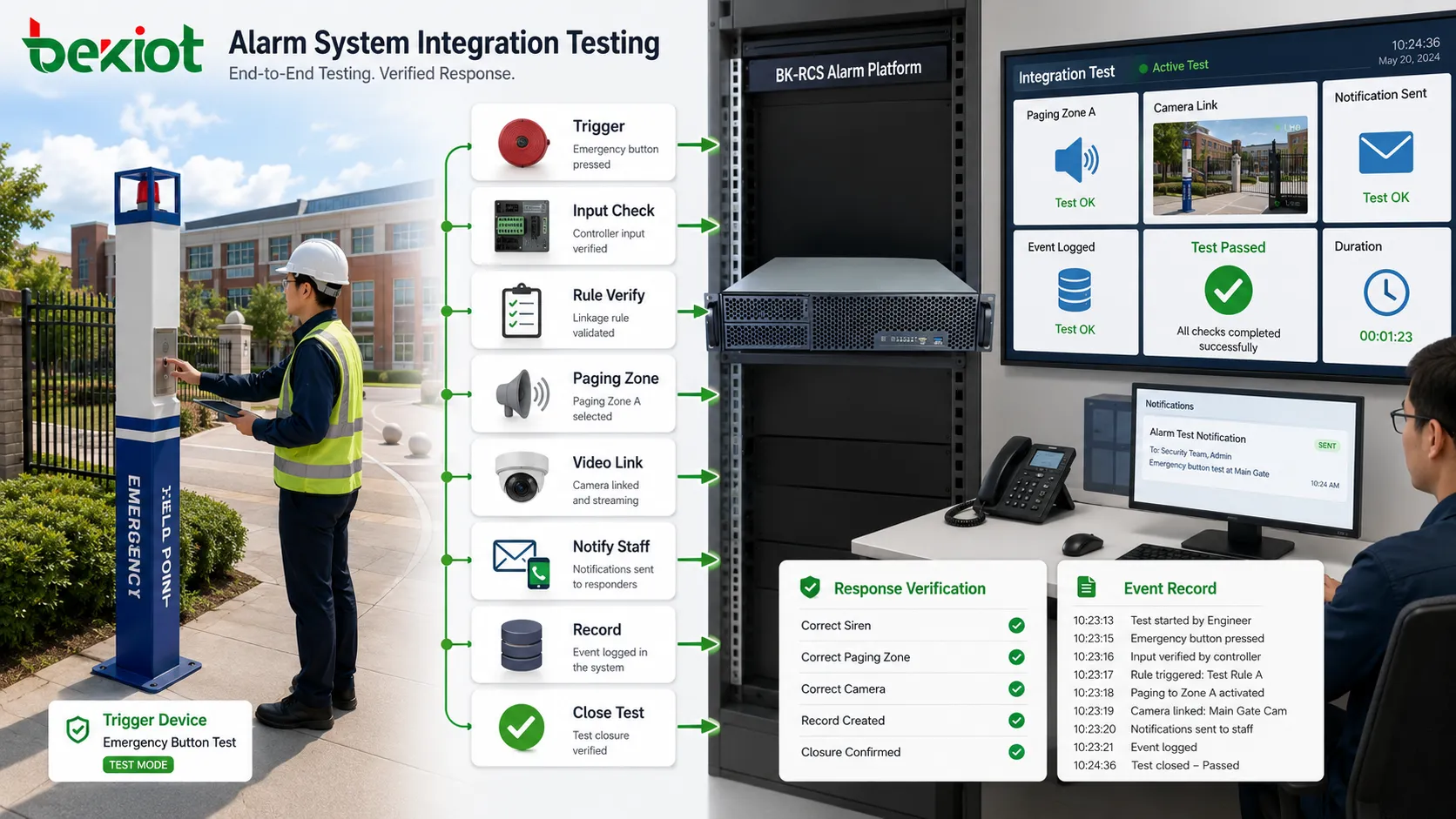
Common problems in alarm trigger activation
Trigger signal is received but no action occurs
This often happens when the trigger input is working but the linkage rule is not configured correctly. The alarm appears in the system, but no siren, paging, notification, or dispatch action follows. The cause may be missing rule mapping, disabled linkage, wrong priority, or incorrect event category.
Troubleshooting should check whether the trigger event is recognized, whether the rule condition matches, whether the output device is online, and whether permission or schedule restrictions block the action.
Wrong zone or wrong device activates
If the wrong paging zone, siren, camera, or notification group activates, the problem is usually mapping-related. Device addresses, zone names, floor plans, camera links, or rule conditions may be incorrect. This can create serious response confusion during emergencies.
Commissioning should include point-by-point verification. Each trigger should be tested and confirmed against the actual physical location. Documentation should be updated when devices are moved or renamed.
Alarm repeats too frequently
Repeated activation may be caused by unstable sensors, bouncing contacts, poor wiring, electrical interference, or overly sensitive thresholds. It may also indicate a real unresolved fault. The system should support debounce, suppression, and repeated-alarm analysis.
Operators should not simply silence repeated alarms without investigation. Repetition may reveal a hidden maintenance issue or a risk condition that has not been cleared.
Trigger works during test but fails in real operation
This may happen when the test only checks the local device and not the full linkage path. A button may work, but the notification network may fail. A sensor may trigger, but the platform may not receive the event during network congestion. A siren may activate, but the paging announcement may not play.
Full-chain testing is necessary. Alarm systems should be tested under realistic operating conditions, including normal network load, backup power state, operator workflow, and multi-event scenarios.
How to evaluate the activation design
Trigger accuracy
The system should activate for real alarm conditions and avoid unnecessary activation from noise, test status, or short unstable signals. Trigger accuracy depends on sensor quality, wiring, thresholds, debounce logic, and event classification.
Response speed
The time from trigger occurrence to system response should meet the scenario requirement. Emergency buttons, fire alarms, and safety events usually need immediate response. Maintenance alarms may tolerate controlled delay. Response speed should be tested, not assumed.
Linkage correctness
The correct output actions should follow the correct trigger. A fire trigger should activate the right evacuation process. A security trigger should open the right camera. A gas alarm should warn the right zone. Linkage correctness is one of the most important acceptance points.
Operator clarity
Operators should understand what alarm occurred, where it occurred, what priority it has, what action has already been triggered, and what they need to do next. A trigger that creates unclear information does not fully support response.
Traceability
The system should record the trigger time, source, type, location, linkage actions, acknowledgement, escalation, handling notes, and closure result. Traceability supports incident review, compliance, maintenance analysis, and continuous improvement.
Closing Notes
An alarm trigger activates the alarm system by sending a valid abnormal signal into a detection and response chain. The system receives the signal, verifies its state, classifies the event, assigns priority, executes linkage rules, activates outputs, notifies responsible users, and records the event. This process turns a physical or software trigger into a coordinated alarm response.
The main trigger sources include manual emergency buttons, sensors, detectors, access control events, equipment controllers, software platforms, and linked system events. The main outputs include sirens, warning lights, paging announcements, video pop-ups, dispatch notifications, access control actions, recording, and event logs.
For integrated platforms such as the Becke Telcom BK-RCS alarm system, the value is that trigger activation can be connected with centralized alarm display, location awareness, communication linkage, notification, and response records. This helps organizations move from isolated alarm signals to structured emergency and operational response.
A reliable alarm activation design depends on clear trigger mapping, accurate classification, false alarm control, priority and escalation rules, stable power and communication paths, full-chain testing, and long-term maintenance. When these elements are handled properly, the alarm trigger becomes the starting point of a fast, traceable, and effective safety response workflow.
FAQ
What is an alarm trigger?
An alarm trigger is a signal or event that starts an alarm process. It may come from a manual button, sensor, detector, access control device, equipment controller, software platform, or linked system event.
Does every trigger immediately activate all alarm outputs?
No. The response depends on classification, priority, verification rules, and linkage configuration. Some triggers activate full emergency response, while others only create maintenance alerts or operator notifications.
Why is trigger verification important?
Verification helps reduce false alarms and unstable signals. The system checks whether the event is valid, whether thresholds are met, whether debounce logic applies, and whether the event should be treated as a real alarm.
What systems can be activated by an alarm trigger?
An alarm trigger can activate sirens, warning lights, paging systems, video pop-ups, dispatch consoles, mobile notifications, access control actions, emergency calls, recording platforms, and event management systems.
How should alarm trigger activation be tested?
Testing should cover the complete path from trigger device to controller, alarm platform, linkage output, notification, acknowledgement, escalation, and event record. Realistic scenario testing is more reliable than checking one device alone.







