


In a paging, public address, dispatch, or emergency communication system, the real difficulty is not simply playing audio. The more important challenge is making sure that the right message reaches the right people, in the right area, at the right moment, without disturbing unrelated zones or blocking urgent instructions. Paging groups are created to solve this practical routing problem. They organize speakers, paging terminals, intercom points, IP phones, amplifiers, zones, departments, and response roles into manageable communication objects.
A paging group can be used for routine announcements, local area notices, emergency override, staff dispatch, building-wide broadcast, production coordination, visitor guidance, public safety instructions, and maintenance communication. Its value is not limited to convenience. A well-planned group structure improves response speed, reduces message confusion, supports permission control, makes system operation easier, and gives administrators a clearer way to manage communication across complex sites.
From single announcement to organized communication
In a small site, one microphone connected to one speaker area may be enough. The operator speaks, and everyone hears the same message. This approach is simple, but it becomes inefficient as soon as the site expands. A factory may have several workshops, a warehouse, an office area, a utility station, and an outdoor loading yard. A campus may have classrooms, dormitories, sports areas, laboratories, and security gates. A hospital may have wards, corridors, public waiting areas, operating departments, staff rooms, and emergency entrances.
If every message is sent everywhere, people hear many announcements that do not concern them. This creates disturbance and reduces attention. If operators must manually select individual speakers one by one, the process becomes slow and error-prone. Paging groups provide a middle structure between single-device paging and full-site broadcast. They allow administrators to define meaningful communication targets in advance.
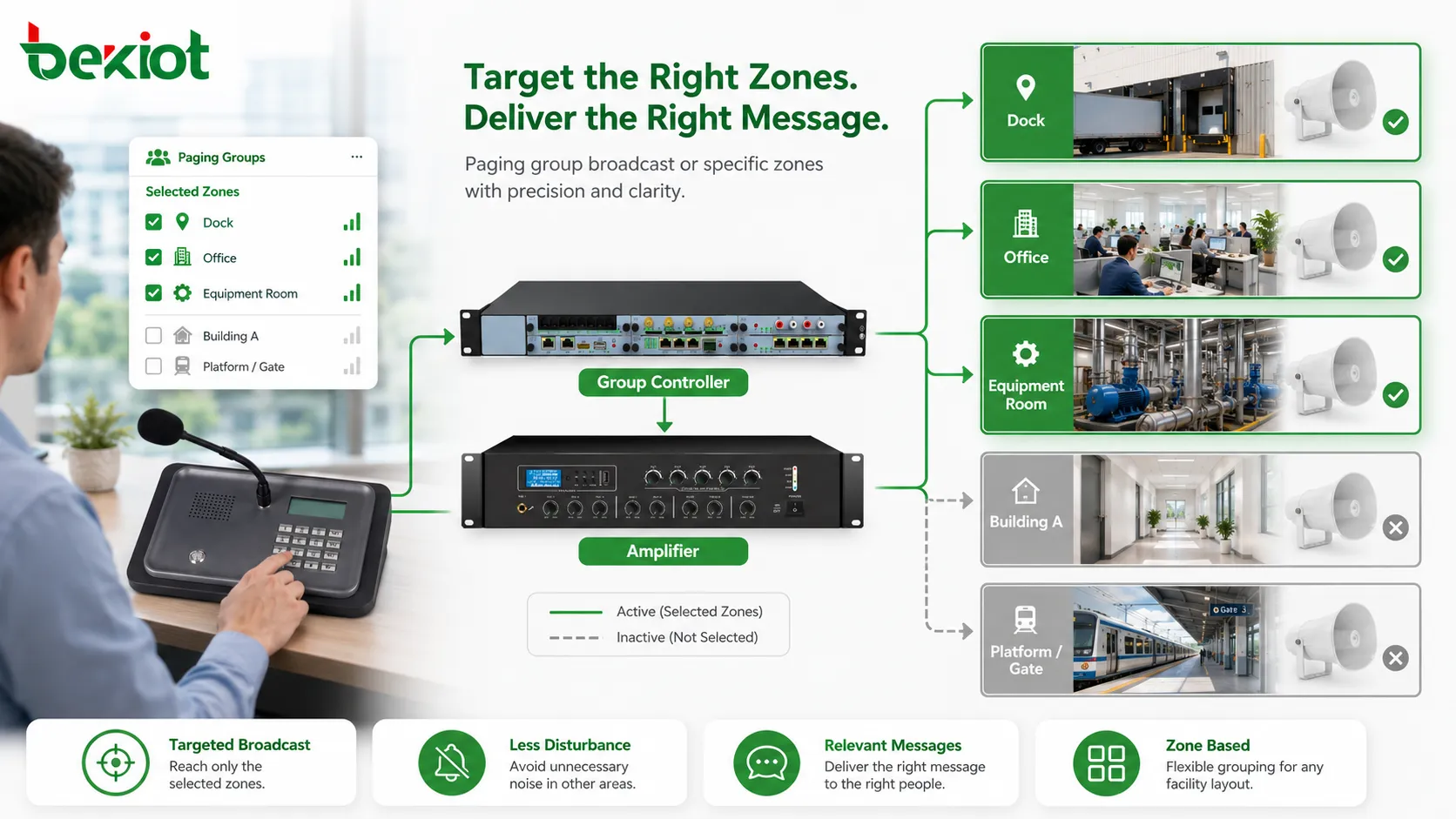
A paging group may represent a physical area, such as one floor, one building, one workshop, or one platform. It may also represent a functional team, such as maintenance, security, reception, emergency response, or warehouse dispatch. In more advanced systems, it may represent a combination of locations and roles. For example, an emergency group may include corridor speakers, outdoor sirens, control room terminals, and security desk notifications.
This organized structure allows the system to behave consistently. Operators do not need to remember every device address. They can select a group with a clear name and send the message to the intended area. The system then routes the audio according to the group configuration. This reduces manual mistakes and makes paging more usable in daily operation.
Targeted zone broadcast
The most direct function of paging groups is targeted zone broadcast. Instead of sending a message to all speakers, the operator can send it to a predefined group. This is useful when the message concerns only one part of the site. A loading dock instruction can be sent to the dock group. A class reminder can be sent to one building. A maintenance warning can be sent to the equipment room group. A platform update can be sent only to the affected platform.
Targeted broadcast improves message relevance. People are more likely to pay attention when most announcements they hear are related to their area or responsibility. If they frequently hear irrelevant messages, paging gradually becomes background noise. Once that happens, even important announcements may be ignored. Good group design protects the attention value of the system.
Zone broadcast also reduces operational disturbance. Offices, patient areas, meeting rooms, classrooms, and customer-facing spaces may not need every routine message. A paging group allows routine operational communication to remain local while keeping broader broadcast available when truly needed. This balance is important in mixed-use environments where industrial, administrative, public, and quiet areas exist in the same facility.
Targeted groups should be created according to real listening areas. A group that looks logical on a drawing may not match actual site behavior. Sound coverage, walls, doors, outdoor conditions, equipment noise, user movement, and daily workflow should all be considered. A good paging group is not only a technical list; it is a practical communication area.
Group calling across different endpoint types
A paging group does not always contain only traditional speakers. In modern communication systems, group members may include IP speakers, ceiling speakers, horn speakers, wall speakers, SIP phones, intercom terminals, paging adapters, network amplifiers, analog speaker circuits, dispatch consoles, mobile clients, or control room endpoints. This makes paging groups useful in mixed communication environments.
For example, a warehouse group may include horn speakers in loading areas, IP speakers in aisles, an intercom terminal at the gate, and a supervisor phone in the office. A hospital service group may include corridor speakers, nurse station terminals, and staff communication points. A transport group may include platform speakers, staff intercoms, and operation center consoles.
This cross-endpoint grouping allows the system to connect different communication technologies under one operational rule. The user does not need to know whether a message is being delivered through an analog amplifier, an IP endpoint, or a SIP device. The group name represents the communication target, while the system handles the technical path.
However, mixed groups require careful testing. Different devices may have different audio delay, volume, codec behavior, answer mode, or monitoring capability. If one group includes both IP speakers and analog amplifier zones, playback timing and audio level should be checked in the field. A group should sound coherent to listeners, not fragmented.
Permission control and user authority
Paging groups also support permission control. Since a group may affect many people at once, not every user should be allowed to broadcast to every group. A receptionist may need permission to page a lobby. A warehouse supervisor may page loading zones. A security officer may page gates and public areas. An emergency commander may page all zones. These permissions should be defined clearly.
Permission control prevents accidental or improper announcements. Without it, a user may broadcast to the wrong building, interrupt quiet areas, trigger emergency groups, or disturb public spaces. In large systems, this risk becomes serious because the number of zones and users increases. Role-based group access keeps operation organized.
Permissions may be assigned by user account, extension number, console login, device identity, department role, password, or administrator policy. The method depends on the system architecture. The key is that each user should see and access only the groups they are responsible for using, while emergency users can still reach critical groups quickly.
Permission design should also support temporary needs. During construction, events, drills, maintenance, or special operations, a user may need short-term access to a group. The system should allow controlled temporary authorization and remove it afterward. Old permissions that remain active after a project ends can become a security and management risk.
Priority and emergency override
Paging groups become especially valuable when priority is added. A routine announcement, a scheduled message, a live dispatch instruction, and an emergency warning should not have the same authority. Priority rules decide which audio can interrupt another and which group can take control during a conflict.
Emergency override is one of the most important applications. An emergency group may include all evacuation zones, safety exits, public corridors, outdoor assembly areas, and control room notification points. When an emergency broadcast is activated, it should override lower-priority audio such as background music, routine reminders, or local service announcements.
Priority also helps prevent operator conflict. If two users try to page the same group at the same time, the system should follow a defined rule. A higher-priority user may take control, while the lower-priority page is rejected, delayed, or interrupted. This avoids overlapping audio and unclear instructions.
The value of priority depends on clear design. The organization should define which groups are routine, which are operational, which are security-related, and which are emergency-critical. Users should understand the difference. Emergency groups should not be used casually, and low-priority groups should not block high-priority response.
Priority behavior should be tested during commissioning. It is not enough to set levels in software. The team should simulate simultaneous paging, scheduled playback, emergency override, and alarm-triggered broadcast to confirm that the actual result matches the intended procedure.
Dispatch coordination and field response
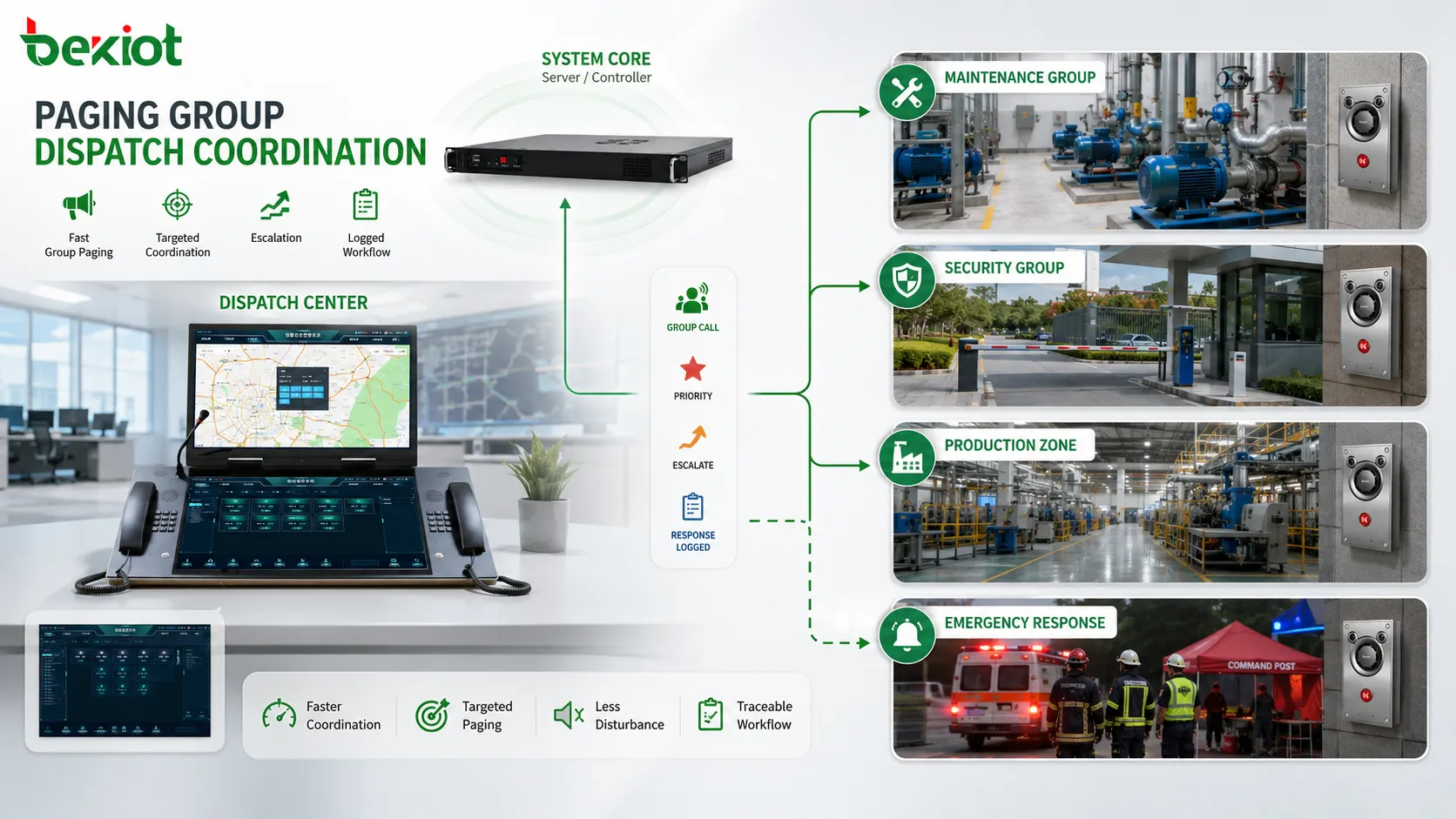
In dispatch systems, paging groups help operators coordinate field teams more efficiently. A control room may need to notify maintenance, call a security patrol, guide logistics staff, alert a production area, or send instructions to several response points at once. Group paging reduces the time needed to reach the right area or team.
For maintenance dispatch, a group may represent equipment rooms, pump stations, production lines, or engineering response points. When a fault occurs, the operator can page the relevant group immediately instead of calling individuals one by one. This is useful when people are moving through the site and may not be near personal phones.
For security dispatch, groups may represent gates, parking areas, patrol zones, public entrances, or restricted corridors. A security center can send instructions to one area, request staff assistance, or guide people during an incident. When integrated with intercom or video, the paging group becomes part of a wider response workflow.
For production dispatch, groups support shift coordination, material requests, process warnings, safety reminders, and line status updates. A supervisor can speak to one production line without interrupting unrelated lines. This improves communication discipline and reduces unnecessary disturbance.
Paging groups also help with follow-up. If an initial page does not produce a response, the operator can escalate to a broader group or a higher-priority group. The system may log the sequence, making it easier to review how dispatch communication developed during an event.
Scheduled announcements by group
Paging groups are useful not only for live paging but also for scheduled announcements. A schedule can be assigned to one group or several groups according to site workflow. This allows routine messages to play automatically in the correct areas without manual operation.
Factories may schedule shift reminders for production groups. Schools may schedule bells for classroom groups. Hospitals may schedule service notices for public areas while avoiding patient rest zones. Warehouses may schedule loading reminders for dock groups. Commercial buildings may schedule closing notices for public groups.
Group-based scheduling reduces repeated manual work and improves consistency. The same message can play at the right time, in the right zone, with the same wording and audio level. This is useful for routine safety prompts, service guidance, cleaning reminders, inspection notices, and time-based workflow coordination.
Scheduled group paging still needs priority control. A routine scheduled message should not interrupt emergency paging. If a higher-priority broadcast occurs, the scheduled message may pause, stop, skip, or resume according to system rules. Logs should show what happened so administrators can understand why a scheduled message did or did not play.
Schedules should be reviewed regularly. If a group changes because a department moves or a zone is redefined, the schedule must be updated. Otherwise, old schedules may continue to play in the wrong areas. Group-based automation is powerful, but it requires lifecycle management.
Alarm linkage and event-driven paging
Paging groups can be connected with alarm systems and event triggers. When a fire alarm, emergency button, access control event, sensor alarm, equipment fault, security alert, or building management event occurs, the system can automatically page a predefined group. This reduces response time and supports more consistent emergency communication.
The key is mapping the correct event to the correct group. A smoke alarm in one building may trigger an evacuation message for that building. A gas detection alarm may page the affected process area and nearby safety group. A gate access event may notify the security group. A machine fault may page maintenance staff. The group defines who or which area receives the event message.
Event-driven paging should not be overused. If too many minor events trigger broadcast messages, people may become tired of announcements and ignore them. The system should distinguish between public alerts, staff-only notices, maintenance messages, and emergency warnings. Only events that require audible communication should activate group paging.
Alarm-linked groups should have tested priority. A safety-related event should override routine announcements. A maintenance event may use lower priority. A security event may notify staff without disturbing the public. The priority model should match the event severity and response procedure.
Logs are important for alarm linkage. The system should record the event trigger, selected group, message content, playback time, priority level, and result. This helps incident review and makes it possible to verify whether the automatic communication worked as intended.
Management value in large systems
As a paging system grows, management becomes more difficult. There may be hundreds of speakers, many intercom points, several buildings, different departments, multiple operators, scheduled messages, emergency groups, and alarm linkages. Without grouping, system operation becomes complicated and hard to control.
Paging groups create a management layer. Administrators can organize devices by building, floor, department, function, or risk level. They can assign permissions by group, apply schedules by group, review logs by group, and test zones by group. This reduces complexity and makes the system easier to maintain.
Groups also help with documentation. A drawing or configuration sheet can show which devices belong to each group, what the group is used for, who can page it, what priority it has, and which schedules or alarms are linked to it. This improves handover between installation teams, administrators, operators, and maintenance staff.
In multi-site systems, groups may represent branch buildings, campuses, stations, plants, or remote utility points. A central control room can manage communication across several locations while still keeping local groups separate. This supports centralized supervision without losing local accuracy.
Management value increases over time. Sites change, departments move, devices are replaced, and workflows evolve. A well-structured group system is easier to update than a flat list of individual devices. It gives administrators a practical way to keep communication aligned with the real site.
Operational value for different environments
In industrial facilities, paging groups support production coordination, safety notices, maintenance dispatch, logistics instructions, and emergency response. Groups may follow production lines, workshops, warehouses, utility rooms, outdoor yards, and control areas. This makes communication faster and more accurate than site-wide broadcasting.
In transport environments, groups may follow platforms, ticket halls, tunnels, parking areas, gates, and staff zones. Operators can send passenger guidance, safety warnings, service updates, and emergency instructions to the affected areas only. This reduces public confusion and improves response during changing conditions.
In healthcare facilities, group design can help balance communication and quiet operation. Public areas, staff areas, corridors, wards, emergency entrances, and service departments may need different paging rules. Targeted groups prevent routine announcements from disturbing sensitive areas while preserving emergency broadcast capability.
In schools and campuses, paging groups can be organized by classroom building, dormitory, sports area, administration building, outdoor field, and security zone. This supports class bells, safety drills, event announcements, emergency alerts, and daily management notices.
In commercial buildings, hotels, office parks, shopping centers, and public facilities, groups support customer service, staff calls, closing reminders, parking guidance, security response, and facility management. The system can communicate with different areas without making the whole building hear every message.
System value for safety communication
Safety communication requires accuracy, speed, and authority. Paging groups support all three. Accuracy comes from sending the message to the correct area. Speed comes from preconfigured groups that operators can select quickly. Authority comes from priority control and emergency override rules.
During emergencies, people need clear instructions. A fire evacuation message may need to play in one building first. A hazardous gas warning may need to reach a process area and nearby exits. A severe weather alert may need to reach outdoor zones. A security lockdown message may need different wording for public areas and staff areas. Paging groups allow the system to deliver instructions according to real risk zones.
Safety groups should be designed with response procedures, not only building layout. The group should match how people are expected to move, where they assemble, which exits they use, and which teams respond. A group that matches a drawing but not the emergency plan may fail in practice.
Regular testing is necessary. Emergency groups should be checked for audio coverage, priority behavior, zone accuracy, alarm linkage, and operator access. A group that is rarely used may contain offline speakers, wrong members, outdated names, or changed routes. Testing keeps the safety function real.
System value for user experience
Paging groups also improve user experience. People prefer messages that are relevant, clear, and not excessive. If every area hears every message, the system becomes annoying. If the right area hears the right message, paging becomes useful and accepted.
In public facilities, targeted groups help reduce confusion. Visitors hear guidance related to their location. Passengers hear updates for their platform. Patients hear notices relevant to the waiting area. Staff hear operational messages without unnecessarily disturbing customers or the public.
In workplaces, group paging reduces interruption. Office staff do not need to hear every warehouse instruction. Warehouse staff do not need to hear every meeting room notice. Production staff receive the messages that affect their line. This supports a more comfortable and efficient working environment.
User experience also depends on message discipline. Grouping makes it easier to control who can broadcast and where. This helps prevent random, repeated, or unclear announcements. When users trust the system, they respond more quickly to important pages.
Monitoring and maintenance by group
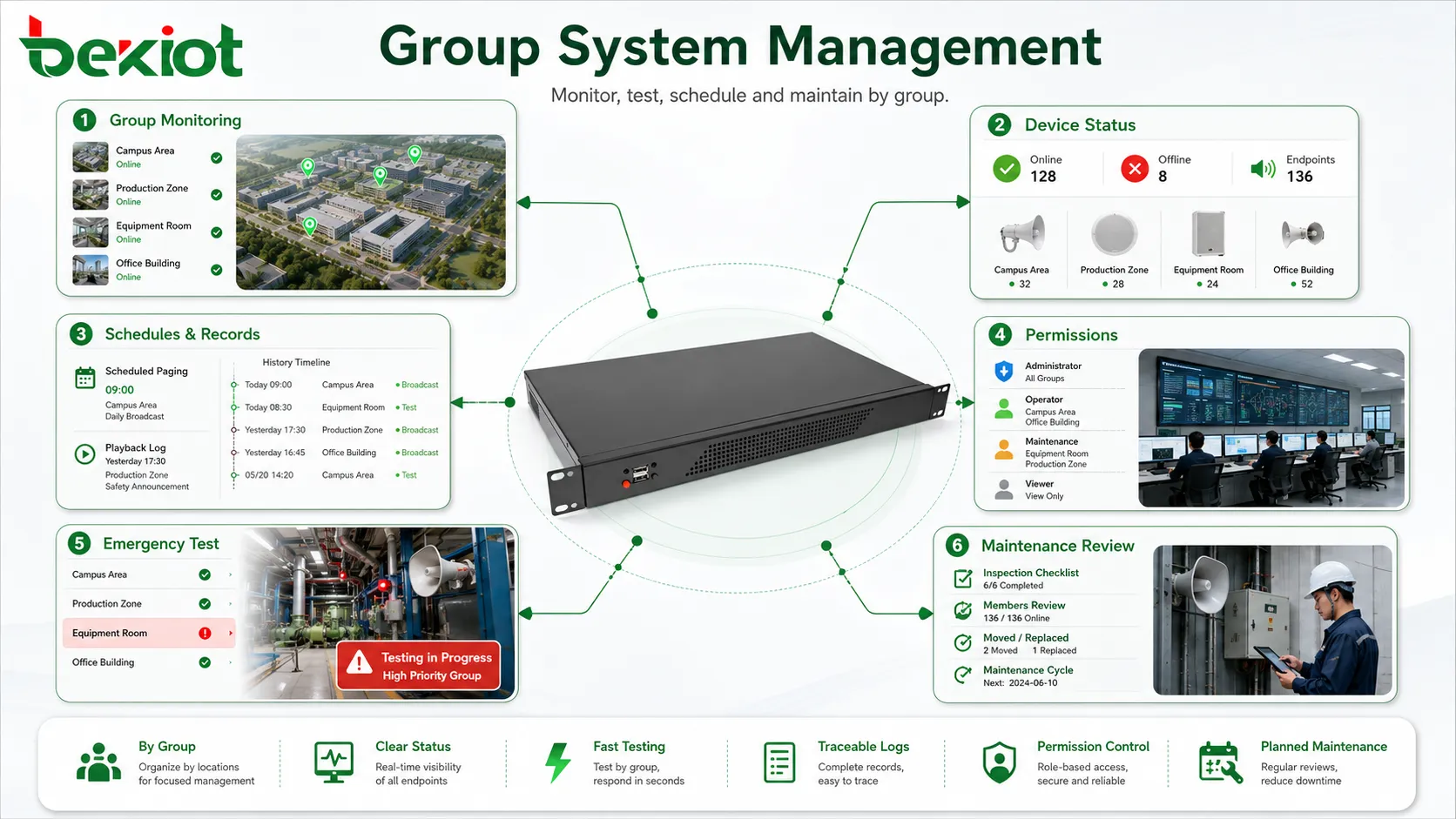
Paging groups can improve maintenance because they provide a logical way to test and monitor the system. Instead of checking every device one by one without structure, maintenance teams can test by group. They can verify whether all speakers in a building group work, whether a production zone group is audible, or whether an emergency group reaches all required areas.
Monitoring by group can show whether a communication area is healthy. If one speaker is offline, the system may show a device fault. If several endpoints in one group fail, the issue may be related to a switch, amplifier, cable route, power supply, or zone controller. Group-level visibility helps locate faults faster.
Playback logs by group are also useful. Administrators can see how often a group is used, which users page it, whether scheduled messages play correctly, and whether priority interruptions occur. This information supports operational review and system optimization.
Group maintenance should include regular review of membership. Devices may be moved, replaced, renamed, or removed. If the group list is not updated, announcements may reach old locations or miss new ones. Documentation should match the current field installation.
Emergency and high-priority groups require stricter maintenance. Their members should be verified more often because failure may affect safety. Routine groups may need less frequent checks, but they should still be reviewed to prevent outdated configuration.
Scalability and future expansion
Paging groups make future expansion easier. When a new building, floor, workshop, gate, corridor, or outdoor area is added, administrators can create a new group or add devices to an existing group. This is simpler than redesigning the whole paging structure every time the site changes.
Expansion should follow the original grouping logic. If groups are named clearly and organized by physical or functional purpose, new areas can be added consistently. If the original group design is chaotic, expansion becomes difficult. Early planning affects long-term scalability.
Large systems may use hierarchical groups. A floor group may belong to a building group. Several building groups may belong to a campus group. Production line groups may belong to a factory-wide group. This structure allows operators to page at different scopes: local, regional, or site-wide.
Hierarchical groups should be managed carefully. If a device is added to a small group, it may also become part of a larger group automatically. Administrators should understand these relationships to avoid unexpected broadcasts. Documentation and visual management can help.
Scalability also includes permissions and schedules. When new groups are created, the system should define who can use them, what priority they have, whether they are included in emergency broadcast, and whether scheduled messages apply. Group creation should be part of a controlled change process.
Recording and accountability value
Paging groups can strengthen recording and accountability. When a broadcast is recorded, the group name helps explain where the message was sent. A recording that says “All Warehouses” or “Building B Emergency Zone” is easier to review than a recording that lists individual speaker addresses only.
For incident review, group information helps reconstruct the communication timeline. Reviewers can see which area received the warning, which operator sent it, what priority was used, and whether follow-up messages were sent to other groups. This supports safety management and operational accountability.
In routine operation, paging records can show how groups are used. A group that receives many urgent pages may indicate a busy or high-risk area. A group that is rarely used may need review. A group that is often paged by mistake may have unclear naming or poor interface placement.
Recording by group also supports training. Supervisors can review whether operators selected the correct group, used clear wording, and followed paging procedures. This helps improve communication quality without relying only on memory or subjective feedback.
Common configuration mistakes
One common mistake is creating groups that are too broad. If one group includes too many unrelated areas, every message becomes almost a site-wide broadcast. This reduces the purpose of grouping and increases disturbance. Groups should be broad enough to be useful but narrow enough to remain relevant.
Another mistake is creating too many small groups without clear names. If operators see dozens of similar group names, they may select the wrong one. Group names should match real site language, such as building names, floor numbers, functional areas, or response teams.
A third mistake is ignoring permission settings. If all users can access all groups, the system may be misused. If permissions are too strict, users may be unable to page the areas they are responsible for. The correct balance depends on role, risk, and workflow.
Some systems fail because group membership is not maintained. A speaker may be moved, a department may relocate, or a new area may be added, but the group list remains unchanged. Over time, the group no longer matches reality. Periodic review is necessary.
Priority mistakes are also serious. Emergency groups should not have the same priority as routine groups. Scheduled messages should not block safety instructions. Testing should confirm that group priority behaves correctly in real conflict situations.
How to evaluate a well-designed paging group
A well-designed paging group should have a clear purpose. Users should understand why the group exists, who it reaches, and when it should be used. If the purpose cannot be explained, the group may be unnecessary or poorly named.
The group should match real physical or operational boundaries. People in the group should need to hear the same type of message. Areas outside the group should not be disturbed unless the message truly affects them. This is the foundation of effective paging.
The group should have appropriate permissions. The right users should be able to page it quickly, while unauthorized users should not. Emergency groups should be protected but accessible to authorized emergency roles.
The group should behave correctly under priority rules. Routine paging, scheduled messages, live dispatch, and emergency override should interact predictably. Operators should know what happens when conflicts occur.
The group should be maintainable. Administrators should be able to view members, test output, check device status, review logs, update schedules, and revise permissions. If a group is difficult to manage, it may become unreliable over time.
Closing Insights
Paging groups possess functions that go far beyond basic audio broadcast. They support targeted zone paging, multi-endpoint communication, permission control, priority handling, emergency override, scheduled announcements, alarm linkage, dispatch coordination, monitoring, recording, and scalable system management. These functions turn paging from a simple sound output into a structured communication tool.
The system value of paging groups lies in accuracy, speed, order, and control. They help operators reach the correct area quickly, reduce unnecessary disturbance, protect urgent messages, simplify daily operation, support safety procedures, and make large communication systems easier to manage. In industrial, transport, healthcare, campus, commercial, warehouse, and public facility environments, this value can directly affect response efficiency and communication quality.
A strong paging group design should follow real site layout, user responsibility, safety workflow, and maintenance needs. It should be clear enough for operators, controlled enough for administrators, and flexible enough for future expansion. When planned and maintained properly, paging groups become one of the most important foundations of a reliable paging and dispatch communication system.
FAQ
What is the main function of a paging group?
The main function is to send a paging message to a predefined set of speakers, terminals, zones, or users. This allows targeted communication without broadcasting every message to the whole site.
Can one paging group include different types of devices?
Yes. A paging group may include IP speakers, analog speaker zones, SIP phones, intercom terminals, paging adapters, amplifiers, or dispatch endpoints, depending on the system architecture and project needs.
Why are permissions important for paging groups?
Permissions prevent unauthorized or accidental broadcasts. They ensure that users can page only the groups related to their roles, while emergency or supervisory users can access wider or higher-priority groups when needed.
How do paging groups support emergency communication?
Emergency groups can include critical zones, exits, public areas, response teams, and control points. With priority and override rules, they allow urgent messages to interrupt routine audio and reach the required areas quickly.
What should be checked during paging group maintenance?
Maintenance should check group membership, device status, zone accuracy, audio coverage, permission settings, priority behavior, schedules, alarm linkage, logs, and whether the group still matches the current site layout and workflow.







