


Dual-network ports refer to devices equipped with two independent Ethernet interfaces, usually two RJ45 ports or one RJ45 port combined with another network interface. In practical deployment, these ports can be used for redundancy, separate network access, management isolation, service traffic distribution, failover, monitoring, or integration with two different network environments.
This design is common in industrial terminals, servers, gateways, IP communication devices, security equipment, edge computing nodes, storage systems, controllers, monitoring platforms, and specialized embedded devices. The value is not only “having one more port.” The real value comes from how the two interfaces are planned, configured, labeled, monitored, and maintained throughout the device lifecycle.
Why Two Interfaces Matter in Modern Deployments
Many networked devices are no longer used in simple office-style environments. They may connect to production networks, management networks, surveillance networks, voice networks, public service networks, private control systems, or backup links. A single interface can work, but it may force different traffic types into the same path.
Two physical interfaces give engineers more design freedom. One port can be used for main service traffic, while the other supports management, backup, diagnostics, a secondary subnet, or an independent upstream switch. This can reduce operational risk and make troubleshooting easier.
The industry trend is toward higher availability and stronger segmentation. As more devices become IP-based, field networks must support uptime, visibility, security policy, and remote maintenance. Dual-port designs help meet these requirements when the architecture is planned correctly.
Typical Operating Modes
Active-Standby Failover
In active-standby mode, one interface carries normal traffic while the second remains available as a backup path. If the primary link fails, the device can switch to the standby link according to its failover logic.
This mode is useful where service continuity is important but traffic does not need to flow through both ports at the same time. It is often used for control systems, communication devices, monitoring equipment, and field terminals that require network backup.
Dual Subnet Access
Some devices use two ports to connect to two different IP networks. One interface may connect to a service network, while the other connects to a management network or an isolated control network.
This design reduces unnecessary exposure. Operators can keep daily service traffic separate from configuration access, diagnostics, firmware updates, or administrative control.
Traffic Separation
Two ports can separate different traffic classes. For example, video traffic can use one interface while control or signaling traffic uses the other. A security system may separate camera streams from management access. An industrial device may separate production traffic from remote maintenance traffic.
Separation can improve stability because heavy traffic on one side is less likely to disturb critical management or signaling functions.
Link Aggregation
Some systems support link aggregation, where two physical interfaces work together as one logical link. This can provide higher bandwidth or redundancy depending on the bonding mode and switch configuration.
Link aggregation requires correct configuration on both the device and the switch. If one side is configured incorrectly, connectivity problems, packet loss, or unstable behavior may occur.
Architecture Planning Before Installation
Before deployment, engineers should define the role of each interface. A common mistake is connecting both ports to the network without deciding whether they are used for redundancy, separation, management, aggregation, or diagnostics.
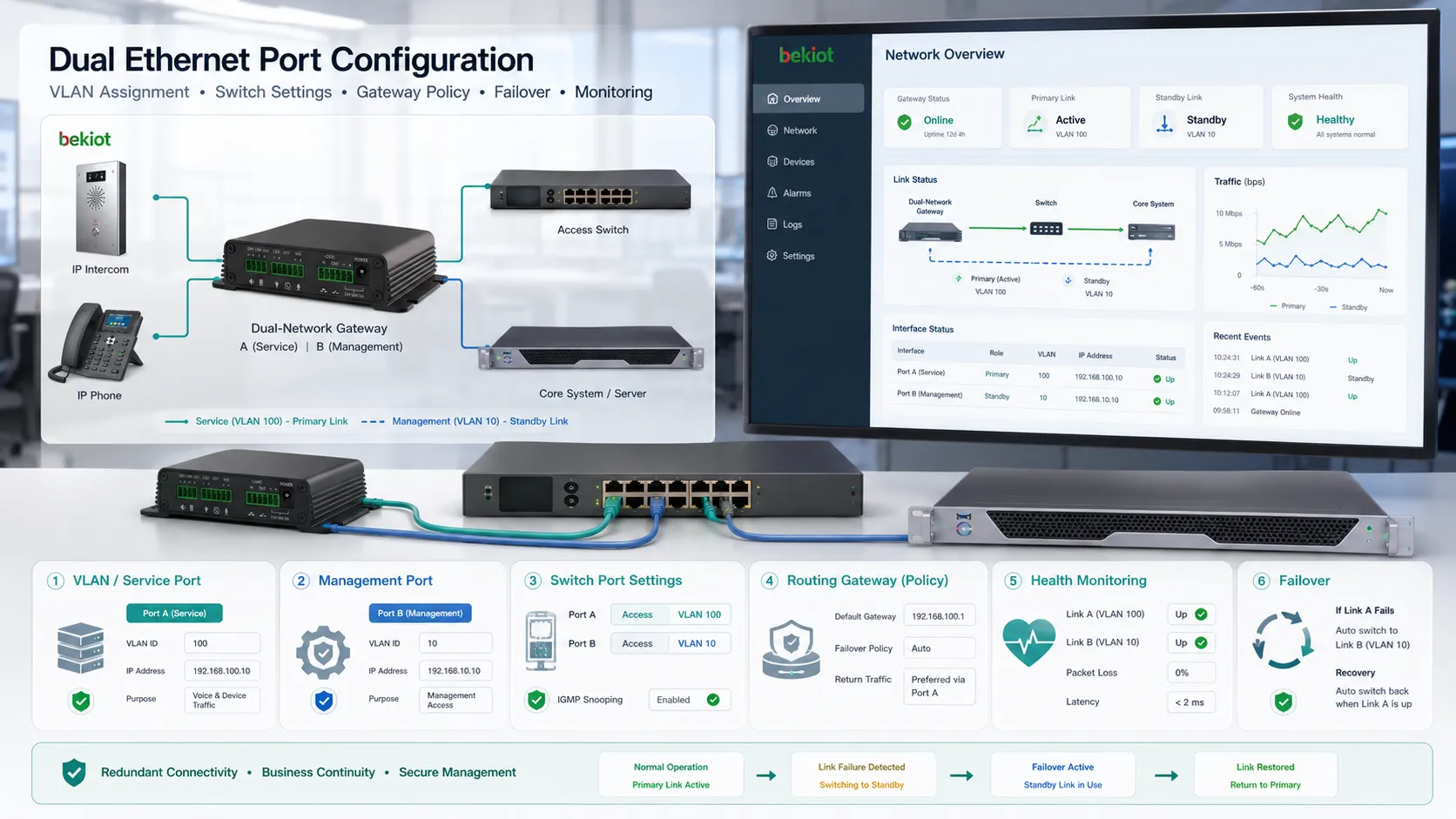
Each port should have a documented purpose, IP addressing plan, VLAN assignment, gateway policy, switch port configuration, allowed traffic scope, and maintenance responsibility. Without this planning, the second interface may create confusion rather than value.
Architecture planning should also include failure behavior. If port one fails, should port two take over automatically? If both ports are online, which route should the device use for default traffic? Should management access be allowed from both networks or only one?
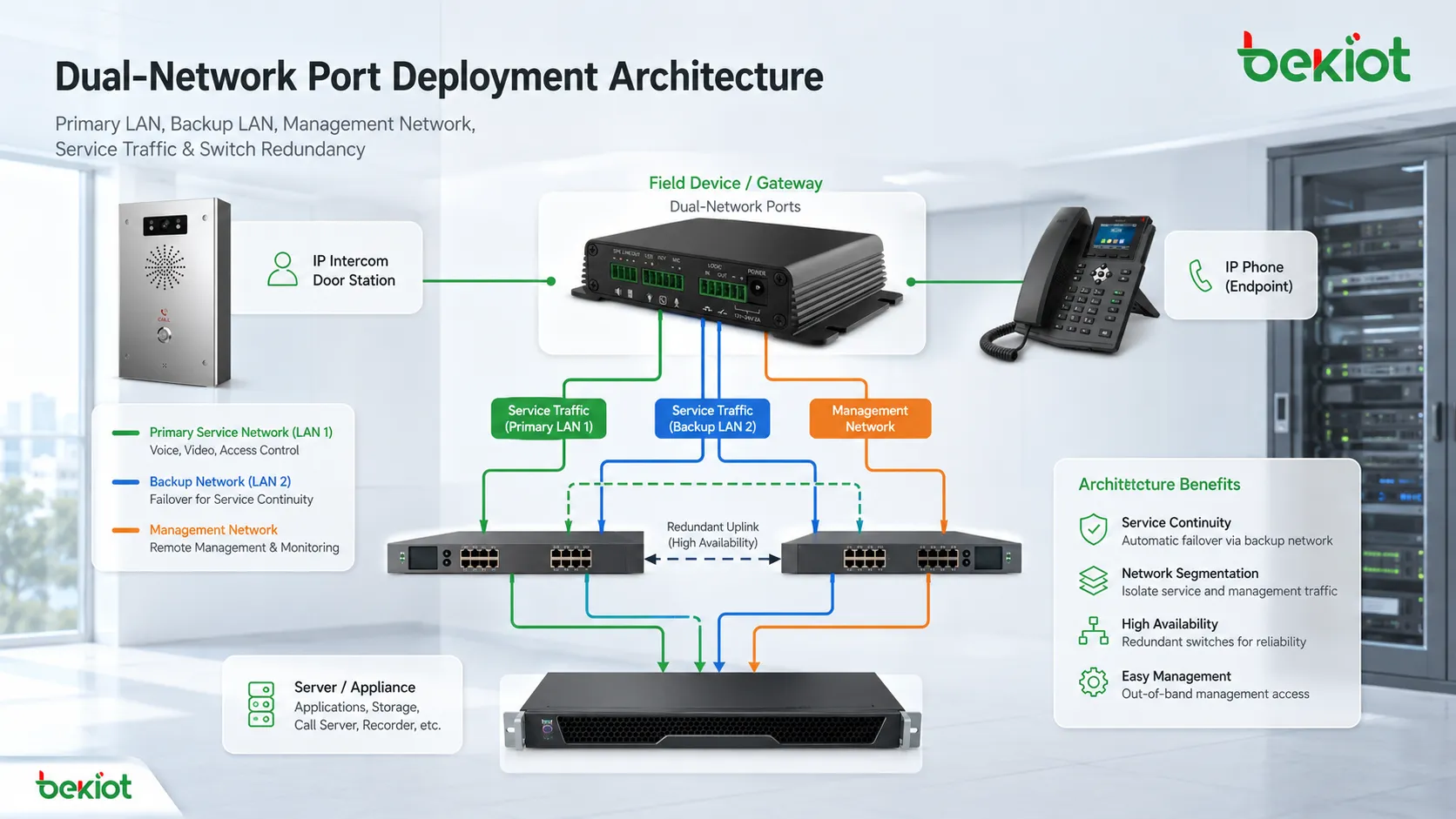
Deployment Advantage: Service Continuity
One of the strongest advantages is improved continuity. If a cable, switch port, upstream switch, or network path fails, a second interface can provide an alternative connection if the system supports failover.
This is valuable in sites where downtime affects safety, operations, communication, monitoring, or production. A single link failure should not always mean device isolation.
However, continuity depends on more than having two ports. The backup path must connect to a different failure domain when possible. If both cables go to the same switch and the switch loses power, the backup port may not help. True resilience requires separate cabling, switch redundancy, power planning, and tested failover rules.
Deployment Advantage: Cleaner Security Boundaries
Two interfaces can support a cleaner security model. A device can expose service functions on one network while keeping configuration access on another protected network. This is useful for servers, gateways, controllers, surveillance devices, and industrial endpoints.
Management isolation reduces the chance that ordinary users, guest networks, or unrelated systems can reach sensitive configuration pages. It also supports audit and access control because administrative traffic can be monitored separately.
The design still needs firewall policy and account protection. A separate interface does not automatically make management secure if weak passwords, open ports, or poor routing rules remain.
Deployment Advantage: Traffic Stability
Some devices handle traffic with very different characteristics. Video streams may consume high bandwidth. Voice traffic may require low latency and stable packet delivery. Control traffic may be small but critical. Management traffic may be occasional but sensitive.
Separating traffic across two interfaces can reduce interference. A burst of file transfer or video data is less likely to affect monitoring, control, or signaling traffic if the paths are properly divided.
This is especially useful in mixed systems where real-time traffic and bulk data traffic must coexist.
Deployment Advantage: Flexible Site Integration
Field environments are often complex. A device may need to connect to an existing LAN while also joining a new project network. A temporary maintenance laptop may need local access without interrupting the main service link. A gateway may need to connect one port to an upstream router and another to an internal equipment network.
Dual-port hardware gives installers more options. It can simplify staged migration, temporary testing, split-network design, and integration with legacy systems.
This flexibility reduces the need for extra adapters, unmanaged switches, or risky cabling changes during maintenance.
Deployment Advantage: Remote Maintenance Access
A second interface can provide a dedicated maintenance path. Engineers may use it for configuration, firmware upgrade, log collection, remote diagnostics, monitoring, or emergency recovery.
This is useful when the main service network is busy, unstable, restricted, or separated by policy. A dedicated maintenance path can help technicians reach the device without disturbing production traffic.
For secure operation, this path should be protected by authentication, access lists, VPN, firewall rules, and clear operating procedures.
IP Addressing and Routing Strategy
Addressing must be designed carefully. If both interfaces are placed in the same subnet without proper bonding or bridging logic, the device may behave unpredictably. ARP confusion, asymmetric routing, duplicated routes, or wrong return paths may occur.
When each interface connects to a different subnet, the default gateway should be planned. Many devices support only one default route, so administrators must decide which path carries general outbound traffic. Static routes may be needed for specific networks.
In controlled environments, management access can be restricted to one interface while service traffic uses another. This keeps routing clearer and reduces accidental exposure.
Switch-Side Configuration
The connected switch ports must match the intended mode. Access port, trunk port, VLAN membership, LACP setting, speed, duplex, PoE behavior, storm control, spanning tree, and security policy should be configured consistently.
If one side expects tagged VLAN traffic and the other side expects untagged traffic, the device may appear online but fail to reach the correct network. If aggregation is enabled on the device but not on the switch, traffic may become unstable.
Switch configuration should be documented together with device-side settings. Troubleshooting becomes difficult when only one side of the link is recorded.
Cable Labeling and Physical Maintenance
Physical labeling is simple but important. Each cable should show device name, port number, switch name, switch port, network purpose, and installation date where possible. Clear labels reduce the risk of unplugging the wrong path during maintenance.
Cable routing should avoid unnecessary tension, sharp bends, loose connectors, water exposure, heavy vibration, and interference sources. In industrial sites, network cables may need stronger shielding, protective conduit, or dedicated routing away from power cables.
Maintenance teams should also inspect connector clips, corrosion, dust, cabinet temperature, cable strain, and grounding conditions. A dual-port design cannot provide reliability if both physical links are poorly maintained.
Monitoring and Health Checks
Monitoring should include link status, speed negotiation, packet errors, dropped frames, interface utilization, duplex mismatch, failover events, IP reachability, routing changes, and device logs.
If the second interface is used only as a backup, it still needs health checks. A standby link that is never tested may fail silently. The team may only discover the problem during a real outage.
Automated alerts can notify administrators when one link goes down, when traffic shifts unexpectedly, or when error counters increase. This helps prevent small physical problems from becoming major service incidents.
Failover Testing
Failover testing should be part of regular maintenance. Engineers can simulate link loss by disabling a switch port, unplugging a test cable, or using controlled maintenance windows to verify that the secondary path takes over correctly.
The test should measure not only whether connectivity returns, but also how long the switch takes, whether sessions survive, whether alarms are generated, and whether traffic returns to the primary link after recovery.
Results should be recorded. If failover behavior changes after firmware updates, switch replacement, or routing changes, the design should be reviewed.
Troubleshooting Common Faults
Both Ports Connected but Only One Works
This may be normal if the device is in active-standby mode. It may also indicate that the second interface has no IP address, no route, wrong VLAN, disabled port, or unsupported operating mode.
The first step is to confirm the intended design. Troubleshooting without knowing the expected mode can waste time.
Intermittent Connectivity
Intermittent connectivity may come from cable faults, duplex mismatch, switch loop protection, unstable aggregation, duplicate IP addresses, ARP conflicts, or routing changes.
Error counters and switch logs are often more useful than simple ping tests because they reveal physical or protocol-level problems.
Management Page Opens from the Wrong Network
This usually indicates that access policy or routing is too broad. Administrators should check service binding, firewall rules, interface access settings, and default gateway behavior.
Management services should be bound only to approved interfaces when the device supports that option.
Failover Does Not Happen
Failover may fail because the backup interface is down, the switch port is disabled, link monitoring is not configured, gateway detection is missing, or the system only detects physical link loss but not upstream path failure.
A good failover design should check the real network path, not only whether the local cable is plugged in.
Security Maintenance Techniques
Each interface should have a defined trust level. A management port should not be treated the same as a public service port. If both interfaces expose the same services, the security benefit is reduced.
Administrators should disable unused services, restrict management access, use strong authentication, apply firmware updates, monitor login attempts, and control which networks can reach configuration functions.
When the second port is used for emergency maintenance, access should still be logged and controlled. A hidden maintenance path can become a security weakness if undocumented.
Firmware and Configuration Control
Firmware updates may change network behavior, failover logic, driver stability, security settings, or interface naming. Before updating production devices, teams should review release notes and test the update on a similar environment.
Configuration backups are also important. If a device is replaced, the new unit should receive correct IP settings, port roles, routing rules, VLAN settings, and access restrictions.
After any update or replacement, both interfaces should be tested. It is not enough to confirm that the primary port works.
Documentation Checklist
A complete record should include device model, serial number, port role, MAC address, IP address, subnet, gateway, VLAN, switch name, switch port, cable label, failover mode, monitoring policy, allowed management source, and maintenance owner.
This information helps future technicians understand why the device was connected in a specific way. It also helps during audits, incident investigation, and system expansion.
Documentation should be updated after every change. Old records can be worse than no records because they may lead engineers to trust incorrect information.
Applications in Industrial Sites
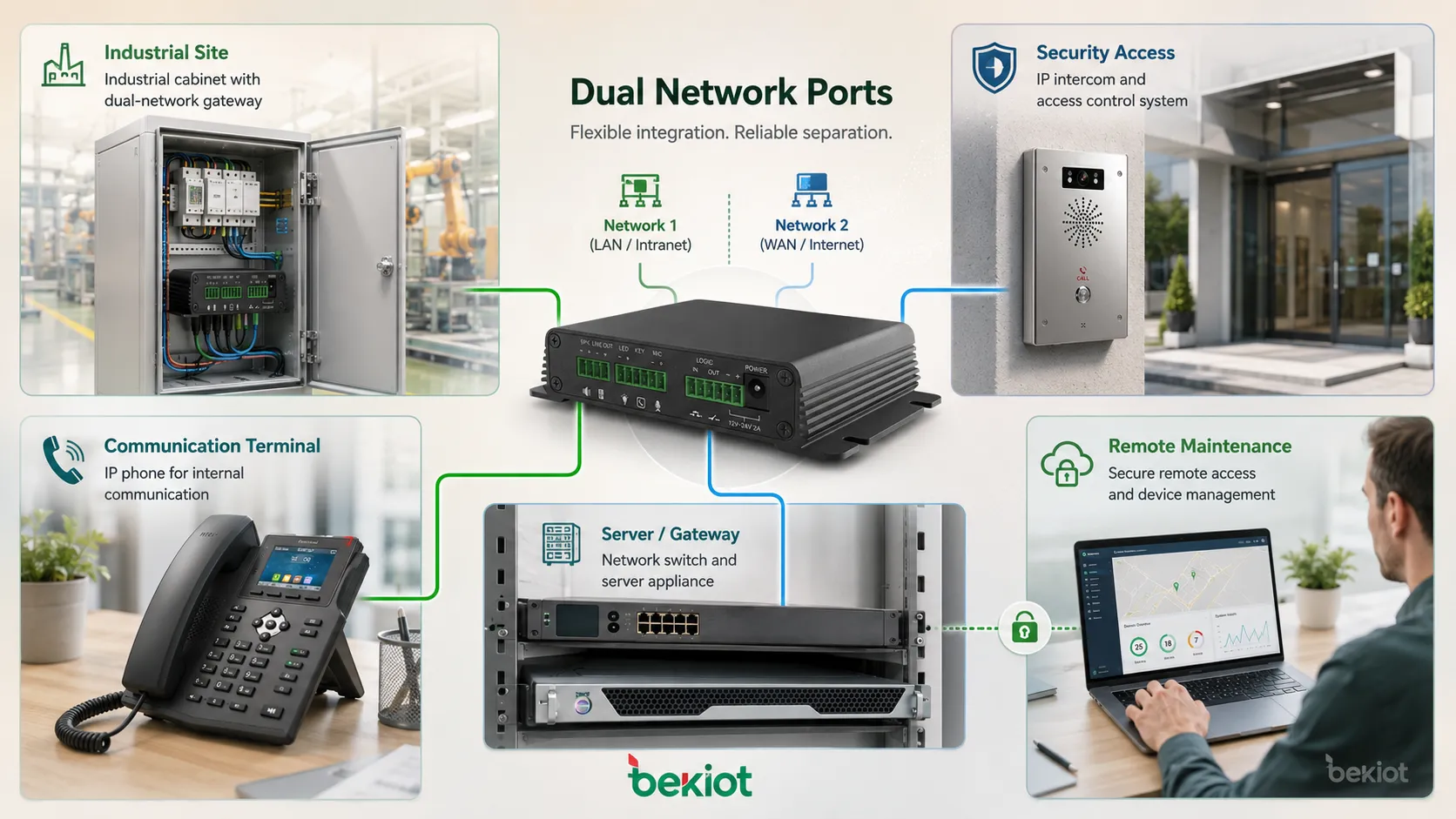
Industrial systems may use two interfaces to separate production control traffic from management access, connect to redundant switches, or provide local diagnostic access. This helps reduce disruption during maintenance and improves operational reliability.
In harsh environments, physical protection is especially important. Cable glands, shielding, cabinet layout, grounding, and surge protection may affect network stability.
Maintenance windows may be limited, so remote diagnostics and reliable backup paths can reduce the need for repeated field visits.
Applications in Enterprise and Security Systems
Enterprise devices may use separate ports for user access, backend connection, monitoring, management, or backup links. This is common in servers, storage systems, firewalls, controllers, and branch network equipment.
Security systems may separate camera traffic, access control data, alarm integration, and administration paths. This reduces congestion and supports clearer access policy.
In these environments, dual-port deployment should align with VLAN segmentation, firewall rules, identity control, and monitoring platforms.
Applications in Edge and Remote Systems
Edge devices often operate outside traditional data centers. They may connect local equipment on one side and a wide-area network on the other. A second interface can simplify local access, field commissioning, or backup connectivity.
Remote sites may depend on limited network resources. If one link is used for operations and another for maintenance or failover, support teams can respond faster when the primary path becomes unstable.
This is useful for remote monitoring, utility sites, transportation facilities, energy stations, outdoor cabinets, and distributed service nodes.
Design Risks
The first risk is accidental bridging. If two networks are connected through a device without clear routing or firewall control, traffic may leak between zones or create loops.
The second risk is routing ambiguity. If both interfaces have default gateways, the device may send return traffic through the wrong interface unless policy routing is supported and configured.
The third risk is false redundancy. Two ports connected to the same switch, same power source, same patch panel, and same uplink may not provide real resilience.
The fourth risk is undocumented access. A second port used for maintenance can become an unmanaged backdoor if it is not recorded and secured.
Best-Practice Deployment Method
Start by defining the purpose of each interface. Then draw the physical and logical path before cabling. Identify switch ports, VLANs, IP subnets, gateways, allowed services, and expected failure behavior.
Configure the device and switches consistently. Avoid enabling aggregation, trunking, bridging, or multi-gateway routing unless the system design explicitly requires it.
Label cables and ports immediately after installation. Record settings in the maintenance document. Test primary access, secondary access, failover, management restrictions, and monitoring alerts.
After commissioning, schedule regular health checks. The second interface should not be ignored just because the main service appears normal.
Future Development Direction
As edge computing, industrial IoT, security platforms, and distributed communication systems expand, dual-interface devices will remain useful. The demand is moving from simple extra ports toward managed redundancy, secure separation, and automated network health visibility.
More systems may support advanced bonding modes, policy routing, remote diagnostics, zero-touch configuration, and centralized monitoring of both interfaces. This will make deployment easier but will also require clearer operational standards.
The long-term value depends on disciplined design. Two ports can improve reliability and flexibility, but only when the network plan, security model, and maintenance process are aligned.
Dual-network ports provide real deployment value when they are treated as planned network roles, not as two interchangeable sockets. Their advantages depend on routing design, switch configuration, security policy, documentation, and routine maintenance.
FAQ
Can two ports use the same IP address?
Normally no. Separate physical interfaces should not share the same IP address unless the device uses a supported bonding, bridge, or failover mechanism designed for that behavior.
Why does a device lose access after both interfaces are connected?
The cause may be routing conflict, duplicate subnet design, wrong default gateway, switch loop prevention, VLAN mismatch, or unsupported dual-port mode.
Should the backup port be left unplugged?
Usually no if it is intended for automatic failover. A backup path should be connected, monitored, and tested. If it is only for local maintenance, it should be clearly labeled and secured.
Is link aggregation always better than failover?
No. Aggregation can improve bandwidth or resilience in some cases, but it requires switch support and correct configuration. Failover may be simpler and more suitable for many field devices.
What should be checked during routine inspection?
Check link status, speed, error counters, cable condition, switch logs, failover behavior, IP configuration, firmware version, access rules, and documentation accuracy.







