


Attended transfer is a call handling feature in which the person who receives a call first speaks with the intended recipient before completing the transfer. Instead of sending the caller directly to another extension, department, agent, or device, the current call handler places the caller on hold, contacts the receiving party, explains the reason for the call, confirms availability, and then connects the caller only when the receiving party is ready.
This method is also known as a warm transfer, consultative transfer, or supervised transfer in many phone systems and contact center platforms. It is widely used in enterprise communication, customer service, reception desks, healthcare hotlines, technical support, sales teams, command centers, hotel service, public institutions, and help desks. Its main purpose is to prevent blind handoff, reduce caller repetition, and improve the quality of service transfer.
In modern voice systems, attended transfer may be supported by IP phones, PBX platforms, SIP systems, softphones, contact center applications, mobile clients, unified communication platforms, and dispatch consoles. Although the interface may differ by device or platform, the communication principle remains the same: consult first, then connect.
Why Call Handoff Needs Human Context
A phone call is not only a voice channel. It often carries context, emotion, urgency, responsibility, and customer expectation. When a caller explains a problem to one person and is then transferred without explanation, the caller may need to repeat everything again. This creates frustration and wastes time.
A supervised handoff solves this problem by letting the first agent summarize the caller’s situation to the next person. The receiving party can ask quick questions, confirm whether they are the right person, prepare relevant information, or refuse the transfer if another destination is more suitable.
This makes the transfer more like a guided service process rather than a mechanical routing action. In high-value service environments, this difference can strongly affect caller satisfaction and operational efficiency.
Basic Working Process
First Conversation
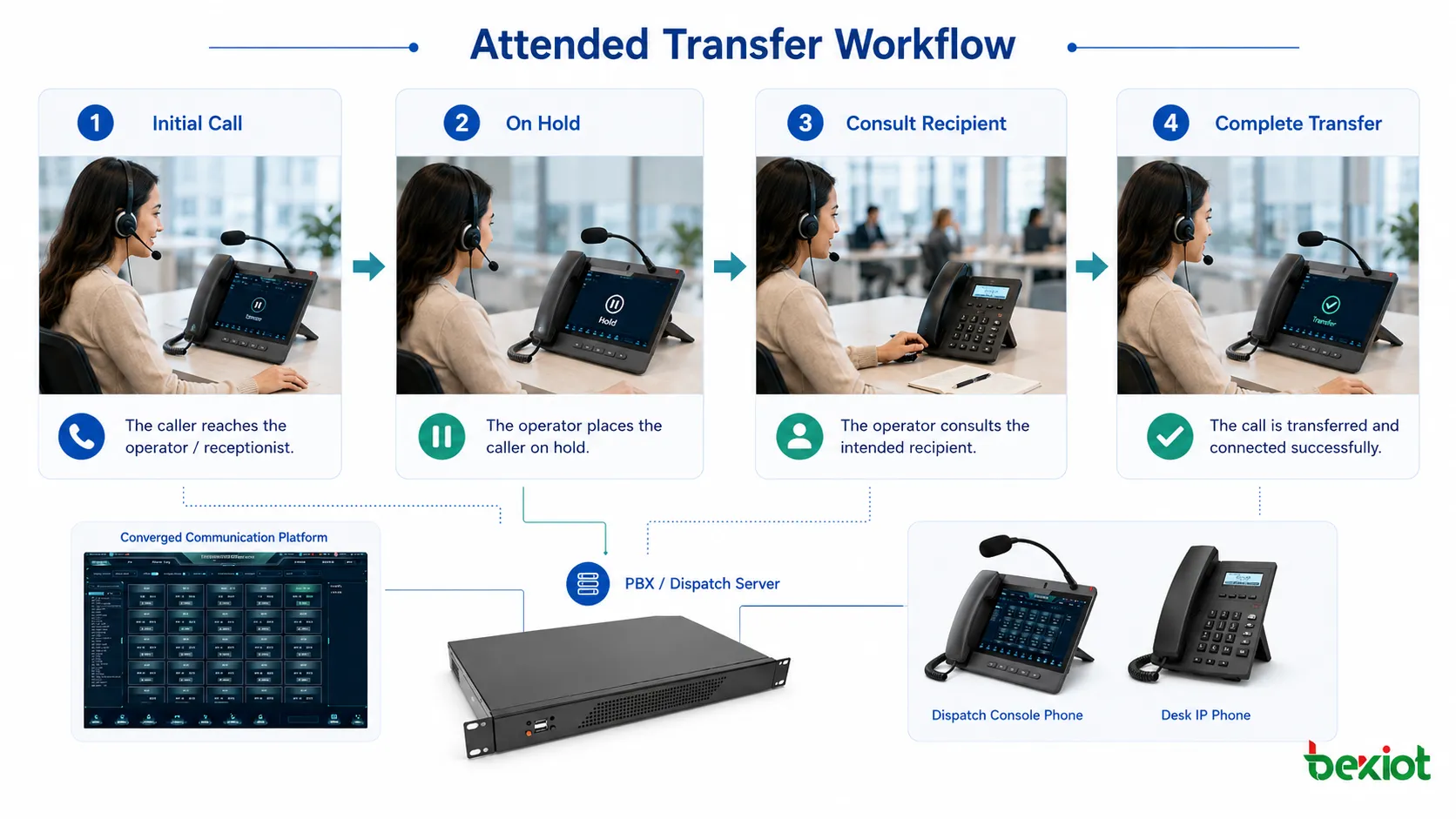
The process begins when the original call handler answers the incoming call. This may be a receptionist, support agent, dispatcher, nurse desk operator, sales assistant, help desk staff member, or internal employee. The handler listens to the caller and determines whether the call should be transferred.
At this stage, the handler should collect enough information to identify the correct destination. This may include the caller’s name, organization, issue type, urgency, account number, location, department request, or service category.
The quality of this first conversation affects the entire transfer. If the handler misunderstands the purpose of the call, even a careful consultation may still send the caller to the wrong place.
Hold and Consultation
After deciding to transfer, the handler places the caller on hold or in a waiting state. Then the handler calls the intended recipient. During this consultation, the handler explains who is calling, why they are calling, what has already been discussed, and whether the issue needs urgent handling.
This private conversation helps the receiving party decide whether to accept the call. It also allows the receiving party to prepare documents, open a customer record, check a schedule, or redirect the handler to a more appropriate person.
Completion or Return
If the receiving party accepts, the handler completes the transfer and connects the caller. If the receiving party does not answer, is unavailable, or is not the right destination, the handler can return to the caller and provide an alternative. This may include transferring to another person, taking a message, offering voicemail, scheduling a callback, or continuing to help directly.
This return option is one of the biggest advantages. The caller is not abandoned in an unknown destination. The handler remains responsible until the call is successfully transferred or resolved in another way.
Difference From Blind Transfer
Blind transfer sends the caller directly to another destination without first speaking to the receiving party. It is faster and requires fewer steps, but it also carries more risk. The receiving party may be unavailable, unprepared, busy, or not responsible for the issue.
Attended transfer is slower, but it gives more control. The handler can confirm that the recipient is available and that the call is appropriate. This makes it more suitable for complex service requests, VIP callers, urgent issues, sensitive conversations, and unfamiliar callers.
The choice between the two methods should depend on the scenario. A routine internal call may be suitable for blind transfer. A customer complaint, medical inquiry, emergency report, or technical escalation may require consultation before handoff.
Communication Quality Benefits
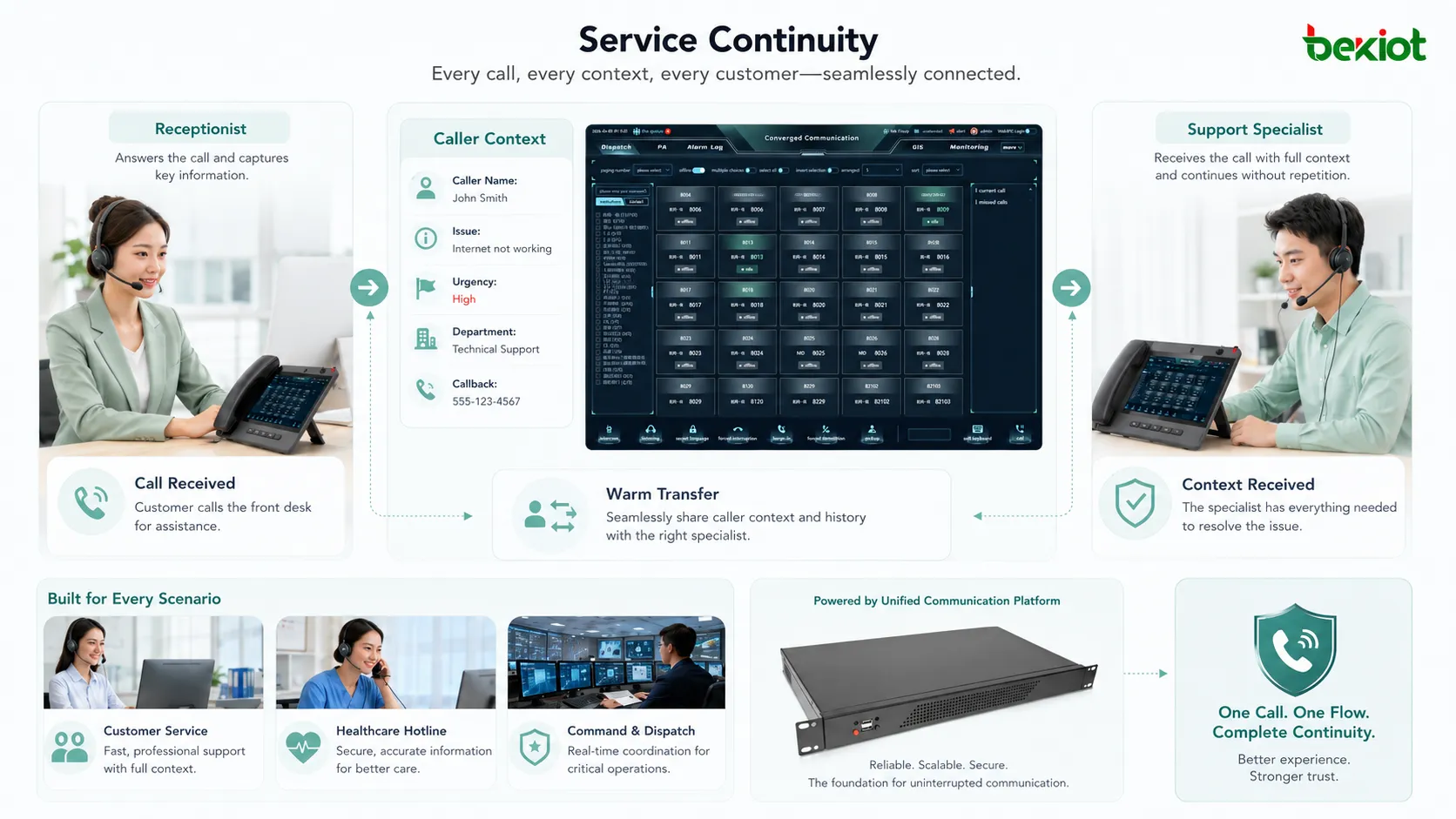
The first benefit is continuity. The caller does not need to restart the conversation from zero. The receiving party already knows the basic situation before speaking to the caller.
The second benefit is accuracy. The first handler can verify that the selected recipient is the correct person or team. If not, the call can be redirected before the caller is transferred.
The third benefit is confidence. Callers often feel more supported when they hear that the handler is actively finding the right person rather than simply pushing the call away.
The fourth benefit is fewer dropped or misrouted calls. If the target person does not answer, the caller can be brought back instead of being left in voicemail or dead air unexpectedly.
Operational Value for Teams
For organizations, this call handling method improves responsibility management. The original handler remains in control until the transfer is complete. This is important in service workflows where callers should not be passed around without accountability.
It also reduces repeated explanations. When the receiving party already understands the caller’s purpose, the conversation can continue more smoothly. This saves time for both the caller and the receiving team.
In contact centers, warm handoff can improve first-contact resolution when escalation is needed. Instead of sending the caller to a queue without context, the agent can introduce the case to a specialist and make sure the specialist is ready to handle it.
Caller Experience
From the caller’s perspective, a transfer can feel either helpful or frustrating. If the caller is suddenly sent to another extension and must explain everything again, the experience may feel careless. If the handler explains the next step, confirms availability, and introduces the caller properly, the transfer feels more professional.
Clear communication is important. The handler should tell the caller why the transfer is needed, who they will be connected to, and whether they may be placed on hold. This reduces uncertainty.
When the handler returns from the consultation, they should update the caller. For example, the handler may say that the specialist is ready, that the person is unavailable, or that another solution is better. This keeps the caller informed and reduces anxiety.
Common Application Scenarios
Reception and Front Desk
Reception teams often use this feature when callers ask for a specific person or department. The receptionist can check whether the person is available before transferring. This prevents callers from being sent to unanswered extensions.
It is especially useful for visitors, external partners, important customers, and callers who are unsure which department they need.
Customer Service
Customer service teams use consultative handoff when a caller needs a specialist, supervisor, billing agent, technical engineer, or complaint handling team. The first agent can summarize the issue and reduce the need for repetition.
This improves service quality because the next agent receives context before the caller joins the conversation.
Technical Support
Technical support often involves layered escalation. A first-level agent may transfer a call to advanced support after basic troubleshooting. A warm transfer allows the second-level engineer to understand the problem, previous steps, device type, error message, and urgency before speaking to the caller.
This reduces duplicated troubleshooting and helps the engineer begin from the right point.
Healthcare and Appointment Services
Healthcare calls may involve privacy, urgency, department routing, appointment details, or patient concerns. A call handler can consult a nurse desk, clinic, scheduling team, or specialist office before completing the transfer.
This helps avoid sending patients or family members to the wrong location and supports better service coordination.
Emergency and Security Desks
Emergency and security environments may require careful verification before connecting a caller to another team. The handler can explain the event, location, caller identity, and risk level before transferring the call to supervisors, responders, or control rooms.
This reduces confusion during urgent situations and improves response readiness.
How to Use It on a Typical Phone System
The exact steps vary by phone model or software platform, but the general flow is similar. The user answers the original call, selects the transfer function, enters the destination extension or number, speaks with the receiving party, and then completes the transfer if the receiving party accepts.
If the receiving party does not accept or does not answer, the user can cancel the transfer and return to the original caller. Many systems provide buttons such as Transfer, Consult, Complete, Cancel, Resume, or End Consultation.
Users should be trained on their specific device interface. In some systems, pressing the wrong button may disconnect the caller, create a blind transfer, or place both parties on hold. Practical training is more reliable than only reading a feature description.
Recommended Conversation Flow
Good usage is not only about button operation. The language used during the transfer also matters. The handler should first explain the reason for the transfer to the caller and ask for permission if appropriate.
When consulting the receiving party, the handler should provide a short and useful summary. A good summary includes caller identity, issue, urgency, prior information, and expected action. It should not be so long that the caller waits unnecessarily.
After the consultation, the handler should either connect the call or return to the caller with a clear update. Silence during hold time should be avoided where possible.
Common Mistakes
One mistake is placing the caller on hold without explanation. The caller may not know whether the call is still active or why they are waiting.
Another mistake is giving too little context to the receiving party. If the receiving party must ask the caller everything again, the main benefit is lost.
A third mistake is transferring to the first available person without confirming suitability. Availability does not always mean responsibility.
A fourth mistake is keeping the caller waiting too long during consultation. If the target party is unavailable, the handler should return to the caller quickly and offer another option.
A fifth mistake is using consultative transfer for every call, even when it is unnecessary. This can slow down high-volume environments. The method should be used where context and confirmation matter.
System Requirements
The phone system must support call hold, consultation call, transfer completion, and return-to-caller functions. In IP-based systems, the PBX, SIP server, endpoint, and network must handle signaling correctly so the call state remains stable during transfer.
The feature may also depend on endpoint support. Desk phones, softphones, mobile clients, and web-based consoles may have different button layouts and call control behavior.
For contact centers, attended transfer may also need integration with customer records, call recording, queue status, supervisor permissions, and reporting tools. A simple transfer button is not enough when the service workflow requires context tracking.
Technical Behavior in IP Voice Systems
In SIP-based environments, call transfer behavior is usually handled through signaling methods that allow one call leg to be placed on hold while another consultation call is created. After consultation, the system connects the caller to the target party and releases or updates the original call handler’s participation.
Different platforms may implement the process differently. Some systems complete transfer through endpoint signaling, while others use server-side call control. Some systems keep the original agent connected until final confirmation, while others release the agent immediately after transfer completion.
Because implementations vary, interoperability testing is important when multiple brands of phones, PBX systems, gateways, or contact center applications are used together.
Recording and Compliance
Recording behavior should be planned carefully. Some systems record only the caller-agent conversation, while others also record the consultation call. In regulated environments, organizations must decide which parts of the interaction should be recorded and who can access those recordings.
Compliance requirements may affect notification prompts, consent, storage duration, playback permissions, and audit logs. A transfer should not accidentally create unrecorded gaps when the organization requires continuous service records.
Supervisors should also understand how transferred calls appear in reports. If reporting is not configured correctly, transferred calls may appear as abandoned, duplicated, or misclassified.
Reporting and Service Metrics
Call transfer data can reveal service quality problems. High transfer rates may indicate that callers are reaching the wrong entry point, IVR menus are unclear, agents lack authority, or department routing is poorly designed.
Long consultation time may indicate that agents are unsure who should handle the issue. Frequent failed transfers may mean that target teams are overloaded or unavailable.
Useful metrics include transfer rate, successful transfer rate, failed consultation attempts, average consultation time, repeat call rate, caller wait time during transfer, and post-transfer resolution rate.
Training and Policy Design
Organizations should define when to use warm handoff and when a blind transfer is acceptable. Without policy, some users may overuse the feature, while others may avoid it even when caller context is important.
Training should include device operation, caller explanation, consultation summary, fallback handling, privacy rules, and documentation requirements. Role-play practice is useful because transfer quality depends on both technical steps and communication skill.
Policy should also define whether employees may transfer external callers directly to mobile numbers, private extensions, emergency teams, or restricted departments.
Benefits for Different Organizations
For small businesses, attended transfer improves professionalism. A receptionist can make sure callers reach the right person instead of being sent to an unanswered extension.
For contact centers, it improves escalation quality and reduces caller repetition. For hospitals, it helps route sensitive or urgent calls more carefully. For government service desks, it supports traceable public service. For technical support, it preserves troubleshooting context. For security and emergency desks, it improves readiness before handoff.
The benefit is strongest where caller context matters, wrong routing has consequences, or the receiving party needs preparation before speaking with the caller.
When It May Not Be the Best Choice
This method is not always necessary. If the caller simply asks for a known extension, and the recipient is expected to handle such calls directly, blind transfer may be faster. In very high-volume environments, consultative transfer for every call may increase waiting time.
It may also be less useful when the target destination is an automated service, voicemail box, or general queue that does not require a human introduction.
The best approach is selective use. Organizations should apply attended transfer where service quality, caller confidence, context handoff, or risk control justifies the extra step.
Best Practices
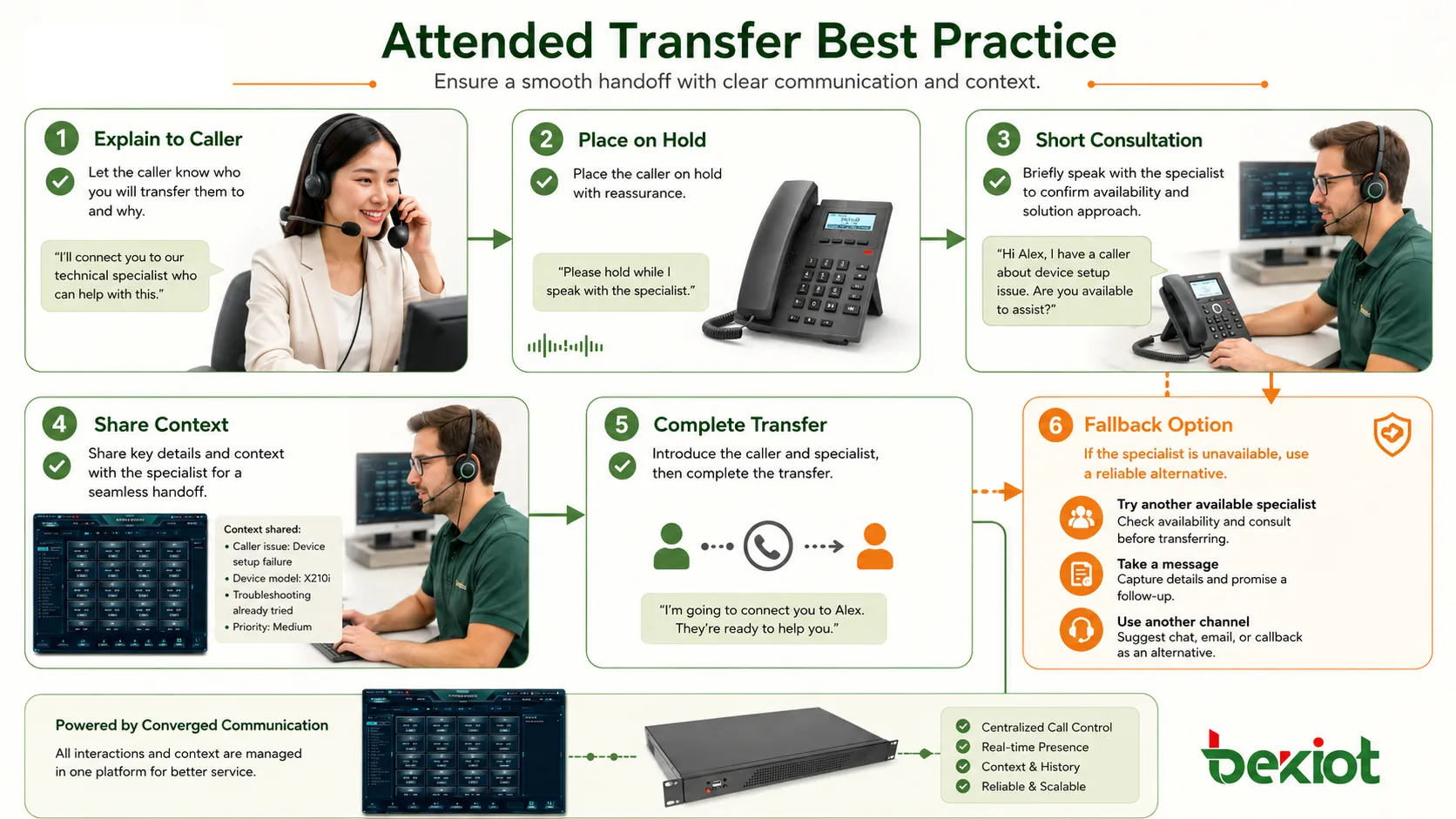
Explain the transfer before placing the caller on hold. A short sentence can prevent confusion and improve caller trust.
Prepare a concise summary for the receiving party. Include only relevant details, such as caller name, issue, urgency, and what has already been done.
Confirm recipient readiness before connecting. Do not complete the transfer if the receiving party is unsure, unavailable, or not responsible.
Return to the caller quickly if the transfer cannot be completed. Offer another destination, a message, a callback, or continued assistance.
Review transfer data regularly. Patterns in failed transfers or repeated handoffs can reveal deeper workflow problems.
Attended transfer is valuable because it adds human confirmation and context to call handoff, turning a simple transfer into a controlled service transition.
FAQ
Can attended transfer be used between internal extensions only?
No. It can often be used between internal extensions, external numbers, departments, queues, or service teams, depending on system permissions and routing configuration.
Why does a transferred call sometimes disconnect?
Possible causes include endpoint operation errors, SIP signaling mismatch, PBX configuration issues, network interruption, timeout behavior, or unsupported transfer features between connected systems.
Should the caller hear the consultation conversation?
No. The caller is usually placed on hold while the handler privately consults the receiving party. If the caller can hear the consultation, hold or call control settings should be checked.
How is it different from conference calling?
A conference keeps multiple parties in the same conversation. Attended transfer uses a private consultation first and then connects the caller to the receiving party, usually removing the original handler after completion.
What should users do if the target person does not answer?
They should return to the caller, explain that the person is unavailable, and offer an alternative such as another contact, voicemail, message taking, or callback scheduling.







