


Group management is the process of organizing users, devices, accounts, departments, roles, teams, or resources into defined groups so that administrators can control access, communication, permissions, policies, and workflows more efficiently. Instead of managing every user or device one by one, a system can apply rules to a group and let all members inherit the same configuration or operating logic.
This concept appears in many types of systems, including enterprise software, communication platforms, access control systems, cloud services, network management tools, collaboration apps, customer service platforms, learning systems, and industrial operation platforms. Although the interface may look different in each system, the basic idea is similar: a group is a manageable unit that simplifies control and improves consistency.
Why Organized Units Matter
As a system grows, individual management becomes slow and error-prone. A small team may only have a few accounts, but a large organization may have hundreds or thousands of users, devices, extensions, endpoints, projects, or service roles. If every permission and policy is configured manually, mistakes become more likely.
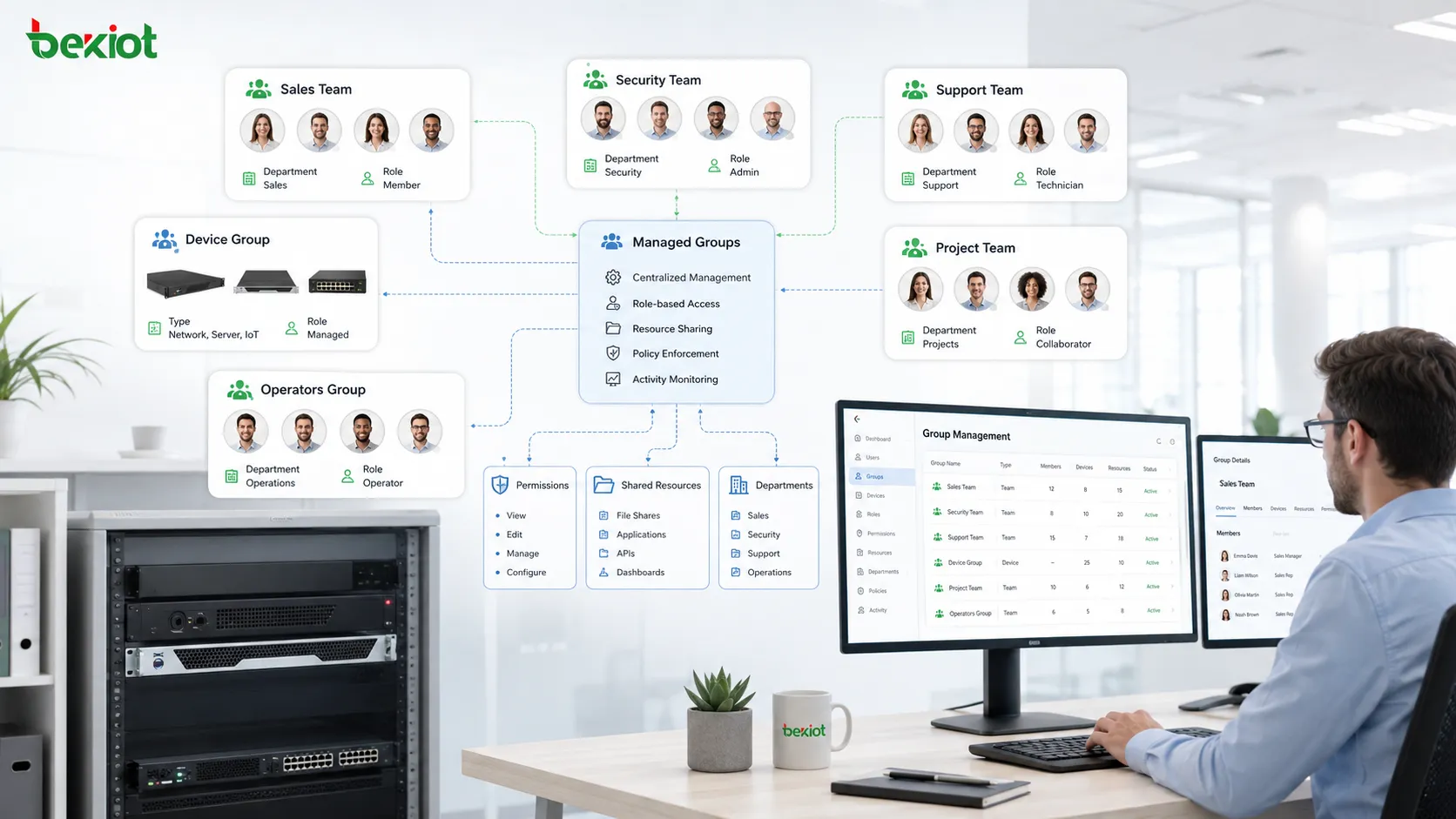
Organized units solve this problem by creating a middle layer between individual objects and system-wide policy. Administrators can define a sales team, security team, maintenance team, visitor group, operator group, device group, emergency response group, or regional branch group. The system can then apply settings to the whole group.
This improves efficiency because one change can affect many members. It also improves clarity because system administrators can understand relationships by group purpose rather than by reading long lists of individual accounts.
Basic Working Logic
Creating a Defined Container
The first step is usually to create a group as a defined container. The group may represent a department, work role, project team, location, device category, permission level, communication list, or operational function.
The name should be clear enough for future maintenance. A group named “Team A” may be confusing after several months, while a name such as “Warehouse Supervisors” or “North Building Access Operators” explains its purpose more clearly.
Adding Members
Members can be users, devices, accounts, extensions, terminals, service objects, or other groups, depending on the system. Some platforms support manual membership, while others support automatic membership based on department, tag, location, identity source, or rule condition.
Membership is the core link between a group and system behavior. A member receives the access, visibility, communication, or workflow settings associated with that group.
Applying Rules
After membership is defined, administrators can apply rules. These rules may include access rights, notification settings, sharing permissions, call permissions, approval steps, device policies, management scope, or data visibility.
The system then treats the group as a policy target. This makes management easier because rules can be updated once instead of repeated across many separate objects.
Main Functions
Permission Control
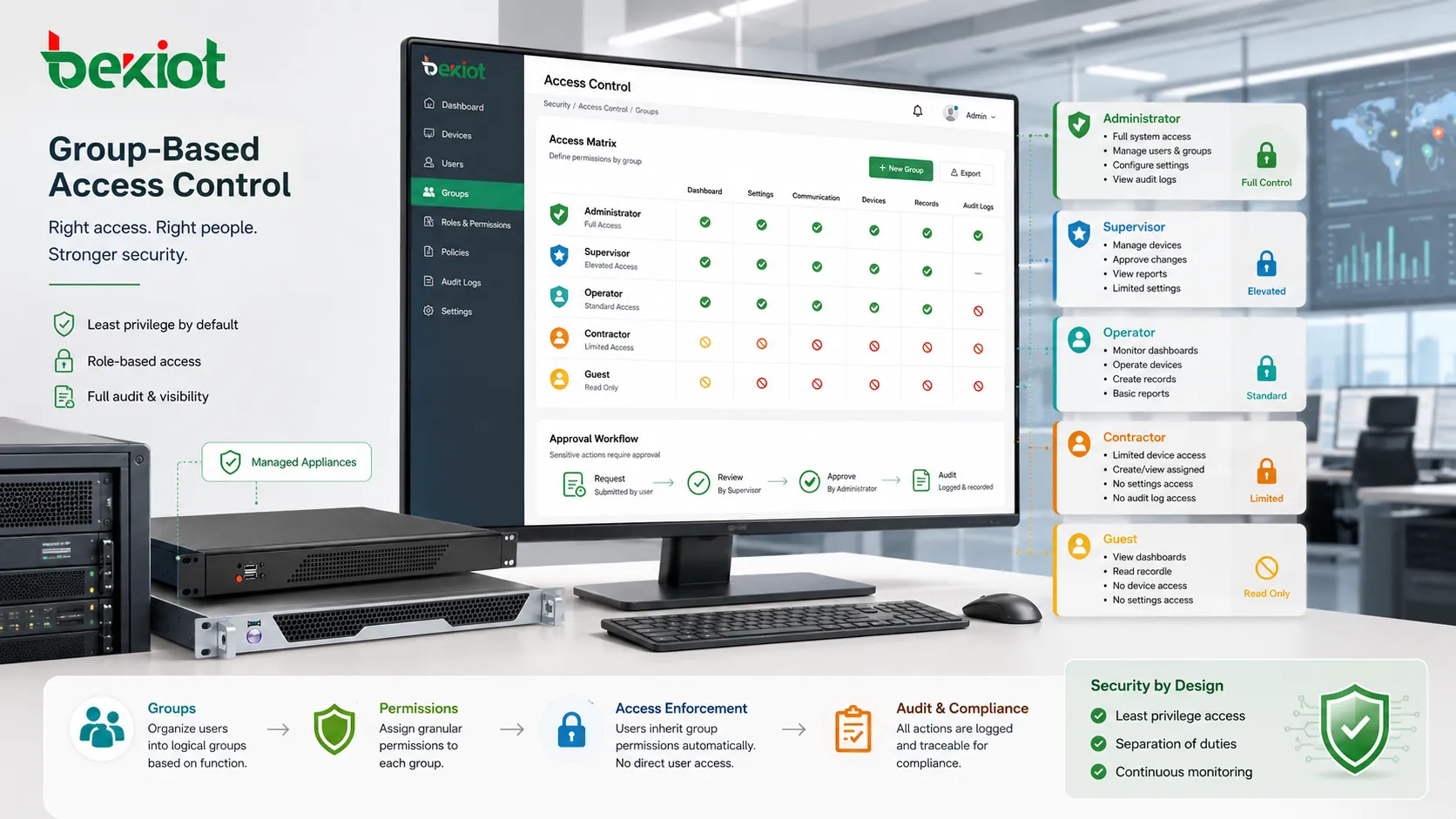
One of the most common functions is permission control. A group can determine who can view, edit, approve, operate, delete, export, configure, or access certain resources.
For example, an administrator group may manage system settings, while a normal user group may only access daily work functions. A finance group may view billing records, while a support group may access service tickets. This reduces the risk of granting broad permissions to everyone.
Communication Distribution
Groups are often used for communication. A message, call, notification, task, alarm, announcement, or email can be sent to a group instead of selecting each person individually.
This is useful in workplaces where teams need fast information delivery. Emergency teams, service departments, customer support groups, maintenance teams, and project members can receive targeted communication based on their role.
Resource Assignment
Resources can be assigned by group. These resources may include files, folders, dashboards, rooms, devices, applications, data views, service queues, channels, or workspaces.
When a new member joins the group, they can automatically receive the correct resource access. When a member leaves, the access can be removed by changing group membership.
Workflow Routing
Some systems use groups to route tasks or events. A service request may be assigned to the support group. A security alarm may notify the control room group. A maintenance ticket may go to the equipment team. A document approval may move to the manager group.
Routing by group improves operational efficiency because the system does not need to depend on a single person. If one person is unavailable, other members can still handle the task.
Device and Endpoint Administration
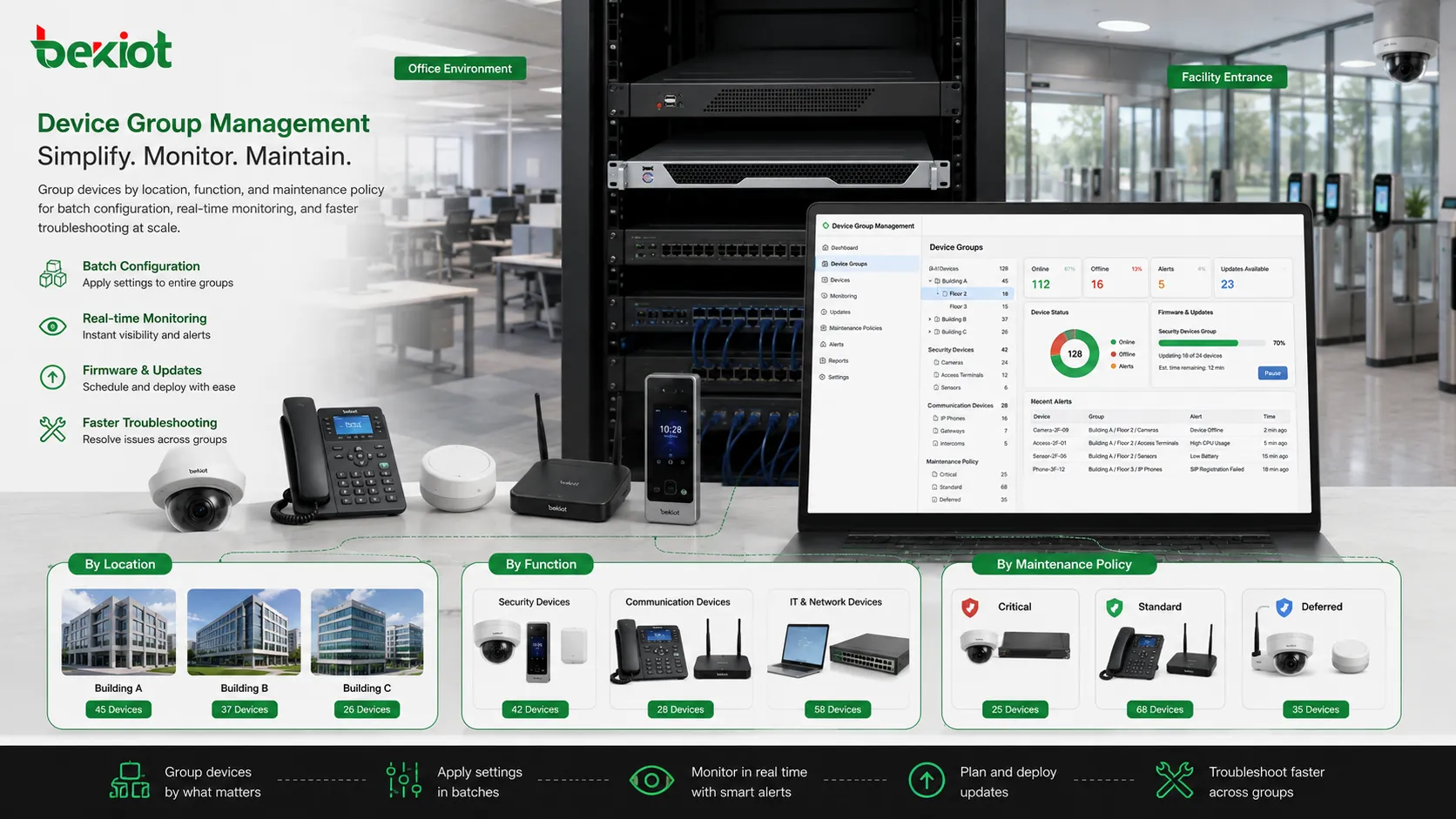
Groups can also organize devices. Cameras, phones, sensors, terminals, computers, gateways, printers, access controllers, or IoT devices may be grouped by location, function, model, risk level, or maintenance team.
This allows administrators to apply configuration, firmware updates, monitoring rules, or maintenance schedules to many devices at once.
Important Features
Role-Based Assignment
Role-based assignment connects group membership with job responsibility. Instead of asking what a specific user should access, the system asks what users in that role need to do.
This approach makes permissions easier to audit. If a user changes position, they can be moved from one group to another instead of manually editing many separate permissions.
Hierarchical Structure
Some systems support parent and child groups. A company group may contain regional groups. A regional group may contain department groups. A department group may contain team groups.
This structure reflects real organizations and helps administrators manage broad policy at one level while keeping detailed control at another level.
Dynamic Membership
Dynamic membership allows a system to add or remove members automatically based on rules. A user may join a group because their department is “Engineering,” their location is “Building A,” or their role is “Supervisor.”
This reduces manual work and helps keep membership accurate when people or devices change frequently.
Policy Inheritance
Inheritance allows settings from a group to flow to its members. This may include permissions, notification rules, security policies, user interface access, or device configuration.
Inheritance saves time, but it must be designed carefully. If a broad group receives too many permissions, many members may inherit access they do not need.
Audit and Traceability
Audit features record who changed group membership, who modified rules, when a permission was added, and which members received the change. This is important for security, compliance, and troubleshooting.
Without audit records, it can be difficult to explain why a user gained access or why a device received a certain policy.
Value in Access Control
Access control becomes more manageable when permissions are assigned to groups. A system can separate administrators, operators, temporary users, contractors, supervisors, guests, and service accounts.
This supports the principle of least privilege. Users should only receive access required for their work. If permissions are granted through well-designed groups, it is easier to review and adjust them.
Group-based access also helps reduce forgotten permissions. When a user leaves a team, removing them from the group can remove many related rights at once.
Value in Collaboration
Collaboration systems use groups to simplify sharing. A project folder, meeting space, discussion channel, task board, or dashboard can be shared with a team instead of with each member separately.
This creates a stable collaboration boundary. New team members can be added once and immediately receive the correct access. Departing members can be removed from the group and lose access without checking every shared resource manually.
In large organizations, this prevents inconsistent sharing and reduces the risk of leaving sensitive documents available to the wrong people.
Value in Communication Systems
Communication platforms may use groups for broadcast messages, call groups, paging groups, notification groups, ring groups, queue teams, dispatch groups, or emergency contact groups.
The purpose is not only convenience. It also improves response reliability. A message sent to a response group can reach multiple responsible members. A call routed to a group can be answered by any available operator.
This is useful for customer service, internal support, public safety, emergency response, facility maintenance, and team coordination.
Value in Device Management
Device groups make endpoint administration easier. A network administrator may group devices by building, floor, department, model, operating system, firmware version, or service role.
Once grouped, devices can receive configuration changes, monitoring rules, updates, access restrictions, or maintenance plans in batches. This is especially important when the number of connected devices grows rapidly.
Device grouping also improves fault analysis. If all devices in one location fail, the issue may be related to power, network, or local infrastructure rather than to each individual endpoint.
Value in Business Workflow
Workflows often depend on responsibility groups. A request may need approval from a manager group. A support ticket may need assignment to a service group. A system alarm may need escalation to a duty group.
Using groups prevents workflows from depending too much on a single named person. It also makes delegation easier because membership can be adjusted without redesigning the whole workflow.
For organizations with shift work, groups can also represent duty schedules, on-call teams, or location-based responsibility areas.
Common Application Scenarios
Enterprise Administration
Companies use group structures for departments, roles, project teams, management levels, external partners, and temporary accounts. This helps simplify permission assignment and internal collaboration.
As employees join, transfer, or leave, group membership provides a more controlled way to update system access.
Education and Training
Schools and training platforms use groups for classes, teachers, students, courses, laboratories, research teams, and exam access. This allows learning resources and announcements to be distributed efficiently.
Group structures can also separate administrative users from teaching users and student users.
Healthcare and Public Services
Healthcare systems may organize users by department, role, shift, ward, or service responsibility. Public service systems may organize operators, field teams, supervisors, and emergency contacts.
Because these environments can involve sensitive information, group design should include strict permission review and audit records.
Industrial and Facility Operations
Factories, campuses, utilities, warehouses, and smart buildings may group maintenance teams, security staff, operators, access devices, cameras, sensors, and equipment zones.
This helps align system permissions and alerts with real operational responsibilities.
Design Principles
Good group design starts with a clear purpose. A group should exist because it represents a real management need, not because it is convenient at the moment.
Names should be consistent. A naming plan can include department, location, function, privilege level, or device type. This helps administrators understand the meaning without opening every detail page.
Membership should be reviewed regularly. People change jobs, contractors leave, devices are replaced, and project teams finish their work. Old membership records can become a security risk.
Permissions should be limited. A group should not receive broad access simply to avoid complaints. It is better to grant required access and adjust when justified.
Typical Mistakes
One mistake is creating too many groups with unclear differences. This makes administration confusing and increases the chance of assigning the wrong membership.
Another mistake is using one large group for everyone. This may seem simple, but it removes the benefit of controlled access and targeted communication.
A third mistake is failing to remove old members. Former employees, completed project accounts, expired contractors, and retired devices may keep access longer than necessary.
A fourth mistake is not documenting ownership. Every important group should have a responsible owner who knows why it exists and who should belong to it.
Security Considerations
Group management directly affects security because it controls who can access what. A small membership error can expose sensitive data, allow unwanted configuration changes, or send notifications to the wrong people.
Important security controls include approval workflows, audit logs, periodic access review, separation of duties, multi-factor authentication for privileged groups, and alerts for high-risk changes.
Privileged groups require special attention. Administrator, security, finance, executive, and system maintenance groups should be reviewed more frequently than ordinary groups.
Management Lifecycle
The lifecycle begins with creation. The system owner defines why the group is needed, who owns it, what members it should contain, and what permissions it should control.
During daily operation, membership and policy may change. These changes should be recorded and reviewed when they affect sensitive systems.
At the end of its purpose, a group should be archived or removed. Unused groups create confusion and may become hidden security risks.
Future Development Direction
Modern systems are moving from manual group maintenance toward automated and identity-driven management. Directory synchronization, HR system integration, device inventory platforms, and identity governance tools can all help update membership more accurately.
Artificial intelligence and analytics may also support abnormal membership detection, access recommendation, role mining, and policy cleanup. However, automated decisions still need human oversight when sensitive access is involved.
The long-term trend is toward groups that are not only static lists, but policy-aware, context-aware, and connected with organizational data.
Group management is valuable because it turns many individual users, devices, and resources into manageable units that support access control, communication, collaboration, workflow routing, and operational consistency.
FAQ
What is the difference between a group and a role?
A group usually collects members together, while a role usually defines what actions are allowed. Many systems combine both: a group contains people, and a role defines permissions.
How often should group membership be reviewed?
High-risk groups should be reviewed frequently, such as monthly or quarterly. Ordinary groups can follow a regular business review cycle based on company policy.
Can one person belong to multiple groups?
Yes. This is common. A person may belong to a department group, project group, location group, and permission group at the same time.
Why do too many groups create problems?
Too many unclear groups make it difficult to know which one is correct. This can cause duplicate access, inconsistent permissions, and harder troubleshooting.
Should temporary users be placed in normal staff groups?
Usually no. Temporary users, contractors, and visitors should use dedicated groups with limited access and expiration rules where possible.







