


A call pool is a communication management concept used to collect, organize, distribute, and control calls within a shared operating environment. It may refer to a pool of incoming calls waiting for service, a shared set of outbound calling resources, a group of available agents, a queue-based voice service area, or a logical call-handling module inside a dispatch, contact center, PBX, customer service, emergency response, or enterprise communication platform.
The core idea is simple: instead of treating every call as an isolated point-to-point event, the system places calls into a managed resource layer. This layer can apply routing rules, priority policies, queue logic, skill matching, overflow handling, recording, monitoring, reporting, and status control. In this way, calls become organized workflow objects rather than uncontrolled voice sessions.
In modern communication systems, call pools are important because organizations need to handle more calls, more channels, more service teams, and more response rules. A small office may manually answer calls one by one, but large service centers, hospitals, public hotlines, logistics platforms, utility operations, dispatch centers, and enterprise support teams need structured call control to avoid missed calls, long waiting times, unclear responsibility, and poor service tracking.
Why Shared Call Handling Exists
When call volume is low, a direct extension or single operator may be enough. A user calls a number, one person answers, and the conversation ends. However, this simple model becomes weak when call volume rises or when different teams need to share responsibility.
If several callers arrive at the same time, some calls may be missed. If the responsible person is busy, the caller may wait without visibility. If a call should go to a specific skill group, the system needs to identify the right destination. If supervisors need service reports, individual call handling does not provide enough structured data.
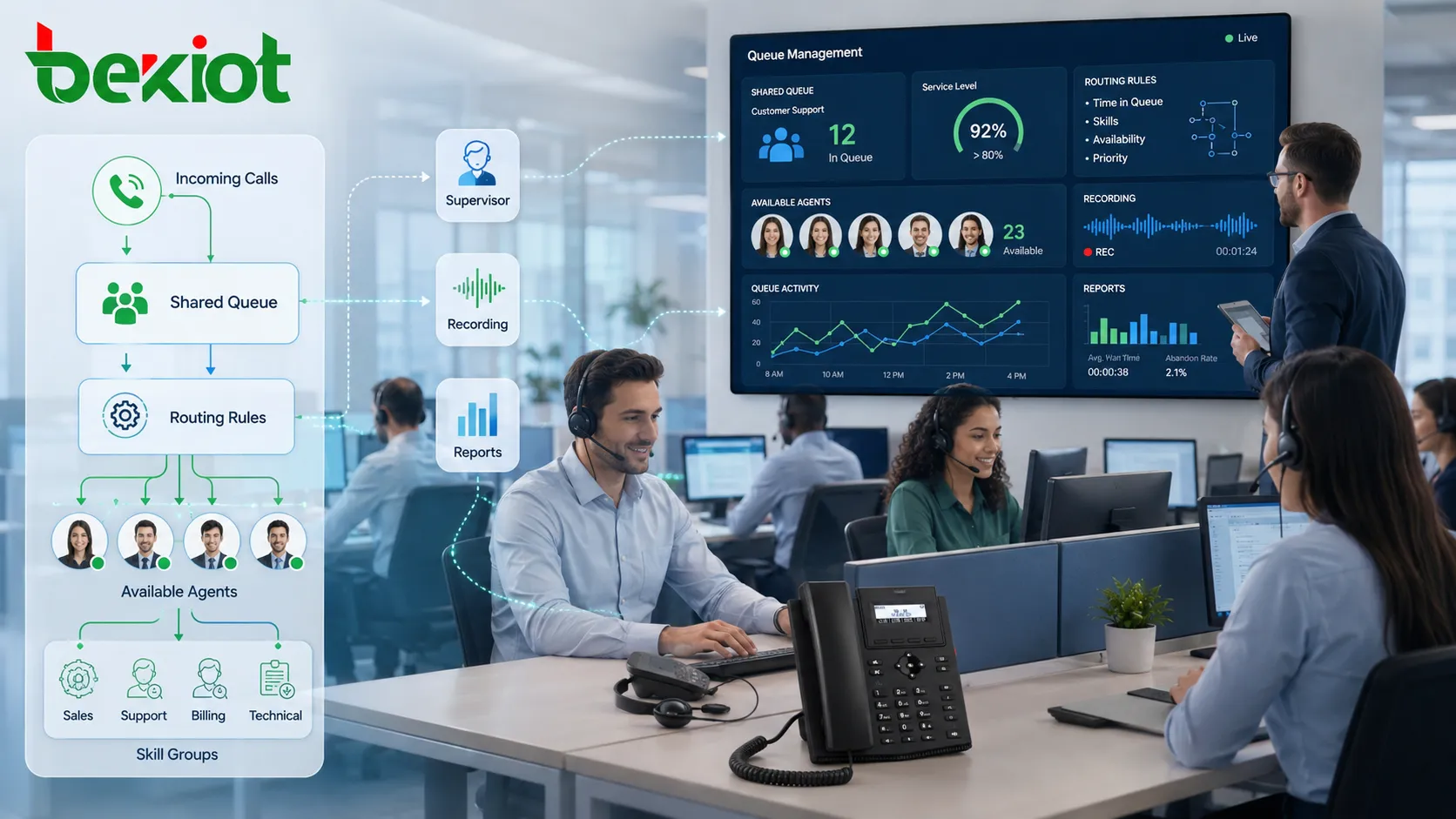
A shared handling model solves these problems by creating a controlled space for calls. The system can decide which call should be answered first, which team should receive it, what happens when all agents are busy, when escalation should occur, and how the call record should be stored.
Basic Operating Logic
Call Entry
The process begins when a call enters the system. It may arrive from a public telephone network, SIP trunk, internal extension, mobile client, emergency terminal, web call button, intercom point, radio gateway, or application interface. The system identifies the call source, dialed number, caller information, time, service line, and available context.
At this stage, the system may also check whether the call belongs to a normal service queue, a VIP line, an emergency route, an internal support group, or a specialized department. This early classification affects every later step.
Resource Allocation
After the call enters the shared layer, the platform compares the call with available resources. Resources may include agents, dispatchers, operators, extensions, trunks, channels, teams, call groups, IVR menus, voicemail boxes, or automated service modules.
The purpose is to match the call with the most suitable available resource. If no resource is available, the call may wait in queue, hear an announcement, receive a callback option, move to another group, or trigger an overflow rule.
State Tracking
Each call has a status. It may be waiting, ringing, connected, held, transferred, escalated, abandoned, completed, recorded, or failed. State tracking allows the system and supervisors to understand what is happening in real time.
Without state tracking, call handling becomes invisible. Operators may not know how many people are waiting, supervisors may not know which team is overloaded, and administrators may not know where calls are being lost.
Main Functional Capabilities
Queue Management
Queue management is one of the most common functions. When all responsible users or agents are busy, calls can wait in an ordered structure instead of being rejected immediately. The system can play prompts, music, estimated waiting messages, or callback options while the caller waits.
Queue logic may be first-in-first-out, priority-based, skill-based, service-level-based, or rule-based. Emergency calls may bypass ordinary waiting order. VIP callers may receive higher priority. Technical support calls may be routed only to trained staff.
Distribution and Routing
Distribution determines where a call goes. The system may route calls by number, department, caller region, time schedule, skill tag, customer type, operator availability, language, device status, or service priority.
Common strategies include ring all, sequential ringing, least recent answer, longest idle agent, round robin, skill-based routing, priority routing, and load-balanced distribution. The correct strategy depends on the service model.
Overflow Handling
Overflow handling defines what happens when the main group cannot answer in time. The call may move to a backup team, supervisor group, voicemail, callback queue, external number, another site, or automated service.
This function is important because it prevents callers from being trapped in a queue with no realistic chance of service. It also helps organizations maintain service continuity during peak hours, staff shortage, system maintenance, or unexpected events.
Priority Control
Not all calls have the same urgency. A public inquiry, emergency report, VIP complaint, internal maintenance call, equipment alarm, or security hotline may require different handling priority.
Priority control allows the platform to place urgent calls higher in the queue, alert supervisors, trigger special ring patterns, open related records, or bypass normal distribution rules. This is especially useful in emergency, healthcare, utility, transport, and security environments.
Monitoring and Supervision
Supervisors can monitor call volume, waiting time, agent status, abandoned calls, answer rate, call duration, and queue pressure. In some systems, supervisors may listen, whisper to agents, join calls, or take over critical conversations according to policy.
Monitoring helps detect service bottlenecks. If a call pool is always overloaded at certain times, the organization may need more staffing, better IVR design, different routing rules, or improved self-service options.
Functional Value Mapping
| Function Area | System Capability | Operational Value |
|---|---|---|
| Queue Control | Waiting order, priority, timeout, callback option | Reduces missed calls and creates predictable service flow. |
| Routing | Skill matching, team selection, time-based rules | Sends callers to the most suitable resource. |
| Overflow | Backup group, voicemail, supervisor escalation | Maintains service when the main team is busy. |
| Monitoring | Real-time status, queue length, agent activity | Improves supervisor visibility and service adjustment. |
| Reporting | Call logs, answer rate, abandon rate, service level | Supports management analysis and staffing decisions. |
Service Quality Management
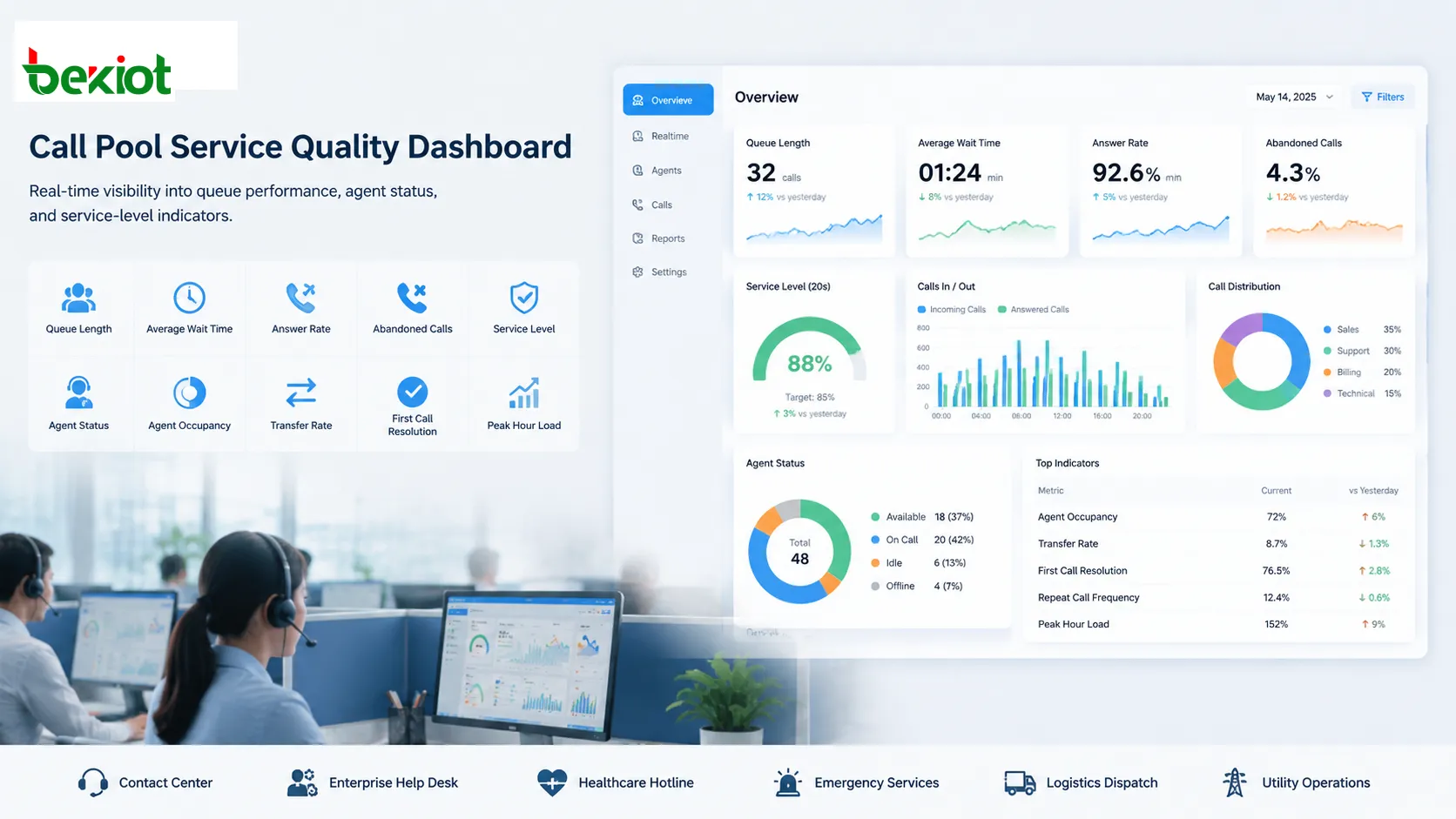
A call pool provides measurable service indicators. These may include average waiting time, average answer speed, call abandonment rate, first-call resolution, queue length, repeat call frequency, agent occupancy, transfer rate, and peak-hour load.
These indicators help managers understand whether the service design is working. For example, a high abandonment rate may mean callers are waiting too long. A high transfer rate may mean routing rules are inaccurate. Long call duration may indicate complex cases or insufficient agent training.
Service quality management is not only about answering more calls. It is about matching call resources with real demand, reducing caller frustration, improving operator efficiency, and providing traceable service data.
Relationship With IVR and Automation
Interactive voice response can work together with a call pool. IVR menus collect caller choices before the call reaches a human team. The selected option can determine which pool or routing rule should be used.
Automation may also handle simple questions before a live operator is needed. For example, a caller may check order status, payment information, appointment time, or account balance through automated prompts. If the issue cannot be solved, the call can enter the appropriate pool with context already attached.
This reduces unnecessary manual handling. However, automation must be designed carefully. If menus are too deep or unclear, callers may become frustrated and repeatedly request human service.
Relationship With Recording and Audit
Call pools often work with recording systems. Recording helps support training, dispute resolution, compliance review, incident investigation, service quality inspection, and operational accountability.
When recordings are linked with queue data, supervisors can understand the full service path. They can see when the call arrived, how long it waited, which user answered, whether it was transferred, what was said, and how the call ended.
Audit records are especially important in regulated environments such as finance, healthcare, government services, emergency response, and critical infrastructure operations.
Applications in Contact Centers
Contact centers are one of the most typical application fields. Calls are grouped by service type, product line, language, region, customer level, campaign, or support skill. Agents receive calls based on availability and routing logic.
In this scenario, the call pool is closely related to workforce management. Managers use historical call data to plan staffing, adjust shifts, refine service scripts, and improve training.
Modern contact centers may also combine voice calls with web chat, email, SMS, social media, and app-based requests. Even when the channel changes, the concept of pooled service resources remains important.
Applications in Enterprise Communication
Enterprises use shared call handling for reception desks, IT help desks, HR service lines, sales teams, after-sales support, maintenance offices, and branch office communication. Instead of publishing one employee’s extension, the company can publish a team number.
This improves continuity because the call does not depend on one person. If one employee is busy or absent, another team member can answer. It also creates a cleaner service boundary between internal users and service departments.
For multi-branch enterprises, call pools can route callers to local teams, central teams, or backup teams according to time, region, and workload.
Applications in Emergency and Public Services
Emergency hotlines, municipal service centers, public safety desks, community support lines, and public utility hotlines often require structured call control. Calls may need priority handling, supervisor visibility, recording, escalation, and integration with incident systems.
In these environments, response time and accuracy matter. A call pool can help separate ordinary inquiries from urgent reports, route calls to trained staff, and provide supervisors with real-time queue status.
Public services also need traceability. Call records may be used to verify response time, review decisions, and improve service procedures.
Applications in Healthcare
Healthcare organizations use call pools for appointment centers, nurse desks, department hotlines, emergency coordination, patient service lines, pharmacy inquiries, and internal support. Calls may need routing by department, time period, urgency, language, or patient category.
Healthcare communication is sensitive because delays can affect patient experience and operational efficiency. Missed calls may cause appointment problems, delayed coordination, or repeated patient contact.
Privacy must also be considered. Call recordings, caller identification, patient details, and service notes should be protected according to organizational policy and applicable regulations.
Applications in Logistics and Field Operations
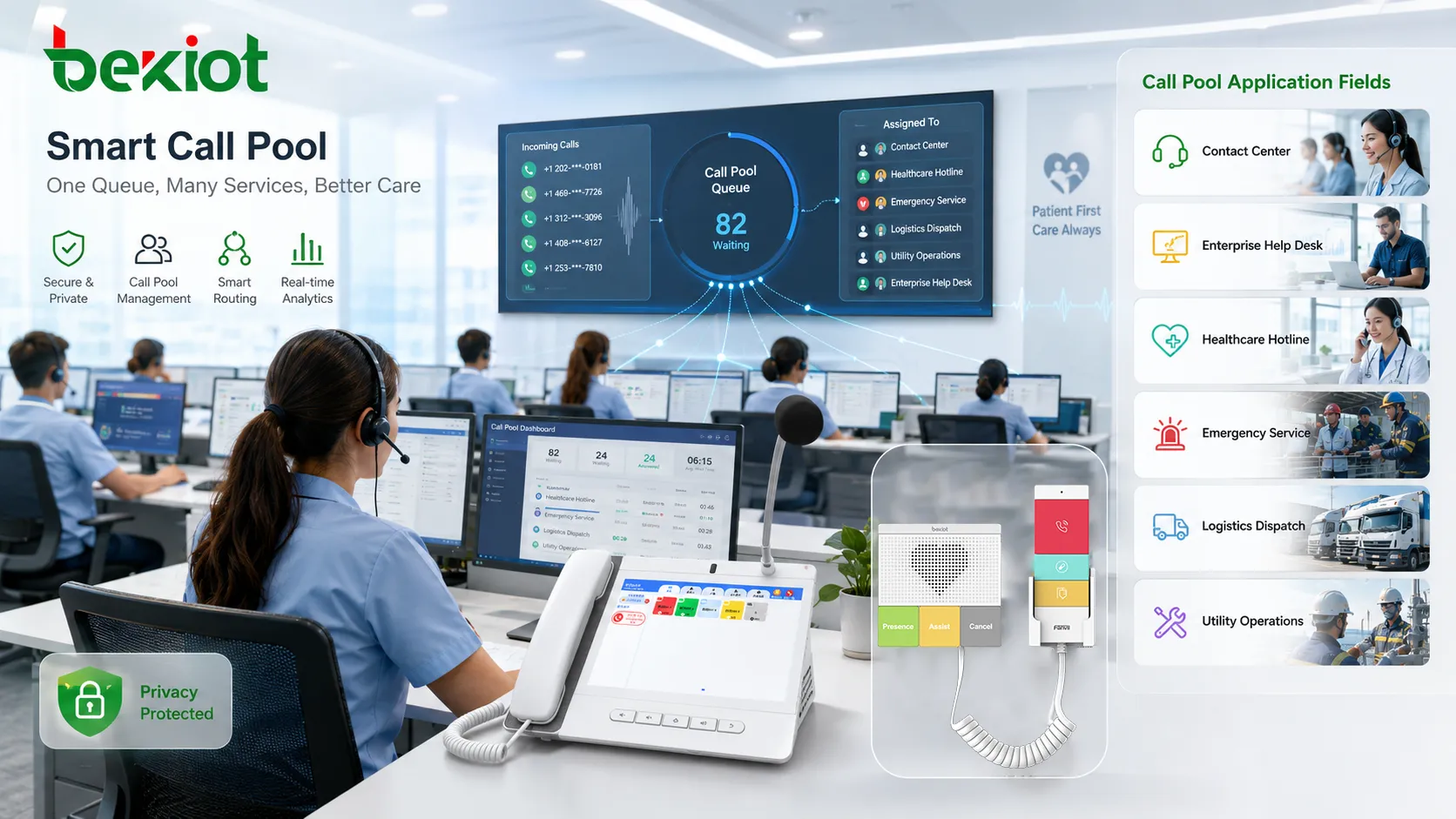
Logistics companies, delivery platforms, transportation operators, and field service teams often handle many calls from drivers, customers, warehouses, dispatchers, and support staff. A call pool can separate customer inquiries from operational coordination and urgent exceptions.
For example, delivery delay reports, vehicle breakdown calls, warehouse loading questions, driver support, and customer complaints may need different routing rules. A single shared number without structure can easily overload the wrong team.
Call pool data can also reveal operational patterns. Repeated calls from certain routes, warehouses, or service areas may indicate process issues that require improvement.
Applications in Utilities and Industrial Operations
Utility companies and industrial sites use pooled call handling for outage reports, maintenance coordination, safety calls, control room communication, equipment fault reports, and emergency response. Calls may come from field teams, customers, control stations, security staff, or automated alarm interfaces.
Priority control is important in these fields. A safety-related call or outage report may need faster handling than a routine inquiry. Overflow rules may route calls to backup centers during storms, incidents, or maintenance windows.
Integration with work order systems, alarm platforms, and dispatch tools can turn a call into a structured operational event.
Applications in Sales and Campaign Operations
Sales teams may use call pools for inbound leads, outbound campaign callbacks, regional sales lines, appointment scheduling, and customer follow-up. Calls can be distributed according to salesperson availability, region, product category, or lead priority.
For outbound scenarios, a pool may also refer to a set of callable numbers, available lines, or campaign call tasks. The system can control dialing order, retry logic, agent assignment, and result tracking.
Good design should avoid over-contacting customers. Retry intervals, consent, opt-out handling, and call result classification are important for responsible operation.
Workload Balancing
Workload balancing prevents some team members from receiving too many calls while others remain idle. The system can distribute calls according to idle time, skill, priority, availability, or maximum workload.
This improves fairness and service stability. It can also reduce operator fatigue because calls are spread more evenly. In high-pressure service environments, workload distribution directly affects both customer experience and employee performance.
However, automatic balancing should not ignore skill differences. Some calls require specialized knowledge, language ability, authority, or emergency training. The system should balance load while still respecting suitability.
Scheduling and Time-Based Rules
Call handling often changes by time. A team may answer during business hours, while an after-hours group handles urgent cases. Weekend calls may go to a different location. Holiday calls may use recorded announcements or emergency-only routing.
Time-based rules help automate these changes. The system can switch pools, play different prompts, change priority, or activate backup paths based on schedule.
This reduces manual configuration errors. It also supports organizations that operate across multiple time zones, shifts, branches, or service windows.
Data Analysis and Management Reports
Call pool data can provide valuable management insight. Reports may show peak call periods, missed call patterns, agent workload, service level, average waiting time, call duration, transfer behavior, callback success, and repeated caller issues.
These reports help organizations improve staffing, process design, IVR menus, training, and service policy. They can also identify hidden problems. For example, if many callers choose the wrong menu option, the menu wording may be unclear. If one category always has long waiting time, the team may need more resources.
Data analysis turns voice activity into operational intelligence.
Common Design Problems
One common problem is creating too many pools without clear difference. This confuses administrators and may send calls to the wrong place. Each pool should have a clear purpose, owner, service scope, and routing rule.
Another problem is weak overflow design. If calls wait too long without escalation, callers may abandon the call. If overflow sends calls to an untrained team, service quality may decrease.
A third problem is ignoring caller experience. Long menus, repeated announcements, unclear prompts, and no callback option can make the system feel inefficient even if routing logic is technically correct.
A fourth problem is poor reporting. Without accurate call logs and status data, managers cannot know whether the call handling model is working.
Security and Privacy Considerations
Call pool systems may handle personal information, customer records, emergency details, payment-related conversations, medical inquiries, or internal operational data. Security and privacy controls are therefore necessary.
Important measures include user authentication, permission control, recording access limits, encrypted transmission where needed, audit logs, data retention rules, and secure integration with CRM or business systems.
Supervisory functions such as listening, whispering, recording playback, and call takeover should be controlled carefully. These capabilities are useful for quality and emergency management, but they should not be available to unauthorized users.
Implementation Planning
Planning should start with real call scenarios. Who calls? Why do they call? Which team should answer? What happens when the team is busy? Which calls are urgent? Which calls need recording? Which data should be reported?
After scenarios are clear, the system can define pools, queues, agents, schedules, routing rules, prompts, overflow paths, priority levels, and reporting dashboards.
Testing should include peak volume, after-hours rules, unanswered calls, transfers, emergency priority, supervisor actions, recording search, and failure conditions. A call pool that works during normal hours may behave differently during overload.
Future Development Direction
The concept is evolving with AI, omnichannel platforms, cloud contact centers, intelligent routing, speech analytics, customer journey tracking, and automation. Calls are increasingly connected with chat, tickets, CRM records, messaging apps, and service workflows.
AI may help predict call intent, recommend routing, summarize conversations, detect emotion, identify risk, and improve workforce planning. However, human supervision remains important because automated routing can make mistakes when context is complex.
The future value will come from combining structured call control with better data context. A call should not only reach someone; it should reach the right resource with the right background information and the right response workflow.
A call pool is valuable because it turns many separate voice interactions into a controlled service resource that can be routed, queued, monitored, recorded, analyzed, and improved over time.
FAQ
Is a call pool the same as a call queue?
Not exactly. A queue is usually the waiting structure. A call pool can be broader, including routing rules, shared agents, priority policies, overflow behavior, monitoring, and reporting.
Can one call belong to more than one handling rule?
Yes. A call may match time rules, priority rules, skill rules, and caller identity rules at the same time. The system must define which rule has higher priority.
Why do callers abandon before being answered?
Common reasons include long waiting time, unclear prompts, no estimated wait information, no callback option, or being routed to the wrong service path.
Should small organizations use pooled call handling?
Yes, if several people share responsibility for answering calls. Even a small team can benefit from simple ring groups, missed call tracking, and after-hours routing.
What data should be reviewed regularly?
Review answer rate, abandoned calls, waiting time, peak periods, transfer rate, repeated callers, overflow frequency, recording exceptions, and agent availability patterns.







