


HTTP, or Hypertext Transfer Protocol, is the application-layer protocol used to transfer web pages, API data, files, forms, images, scripts, and other resources between clients and servers. It is the foundation of the World Wide Web and one of the most widely used communication protocols in modern internet systems.
When a user opens a website, clicks a link, submits a form, loads an image, or calls an API, HTTP defines how the client asks for a resource and how the server responds. The protocol itself does not decide how a page looks or how an application behaves. Its main role is to provide a structured communication method between two sides.
A Request-Response Conversation
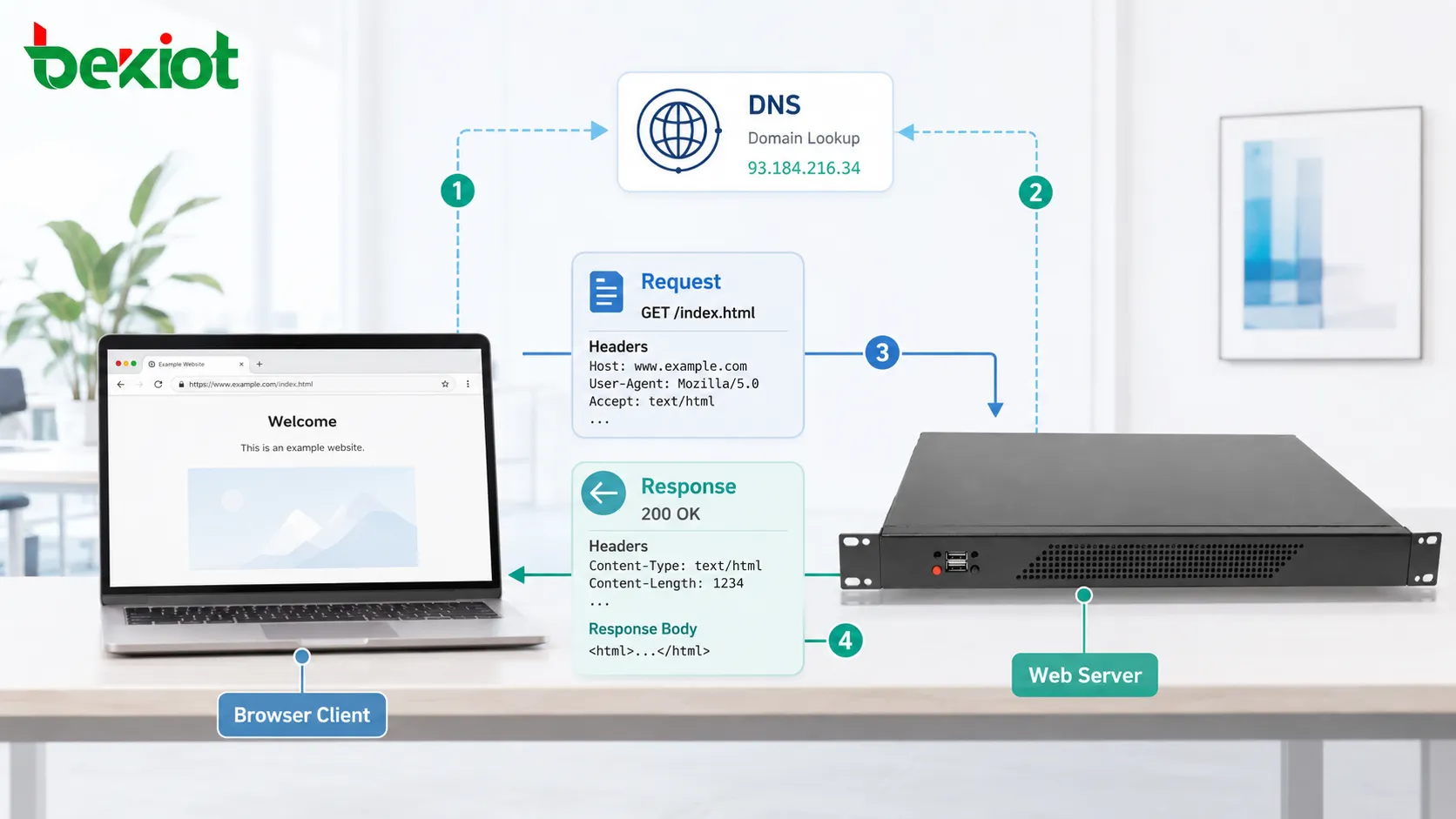
The basic working principle is simple: a client sends a request, and a server returns a response. The client is usually a web browser, mobile app, desktop application, API tool, crawler, or embedded device. The server is the system that hosts the requested resource or service.
For example, when a browser visits a website, it sends a request asking for a specific page. The server receives the request, checks what resource is being requested, processes the rules behind it, and returns a response containing content, status information, and metadata.
This model is called request-response communication. The client starts the exchange, and the server answers. Each exchange is structured so both sides can understand what is being requested, how it should be handled, and what result is returned.

Before the First Byte Moves
Before an HTTP request can reach the server, the client must know where to send it. When a user enters a domain name, the browser usually performs DNS resolution first. DNS translates the human-readable domain name into an IP address.
After that, the client establishes a network connection to the server. With traditional HTTP over TCP, this means opening a TCP connection. With HTTPS, a TLS handshake is also performed so the communication can be encrypted and authenticated.
Only after these steps can the actual HTTP message be exchanged. This means that loading a web page is not only about the protocol message itself. It also depends on DNS, transport connection, encryption, server availability, routing, and network performance.
Anatomy of a Client Request
An HTTP request usually contains a method, target path, version, headers, and sometimes a message body. The method explains the intended action. The path identifies the resource. Headers provide extra information. The body carries submitted data when needed.
A simple request may ask for a home page. A more complex request may submit login credentials, upload a file, send JSON data to an API, or request a cached resource only if it has changed.
Common request methods include GET, POST, PUT, PATCH, DELETE, HEAD, and OPTIONS. Each method has a different meaning and should be used according to the purpose of the operation.
GET is commonly used to retrieve data. POST is often used to submit data. PUT and PATCH are used to update resources. DELETE is used to request removal. HEAD asks for response headers without the full body. OPTIONS checks supported communication options.
How the Server Interprets the Message
After receiving the request, the server reads the method, path, headers, body, cookies, authentication data, and routing rules. It then decides what should happen.
If the request is for a static file, the server may return the file directly. If the request is for a dynamic page or API endpoint, the server may call application code, query a database, verify user permissions, run business logic, or communicate with another service.
The server may also apply security rules before returning anything. It can check whether the request is authenticated, whether the user has permission, whether the request is malformed, whether the source is blocked, or whether rate limits have been exceeded.
The final result is packaged into an HTTP response.
Response Structure and Meaning
An HTTP response usually contains a status code, headers, and an optional body. The status code tells the client whether the request succeeded, failed, redirected, or needs further action.
Headers describe the response. They may include content type, content length, cache rules, cookies, server information, compression method, security policy, and redirect location.
The body carries the actual returned content. This may be HTML, JSON, XML, image data, video segments, text files, style sheets, scripts, or binary downloads.
A browser uses the response body and headers to decide what to display, what to cache, what to execute, what to download, and whether additional requests are needed.
Status Codes as Traffic Signals
Status codes help clients understand the result quickly. They are grouped by category.
| Code Range | General Meaning | Example Use |
|---|---|---|
| 100-199 | Informational response | Continue processing or protocol-level notice |
| 200-299 | Successful response | Page loaded, API returned data, file delivered |
| 300-399 | Redirection | Resource moved or client should request another URL |
| 400-499 | Client-side error | Bad request, unauthorized access, missing resource |
| 500-599 | Server-side error | Application failure, gateway error, server overload |
A 200 response usually means the request succeeded. A 301 or 302 response means the client should go to another location. A 404 response means the requested resource was not found. A 500 response means the server encountered an internal problem.
Status codes are not only for browsers. API clients, monitoring systems, crawlers, proxies, and load balancers also use them to make decisions.
Headers Carry the Context
Headers are key-value fields that provide context for the exchange. They help both sides describe data format, language preference, compression, authentication, cache behavior, cookies, connection behavior, and security requirements.
For example, the Accept header can tell the server what content types the client prefers. The Content-Type header tells the receiver what format the body uses. The Authorization header may carry credentials or tokens. The Cache-Control header defines caching behavior.
Headers make the protocol flexible. The same request-response model can support websites, APIs, file downloads, streaming segments, authentication flows, and service integrations because headers provide additional instructions without changing the basic message structure.
Stateless Design and Session Handling
HTTP is often described as stateless. This means each request is independent by default. The server does not automatically remember previous requests as part of the basic protocol model.
However, most real websites and applications need session behavior. Users log in, add items to carts, change settings, and continue workflows across many requests. To support this, systems use cookies, session IDs, tokens, local storage, server-side sessions, and authentication headers.
The protocol remains request-based, but applications build continuity on top of it. This is why a website can remember a user while the underlying exchange is still made of separate requests and responses.
Resource Identification with URLs
A URL tells the client where a resource is located and how to request it. It usually includes a scheme, host, path, query string, and sometimes a port or fragment.
The scheme may be http or https. The host identifies the domain. The path points to a specific resource or route. The query string carries extra parameters. The fragment is usually handled by the client side and does not need to be sent to the server in the same way as the main request path.
URLs make web resources addressable. They allow browsers, APIs, search engines, applications, and users to refer to resources in a consistent format.
What Happens When a Web Page Loads
A single page load may involve many HTTP exchanges. The first request may retrieve the main HTML document. After reading that document, the browser discovers additional resources such as CSS files, JavaScript files, images, fonts, icons, analytics scripts, API calls, and media files.
Each resource may require another request. Some resources may come from the same server, while others may come from CDNs, third-party services, advertising systems, map providers, or API gateways.
The browser then combines the received resources, builds the page structure, applies styles, executes scripts, and renders the final visual interface. This is why a web page can require dozens or even hundreds of protocol exchanges behind one visible action.
Caching and Performance Improvement
Caching allows clients, browsers, proxies, CDNs, and servers to reuse previously downloaded resources when appropriate. This reduces repeated data transfer, lowers latency, saves bandwidth, and improves user experience.
Cache behavior is controlled through headers such as Cache-Control, ETag, Last-Modified, and Expires. These headers help determine whether a resource can be reused, must be revalidated, or should be downloaded again.
For static files such as images, scripts, and style sheets, caching can greatly reduce load time. For dynamic data, caching must be used carefully because outdated content may cause incorrect results.
Role of Proxies, Gateways, and CDNs
HTTP traffic does not always travel directly from browser to origin server. It may pass through reverse proxies, forward proxies, API gateways, load balancers, firewalls, CDN edge nodes, or security inspection systems.
A reverse proxy may receive requests on behalf of backend servers. A load balancer may distribute traffic across multiple application servers. A CDN may cache content closer to users. An API gateway may verify tokens, limit request rates, transform headers, or route traffic to microservices.
These intermediate systems improve scalability, security, performance, and manageability. They also make troubleshooting more complex because errors may happen at different layers.

HTTPS and Secure Communication
HTTPS is HTTP carried over TLS encryption. It protects data in transit by encrypting communication between the client and server. It also helps verify server identity through digital certificates.
Without encryption, sensitive information such as passwords, tokens, personal data, and session cookies could be exposed to attackers on the network. HTTPS reduces this risk and has become the normal standard for modern websites and APIs.
Secure communication also depends on correct certificate configuration, strong protocol versions, secure cookies, proper redirects, and safe server settings. HTTPS is essential, but it must be configured correctly.
Evolution of Protocol Versions
HTTP has evolved to improve performance and efficiency. Earlier versions used simpler request handling. Later versions introduced persistent connections, multiplexing, header compression, server push concepts, and improved transport behavior.
HTTP/1.1 improved connection reuse and became widely deployed. HTTP/2 introduced multiplexing, allowing multiple requests and responses to share one connection more efficiently. HTTP/3 uses QUIC over UDP to improve connection establishment and reduce some latency problems under certain network conditions.
The working principle remains request-response communication, but the transport and performance mechanisms have become more advanced.
APIs and Machine-to-Machine Communication
HTTP is not only used by browsers. It is also the dominant protocol style for many APIs. Mobile apps, web applications, IoT platforms, cloud services, payment systems, monitoring tools, and enterprise systems often exchange JSON or XML data over HTTP.
In API communication, the response body may not be an HTML page. It may be structured data for another program to process. Status codes, headers, authentication tokens, and request methods become especially important for predictable integration.
This is why developers must understand both the basic working model and the practical conventions used in API design.
Common Problems and Their Causes
A slow page may be caused by DNS delay, large files, poor caching, server overload, database latency, network congestion, too many requests, or inefficient scripts.
A 404 error may indicate a missing file, wrong URL, deleted route, incorrect rewrite rule, or broken link. A 500 error may point to server-side code failure, database issue, permission problem, or misconfigured backend service.
Authentication failures may involve expired tokens, missing cookies, wrong credentials, blocked cross-origin settings, or incorrect header handling.
Understanding the request-response path helps locate where the problem occurs.
Practical Troubleshooting Method
Start by checking the URL and request method. Then inspect the status code. Next, review request headers, response headers, cookies, and response body. Browser developer tools are useful for this process.
For server-side issues, check access logs, error logs, application logs, reverse proxy logs, and backend service status. In distributed systems, trace IDs and request IDs can help follow one request across multiple services.
For performance issues, check DNS time, connection time, TLS time, server response time, content download time, caching behavior, and resource size. These details reveal whether the problem is network-related, server-related, or frontend-related.
Why the Model Remains Important
The working principle of HTTP remains important because almost every modern digital service depends on it. Websites, APIs, mobile apps, cloud dashboards, management platforms, payment systems, login services, monitoring systems, and IoT platforms all use the same basic idea: request, process, respond.
Its strength comes from simplicity, extensibility, readability, and broad compatibility. It can carry many types of content and support many kinds of applications while keeping a consistent communication structure.
At the same time, good design requires attention to security, caching, headers, status codes, error handling, version compatibility, and network architecture.
Summary
HTTP works by allowing a client to send a structured request to a server and receive a structured response. Around this simple model, modern web systems add DNS, TLS, caching, proxies, CDNs, APIs, authentication, performance optimization, and security controls.
FAQ
Is HTTP the same as HTTPS?
No. HTTP defines the message exchange model, while HTTPS adds TLS encryption and certificate-based identity verification to protect communication in transit.
Why does one web page trigger many requests?
A page usually depends on separate files such as images, scripts, style sheets, fonts, API calls, and media resources. The browser requests these resources after reading the main document.
Can HTTP be used without a browser?
Yes. Mobile apps, servers, command-line tools, IoT devices, monitoring systems, and APIs can all use HTTP without a traditional web browser.
Why do some API calls return data instead of web pages?
APIs often return structured data such as JSON or XML. The receiving program processes the data instead of displaying it as a web page.
What should be checked first when an HTTP request fails?
Check the URL, request method, status code, headers, authentication state, network connection, server logs, and whether any proxy or gateway is changing the request.







