


Unified dispatching is built on a simple operational need: when an incident occurs, operators should not waste time switching between separate telephones, radio panels, alarm screens, video systems, paging tools, and contact lists. A dispatch console brings these scattered communication resources into one controlled interface, allowing command staff to call, monitor, group, prioritize, record, and coordinate field teams from a single operating position.
The principle behind this model is not only “centralized communication.” A real dispatch environment must connect different networks, normalize different terminal types, manage command priority, maintain service continuity, and present complex field status in a way that operators can understand quickly. In industrial plants, transportation systems, emergency command centers, utility networks, ports, campuses, tunnels, and public safety operations, the dispatch console becomes the human-facing control layer of a much larger communication architecture.
To understand unified dispatching, it is necessary to look at the console as both an operator workstation and a system control node. It receives signaling information from communication servers, displays terminal and group status, supports push-to-talk and full-duplex calls, integrates alarms and recordings, and helps dispatchers make faster decisions during routine operations and emergency events.
Related solution: Becke Telcom BK-RCS Converged Communication System
Control room communication as an integrated operating layer
A dispatch console works because it transforms many communication channels into one operating layer. In older systems, a dispatcher often needed separate devices for fixed telephony, radio communication, paging, video confirmation, and alarm handling. Each device had its own screen, button logic, contact structure, and operational procedure. This separation creates delays, especially when the dispatcher must coordinate multiple teams or respond to fast-changing field conditions.
Unified dispatching changes this structure by placing voice communication, group calling, radio access, emergency notification, contact search, and device status monitoring inside one console environment. The console does not replace every subsystem; instead, it gives operators one control point for using those subsystems more efficiently. This reduces interface fragmentation and helps command staff focus on decisions rather than tool switching.
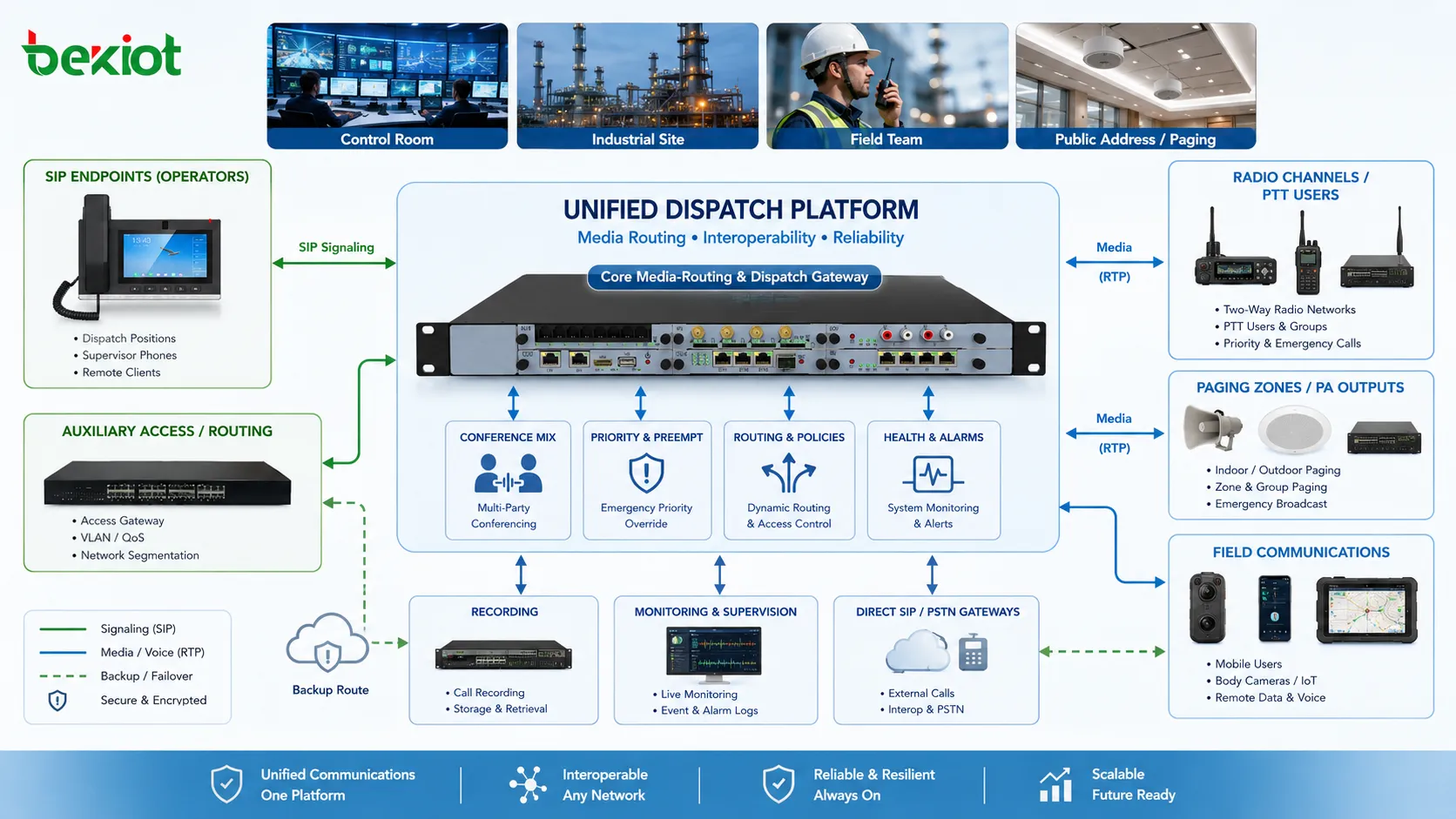
At the system level, the console usually communicates with a dispatch server or converged communication platform. The platform manages signaling, user registration, group permissions, media routing, recording, event linkage, and device status. The console then visualizes these functions through a practical operating interface. In this way, the dispatch console is not a standalone telephone. It is the visible command surface of a larger communication system.
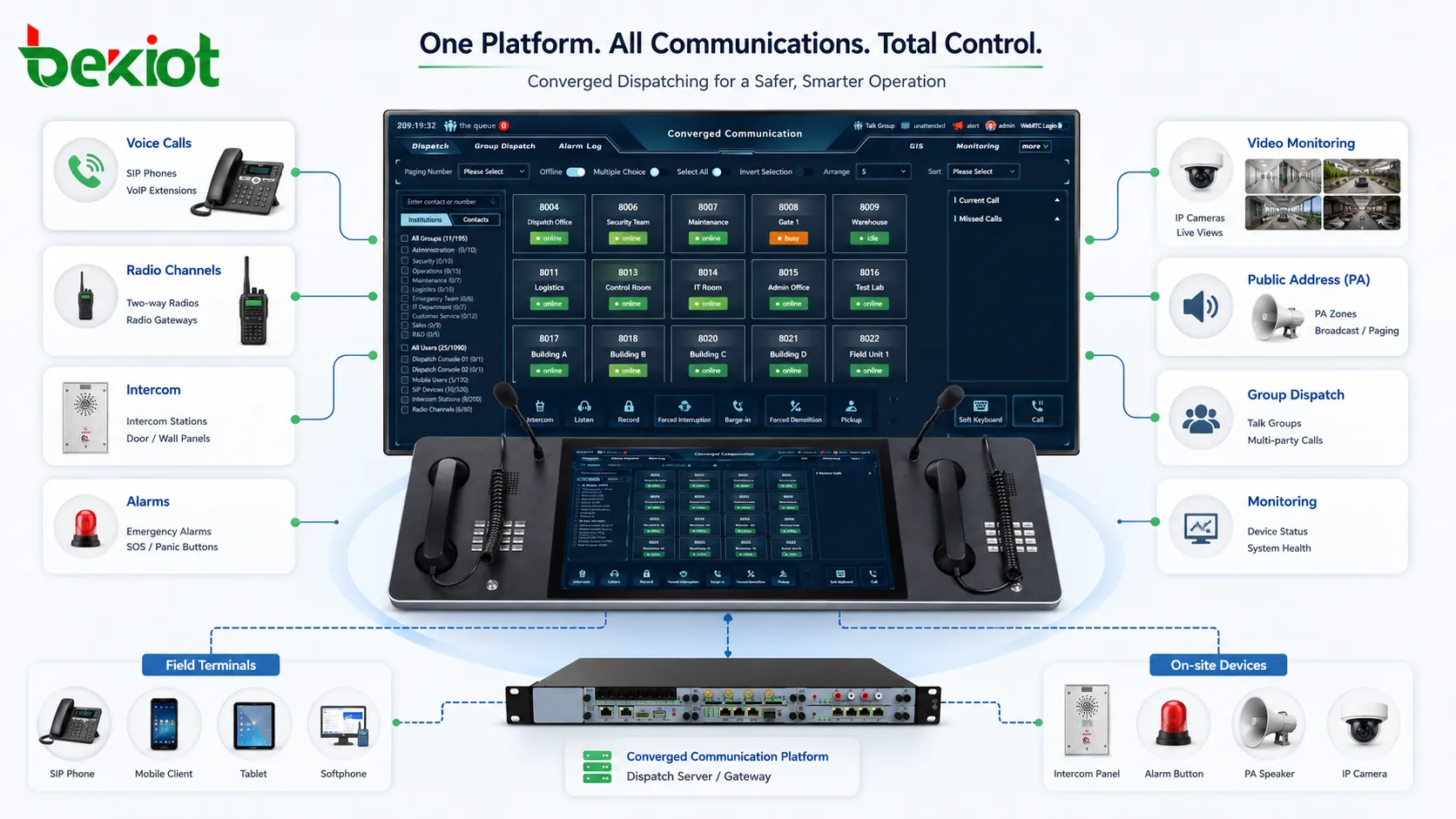
This integrated layer is especially important in environments where field teams may use different devices. One group may use SIP phones, another may use radio terminals, another may rely on intercom stations, and another may receive announcements through public address speakers. Unified dispatching allows these different endpoints to be organized by department, zone, role, incident type, or command level, making communication more aligned with actual operations.
How the console abstracts different communication networks
One of the most important principles behind unified dispatching is abstraction. In practical deployments, communication systems are rarely built from one protocol or one terminal category. A site may include SIP extensions, analog gateways, IP intercom terminals, radio systems, paging amplifiers, alarm columns, video devices, mobile apps, and external trunk connections. If operators had to understand every technical difference during daily work, dispatch efficiency would drop sharply.
The dispatch console hides much of this complexity by presenting different communication resources as manageable objects. A radio channel may appear as a talk group. A SIP phone may appear as an extension. An alarm terminal may appear as an emergency point on a map. A paging zone may appear as a selectable broadcast target. The operator does not need to manually handle every underlying protocol; the platform converts those technical resources into operational actions.
This abstraction is supported by gateways, signaling servers, media processing modules, and permission policies. For example, an IP-based dispatch platform can route a call from a console to a SIP phone, connect a radio gateway into a voice group, trigger an announcement to a paging zone, and record the entire communication session. Each action may involve different protocols, but the console presents them as part of one workflow.
In systems such as Becke Telcom’s BK-RCS converged communication system, this principle is reflected in the way different communication endpoints can be organized into a unified command framework. The value is not only the number of devices connected, but the ability to make them usable under one dispatch logic. That is what turns a collection of communication tools into a coordinated command system.
Call control, grouping, and priority handling
Dispatching is different from ordinary calling because it often requires fast control over many users at once. A standard phone system usually focuses on one-to-one calls or simple extension dialing. A dispatch console must support one-to-one calls, group calls, forced release, emergency call takeover, call queue handling, monitoring, transfer, conference control, and rapid selection of predefined teams. This makes call control one of the core principles of unified dispatching.
Grouping is central to this process. Dispatchers rarely think only in terms of individual numbers during an incident. They think in terms of patrol teams, maintenance crews, emergency response groups, security posts, tunnel sections, production zones, station areas, or command levels. A unified console should therefore allow users and devices to be organized into operational groups that match real site structure.
Priority handling ensures that urgent communication is not blocked by routine traffic. In emergency communication, an alarm call from a field terminal may need to override a normal conversation. A command announcement may need to interrupt background audio. A dispatcher may need to establish a forced group call when field personnel are already engaged in other communication. These actions require a priority model inside the dispatch platform, not just a visual button on the console.
Priority is usually managed through permission levels, call classes, emergency flags, and routing rules. The system must decide which call can interrupt another call, which operator can initiate forced communication, which group has higher access rights, and how emergency sessions are recorded or displayed. When these rules are designed properly, the console becomes a reliable command tool rather than a simple communication panel.
In unified dispatching, the console is valuable because it converts communication priority into visible, executable operator actions.
Real-time status awareness and field visibility
A dispatcher cannot manage what cannot be seen. Unified dispatching therefore depends heavily on real-time status awareness. The console must show whether users are online, busy, idle, ringing, offline, in alarm state, or connected to a specific call group. In larger systems, this status may also include device health, network condition, location information, recording state, and linked video or alarm events.
Status awareness reduces uncertainty during coordination. If a dispatcher needs to contact a maintenance team, the console can show which terminal is available. If an emergency call comes from a specific area, the system can highlight the calling point and related nearby resources. If a radio gateway or intercom station is offline, operators can choose alternative contact paths instead of repeatedly attempting failed calls.
In industrial and public infrastructure environments, real-time visibility is especially important because field conditions may change quickly. A tunnel incident, production line fault, station emergency, or port security event may require communication with several teams in parallel. The console helps the operator understand who is reachable, which channel is active, and where the incident is located within the operational structure.
Some dispatch systems extend this visibility through GIS maps, topology views, alarm lists, camera linkage, and event timelines. The purpose is not to overload the operator with data, but to organize information so that communication decisions can be made quickly. Effective dispatch console design should show the right status at the right time, with clear visual priority for urgent events.
Media routing and voice path coordination
Behind the console interface, unified dispatching depends on controlled media routing. Signaling tells the system who wants to communicate with whom, but media routing determines how the actual voice stream flows. This may involve direct RTP paths, server-based mixing, recording bridges, radio gateway conversion, conference resources, or paging outputs. The dispatch platform must coordinate these paths without forcing operators to manage technical details.
Media routing becomes more complex when different communication types are involved. A call between two SIP phones may be relatively simple. A group call involving a dispatch console, several SIP terminals, a radio channel, and a paging output requires more coordination. The system must handle codec compatibility, mixing logic, one-way or two-way communication mode, echo behavior, recording requirements, and call priority.
In push-to-talk environments, media control also includes floor management. Only one user may speak at a time in a half-duplex group, and the system needs rules for who can seize the floor, who can interrupt, and how emergency speech priority is handled. In full-duplex dispatch communication, the focus shifts to echo control, call mixing, volume consistency, and stability during conference sessions.
Voice path coordination is also connected to reliability. If a server or gateway fails, the system should support backup routing, redundant registration, or alternative communication paths where required. In mission-critical deployments, media routing is not just about audio quality. It is about maintaining command continuity when the network or part of the system becomes unstable.
Event linkage between alarms, video, and communication
Modern dispatching is no longer limited to voice. In many scenarios, the first signal received by the command center is not a phone call but an alarm event, sensor trigger, access control alert, video detection warning, emergency button activation, or system fault notification. Unified dispatching becomes more effective when these events are linked directly with communication actions.
For example, when an emergency terminal is triggered, the console can display the source location, open the related communication channel, show nearby cameras, notify a predefined response group, and start recording automatically. This reduces the number of manual steps required from the operator and ensures that critical context appears at the moment it is needed.
Video linkage is particularly useful in security, transportation, industrial safety, and emergency response environments. A voice report may be unclear or incomplete, but a linked camera can help the dispatcher verify the situation. The console does not need to replace the video management system; it only needs to integrate relevant video access into the communication workflow.
Alarm linkage also improves traceability. The system can record when the alarm occurred, which operator handled it, which calls were made, which groups were contacted, and how long the response took. This creates a communication record that supports post-event review, training, compliance, and process improvement. In high-risk industries, this traceability is often as important as the real-time response itself.
Human-machine interface design for fast command decisions
The design of a dispatch console interface has a direct impact on operating efficiency. In emergency or high-pressure conditions, operators should not search through deep menus or memorize complex command sequences. The interface should support rapid selection, clear status recognition, one-touch communication, group operation, and visible priority distinction.
Good console design usually organizes resources according to operational logic rather than technical categories. A dispatcher may want to see “North Tunnel Maintenance,” “Fire Response Team,” “Gate Security,” or “Station Control Room,” not a raw list of device models or extension numbers. The system should allow contact groups, zones, maps, quick keys, and event panels to be arranged around how the organization actually works.
Visual clarity is also important. Busy channels, emergency calls, offline devices, active groups, alarm events, and recorded sessions should be easy to distinguish. Color, icon, layout, and alert behavior must help operators understand priority without creating visual noise. Too much information can slow decision-making, while too little information can cause unsafe assumptions.
Physical console hardware may also be part of the user experience. Touchscreens, gooseneck microphones, handsets, foot pedals, programmable keys, speakers, headsets, and external control panels may all be used depending on the site. The best design is not always the most complex one. It is the design that allows the operator to act correctly and confidently under real working conditions.
Recording, logging, and operational accountability
Unified dispatching usually requires more than live communication. It also requires a reliable record of what happened. Voice recording, operation logs, alarm handling records, call history, user actions, and system events help organizations review incidents, resolve disputes, evaluate response efficiency, and meet internal management or regulatory requirements.
Recording is not only useful after major incidents. It also supports daily management. Supervisors can review whether operators followed procedures, whether response groups were contacted correctly, whether calls were missed, and whether communication quality met operational needs. In command centers, recording and logging provide a factual timeline that reduces dependence on memory after stressful events.
From a technical perspective, recording must be coordinated with call control and media routing. The system needs to know which sessions should be recorded, where files are stored, how records are indexed, who can access them, and how long they should be retained. For multi-channel dispatching, recordings should be associated with users, groups, alarm events, time ranges, and operator actions.
Auditability is also a security requirement. When a dispatcher performs forced call release, emergency broadcast, group activation, or permission change, the system should record the action. This helps prevent misuse and supports operational accountability. In well-designed systems, logs are not an afterthought; they are part of the dispatch control model.
| Dispatch Function | Operational Purpose | Typical System Requirement |
|---|---|---|
| Voice recording | Preserve command communication | Indexed storage with playback and permission control |
| Event logging | Track alarms and operator actions | Time-stamped records linked to calls and users |
| Group communication | Coordinate teams quickly | Predefined groups, priority rules, and status display |
| System linkage | Connect alarms, video, and voice | Open interfaces and configurable response workflows |
Resilience and continuity during abnormal conditions
A unified dispatch console must remain useful when conditions are not ideal. Network congestion, endpoint failure, gateway interruption, server fault, power fluctuation, or field damage can all affect communication. The principle of resilience means that the dispatch system should not depend on a single fragile path wherever the application is mission-critical.
Resilience can be built at several layers. Endpoint registration can support redundancy. Servers can be deployed with backup nodes. Gateways can provide alternative access to radio or PSTN resources. Network paths can be segmented or prioritized. Console workstations can be configured with backup login or role transfer. Recording and log systems can use protected storage. Each layer reduces the chance that one fault will interrupt the entire command process.
Continuity also depends on operational design. Dispatchers should know which backup path to use when a terminal is offline or when a group cannot be reached through the primary channel. A console that displays alternative contacts, backup groups, and abnormal device status helps operators continue coordination even during degraded operation.
For emergency communication projects, resilience should be designed before deployment rather than added after incidents reveal weaknesses. Platforms such as Becke Telcom BK-RCS are typically considered in this context because converged communication systems need to support not only normal dispatch, but also continuity under pressure, multi-system access, and structured emergency response workflows.
Deployment planning for command centers and field networks
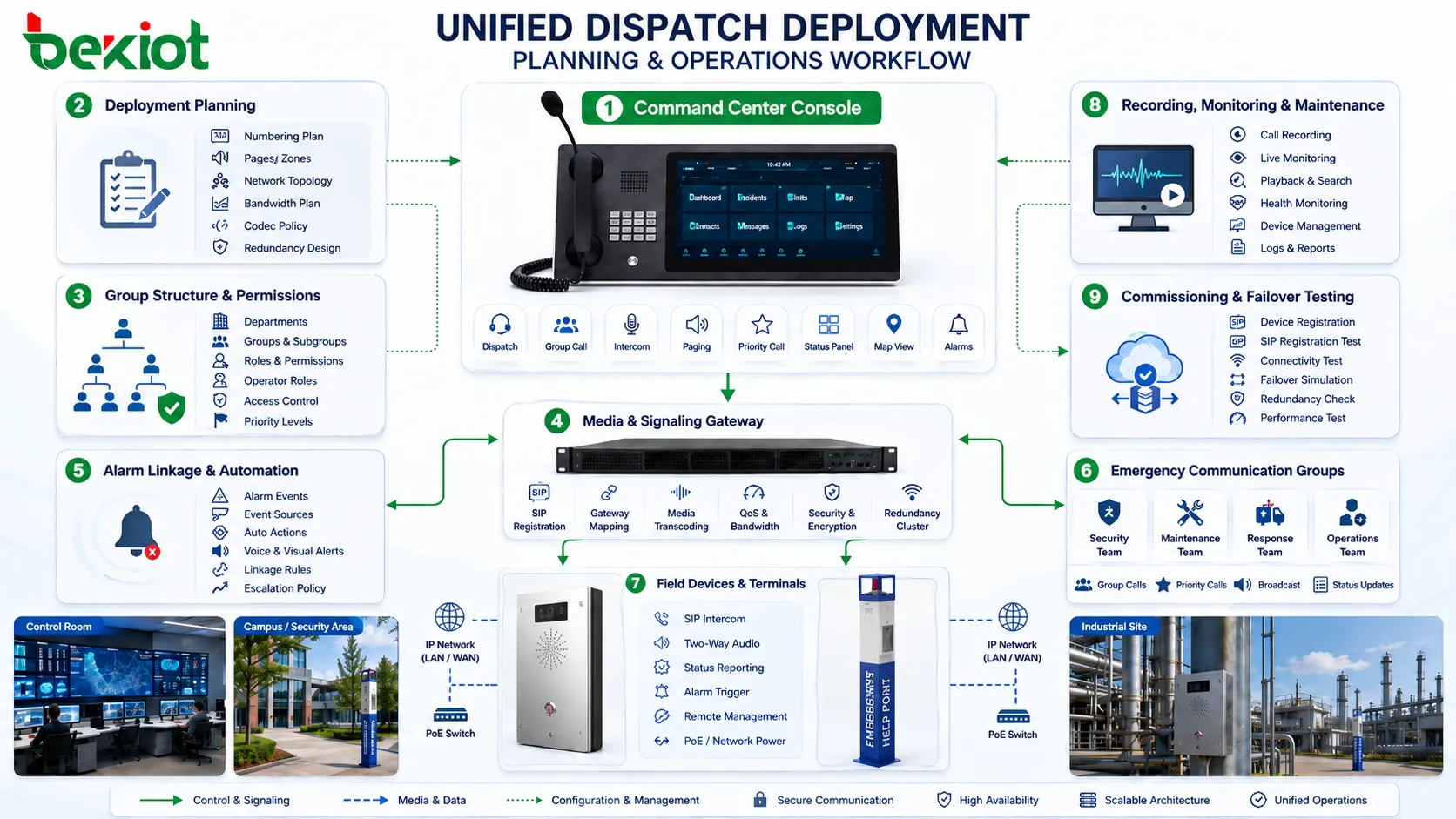
Successful unified dispatching depends on planning the relationship between command center operations and field network structure. Before selecting console layouts or button functions, engineers need to understand the organization’s communication hierarchy. Who commands whom? Which teams need direct access? Which calls require priority? Which zones need paging? Which devices must be recorded? Which alarms should trigger automatic actions?
Numbering plans, group structures, user permissions, gateway locations, network bandwidth, codec policies, and redundancy requirements should be considered together. If the system is planned only as a collection of endpoints, the console may become cluttered and difficult to operate. If it is planned around actual workflows, the console becomes a practical command tool.
Field deployment also matters. A dispatch console can only coordinate resources that are correctly connected, registered, powered, and maintained. SIP terminals, intercoms, gateways, radio links, paging amplifiers, and emergency stations all need clear addressing, labeling, location mapping, and maintenance records. Without this foundation, even a powerful console interface cannot guarantee effective operations.
During commissioning, test scenarios should include normal calls, group calls, emergency priority, alarm linkage, recording playback, failover behavior, and operator role changes. These tests help confirm that the system works as a whole, not just as individual devices. In B2B projects, this stage is often where the real value of unified dispatching becomes visible to the customer.
How unified command value is created in daily operations
The value of unified dispatching is often most visible during emergencies, but its benefits also appear in routine daily operations. Operators can call the right person faster, monitor key communication resources, handle events with fewer manual steps, and reduce errors caused by fragmented tools. Over time, this improves both response speed and communication consistency.
For maintenance teams, unified dispatching simplifies coordination across distributed sites. Instead of relying on informal phone calls or isolated radio communication, supervisors can contact predefined groups, record instructions, and monitor whether field resources are reachable. For security teams, alarm linkage and camera-assisted calling improve situational awareness. For industrial production, coordinated announcements and group communication reduce downtime during abnormal events.
Management value is created through visibility and traceability. Call logs, recordings, event response timelines, and device status records help organizations understand how communication resources are actually used. This supports optimization of staffing, training, emergency procedures, and system expansion plans.
In this sense, the dispatch console is not only an operational tool. It is also a data and workflow entry point for improving communication management. When properly connected to a converged communication platform, it helps organizations transform communication from a set of independent channels into a managed command capability.
FAQ
How should a project decide how many dispatch console seats are needed?
The number of seats should be based on operator roles, shift structure, incident workload, and redundancy requirements rather than only the number of devices. A small site may need one main console and one backup position, while a large command center may require separate seats for security, maintenance, production, traffic, or emergency coordination.
Can a dispatch console connect both IP phones and radio systems?
Yes, but radio access usually requires a gateway or integration module that converts radio audio and control behavior into a format the dispatch platform can manage. The project should confirm whether only audio bridging is required or whether channel selection, push-to-talk control, recording, and group linkage are also needed.
What is the difference between a dispatch console and a normal softphone?
A softphone is mainly designed for personal calling, while a dispatch console is designed for command operations. It usually supports group control, priority calls, monitoring, recording linkage, alarm association, multi-channel operation, role-based permissions, and fast access to field resources.
Why is permission design important in unified dispatching?
Permission design prevents operational confusion and unauthorized control. Not every operator should be able to force-release calls, activate emergency groups, access recordings, or broadcast to all zones. Clear permission levels help protect both safety and accountability.
What should be tested before putting a unified dispatch system into service?
Testing should include ordinary calls, emergency calls, group calls, radio gateway access, alarm linkage, recording retrieval, failover behavior, user permission control, and operator handover. These tests confirm that the platform supports real workflows rather than only basic connectivity.







