


Remote upgrades refer to the process of updating software, firmware, configuration components, security patches, feature modules, or system packages through a network connection without requiring technicians to access the device physically. This method is widely used in computers, servers, routers, gateways, IP phones, industrial terminals, IoT devices, security systems, cloud platforms, vehicles, medical devices, smart buildings, and distributed enterprise equipment.
In traditional maintenance, every update may require a technician to visit the site, connect a cable, replace a storage card, or operate the device locally. Remote upgrading changes this model. It allows organizations to deliver updates from a central platform, schedule controlled rollouts, monitor results, and maintain many devices across different locations more efficiently.
A Shift from Manual Visits to Managed Delivery
The biggest change is operational. Instead of treating each device as an isolated maintenance task, remote upgrading turns updates into a managed process. Administrators can prepare an update package, select target devices, define a schedule, push the package, verify installation, and record the result.
This is especially useful when devices are installed in branch offices, public facilities, remote sites, outdoor cabinets, production areas, control rooms, vehicles, or customer locations. The more distributed the equipment is, the more value remote delivery provides.
However, the method is not only about convenience. A well-designed upgrade mechanism also improves security response, version consistency, lifecycle control, and long-term service reliability.
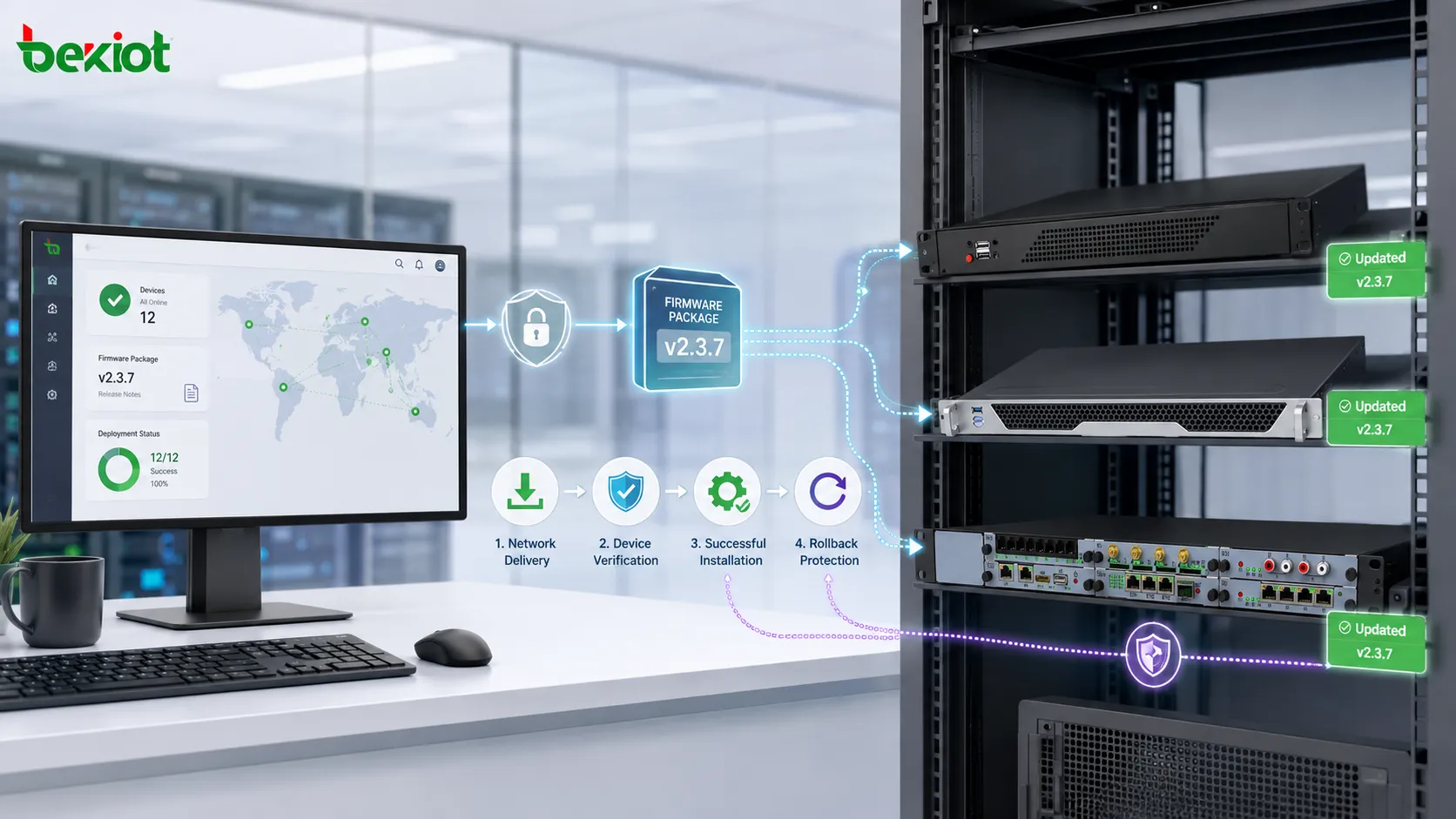
How the Process Usually Works
Package Preparation
The update package may include firmware, software files, security patches, driver updates, application components, protocol fixes, or feature improvements. Before release, the package should be checked for compatibility, integrity, version number, and installation requirements.
In professional environments, update packages are often signed or verified to prevent tampering. This helps ensure that devices install only trusted files from approved sources.
Target Selection
Not every device should receive an update at the same time. Administrators may select devices by model, location, firmware version, user group, network segment, risk level, or business role.
This avoids unnecessary disruption and reduces the chance that an incompatible device receives the wrong package.
Network Delivery
The package is sent through LAN, WAN, VPN, private network, cloud platform, mobile network, or device management service. The device downloads the package, checks its validity, and prepares for installation.
Stable connectivity is important. A good design should handle interrupted downloads, resume capability, bandwidth limits, and retry logic.
Installation and Reboot
Some upgrades can be applied without restart, while others require a reboot or service restart. Critical systems should schedule installation during low-traffic periods or maintenance windows.
The device should report progress so administrators know whether the installation is pending, running, completed, failed, or waiting for restart.
Verification and Reporting
After installation, the system should confirm the new version, service status, configuration compatibility, and device health. A central report helps administrators identify failed updates and take corrective action quickly.
Without verification, an upgrade may appear complete but still leave the device unstable or partially updated.
Main Advantages
Reduced On-Site Maintenance Cost
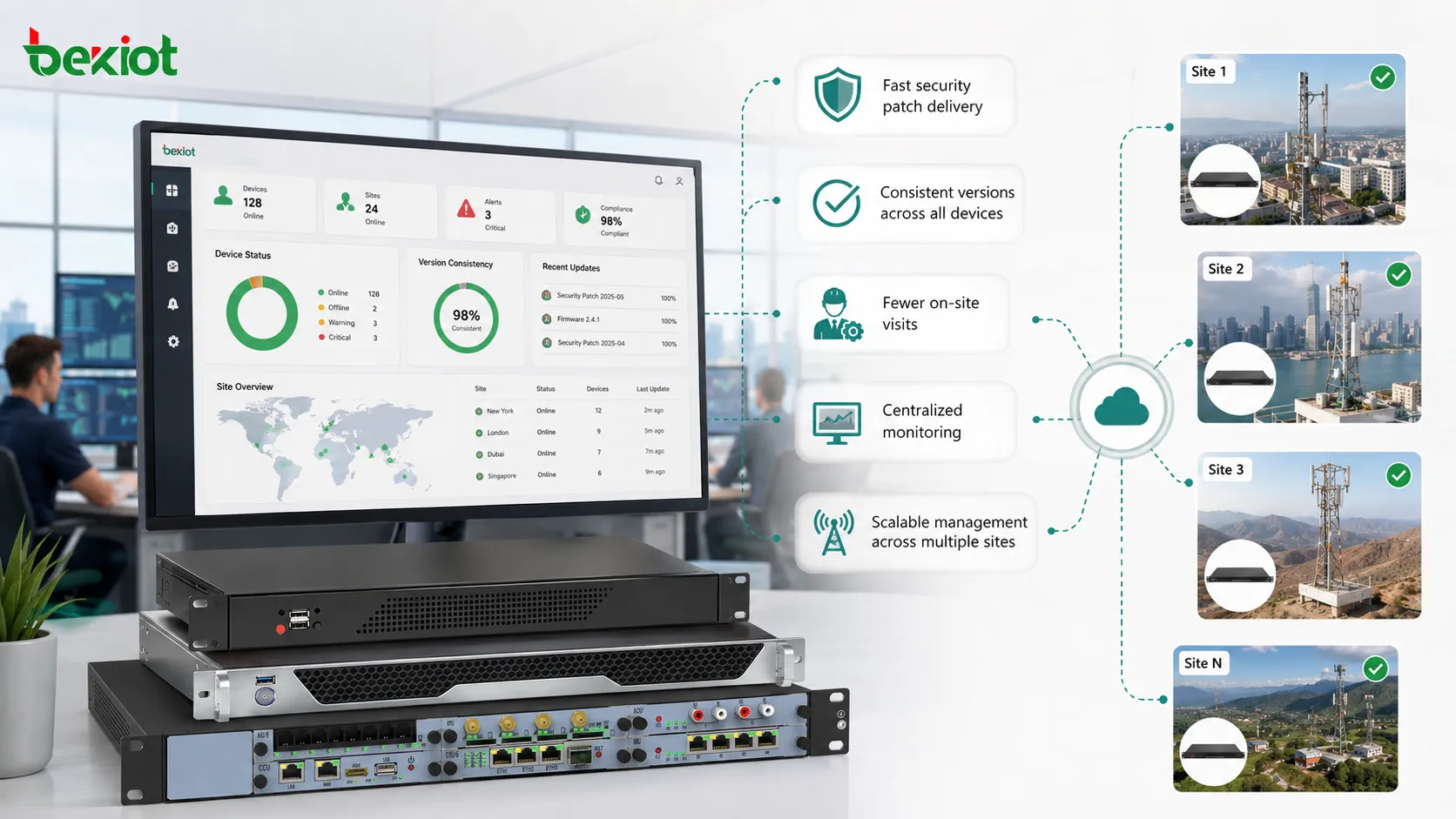
Remote delivery greatly reduces the need for field visits. This saves travel time, labor cost, transportation expense, site access coordination, and service downtime. It is especially valuable when equipment is located in distant branches, outdoor sites, restricted areas, or customer premises.
For organizations with hundreds or thousands of devices, even a small update can become expensive if handled manually. Remote upgrading allows the same task to be completed at scale.
Faster Security Response
When a security vulnerability is discovered, waiting for manual site visits may leave systems exposed for too long. Remote upgrades allow security patches to be distributed faster across affected devices.
This helps reduce the window of risk. For internet-connected equipment, network devices, endpoint systems, and cloud-managed platforms, rapid patching is a major advantage.
Version Consistency
Different firmware or software versions can create support problems. Some devices may behave differently, lack newer features, or contain unresolved bugs. Remote upgrading helps keep device versions consistent across sites.
Consistency makes troubleshooting easier. When devices share the same approved version, support teams can diagnose problems with fewer unknown variables.
Feature Expansion Without Hardware Replacement
Many products gain new functions through firmware or software updates. Remote upgrades can add protocol support, improve user interface behavior, optimize performance, enhance compatibility, or expand management features without replacing the physical device.
This extends the useful life of equipment and allows organizations to adapt systems after deployment.
Better Lifecycle Management
Remote upgrade platforms often keep records of device version, upgrade history, success rate, failure reason, and update time. These records help teams manage device lifecycle more professionally.
Lifecycle visibility supports planning for patch cycles, end-of-support devices, replacement schedules, and compliance review.
| Advantage Area | Practical Effect | Operational Value |
|---|---|---|
| Cost Control | Fewer field visits and less manual device handling. | Reduces maintenance expense across distributed sites. |
| Security | Faster patch delivery after vulnerabilities are found. | Shortens exposure time and improves risk response. |
| Consistency | Devices run approved software or firmware versions. | Simplifies support, auditing, and compatibility management. |
| Scalability | Many devices can be upgraded through one platform. | Supports large fleets, branches, and multi-site operations. |
| Function Growth | New features can be added after deployment. | Extends equipment value without immediate replacement. |
Why It Improves Operational Reliability
Reliability is improved because known defects can be corrected more quickly. A firmware bug, compatibility issue, call failure, network instability, user interface error, or security weakness may be resolved through an update rather than hardware replacement.
Remote upgrading also supports preventive maintenance. Instead of waiting for devices to fail, administrators can update systems before problems become widespread. This is useful for equipment that runs continuously or supports critical business operations.
Another reliability benefit is traceability. If every upgrade is recorded, teams can identify which devices were updated, which devices failed, and which version is currently active. This reduces uncertainty during troubleshooting.
Applications Across Different Systems
Enterprise IT Devices
Computers, laptops, thin clients, printers, mobile devices, and office endpoints often receive operating system updates, security patches, driver updates, and application improvements remotely.
This helps IT teams support remote workers, branch users, and shared office equipment without touching every device manually.
Network and Communication Equipment
Routers, switches, gateways, wireless access points, firewalls, IP phones, intercoms, and voice platforms may require firmware updates to improve stability, protocol support, and security.
Because these devices often support business connectivity, upgrades should be planned carefully with rollback and maintenance windows.
Industrial and Field Devices
Industrial controllers, sensors, terminals, monitoring devices, remote gateways, and edge computing nodes may be deployed in hard-to-reach locations. Remote upgrades help reduce site visits and keep systems aligned with current operational requirements.
In industrial environments, update timing should avoid production interruption and should be validated with site-specific conditions.
Security and Surveillance Systems
Cameras, access control panels, alarm systems, recording servers, and security gateways may need updates for cybersecurity, video compatibility, user management, and system stability.
Remote delivery is useful because security systems are often distributed across buildings, campuses, branches, and outdoor areas.
IoT and Smart Building Platforms
Smart meters, lighting controllers, HVAC nodes, environmental sensors, kiosks, parking devices, and building automation equipment may be upgraded remotely to improve functions, fix bugs, or adjust behavior.
For large facilities, remote upgrade capability becomes a core part of long-term system management.
Risk Control During Upgrade Execution
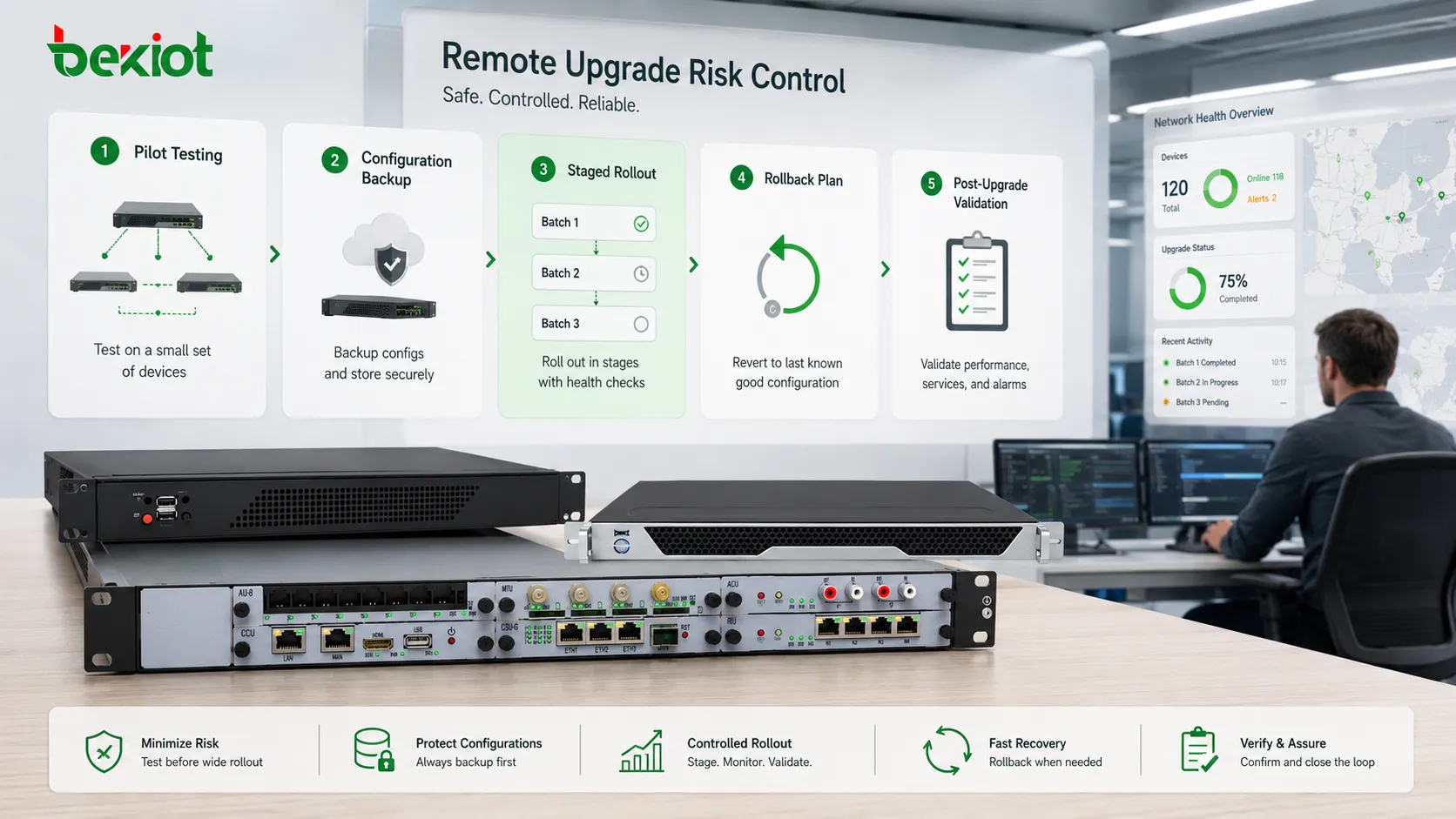
Pilot Testing
Before applying an update widely, a small pilot group should be selected. The pilot should include representative devices, different network conditions, and key use cases.
Pilot testing helps identify compatibility problems before they affect the full fleet.
Backup Before Change
Configuration backup should be performed before an upgrade. If settings are changed, lost, or made incompatible, the backup provides a recovery path.
For critical systems, both configuration and current firmware version should be documented before starting.
Staged Rollout
A staged rollout updates devices in batches. This limits impact if a problem appears. For example, administrators may update one department first, then one branch group, then the wider network.
This method is safer than updating all devices at once.
Rollback Plan
Rollback allows the device to return to a previous known-good version if the new version fails. Some systems support dual firmware partitions, automatic fallback, or manual downgrade.
Rollback should be tested in advance because not every platform can downgrade safely.
Post-Upgrade Validation
After the update, administrators should check version number, connectivity, service availability, user functions, logs, alarms, and performance. Validation is what turns an update into a confirmed success.
If validation is skipped, hidden problems may remain until users report them later.
Security Requirements
Remote upgrading must be secure because the update channel has control over device behavior. If attackers compromise the update process, they may install malicious firmware, disable functions, steal data, or disrupt services.
Secure design should include authentication, encrypted transport, digital signature verification, trusted repositories, access control, audit logs, and approval workflows. Devices should reject unsigned or unauthorized packages.
Administrative accounts should be protected with strong passwords, multi-factor authentication where available, and role-based permissions. Upgrade authority should not be given broadly to ordinary users.
Network and Bandwidth Planning
Large upgrade packages can consume significant bandwidth. If many devices download at the same time, the network may become congested and affect normal services.
Bandwidth planning may include local cache servers, staggered schedules, download rate limits, off-peak windows, branch distribution points, or multicast delivery where supported.
Unstable networks require extra care. Devices should support checksum verification, resume download, retry logic, and safe installation behavior after interruption.
Common Misunderstandings
Remote Does Not Mean Uncontrolled
Remote delivery should still follow approval, testing, scheduling, backup, and validation processes. Convenience should not replace change management.
Latest Version Is Not Always the Best Immediate Choice
A new version may contain useful fixes, but it may also introduce changes that affect compatibility. Critical systems should test before full deployment.
Successful Download Is Not Successful Installation
Downloading the file is only one step. The device must verify, install, restart if needed, and report healthy status after the upgrade.
One Schedule Does Not Fit Every Device
Different devices have different business roles. Critical equipment, office endpoints, test devices, public terminals, and remote field units may need different rollout schedules.
Best Practices for Long-Term Management
Maintain an approved version list. Administrators should know which versions are current, which versions are deprecated, and which versions are blocked.
Keep device inventory accurate. The platform should record model, serial number, location, current version, last upgrade time, configuration profile, and responsible team.
Use alerts for failed upgrades. A failed device should not remain unnoticed. The system should report failure reason, last successful version, and recommended recovery action.
Review update history regularly. Patterns such as repeated failures in one site or one model may indicate network issues, storage problems, hardware limitations, or package incompatibility.
Document emergency procedures. If a critical device fails after upgrade, teams should know how to recover it, who to contact, and whether a site visit is required.
Remote upgrades are valuable because they turn device improvement, security patching, version control, and long-term maintenance into a scalable and traceable process.
FAQ
Can a remote upgrade be performed without restarting the device?
Sometimes. Minor software modules may update without restart, but firmware, operating system, driver, or core service updates often require reboot or service interruption.
What happens if the network disconnects during the process?
A well-designed system should verify package integrity, support retry or resume, and avoid installing incomplete files. Critical devices should have safe fallback behavior.
Should every device receive updates automatically?
Not always. Automatic delivery may work for low-risk devices, but critical systems usually need approval, scheduling, pilot testing, and rollback planning.
How can administrators know whether the update succeeded?
They should check version report, device health, service status, logs, user functions, alarms, and whether the device reconnects to the management platform after installation.
Why is backup necessary before upgrading?
Backup protects existing configuration and provides a recovery path if the update changes settings, creates incompatibility, or requires replacement hardware.







