


A software development kit, commonly abbreviated as SDK, is a collection of tools, libraries, documentation, code samples, APIs, compilers, debuggers, templates, and integration resources that help developers build applications for a specific platform, device, operating system, service, or software environment. It gives developers a ready-made development foundation instead of forcing them to build every function from the beginning.
In system development, an SDK is not only a convenience package. It can influence integration efficiency, product stability, feature expansion, security implementation, testing quality, platform compatibility, developer experience, and long-term maintainability. Whether used for mobile apps, cloud services, embedded devices, communication systems, AI platforms, payment tools, industrial software, or IoT applications, its value comes from turning complex platform capabilities into reusable development resources.
Why Development Teams Need a Ready-Made Toolkit
Modern software rarely works alone. Applications need to connect with operating systems, hardware modules, cloud APIs, databases, identity platforms, communication services, sensors, payment gateways, media engines, analytics systems, or third-party platforms. Without a structured toolkit, every integration would require developers to study low-level interfaces, protocol details, authentication methods, data formats, error handling, and compatibility behavior separately.
A well-designed toolkit reduces this complexity. It packages common functions into documented methods and reusable components. Developers can call approved interfaces, follow tested examples, and build features faster with fewer mistakes.
This improves both speed and reliability. Teams spend less time solving basic connectivity problems and more time building product logic, user experience, workflow automation, and business value.
Core Components in a Complete Package
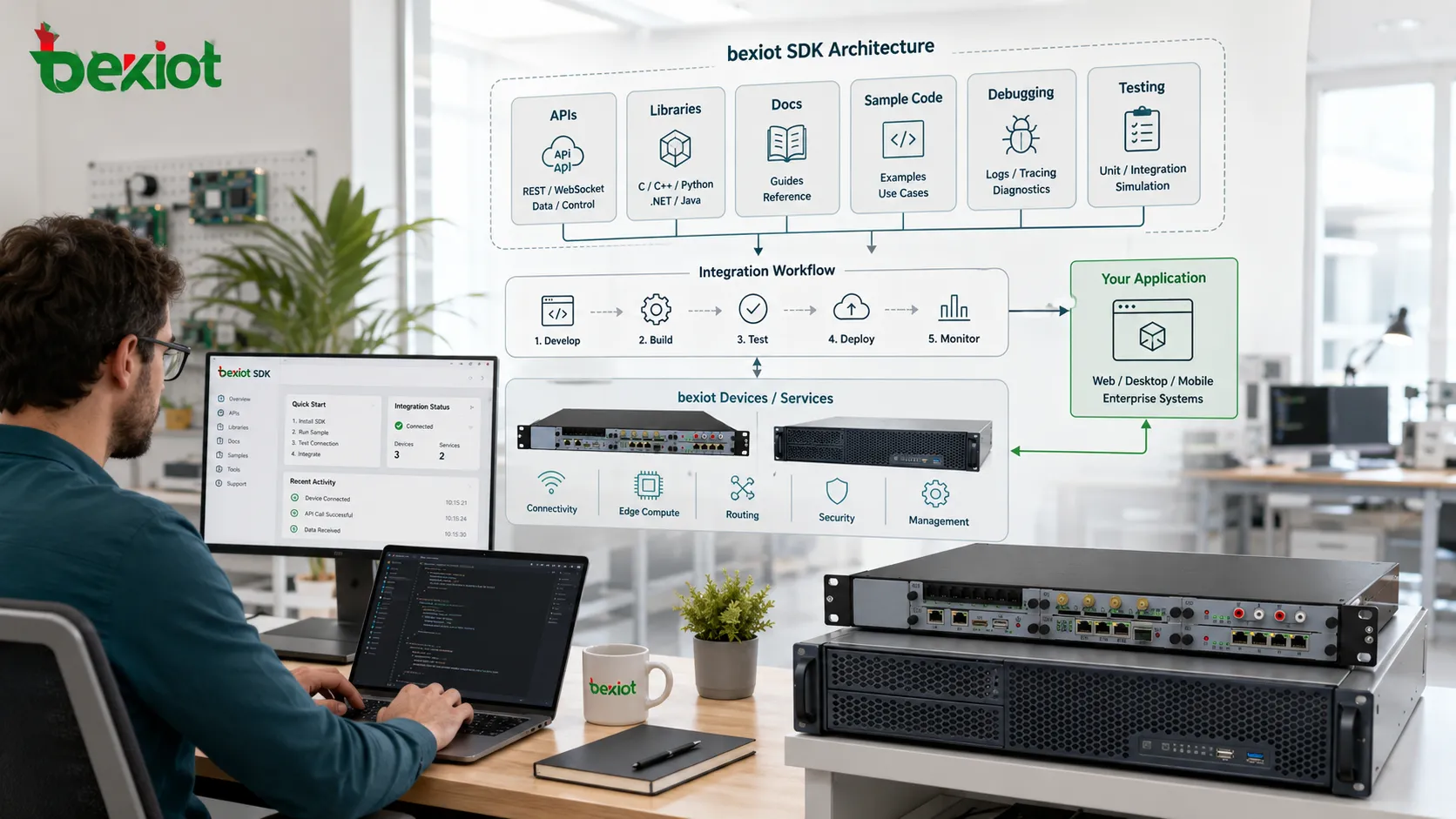
APIs and Interface Definitions
APIs define how software communicates with the platform or service. They specify available functions, request formats, response formats, authentication rules, error codes, and usage limits.
Clear interface definitions help developers call platform capabilities correctly. This reduces integration ambiguity and prevents inconsistent implementation across different teams.
Libraries and Prebuilt Modules
Libraries provide ready-to-use code for common functions. These may include data processing, encryption, media handling, device control, network communication, authentication, logging, file access, payment processing, or user interface components.
Prebuilt modules save time because developers do not need to rewrite stable functionality. They also reduce risk because widely tested components are usually more reliable than improvised project-specific code.
Documentation and Guides
Documentation explains how to install, configure, use, test, and troubleshoot the toolkit. It may include quick-start guides, reference manuals, architecture diagrams, code examples, migration notes, version history, and best practices.
High-quality documentation is one of the most important system benefits. Poor documentation can make even a powerful toolkit difficult to use.
Testing and Debugging Tools
Many development packages include test environments, simulators, emulators, log viewers, validators, sandbox accounts, mock services, and debugging utilities. These tools help developers find problems before software reaches production.
Testing support is especially important when integrating with hardware, payment systems, communication services, cloud APIs, or safety-related workflows.
Benefit One: Faster Product Development
The most visible benefit is speed. Developers can use prepared functions instead of building every low-level capability manually. This shortens development cycles and allows teams to deliver features more quickly.
For example, a mobile application can use a platform toolkit to access camera, location, notifications, storage, and biometric authentication. A cloud application can use prepared libraries for authentication, data upload, event handling, and API requests. An embedded system can use device libraries for sensors, serial ports, network modules, and firmware functions.
Speed does not only mean writing less code. It also means reducing research time, avoiding repeated mistakes, accelerating onboarding for new developers, and creating a more predictable project schedule.
Benefit Two: Lower Integration Complexity
System integration often fails because different components use different formats, protocols, security models, and error-handling logic. A toolkit can hide much of this complexity behind stable interfaces.
Instead of manually handling every authentication token, request signature, device command, callback event, or data conversion rule, developers can use structured methods provided by the package.
This makes integration more consistent across products. When multiple teams use the same toolkit, their implementation style becomes easier to review, maintain, and support.
Benefit Three: Improved Compatibility
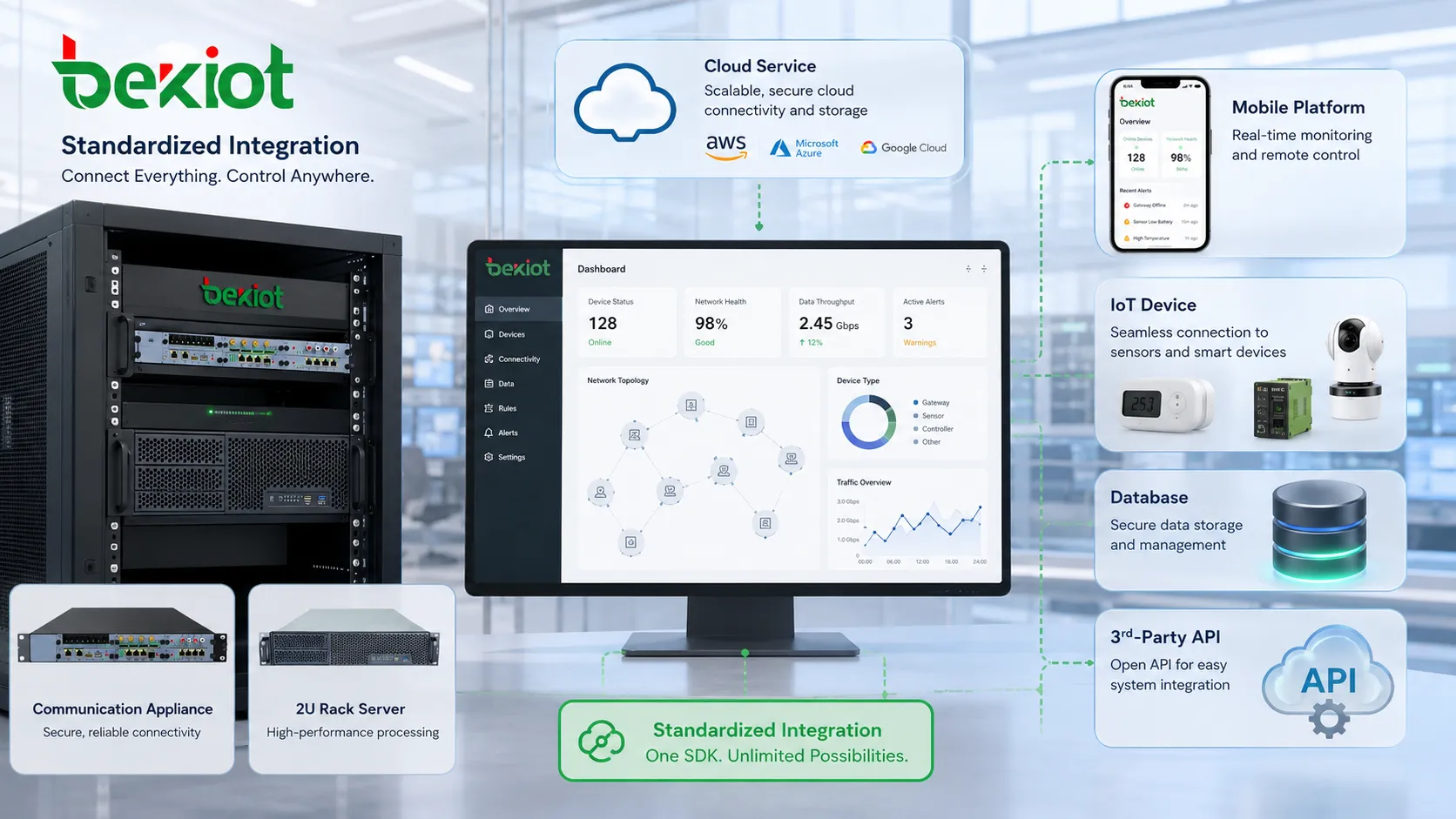
Platforms change over time. Operating systems update APIs, cloud services change authentication flows, devices receive firmware upgrades, and browser environments introduce new restrictions. A maintained toolkit helps developers adapt to these changes more easily.
When the platform provider updates the package, compatibility fixes can be delivered through new versions. Developers can then update their applications without redesigning the entire integration.
Compatibility is especially important for mobile apps, device drivers, payment integrations, communication platforms, and IoT ecosystems where many versions may exist at the same time.
Benefit Four: Better Security Implementation
Security features are easy to implement incorrectly if every team writes them from scratch. Authentication, encryption, token refresh, certificate validation, permission checks, secure storage, API signing, and data validation all require careful design.
A reliable toolkit can provide tested security functions and recommended implementation patterns. This helps reduce common mistakes such as hard-coded credentials, weak request signing, missing certificate checks, insecure data storage, or improper session handling.
Security still depends on correct usage. Developers must follow documentation, keep the package updated, protect secrets, and avoid bypassing built-in safeguards.
Benefit Five: Consistent User and Developer Experience
When a platform provides official UI components, workflow templates, or interaction patterns, applications can deliver a more consistent user experience. This is common in mobile platforms, payment systems, identity login, messaging tools, and device control apps.
Consistency also benefits developers. If the same toolkit is used across projects, developers can reuse knowledge, code structure, testing methods, and troubleshooting skills. This reduces training time and helps teams maintain multiple applications more efficiently.
For organizations building many related products, consistency becomes a system-level advantage rather than only a coding convenience.
Benefit Six: Stronger Testing and Quality Control
A good toolkit often includes test utilities, sandbox environments, sample projects, simulators, and error-reporting features. These resources help teams verify behavior before deployment.
Testing becomes more accurate when developers can reproduce real platform behavior in a controlled environment. For example, a payment sandbox can simulate transaction success and failure. A device simulator can test sensor events. A communication toolkit can simulate call states, connection loss, or message delivery errors.
This improves quality control because bugs can be found earlier, before they affect users or production systems.
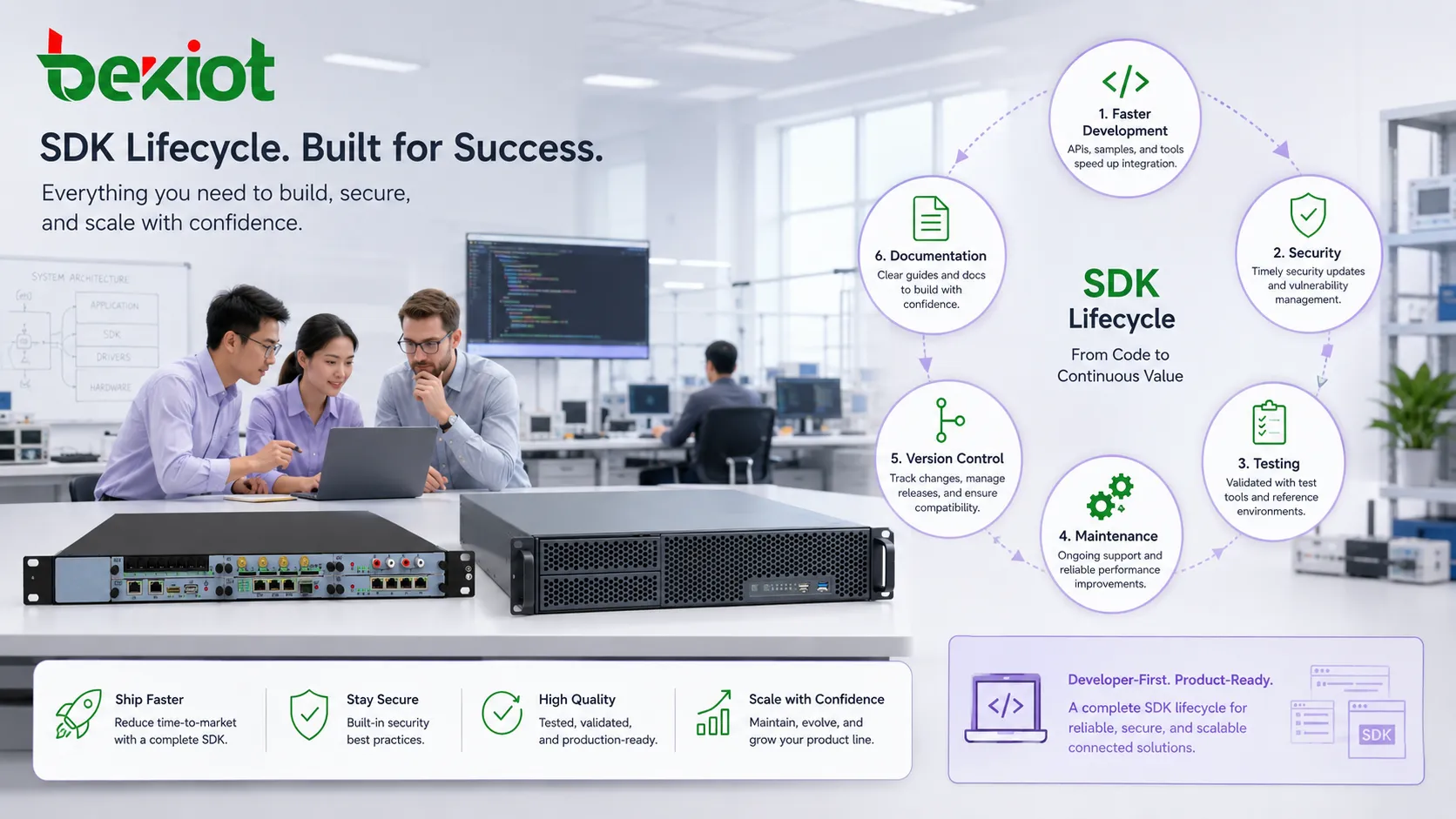
Benefit Seven: Easier Maintenance and Upgrades
Long-term maintenance is often more difficult than initial development. Applications must be updated for new platform versions, security patches, deprecated APIs, performance issues, and changing business requirements.
Using an official or well-maintained package makes maintenance easier because much of the platform-specific change can be handled through toolkit updates. Developers can review release notes, upgrade libraries, adjust affected code, and test compatibility in a structured way.
Version management is important. Teams should track which toolkit version is used in each product, what changes are introduced, and whether older versions contain known risks.
Benefit Eight: Platform Ecosystem Expansion
For platform providers, an SDK helps third-party developers build around their ecosystem. This can increase adoption, expand application scenarios, and create stronger platform value.
For developers, this means faster access to platform capabilities. They can build plug-ins, add-ons, integrations, device applications, automation tools, analytics modules, or customized workflows without needing internal platform knowledge.
This is why many cloud providers, device manufacturers, operating system vendors, payment platforms, AI services, and communication systems provide development toolkits as part of their ecosystem strategy.
Common Application Fields
Mobile Application Development
Mobile platforms use toolkits for camera access, push notifications, maps, payments, login, storage, sensors, media playback, and app lifecycle management.
These resources help developers build apps that behave correctly on different phones, operating system versions, and screen environments.
Cloud and Web Services
Cloud platforms provide packages for storage, databases, authentication, messaging, monitoring, AI services, serverless functions, and API calls.
This reduces the complexity of connecting applications to distributed cloud infrastructure.
Embedded and IoT Systems
Embedded systems use toolkits for hardware drivers, communication modules, sensor access, firmware update, low-power control, device provisioning, and remote monitoring.
In IoT projects, development resources can greatly reduce the time needed to connect devices to cloud platforms and management systems.
AI and Data Applications
AI services often provide toolkits for model inference, speech recognition, image analysis, text processing, vector search, dataset handling, and GPU acceleration.
These packages help developers integrate advanced functions without writing all model-handling code manually.
Communication and Media Platforms
Voice, video, messaging, streaming, and collaboration platforms use development kits to expose call control, media processing, signaling, recording, notification, and real-time data functions.
This makes it easier to build custom communication apps, service dashboards, recording tools, or workflow integrations.
Selection Criteria for Developers
Before choosing a development package, teams should review platform compatibility, language support, documentation quality, update frequency, license terms, security model, community activity, and long-term maintenance policy.
They should also test whether the toolkit fits the project architecture. A package that works well for a small prototype may not be suitable for a high-availability production system if it lacks logging, error handling, scaling support, or security controls.
Good selection requires both technical testing and lifecycle thinking. The team should ask not only “Can this build the feature?” but also “Can we maintain this safely for years?”
Potential Risks and Limitations
Dependency Risk
When a project depends heavily on a toolkit, problems in that package can affect the whole application. If the provider stops maintaining it, developers may need to migrate or rewrite code.
Version Conflicts
Different libraries may depend on different versions of the same component. This can create build failures, runtime errors, or difficult debugging problems.
Hidden Complexity
A toolkit simplifies many tasks, but it may also hide internal behavior. When problems occur, developers still need enough technical understanding to troubleshoot logs, network calls, data formats, and platform responses.
Security Misuse
Even secure libraries can be used incorrectly. Developers must still protect credentials, validate inputs, manage permissions, and keep dependencies updated.
Best Practices for Implementation
Start with official documentation and sample projects. Do not copy code blindly; understand authentication, error handling, retry logic, and permission requirements.
Create a small proof of concept before full integration. This helps confirm that the package supports the required language, platform, performance level, and deployment environment.
Track versions carefully. Maintain a dependency list, review release notes, and test upgrades in a staging environment before production release.
Build error handling around toolkit calls. Network failure, API limits, expired tokens, unsupported devices, and service-side errors should be expected and handled gracefully.
Keep security controls active. Avoid disabling certificate checks, storing secrets in source code, or using deprecated methods for convenience.
The system value of an SDK comes from turning complex platform functions into reusable, documented, testable, and maintainable development building blocks.
FAQ
Is an SDK the same as an API?
No. An API defines how software communicates with a service or platform. An SDK may include APIs, libraries, tools, documentation, samples, and testing resources.
Can a project use more than one development toolkit?
Yes. Many applications use several toolkits, such as cloud, payment, analytics, messaging, and device packages. Dependency management becomes important.
What should be checked before updating to a new version?
Review release notes, breaking changes, security fixes, deprecated functions, platform requirements, test results, and compatibility with existing dependencies.
Why do some integrations fail even when the toolkit is official?
Failures may come from wrong credentials, unsupported platform versions, network restrictions, incorrect permissions, poor error handling, or misunderstanding of the workflow.
Should unused SDK modules be removed?
Yes. Removing unused modules can reduce application size, attack surface, dependency conflicts, and maintenance workload.







