Public address systems are no longer used only for one-way announcements. In many modern facilities, paging needs to work with intercom calls, alarm inputs, access events, CCTV systems, security desks, and control room response procedures. This is where a SIP-based paging workflow becomes more valuable than a simple broadcast path.
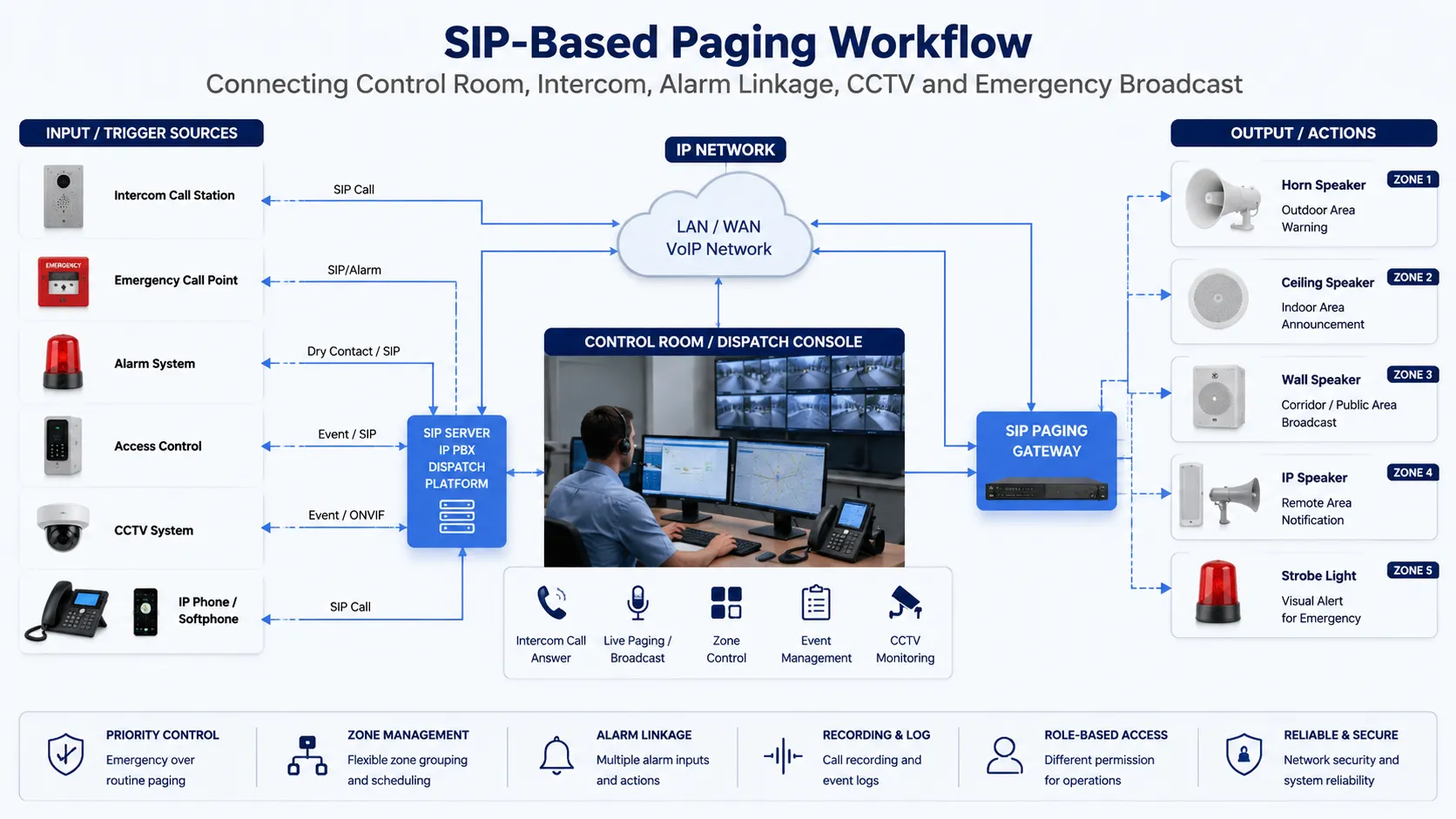
From Manual Paging to Event-Driven Communication
Traditional paging depends heavily on manual operation. An operator notices an event, picks up a microphone, selects a zone, and makes an announcement. This model may be enough for simple daily notices, but it is not ideal when the communication process must respond to access events, emergency buttons, door intercom calls, sensor alarms, or security incidents.
Related Product Introduction: SIP Paging Gateway
An event-driven workflow changes the logic. A trigger can start a communication action, open a talk path, activate a warning tone, notify a control room, or route a call to a responsible team. The paging system becomes part of a response chain rather than a separate audio tool.
The key value is not only broadcasting louder messages. It is connecting the right trigger, the right operator, the right zone, and the right response action.
Intercom Calls as the First Step of Response
Entrance and service-point communication
Many communication events begin with a person requesting help or access. This may happen at a gate, entrance, loading dock, parking area, service window, clean room door, equipment room, or restricted zone. When an intercom call reaches the control room, the operator should not only answer the call, but also understand where it comes from and what action may be required.
A SIP-based paging workflow can connect that intercom call with nearby speakers, door control, camera viewing, recording, and escalation rules. For example, a visitor call at a restricted entrance may be answered by the security desk, while a local speaker can deliver instructions to people waiting outside.
Two-way confirmation before broadcast action
Not every event should immediately become a public announcement. In some cases, an operator needs to talk with the person on site before deciding whether to page a zone, unlock a door, notify maintenance, or escalate the event.
Two-way intercom confirmation helps reduce false alarms and unnecessary broadcasts. It also allows the control room to collect basic information before activating a wider notification workflow.
Alarm Linkage That Reduces Operator Delay
Dry contact and sensor-triggered actions
Alarm linkage often starts from a simple signal. It may come from an emergency button, access control relay, door contact, sensor output, equipment fault signal, or security panel. When connected through a gateway or communication platform, this signal can trigger audio notification or operator alert actions.
The response does not have to be the same for every event. A low-level maintenance signal may notify a technical team, while a safety alarm may trigger a warning tone and send a call to the control room. This makes the system more flexible than a fixed manual paging process.
Pre-recorded messages and live override
Some events are best handled by a pre-recorded message because the instruction must be clear and consistent. Examples include restricted-area warnings, evacuation guidance, door left-open reminders, safety reminders, or equipment-area alerts.
However, live paging still matters. A good workflow should allow authorized operators to override or follow the recorded message with a live announcement when the situation changes. Becke Telcom can support this type of planning by combining paging gateways, SIP speakers, industrial telephones, and dispatch-side operation logic according to the project environment.
Control Room Workflow Design
Event visibility for operators
A control room needs more than sound. Operators need to know where the event happened, what device was triggered, which zone is affected, whether the call is active, and what response options are available. When communication is designed as a workflow, audio, device status, and event information can support the same decision process.
In a security or industrial control room, this may include an incoming SIP intercom call, a linked camera view, an alarm pop-up, a paging zone button, and a record of the response. The goal is to reduce confusion during time-sensitive events.
Role-based response actions
Different users should not have the same operation permissions. A receptionist may answer visitor calls, a security operator may trigger local warnings, a maintenance dispatcher may page technical staff, and an emergency supervisor may activate wider notifications.
Role-based workflow design helps prevent accidental broadcasts and supports more controlled response. It is especially important in campuses, hospitals, industrial sites, transportation facilities, and public service buildings where multiple teams share the communication system.
Practical Workflow Examples
Gate intercom to security desk
A visitor presses the call button at an entrance station. The call reaches the security desk through the SIP system. The operator answers, checks the linked camera, gives instructions through the intercom, and uses a local speaker if people near the entrance also need to hear the message.
This workflow is suitable for gates, parking entrances, delivery points, warehouse docks, and restricted access areas where voice confirmation and local instruction are both needed.
Emergency button to local alert
A person presses an emergency button in a remote area. The signal triggers a control room alert and activates a nearby speaker with a warning tone or assistance message. The operator can then open a live voice channel, notify nearby staff, or escalate the event to a wider paging zone.
This workflow is useful for industrial sites, campuses, tunnels, parking areas, public service spaces, and other locations where people may need quick assistance.
Equipment alarm to maintenance paging
A fault signal from an equipment room can trigger a maintenance notification instead of a public announcement. The system may page only the technical team, call a maintenance extension, or send a localized audio reminder near the affected equipment area.
This helps reduce unnecessary site-wide noise while still making sure the correct team receives the message. In Becke Telcom industrial communication projects, this type of workflow can be integrated with industrial telephones, horn speakers, alarm inputs, and control room dispatch.
Recording and Traceability
For many sites, communication records are part of operation management. Intercom calls, alarm-triggered broadcasts, operator live paging, and response actions may need to be reviewed after an incident. Recording and event logs can help teams understand who responded, what message was delivered, and when the action happened.
Traceability is also useful for training and process improvement. If a response took too long or the wrong zone was selected, the record can help the project team improve the workflow, adjust permissions, or redesign the announcement process.
Design Points for Project Planning
Define the event before choosing the device
A reliable workflow should begin with the event, not the hardware. The project team should first define what may happen on site, who should receive the alert, which zone should hear the message, whether two-way communication is required, and whether the event needs to be recorded.
Once the workflow is clear, it becomes easier to choose the right paging gateway, speaker type, intercom terminal, relay input, control platform, and network connection method.
Separate routine messages from urgent alerts
Routine messages and urgent alerts should not follow the same priority rules. Daily announcements, visitor guidance, maintenance reminders, and background paging can use normal priority. Emergency buttons, safety warnings, and security events should have higher priority and clearer operator control.
Priority planning helps prevent important alerts from being covered by routine audio. It also helps operators understand which communication action should happen first.
Plan zones around people and risk areas
Paging zones should be designed around how people move and where risks exist. A zone may be a floor, corridor, workshop, gate, parking area, warehouse section, equipment room, or outdoor yard. The right zone design makes announcements more targeted and reduces unnecessary disturbance.
For projects that combine paging with intercom and alarm linkage, zone planning should also consider camera coverage, operator visibility, door locations, emergency call points, and staff response routes.
Building a More Responsive Communication Workflow
A SIP-based paging system becomes more powerful when it is connected with intercom calls, alarm signals, control room operation, and event records. This approach helps facilities move from manual paging to coordinated response, where each trigger can lead to a clear communication action.
For offices, campuses, hospitals, factories, transportation sites, and public facilities, this workflow-based design can improve daily management and emergency response. With proper planning and light integration from Becke Telcom communication products, organizations can build a paging and intercom system that is easier to operate, easier to trace, and more suitable for real site conditions.
FAQ
How is an event-driven paging workflow different from normal paging?
Normal paging usually depends on a user making a manual announcement. An event-driven workflow can start from an intercom call, emergency button, alarm input, access signal, sensor event, or operator action, then route the response to the correct speaker zone or control room user.
Does every alarm need to trigger a public announcement?
No. Some alarms should notify only operators or maintenance teams, while others may need local or site-wide broadcast. The workflow should define different response rules according to event type, risk level, affected zone, and operator permission.
Why is two-way intercom useful before paging?
Two-way intercom allows the operator to confirm the situation before sending a wider announcement. This can reduce false alarms, improve response accuracy, and help the operator decide whether to use local paging, team notification, or emergency escalation.
Can CCTV be connected with paging and intercom workflows?
Yes. In many control room designs, an intercom call or alarm event can be associated with a camera view, helping the operator understand the site condition before giving instructions or activating a paging zone.
What should be planned first in this type of project?
The first step is to define the response workflow: what event may occur, who should receive it, which zone should hear the message, whether live talkback is needed, and whether the action should be recorded. Device selection should follow the workflow design.