


In scenic areas, museums, stations, parks, campuses, venues, and public service spaces, visitors may need quick assistance when they are lost, injured, separated from their group, or facing an emergency. A scenic area intercom help system provides a simple way to connect visitors with the duty room. The visitor only needs to press one help button, and the system can automatically call the security or operation staff.
The solution is usually based on SIP audio and video communication. It does not require a complex communication network. In a typical deployment, the system is built with SIP intercom terminals, an intercom server, and a dispatch console in the duty room. As long as the internal LAN is connected and the devices are properly registered, the system can support one-button help calls, two-way voice, call recording, device management, and video linkage.
Why Public Sites Need One-Button Help Access
Scenic spots and public venues often have large outdoor areas, multiple entrances, parking zones, trails, rest areas, ticket offices, and service points. Visitors may not know where to find staff when a problem happens. A fixed help intercom terminal gives them a visible and reliable contact point.
Compared with ordinary phone numbers or mobile apps, a one-button help terminal is easier for visitors to use. It does not require registration, scanning, dialing, or downloading software. This is important for elderly visitors, children, foreign tourists, and people who are not familiar with the location.
For the management side, the system helps centralize emergency communication. Staff in the duty room can answer calls, confirm the location, speak with the visitor, check video if cameras are linked, and arrange patrol or rescue personnel more efficiently.
A Simple Architecture for Daily Operation
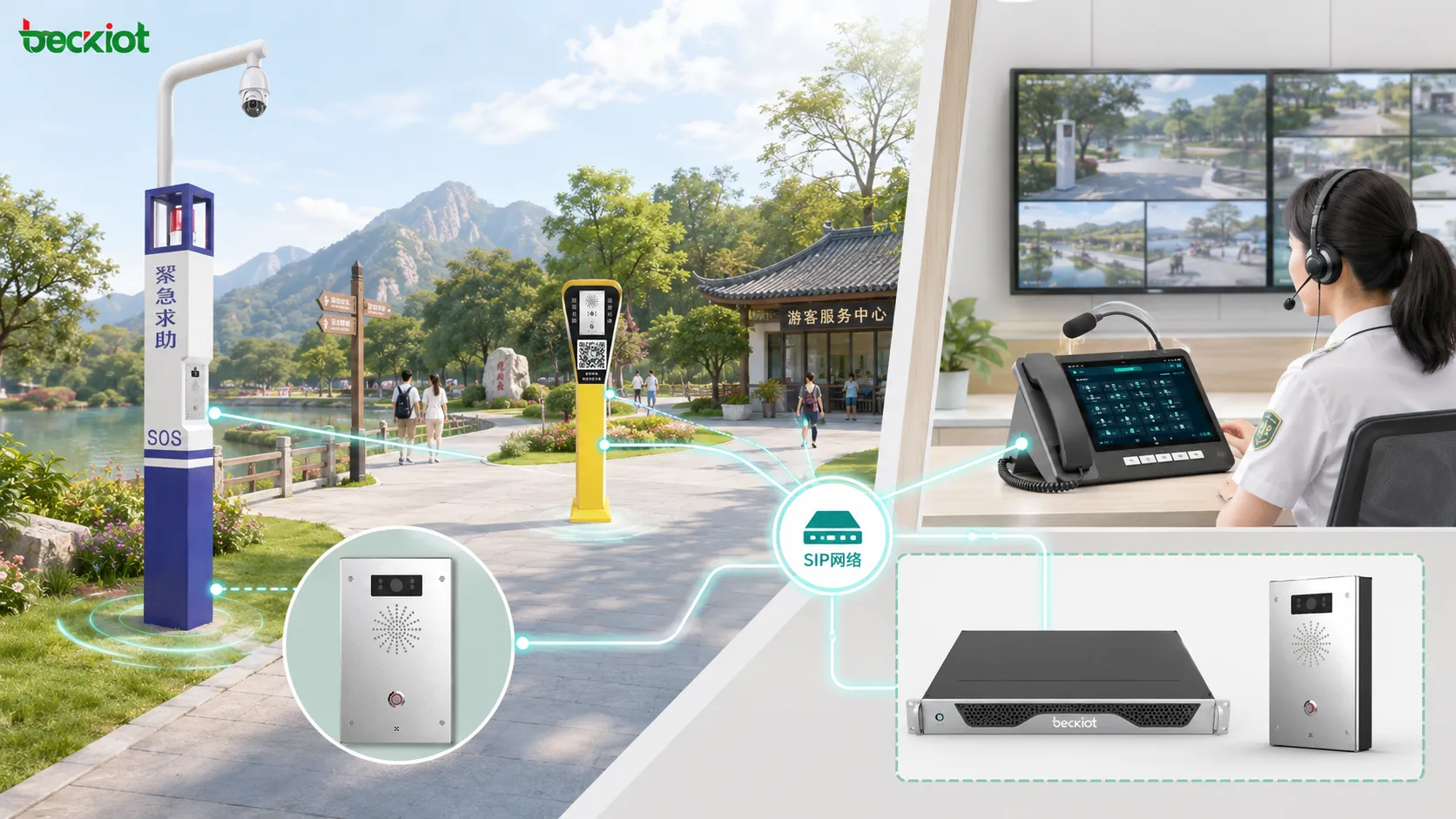
A typical scenic area intercom help system includes three main parts: help intercom terminals, an intercom server, and a dispatch console. The help intercom terminals are installed at service points, scenic paths, elevators, parking lots, emergency exits, and other locations where visitors may need assistance.
The intercom server is usually deployed in the equipment room or communication room. It manages SIP registration, extension numbers, call routing, call records, recording files, and basic device communication. Each intercom terminal and dispatch console is assigned a SIP account and password.
The dispatch console is placed in the duty room, security office, tourist service center, or operation control room. When a visitor presses the help button, the terminal can automatically call the predefined dispatch number. Staff can answer the call and speak with the visitor immediately.
This structure is easy to expand. A site can begin with several key help points and add more terminals later as visitor routes, service areas, or safety requirements change. Because the system is based on SIP networking, new terminals can usually be added by assigning accounts, configuring hotline rules, and connecting them to the existing network.
Related Product: dispatch console
How SIP Registration Makes the System Work
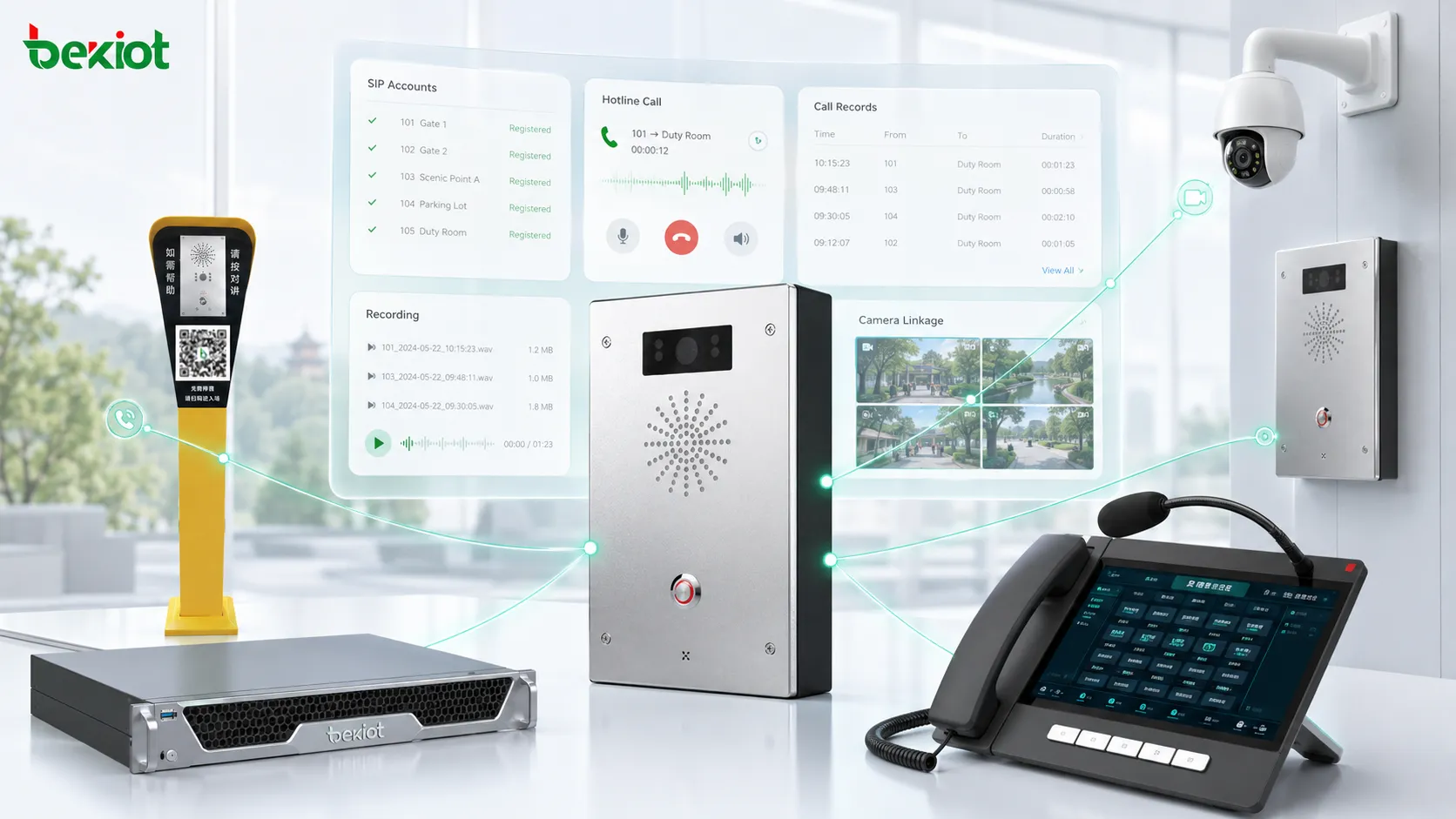
SIP registration is the basic step that allows all devices to communicate. The server provides the SIP service, while the dispatch console and intercom terminals register to the server with their own extension numbers, usernames, and passwords.
For example, an intercom terminal may be assigned an extension such as 6003, while the dispatch console may use a number such as 6010. These numbers are not fixed requirements; they are examples of how the system can organize calling rules. Once registration is successful, the terminal can call the dispatch console through the LAN.
The most important setting for a help terminal is the hotline number. After the hotline is configured, visitors do not need to dial any number. When the help button is pressed, the terminal automatically calls the duty room number. This creates a direct and predictable communication path.
Deployment at Visitor Service Points
The number of terminals depends on the site layout. A small scenic area may only need several help points near entrances, exits, and parking areas. A large tourist attraction may need terminals along trails, shuttle stops, ticket areas, restrooms, viewing platforms, and remote zones.
Installation should consider visibility, visitor flow, network access, weather protection, power supply, and maintenance convenience. Outdoor terminals should be placed where visitors can easily notice them, but they should also be protected from unnecessary damage, rain exposure, and accidental impact.
Most IP-based intercom terminals can use PoE power supply. If a PoE switch is available, the terminal can receive both network and power through one cable. If PoE is not available, an external power adapter can be used. During construction, the project team should plan cable routes, power points, network switches, and cabinet locations in advance.
Location planning should also follow real visitor behavior. Help points are usually more valuable near decision points, such as route intersections, cable car stations, lakeside areas, mountain paths, parking payment areas, unmanned entrances, and places where visitors may stay for a long time. Clear signage should be used so that the terminal can be recognized quickly in an emergency.
Related Product: sip intercom
Video Linkage Helps Staff See the Scene
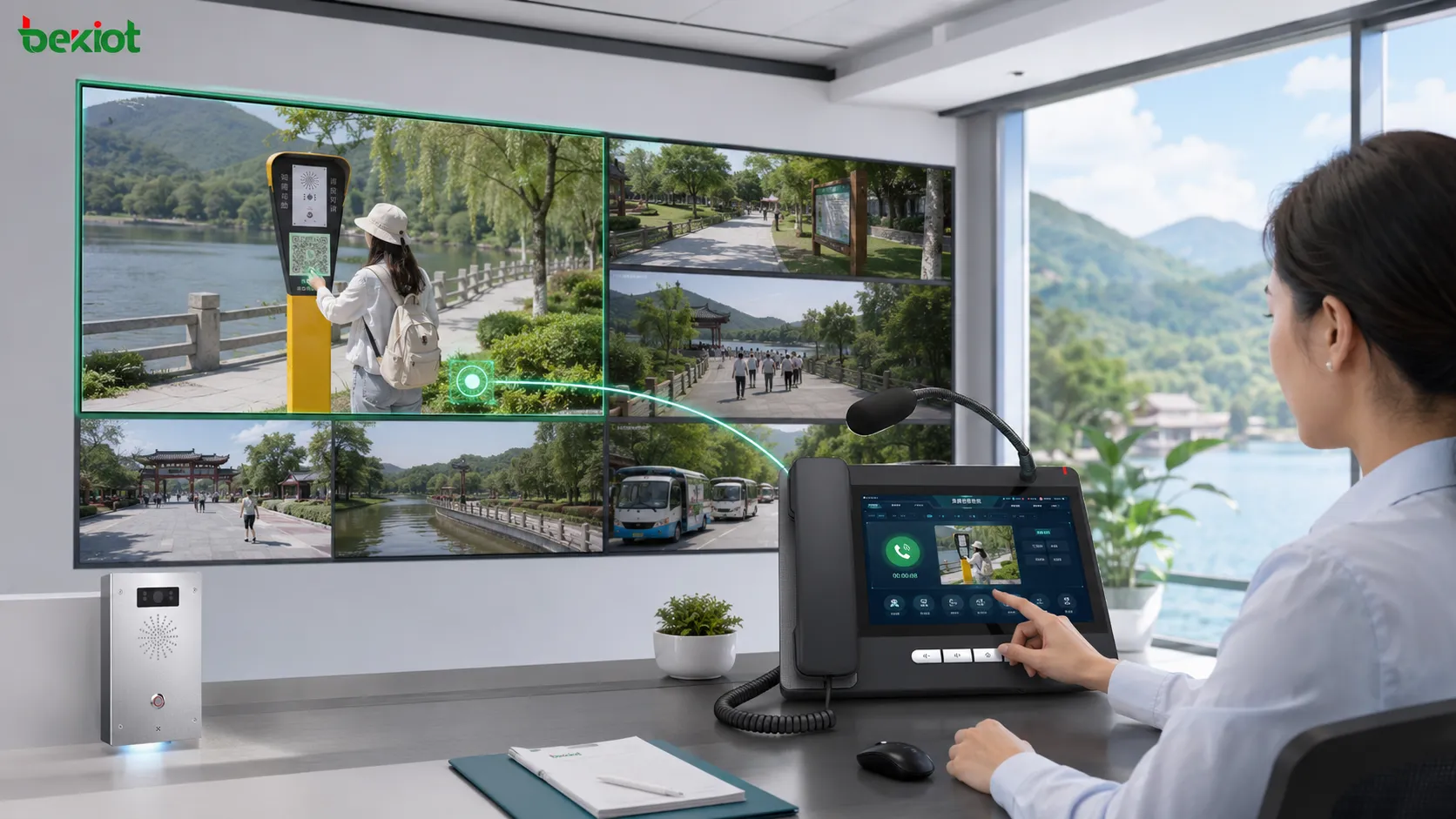
A scenic area help system can be upgraded with camera linkage. If a surveillance camera is installed near the help point, the terminal or server can be associated with the camera stream. When the help call is connected, the dispatch console can display the corresponding video feed.
This function helps staff understand the real situation more quickly. For example, they can check whether the visitor is injured, whether there is crowding, whether a child is waiting alone, or whether patrol staff need to be sent to the exact location.
Video linkage is especially useful for large sites, mountain areas, parking lots, unmanned entrances, riverfront spaces, and night operation zones. It turns a simple voice call into a more complete safety response process.
Duty Room Response Workflow
A clear response workflow is important after the system is installed. When a help call comes in, the duty room should identify the terminal location, answer the call quickly, confirm the visitor’s condition, check linked video if available, and decide whether patrol staff, medical support, or emergency services are needed.
The dispatch console can help staff handle multiple tasks in one place. Operators can answer the call, view the terminal name, check nearby video, contact patrol teams, and keep the communication record. This reduces confusion when several help requests occur at the same time.
Call Recording and Operation Records
In addition to real-time communication, the server can provide call records and recording functions. These records help managers review emergency events, check response efficiency, confirm communication details, and improve future service procedures.
For scenic area operation teams, this is useful for daily management. The records can show which help points are used frequently, what types of problems visitors report, and whether duty room staff respond in time. This information can support service improvement and safety planning.
Expanding from Help Calls to Unified Dispatch
A basic scenic area intercom help system can be deployed with only a few small devices, but it can also be expanded. The system may later integrate dispatch consoles, IP phones, video intercoms, public address, mobile patrol terminals, radio gateways, or public network push-to-talk services.
This means the one-button help system can become part of a wider dispatch and emergency communication platform. When a visitor asks for help, the duty room can not only answer the call, but also notify patrol staff, contact nearby service teams, broadcast instructions, or coordinate with external emergency units when needed.
Maintenance and Long-Term Management
After deployment, regular inspection is necessary. The operation team should check whether each terminal is online, whether SIP registration is normal, whether the help button works, whether audio is clear, and whether camera linkage opens the correct video feed.
Outdoor devices may face rain, dust, temperature changes, sunlight, and visitor contact. Regular cleaning, cable inspection, network testing, and recording storage checks help keep the system reliable. A simple maintenance schedule can prevent small faults from becoming service risks.
Where This Solution Is Most Useful
This solution is suitable for scenic areas, museums, railway stations, airports, parks, campuses, exhibition centers, stadiums, commercial complexes, industrial parks, and public service zones. Any site with distributed visitor areas and centralized duty management can benefit from this type of system.
It is especially useful in locations where mobile phone signal may be unstable, visitors may not know the local emergency number, or staff cannot be present at every point. A fixed SIP help terminal creates a stable communication entrance for public assistance.
Planning Points Before Implementation
Before deployment, the project team should confirm the number of help points, network coverage, power supply method, dispatch room location, SIP numbering plan, camera linkage requirements, and recording storage policy.
The system should also be tested before formal use. Testing should include SIP registration, hotline calling, audio clarity, video linkage, PoE stability, recording playback, and staff response process. If multiple terminals are installed, each terminal should be tested one by one.
Conclusion
A scenic area intercom help system uses SIP communication to connect visitors with duty room staff through one-button calling. Its core structure is simple: intercom terminals are installed at help points, the server manages registration and call routing, and the dispatch console handles communication in the duty room.
With PoE deployment, hotline calling, call recording, and camera linkage, the system can provide a practical safety communication solution for scenic areas and public venues. It helps visitors get assistance quickly and helps operation teams manage emergencies with clearer information and faster response.
FAQ
Can the system work without a public telephone line?
Yes. If all devices are connected within the same LAN and registered to the SIP server, internal help calls can work without a public telephone line.
Do visitors need to know the duty room number?
No. The terminal can be configured with a hotline number, so pressing the help button automatically calls the duty room.
Can the system support multiple help terminals?
Yes. Multiple terminals can be added by assigning different SIP accounts, locations, and hotline rules.
Is camera linkage required?
No. Voice help can work independently. Camera linkage is optional, but it improves situational awareness for staff.
What should be prepared before installation?
The project should prepare network access, power supply, terminal locations, SIP accounts, server address, dispatch number, and testing procedures.
Can this solution be expanded later?
Yes. It can be expanded with dispatch consoles, public address systems, patrol communication, radio gateways, and wider emergency response workflows.







