


In daily communication, people often lose time not because they lack a contact method, but because they do not know whether the target person, extension, device, or service position is actually reachable. Presence display reduces this uncertainty by turning hidden availability and activity states into visible guidance.
This article analyzes presence as a practical coordination function. It explains common status types, data sources, registration and call-state logic, usage in reception, contact centers, dispatch rooms, enterprise collaboration, endpoint management, security control, troubleshooting, and user instructions for making better call, message, transfer, and escalation decisions.
Why Availability Awareness Matters
Communication becomes inefficient when users do not know whether the target person or resource is reachable. A caller may dial someone who is already on a call. A receptionist may transfer a customer to an unavailable employee. A dispatcher may try to contact a field user who is offline. A support supervisor may not know which agents can take the next case. These small visibility gaps can create delays, repeated attempts, and caller frustration.
Presence indicators solve part of this problem by converting hidden communication state into visible information. The user does not need to guess whether a person is available. The system can show a status based on real-time activity or configured rules.
The value becomes stronger as the number of users grows. In a small team, people may know each other’s availability informally. In a large organization, multi-site operation, contact center, hospital, school, control room, or field service environment, visible status becomes an essential coordination tool.
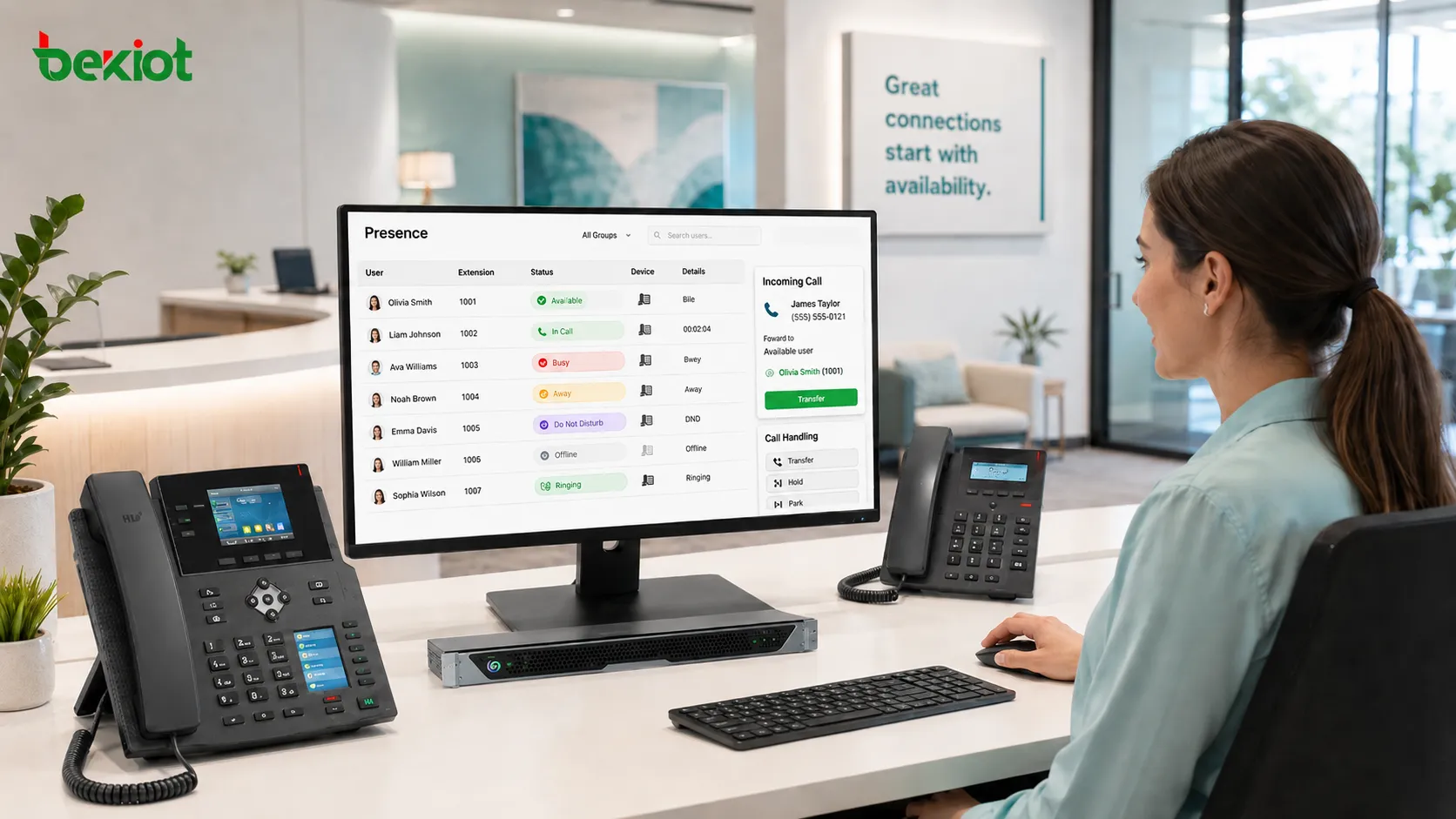
Common Status Types
Available
Available means the user, device, or extension can normally receive communication. This may indicate that the endpoint is registered, the user is logged in, no active call is blocking the line, and no do-not-disturb rule is enabled.
This state is often shown in green or with a check icon. Users usually interpret it as permission to call, transfer, or send an immediate message. However, availability does not always guarantee that the person will answer. It only means the system sees the resource as reachable according to current rules.
Busy
Busy means the user or line is already engaged. This may be caused by an active voice call, video meeting, calendar event, queue task, conference session, or manually selected status. In telephony systems, it may be connected directly to call state. In collaboration platforms, it may also be linked to calendar activity.
Busy status helps prevent interruptions. A user can choose to send a message instead of starting another call. A receptionist can avoid transferring an external caller to a person who is already occupied.
Away or Inactive
Away usually means the user has not interacted with the application for a certain period, has locked the device, or has manually selected an away state. It suggests that immediate response may be delayed.
This state is useful for internal coordination, but it should not be treated as a strict technical failure. A user may be away from a desktop softphone but still reachable through a mobile client, desk phone, or alternate route.
Do Not Disturb
Do-not-disturb status means the user does not want to receive ordinary interruptions. Calls may be rejected, forwarded, sent to voicemail, or handled according to policy. Messages may still be delivered silently depending on the system.
This status is important for focused work, meetings, after-hours protection, sensitive tasks, and operational roles where interruption control is necessary. Administrators should define whether urgent calls can bypass this state.
Offline or Unregistered
Offline means the user or endpoint is not reachable through the current communication system. For a device, it may mean the endpoint is powered off, disconnected, unregistered, or unable to maintain network connection. For a user, it may mean the user has logged out or is not active on any registered device.
Offline state helps callers avoid repeated failed attempts. It also helps administrators detect device, network, or registration problems.
Data Sources Behind the Indicator
Presence information can come from several sources. A phone system may use SIP registration and dialog state. A collaboration platform may use login status, activity detection, calendar schedule, or user selection. A contact center may use agent state such as ready, not ready, after-call work, break, training, or unavailable. A device management platform may use heartbeat signals or network reachability.
Combining multiple sources can improve accuracy, but it also creates complexity. If a user is in a calendar meeting but still answers calls, should the status be busy or available? If a desk phone is offline but the mobile app is online, should the user appear reachable? If an agent is logged in but not ready for queue calls, should ordinary users see that detail?
Good system design defines status priority clearly. Otherwise, users may see confusing or contradictory information.
Technical Logic in Voice Systems
Registration State
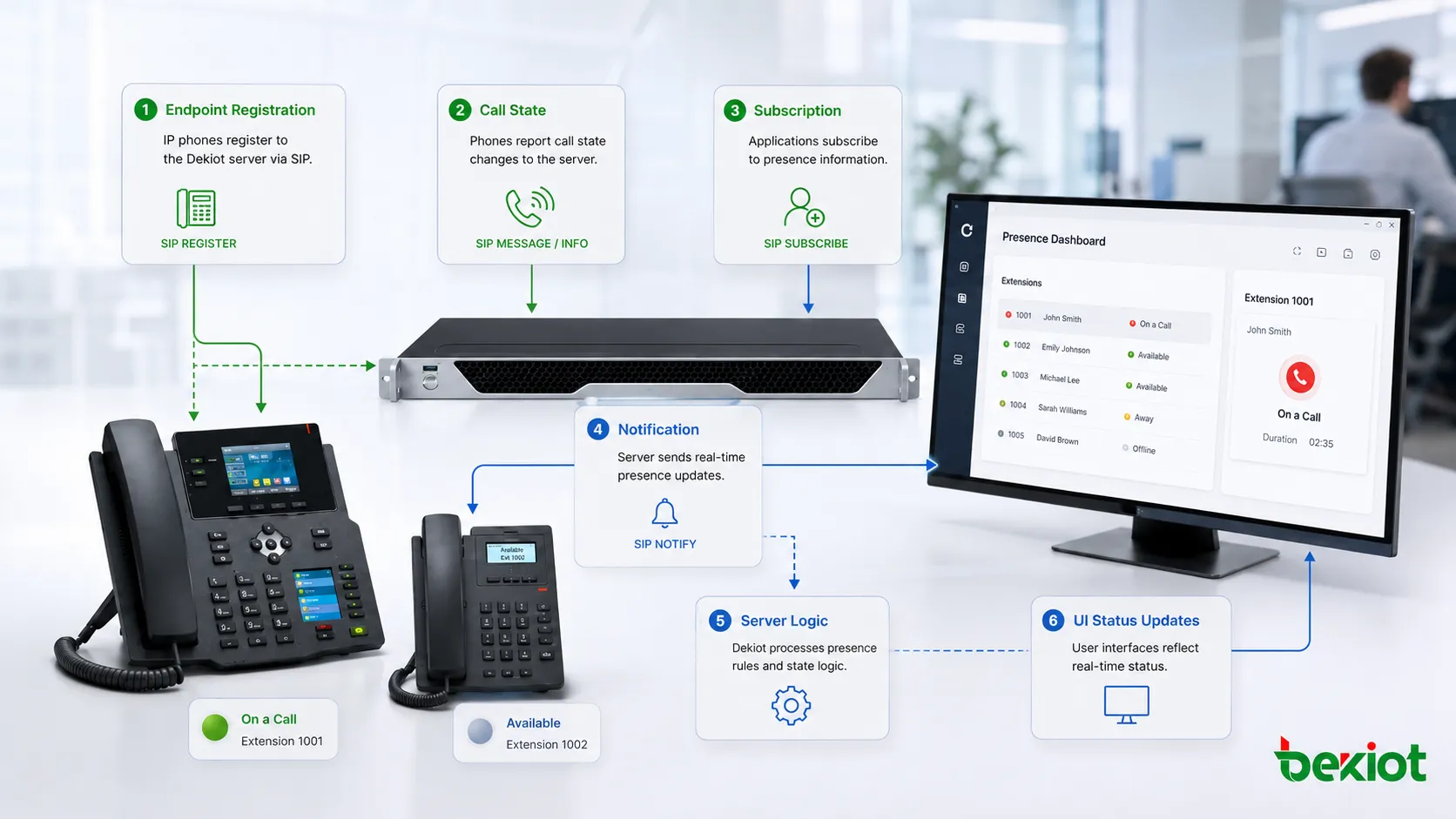
In IP telephony, a device or softphone often registers to a server. Registration tells the platform that the endpoint is reachable at a specific network address. If registration expires or fails, the system may mark the extension as offline or unavailable.
Registration-based status is useful for device reachability, but it does not fully describe human availability. A phone may be registered while the user is away from the desk.
Dialog and Call State
Call state shows whether an extension is idle, ringing, connected, on hold, or otherwise engaged. This information can support line monitoring, busy lamp fields, receptionist panels, and dispatch consoles.
When presence display uses call state, users can avoid calling or transferring to an extension that is already active. This improves call handling accuracy.
Subscription and Notification
Some systems use a subscribe-and-notify model. A client requests status updates for a user or extension, and the server sends notifications when the state changes. This avoids constant manual refresh and keeps the interface updated.
The benefit is real-time visibility. The challenge is scalability. If many users subscribe to many other users, the system must manage large numbers of status updates efficiently.
Functions in Daily Communication
The first function is reachability awareness. Users can see who is likely to answer before calling. This reduces unnecessary call attempts and helps people choose the best contact method.
The second function is routing support. Receptionists, operators, supervisors, and service teams can route calls based on current availability rather than static directory information.
The third function is interruption control. Busy, away, and do-not-disturb states help protect users from poorly timed calls. This is especially important in organizations where users receive many internal and external requests.
The fourth function is team coordination. In a shared work environment, visibility of availability helps teams know who can respond, who is occupied, and who may need backup.
The fifth function is service monitoring. Supervisors can watch the status of agents, lines, devices, or service groups and respond when too many resources become unavailable.
Usage in Reception and Transfer Scenarios
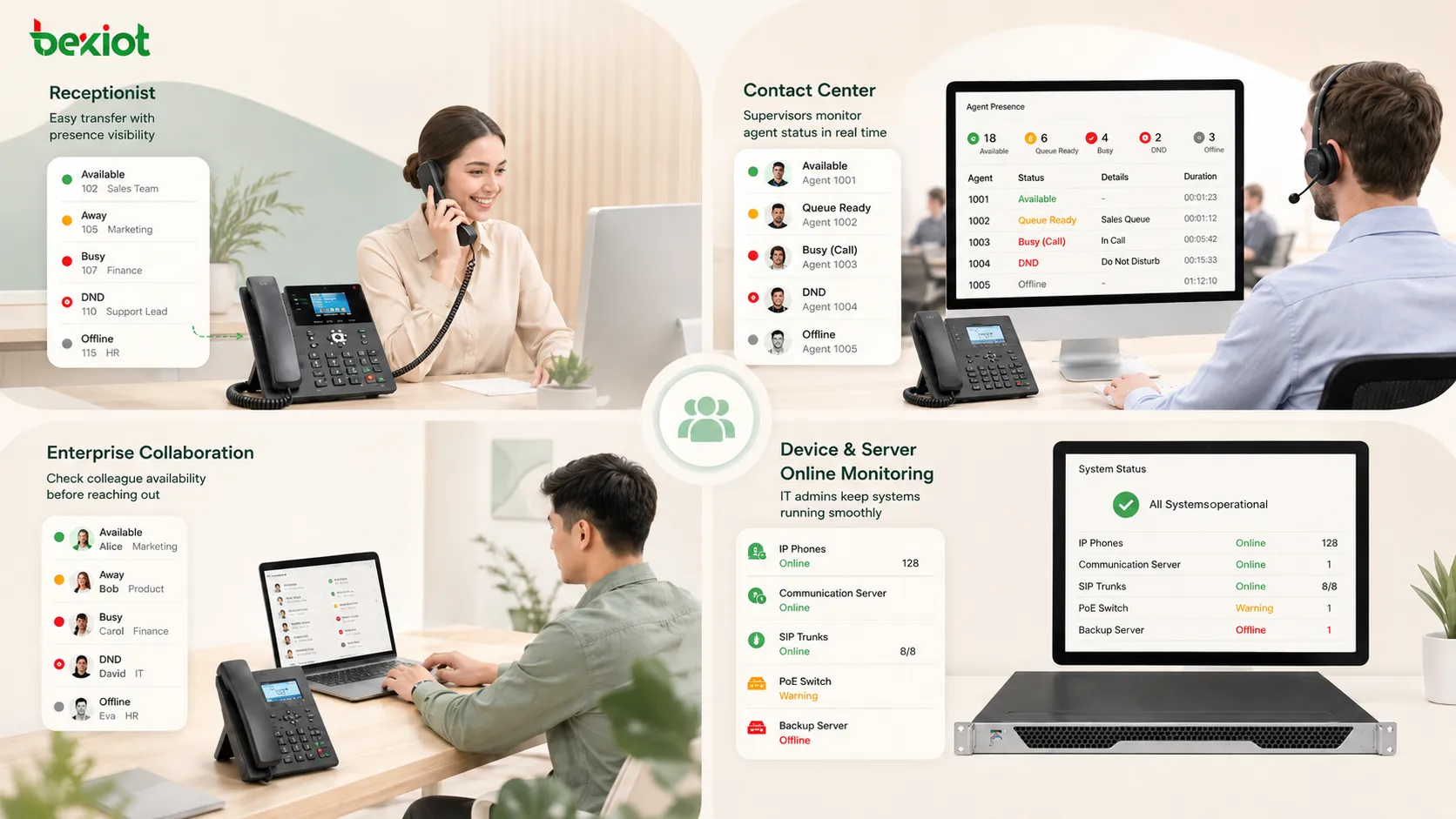
Reception teams often rely on status display before transferring calls. If the target person is busy or offline, the receptionist can avoid a failed transfer and offer alternatives such as voicemail, callback, another colleague, or message taking.
This improves caller experience because the caller is not sent to an unavailable destination. It also reduces the number of calls that bounce back or remain unanswered.
For better results, the status panel should be easy to read. Names, extensions, departments, status colors, and search functions should be clear. If the panel is cluttered, users may ignore it and return to guessing.
Usage in Contact Centers
Contact centers use availability state to manage agents and queues. An agent may be ready, ringing, talking, on hold, in after-call work, on break, in training, logged out, or unavailable. These states affect routing and reporting.
Supervisors use this information to balance workload. If too many agents are in after-call work, queue waiting time may increase. If many agents are not ready, service levels may drop. If one team is overloaded, calls may need to overflow to another group.
Presence display in contact centers is therefore not only a user convenience feature. It is a workforce management and service quality tool.
Usage in Dispatch and Operations Centers
Control rooms and dispatch environments use availability indicators for operators, radio channels, emergency lines, field teams, supervisors, and service positions. The display helps users know which resource is active, which channel is busy, and which operator can respond.
In emergency or time-sensitive operations, wrong assumptions can delay action. If an operator can see that a field contact is unavailable or that a channel is active, they can select a better route or avoid interrupting ongoing communication.
Some systems combine presence with alarms, maps, video, recordings, and incident records. This creates a more complete operational view.
Usage in Enterprise Collaboration
Enterprise collaboration tools use status indicators to support internal communication. Employees can see whether colleagues are available, in a meeting, presenting, away, offline, or using do-not-disturb. This helps decide whether to call, send a chat message, schedule a meeting, or wait.
Calendar integration is common in this environment. If a user has a meeting scheduled, the system may automatically show a busy state. Manual override may still be allowed because calendar data does not always reflect real availability.
Good collaboration design avoids overexposure. Users should not feel that every moment of inactivity is being judged. Presence should support communication efficiency, not create unnecessary monitoring pressure.
Usage in Device and Endpoint Management
Presence can also apply to devices. A desk phone, intercom terminal, gateway, camera, sensor, softphone, or service endpoint may show online, offline, registered, fault, busy, or maintenance status. This helps administrators find problems quickly.
Device-level presence is useful in distributed systems. If a remote terminal goes offline, the management team can identify the issue before users report failure. If many devices in the same area go offline at once, the cause may be network, power, or local infrastructure.
This type of display should be connected with alerting and logs. A visual indicator is helpful, but historical records are needed for troubleshooting.
Recommended User Instructions
Users should first understand what each status means in their specific platform. A green icon, red icon, yellow icon, gray icon, or phone symbol may have different meanings depending on the system. Training should define the local meaning clearly.
Before calling or transferring, users should check the visible state. If the target is available, a direct call may be appropriate. If the target is busy, a message or scheduled callback may be better. If the target is on do-not-disturb, only urgent or permitted calls should be attempted.
Users should update their own status when needed. Manual status is useful when the system cannot automatically detect real availability. For example, someone may set away during field work, busy during a meeting, or do-not-disturb during focused tasks.
Users should also avoid overtrusting the display. Presence is a decision aid, not an absolute guarantee. A person shown as available may still be unable to answer, and a person shown as away may still respond to urgent messages.
Configuration Guidance for Administrators
Administrators should define a standard status model. Too few states may be vague, while too many states may confuse users. The best model includes enough information for action but not unnecessary detail.
Status priority should be configured. For example, should do-not-disturb override calendar busy? Should an active call override manual available? Should offline device status override mobile app availability? These rules should be consistent.
Access permissions should also be controlled. Not every user needs to see every detail. A receptionist may need extension availability, while ordinary employees may only need basic availability. Supervisors may need agent state, but sensitive operational details may require restricted access.
For large systems, administrators should consider subscription limits, update frequency, server load, and network traffic. Real-time status is useful, but excessive update traffic can affect performance if poorly designed.
Design Principles
Clarity
The display should be easy to understand at a glance. Users should not need to open multiple screens to know whether a person is available or busy. Clear colors, labels, icons, and tooltips improve usability.
However, color alone should not be the only indicator. Accessibility should be considered for users who may have difficulty distinguishing colors.
Consistency
All clients and devices should use consistent meaning. If green means available on one interface but registered on another, users may misunderstand the state. Consistency is especially important when desk phones, softphones, mobile apps, and web dashboards are used together.
Documentation should define each state and the action users should take.
Timeliness
Status should update quickly enough to support real decisions. If a user finishes a call but remains shown as busy for several minutes, colleagues may avoid contacting them unnecessarily. If a disconnected endpoint still appears online, calls may fail.
Timeliness depends on signaling design, server update logic, endpoint behavior, network delay, and refresh intervals.
Privacy
Presence visibility should be balanced with privacy. It is useful to know whether someone is reachable, but overly detailed activity tracking can feel intrusive. Organizations should decide which status details are visible and to whom.
For example, showing “busy” may be enough for most users, while showing detailed meeting titles or exact device location may be unnecessary or inappropriate.
Common Problems and Causes
One common problem is stale status. A user may appear online after closing the app, or busy after ending a call. This can be caused by missed notifications, network interruption, client crash, server delay, or failed deregistration.
Another problem is conflicting status. The desk phone may be idle, the mobile client may be offline, and the calendar may show busy. Without priority rules, the final display may confuse users.
A third problem is missing status for some users. This may happen when subscriptions are not allowed, permissions are missing, the endpoint does not support status reporting, or the server has a configuration mismatch.
A fourth problem is excessive updates. In large deployments, frequent presence changes can create signaling load. System designers should optimize update intervals, subscription scope, and server capacity.
Troubleshooting Methods
Start by checking whether the user or device is actually registered, logged in, or connected. If the endpoint is offline, the presence result may be correct even if users expect otherwise.
Next, compare multiple clients. If one interface shows available and another shows busy, the issue may be client synchronization or server-side state priority.
Check recent call state. A stuck busy status may be caused by an unfinished call record, failed call release message, or application session error.
Review permissions. Some users may not be allowed to view detailed status information for others.
Finally, inspect logs and signaling traces when necessary. For SIP-based systems, registration, dialog state, SUBSCRIBE, NOTIFY, and endpoint events may provide useful clues. For collaboration systems, login session, calendar integration, and activity detection should be checked.
Security and Access Considerations
Presence information can reveal user activity, working patterns, device status, and availability. In some environments, this may be sensitive. For example, showing whether a supervisor, doctor, operator, security guard, or field worker is online may have operational implications.
Access should therefore be controlled. The system should define who can view presence information, how much detail they can see, whether history is stored, and whether status data can be exported.
Security also includes preventing false status manipulation. If an attacker can fake availability or hide offline devices, communication decisions may be affected. Endpoint authentication and secure signaling help reduce this risk.
Operational Value
The value of presence display can be measured through fewer failed transfers, shorter response time, lower repeated call attempts, better queue management, faster troubleshooting, improved team coordination, and more accurate resource selection.
In reception and service environments, it improves caller experience. In contact centers, it supports staffing and workload control. In dispatch rooms, it helps operators select the right channel or contact. In enterprise collaboration, it reduces unnecessary interruptions. In device management, it helps detect service problems earlier.
The feature becomes more valuable when it is connected with routing, call control, messaging, reporting, and escalation rules. A visible status is useful; a visible status that drives correct system behavior is even more useful.
Best Practices
Use a simple and consistent status set. Too many similar states can confuse users and reduce adoption.
Train users on what each state means and what action is recommended. Status display is only useful if users understand how to react.
Allow manual override where appropriate, but define rules so manual status does not create long-term misinformation.
Protect sensitive visibility. Not every user needs detailed activity information for every other user.
Monitor system health. If status updates become slow or inaccurate, users will stop trusting the display.
Future Development Direction
Presence display is evolving from simple online indicators toward context-aware availability. Future systems may combine call state, calendar, location, device activity, workload, queue role, working hours, meeting mode, and user preference into smarter availability logic.
Artificial intelligence may help predict the best contact method, suggest alternative recipients, identify overloaded teams, or recommend escalation paths. However, automation should remain transparent. Users need to understand why a status appears and how to correct it when it is wrong.
The long-term direction is not simply more status details. The real goal is better communication decisions with less manual guessing.
Presence display is valuable because it turns hidden availability and activity states into visible communication guidance that supports better calling, transfer, routing, monitoring, and collaboration decisions.
FAQ
Can presence display show incorrect status?
Yes. Network delay, missed updates, client crashes, conflicting data sources, calendar mismatch, or failed deregistration can cause inaccurate status.
Should users manually change their status?
Manual changes are useful when automatic detection cannot reflect real availability. However, users should remember to reset the status when the situation changes.
Is presence information private?
It can be. Availability data may reveal work patterns or operational roles, so organizations should control who can view detailed status information.
Why does someone appear busy after the call ended?
The system may not have received the final call release event, the client may be delayed, or the server may still hold an active dialog state.
Can presence display improve call routing?
Yes. Routing systems can use availability state to avoid unavailable users, select ready agents, or send calls to backup contacts when the primary person is busy.







