


An Analog Telephone Adapter, commonly called an ATA, is a device that connects traditional analog telephones, fax machines, door phones, alarm panels, modems, or legacy voice terminals to an IP-based communication network. It performs the conversion between analog telephone signals on one side and packet-based VoIP communication on the other side.
In a typical deployment, the analog device connects to an FXS port on the adapter. The ATA then registers to an IP PBX, hosted VoIP platform, SIP server, or service provider through Ethernet or broadband access. When a call is made, analog audio, dialed digits, ringing signals, and line states are translated into SIP signaling and RTP media streams.
Why This Device Still Matters in IP Networks
Many organizations have moved to SIP, cloud telephony, and IP PBX platforms, but not every endpoint is ready to become fully IP-based. Existing analog phones may still be used in guest rooms, elevators, warehouses, public areas, security rooms, workshops, service counters, and remote sites. Fax machines, alarm dialers, lift phones, and special-purpose terminals may also depend on analog interfaces.
The adapter provides a migration bridge. It allows legacy equipment to remain in service while the core communication network moves to IP. This avoids replacing every terminal at once and gives organizations more flexibility during phased upgrades.
Its architectural value comes from interface translation. It hides IP complexity from analog devices and hides analog line behavior from the VoIP platform. The analog device behaves as if it is connected to a telephone line, while the IP network sees a SIP endpoint or voice gateway.
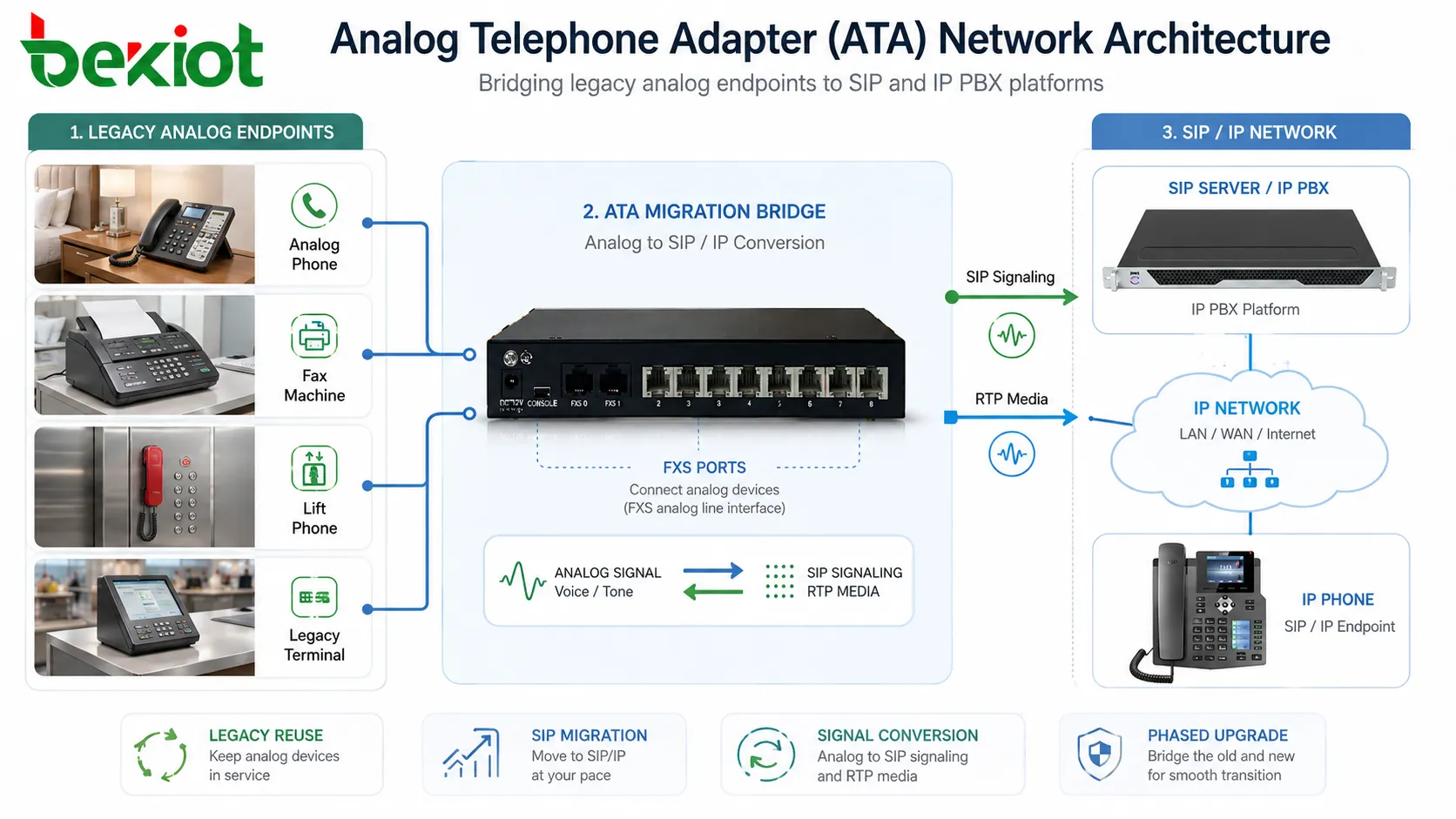
From Copper Loop to Packet Network
The analog side of the adapter behaves like a small telephone line provider. It supplies battery voltage, detects off-hook and on-hook state, generates ringing voltage, receives DTMF digits, provides dial tone, and carries voice-frequency audio to and from the connected device.
The IP side communicates over Ethernet or another packet network. It sends SIP messages for registration, call setup, call teardown, authentication, and feature control. It sends RTP packets for voice media after the call is established.
The adapter therefore sits at the boundary between two worlds. One world is based on electrical line conditions and audio tones. The other is based on IP addresses, UDP or TCP transport, SIP messages, codecs, jitter buffers, NAT traversal, and network quality.
Core Architectural Layers
| Layer | Main Function | Typical Design Concern |
|---|---|---|
| Analog Interface | Provides FXS line behavior for analog phones, fax machines, or terminals. | Impedance, ring voltage, loop current, caller ID, and DTMF detection. |
| Voice Processing | Converts analog audio into digital voice streams and applies codecs. | Codec selection, echo cancellation, gain control, packetization, and fax handling. |
| SIP Signaling | Registers the device and controls call setup, routing, and teardown. | Authentication, registrar address, dial plan, timers, and server failover. |
| IP Transport | Moves signaling and RTP packets across LAN, WAN, VPN, or internet access. | QoS, NAT traversal, firewall rules, VLANs, latency, jitter, and packet loss. |
| Management | Supports configuration, provisioning, monitoring, firmware updates, and logs. | Security, remote access, backup configuration, and large-scale deployment control. |
Analog Port Behavior
FXS Interface
Most adapters provide FXS ports. An FXS port connects to an analog telephone or similar terminal and supplies the line conditions that the device expects. It provides dial tone, ringing voltage, loop current, and on-hook or off-hook detection.
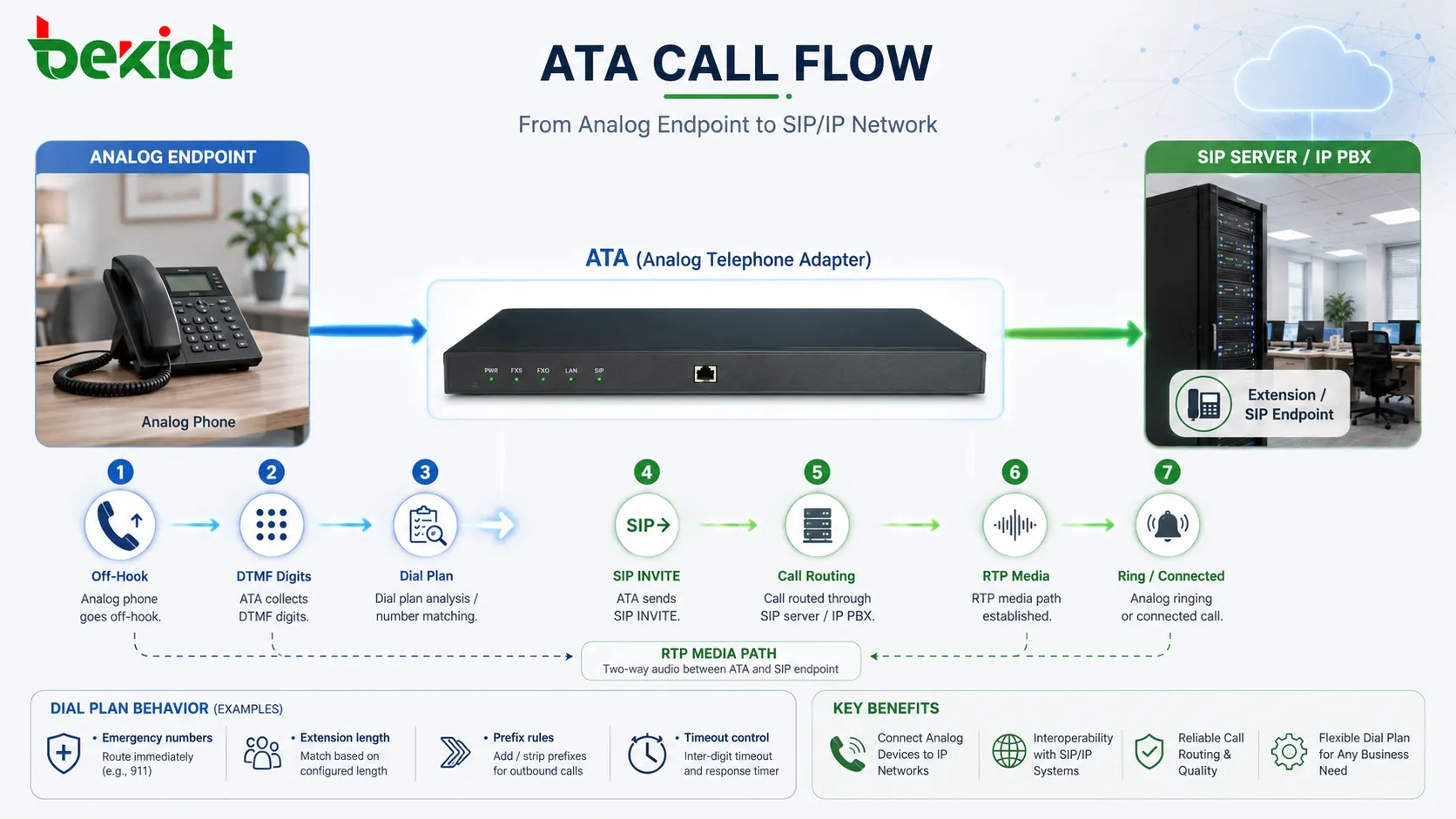
When a user lifts the handset, the FXS port detects the off-hook condition. The adapter then accepts dialed digits and prepares a SIP call according to its dial plan.
Dial Tone and Ringing
The adapter generates tones locally. Dial tone, ringback tone, busy tone, reorder tone, and call waiting tone may all be produced by the device depending on configuration and regional settings.
Ringing is also generated at the analog port. The adapter must provide enough ringing voltage and cadence for the connected device. This can be important when connecting old phones, bell-based devices, or multiple analog loads.
Caller ID and Line Signaling
Analog caller ID may be delivered using FSK or DTMF formats depending on the region and endpoint type. The adapter receives caller information from SIP signaling and converts it into an analog caller ID signal for the connected device.
Line reversal, polarity behavior, hook flash, message waiting indication, and other analog features may also be supported depending on the model and configuration.
Digital Voice Processing
After analog audio enters the device, it is sampled, encoded, packetized, and transmitted as RTP media. The reverse process happens for incoming audio. The adapter receives RTP packets, decodes them, converts them to analog audio, and sends the signal to the phone port.
Codec selection affects bandwidth, quality, and compatibility. Common voice codecs may include G.711, G.729, G.722, or other options depending on the platform. G.711 is often preferred for fax and legacy modem-like applications because it preserves more of the voice-band signal.
Echo cancellation is also important. Analog interfaces can create echo because of hybrid circuits, impedance mismatch, cable conditions, and endpoint design. A well-configured adapter reduces echo before it becomes noticeable to the far-end user.
SIP Registration and Call Control
Account Registration
The adapter usually registers one or more SIP accounts to a registrar server. Each analog port may map to a separate extension, user account, or service number. Some devices support multiple profiles so different ports can connect to different SIP platforms.
Registration allows the IP PBX or service provider to know where the adapter can currently be reached. If registration fails, inbound calls may not reach the analog endpoint.
Outbound Call Setup
When the user dials, the adapter collects digits according to its dial plan. Once the number matches a rule or a timeout occurs, the device sends a SIP INVITE toward the configured proxy or server.
The SIP server then routes the call to another extension, trunk, PSTN gateway, voicemail system, contact center, or external destination. During this process, the analog user only experiences ordinary dialing behavior.
Inbound Call Delivery
When an incoming SIP call reaches the adapter, the device decides which analog port should ring. It generates ring voltage on that port and may send analog caller ID before ringing, depending on regional timing rules.
After the user answers, the adapter sends the proper SIP response and begins RTP media exchange.
Dial Plan and Number Handling
The dial plan is a critical part of adapter behavior. It defines which digit patterns are valid, how long the device waits for more digits, whether prefixes should be added or removed, and which calls should be routed immediately.
A poor dial plan can cause slow calling, wrong routing, failed emergency numbers, or user confusion. For example, if the adapter waits too long before sending a call, users may think the device is not working. If it sends digits too early, incomplete numbers may be routed incorrectly.
Dial plans should reflect local numbering rules, internal extension length, emergency numbers, trunk access prefixes, international dialing rules, and service codes such as voicemail access or call pickup.
Network Placement Options
Local LAN Deployment
In a local office or facility, the adapter may connect to the same LAN as the IP PBX or voice server. This is usually the simplest topology because latency is low, NAT may not be involved, and QoS can be managed inside the local network.
Voice VLANs are often used to separate voice traffic from ordinary data traffic. This can improve manageability and reduce the risk of congestion affecting call quality.
Remote Site Connection
Remote branches may connect adapters to a central SIP platform over VPN, private WAN, MPLS, SD-WAN, or secure internet access. This allows analog phones or devices at the branch to use the central call system.
Remote deployment requires attention to bandwidth, latency, packet loss, NAT traversal, failover routes, and local survivability if the WAN link fails.
Hosted VoIP Access
Small offices and distributed sites may connect directly to a hosted VoIP provider. In this model, the adapter registers over the internet to the provider platform.
Security and stability become especially important. Strong passwords, TLS where supported, firewall rules, firmware updates, and provider-approved configuration are recommended.
Gateway and PBX Hybrid
Some environments use an adapter together with analog gateways, IP PBX servers, SBCs, and PSTN trunks. The adapter may serve individual analog endpoints, while larger gateways handle groups of lines or trunks.
This hybrid architecture is common during migration, where some services remain analog while the core call routing moves to SIP.
Quality of Service and Voice Stability
Voice traffic is sensitive to delay, jitter, and packet loss. The adapter may support DSCP marking, VLAN tagging, jitter buffer adjustment, RTP port range configuration, and codec selection to improve call stability.
QoS must also be supported by switches, routers, firewalls, and WAN equipment. Marking packets on the adapter is useful only if the network honors those markings.
Packetization time affects the balance between bandwidth and latency. Larger packets reduce overhead but may increase delay and impact perceived quality if packets are lost. Smaller packets may improve responsiveness but use more bandwidth.
NAT, Firewall, and SIP Traversal
Adapters often operate behind routers or firewalls. SIP signaling may contain private IP addresses that are not reachable from the public network. RTP media may fail even when registration appears successful.
Common solutions include NAT keepalive, STUN, outbound proxy, SBC, VPN, static port mapping, and provider-side NAT handling. The best approach depends on whether the platform is local, hosted, or across a managed WAN.
Firewall rules should allow the required SIP signaling and RTP media ports. Randomly opening broad port ranges can create security risk, while overly strict rules can block calls or one-way audio.
Fax, Alarm, and Legacy Device Support
Fax machines and alarm panels are more sensitive than ordinary voice calls. They may rely on tones, timing, modem negotiation, or line characteristics that do not always survive packet networks well.
T.38 fax relay can improve fax transmission when supported by both the adapter and service platform. When T.38 is not available, G.711 pass-through may be used, but network quality must be stable.
Alarm dialers, elevator phones, POS terminals, and modem-based devices should be tested carefully. Some may work reliably, while others may require dedicated analog lines, specialized gateways, or updated communication methods.
An ATA can extend the life of analog equipment, but it does not make every legacy device behave perfectly over IP. The more timing-sensitive the device is, the more testing is required.
Provisioning and Remote Management
Large deployments require repeatable configuration. Manual setup may work for a few units, but it becomes inefficient when hundreds of adapters are used across hotels, campuses, branches, elevators, or service facilities.
Provisioning can use configuration files, DHCP options, HTTPS downloads, vendor management platforms, TR-069, or centralized templates depending on device capability. This helps standardize SIP accounts, dial plans, codecs, regional tones, firmware versions, and security settings.
Remote management should be secured. Default passwords, exposed web interfaces, outdated firmware, and unsecured provisioning URLs can create serious risk.
Security Architecture
SIP Account Protection
SIP credentials should be unique, strong, and protected. If an attacker gains access to an adapter account, they may register unauthorized endpoints, place fraudulent calls, or disrupt service.
Rate limiting, IP restrictions, account lockout, registration monitoring, and strong provisioning controls can reduce risk.
Transport Security
TLS can protect SIP signaling where supported. SRTP can protect voice media where supported by both sides. These features are useful when traffic crosses untrusted networks.
Encryption should be planned together with certificate management, endpoint compatibility, and troubleshooting procedures.
Management Access Control
The management interface should not be exposed unnecessarily to the public internet. Access should be limited by network policy, VPN, strong authentication, and role-based administration where available.
Configuration backups should also be protected because they may contain SIP account information or network details.
Applications in Real Deployments
Hotels and Guest Rooms
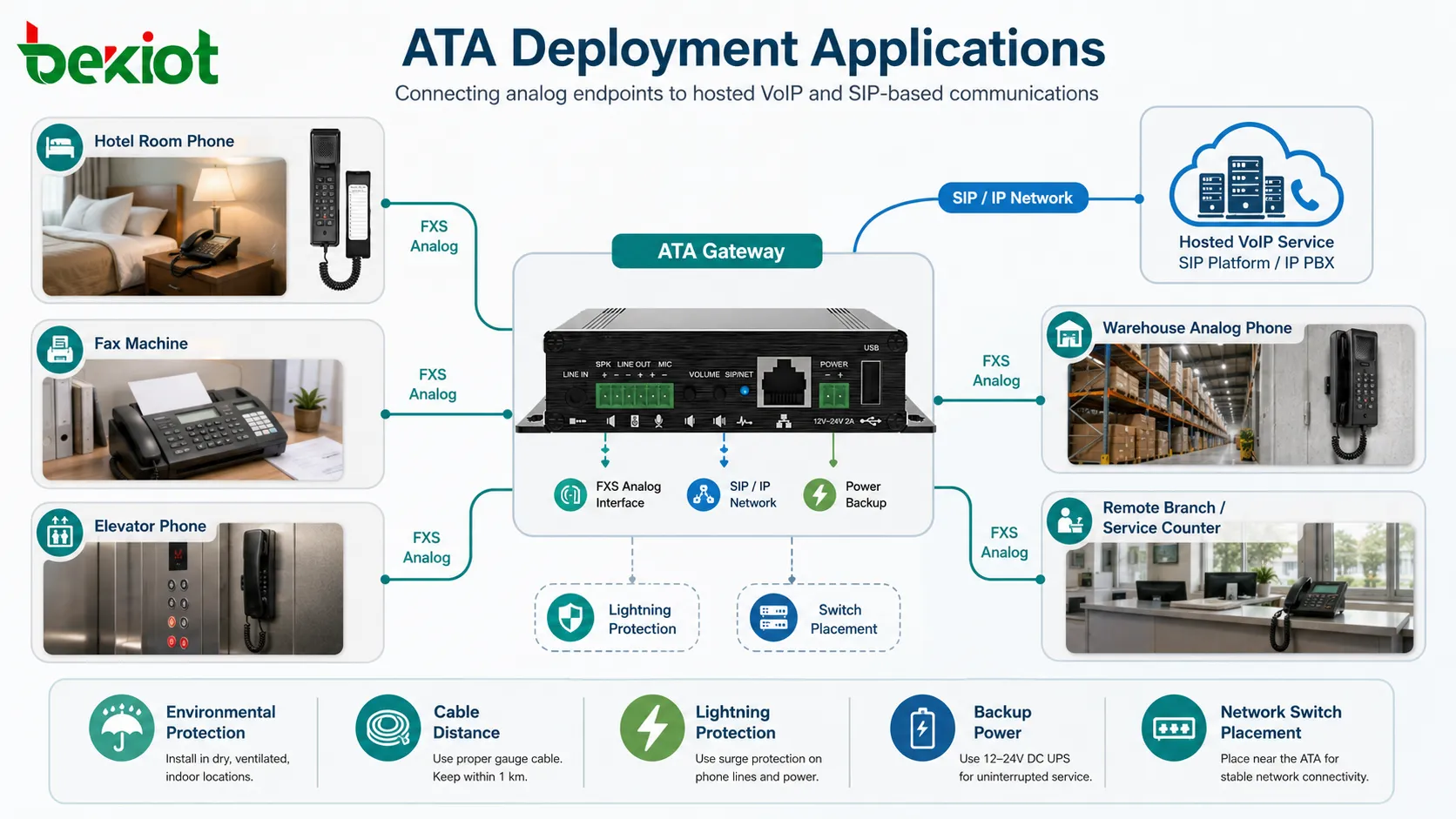
Hotels often use adapters to connect analog guest room phones to IP-based hotel PBX systems. This allows existing room phones to remain in use while the core telephony platform is modernized.
Important considerations include message waiting indication, front desk dialing, emergency calls, room number mapping, wake-up call integration, and maintenance access.
Elevator and Emergency Lines
Elevator phones and service help phones may connect through adapters when the building communication system is IP-based. These lines require reliable power, clear location identification, and regular functional testing.
Emergency-related use should be designed according to local requirements and should not rely on unstable broadband paths without backup planning.
Fax and Office Legacy Devices
Many offices still use fax machines, analog conference phones, cordless analog phones, or legacy devices. An adapter can connect these devices to a modern SIP platform without replacing them immediately.
Fax use should be tested with real destinations because compatibility varies by codec, network quality, provider support, and T.38 behavior.
Warehouses and Industrial Support Areas
Analog phones may remain useful in warehouses, guard rooms, maintenance shops, loading areas, and utility rooms. Adapters allow these endpoints to connect to the same VoIP system used by office phones.
Environmental protection, cable distance, lightning protection, power backup, and network switch placement should be considered in these areas.
Operational Troubleshooting
No Registration
If the adapter does not register, check SIP server address, username, password, realm, DNS, network gateway, VLAN, firewall, transport protocol, and account status.
Packet capture or SIP logs can quickly show whether the device is sending REGISTER requests and what response it receives.
One-Way Audio
One-way audio often points to RTP path problems. NAT, firewall rules, wrong RTP port ranges, private IP addresses in SIP messages, or blocked UDP traffic are common causes.
Testing on the same LAN can help separate device configuration problems from WAN or firewall problems.
No Ringing on Analog Phone
If inbound calls arrive but the phone does not ring, check ring voltage capability, REN load, port mapping, caller ID timing, cable condition, analog phone compatibility, and whether the correct port is being called.
Old bell-based phones may require more ringing power than modern electronic phones.
Poor Voice Quality
Poor quality may be caused by packet loss, jitter, weak bandwidth, echo, wrong codec, gain mismatch, acoustic feedback, or analog wiring issues.
Check both sides of the adapter. A network issue and an analog line issue can produce similar user complaints.
Fax Failure
Fax problems may come from disabled T.38, incompatible providers, packet loss, echo cancellation settings, wrong codec, jitter, or excessive latency.
Short test faxes may succeed while long documents fail. Testing should include realistic document length and multiple destination types.
Selection and Design Checklist
Start with the number and type of analog ports required. A single desk phone, a bank of guest room phones, a fax line, and an elevator phone may all require different port counts and features.
Verify compatibility with the target SIP platform. Check registration method, codec support, T.38, caller ID format, dial plan behavior, TLS, SRTP, provisioning method, and failover support.
Review power and network availability. Some adapters are powered by local adapters, while others may support PoE depending on model. Critical endpoints may need UPS or backup power.
Plan the analog wiring. Cable length, REN load, noise, grounding, surge exposure, and cross-connection quality can affect performance.
Document every port. Each analog line should have a clear extension number, physical location, connected device type, SIP account, fallback route, and maintenance owner.
The best ATA architecture is not only about connecting an old phone to VoIP. It is about preserving expected analog behavior while meeting the reliability, security, and manageability requirements of an IP voice network.
FAQ
Can an ATA connect a rotary phone?
Some adapters may support pulse dialing, but many support only DTMF dialing. Rotary phone compatibility should be verified before deployment.
How many analog devices can connect to one port?
It depends on the port’s ringing capacity and the total REN load of the connected devices. Too many devices on one port may prevent proper ringing.
Can emergency calls be routed through an adapter?
They can, but emergency routing must be planned carefully. Location information, backup power, network reliability, and local regulations should be reviewed.
Why does an analog phone work for calls but not show caller ID?
The caller ID format, regional setting, timing before ringing, phone compatibility, or SIP caller information mapping may be incorrect.
Should adapters be placed near phones or near network switches?
Place them where both analog cable quality and network access are practical. Long analog runs may pick up noise, while poor network placement may create packet or power issues.







