


Intercom, paging, and PA systems are often mentioned together in building communication, industrial safety, public security, transportation, healthcare, education, and emergency response projects. They all transmit voice, but they are not the same type of system. Each one has a different communication direction, coverage model, device structure, and operational purpose.
For project owners, system integrators, consultants, and facility managers, understanding the difference is important before selecting equipment or designing a communication network. Choosing the wrong system may result in poor coverage, unclear announcements, slow emergency response, duplicate investment, or isolated systems that cannot work together.
This article explains the differences between intercom, paging, and PA systems, compares their typical applications, and provides a practical selection guide for commercial buildings, campuses, factories, tunnels, transportation sites, and other mission-critical environments.
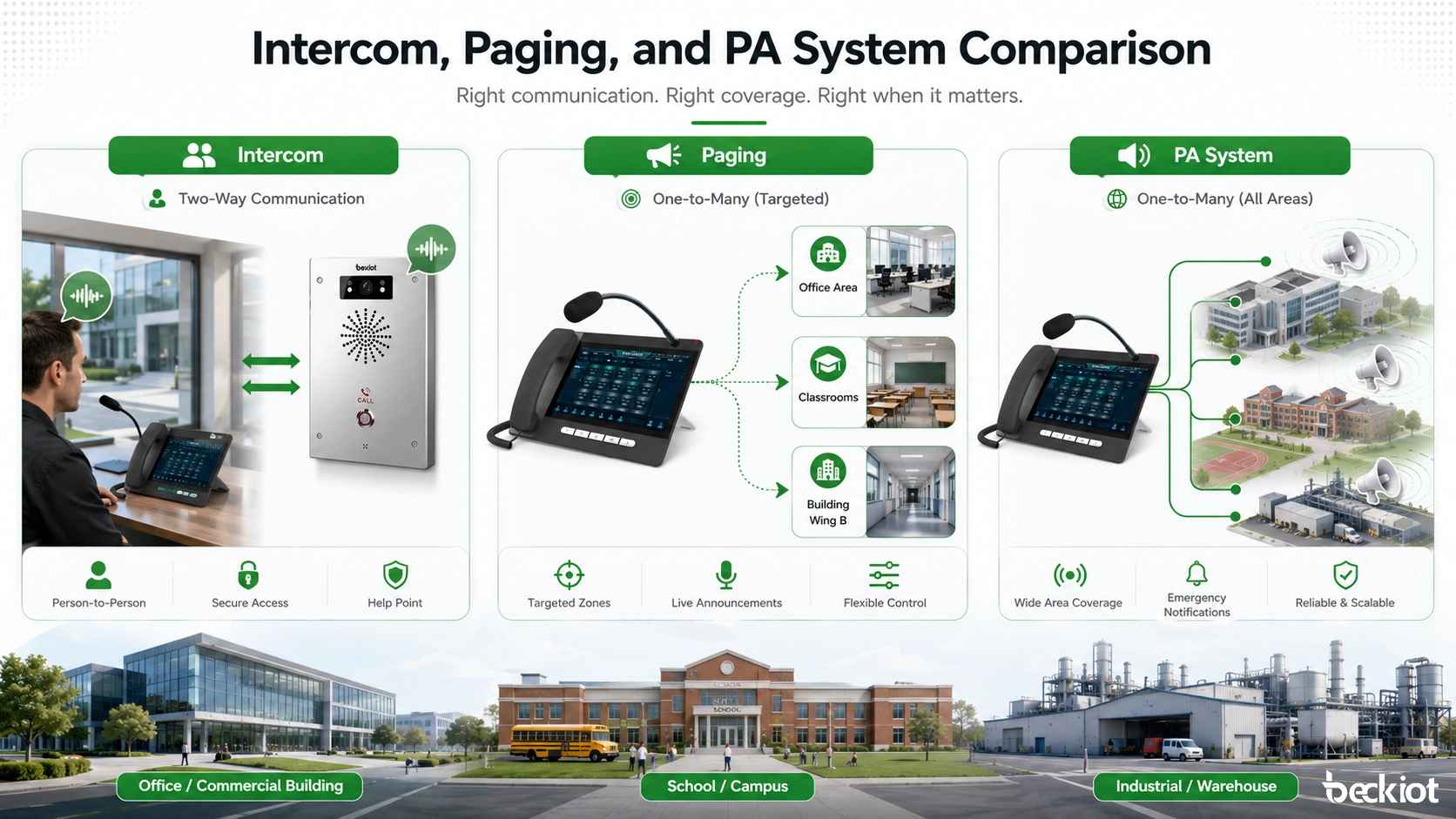
What Is an Intercom System?
Two-Way Communication for Direct Conversation
An intercom system is mainly used for two-way voice communication. It allows one person to speak with another person, a control room, a security desk, a nurse station, a gatehouse, or an emergency response center. Unlike a simple loudspeaker system, an intercom supports conversation, confirmation, and real-time interaction.
Traditional intercom systems were often based on analog wiring and dedicated stations. Modern IP intercom systems can use Ethernet networks, SIP protocol, PoE power supply, video cameras, call buttons, access control interfaces, and software dispatch platforms. This makes them suitable for both daily service communication and emergency help points.
In industrial and public safety environments, intercom devices may be designed as vandal-resistant phones, weatherproof telephones, emergency call stations, clean room SIP phones, or explosion-proof communication terminals. These devices are used where reliable voice communication must remain available under harsh conditions.
Typical Intercom Applications
Intercom systems are commonly used at entrances, gates, parking lots, elevators, clean rooms, tunnels, railway platforms, industrial workshops, hospitals, schools, and service counters. Users press a call button or lift a handset to speak with an operator, receptionist, guard, nurse, dispatcher, or control center.
In security projects, intercom systems are often connected with access control and CCTV. When a visitor calls from an entrance station, the operator can speak with the visitor, view the camera feed, and remotely open the door if permitted. In emergency projects, an intercom call can trigger a dispatch workflow, record the call, display the call location, and notify related staff.
What Is a Paging System?
One-Way Announcements to Groups or Zones
A paging system is mainly used for one-way voice announcements. Instead of creating a conversation between two people, paging allows an operator to broadcast a message to a selected group, zone, floor, department, building, or outdoor area. The message may be live speech, a pre-recorded announcement, a tone, or an alarm notification.
Paging systems are useful when information must reach many people quickly. For example, a factory supervisor may broadcast a shift change notice to a production line, a school administrator may make a campus announcement, or a control room operator may send safety instructions to a specific zone during an incident.
Modern IP paging systems can connect to SIP servers, IP PBX platforms, dispatch consoles, paging gateways, horn speakers, ceiling speakers, wall speakers, SIP speakers, visual alert devices, and emergency notification platforms. This allows paging to become part of a broader communication and safety system instead of being a standalone audio network.
Typical Paging Applications
Paging is widely used in factories, warehouses, schools, hospitals, office buildings, shopping centers, logistics parks, transportation hubs, public facilities, and industrial plants. It is suitable for routine announcements, operational instructions, safety reminders, visitor notifications, production coordination, and urgent alerts.
In noisy or wide-area environments, paging systems may use high-power horn speakers, column speakers, strobe lights, or visual displays to improve message delivery. In facilities with multiple departments or buildings, zone paging helps operators send messages only to the areas that need them, reducing disturbance and improving operational efficiency.
What Is a PA System?
Public Address for Large-Area Audio Distribution
A PA system, or public address system, is designed to amplify and distribute sound across a larger area. It may include microphones, amplifiers, speakers, audio controllers, mixers, paging consoles, network audio endpoints, digital signal processors, emergency panels, and system management software.
Compared with a paging system, a PA system is usually broader in scope. Paging is often one function within a PA system, while the PA system may also support background music, public announcements, emergency voice alarm, zone control, priority management, scheduled broadcasts, and integration with fire alarm or building management systems.
In many modern projects, the PA system is no longer just a microphone and speaker network. It can be an IP-based public address and emergency broadcasting platform that connects with security systems, control rooms, dispatch platforms, CCTV, access control, sensors, emergency buttons, and mass notification workflows.
Typical PA System Applications
PA systems are widely used in airports, railway stations, metro stations, campuses, hospitals, government buildings, factories, tunnels, ports, shopping malls, stadiums, hotels, and public venues. Their main purpose is to ensure that voice messages can be heard clearly across large indoor and outdoor areas.
In emergency situations, a PA system can broadcast evacuation instructions, safety alerts, warning tones, multilingual messages, or incident-specific guidance. When designed correctly, it helps people understand what is happening, where to go, and what action to take, especially in large or complex facilities.
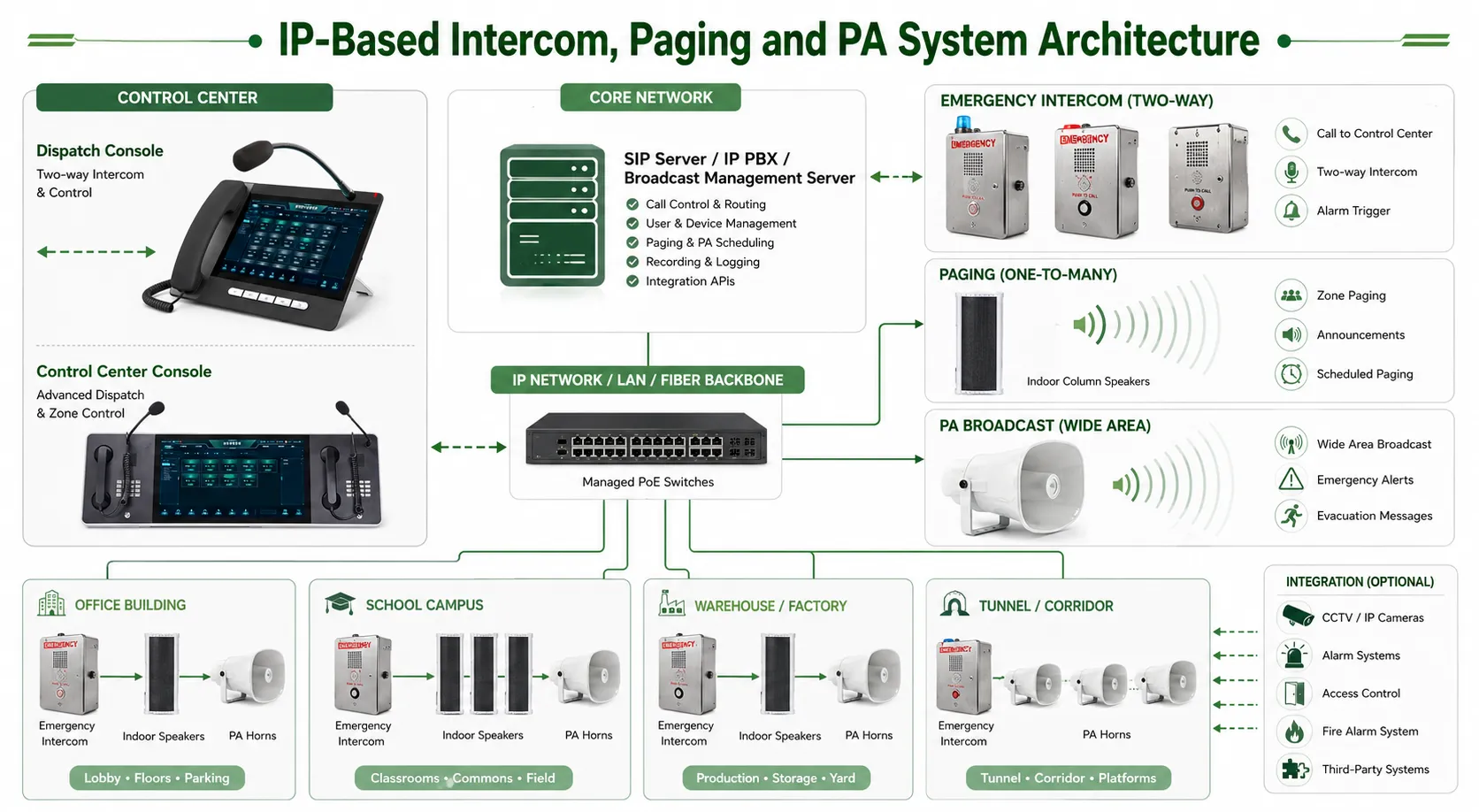
Intercom vs Paging vs PA System: Key Differences
Communication Direction
The most important difference is communication direction. An intercom system is mainly two-way, so both sides can speak and listen. A paging system is mainly one-way, so one operator sends a message to many listeners. A PA system is also mainly one-way, but it is usually designed for larger coverage, stronger amplification, and more complex audio management.
This difference directly affects system design. If users must ask questions, confirm information, request help, or speak with a control room, an intercom is required. If the goal is to broadcast a message quickly to many people, paging or PA is more suitable.
Coverage and Target Audience
Intercom systems usually focus on specific communication points, such as a door, room, machine area, emergency station, platform, gate, or help point. Paging systems focus on selected groups or zones, such as a workshop, corridor, floor, warehouse area, or department. PA systems focus on larger spaces, such as an entire building, campus, station, factory, tunnel, or public venue.
In simple terms, intercom answers the question “Who needs to talk with whom?” Paging answers “Which group needs to hear this message?” PA answers “How can the whole area receive clear voice announcements?”
System Components
An intercom system usually includes intercom stations, call buttons, handsets, microphones, speakers, cameras, door release relays, SIP phones, control room terminals, and management software. A paging system usually includes paging microphones, paging adapters, SIP speakers, horn speakers, amplifiers, zone controllers, and announcement sources.
A PA system may include many of the above components, but it usually adds stronger audio distribution capability, amplifiers, speaker lines, rack equipment, emergency control units, audio matrices, priority control, backup power, and monitoring functions. In IP-based projects, these systems can share the same network and SIP communication platform.
Comparison Table
| Item | Intercom System | Paging System | PA System |
|---|---|---|---|
| Main Purpose | Direct two-way communication | One-way announcement to groups or zones | Large-area audio broadcasting and public address |
| Communication Mode | Point-to-point, point-to-control room, or group call | One-to-many announcement | One-to-many or zone-based audio distribution |
| User Interaction | Users can speak and listen | Listeners usually cannot reply | Listeners usually cannot reply |
| Typical Devices | Intercom stations, SIP phones, emergency phones, door phones | Paging microphones, SIP speakers, horn speakers, paging gateways | Microphones, amplifiers, speakers, audio controllers, emergency panels |
| Coverage | Specific points or locations | Selected groups, floors, zones, or departments | Buildings, campuses, plants, stations, tunnels, and public areas |
| Best Use | Emergency calls, entrance communication, service assistance, access control | Routine announcements, zone notification, operational paging | Public announcements, emergency voice alarm, wide-area broadcasting |
| Integration Potential | Can integrate with SIP, CCTV, access control, and dispatch platforms | Can integrate with SIP, IP PBX, alarm systems, and notification software | Can integrate with fire alarm, BMS, CCTV, security, and emergency command systems |
When Should You Choose an Intercom System?
Choose Intercom for Conversation and Confirmation
You should choose an intercom system when people need to communicate directly. This is especially important when the message is not just an announcement but a request, report, confirmation, or emergency call. Intercom allows the operator to understand the situation, ask follow-up questions, and provide instructions in real time.
For example, a tunnel emergency telephone allows a driver to report an accident to the control center. A clean room SIP phone allows staff to communicate without leaving the controlled area. A gate intercom allows security staff to verify visitors before granting access.
Choose Intercom for Security and Emergency Points
Intercom is also the preferred choice for controlled access points, help points, service windows, industrial equipment areas, hazardous locations, and remote unmanned sites. In these scenarios, the ability to identify the caller, locate the device, record the call, and connect with video surveillance can be more important than simple broadcasting.
For outdoor, industrial, or hazardous environments, rugged intercom devices should be selected according to the installation conditions. Weatherproof, vandal-resistant, stainless steel, corrosion-resistant, or explosion-proof designs may be required to maintain stable communication over long-term operation.
When Should You Choose a Paging System?
Choose Paging for Fast Group Notification
You should choose a paging system when one message needs to reach a group of people quickly. Paging is suitable for live announcements, operational coordination, queue reminders, production instructions, campus notices, warehouse dispatching, and safety warnings.
Compared with one-to-one calling, paging reduces communication time. The operator does not need to call each person individually. Instead, the announcement can be sent to a selected zone, multiple zones, or the entire site depending on the system design.
Choose Paging for Zone-Based Operation
Zone paging is valuable in facilities with multiple floors, departments, buildings, or production areas. Operators can send a message only to the relevant area, which helps reduce unnecessary noise and improves message relevance.
For example, a hospital may page only the emergency department, a factory may page only a production line, and a campus may page only outdoor walkways during severe weather. When integrated with SIP, paging can be initiated from IP phones, software consoles, control room terminals, or automated alarm events.
When Should You Choose a PA System?
Choose PA for Wide-Area Sound Coverage
You should choose a PA system when the main requirement is clear audio coverage over a large area. PA systems are designed to ensure that announcements are audible and intelligible in public spaces, large buildings, outdoor zones, transportation sites, and industrial facilities.
A well-designed PA system considers speaker placement, sound pressure level, background noise, reverberation, amplifier capacity, cable distance, network reliability, and zoning logic. In large projects, acoustic planning and system redundancy are important for stable performance.
Choose PA for Emergency Voice Broadcasting
A PA system is often necessary when the project requires emergency voice broadcasting. During fire, security incidents, equipment accidents, severe weather, evacuation, or public safety events, the system must deliver clear instructions to the affected areas.
Emergency PA systems may use priority control so that urgent messages override routine announcements or background music. They may also support pre-recorded messages, manual microphone announcements, automatic alarm linkage, visual alerts, event logging, and integration with control room platforms.
Can Intercom, Paging, and PA Systems Work Together?
Unified Communication Instead of Isolated Systems
In many modern projects, intercom, paging, and PA systems should not be designed as completely separate systems. They can be integrated into a unified communication architecture, especially when using SIP, IP networking, dispatch software, and centralized management.
For example, an emergency call from an intercom station can appear on the dispatch console. The operator can answer the call, view the related CCTV camera, and then broadcast instructions through paging speakers or PA zones. This creates a closed-loop workflow from incident reporting to command response and public notification.
Example: Industrial Emergency Communication
In an industrial plant, workers may use rugged emergency telephones or intercom stations to contact the control room. The control room can confirm the incident, locate the call point, communicate with field staff, and activate zone paging or PA announcements for evacuation or safety instructions.
In this type of architecture, the intercom handles two-way emergency communication, the paging system handles targeted area notification, and the PA system handles wide-area voice broadcasting. When combined with CCTV, alarms, access control, and dispatch software, the entire site gains stronger situational awareness and faster response capability.
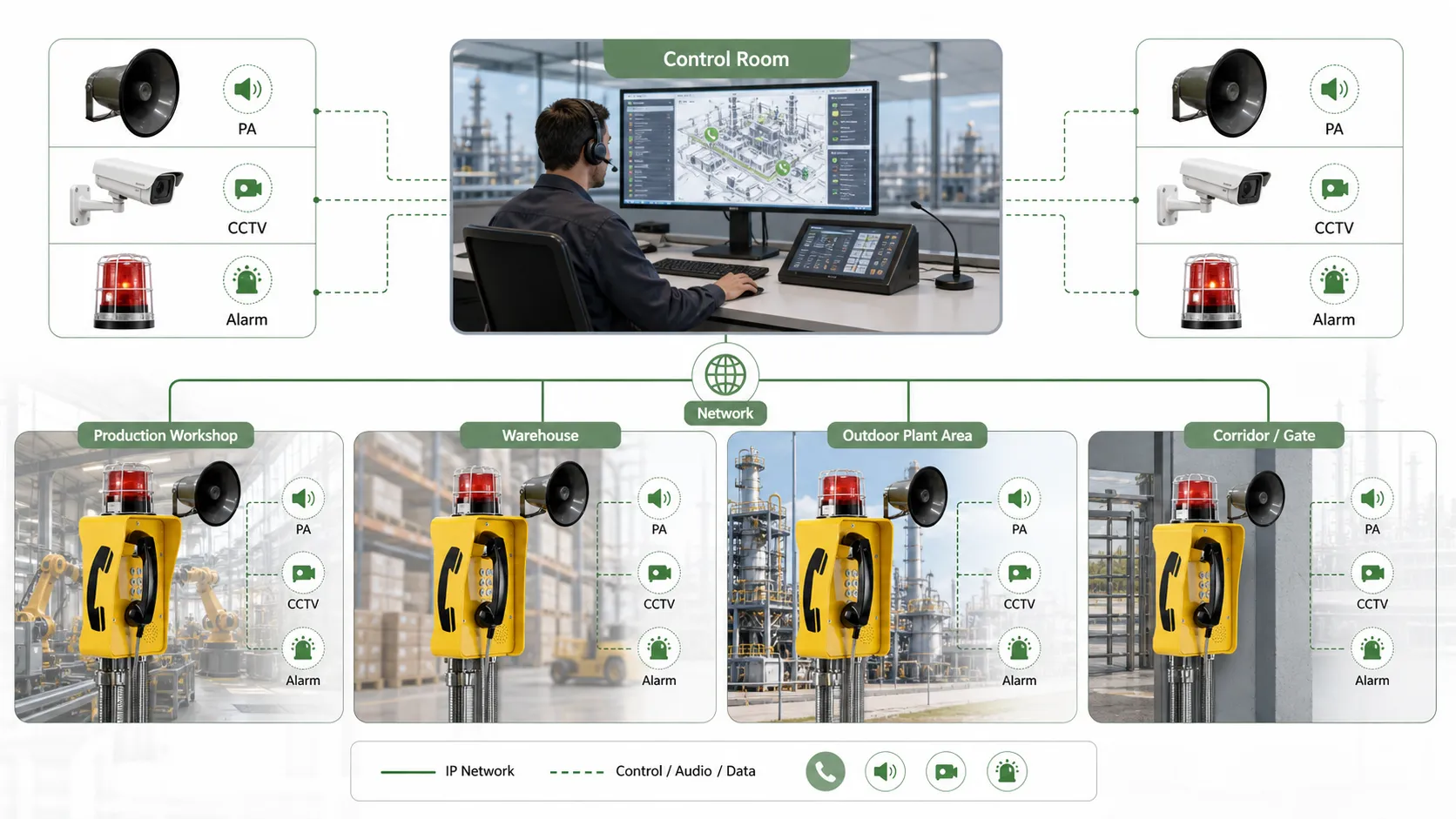
Selection Guide: How to Choose the Right System
Start with the Communication Scenario
The first step is to define the communication scenario. If users need to speak with an operator or another person, intercom is the right starting point. If operators need to announce messages to groups, paging is required. If the facility needs large-area voice distribution, emergency broadcasting, or public address, a PA system is needed.
Many projects require more than one function. A school may need classroom intercom, campus paging, and emergency PA. A factory may need industrial telephones, zone paging, and alarm-linked broadcasting. A tunnel may need emergency phones, horn speakers, CCTV linkage, and control room dispatch.
Consider the Environment
The installation environment strongly affects device selection. Office buildings may use indoor intercoms and ceiling speakers, while factories, mines, ports, tunnels, and petrochemical sites may require ruggedized equipment. Outdoor areas need weatherproof housings, corrosion resistance, high sound output, and stable network connectivity.
In hazardous areas, explosion-proof communication devices may be necessary. In clean rooms or healthcare environments, devices should support hygienic surfaces and easy cleaning. In public areas, vandal-resistant designs can reduce damage and maintenance cost.
Check SIP and IP Integration Capability
For new projects and system upgrades, SIP and IP integration are important. SIP-compatible intercom, paging, and PA devices can connect with IP PBX systems, VoIP platforms, dispatch consoles, recording servers, emergency command systems, and third-party security platforms more easily.
IP-based systems also make multi-site deployment more flexible. A centralized control room can manage remote sites, dispatch calls, send announcements, monitor device status, and integrate with alarms through the existing network infrastructure.
Plan for Emergency Priority and Redundancy
For mission-critical environments, it is not enough for the system to work during normal operation. It must also remain reliable during emergencies. The design should consider priority levels, backup power, network redundancy, device monitoring, fault alarms, and clear operating procedures.
Emergency messages should override lower-priority audio. Critical endpoints should be monitored. Operators should be able to identify device status, call location, announcement zones, and event history. These details help ensure the communication system supports real response actions instead of only providing basic audio output.
Becke Telcom Intercom, Paging, and PA Solutions
Integrated SIP-Based Communication Architecture
Becke Telcom provides industrial communication products and integrated solutions for intercom, paging, PA broadcasting, emergency calls, and dispatch communication. The solution can combine SIP phones, industrial telephones, explosion-proof telephones, paging gateways, horn speakers, network speakers, dispatch consoles, CCTV linkage, and alarm integration into one communication platform.
For harsh environments such as factories, tunnels, mines, ports, power plants, utility corridors, transportation facilities, and petrochemical sites, Becke Telcom focuses on reliable endpoints, clear voice transmission, SIP compatibility, and control room coordination. This helps customers build communication systems for both daily operations and emergency response.
From Standalone Devices to Complete Workflows
A single intercom, paging speaker, or PA amplifier can solve a local communication need. However, many industrial and public safety projects require a complete workflow. Field staff must report incidents, operators must verify information, managers must issue instructions, and people in affected zones must receive clear announcements.
By integrating intercom, paging, PA, alarms, CCTV, and dispatch functions, Becke Telcom solutions can support a more complete communication chain. This approach is suitable for projects that need not only equipment supply but also system planning, SIP integration, emergency linkage, and long-term operational reliability.
Conclusion
Intercom, paging, and PA systems are closely related, but their roles are different. An intercom system is mainly for two-way conversation, a paging system is mainly for one-way announcements to selected groups or zones, and a PA system is mainly for large-area public address and emergency voice broadcasting.
The best choice depends on communication direction, coverage area, installation environment, safety requirements, and integration needs. In many modern buildings, campuses, factories, tunnels, and transportation facilities, the most effective solution is not choosing only one system, but combining intercom, paging, and PA into a unified IP-based communication architecture.
When designed correctly, these systems can support daily communication, operational coordination, public announcements, emergency alerts, and control room dispatch. For mission-critical environments, integrated communication is not just an audio system; it is an essential part of safety, management, and response capability.
FAQ
Is paging the same as a PA system?
No. Paging is usually a function used to send announcements to selected people, groups, or zones. A PA system is a broader audio system used for public address, large-area sound distribution, emergency broadcasting, and sometimes background music.
Can an intercom system be used for paging?
Some modern IP intercom systems can support paging when connected with SIP speakers, paging gateways, IP PBX systems, or dispatch platforms. However, the main purpose of an intercom is still two-way communication, while paging is designed for one-way announcements.
Which system is best for emergency communication?
An integrated system is usually the best choice. Intercom devices allow people to report incidents, paging systems notify selected zones, and PA systems broadcast emergency instructions across large areas. Together, they create a more complete emergency communication workflow.
Do intercom, paging, and PA systems support SIP?
Many modern intercom, paging, and PA devices support SIP. SIP compatibility makes it easier to connect them with IP PBX systems, VoIP networks, dispatch consoles, recording servers, and emergency command platforms.
How should industrial sites choose these systems?
Industrial sites should consider communication direction, background noise, coverage distance, environmental protection, emergency priority, device durability, and system integration. Rugged phones, weatherproof intercoms, horn speakers, paging gateways, and dispatch platforms are often used together in factories, tunnels, ports, mines, and energy facilities.







