


In video surveillance, drone inspection, emergency command, remote site monitoring, and mobile field operations, video quality is only one part of the challenge. The more difficult question is how to transmit clear video through limited bandwidth, store large amounts of footage efficiently, and still keep broad compatibility with existing terminals, browsers, video platforms, and display systems.
H.264 and H.265 are two of the most widely discussed video coding standards. H.265, also known as HEVC, can be seen as an upgraded generation of H.264. It inherits many strengths of H.264 while improving compression performance significantly. In many practical scenarios, H.265 can deliver similar 1080P HD image quality with roughly half the data stream bandwidth required by H.264. It also provides stronger support for 4K and 8K high-definition video, making it attractive for bandwidth-sensitive and storage-intensive projects.
Why Codec Strategy Matters in Real Projects
Choosing a video codec is not only a technical preference. It directly affects network bandwidth, satellite link cost, storage capacity, device compatibility, platform integration, and the final viewing experience. A system that only focuses on image resolution may fail in the field if the available transmission channel cannot carry the required bitstream.
For example, a 1080P video stream encoded with H.264 may be easy to play on many browsers, mobile devices, video platforms, and large-screen systems, but it may consume more bandwidth. H.265 can reduce bandwidth and storage pressure, but its playback environment is not always as universal. Therefore, the best solution is not simply choosing one codec and rejecting the other. In many industrial projects, H.264 and H.265 should be combined according to the transmission path, terminal capability, and operating scenario.
Compression Efficiency and Visual Quality
H.265 is designed to transmit higher-quality video with a smaller data stream. Compared with H.264, it provides more efficient compression, which means that under similar visual quality, the video stream can be smaller. This is especially useful when the system needs to carry HD video over wireless networks, satellite links, mobile command vehicles, temporary emergency networks, or remote private links.
In practical terms, if the system needs to transmit the same 1080P HD image, H.265 may require only about half the bandwidth of H.264. This can greatly reduce network pressure. At the same time, the same storage system can save more hours of video footage when H.265 is used, because the encoded files are smaller under comparable quality settings.
For 4K and 8K video applications, this advantage becomes even more important. Ultra-high-definition video brings much larger data volume. Without efficient compression, network transmission and long-term storage costs can grow quickly. H.265 provides a more suitable technical path for these high-resolution scenarios.
Compatibility Still Keeps H.264 Important
Although H.265 offers stronger compression performance, H.264 remains far more common in many real-world systems. One major reason is ecosystem maturity. H.264 has been adopted for many years by mainstream devices, operating systems, browsers, media players, video platforms, and surveillance products.
H.264 became widely used partly because its licensing model was simpler in earlier market development. Major consumer devices and systems, including smartphones, tablets, personal computers, mainstream browsers, and Android-based platforms, adopted H.264 as a common media codec. As a result, H.264 became a highly compatible format across the video industry.
H.265 has stronger performance, but its patent licensing cost and licensing calculation methods have created adoption barriers. Many companies and platform providers have supported H.265 more slowly because of cost and complexity concerns. At the same time, open or alternative codecs such as VP8 and VP9 have also competed in the market, further slowing the universal adoption of H.265 in some consumer electronics and web playback environments.
| Comparison Item | H.264 | H.265 / HEVC | Project Impact |
|---|---|---|---|
| Compression Efficiency | Good and widely proven | Higher efficiency, often about 50% lower bandwidth for similar 1080P quality | H.265 is better for constrained networks and storage saving |
| Compatibility | Very broad across browsers, devices, players, and platforms | More limited depending on device, software, and licensing support | H.264 is safer for final display and cross-terminal playback |
| Resolution Support | Commonly used for HD and full HD video | Better suited for 4K and 8K video applications | H.265 is more attractive for ultra-HD video transmission |
| Adoption Barrier | Mature ecosystem and simpler historical adoption | Patent licensing cost and complex authorization model | Mixed-codec solutions are often more practical |
A Better Approach: Use Both Formats Where They Fit
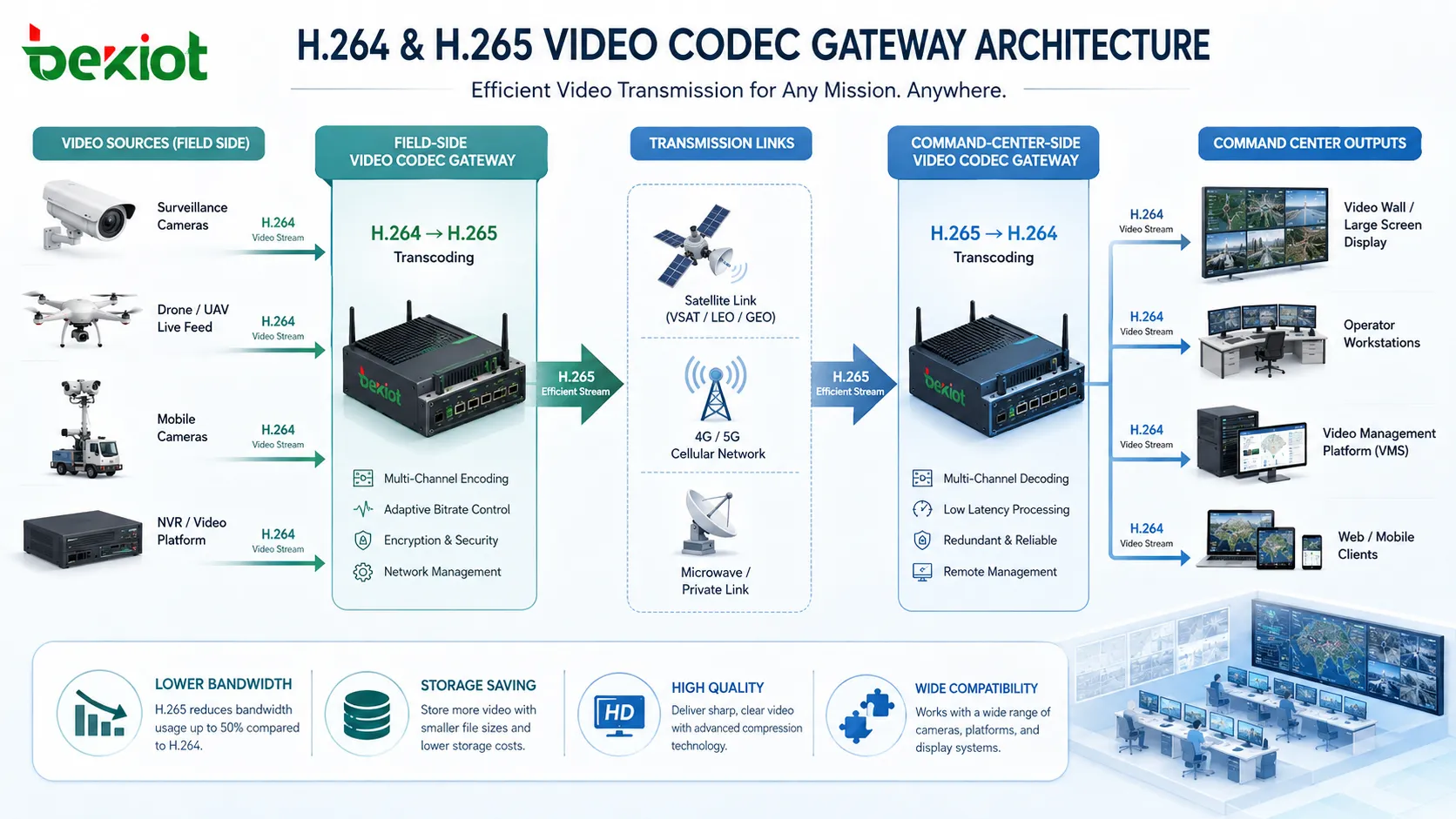
For command center and industry applications, the practical answer is often not “H.264 or H.265,” but “where should each codec be used?” H.264 is suitable for front-end compatibility, platform access, browser playback, legacy display systems, and terminal-side decoding. H.265 is suitable for bandwidth-constrained transmission, long-distance backhaul, satellite links, storage saving, and high-definition video compression.
A video codec gateway can sit between these two worlds. It can receive H.264 streams from cameras, drones, NVR systems, or video platforms, convert them into H.265 for efficient transmission, and then convert them back into H.264 when the video needs to be displayed on command center terminals, large screens, or existing video platforms.
This hybrid design allows the system to keep the compatibility advantage of H.264 while gaining the bandwidth and storage benefits of H.265. It is especially useful when the field side and the command center side have different network conditions and device capabilities.
Field-to-Command-Center Transmission Model
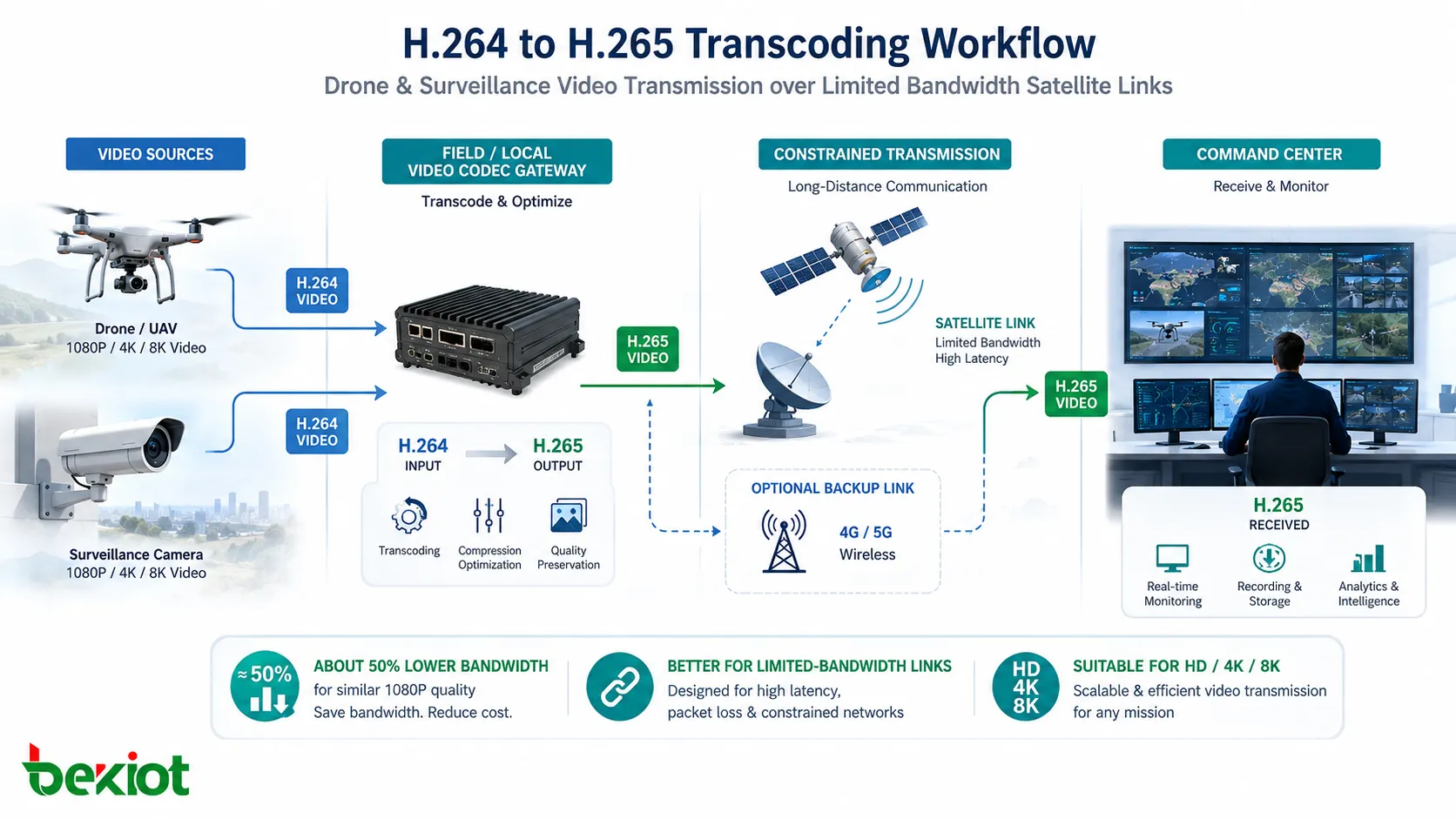
A typical deployment starts with front-end video collection. Drones, mobile cameras, body-worn cameras, vehicle-mounted cameras, or surveillance cameras may generate video streams in H.264 format. This keeps front-end device compatibility high because many existing cameras and video systems already support H.264 output.
The video stream is then sent to a local video gateway near the field site. The gateway converts the H.264 stream into H.265, reducing the data volume before it enters the long-distance transmission link. This is especially valuable when the video must pass through satellite communication, 4G/5G private links, microwave links, emergency network equipment, or other bandwidth-limited channels.
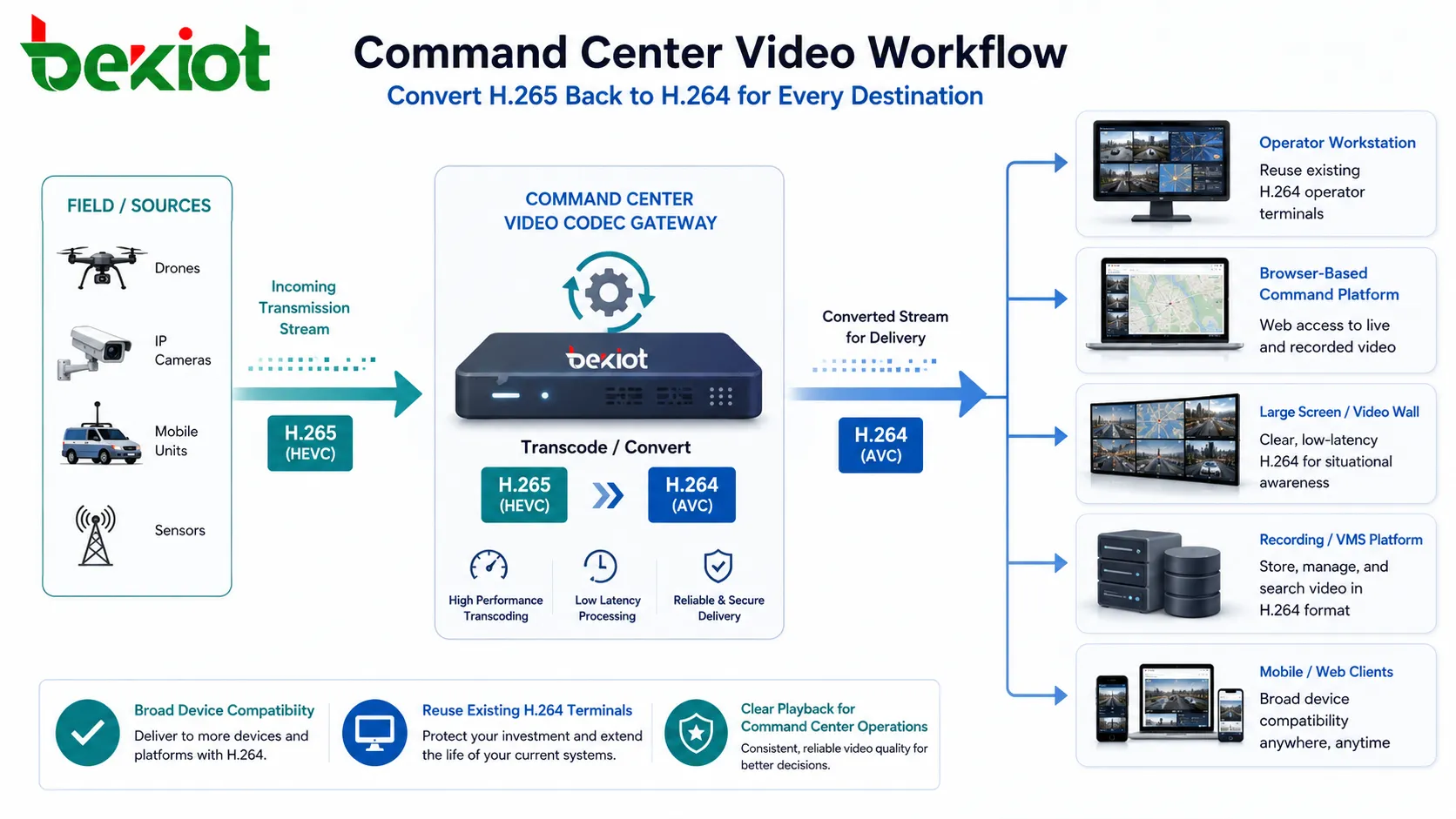
After the H.265 stream reaches the command center, a remote video gateway can convert it back into H.264. This makes the video easier to display on existing operator terminals, browser-based platforms, video walls, conference systems, and large-screen visualization systems. The command center does not need to replace every display endpoint simply to receive a more efficient transmission stream.
Where This Architecture Creates Value
This type of video gateway solution is valuable in emergency command, public safety, fire rescue, border inspection, energy patrol, transportation monitoring, disaster response, mobile command vehicles, maritime operation, and temporary field deployment. These scenarios often face the same contradiction: the front-end video must be clear, but the available transmission bandwidth may be limited or unstable.
By using H.265 in the transmission section, the system can reduce bandwidth occupation and improve the chance of stable video delivery. By keeping H.264 at the access and display side, the system maintains compatibility with mainstream devices and existing video platforms. This reduces reconstruction cost and makes phased deployment easier.
For long-term storage, H.265 can also reduce hard disk consumption. If the platform needs to store large amounts of HD surveillance footage, a more efficient codec means that the same storage capacity can hold more video data. This can reduce storage expansion pressure in large monitoring and command projects.
Functional Requirements for the Video Gateway
A practical video gateway should not only support format conversion. It should support H.264 and H.265 transcoding in both directions, video stream adjustment, bitrate control, resolution adaptation, frame rate adjustment, and protocol conversion. These functions allow the system to adapt to different network conditions, platform requirements, and terminal capabilities.
Protocol conversion is also important because real projects may involve RTSP, RTMP, GB/T28181, SIP-based video access, platform SDKs, or proprietary video sources. The gateway should help different systems exchange video resources without forcing every subsystem to be rebuilt.
| Gateway Capability | What It Does | Deployment Benefit |
|---|---|---|
| H.264 to H.265 Transcoding | Compresses compatible front-end streams into a lower-bandwidth format | Reduces pressure on satellite, wireless, and long-distance links |
| H.265 to H.264 Transcoding | Converts efficient transmission streams back to widely compatible playback streams | Supports terminals, browsers, large screens, and legacy platforms |
| Bitrate and Resolution Control | Adjusts stream size according to network and display requirements | Improves stability under changing bandwidth conditions |
| Protocol Conversion | Connects different video systems and access methods | Improves interoperability between cameras, platforms, and command systems |
Deployment Planning Considerations
Before deployment, the project team should confirm which devices generate H.264, which links require H.265 compression, and which terminals must receive H.264 for playback. The codec strategy should be mapped across the full video path rather than configured only at one device.
Network conditions should also be measured in advance. A satellite link, mobile network, or emergency communication link may not provide stable bandwidth all the time. The gateway should therefore support adjustable bitrate and stream adaptation, so the video can continue to be transmitted even when network capacity changes.
Finally, the command center should test the entire workflow: front-end acquisition, gateway transcoding, limited-bandwidth transmission, remote decoding or transcoding, platform access, large-screen display, recording, and playback. A successful design is not only about codec conversion; it is about making the video usable from the field to the command decision point.
Operational Benefits for Industry Users
With a well-designed codec gateway solution, organizations can reduce bandwidth cost, save storage space, improve long-distance video delivery, and avoid unnecessary replacement of existing H.264-compatible systems. This is especially important when the project must connect old and new devices, different video platforms, and multiple transmission environments.
The solution also improves flexibility. The system can use H.264 where compatibility is more important and H.265 where compression efficiency is more valuable. This balance helps users achieve both performance and cost control without being locked into a single codec strategy.
For command center operators, the final value is practical: field video can arrive more reliably, large-screen display remains compatible, and decision makers can view clearer images even when the transmission environment is not ideal. For system designers, the value is architectural: codec conversion becomes a controllable layer rather than a limitation of each endpoint.
FAQ
Should every camera be forced to output H.265?
No. If existing cameras, platforms, or terminals work more reliably with H.264, it may be better to keep H.264 at the access side and use gateway transcoding only where bandwidth or storage pressure requires H.265.
Will H.265 always reduce bandwidth by exactly 50%?
Not always. The actual saving depends on resolution, frame rate, scene complexity, encoder quality, bitrate control, and image quality requirements. The common value is that H.265 can often approach similar 1080P quality with about half the bandwidth of H.264, but real testing is still necessary.
Why might some terminals fail to play H.265 video?
Some terminals, browsers, media players, or hardware chips may not support H.265 decoding, or may require additional licensing or hardware acceleration. This is why converting H.265 back to H.264 at the display side can be useful.
Is transcoding suitable for real-time command scenarios?
It can be, but latency must be evaluated. The project team should test encoder delay, gateway processing time, transmission delay, and display delay together, especially for emergency command and live dispatch applications.
What should be checked before choosing a video gateway?
The team should confirm supported codecs, input and output protocols, maximum channels, resolution capability, bitrate control, latency, hardware acceleration, platform compatibility, and long-term stability under continuous operation.







