


As VoIP technology becomes more mature, many organizations are replacing traditional PBX systems with IPPBX business phone systems. Compared with legacy telephone exchanges, an IPPBX uses IP networks to build a more flexible, scalable and feature-rich communication platform. It can support not only basic voice calling, but also video calls, multi-party conferencing, voicemail, ringback tone, call queues, call pickup, call transfer, simultaneous ringing, call recording and operator console functions.
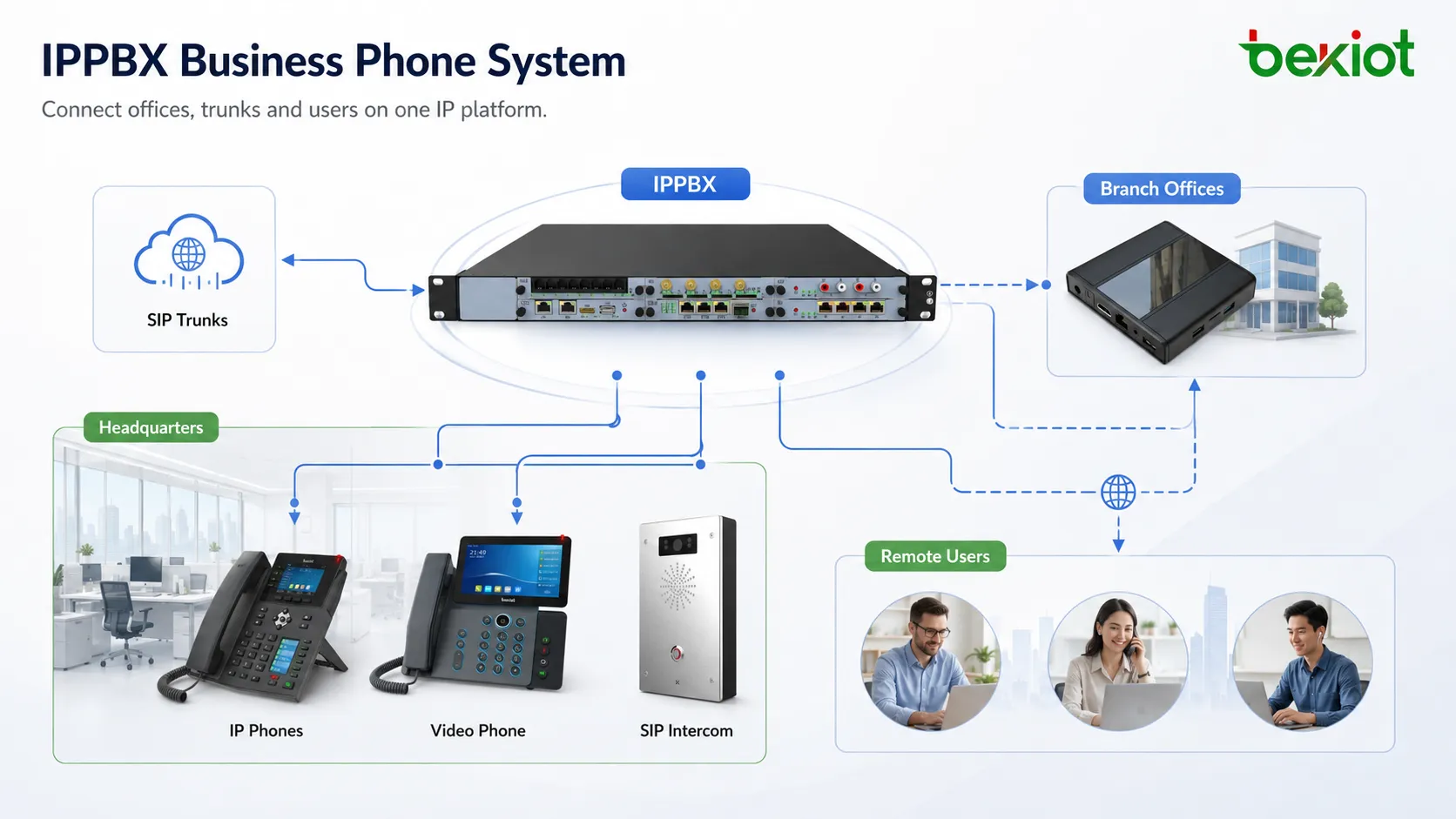
For offices, branches, factories, hotels, service centers and multi-site enterprises, IPPBX is no longer only a telephone switching device. It is a unified voice communication platform that helps organizations manage internal extensions, external lines, SIP trunks, IP phones, call rules, recordings and collaboration workflows in one system.
Why Enterprises Are Moving Away from Traditional PBX
Traditional PBX systems were mainly designed for fixed-line voice calling. They often depended on dedicated telephone wiring, proprietary hardware, manual jumper management and specialized configuration tools. When a company needed more extensions, call recording, IVR, billing, conferencing or advanced call control, additional modules or separate devices were often required.
IPPBX changes this model by moving voice communication onto the IP network. Extensions are registered through the network, calls are routed by software, and system management is usually completed through a web-based interface. This makes deployment, maintenance and expansion much easier for modern IT teams.
Because an IPPBX is built around VoIP and SIP technologies, it can also integrate with many other communication resources. SIP trunks, IP phones, FXO gateways, FXS gateways, LTE wireless gateways, RoIP gateways and other SIP-compatible devices can be connected into the same communication architecture when the project requires it.
Easier Deployment with Network-Based Architecture
One major advantage of an IPPBX system is simple deployment. Since the service is built on IP networking, organizations can deploy the system through a highly integrated hardware appliance or a standardized server platform. In many projects, basic deployment can be completed by powering on the system, configuring the network and setting up extensions, trunks and call rules.
This is very different from traditional telephone exchanges, where hardware boards, line cards, jumper wiring and dedicated installation work may be required. With IPPBX, the focus moves from complex physical wiring to logical configuration. This reduces installation difficulty and makes the system more suitable for modern network-based offices.
For new buildings, renovated offices and fast-growing companies, this deployment model is especially valuable. It allows communication planning to follow the existing LAN infrastructure, reducing repeated construction work and making later changes easier.
Less Cabling and Easier Seat Movement
An IPPBX business phone system runs over the IP network. IP phones can usually work after connecting to the network, registering an account and receiving the correct configuration. There is no need to build a separate telephone wiring system for every extension in the same way as traditional analog telephony.
This is useful when employees change desks, departments move floors or teams adjust their workspace. In many cases, the user can take the IP phone to a new location, connect it to the network and continue using the same extension. IT administrators no longer need to handle frequent telephone jumper changes.
Many IP phones also provide two Ethernet ports. This is convenient when a workstation has only one network outlet and the computer already needs a connection. The phone can be connected to the wall network port, and the computer can connect through the phone’s pass-through port. This improves practical usability in office environments.
Web-Based Management for Daily Maintenance
Traditional PBX configuration was often difficult for non-specialists. Many systems required command-line operations, proprietary configuration software or vendor engineer support. This increased maintenance cost and made simple changes less efficient.
IPPBX systems are usually managed through a graphical web interface. Administrators can use a browser to configure extensions, trunks, call routes, IVR menus, ring groups, queues, voicemail, recording policies and system permissions. Function descriptions and settings are displayed directly in the management interface, making daily operation easier to understand.
For IT maintenance teams, common tasks such as adding users, deleting extensions, changing numbers, adjusting permissions, setting call forwarding and checking call logs can be completed more quickly. In many small and medium projects, administrators with basic network knowledge can handle daily configuration without waiting for on-site vendor support.
Integrated Features for Office Communication
IPPBX provides many functions that traditionally required separate equipment or paid modules. Features such as IVR, call recording, auto attendant, background music, billing, voicemail and call queue management can often be integrated into the same platform.
This integrated design gives enterprises a more complete communication system without building many independent subsystems. Reception, customer service, sales, administration, security and technical support teams can all use different features according to their workflow.
| Function | Business Value |
|---|---|
| IVR and auto attendant | Guides callers to departments, extensions or service menus automatically. |
| Call queue | Helps service teams manage multiple incoming calls in an organized way. |
| Call recording | Supports service review, dispute handling, training and compliance needs. |
| Voicemail | Reduces missed communication when users are unavailable. |
| Call transfer and pickup | Improves collaboration between reception, departments and duty teams. |
| Multi-party conferencing | Supports remote discussion and internal coordination without extra meeting tools. |
Flexible Extension and Call Routing Design
IPPBX allows enterprises to design extension plans based on departments, floors, branches, roles or business lines. For example, reception, sales, customer service, finance, warehouse, security and management teams can each have their own number range and call rules.
Call routing can also be configured according to working hours, departments, caller numbers, external lines or service priorities. Incoming calls can go to an auto attendant, ring group, call queue, receptionist, mobile extension or voicemail depending on the organization’s workflow.
This flexibility is important for companies that need more than simple internal calling. A well-designed IPPBX can support business reception, hotline service, after-hours duty, multi-branch calling, internal collaboration and emergency contact workflows from the same platform.
Cost Efficiency Through Standardized Platforms
IPPBX systems usually offer strong cost advantages compared with traditional proprietary PBX hardware. Many IPPBX platforms can run on standardized hardware or integrated server appliances, reducing dependence on closed hardware structures.
Because many software features are integrated into one platform, organizations can avoid purchasing separate devices for IVR, recording, auto attendant, billing or conference functions. A single system can handle many voice communication tasks that previously required multiple components.
Cost efficiency is not only about the purchase price. It also includes reduced cabling work, easier maintenance, faster user changes, lower expansion cost and better use of existing network infrastructure. For growing enterprises, these operational savings can be more important than the initial device cost.
A Rich IP Phone and Terminal Ecosystem
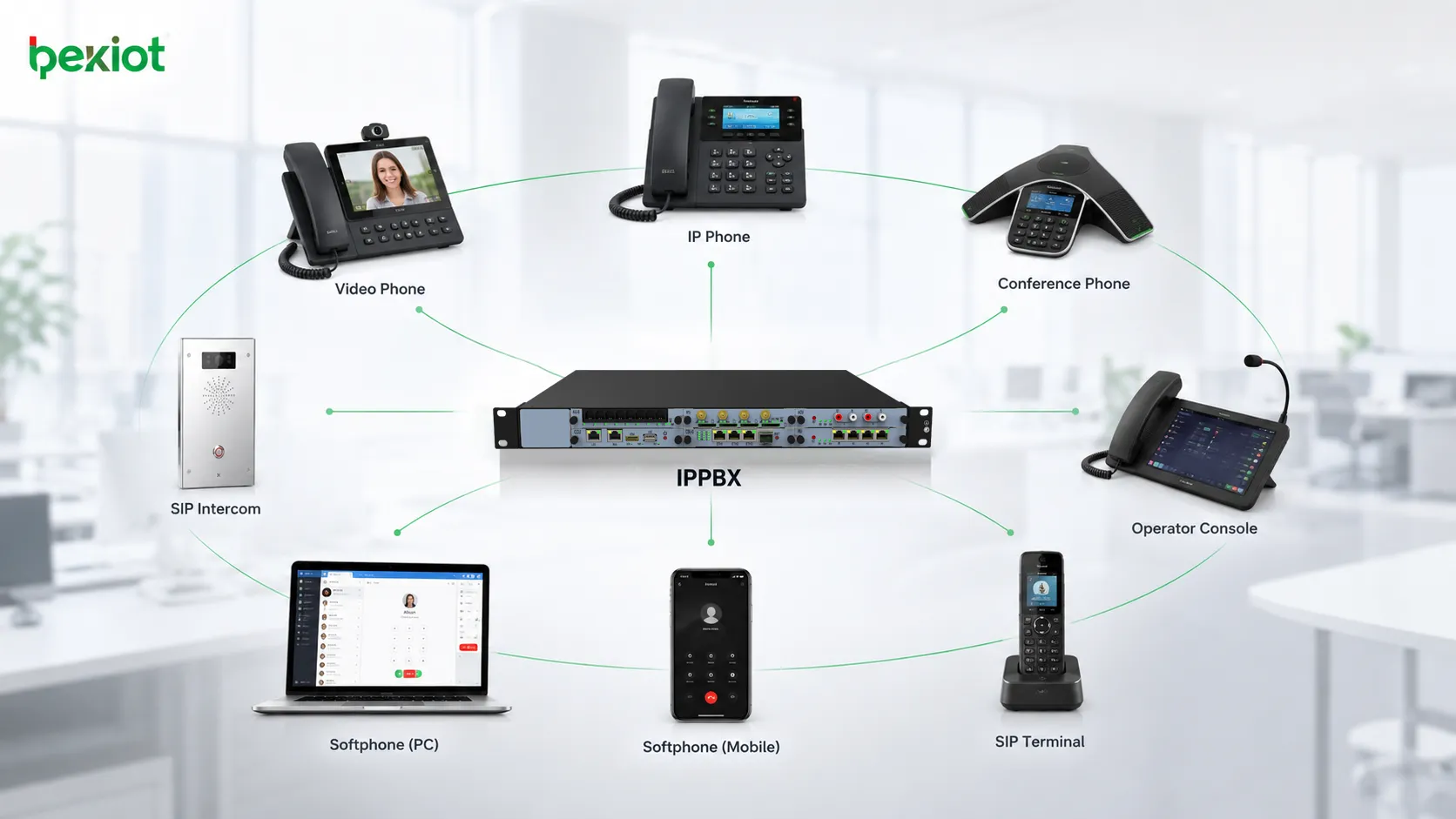
IPPBX technology has developed over many years and has formed a mature ecosystem. Enterprises can choose many types of IP phone terminals according to different needs and budgets. Entry-level IP phones can serve ordinary office users, while advanced models can support receptionists, managers, customer service agents, conference rooms and dispatch positions.
The terminal selection is broad, from basic desk phones to video phones, conference phones, operator consoles, SIP intercoms, door phones and softphone applications. This gives project designers more flexibility when planning different office scenarios.
Because most IPPBX systems follow standard protocols, many terminals from different brands can be compatible when they support SIP registration and standard VoIP features. This reduces lock-in risk and gives customers more options during procurement, replacement and expansion.
Open SIP Connectivity for Expansion
Open SIP protocol support is one of the most important advantages of IPPBX. SIP allows different voice systems, endpoints and gateways to communicate through a standardized method. This gives IPPBX strong scalability and integration capability.
Two IPPBX systems can be connected through SIP over the network, enabling communication between branches, offices or remote sites. SIP gateways can also connect IPPBX with analog lines, analog phones, mobile networks, radio systems or legacy telephone devices.
Typical gateway options may include FXO telephone gateways for connecting external analog lines, FXS gateways for analog phone access, LTE wireless gateways for mobile network calling and RoIP gateways for radio communication access. Through proper configuration, IPPBX can support applications such as calling radios, calling mobile users, connecting branch offices and integrating with existing telephone resources.
Better Support for Branch Offices and Remote Teams
Many enterprises now operate across multiple offices, factories, stores, warehouses or project sites. Traditional PBX systems often make cross-site communication complicated, especially when every site has its own independent phone system.
IPPBX can connect branches through IP networks. Extensions at different locations can call each other like internal users, reducing external call cost and improving collaboration. Remote workers can also register softphones or IP phones to the system if network and security policies allow it.
This makes IPPBX suitable for headquarters and branches, hotel chains, industrial parks, logistics networks, school campuses, hospitals, service centers and distributed office teams. The organization can maintain a unified numbering plan and call policy while allowing users to work from different locations.
Security and Access Control
Compared with traditional analog telephony, IP-based communication can provide stronger security design when configured correctly. Voice traffic can be protected through encrypted transmission, secure registration policies and network access control. This helps reduce the risk of information leakage and unauthorized use.
IPPBX systems can also strengthen user identity management. Extensions can be bound to user information, passwords, device accounts or access rules. Administrators can control which users can make external calls, international calls, inter-branch calls or access special features.
Security should be planned as part of the whole solution. Firewall rules, VLAN design, SIP account passwords, registration restrictions, call permission levels, recording access and administrator accounts should all be managed carefully to protect enterprise communication.
Recording and Management Visibility
Call recording is valuable for many business scenarios. Customer service teams can use recordings for service review and training. Sales teams can review communication details. Management teams can use call logs to understand traffic volume, peak hours and service performance.
IPPBX also provides better visibility into communication operations. Administrators can check extension status, call history, queue statistics, system logs and trunk usage from the management interface. This makes daily operation more measurable than a traditional standalone phone exchange.
For industries with stronger compliance requirements, recording and logs can support incident review, duty handover, dispute investigation and internal management. The organization can keep communication evidence in a structured and searchable form.
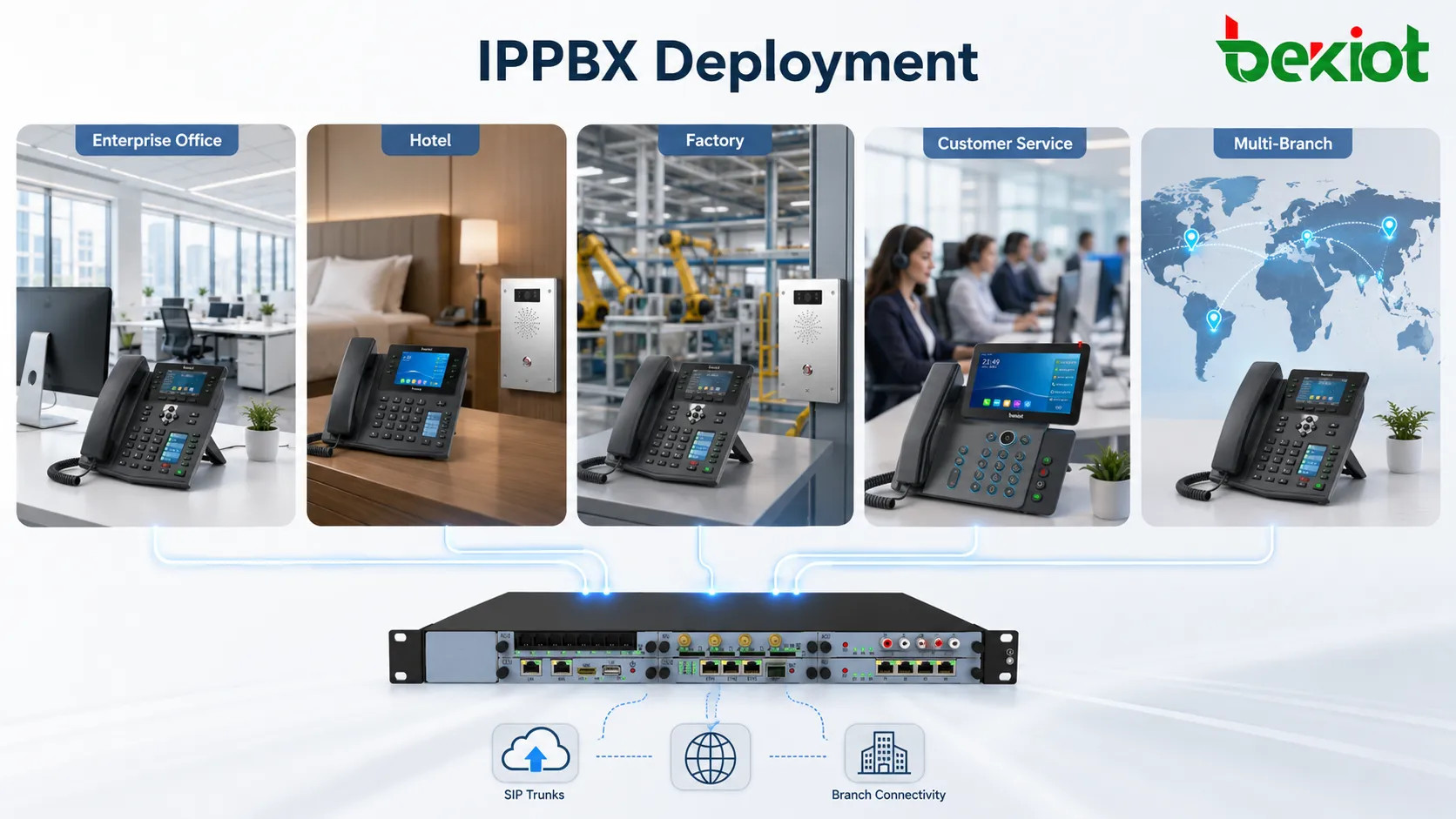
Suitable Application Scenarios
Enterprise office communication
IPPBX is suitable for daily office calling, internal extension communication, department transfer, reception handling, voicemail and meeting coordination. It helps companies build a unified internal phone system based on the existing IP network.
Customer service and hotline centers
Call queues, IVR, recording and transfer functions make IPPBX useful for customer service teams, sales hotlines, after-sales support and appointment service centers. Calls can be distributed more clearly and reviewed later when needed.
Hotels and commercial buildings
Hotels, office buildings and commercial complexes often need reception, room extensions, service desks, security duty rooms and facility management communication. IPPBX can support unified numbering and flexible call routing across departments.
Factories and industrial parks
Manufacturing sites, warehouses, control rooms and security centers require stable voice communication between offices and field positions. IPPBX can integrate IP phones, SIP intercoms, analog gateways and other access devices according to the project needs.
Multi-branch organizations
Organizations with headquarters, branches and remote sites can use IPPBX networking to support internal dialing across locations. This helps reduce isolated communication systems and improves collaboration efficiency.
Planning Points Before Deployment
Evaluate user scale and extension growth
The project team should confirm the current number of users, expected extension growth, branch quantity and concurrent call demand. This helps select the right platform capacity and avoid early bottlenecks.
Design a clear numbering plan
Extension numbers should be planned by department, floor, office area or branch. A clear numbering structure makes daily use easier and reduces confusion during future expansion.
Confirm trunk and gateway requirements
Organizations should define whether they need SIP trunks, analog external lines, mobile network access, analog phone reuse or special gateway integration. This affects the final architecture and call routing design.
Check the network environment
Since IPPBX depends on the IP network, LAN quality matters. Network switches, PoE supply, VLAN planning, QoS settings, firewall rules and bandwidth should be checked before deployment.
Prepare operation and maintenance rules
User creation, password policy, call permission, recording access, backup, upgrade and log review should be managed as part of the system operation process. This keeps the platform stable after delivery.
Long-Term Value for Business Communication
IPPBX helps enterprises move from hardware-centered telephone switching to software-driven communication management. It reduces cabling complexity, simplifies configuration, integrates more features and supports a wider terminal ecosystem.
For organizations that need better office communication, customer service, branch networking and voice management, IPPBX provides a practical upgrade path. It keeps the familiar telephone experience while adding IP-based flexibility, SIP openness, call visibility and long-term scalability.
As enterprise communication continues to evolve, IPPBX can also act as a foundation for unified communication, mobile office, video calling, dispatch integration and business system linkage. It is not only a replacement for traditional PBX, but a flexible voice platform for modern digital operations.
FAQ
Can IPPBX use existing network cabling?
Yes. In most projects, IPPBX works over the existing IP network. However, the network should be checked for stability, PoE support, bandwidth and voice quality requirements.
Does IPPBX support analog phone lines?
Yes, when suitable FXO or FXS gateways are used. This allows organizations to connect analog external lines or reuse some analog phones during migration.
Can IPPBX connect different branches together?
Yes. Branch offices can be connected through SIP networking or IP-based trunking, allowing users in different locations to dial each other as internal extensions.
Is IPPBX suitable for small companies?
Yes. IPPBX can be deployed for small offices as well as larger enterprises. The configuration can be scaled according to user quantity, trunk needs and feature requirements.
What should be checked before replacing a traditional PBX?
The main items include extension quantity, existing lines, network readiness, phone terminal choices, call routing rules, recording needs, security policy and future expansion plans.







