


Powerline adapters, also known as PLC adapters or powerline communication devices, were once seen as a simple solution for home networking. Their promise was attractive: if a room had a power outlet, it could also have a network connection. For homes without pre-installed Ethernet cabling and for users struggling with weak Wi-Fi signals through thick walls, this sounded like an easy way to extend internet access without drilling holes, pulling cables, or redesigning the network.
However, the home networking market has changed. Wi-Fi Mesh systems, dedicated wireless backhaul, Wi-Fi 6, Wi-Fi 7, and fiber-based in-home networking have greatly improved whole-home coverage. At the same time, the technical weaknesses of PLC have become more visible: unstable electrical wiring, electromagnetic interference, power strip filtering, transformer boundaries, fluctuating latency, and inconsistent throughput. Powerline communication is not obsolete, but its best-fit role has shifted away from mainstream home networking and toward specific infrastructure and narrowband IoT applications.
From a Clever Home Shortcut to a Niche Solution
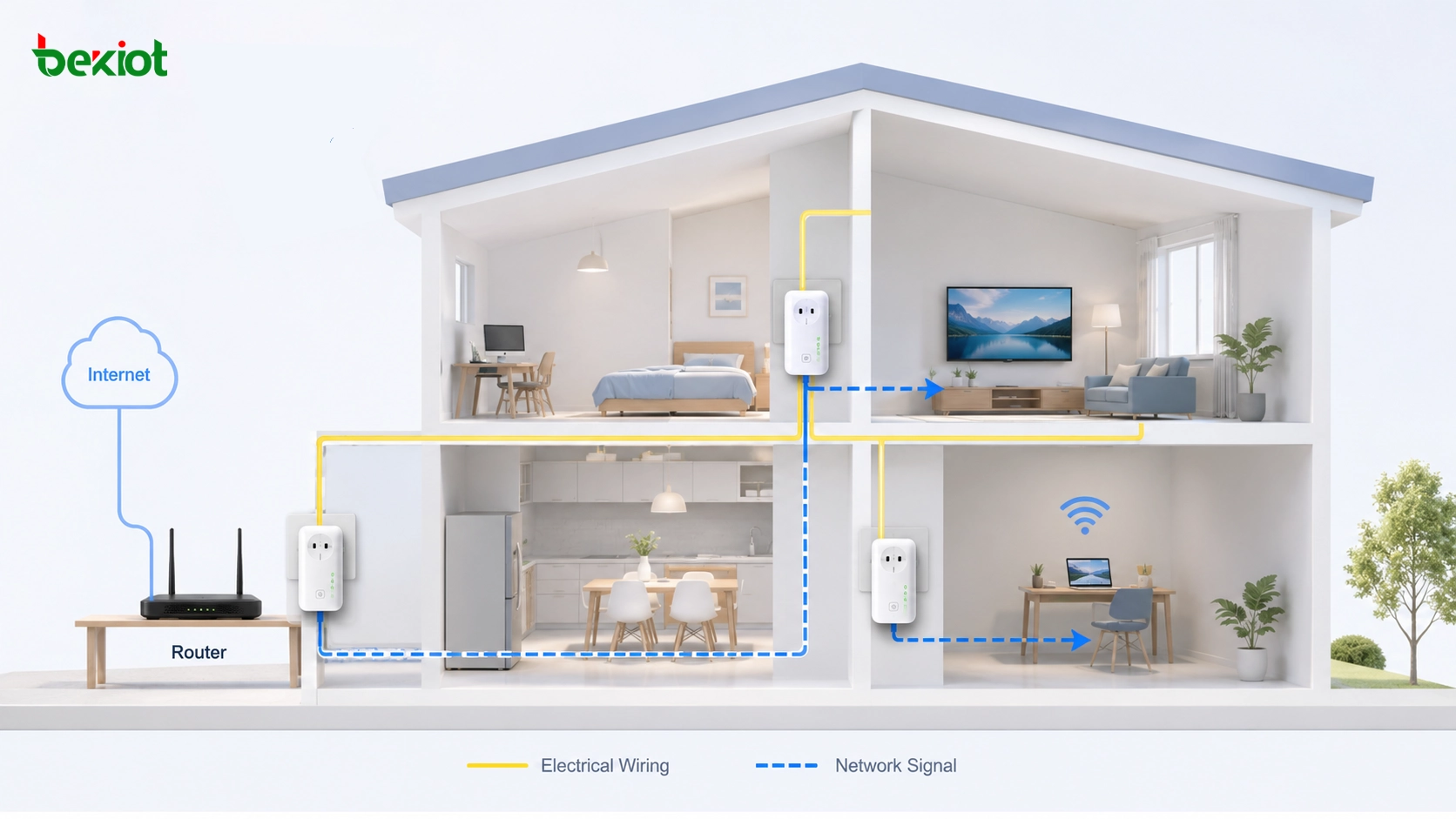
The basic idea behind powerline communication is to use existing electrical wires as a data transmission medium. In a typical home setup, one adapter is connected to the router and plugged into a wall outlet. Another adapter is plugged into a different room. Network signals are modulated onto high-frequency carriers and sent through the electrical wiring, allowing the second adapter to provide Ethernet or Wi-Fi access in another part of the house.
For many users, this was a practical answer to a common problem. Older houses often lack structured cabling. Large apartments may have thick concrete walls. Some rooms may sit outside the reliable coverage area of a single router. In these environments, powerline adapters offered a low-effort option: plug in a pair of devices, press a pairing button, and establish a basic network link.
This convenience explains why powerline adapters became popular during an earlier phase of home networking. At that time, many Wi-Fi routers had weaker coverage, Mesh systems were not common, and users wanted a simple way to bridge difficult rooms. PLC did not need new cables, could bypass certain wall-related Wi-Fi problems, and required far less technical knowledge than professional cabling.
A Short History of Powerline Communication
Powerline communication is not a new technology. Long before consumer powerline adapters appeared in homes, carrier systems had already been used by power utilities. As early as 1925, carrier communication equipment was used for voice communication between power companies and remote operators, transmitting signals over high-voltage power lines across long distances.
In home networking, PLC works by placing digital data onto high-frequency carrier signals that are much higher than the normal 50Hz or 60Hz AC power frequency. Consumer and broadband powerline systems typically operate in frequency ranges such as 2–86MHz, depending on the standard and device design. This allows data signals and electrical power to share the same wiring path while being separated by frequency.
The technology continued to evolve through different generations. The X10 standard appeared in the 1970s for home automation control. Later, the HomePlug family became widely known in consumer powerline networking. Although the HomePlug Alliance has stopped activity, many technical ideas were absorbed into broader standards such as IEEE 1901. During the Wi-Fi 4 era, especially around 802.11n adoption, powerline adapters served as an important supplement for homes with cross-floor coverage problems or difficult wall penetration.
Why It Was Attractive at the Beginning
Powerline adapters gained attention because they solved three practical home networking pain points. The first was wiring cost. Pulling Ethernet cable through a finished home can be expensive, messy, and sometimes impossible without renovation. PLC reused existing copper electrical wiring, allowing users to avoid wall cutting and cable routing.
The second advantage was physical reach. Wi-Fi signals can be weakened by concrete walls, metal structures, mirrors, floor slabs, and household layouts. Powerline communication travels through the electrical circuit rather than through open air, so it can sometimes reach rooms where wireless signals perform poorly.
The third advantage was simple configuration. Many consumer powerline adapter kits were designed as plug-and-play products. Users could connect one unit near the router, plug another unit into the target room, pair them, and start using the connection. For non-technical users, this “no extra wiring” experience was a major selling point.
The early appeal of powerline adapters came from convenience: they turned existing electrical outlets into network access points at a time when Wi-Fi coverage and structured cabling were both common household challenges.
The Hidden Problem: Electrical Wiring Was Not Built for Data
The biggest limitation of home PLC is not the communication idea itself. The problem is the transmission medium. Household electrical wiring was designed to deliver power, not high-frequency data. Unlike Ethernet cable, home power wiring is usually not shielded, not twisted in balanced pairs, and not laid out with data signal integrity in mind.
When high-frequency data signals travel over ordinary electrical wiring, the wiring can behave like a large antenna. It may radiate radio-frequency energy outward and also pick up unwanted electromagnetic interference from the environment. This creates an unstable signal path that is far less predictable than Ethernet cable and often less controllable than modern Wi-Fi systems.
Electrical circuits inside homes are also built as shared and branching networks. Different rooms, outlets, appliances, breakers, and distribution paths may all affect signal quality. A powerline adapter may work well in one outlet and poorly in another outlet only a few meters away. This uncertainty is one reason many users eventually lost confidence in powerline networking.
Noise from Appliances Makes Performance Unstable
A household electrical circuit is a noisy environment. Many appliances generate electrical noise when they operate. Devices with motors, such as hair dryers, vacuum cleaners, washing machines, refrigerators, and power tools, can create strong pulse noise when they start, stop, or change operating state. These pulses can distort the high-frequency carrier used by PLC.
Chargers, power adapters, LED drivers, and switching power supplies can also inject ripple and high-frequency noise into the circuit. In a modern home, these devices are everywhere: phone chargers, laptop adapters, smart speakers, televisions, routers, set-top boxes, game consoles, lighting systems, and small appliances. Each one may slightly change the electrical environment.
When the PLC carrier signal is distorted, data packets may be damaged. The system then needs retransmission, rate adaptation, or error correction. For the user, this appears as unstable speed, high latency, temporary disconnection, buffering, or sudden drops in performance. Even if the nominal product speed looks high on the box, the real experience may vary greatly depending on the home wiring and appliance behavior.
Distribution Architecture Creates Physical Boundaries
Powerline communication is also limited by the structure of the electrical distribution system. High-frequency PLC signals do not pass freely through every electrical component. Distribution transformers, meters, circuit breakers, filters, and different phase wiring can all affect signal propagation.
One common limitation is signal blocking. Transformers and some distribution structures can prevent high-frequency carrier signals from passing through. This means PLC signals may not cross certain electrical boundaries, such as different transformer areas or different metering domains. For a typical home user, this may appear as certain rooms or circuits being unable to communicate reliably.
Another common issue is filtering. Many users plug network devices into surge-protected power strips or filtered extension boards. These products are designed to protect electronics by suppressing electrical noise. Unfortunately, PLC high-frequency carrier signals may be treated as noise and filtered out. As a result, a powerline adapter connected through such a strip may fail completely or perform very poorly. This is why manufacturers often recommend plugging adapters directly into wall outlets rather than power strips.
Why Wi-Fi Mesh Changed the Home Networking Market
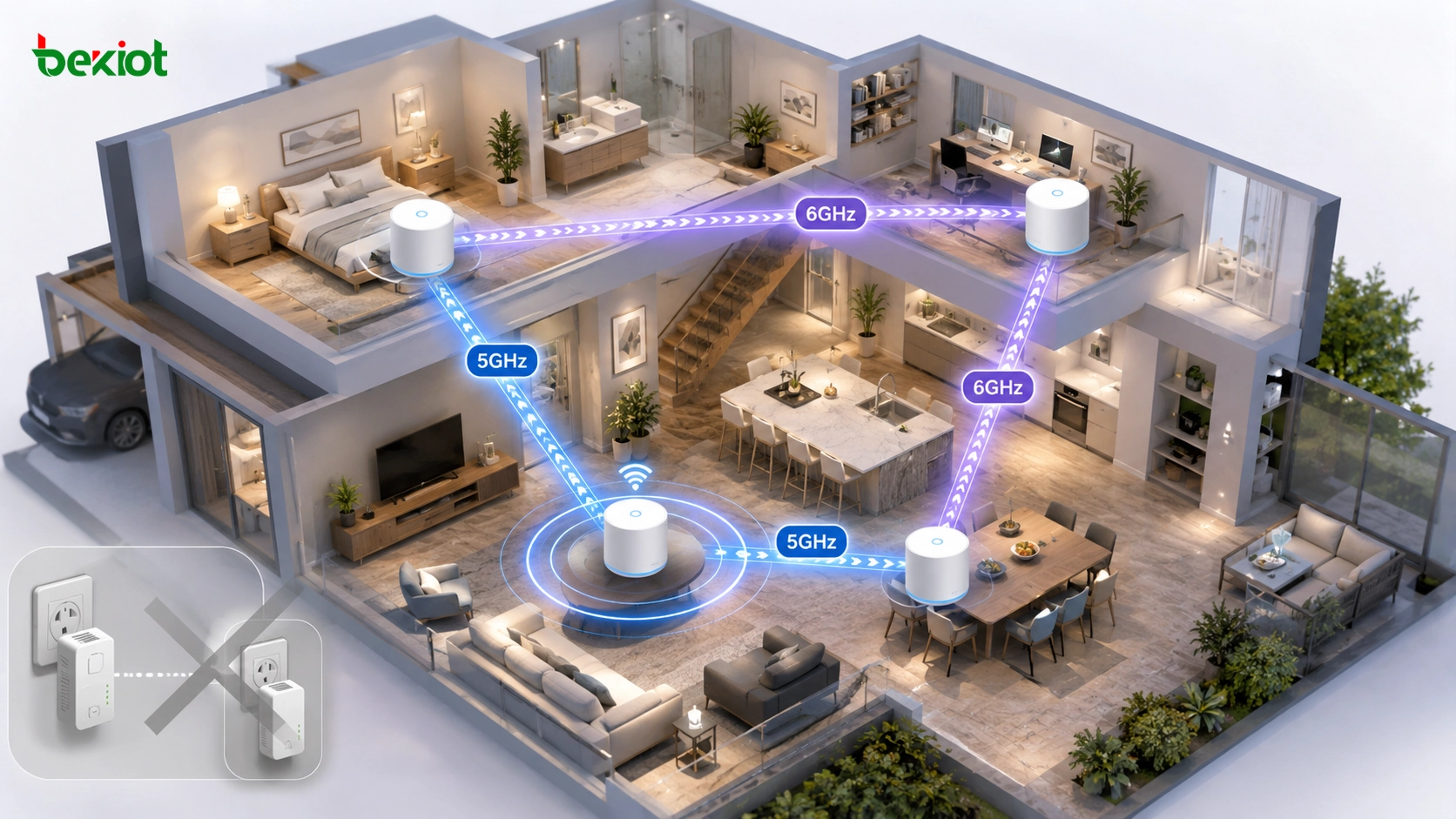
If PLC lost ground because of its technical limitations, Wi-Fi Mesh became the technology that accelerated the shift. Modern Mesh routers solve many of the problems that once made powerline adapters attractive. Instead of relying on a single router, a Mesh system uses multiple nodes to create a coordinated wireless network across the home.
Many modern Mesh systems support dedicated backhaul, dynamic path selection, automatic roaming, and centralized management. Compared with PLC nodes sharing a noisy electrical bus, Mesh systems can create cleaner wireless backhaul links using 5GHz or even 6GHz bands. This improves stability, reduces user configuration work, and allows better coverage planning.
Mesh also improves the user experience. A homeowner does not need to know which outlet belongs to which circuit, whether a power strip has a filter, or whether an appliance is generating noise. The system automatically manages wireless paths between nodes. For most modern households, this is easier and more predictable than troubleshooting PLC links.
The New Standard for Home Networks
Home network demand has changed from “basic connectivity” to high-bandwidth, low-latency, multi-device performance. A modern household may have 4K streaming, cloud gaming, video conferencing, smart TVs, NAS storage, home surveillance, Wi-Fi cameras, smart home devices, laptops, tablets, and mobile phones all running at the same time.
In this environment, a network link must be more than simply connected. It must provide stable throughput, low latency, predictable roaming, and reliable coverage. Powerline adapters may still provide usable connectivity in some rooms, but they often cannot guarantee the consistency required by demanding applications.
Wi-Fi 6, Wi-Fi 7, tri-band Mesh systems, and fiber-to-the-room or all-optical home networks have raised user expectations. Wi-Fi 7 improves spectrum use, channel width, latency handling, and multi-link operation. Meanwhile, fiber-based home networking provides a more future-proof physical layer. Against these newer options, PLC appears less attractive as a mainstream home solution.
Where Powerline Adapters Still Make Sense
Powerline adapters have not disappeared completely. They can still be useful in certain homes where Wi-Fi coverage is extremely difficult and Ethernet cabling is not possible. For example, old buildings with thick walls, rental apartments where renovation is not allowed, temporary network setups, or rooms with severe wireless shielding may still benefit from PLC as a low-cost fallback.
However, expectations must be realistic. PLC should not be planned as the first choice for high-performance home networking. It is better understood as a practical rescue tool when the preferred options are unavailable. Users should plug adapters directly into wall outlets, avoid filtered power strips, test multiple outlets, and understand that speed may change depending on appliance usage and electrical circuit conditions.
For ordinary households, a good planning sequence is usually: structured Ethernet or fiber where possible, Wi-Fi Mesh for whole-home coverage, and PLC only as a supplementary link in difficult environments. This reflects the current technology landscape more accurately than treating powerline adapters as a universal solution.
Professional Fields Still Use the Technology
Although consumer powerline adapters have lost popularity, PLC technology itself has not died. It has found stronger roles in professional and infrastructure markets where the traffic profile and deployment environment are different from home broadband.
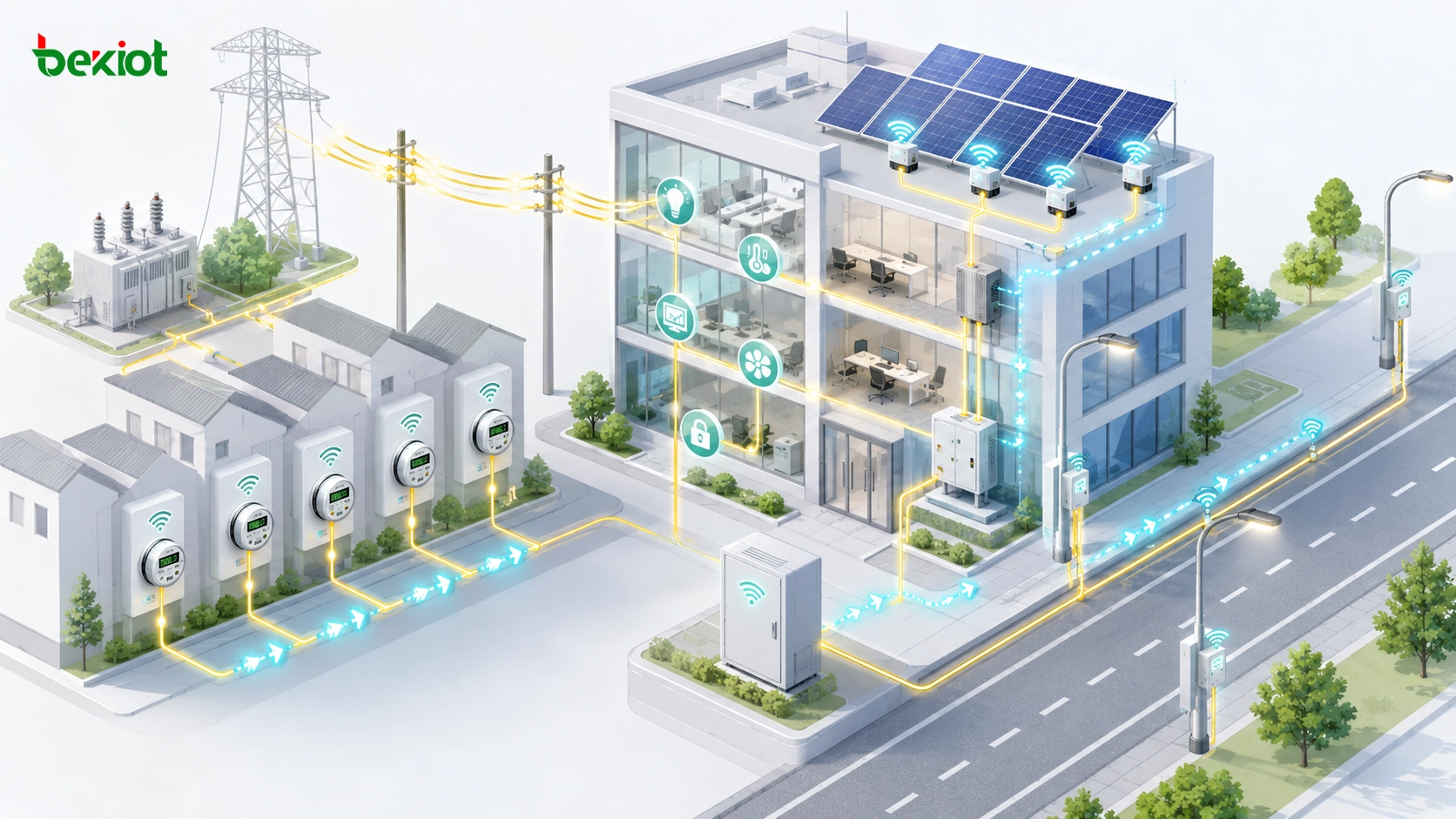
One important area is Advanced Metering Infrastructure, or AMI. In smart meter systems, PLC can help power utilities collect electricity usage data without installing separate communication wiring. The data volume is usually small, and the communication requirements are different from high-speed home internet. This makes PLC practical for utility-scale metering.
Another area is Broadband over Power Line, or BPL. In some remote areas, BPL may still be used to extend internet access through power infrastructure, especially where traditional broadband installation is difficult. It is not the dominant solution in most urban markets, but it remains part of the broader PLC application landscape.
Smart city and narrowband IoT applications are also important. Technologies such as G3-PLC and 6LoWPAN can support applications such as smart streetlight control, building automation, and solar microinverter monitoring. These scenarios often transmit small amounts of data, do not require ultra-low latency, and benefit from the ability to communicate over existing power lines.
Planning Guidance for Home and Small Office Networks
For home users and small offices, the choice should start with application requirements. If the network is used for simple web browsing, occasional streaming, or connecting a room where Wi-Fi is weak, a powerline adapter may still be acceptable. If the network must support gaming, video meetings, NAS access, surveillance recording, or multiple high-bandwidth devices, a more stable solution is usually needed.
The second step is to evaluate the building environment. If Ethernet cabling is available, it remains the most stable choice. If cabling is not possible, a modern Mesh system with properly placed nodes is often the best balance between performance and convenience. If both cabling and wireless coverage are difficult, PLC can be tested as a supplementary path.
The third step is to test real performance instead of trusting nominal speeds. Powerline products may advertise high theoretical rates, but actual throughput depends on wiring quality, circuit distance, electrical noise, phase layout, and outlet conditions. A simple speed test, latency test, and stability test across several days will reveal whether PLC is suitable for the specific location.
Common Mistakes to Avoid
One common mistake is plugging a powerline adapter into a surge-protected or filtered power strip. This can significantly reduce performance or prevent the link from working. PLC adapters should usually be plugged directly into wall outlets.
Another mistake is assuming that two outlets in the same house will always provide similar performance. In reality, different circuits, breaker paths, electrical phases, and appliance interference can create very different results. Testing several outlets is often necessary.
A third mistake is using PLC as a long-term replacement for proper network planning. If a home needs reliable high-speed coverage, the long-term solution should usually involve Ethernet, fiber, or a well-designed Mesh system. Powerline communication should be used where it fits, not where it is forced.
Future Role in Connected Infrastructure
The decline of powerline adapters in home networks reflects a broader shift in user expectations. Home users no longer need only basic access. They expect stable speed, low latency, seamless roaming, and strong support for many connected devices. Electrical wiring was never designed for this kind of broadband networking, so PLC naturally struggles against modern Wi-Fi and fiber-based alternatives.
At the same time, PLC still has a meaningful future in infrastructure. Smart grids, smart meters, building automation, street lighting, energy systems, and certain industrial monitoring applications can benefit from communication over existing power lines. These systems often require wide coverage, low installation cost, and small-packet communication rather than high-bandwidth entertainment or real-time gaming.
This is the key lesson: PLC is not a failed technology. It is a technology whose best application space has changed. It moved from being a consumer home-network shortcut to becoming a specialized communication method for power-related and infrastructure scenarios.
Conclusion
Powerline adapters lost popularity in home networks because household electrical wiring is not an ideal broadband communication medium. Unshielded and untwisted power lines create interference problems. Appliances inject noise. Transformers, meters, circuit layouts, and filtered power strips can block or weaken signals. These factors lead to unstable throughput, fluctuating latency, and unpredictable user experience.
At the same time, Wi-Fi Mesh, 5GHz and 6GHz backhaul, Wi-Fi 7, Ethernet, and fiber-based home networking have improved rapidly. These technologies provide easier management, better coverage, higher performance, and more predictable operation for modern households.
Powerline communication still has value, but its role has changed. In homes, it is now best used as a fallback option for difficult rooms or old buildings where other methods are unavailable. In professional fields such as AMI, BPL, G3-PLC, 6LoWPAN, smart lighting, building automation, and energy monitoring, PLC continues to play an important role because its ability to reuse existing power lines remains valuable.
FAQ
What is a powerline adapter?
A powerline adapter is a networking device that uses existing electrical wiring to transmit data. One adapter connects to the router and plugs into a wall outlet, while another adapter plugs into a different room to provide network access through Ethernet or Wi-Fi.
Why did powerline adapters become less popular?
Powerline adapters became less popular because their performance depends heavily on home wiring quality, electrical noise, outlet location, and power distribution structure. At the same time, Wi-Fi Mesh, Wi-Fi 6, Wi-Fi 7, Ethernet, and fiber-based home networks have become easier and more reliable.
Do powerline adapters work through power strips?
They may work poorly or fail completely through filtered or surge-protected power strips. Many power strips suppress high-frequency signals as electrical noise, which can block the PLC carrier signal. For best results, powerline adapters should usually be plugged directly into wall outlets.
Is Wi-Fi Mesh better than powerline networking?
For most modern homes, Wi-Fi Mesh is usually more flexible and easier to manage. Mesh systems can use 5GHz or 6GHz wireless backhaul, dynamic path selection, and seamless roaming. However, powerline adapters may still help in special cases where Wi-Fi signals are severely blocked and cabling is not possible.
Is PLC technology still useful today?
Yes. PLC technology is still useful in smart meters, AMI systems, BPL, smart street lighting, building automation, solar microinverter monitoring, and narrowband IoT applications. It is less dominant in consumer home networking but remains valuable in infrastructure scenarios where existing power lines can reduce deployment cost.







