


NDI is a network video transmission protocol designed for local-area video production, multi-camera connection, and low-latency media routing. It is often discussed together with protocols such as SRT, RTMP, RTSP, and GB/T28181, but its design purpose is different. NDI is not mainly built for long-distance emergency video backhaul over unstable networks. Its stronger value is replacing complex HDMI, SDI, and USB cabling in studios, meeting rooms, classrooms, event spaces, and production environments where multiple video sources need to be connected over an IP network.
To use NDI correctly, buyers and system designers must first understand where it fits. It performs best in a controlled LAN environment with enough bandwidth, suitable switches, NDI-enabled cameras or converters, and production software or hardware that can discover, receive, control, decode, and process NDI streams.
Why Network Video Became Important
Traditional video production often depends on physical signal cables. When only one camera is connected to a computer or mobile device, the workflow is simple. However, once the project moves into a large conference room, studio, church, lecture hall, training center, or live event venue, the situation becomes more complex. Multiple cameras may be installed more than ten meters away from the production desk, and each signal must be routed back to a switcher, capture card, encoder, or director workstation.
Using HDMI cables in this environment creates several problems. Long HDMI runs may require extenders, signal boosters, conversion boxes, or additional power supplies. Cable routing becomes difficult, troubleshooting becomes slower, and the production area can quickly turn into a complicated wiring site. USB capture workflows face similar limitations because USB is sensitive to distance, bandwidth, and interference. It is convenient for short desktop connections, but it is not ideal for distributed camera deployment.
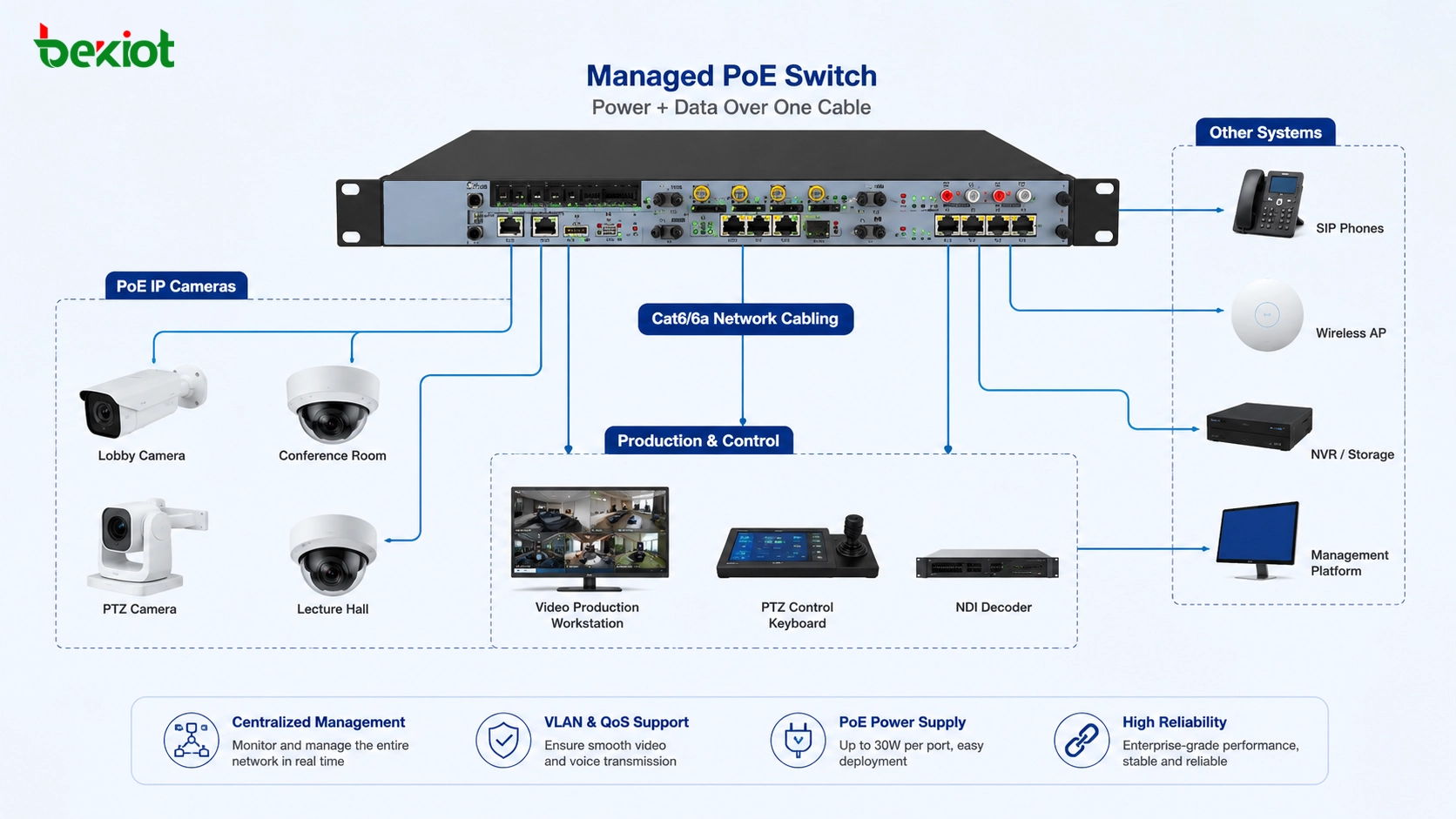
Network video transmission solves this problem by using Ethernet infrastructure to carry video signals. Instead of pulling many separate video cables from each camera to the production desk, cameras and video devices can connect to a network switch. The production system can then receive video sources through the network. This is the basic reason NDI became popular in live production and AV system integration.
Where NDI Fits Best
NDI is suitable for local video environments that need low latency, high-quality images, flexible routing, and easier device management. In a LAN, NDI can transmit video with very low delay and can preserve high-definition image quality for production use. If a camera supports NDI, it can send video directly through the network to a compatible workstation, switcher, decoder, or production system.
Another important advantage is control. NDI does not only transmit video. It can also support network-based device control, including PTZ movement and lens control for compatible cameras. This means operators can manage camera pan, tilt, zoom, and focus from the production area without adding a separate control cable.
NDI also works well with PoE network design. When an NDI camera supports PoE and the project uses a PoE switch, the camera can receive both power and network connection through one Ethernet cable. This reduces power adapter deployment, simplifies ceiling or wall-mounted camera installation, and improves the neatness of the system.
How It Replaces Traditional Cabling
In a traditional meeting room or studio, a camera may require a video cable, a power cable, and sometimes a control cable. If the camera is far from the director desk, the project may also need HDMI extenders, SDI conversion, USB extension, or extra signal distribution equipment. Each added device increases the installation cost and adds another possible failure point.
In an NDI-based system, each camera can connect to the network instead. The production computer or hardware switcher discovers available NDI sources on the LAN and selects the required video feed. For multi-camera production, this greatly reduces cable clutter and makes it easier to change layouts, add cameras, or move equipment.
NDI is similar in concept to Dante in professional audio: both use IP networking to replace dedicated signal cables and make media routing more flexible. The key difference is that NDI focuses on video and audio transport for production workflows, while Dante is mainly used for professional audio networking.
Network Design Matters More Than Many People Expect
NDI is convenient, but it is not a low-bandwidth protocol. High-quality video streams can place heavy pressure on a local network, especially when several cameras are used at the same time. A single camera may be easy to handle, but a multi-camera production environment requires careful network planning.
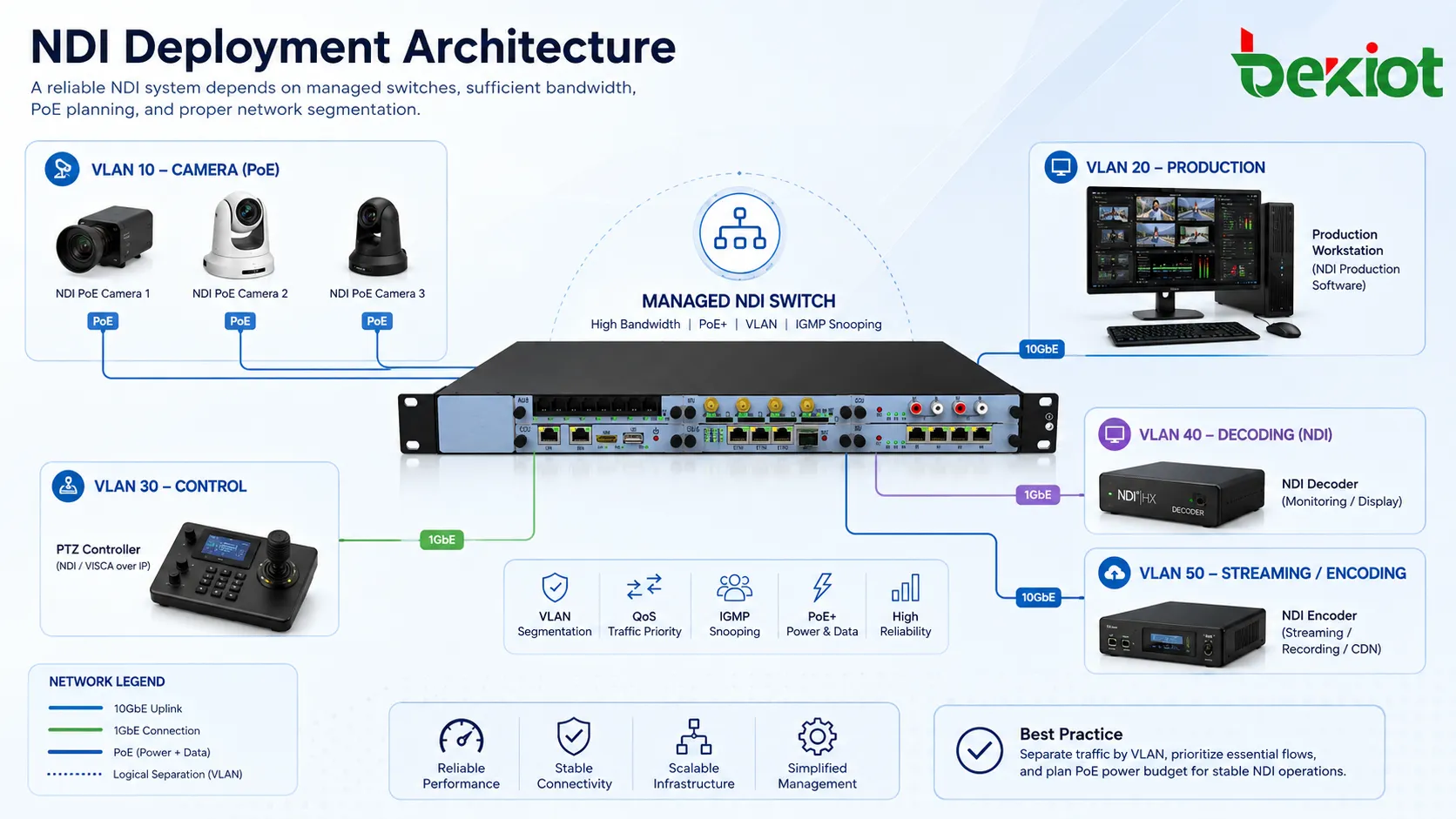
The switch should have enough bandwidth and backplane capacity. In many projects, a dedicated switch or an isolated network segment is a better choice than sharing the same network with office computers, Wi-Fi users, file transfers, and other business traffic. If the LAN must be shared, VLAN separation is recommended so that video production traffic does not interfere with normal data services.
PoE capacity should also be checked. A switch may have many PoE ports, but the total PoE power budget may not be enough for all cameras at full load. For PTZ cameras, the power requirement can be higher than that of simple fixed cameras. Designers should calculate the number of cameras, required wattage, link speed, and uplink bandwidth before deployment.
Device Cost and Licensing Should Be Considered
NDI is not simply a free open video standard that every device can use without cost. Manufacturers that support NDI usually need to license the technology and integrate it into cameras, encoders, decoders, converters, or software products. For buyers, this means NDI-enabled devices may be more expensive than basic HDMI or USB devices.
This does not mean NDI is not worth using. The correct question is whether the project benefits from flexible network routing, reduced cabling, PTZ control, faster production setup, and easier multi-camera management. In a small one-camera setup, HDMI or USB may still be more economical. In a distributed multi-camera system, NDI can reduce installation difficulty and improve operational efficiency.
When It Is Not the Right Choice
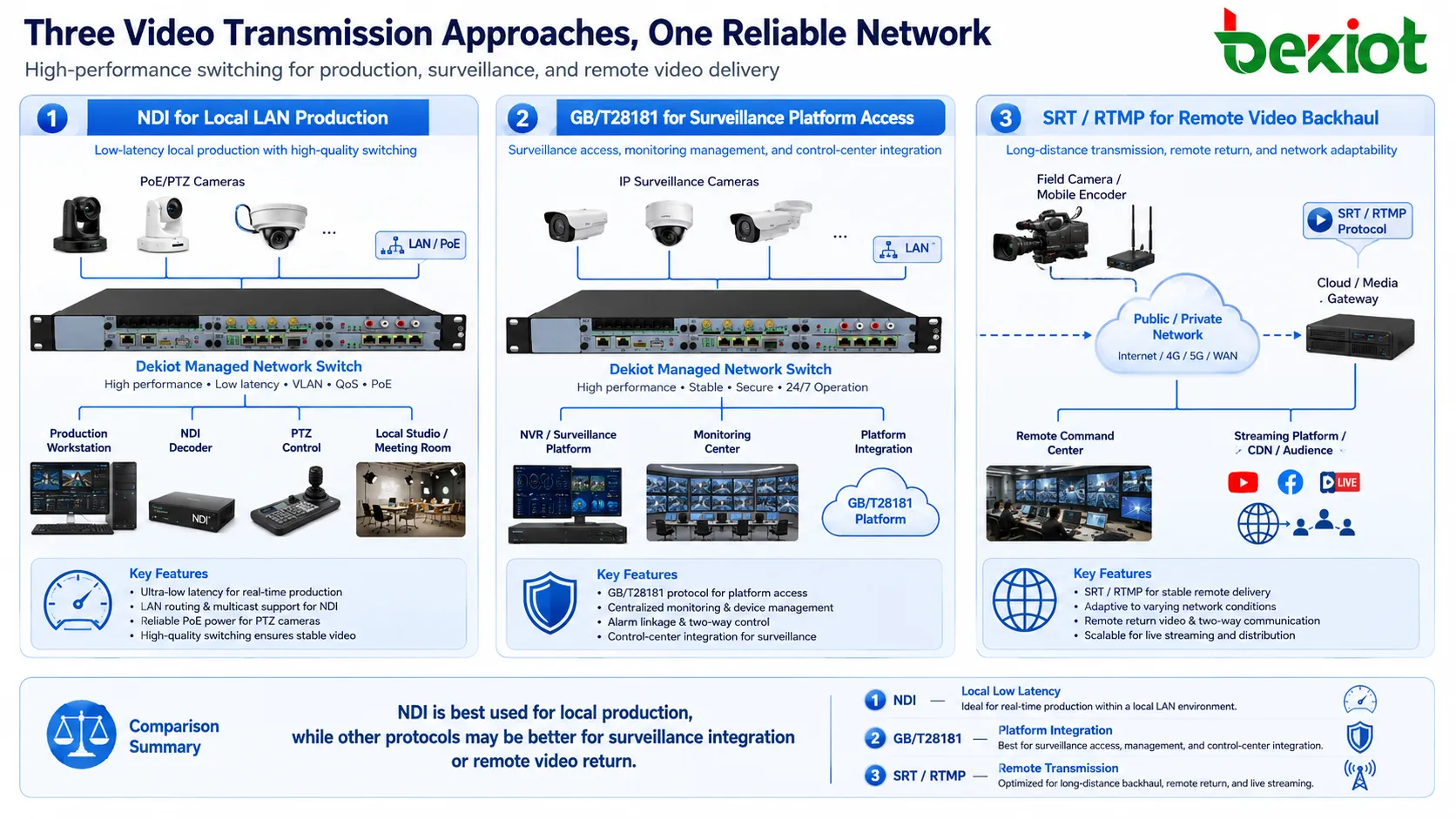
NDI is often misunderstood as a universal solution for all video return scenarios. It is not. NDI is mainly designed for local-area network production. It is not the best choice for emergency video backhaul over weak wireless links, satellite networks, public Internet links, temporary field networks, or long-distance unstable connections.
In emergency response, mobile command, drone video return, remote monitoring, or cross-region command applications, other streaming methods may be more suitable after local video collection. A practical workflow can use NDI inside the local production site, then decode, transcode, compress, and forward the video through SRT, RTMP, RTSP, private streaming protocols, or a command platform according to the network condition.
In other words, NDI can be part of the local acquisition layer, but it should not be treated as the only transmission layer for every scenario. The final design should consider delay, image quality, bandwidth, stability, public network traversal, security, platform compatibility, and field operation requirements.
NDI and GB/T28181 in Camera Access Projects
For camera access in command, surveillance, emergency response, and public safety projects, GB/T28181 can also be considered. GB/T28181 is widely used for video surveillance access and platform integration. It can transmit camera video through the network to a video gateway, media server, or upper-level platform, and it can also support PTZ control and focus adjustment.
The selection between NDI and GB/T28181 should be based on the project type. NDI is more suitable for local production, live switching, studio workflow, and AV integration. GB/T28181 is more suitable for surveillance platform access, command center integration, and security camera management. In some complex systems, both can be used: NDI for local production sources and GB/T28181 for surveillance resources.
Practical Deployment Steps
A practical NDI deployment can start with three checks: whether the camera supports NDI, whether the receiving system can decode NDI, and whether the network can carry the expected number of streams. After that, the designer can plan switch capacity, PoE power, VLAN separation, IP addressing, production software, recording, and output requirements.
For a meeting room or studio, the workflow may include NDI cameras, a PoE switch, production software, PTZ control, recording, live streaming, and a display output. For a hybrid command or event system, NDI sources may first enter a local production workstation or media gateway, then be converted into another streaming format for remote transmission.
| Design Item | Recommended Check | Why It Matters |
|---|---|---|
| Camera Compatibility | Confirm native NDI or NDI converter support | Ensures the video source can enter the network workflow |
| Receiving System | Check whether software, switcher, decoder, or gateway supports NDI input | Prevents a camera from being visible but unusable in production |
| Switch Performance | Evaluate port speed, backplane capacity, uplink bandwidth, and multicast handling | Reduces video delay, packet loss, and unstable preview |
| PoE Budget | Calculate total camera power demand and switch PoE capacity | Prevents cameras from powering off or becoming unstable |
| Network Isolation | Use a dedicated network or VLAN for video traffic | Protects production video from office traffic and other services |
| Remote Delivery | Use transcoding or another streaming protocol when sending video outside the LAN | Improves adaptability for public networks, wireless links, and remote platforms |
Best-Fit Applications
NDI is valuable in live broadcasting rooms, lecture halls, corporate meeting rooms, training centers, houses of worship, event venues, remote production rooms, education recording studios, and AV-over-IP systems. It is also useful when multiple cameras must be installed at different positions and operators want to manage video, audio, and PTZ control through a network-based workflow.
For system integrators, the main value is not only the protocol itself. The value is a cleaner system architecture. Cameras become easier to place, signals become easier to route, control becomes more centralized, and the production desk becomes less dependent on long signal cables. When used in the correct environment, NDI can make the project easier to build and easier to expand.
Selection Advice for System Designers
NDI should be selected when the project needs low-latency LAN video, multi-camera production, flexible routing, PTZ control, and simplified cabling. It should be used carefully when the project involves long-distance transmission, unstable networks, satellite links, or emergency field backhaul.
A good video system is rarely based on one protocol only. NDI, GB/T28181, SRT, RTMP, RTSP, HDMI, SDI, and USB all have different roles. The correct design depends on where the video is generated, where it needs to be viewed, how stable the network is, what latency is acceptable, and which platform must receive the stream.
For this reason, NDI is best understood as a powerful local production and AV-over-IP tool. When combined with proper network design and the right media gateway or transcoding workflow, it can become an important part of a broader video communication solution.
FAQ
Can NDI run over Wi-Fi?
It can work in limited cases, but wired Ethernet is strongly preferred for production use. Wi-Fi may introduce variable latency, packet loss, and unstable bandwidth, especially when multiple cameras are involved.
Do all production programs automatically support NDI?
No. Some software supports NDI directly, while others require plug-ins, drivers, converters, or capture workflows. Compatibility should be verified before buying cameras or switching equipment.
Is NDI better than HDMI?
They solve different problems. HDMI is simple and reliable for short point-to-point connections. NDI is better when multiple video sources need to be routed, controlled, and managed over a network.
Should NDI traffic be placed on the same office network?
It is better to avoid this unless the network has been designed for video traffic. A dedicated switch, dedicated VLAN, or separated production network can reduce congestion and make the system easier to maintain.
What should be prepared before an NDI project is installed?
Prepare a camera list, stream quantity, expected resolution, switch model, PoE budget, receiving software, control requirements, recording plan, remote output method, and fallback plan for signal failure.







