Why Logs Need to Leave the Original System
Log export is the process of extracting system logs, application logs, security logs, device logs, operation records, access records, error messages, alarm events, or audit trails from one system and saving or sending them to another location for storage, review, analysis, compliance, or troubleshooting.
In many digital and operational environments, logs are generated continuously. Servers record user activity, applications record errors, firewalls record access attempts, communication platforms record call events, industrial devices record alarms, and cloud platforms record service behavior. Log export makes these records easier to preserve, search, compare, share, and analyze outside the original system.
Log export turns scattered operational records into usable evidence, diagnostic material, compliance data, and decision-support information.
Basic Meaning of Log Export
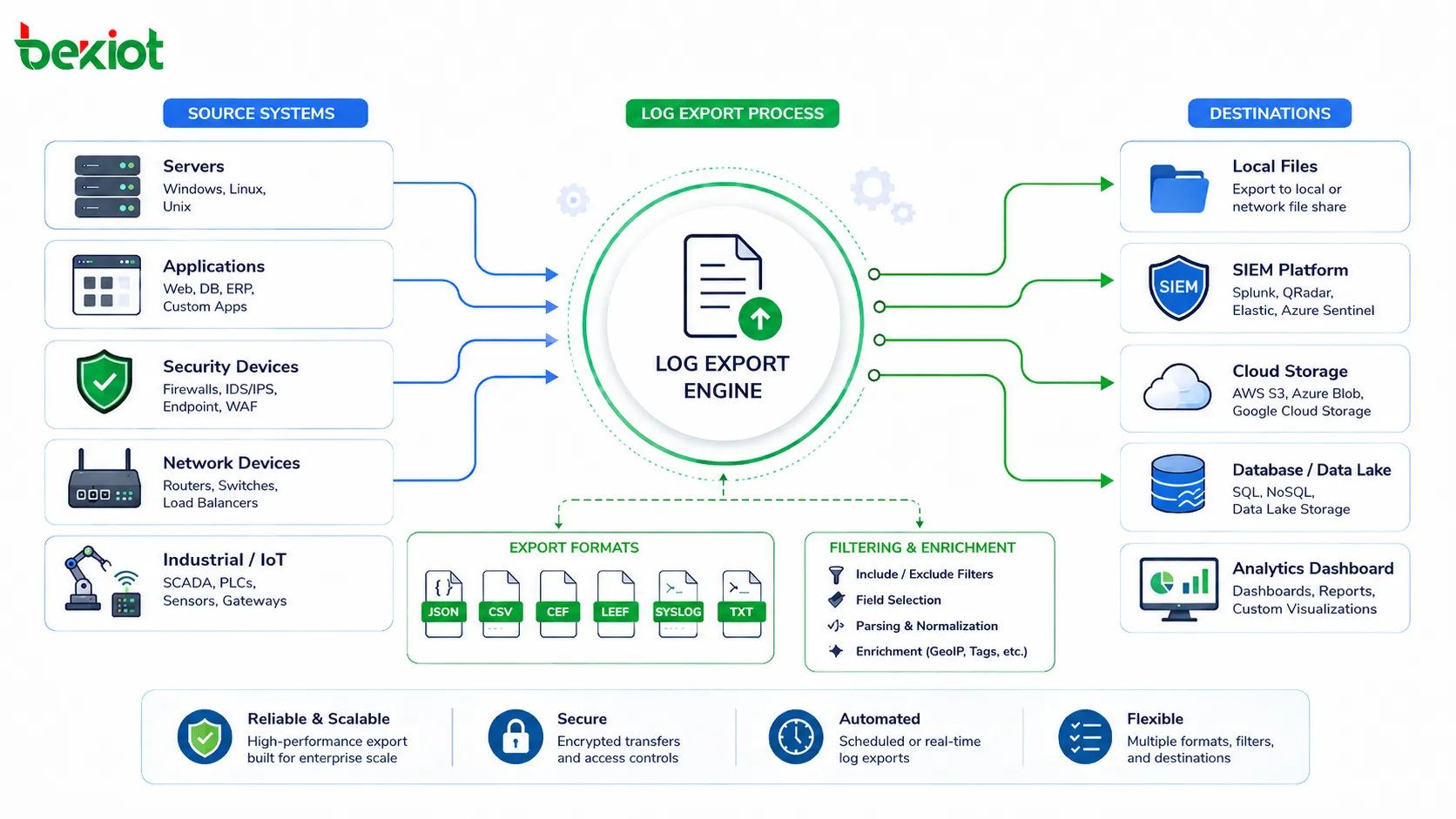
Log export means taking log data from a source system and transferring it into a file, database, monitoring platform, SIEM system, cloud storage, analytics tool, backup archive, or reporting environment. The exported log may be used immediately for investigation or stored for future review.
Common export formats include CSV, TXT, JSON, XML, Syslog, PDF reports, database tables, compressed archive files, or platform-specific log packages. The best format depends on how the logs will be used after export.
Log Source
The log source is the system that creates the record. It may be an operating system, web server, database, firewall, router, switch, application server, access control system, cloud platform, endpoint device, IoT gateway, industrial controller, or business software platform.
Each source may generate different types of logs. For example, a firewall may record traffic and security events, while an application may record login attempts, user actions, API errors, database failures, and service exceptions.
Export Destination
The export destination is where the log data is stored or analyzed after leaving the source system. It may be a local folder, remote server, SIEM platform, log management system, cloud bucket, compliance archive, data warehouse, or maintenance tool.
Choosing the right destination matters. A temporary export file may be enough for quick troubleshooting, while security monitoring and compliance review often require centralized, protected, and searchable log storage.
How the Log Export Process Works
The log export process usually begins with selecting the log type, time range, event category, device, user, application module, or severity level. The system then extracts matching records and converts them into the required format.
After export, the log file or stream can be downloaded, transferred, archived, imported into another tool, or automatically sent to a centralized platform. In larger systems, this process may be scheduled or automated instead of performed manually.
Manual Export
Manual export is performed by an administrator or authorized user through a management interface, command line, reporting tool, or system console. The user selects the required log range and downloads the result.
This method is useful for occasional troubleshooting, audit requests, incident review, or technical support. However, it is not ideal for long-term monitoring because it depends on human action and may miss important events if not performed regularly.
Scheduled Export
Scheduled export runs automatically at defined intervals, such as hourly, daily, weekly, or monthly. The system exports logs to a storage path, email report, remote server, or archive platform according to a predefined rule.
This method improves consistency. It is useful when organizations need regular reports, long-term retention, operational review, or compliance evidence without relying on manual downloads.
Real-Time Log Forwarding
Real-time log forwarding sends log events continuously or near real time to another system. This is common in security monitoring, cloud operations, network management, and large-scale application observability.
Real-time export allows security teams and operations teams to detect abnormal activity faster. For example, repeated login failures, system errors, network attacks, device offline events, or application crashes can trigger alerts shortly after they occur.
Main Functions of Log Export
Log export supports many operational and security functions. It helps teams understand what happened, when it happened, who was involved, which system was affected, and what action should follow.
Troubleshooting and Root Cause Analysis
When a system fails, logs often provide the first technical clues. Exported logs can help engineers review errors, compare timestamps, identify repeated failures, trace user actions, and understand system behavior before and after the issue.
For example, an application crash may be related to a database timeout, failed API request, memory error, or permission problem. Exported logs allow teams to investigate the full sequence instead of relying only on screenshots or user descriptions.
Security Investigation
Security teams use exported logs to investigate suspicious activity, failed logins, unauthorized access, malware behavior, firewall blocks, privilege changes, data access events, and abnormal network traffic.
Centralized log export is especially important because attackers may try to erase local logs after compromising a system. Sending logs to protected external storage can preserve evidence for later analysis.
Compliance and Audit Support
Many organizations need to retain operation logs, access logs, security logs, and administrative activity records for compliance, legal review, customer audits, or internal governance.
Log export helps provide evidence that systems were operated, accessed, monitored, or maintained according to policy. The exported data can support audit trails, incident reports, access reviews, and regulatory documentation.
Performance Monitoring
Logs can reveal system performance patterns such as slow queries, failed requests, high error rates, service restarts, overloaded devices, network delay, or repeated timeout events.
When exported into analytics tools, log data can support dashboards, trend reports, capacity planning, and service quality improvement. This helps teams detect problems before users report them.
Distinctive Advantages of Log Export
The distinctive advantage of log export is that it makes operational records portable, independent, searchable, and reusable. Logs are no longer trapped inside one device or platform. They can be analyzed across systems and preserved beyond the life of the original environment.
Independent Evidence Preservation
Exported logs can be stored outside the source system. This protects records when the original system is restarted, replaced, damaged, upgraded, attacked, or decommissioned.
For incident investigation, independent storage is valuable. If all logs remain only on the affected system, evidence may be lost when the device fails or when an attacker changes local records.
Cross-System Analysis
Most incidents do not happen inside one system only. A user login issue may involve identity service logs, application logs, firewall logs, database logs, and endpoint logs. Log export allows these records to be collected and compared.
Cross-system analysis helps teams build a complete timeline. This is useful for security investigation, application debugging, network troubleshooting, and operational review.
Long-Term Retention
Many systems store logs only for a limited time because local storage is small. Exporting logs to external storage allows organizations to keep records for weeks, months, or years according to policy.
Long-term retention is important for audits, delayed incident discovery, trend analysis, and historical comparison. Some problems are only visible when older records are available.
Flexible Reporting
Exported logs can be imported into spreadsheets, BI tools, SIEM platforms, data lakes, or reporting systems. This makes it easier to generate summaries, charts, incident reports, compliance records, and operational dashboards.
Instead of viewing logs only through the original system interface, teams can process them with tools that match their workflow and reporting needs.
Better Collaboration
Exported logs can be shared with internal teams, vendors, technical support, auditors, cybersecurity consultants, or management teams. This helps different stakeholders review the same evidence.
Sharing should still follow security and privacy rules. Sensitive fields may need masking, encryption, or access approval before logs are distributed.
Common Log Export Formats
The log export format affects how easily logs can be read, searched, imported, or analyzed. Human-readable formats are convenient for quick review, while structured formats are better for automation and analytics.
| Format | Typical Use | Main Benefit |
|---|---|---|
| TXT | Simple system logs, support review, manual inspection | Easy to open and read |
| CSV | Reports, audit lists, spreadsheet analysis | Easy to filter, sort, and process |
| JSON | APIs, cloud platforms, log management systems | Structured and machine-readable |
| XML | Enterprise systems, legacy integrations, formal data exchange | Structured and self-descriptive |
| Syslog | Network devices, servers, firewalls, SIEM forwarding | Widely supported for centralized logging |
| PDF Report | Management review, formal audit submission | Readable and presentation-friendly |
Structured and Unstructured Logs
Unstructured logs are usually plain text messages. They are easy for humans to read, but harder for systems to parse automatically. Structured logs use fields such as timestamp, device ID, user, event type, severity, source IP, action, and result.
Structured logs are better for large-scale analysis because they can be filtered and correlated more easily. For modern platforms, JSON and structured Syslog are commonly used for automated processing.
Compressed Log Packages
Large systems may export logs as compressed packages. These packages may include several files, such as system logs, debug logs, configuration snapshots, crash dumps, and diagnostic metadata.
This is useful for technical support because engineers can review the full environment instead of receiving one incomplete log file. However, compressed log packages may contain sensitive information and should be protected.
Applications in Different Environments
Log export is used across IT, security, business, cloud, industrial, and communication environments. Each environment has different log types, but the need for traceability and analysis is similar.
Enterprise IT Operations
IT teams export logs from servers, endpoints, databases, applications, identity systems, email platforms, backup systems, and network devices. These logs support troubleshooting, user support, patch review, capacity planning, and service management.
When systems are integrated into a centralized log platform, administrators can search events across many sources from one interface. This improves response speed during incidents.
Cybersecurity Monitoring
Security teams use log export to collect authentication logs, firewall logs, VPN logs, endpoint security events, intrusion detection alerts, privileged account activity, and cloud access records.
These logs help detect attack patterns, investigate incidents, and support forensic review. Exporting logs to protected storage also helps preserve records even if the original system is compromised.
Application and API Management
Developers and DevOps teams export application logs, API gateway logs, container logs, service logs, error traces, and performance metrics. This helps identify bugs, failed requests, latency spikes, and user experience issues.
In microservice environments, exported logs are essential because one user request may pass through several services. Centralized log analysis helps reconstruct the full request path.
Cloud and SaaS Platforms
Cloud platforms provide logs for compute resources, storage access, identity activity, API calls, network traffic, database events, and security rules. SaaS platforms may provide audit logs, user activity logs, and administrative change logs.
Exporting these logs helps organizations meet governance requirements and maintain visibility beyond the provider’s default console view.
Industrial and Facility Systems
Industrial systems, building automation platforms, access control systems, video systems, alarm panels, and maintenance platforms may export event logs, device fault records, access records, and operator actions.
These logs support incident review, maintenance planning, safety analysis, and operational reporting. In large facilities, exported logs can help identify recurring faults across devices and locations.
Security and Privacy Considerations
Log export can expose sensitive information if not managed properly. Logs may include usernames, IP addresses, device identifiers, access tokens, personal data, system paths, internal errors, call records, location information, or security events.
Access Control
Only authorized users should be able to export logs. Export permissions should be limited according to job role, data sensitivity, and business need.
For high-risk systems, log export may require approval, multi-factor authentication, or administrative review. This prevents unauthorized users from extracting sensitive operational data.
Data Masking
Some log fields may need masking before sharing. This may include passwords, tokens, personal identifiers, phone numbers, email addresses, customer IDs, IP addresses, or confidential business data.
Data masking is especially important when logs are sent to external vendors, consultants, auditors, or public support forums. Sharing raw logs without review can create privacy and security risks.
Encryption and Secure Transfer
Exported logs should be protected during transfer and storage. Secure methods may include HTTPS downloads, SFTP transfer, encrypted archives, access-controlled cloud buckets, VPN connections, and encryption at rest.
Plain email attachments are often risky for sensitive logs. Organizations should define approved transfer methods for support and audit workflows.
Common Challenges and Mistakes
Log export can fail to deliver value if logs are incomplete, inconsistent, poorly formatted, or difficult to search. A good export process should be designed before an incident occurs.
Exporting Too Little Data
If only a small part of the log is exported, investigators may miss the real cause. For example, exporting only the error moment without earlier warnings may hide the sequence that led to the failure.
When investigating incidents, it is often useful to export a wider time range before and after the event. This gives teams more context for analysis.
Exporting Too Much Unfiltered Data
Exporting every log without filters can create huge files that are hard to review. Large exports may also contain unnecessary sensitive data.
The better approach is to define useful filters such as time range, severity, device, user, module, event type, or error code. For long-term analytics, centralized indexing is usually more effective than manual file review.
Ignoring Time Synchronization
Log analysis depends heavily on accurate timestamps. If servers, devices, and applications use different times, it becomes difficult to reconstruct the event timeline.
Systems should use reliable time synchronization such as NTP. Time zone settings should also be documented, especially in multi-site and cloud environments.
No Retention Policy
Without a retention policy, logs may be deleted too early or stored longer than necessary. Short retention can harm investigations, while excessive retention may increase storage cost and privacy risk.
Retention should match operational, security, legal, and compliance requirements. Different log types may require different retention periods.
Best Practices for Log Export
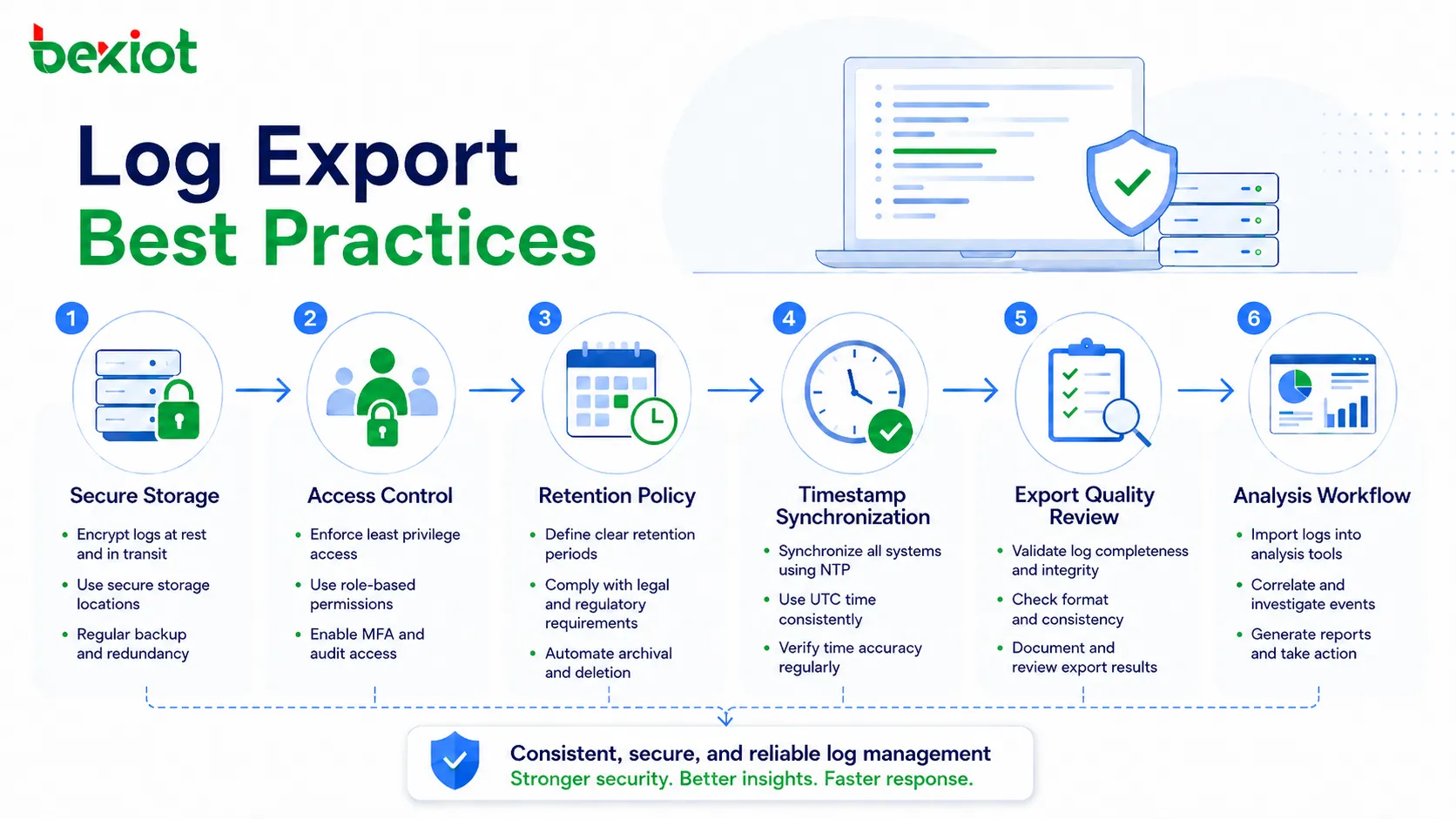
A reliable log export strategy should focus on consistency, security, usability, and recovery value. Logs should be easy to find when needed, but also protected from unauthorized use.
Define Export Scope
Organizations should define which systems need log export, which log types matter, how often export should happen, and who can access exported records.
Critical systems should usually include system logs, security logs, user activity logs, configuration change logs, and error logs. Less critical systems may need only basic event records.
Use Consistent Naming
Exported files should use clear naming rules. Useful file names may include system name, log type, date range, site, severity, and export time.
Consistent naming reduces confusion during audits and incident review. It also helps teams find the right file quickly when many exports exist.
Protect Exported Files
Exported logs should be stored securely. Access should be limited, and sensitive files should be encrypted. If logs are no longer needed, they should be deleted according to policy.
For formal investigations, exported logs should be protected from modification. Hash values, digital signatures, or controlled evidence repositories may be used when integrity matters.
Review Export Quality
After export, users should confirm that the file opens correctly, contains the expected time range, includes complete fields, and can be imported into the intended analysis tool.
This is especially important before sending logs to technical support or auditors. A corrupted or incomplete export can delay the review process.
FAQ
Should exported logs be kept separately from production systems?
Yes, for important systems. Separate storage reduces the risk that logs are lost when the production system fails, is replaced, or is compromised during a security incident.
How can exported logs be verified for integrity?
Integrity can be verified through checksums, hash values, digital signatures, controlled access records, write-once storage, or evidence management procedures. This is useful when logs may support investigations or audits.
What information should be removed before sharing logs externally?
Sensitive fields such as passwords, tokens, personal data, customer information, internal IP details, confidential paths, and private business identifiers should be reviewed and masked where necessary.
Can log export affect system performance?
Large exports can affect performance if they read heavy data from a busy system. For critical platforms, exports should be scheduled carefully or handled through replicated log storage or centralized logging tools.
How long should exported logs be retained?
Retention depends on business needs, security policy, legal requirements, audit obligations, and storage cost. Security logs, access logs, and compliance logs may require longer retention than routine debug logs.
What should be checked when an exported log file cannot be imported?
Check file encoding, delimiter format, timestamp format, field names, compression status, file size, line breaks, export version, and whether the target tool supports the selected log format.