


Unified communication projects are no longer limited to voice calls, SIP extensions, or a single dispatch console. In real command-and-control environments, a modern communication platform often needs to connect video surveillance systems, two-way radios, mobile terminals, emergency phones, broadcasting systems, access control alarms, and third-party application platforms. The goal is simple: bring different communication resources into one unified interface for monitoring, calling, dispatching, recording, and coordinated response.
However, implementation is rarely simple. Many projects encounter two major bottlenecks during system integration. The first is protocol incompatibility, especially when different devices and networks use different access standards such as GB/T28181, RTMP, RTSP, ONVIF, PDT, DMR, SIP, private radio protocols, or vendor-defined interfaces. The second is video codec incompatibility, especially when some dispatch platforms, browsers, mobile terminals, video walls, or legacy decoders cannot properly handle H.265 video streams.
When these problems are not solved correctly, the unified communication platform may suffer from failed device access, unstable video preview, black screens, playback freezing, mosaic artifacts, delayed response, and poor user experience. In emergency dispatch, industrial safety, public security, transportation, energy, mining, ports, and large enterprise campuses, these are not small technical issues. They directly affect command efficiency and operational continuity.
The practical solution is not to replace every device or rebuild the whole system. In many cases, the right architecture is to use dedicated gateways and transcoding services as the middle layer. Protocol gateways can convert non-standard or heterogeneous access protocols into standard interfaces that the platform can recognize. Video transcoding servers can convert H.265 streams into H.264 or other compatible formats in real time. With this approach, complex compatibility problems can be handled at the system edge instead of being pushed to every endpoint.
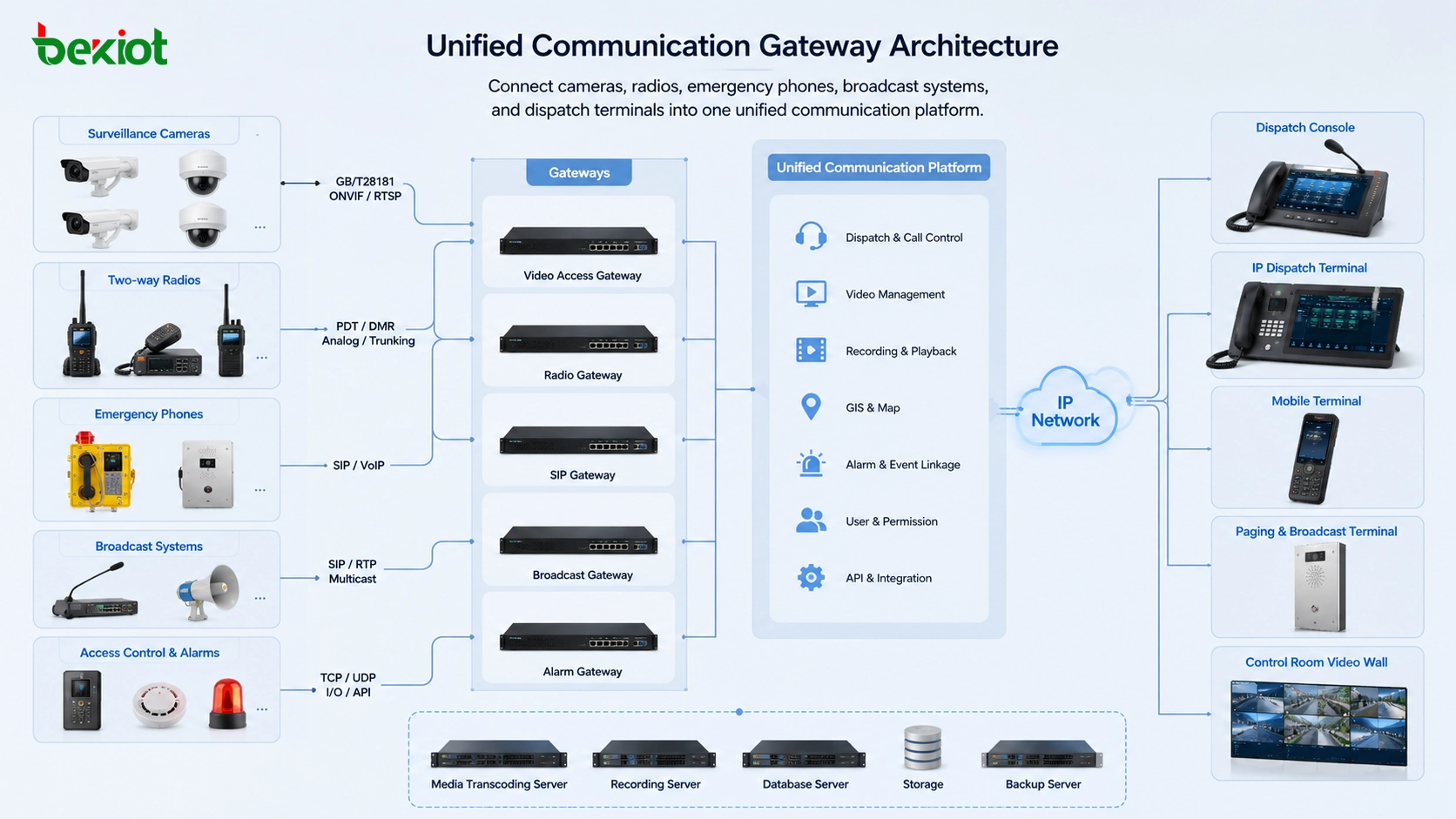
The Real Challenge Behind System Convergence
The phrase “unified communication” sounds clean and simple, but actual projects involve many different systems that were not originally designed to work together. A video surveillance system may use GB/T28181, RTSP, ONVIF, or RTMP. A radio system may use PDT, DMR, analog radio, or a private trunking interface. An emergency phone may use SIP. A public address system may require paging control. A command platform may need GIS location, video preview, audio dispatch, alarm linkage, and recording.
Each system has its own communication logic. Some devices are designed for video streaming. Some are designed for voice dispatch. Some focus on private radio communication. Some are built for alarm triggering and event reporting. When these systems are deployed separately, they may work well inside their own boundaries. The difficulty appears when a project requires them to work as one coordinated communication network.
This is why many integration projects fail at the access layer. The platform may have enough functions, but it cannot directly understand every device protocol. The device may be functional, but it cannot send media or signaling in a format that the platform accepts. The result is a “communication island” problem: every system works independently, but the command center cannot use all resources in one workflow.
When Devices Speak Different Protocols
Protocol incompatibility is one of the most common problems in integrated communication projects. A command platform may need to receive video from surveillance cameras, voice from radio networks, alarm signals from field devices, and media streams from remote monitoring terminals. These resources may come from different vendors, different industries, and different generations of technology.
For example, many surveillance systems use GB/T28181 for video access and control in Chinese security projects. Some video devices may use RTMP, RTSP, or ONVIF for stream transmission and device management. Radio communication systems may use PDT or DMR. SIP systems are widely used for VoIP, intercom, dispatch voice, and IP broadcasting. Without a conversion layer, these protocols cannot always be directly recognized by the same platform.
A common mistake is to expect the central platform to support every possible protocol by itself. This may look convenient at first, but it makes the platform heavy, difficult to maintain, and dependent on many custom interfaces. A more flexible architecture is to place dedicated gateways between field systems and the unified communication platform. Each gateway handles protocol conversion for a specific device type or network type.
Using Gateways as the Integration Bridge
A gateway acts as a bridge between the field system and the unified communication platform. It receives media, signaling, control commands, or status information from one side, then converts them into a format that the other side can understand. In this way, the gateway hides complexity from the central platform and reduces the need for deep customization on every device.
For video access, a video gateway can connect surveillance cameras, NVRs, video platforms, remote video terminals, or other video sources using protocols such as GB/T28181, RTMP, RTSP, ONVIF, or vendor-specific interfaces. It can then forward streams to the dispatch platform using a standardized format. This allows operators to preview, switch, record, and distribute video inside one command system.
For radio communication, a trunking intercom gateway or RoIP gateway can connect PDT, DMR, analog radio, or other two-way radio networks to an IP dispatch platform. This allows dispatchers to talk with field radio users from a software console, SIP phone, command center microphone, or mobile dispatch terminal. It also allows radio voice to be recorded, managed, and linked with other emergency communication resources.
For voice and intercom systems, SIP gateways and IP communication gateways can connect analog phones, emergency call stations, IP phones, broadcast terminals, and dispatch servers. In industrial scenarios, Becke Telcom can be considered for projects that need SIP-based dispatch, industrial phones, emergency intercom, broadcast linkage, and radio gateway integration within one communication architecture.
Why H.265 Compatibility Becomes a Critical Issue
The second major bottleneck is video codec compatibility. H.265, also known as HEVC, can reduce bandwidth compared with H.264 under similar video quality. This makes it attractive for high-definition surveillance, long-distance transmission, remote monitoring, and large-scale video systems. However, H.265 also requires stronger decoding capability and wider software support.
In real projects, not every terminal can decode H.265 smoothly. Some dispatch platforms, browsers, mobile devices, legacy decoders, video walls, or embedded terminals may only support H.264 reliably. When an H.265 stream is sent directly to these devices, the user may see a black screen, video freezing, decoding failure, frame loss, or mosaic artifacts.
This problem becomes more serious in command-center environments because video is not only used for viewing. It may support emergency verification, incident tracking, remote inspection, dispatch decision-making, and post-event review. If the video cannot be opened quickly during an emergency, the entire communication workflow becomes less effective.
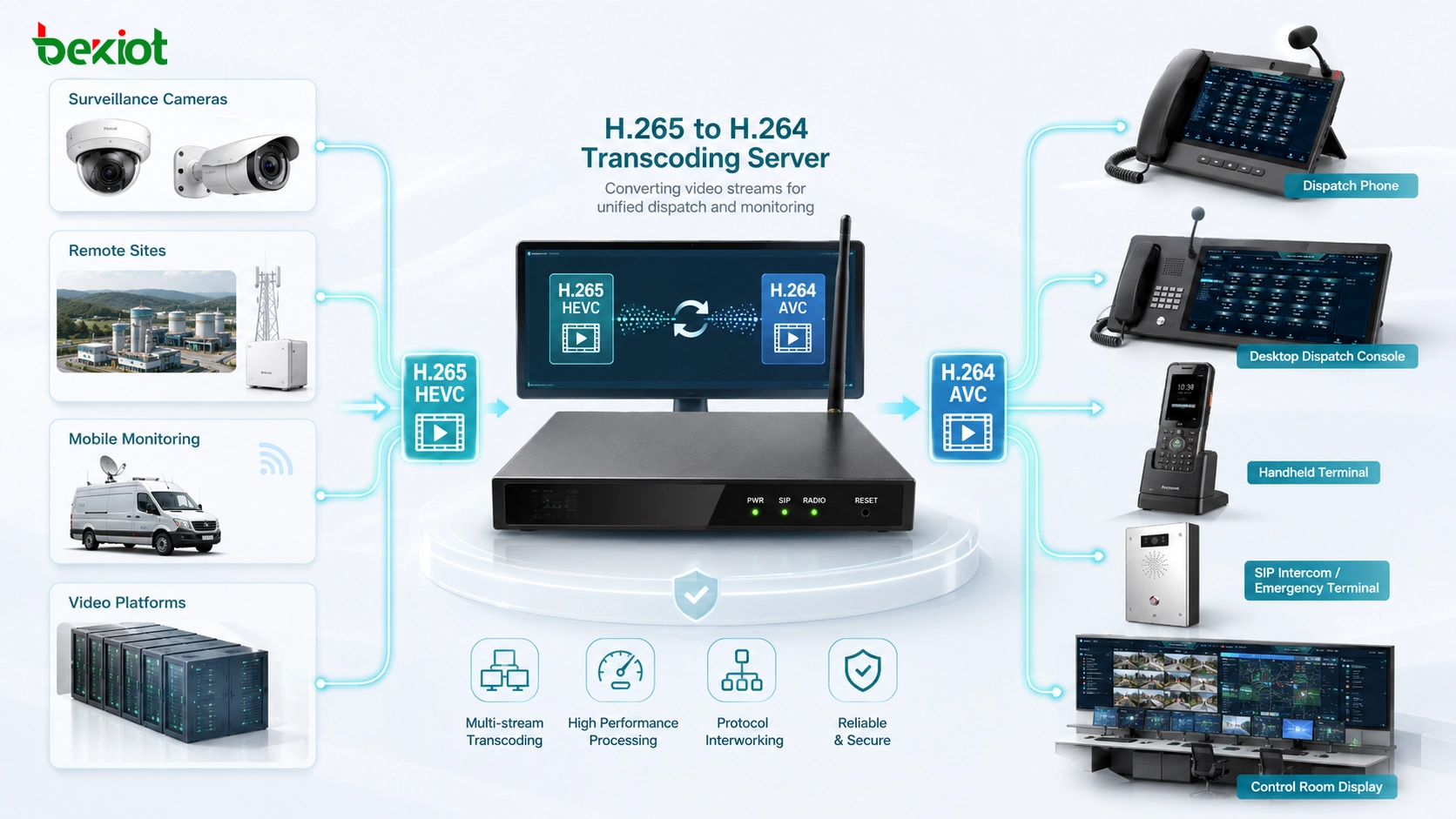
Transcoding as the Practical Compatibility Layer
The most practical solution is to deploy a video transcoding server between the video source and the unified communication platform. The transcoding server receives the original video stream, decodes it, and converts it into a format that the target system can play smoothly. In many projects, this means converting H.265 video into H.264.
This approach avoids the need to replace existing cameras, video platforms, display terminals, or mobile devices. It also avoids forcing the dispatch platform to support every codec variation directly. The transcoding layer becomes a controlled media-processing point where bitrate, frame rate, resolution, stream format, and output compatibility can be adjusted according to the actual project requirements.
For example, a high-definition H.265 stream from a camera may be converted into a lower-bitrate H.264 stream for mobile viewing, while another higher-resolution stream may be sent to the command center video wall. A remote monitoring stream may be converted and distributed to multiple dispatch users. A surveillance stream may be optimized for browser-based playback. This flexibility improves both compatibility and user experience.
Designing a Unified Media Access Architecture
A strong unified communication system should separate access, conversion, control, and application layers. The access layer connects cameras, radios, emergency phones, alarms, and broadcasting terminals. The gateway layer handles protocol conversion and media adaptation. The core platform manages user permissions, dispatch logic, recording, routing, event handling, and system linkage. The application layer provides operator consoles, mobile apps, web clients, video walls, and command dashboards.
This layered architecture is easier to scale and maintain. When a new device type is added, the project team does not need to redesign the whole platform. They can add or configure the appropriate gateway. When a new video codec creates compatibility issues, they can update the transcoding layer. When a new dispatch workflow is needed, the core platform can integrate the required media and signaling resources through standardized interfaces.
In practical deployments, the architecture may include a video access gateway, radio gateway, SIP server, dispatch platform, video transcoding server, recording server, alarm linkage module, GIS map module, and user management system. The exact configuration depends on the industry scenario, but the principle is the same: solve heterogeneity at the edge and keep the central platform stable.
Application Value for Command and Dispatch Centers
Command centers need real-time visibility and reliable communication. Operators may need to see video from a camera, talk to a field team over radio, trigger an emergency broadcast, call an internal SIP extension, view a GIS location, and record the whole event. If these systems are separated, operators must switch between multiple screens and tools. This slows response and increases the risk of mistakes.
A gateway-based unified communication architecture allows different resources to appear in one operational interface. The dispatcher can access video, voice, intercom, alarm, and broadcast resources from the same platform. When an alarm is triggered, the system can automatically display nearby cameras, open a voice channel, notify the relevant team, and record the event. This is the real value of convergence.
For industrial parks, energy facilities, transportation hubs, mines, campuses, ports, and public safety agencies, the benefit is not only convenience. It improves emergency response speed, reduces communication blind spots, increases resource visibility, and supports centralized management across multiple subsystems.
Key Deployment Considerations
Before implementing a unified communication solution, project teams should evaluate all existing devices and systems. This includes video protocols, audio protocols, radio network types, codec formats, stream resolution, bandwidth requirements, control interfaces, user roles, security policies, and recording requirements. A clear inventory helps determine which gateways and transcoding services are needed.
Bandwidth planning is especially important. Video streams can consume significant network resources, especially when high-resolution feeds are distributed to multiple users. H.265 can reduce bandwidth, but not all terminals can decode it. H.264 has wider compatibility but may require more bandwidth for the same quality. A practical design may use multiple stream profiles for different terminals and network conditions.
Latency should also be considered. Voice dispatch and emergency intercom require low delay. Video preview should be smooth enough for decision-making. Transcoding may introduce processing delay, so the system should balance compatibility, quality, and real-time performance. Hardware acceleration, optimized stream routing, and proper server sizing can help maintain stable performance.
Security and Reliability Requirements
Unified communication platforms often handle sensitive operational data. Video, radio voice, emergency calls, dispatch commands, and alarm events may all pass through the same system. Therefore, security must be designed from the beginning. Access control, user authentication, encrypted transmission, device authorization, log auditing, and network segmentation are important for protecting the platform.
Reliability is equally important. Gateways and transcoding servers become key nodes in the system architecture. If one gateway fails, certain devices may become unavailable. If the transcoding server fails, video playback may be affected. For critical projects, redundancy, failover, health monitoring, backup power, and alarm reporting should be included in the design.
A well-designed system should also support centralized monitoring. Administrators should be able to view device status, gateway status, stream status, CPU usage, network bandwidth, storage status, and alarm events. This helps detect problems early and reduces maintenance difficulty.
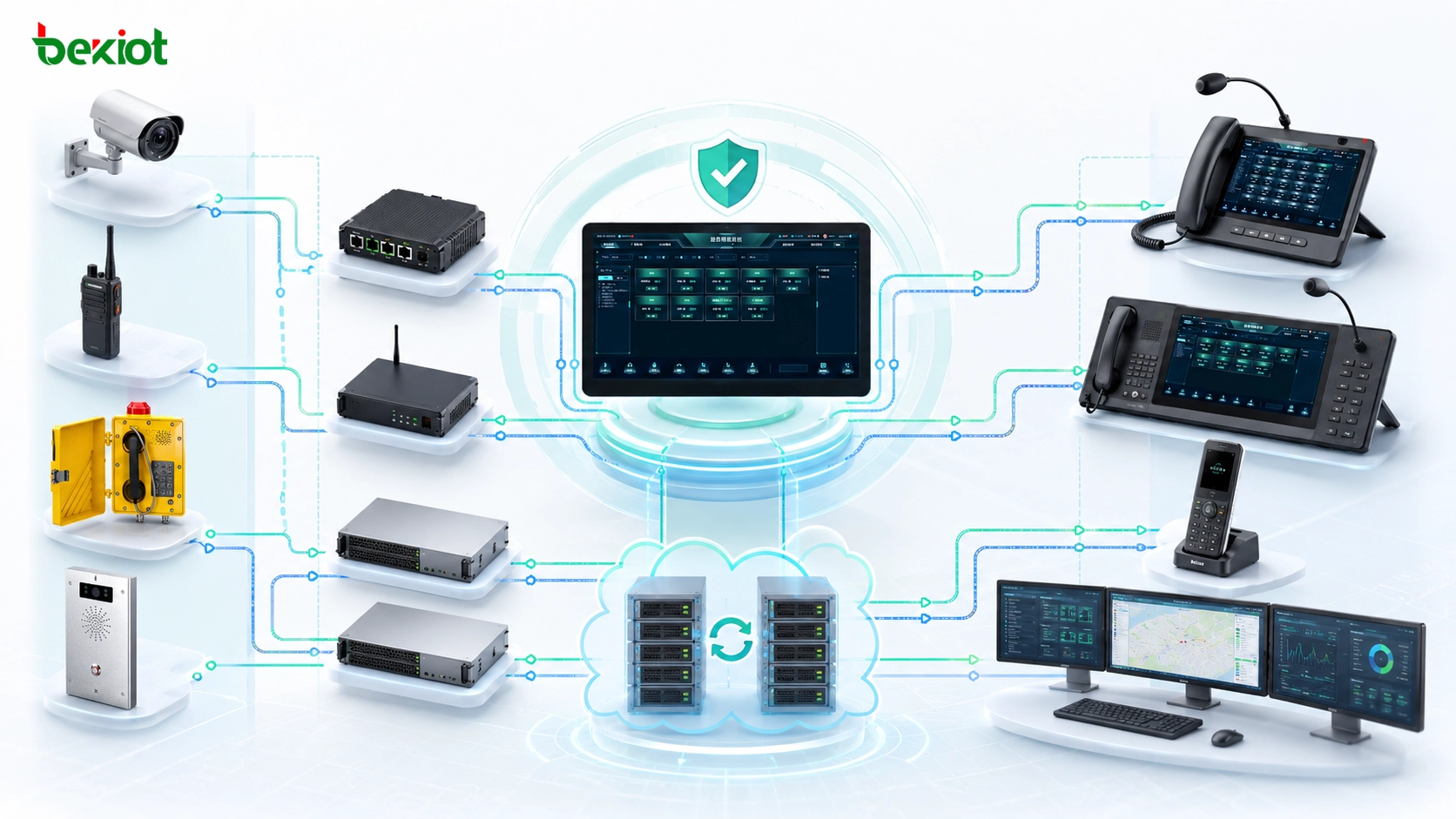
Industrial Endpoint and Platform Integration
In projects that involve industrial voice, SIP intercom, emergency communication, dispatch linkage, radio integration, and public address notification, endpoint and platform selection should follow actual site requirements. The suitable approach is not to force a single product into every scenario, but to match SIP phones, industrial telephones, gateways, dispatch platforms, and broadcasting terminals according to the operating environment, network structure, and emergency workflow.
For example, an industrial site may use a unified dispatch platform to connect control room operators, field maintenance teams, radio users, video surveillance, emergency phones, and broadcast zones. In this type of architecture, SIP-based calling, intercom, paging, alarm linkage, and harsh-environment communication access can work together while gateways and transcoding services handle protocol and video compatibility.
For engineering teams, the best unified communication design is not the one with the most functions on paper. It is the one that can connect real field devices, convert incompatible protocols, play video smoothly, and support fast dispatch decisions under pressure.
Recommended Solution Framework
A practical unified communication solution should begin with a device and protocol survey. The project team should identify which systems need to be connected, which protocols they use, what media formats they generate, and what the command platform needs to display or control. This step determines whether the project requires a video access gateway, radio gateway, SIP gateway, transcoding server, or API integration module.
The next step is to build the media and signaling bridge. Video sources should be connected through a video gateway where possible. Radio systems should be connected through a radio or RoIP gateway. SIP devices should register with the SIP server or dispatch platform. H.265 streams should be transcoded when target terminals cannot decode them reliably.
The final step is to unify operations at the application layer. Dispatchers should not need to understand protocol details. They should be able to select a camera, call a field team, open a radio channel, trigger a broadcast, view alarm information, and manage events through one interface. The complexity should remain behind the platform, handled by gateways, transcoding servers, and integration services.
Conclusion
The two major challenges in unified communication projects are protocol incompatibility and video codec incompatibility. Multiple device types, different access standards, radio networks, surveillance systems, emergency phones, and dispatch platforms cannot always communicate directly. At the same time, H.265 video streams may cause black screens, freezing, decoding failures, or mosaic artifacts when terminals are not compatible.
The most effective solution is to use dedicated gateways and video transcoding services as the integration layer. Protocol gateways convert heterogeneous device protocols into formats the platform can recognize. Video transcoding servers convert H.265 streams into H.264 or other compatible formats while adjusting bitrate, frame rate, and resolution when needed.
With the right architecture, unified communication becomes more than a collection of isolated systems. It becomes a practical command and dispatch environment where video, voice, radio, intercom, broadcasting, alarm, and field resources can work together. For industrial, public safety, transportation, energy, campus, and enterprise projects, this approach improves compatibility, response efficiency, and long-term scalability.
FAQ
What are the two biggest bottlenecks in unified communication projects?
The two most common bottlenecks are protocol incompatibility and video codec incompatibility. Protocol incompatibility appears when different systems use standards such as GB/T28181, RTMP, RTSP, ONVIF, PDT, DMR, SIP, or private interfaces. Codec incompatibility often appears when H.265 video cannot be decoded by dispatch terminals, browsers, video walls, or legacy systems.
How can gateways solve protocol compatibility problems?
Gateways act as protocol bridges. They receive device signals, media streams, or control commands from one system and convert them into a format that the unified communication platform can recognize. This allows cameras, radios, SIP devices, emergency phones, and broadcast systems to be integrated without replacing every device.
Why is H.265 video difficult in some dispatch systems?
H.265 provides efficient compression, but it requires stronger decoding capability and wider software support. Some terminals only support H.264 reliably. When H.265 streams are sent directly to incompatible devices, users may experience black screens, freezing, mosaic artifacts, or failed playback.
When should a video transcoding server be deployed?
A video transcoding server should be deployed when the system needs to access H.265 video sources but some terminals, browsers, platforms, or display devices cannot decode them smoothly. The server can convert H.265 into H.264 and adjust bitrate, frame rate, and resolution to improve playback compatibility.
What type of sites need this architecture most?
This architecture is especially useful for industrial parks, transportation hubs, energy facilities, mines, ports, campuses, public safety centers, and large enterprise sites. These environments usually need to connect video surveillance, radio communication, SIP intercom, emergency phones, broadcasting systems, alarms, and dispatch applications into one coordinated workflow.







