


When Written Content Needs a Voice
Text to Speech, often abbreviated as TTS, is a technology that converts written text into spoken audio. It allows computers, mobile devices, applications, vehicles, kiosks, robots, smart speakers, public information systems, and digital platforms to read text aloud in a human-like voice.
Instead of requiring users to read every message on a screen, Text to Speech can deliver information through sound. This makes digital content more accessible, improves hands-free interaction, and supports automated voice output in many industries.
Text to Speech is not simply a reading tool. It is a voice interface that helps digital systems communicate with people more naturally.
Basic Meaning of Text to Speech
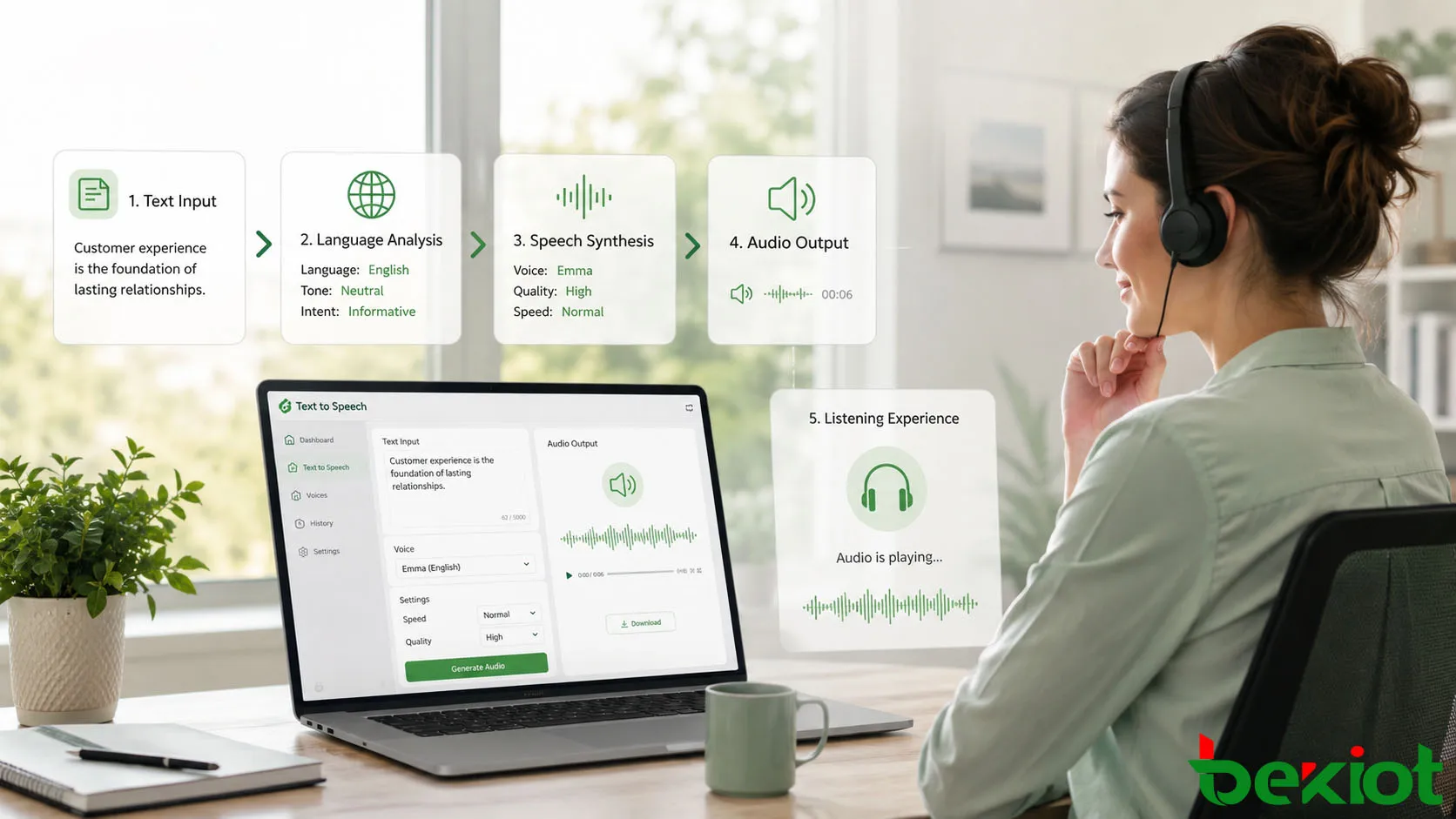
Text to Speech is a speech synthesis technology. It analyzes written text, interprets language structure, determines pronunciation, applies rhythm and intonation, and generates an audio waveform that can be played through speakers, headphones, phones, or communication systems.
Early TTS systems often sounded robotic and unnatural. Modern systems use advanced linguistic models, neural networks, and speech synthesis methods to create smoother voices, more natural pauses, better pronunciation, and more expressive speech.
From Text Input to Spoken Output
The process begins with text input. The text may come from a document, web page, chat message, navigation system, alarm notification, customer service script, training platform, or software application.
The TTS engine then processes the text and generates speech audio. The final output may be played immediately, saved as an audio file, sent to a phone system, used in an announcement platform, or embedded into an application workflow.
Text to Speech and Speech Recognition
Text to Speech should not be confused with speech recognition. Text to Speech converts written text into spoken audio. Speech recognition does the opposite: it converts spoken audio into text.
Both technologies are often used together in voice assistants, call centers, smart devices, accessibility tools, and conversational AI systems. Speech recognition helps the system understand the user, while Text to Speech helps the system respond by voice.
How Text to Speech Works
A Text to Speech system usually includes text normalization, linguistic analysis, pronunciation processing, prosody generation, and waveform synthesis. These steps help the system transform plain written language into natural-sounding speech.
The technical process may vary by platform, but the goal is consistent: produce audio that is clear, understandable, and suitable for the intended application.
Text Normalization
Text normalization converts written symbols into speakable words. Numbers, dates, abbreviations, units, currencies, URLs, punctuation, and special characters must be interpreted correctly before speech can be generated.
For example, “5/16/2026” may need to be read as a date, while “$50” should be read as a currency amount. Without normalization, the system may pronounce text awkwardly or incorrectly.
Pronunciation Processing
After normalization, the system determines how each word should be pronounced. This may involve dictionaries, phonetic rules, context analysis, and language-specific pronunciation models.
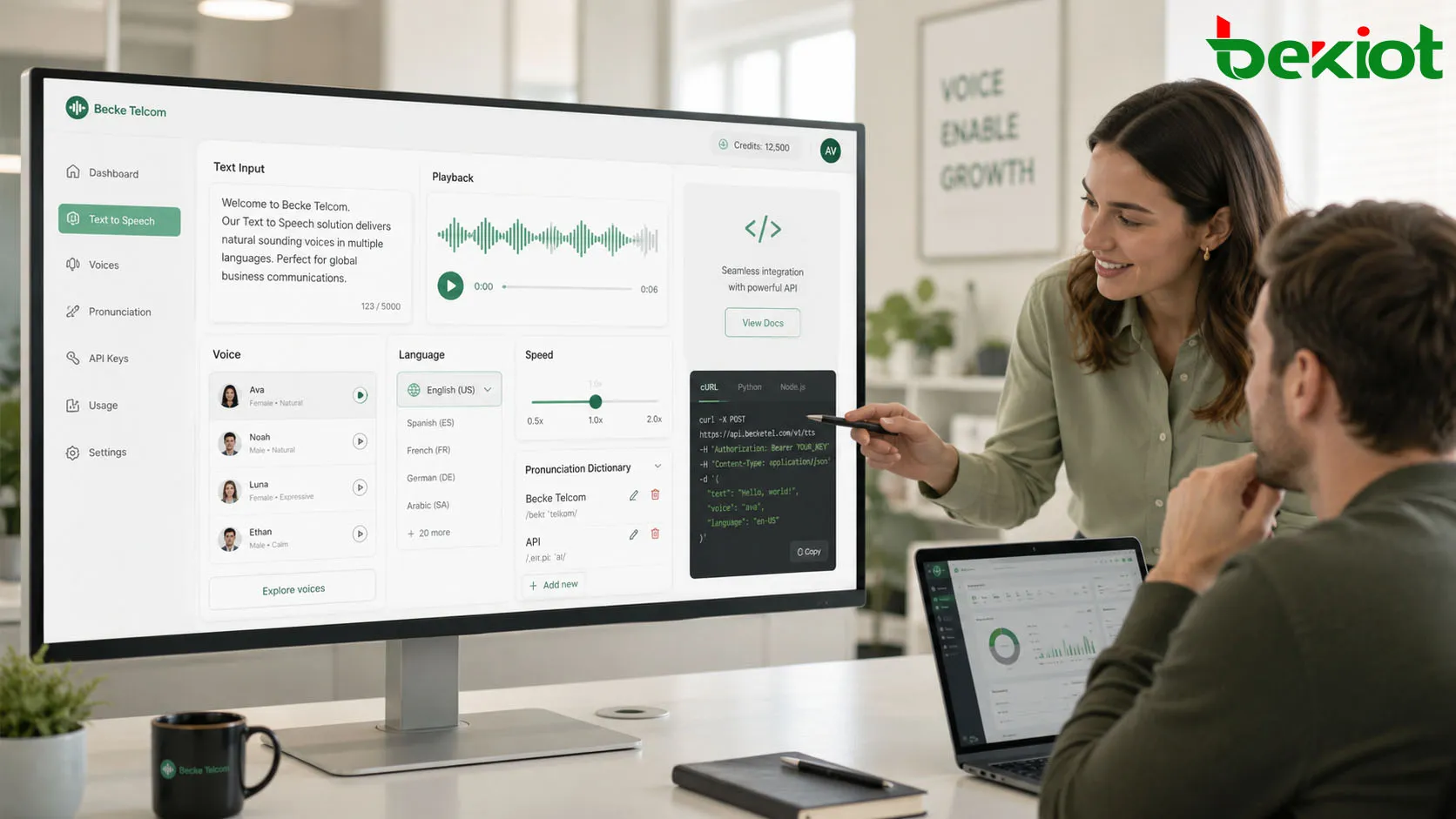
Pronunciation is especially important for names, technical terms, acronyms, brand names, locations, and multilingual content. Some TTS systems allow custom pronunciation dictionaries so organizations can control how special words are spoken.
Prosody and Intonation
Prosody refers to rhythm, stress, pitch, pause, and speaking style. It affects whether speech sounds natural or mechanical. A sentence should not be read with the same tone from beginning to end.
Modern TTS systems try to add suitable pauses, emphasize important words, and adjust intonation according to punctuation and sentence meaning. This makes the audio easier to understand and more comfortable to listen to.
Speech Waveform Generation
The final stage is speech waveform generation. The TTS engine creates the actual audio signal from the processed language information. Traditional systems used recorded speech fragments or statistical models, while many modern systems use neural synthesis methods.
The generated audio can be streamed in real time or saved as a file. Common output formats may include WAV, MP3, OGG, or other audio formats depending on the application.
Main Features of Text to Speech
A practical TTS system should provide clear pronunciation, natural voice quality, language support, speed control, volume control, voice selection, integration options, and reliable performance. Different applications may require different feature priorities.
Natural Voice Quality
Natural voice quality is one of the most important features. A good TTS voice should be easy to understand, pleasant to hear, and suitable for long listening sessions.
For public announcements, customer service, education, and accessibility, voice quality can strongly affect user experience. A harsh or unnatural voice may make users tired or reduce trust in the system.
Multiple Voices and Languages
Many TTS systems support multiple voices, accents, speaking styles, and languages. This allows organizations to choose a voice that fits the audience, region, brand tone, or application scenario.
Multilingual support is especially important for global websites, public transport systems, travel services, education platforms, healthcare tools, and customer service applications. The system should handle local pronunciation and language-specific rhythm properly.
Adjustable Speed and Pitch
Speech speed and pitch control help adapt audio output to different users and environments. A slower voice may be better for education, elderly users, or safety instructions. A faster voice may be useful for experienced users who want quick information playback.
Pitch and speaking style may also be adjusted to make the voice sound more formal, friendly, calm, energetic, or alert-oriented, depending on the platform capability.
Real-Time Audio Generation
Real-time TTS allows systems to generate speech immediately after receiving text. This is important for navigation, live alerts, customer service bots, screen readers, control panels, and interactive voice systems.
Low latency matters when users expect instant response. If the delay between text input and speech output is too long, the interaction may feel unnatural.
API and Platform Integration
Text to Speech is often integrated through APIs, SDKs, cloud services, operating system functions, embedded modules, or application plugins. This allows developers to add voice output to websites, apps, devices, kiosks, vehicles, and enterprise systems.
Integration ability is important because TTS rarely works alone. It usually connects with content management systems, chatbots, call center platforms, navigation software, learning systems, alarm platforms, or accessibility tools.
Benefits for Users and Organizations
Text to Speech provides value by making information easier to access, easier to consume, and easier to automate. It helps both individual users and organizations improve communication efficiency.
Improved Accessibility
One of the most important benefits is accessibility. TTS helps people with visual impairments, reading difficulties, learning differences, or temporary screen access limitations consume written content through audio.
It also supports users who prefer listening instead of reading. This makes digital information more inclusive and available across more situations.
Hands-Free Information Delivery
TTS is useful when users cannot safely or conveniently read from a screen. Drivers, workers, technicians, operators, travelers, and field staff may need information while their eyes and hands are busy.
Voice output can provide navigation instructions, task updates, safety alerts, equipment messages, or workflow prompts without requiring constant visual attention.
Faster Content Distribution
Organizations can use TTS to turn written messages into audio quickly. This is useful for announcements, training content, audio guides, automated notifications, learning materials, and customer service prompts.
Compared with manual recording, TTS can reduce production time and make it easier to update audio content when the text changes.
Consistent Voice Output
Text to Speech can deliver consistent voice output across many channels. The same message can be read in the same voice and style across mobile apps, websites, kiosks, telephone systems, and information terminals.
This consistency is useful for brands, public services, training platforms, and automated systems that need predictable communication quality.
Common Applications
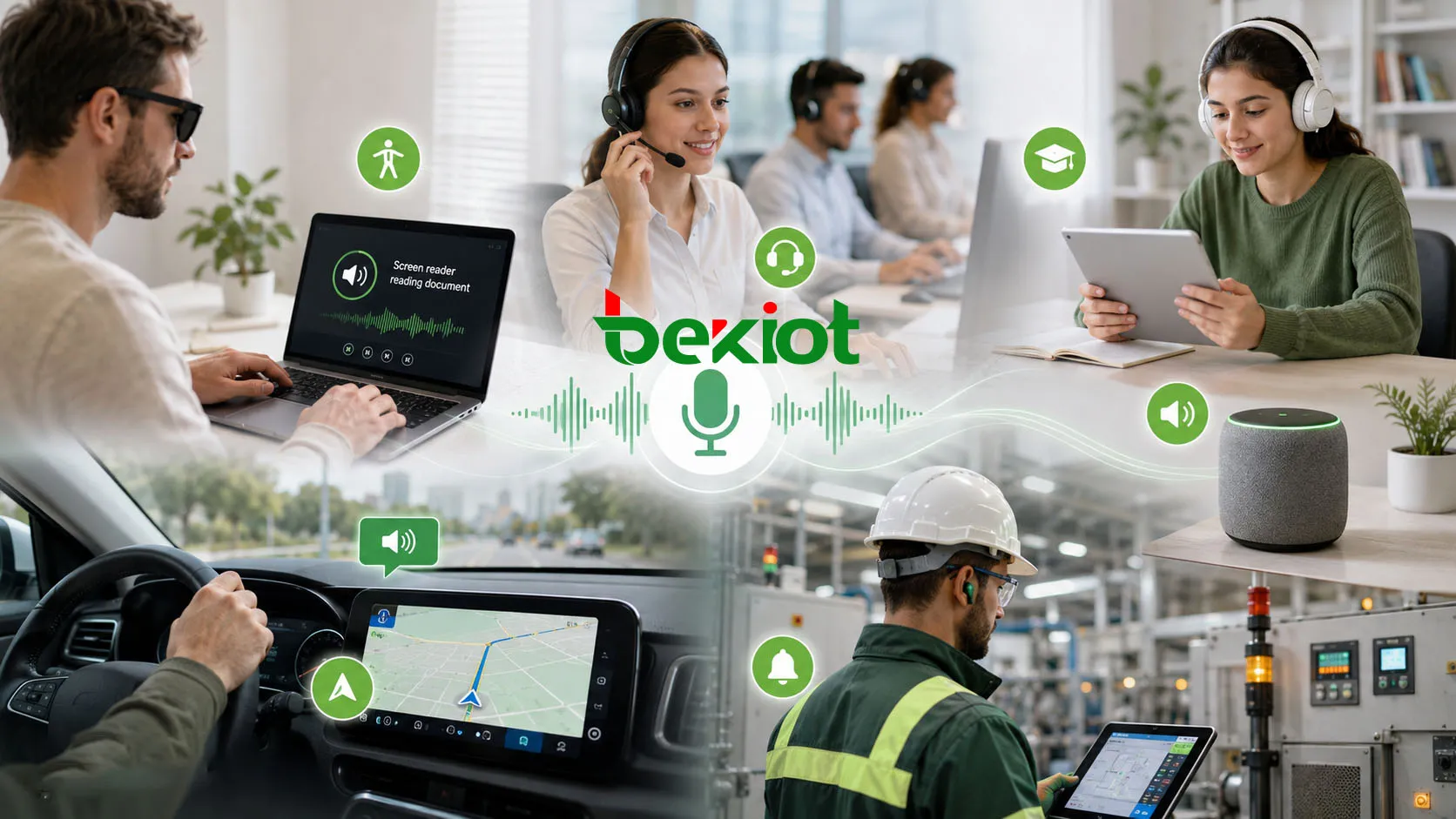
Text to Speech is used across consumer, enterprise, industrial, education, healthcare, transportation, and public service environments. Its role changes depending on whether the goal is accessibility, automation, notification, learning, or user interaction.
Accessibility and Screen Readers
Screen readers use Text to Speech to read interface elements, documents, websites, messages, menus, and system notifications aloud. This helps users who cannot rely on visual display alone.
Accessibility-focused TTS should support clear pronunciation, fast navigation, language switching, keyboard control, and compatibility with assistive technologies.
Customer Service and IVR Systems
Customer service platforms and IVR systems use TTS to generate voice prompts, account information, order status, appointment reminders, and automated responses. This reduces the need to record every possible message manually.
Dynamic TTS is especially useful when the system must speak personalized information, such as a customer name, balance, delivery time, ticket number, or service status.
Education and E-Learning
Education platforms use TTS to read lessons, instructions, quizzes, digital textbooks, language learning materials, and accessibility support content. It can help learners review material while listening.
For language learning, voice quality and pronunciation accuracy are especially important. Learners may depend on the TTS output as a pronunciation model.
Navigation and Transportation
Navigation systems use Text to Speech to provide turn-by-turn directions, road alerts, station announcements, boarding guidance, route changes, and public information messages.
In transportation environments, messages must be clear, timely, and easy to understand in noisy surroundings. Multilingual support may also be needed for international passengers.
Smart Devices and Voice Assistants
Smart speakers, home devices, wearable devices, robots, and voice assistants use TTS to respond to user commands, read notifications, report weather, answer questions, and control connected systems.
In these systems, TTS is part of a conversational interface. The voice must sound natural enough to support repeated daily interaction.
Industrial and Operational Alerts
Industrial and operational platforms can use TTS to announce alarms, maintenance reminders, safety messages, process updates, and equipment status. Voice output can help operators receive information quickly when visual displays are not practical.
In these environments, clarity matters more than entertainment quality. The voice should be understandable over background noise and should match the seriousness of the message.
Technical Considerations for Deployment
Choosing and deploying Text to Speech requires more than selecting a voice. Teams should consider language support, audio quality, latency, integration method, customization, data privacy, cost, and the environment where the audio will be played.
Cloud-Based and On-Premises TTS
Cloud-based TTS is easy to scale and often provides high-quality voices, many languages, and convenient APIs. It is suitable for web apps, mobile apps, online services, and platforms that can rely on internet connectivity.
On-premises or embedded TTS may be preferred when internet access is limited, latency must be very low, data privacy is strict, or the system must operate independently. This is common in some industrial, government, offline, and embedded device scenarios.
Voice Quality and Audio Format
The selected audio format should match the playback system. High-quality audio may be needed for education, media, and customer-facing applications, while lower bitrate audio may be acceptable for simple alerts or telephony prompts.
Telephony systems often require specific formats and sample rates. If the audio format is not matched correctly, the voice may sound distorted, too quiet, or incompatible with the platform.
Pronunciation Customization
Special words may need custom pronunciation. Company names, product names, technical terms, acronyms, addresses, medical terms, and local place names may not be pronounced correctly by default.
Pronunciation dictionaries, phonetic spelling, SSML tags, or platform-specific customization tools can improve accuracy. This is important for professional applications where wrong pronunciation may cause confusion.
Latency and Reliability
Interactive systems need low latency. A voice assistant, real-time alert platform, or customer service bot should not take too long to speak after receiving text input.
Reliability is also important. If TTS depends on a cloud service, the system should consider network availability, service limits, fallback messages, caching, or local backup audio for critical prompts.
Text to Speech Compared with Recorded Voice
Text to Speech and recorded human voice can both be used for audio output, but they serve different needs. TTS is flexible and scalable, while recorded voice may provide more natural emotion and brand control for fixed messages.
| Item | Text to Speech | Recorded Voice |
|---|---|---|
| Content updates | Easy to update by changing text | Requires new recording when content changes |
| Dynamic information | Suitable for personalized or real-time content | Difficult for highly variable messages |
| Voice naturalness | Depends on engine quality and voice model | Can sound very natural and expressive |
| Cost at scale | Efficient for large or changing content | Higher cost when many messages are needed |
| Consistency | Highly consistent across generated content | May vary by speaker, recording session, and editing |
When TTS Is Better
Text to Speech is better when content changes often, messages are personalized, many languages are needed, or audio must be generated automatically. Examples include navigation instructions, account information, learning content, and automated notifications.
It is also useful when organizations need large amounts of spoken content quickly without scheduling repeated recording sessions.
When Recorded Voice Is Better
Recorded voice may be better for fixed messages that require strong emotion, special branding, or carefully directed performance. Examples include advertising, premium media content, signature announcements, and scripted brand introductions.
Some systems use both methods. Fixed high-value messages are recorded by humans, while dynamic or frequently changing messages are generated by TTS.
Common Challenges and Mistakes
Text to Speech can improve communication, but poor implementation may make audio difficult to understand or uncomfortable to hear. Common issues include wrong pronunciation, unnatural pacing, low-quality output, poor message writing, and weak integration.
Writing Text That Sounds Bad When Spoken
Text written for reading does not always sound good when spoken. Long sentences, dense punctuation, technical abbreviations, and unclear structure may create awkward audio output.
For TTS, text should be written in a speech-friendly way. Shorter sentences, clear punctuation, and natural wording usually produce better results.
Ignoring Listening Environment
The playback environment affects comprehension. A voice that sounds clear through headphones may not work well in a noisy station, factory, vehicle, or public area.
Volume, speaker quality, background noise, echo, and message length should be tested in the real environment. For critical announcements, audio clarity should be verified before deployment.
Using One Voice for Every Situation
One voice may not fit every application. A calm voice may be suitable for education, while an alert-style voice may be better for warnings. A formal voice may fit enterprise systems, while a friendly voice may fit consumer apps.
Voice choice should match the user group, message type, and brand or service tone. It should also remain understandable across different playback devices.
Best Practices for Better TTS Output
Better TTS results come from good text preparation, suitable voice selection, pronunciation control, audio testing, and continuous improvement. The technology can only perform well if the input and deployment environment are designed properly.
Prepare Speech-Friendly Scripts
Scripts should be clear, concise, and easy to hear. Avoid overly long sentences and unnecessary symbols. Use punctuation to guide pauses and sentence flow.
For important prompts, read the text aloud before putting it into the TTS system. If it sounds unnatural when read by a person, it may also sound unnatural through TTS.
Use Pronunciation Rules
Custom pronunciation rules should be created for important terms. This may include product names, technical codes, location names, industry words, and abbreviations.
Testing pronunciation with real users can reveal errors that automated systems may miss. This is especially important for multilingual services.
Test Across Devices
TTS audio should be tested on the actual devices users will hear. A message may sound good on studio speakers but poor on a phone speaker, public address device, car speaker, kiosk, or headset.
Testing across devices helps teams adjust speed, volume, audio format, and message wording before full deployment.
Monitor User Feedback
Users may notice pronunciation problems, unclear messages, or uncomfortable voice settings after deployment. Feedback should be collected and used to improve scripts, voices, and configuration.
For customer-facing systems, small improvements in TTS clarity can reduce confusion and improve service satisfaction.
FAQ
Can Text to Speech read mixed-language content correctly?
It depends on the engine and configuration. Some TTS systems can detect language automatically, while others need language tags or separate voice selection. Mixed-language text should be tested carefully to avoid unnatural pronunciation.
Does Text to Speech require internet access?
Not always. Cloud TTS requires network access, but embedded or on-premises TTS can run locally. Offline deployment is useful for vehicles, industrial systems, private networks, and devices that must operate without constant internet connection.
Can TTS voices be customized for a brand?
Yes, some platforms support custom voice models, branded voices, or controlled speaking styles. This can help organizations create a consistent voice identity, but it may require additional data, licensing, and quality review.
Is TTS suitable for emergency announcements?
It can be suitable when messages are clear, tested, and generated reliably. Emergency use should include fallback plans, approved message templates, proper audio levels, and real-environment testing to ensure intelligibility.
How should acronyms be handled in TTS?
Acronyms should be tested because the system may read them as words or individual letters. Pronunciation rules, spacing, punctuation, or SSML controls can help ensure that technical terms are spoken correctly.
Can TTS output be saved as audio files?
Yes. Many TTS systems allow generated speech to be saved as audio files such as WAV or MP3. This is useful for training materials, IVR prompts, offline playback, announcements, and content distribution.







