


A ring group is a PBX or SIP phone system feature that allows one incoming call to ring multiple extensions, users, phones, or endpoints according to a predefined rule. Instead of sending a call to only one person, the system distributes the call to a team so that any available member can answer it.
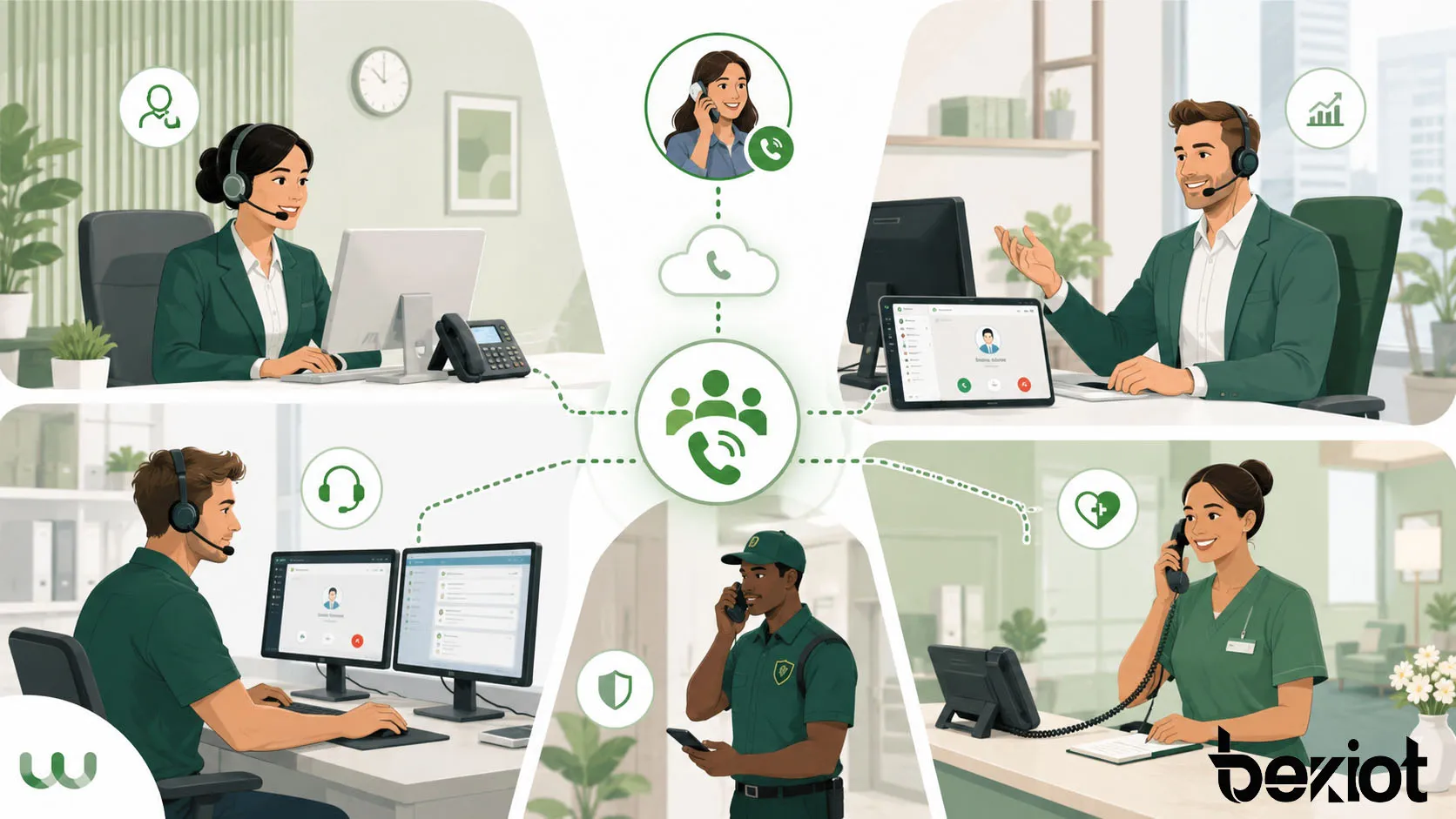
This function is widely used in sales teams, reception desks, customer service departments, technical support groups, security rooms, hotel front desks, healthcare stations, warehouses, schools, and enterprise offices. It helps organizations reduce missed calls, improve response speed, and make team-based communication easier to manage.
A ring group turns one dialed number into a shared answering point, allowing a team to handle calls without forcing callers to remember individual extensions.
Basic Meaning in PBX and SIP Systems
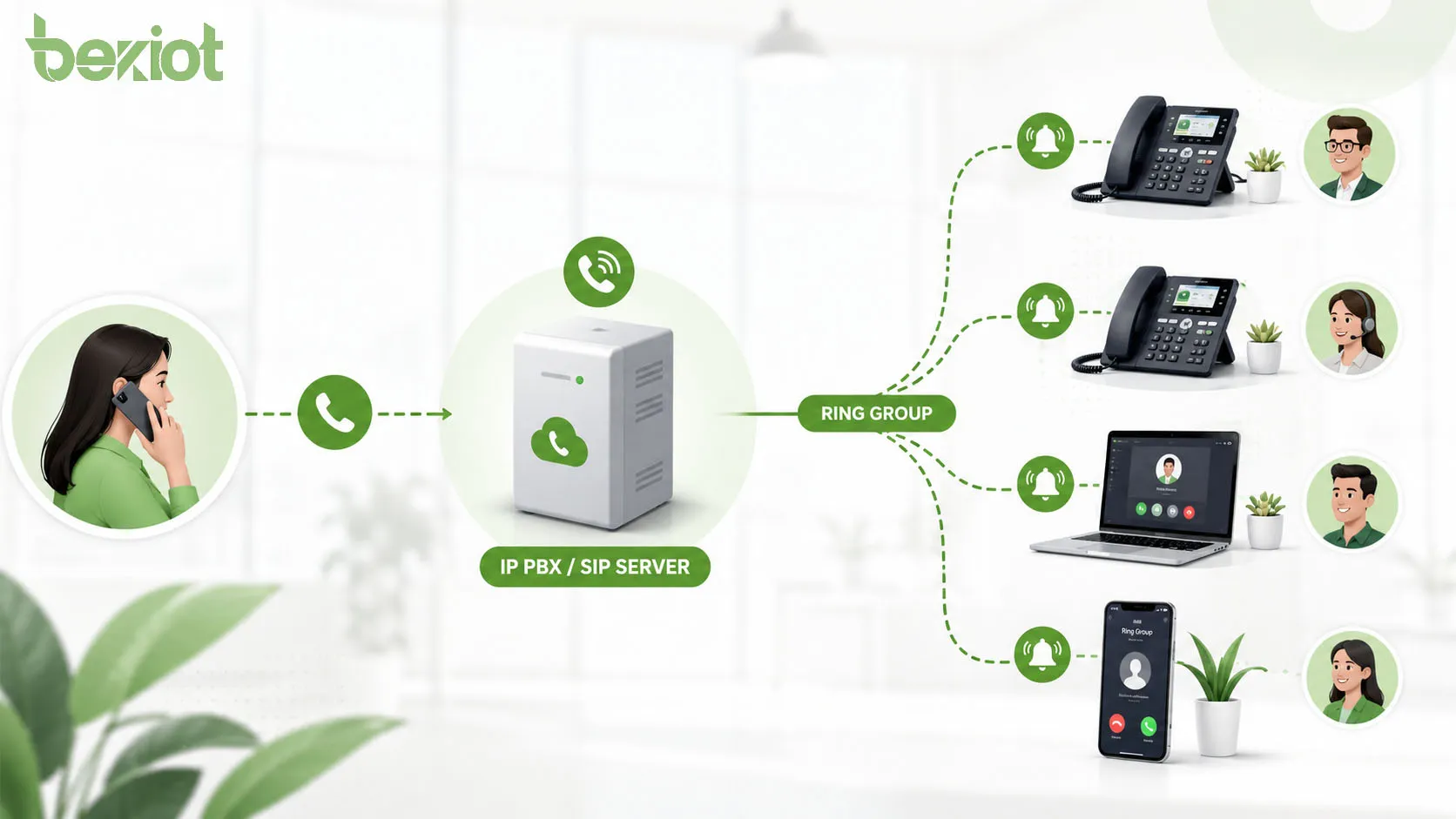
In a PBX or SIP-based communication system, a ring group is usually assigned a group extension or virtual number. When someone calls that number, the PBX checks the ring group rule and sends the call to selected members.
The members may be desk phones, SIP phones, softphones, mobile extensions, analog phones through gateways, or operator consoles. The system controls how these endpoints ring and what happens if nobody answers within the configured time.
One Number for Multiple Users
The most important idea behind a ring group is shared access. A caller dials one number, but several people can receive the call. This is useful when the caller needs a department rather than a specific person.
For example, a customer may call the sales number, and the system rings several sales representatives. The first available person can answer, reducing waiting time and improving call handling efficiency.
Difference from a Personal Extension
A personal extension belongs to one user or device. A ring group belongs to a team or function. This makes it better for shared responsibilities such as reception, support, service desk, facility maintenance, or emergency coordination desk.
If one person is away, another group member can answer. This improves availability without requiring the caller to try several numbers manually.
How the Call Flow Works
The call flow starts when an external caller, internal user, IVR menu, DID number, or transfer action sends a call to the ring group extension. The PBX then applies the group ringing strategy and attempts to reach the configured members.
If a member answers, the call is connected and the remaining ringing endpoints stop ringing. If no one answers, the system follows the next rule, such as forwarding to voicemail, transferring to another group, sending the call to an operator, or returning to an IVR menu.
Incoming Call Matching
The PBX first identifies that the dialed number or route belongs to a ring group. This may happen through an internal extension, inbound route, IVR option, time condition, or DID mapping.
For example, an inbound number may route to the “Support Ring Group” during office hours. After hours, the same number may route to voicemail or an emergency duty phone, depending on the system design.
Ringing Strategy Execution
After matching the ring group, the PBX sends ringing signals to the selected endpoints. The strategy may ring all phones at once, ring one after another, ring according to priority, or ring in a rotating sequence.
The chosen strategy affects user experience and team workload. Simultaneous ringing provides fast response, while sequential or rotating ringing can reduce noise and distribute calls more evenly.
No-Answer Handling
No-answer handling is an essential part of ring group design. If nobody answers, the caller should not be left waiting indefinitely. The system should define a timeout and next destination.
Common options include voicemail, another ring group, call queue, operator, mobile fallback, IVR menu, announcement, or external number. This ensures that missed calls still follow a controlled path.
Main Ringing Strategies
Different ring group strategies are used for different operational needs. The right choice depends on team size, call urgency, work style, noise level, and how calls should be distributed.
Simultaneous Ringing
Simultaneous ringing makes all group members ring at the same time. The first person to answer takes the call. This is one of the fastest ways to reduce caller waiting time.
It is useful for reception desks, emergency desks, small support teams, and environments where response speed is more important than balanced call distribution. However, if the group is too large, simultaneous ringing may create too much noise or distraction.
Sequential Ringing
Sequential ringing sends the call to one member first, then moves to the next member if the first person does not answer. This can be useful when calls should follow a preferred order.
For example, a call may ring the primary receptionist first, then the backup receptionist, then the office manager. This structure keeps call responsibility clear while still providing fallback coverage.
Round-Robin Ringing
Round-robin ringing distributes calls among members in rotation. After one member receives a call, the next call starts with another member. This helps distribute workload more evenly.
Round-robin is useful for sales teams, service desks, and support groups where calls should not always go to the same person. It is simpler than a full call queue but still supports fairer distribution.
Priority-Based Ringing
Priority-based ringing assigns different levels to different members. Higher-priority members ring first, while lower-priority members ring only if the call is not answered within a defined time.
This is useful when senior staff, supervisors, or dedicated operators should receive calls before backup members. It also helps avoid interrupting people who should only answer when the main team is unavailable.
Core Features of a Ring Group
A practical ring group feature should include more than a list of extensions. It should support flexible routing, timeout control, member management, caller experience settings, and reporting where needed.
Member Configuration
Administrators can add or remove group members according to team structure. Members may include internal extensions, remote users, softphones, branch phones, or mobile extensions depending on PBX capability.
Good member management is important because team availability changes over time. Staff may move departments, change schedules, work remotely, or use different devices. The ring group should be easy to update without redesigning the whole dial plan.
Ring Timeout
Ring timeout defines how long the system waits before taking the next action. A short timeout can reduce caller waiting, while a longer timeout gives members more time to answer.
The correct value depends on the work environment. In a quiet office, a short timeout may be enough. In a warehouse, hospital, or workshop, users may need more time to reach the phone.
Caller ID Display
Many PBX systems allow ring group calls to display the original caller ID, the ring group name, or both. This helps users understand why the call is ringing and how to answer it.
For example, a user may see “Support Group” before the caller number. This tells the user that the call is for the department rather than a personal call.
Music or Announcement While Ringing
Some systems can play ringback tone, music, or a short announcement while the call is ringing. This improves caller experience and confirms that the call is being processed.
Announcements should be brief and clear. If a caller waits too long without feedback, they may hang up before anyone answers.
Failover Destination
A failover destination defines where the call goes if the ring group is not answered. This can be voicemail, another group, a call queue, operator, mobile phone, or after-hours service.
Failover is especially important for customer-facing departments. Without it, unanswered calls may be lost, leading to poor service and missed business opportunities.
Network Architecture in VoIP Deployment
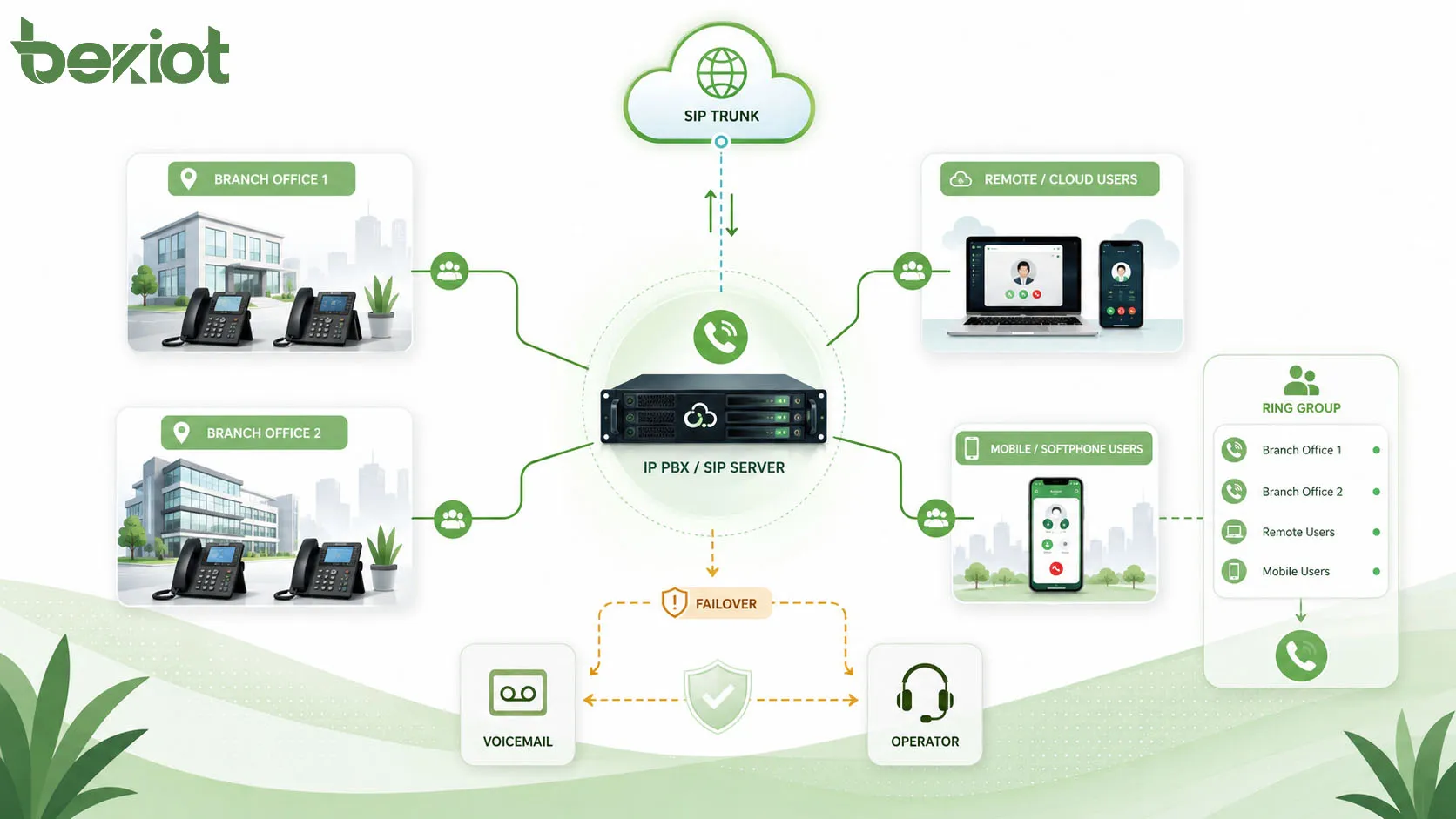
In a VoIP or SIP environment, a ring group is usually implemented inside an IP PBX, SIP server, hosted PBX platform, or unified communication system. The endpoints register to the system, and the PBX controls call distribution.
The architecture may be simple for one office or more complex for multi-site enterprises. Ring group members may be on the same LAN, connected through VPN, registered over the internet, or located in different branches.
PBX-Centered Architecture
In a PBX-centered architecture, the PBX stores ring group rules and controls all call signaling. SIP phones register to the PBX, and inbound calls are routed through trunks, gateways, or internal dial plans.
When a call reaches the ring group, the PBX sends SIP INVITE messages to the target endpoints according to the configured strategy. Once one endpoint answers, the PBX connects media and cancels ringing on the other endpoints.
Hosted PBX and Cloud UC
In hosted PBX or cloud unified communication platforms, the ring group logic runs in the cloud. Users may answer calls from desk phones, mobile apps, desktop softphones, or web clients.
This model is useful for distributed teams because members do not need to be in the same office. However, network quality, internet stability, endpoint registration, and user availability settings become important for reliable call handling.
Branch and Multi-Site Routing
In multi-site systems, a ring group may include members from different locations. For example, a company may create a regional support group that rings phones in several branch offices.
Multi-site ring groups require careful design. Administrators should consider time zones, bandwidth, codec selection, latency, emergency call policies, and whether calls should stay local or route through a central PBX.
Ring Group Compared with Call Queue
Ring groups and call queues are related, but they are not the same. A ring group is usually simpler and rings a defined set of members. A call queue is designed to hold callers in line and distribute calls to agents based on availability and queue rules.
Choosing between the two depends on call volume and service requirements. For small teams and low to medium call volume, a ring group may be enough. For high-volume support or customer service, a call queue is often more suitable.
| Item | Ring Group | Call Queue |
|---|---|---|
| Main purpose | Ring multiple members so one can answer | Hold and distribute multiple waiting calls |
| Best for | Small teams, reception, department lines | Call centers, service desks, high call volume |
| Caller waiting | Usually limited by ring timeout | Callers can wait in queue with announcements |
| Agent logic | Simple member ringing | Advanced agent status and distribution rules |
| Reporting | Basic in many systems | Often includes detailed queue analytics |
When a Ring Group Is Enough
A ring group is usually enough when the team receives a manageable number of calls and callers do not need to wait in a structured queue. It works well for reception, small sales teams, maintenance desks, and shared office lines.
The configuration is usually simple, easy to understand, and easy to maintain. This makes ring groups a practical choice for many small and medium-sized deployments.
When a Call Queue Is Better
A call queue is better when many callers may arrive at the same time and need to wait for the next available agent. It provides more control over queue position, agent login status, service level, waiting announcements, and reporting.
For customer service centers, technical hotlines, and busy support teams, a call queue can provide a more professional caller experience than a simple ring group.
Applications in Business Communication
Ring groups are used in many organizations because they solve a common problem: calls should reach a function or team, not just one person. This makes them useful in both customer-facing and internal communication workflows.
Reception and Front Desk
A reception ring group can ring several front desk phones or backup staff. If the main receptionist is busy, another person can answer the call before it is missed.
This is useful in offices, hotels, schools, clinics, commercial buildings, and property management centers. It provides a simple way to improve call coverage without requiring a full call center system.
Sales and Customer Inquiry Teams
Sales teams often use ring groups so that inbound inquiries reach any available representative. This improves response speed and reduces the chance that a potential customer reaches voicemail.
Depending on the team structure, the system may use simultaneous ringing for fastest response or round-robin ringing for more balanced distribution.
Technical Support and Service Desks
Small support teams can use ring groups to share incoming technical calls. The system may ring support engineers, service desk phones, or softphone users at the same time or in sequence.
For larger support operations, call queues may eventually replace ring groups. However, ring groups remain useful for escalation teams, on-duty engineers, and backup support groups.
Security, Facility, and Maintenance Teams
Security offices, facility teams, and maintenance departments often need shared call access. A ring group can route calls from help points, internal extensions, service desks, or alarm-related call flows to the right team.
In these applications, no-answer routing is important. If the first team is unavailable, the call may need to route to a duty phone, supervisor, control room, or after-hours service.
Healthcare and Hospitality Environments
Hospitals, clinics, nursing stations, hotels, and guest service centers use ring groups to make sure calls reach available staff. A nurse station group, housekeeping group, front desk group, or service request group can improve response efficiency.
These environments often require clear naming, practical timeout settings, and simple call transfer rules so that staff can respond quickly without complex operation.
Design Considerations
A ring group should be designed around real user behavior. The goal is not to ring as many phones as possible, but to route calls to the right people in a way that improves response without creating noise or confusion.
Choose the Right Group Size
A small group may not provide enough coverage, while a very large group may distract too many people. The ideal group size depends on call volume, staff role, and response expectations.
For example, a reception group may include three to five members. A maintenance group may include only on-duty staff. A sales group may include all available sales users during business hours.
Set Practical Ring Time
Ring time should be long enough for users to answer but short enough to keep callers from waiting too long. If the timeout is too short, calls may fail over before staff can answer. If it is too long, callers may hang up.
Testing with real users is useful. Administrators should observe how long staff need to notice the call, reach the phone, and answer under normal working conditions.
Use Clear Failover Rules
Every ring group should have a defined failover destination. This prevents calls from disappearing when nobody answers. The failover destination should match the importance of the call.
For example, a sales group may fail over to voicemail, while a facility emergency group may fail over to an on-duty mobile phone or control room.
Avoid Overlapping Responsibilities
If the same users belong to too many ring groups, they may receive excessive calls and become less responsive. Overlapping groups can also make it unclear which team is responsible for answering.
Administrators should review group membership regularly and remove users who no longer need to receive certain calls.
Security and Permission Management
Ring groups are usually safe and simple, but they still need permission control. Not every user should be able to modify ring groups, add external numbers, or redirect department calls.
Administrative Access
Only authorized administrators should change ring group settings. Incorrect changes can affect customer service, emergency response, or internal communication.
Important settings such as group members, failover destination, ring strategy, and external forwarding should be documented before and after modification.
External Number Forwarding
Some systems allow ring group members to include mobile numbers or external numbers. This can be useful for remote staff, but it may also create cost, privacy, and security concerns.
Organizations should define rules for external forwarding. Calls may need caller ID control, recording policy, cost monitoring, or user consent depending on the deployment.
Call Recording and Privacy
If ring group calls are recorded, users and callers may need to be informed according to local laws and company policy. Recording rules should be consistent with the purpose of the group.
For example, a customer support group may require recording for quality control, while internal department calls may not need recording. Access to recordings should be controlled.
Maintenance and Optimization Tips
Ring groups should not be configured once and forgotten. Team structure, work schedules, call volume, and customer expectations can change over time. Regular review keeps the system useful.
Review Missed Call Data
Missed call records can show whether the ring group is working well. If many calls are missed, the group may need more members, a different ring strategy, longer ring time, or better failover routing.
Call detail records can also show whether calls are being answered by only one person. If the workload is uneven, round-robin or priority adjustments may help.
Update Members Regularly
Group membership should be reviewed whenever staff leave, change roles, move departments, or start remote work. Old members should be removed, and new responsible users should be added.
Outdated membership can cause calls to ring unused phones or reach people who are no longer responsible for that function.
Test Call Flow After Changes
After modifying a ring group, administrators should test inbound calls, internal calls, no-answer failover, voicemail behavior, caller ID display, and time-based rules.
Testing is especially important when the ring group is connected to an IVR, DID route, SIP trunk, or after-hours schedule. A small configuration error can affect many callers.
Common Problems and How to Avoid Them
Ring group issues often come from poor planning rather than technical failure. Typical problems include too many ringing phones, missed calls, unclear ownership, no failover destination, and users who no longer belong in the group.
Too Much Ringing Noise
If too many phones ring at the same time, the workplace may become noisy and distracting. Staff may also start ignoring group calls because they assume someone else will answer.
To reduce this problem, use smaller groups, sequential ringing, priority rules, or call queues. The design should match how the team actually works.
Calls Going to the Wrong People
Calls may reach the wrong users if group membership is outdated or if inbound routes are not documented. This can confuse callers and reduce service quality.
Regular audits can prevent this. Administrators should check each group name, extension, member list, inbound route, and failover destination.
No Clear After-Hours Handling
A ring group that works during office hours may fail after hours if no one is available. Callers may wait until timeout and then disconnect.
Time conditions, voicemail, duty phones, announcements, or after-hours operators can solve this problem. The system should define what happens outside normal working time.
FAQ
What is a ring group?
A ring group is a PBX or SIP system feature that routes one incoming call to multiple extensions or endpoints according to a predefined ringing rule. Any available group member can answer the call.
How does a ring group work?
When a call reaches the ring group number, the PBX matches the call to the group rule and rings the configured members. If one member answers, the call connects and the other endpoints stop ringing.
What is the difference between a ring group and a call queue?
A ring group rings a group of members so one person can answer. A call queue holds callers in line and distributes calls to agents based on queue rules. Ring groups are simpler, while call queues are better for high call volume.
What ringing strategies are commonly used?
Common strategies include simultaneous ringing, sequential ringing, round-robin ringing, and priority-based ringing. The best choice depends on team size, urgency, workload balance, and caller expectations.
Where are ring groups commonly used?
Ring groups are commonly used for reception desks, sales teams, customer service, technical support, security rooms, facility maintenance, healthcare stations, hotels, schools, and shared department lines.
How should a ring group be maintained?
A ring group should be maintained by reviewing missed calls, updating members, testing failover rules, checking caller ID display, adjusting ring time, and documenting all call-routing changes.







