


A fault alarm is a warning signal generated when equipment, software, communication systems, sensors, power devices, industrial machines, safety terminals, or infrastructure platforms detect an abnormal condition. It helps operators identify failures, respond quickly, reduce downtime, and prevent small technical problems from becoming larger operational risks.
A fault alarm is not only a warning message. It is the starting point of a response workflow that connects detection, notification, verification, dispatch, maintenance, and recovery.
Basic Meaning and System Role
A fault alarm indicates that a device, circuit, service, sensor, or system component is not operating as expected. The fault may involve power loss, network disconnection, equipment failure, signal interruption, abnormal temperature, low battery, sensor error, communication timeout, hardware damage, software exception, or unsafe operating status.
In modern systems, fault alarms are usually sent to a monitoring platform, control room, maintenance dashboard, dispatch center, mobile app, or notification system. The purpose is to make abnormal conditions visible and actionable so that the responsible team can respond before service quality or safety is seriously affected.
Fault Alarm vs General Notification
A general notification may provide routine information, such as status updates, reminders, or operational messages. A fault alarm is more specific because it indicates an abnormal condition that requires attention, verification, or corrective action.
For example, “device online” is a status notification, while “device offline,” “power failure,” “communication lost,” or “sensor fault” is a fault alarm. The alarm level, response time, and escalation rule should match the seriousness of the problem.
Why It Matters in Daily Operation
Without fault alarms, maintenance teams may only discover failures after users complain, equipment stops, production is interrupted, or safety risks appear. This reactive approach increases downtime and makes troubleshooting more difficult.
With properly configured fault alarms, operators can identify issues earlier. A network device can report link failure, a power module can report abnormal voltage, an emergency terminal can report offline status, and a sensor can report invalid data before the entire system becomes unavailable.
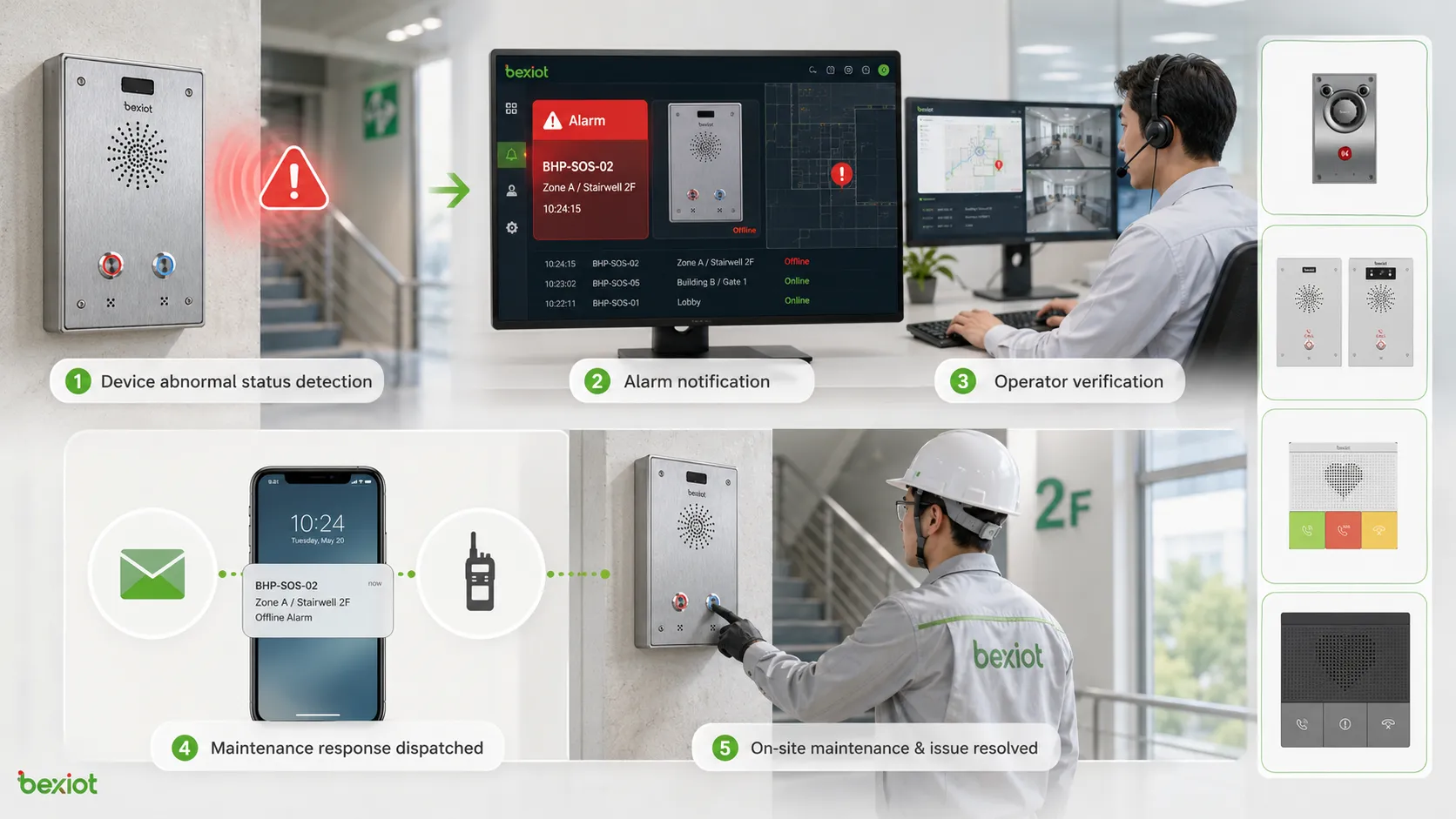
How Fault Alarm Detection Works
Fault alarm detection usually begins with continuous monitoring. The system checks operating parameters, device status, communication state, power condition, environmental data, software logs, or sensor feedback. When a monitored value exceeds a defined threshold or a required signal disappears, the system generates an alarm.
The detection method depends on the system type. Industrial equipment may use sensors and PLC signals. IT systems may use logs and health checks. Communication systems may use registration status, heartbeat messages, packet loss, and device polling. Safety devices may use contact inputs, tamper switches, battery status, or network supervision.
Threshold-Based Detection
Threshold-based detection uses predefined limits. If temperature rises above a safe level, voltage drops below the allowed range, storage usage becomes too high, or signal strength becomes too weak, the system triggers a fault alarm.
This method is easy to understand and widely used. However, thresholds must be set carefully. If the threshold is too sensitive, the system may create frequent false alarms. If it is too loose, the system may miss early warning signs.
Status-Based Detection
Status-based detection monitors whether a device or service is in the expected state. Examples include online or offline, normal or fault, registered or unregistered, open or closed, active or inactive, charged or low battery.
This method is common in communication platforms, access control systems, power monitoring, building automation, and emergency call terminals. A device that stops reporting status may trigger an offline or communication fault alarm.
Event-Based Detection
Event-based detection responds to specific system events. These events may include restart failure, module error, sensor disconnection, door tamper, line break, overcurrent trip, software crash, failed login, or abnormal configuration change.
Event-based alarms are useful because they often provide more detail than simple threshold alarms. They can help technicians understand not only that something is wrong, but also what type of fault occurred.
Main Features of a Fault Alarm System
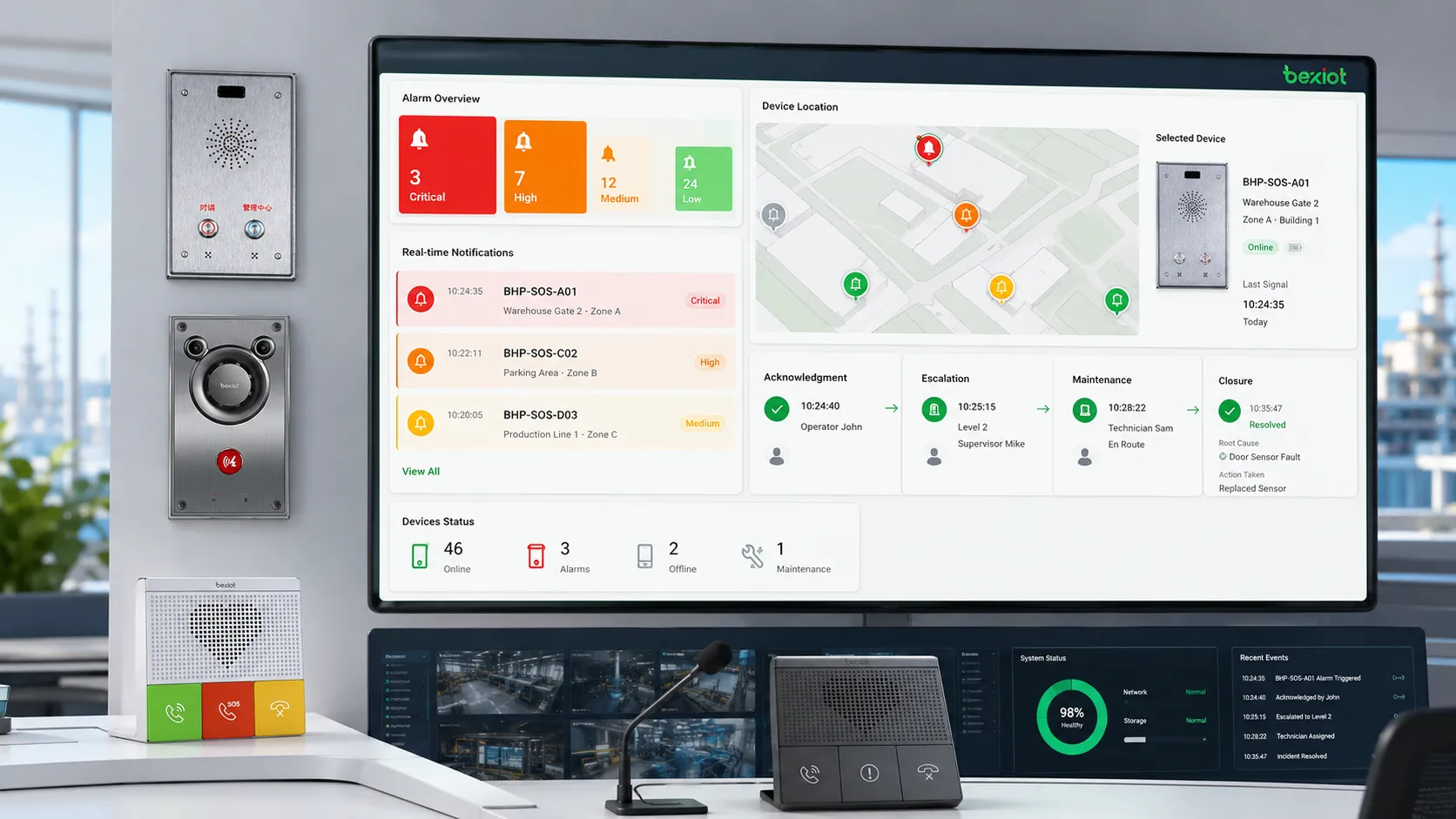
A useful fault alarm system should do more than display warnings. It should classify alarms, identify locations, filter repeated events, support escalation, record response actions, and help teams close the fault after repair.
Alarm Classification
Fault alarms are often classified by severity, system type, location, source device, or fault category. Common severity levels include information, warning, minor, major, and critical. Classification helps operators decide which alarm should be handled first.
For example, a low-priority maintenance reminder should not receive the same response as a critical communication failure in an emergency call system. Clear classification prevents alarm overload and improves response efficiency.
Real-Time Notification
Real-time notification allows the system to send alarms to the right people or platforms immediately. Notification methods may include dashboard pop-ups, emails, SMS messages, mobile app alerts, voice calls, public address linkage, or dispatch system events.
Notification rules should match duty schedules and responsibility. A power fault may go to facility engineers, a network fault may go to IT staff, and an emergency terminal fault may go to the security or control room team.
Location and Device Identification
A fault alarm should clearly identify where the problem is. Useful information includes device name, device ID, room, floor, building, zone, site, map location, system category, and timestamp.
Without location information, technicians may spend too much time searching for the affected device. In large campuses, industrial parks, tunnels, hospitals, transport stations, and public facilities, accurate location identification is essential.
Alarm Acknowledgment and Closure
Acknowledgment confirms that an operator has seen the alarm and accepted responsibility for follow-up. Closure confirms that the fault has been repaired, verified, or otherwise resolved.
This workflow helps prevent alarms from being ignored. It also creates a traceable record showing when the fault occurred, who handled it, what action was taken, and when the system returned to normal.
Escalation and Repeat Alarm Control
If an alarm is not handled within a defined time, the system may escalate it to a supervisor, another team, or a higher-level command center. Escalation is important for critical systems where delayed response can create safety or service risks.
Repeat alarm control is also important. If a device sends the same alarm repeatedly, the platform should group or suppress duplicates where appropriate. This helps reduce alarm fatigue and keeps operators focused on meaningful events.
System Value for Reliability and Safety
Fault alarms create value by making hidden problems visible. They help teams move from passive repair to active monitoring and response. When alarm data is well managed, it can support maintenance planning, service improvement, risk control, and long-term system optimization.
Faster Fault Discovery
Fault alarms reduce the time between failure occurrence and failure discovery. Instead of waiting for manual inspection, the system automatically reports abnormal conditions when they happen.
Faster discovery helps reduce downtime. If a device is offline, a battery is low, a server service has stopped, or a communication terminal is not registered, the maintenance team can act before users are affected.
Better Maintenance Efficiency
Fault alarms provide maintenance teams with more accurate fault information. Instead of checking every device manually, technicians can prioritize alarms by severity, location, and system type.
Historical alarm records also help identify recurring faults. If the same device repeatedly reports network loss or power failure, the root cause may be wiring, environment, configuration, or hardware aging.
Improved Risk Control
Some faults create safety risks. Examples include emergency device offline status, fire alarm interface failure, access control malfunction, power supply abnormality, communication line fault, or sensor failure in hazardous environments.
Early alarm detection helps operators reduce these risks. In safety-related systems, fault alarms should be tested regularly and linked to clear response procedures.
Stronger Operational Visibility
When fault alarms are collected in a central platform, managers can see system health across multiple sites, buildings, zones, or departments. This supports better resource allocation and performance review.
Operational visibility is especially useful for large organizations with distributed infrastructure. It helps teams understand which systems are stable, which devices fail frequently, and where investment or maintenance improvement is needed.
Common Application Scenarios
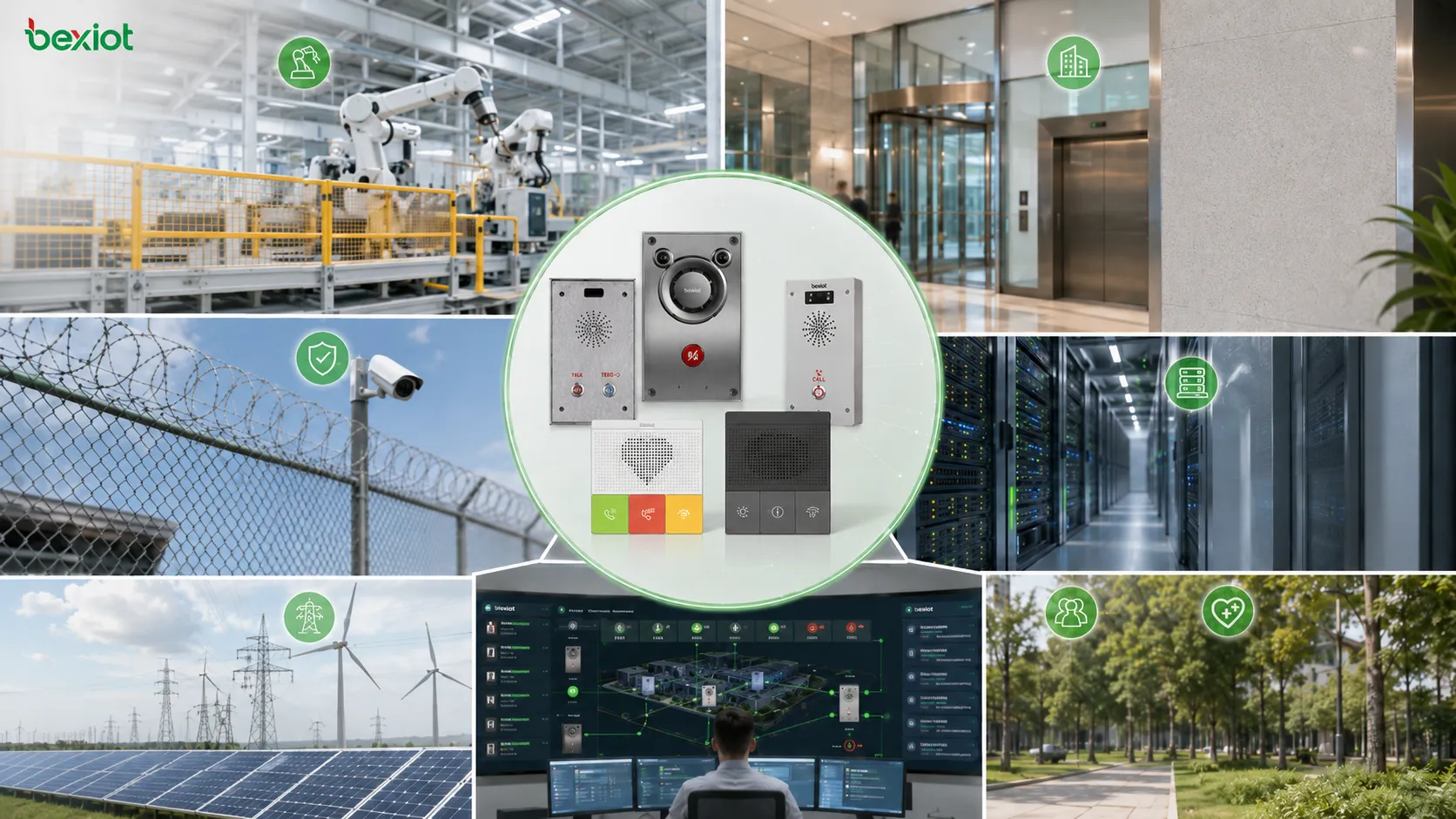
Fault alarms are used in many systems because almost every technical environment needs abnormal condition detection. The alarm logic may vary, but the purpose remains consistent: identify faults quickly and guide response.
Industrial Automation and Production Equipment
Industrial systems use fault alarms for motors, pumps, conveyors, sensors, PLCs, drives, control cabinets, power supplies, temperature systems, compressed air systems, and production equipment. Alarms may indicate overload, overheating, abnormal pressure, sensor disconnection, emergency stop, or communication loss.
In production environments, fault alarms help reduce unplanned downtime and support maintenance scheduling. They also help operators protect equipment and avoid secondary damage.
Building and Facility Management
Building systems use fault alarms for HVAC equipment, elevators, lighting control, access control, fire alarm interfaces, water leakage detection, power distribution, UPS systems, security devices, and energy management platforms.
Facility teams rely on alarms to keep buildings safe and comfortable. A failed pump, offline controller, abnormal temperature, or power fault can affect occupants and business continuity if not addressed quickly.
Communication and Emergency Systems
Communication systems may generate fault alarms for SIP registration failure, network interruption, device offline status, audio path failure, trunk fault, gateway error, low battery, or server service abnormality.
For emergency communication points, alarm-button intercoms, SOS terminals, and public help systems, device health is critical. Becke Telcom BHP-SOS series alarm-button intercom solutions can be considered in projects where emergency triggering, voice communication, and fault status supervision need to be integrated into a security or dispatch workflow.
IT Infrastructure and Cloud Platforms
IT systems use fault alarms for servers, storage, databases, virtual machines, containers, network devices, firewalls, applications, APIs, and cloud services. Alarms may relate to CPU usage, memory pressure, disk failure, service crash, high latency, packet loss, or failed backup.
In digital services, a fault alarm can help teams respond before users experience serious problems. Monitoring and alerting are core parts of IT operations, DevOps, and site reliability engineering.
Power, Energy, and Utilities
Power and utility systems use fault alarms for substations, transformers, inverters, battery systems, generators, distribution cabinets, metering devices, solar equipment, and energy storage systems.
These alarms support safe operation and continuity. Abnormal voltage, overload, insulation fault, grounding issue, communication failure, or battery warning may require immediate technical response.
Integration with Response Workflows
A fault alarm becomes more useful when it is connected to a response workflow. The workflow should define who receives the alarm, how it is verified, what action is required, when it should be escalated, and how it is closed.
Operator Verification
After an alarm appears, the operator should verify whether it is real, repeated, temporary, or already under maintenance. Verification may involve checking device status, viewing camera feeds, calling field staff, reviewing logs, or testing the affected service.
Verification prevents unnecessary dispatch. It also helps avoid ignoring real faults that appear minor at first but may develop into larger failures.
Maintenance Dispatch
Once the fault is confirmed, the system can create a maintenance task or dispatch a technician. The task should include alarm type, location, device ID, fault time, severity, and suggested troubleshooting steps if available.
For large sites, map-based dispatch and device location records can shorten response time. Technicians should be able to find the affected equipment quickly and confirm repair results after work is complete.
Linkage with Communication Tools
Fault alarms can trigger communication actions such as voice calls, SMS messages, mobile push notifications, intercom calls, radio dispatch, or public address announcements. The type of notification should match the severity and audience.
For example, a non-critical device fault may only notify maintenance staff, while a critical emergency terminal offline alarm may notify both the control room and the duty supervisor.
Selection Factors for a Fault Alarm System
Choosing a fault alarm system requires understanding the devices, risks, response teams, and integration needs. A simple site may only need local indicators, while a large facility may need centralized monitoring and automated escalation.
| Selection Factor | Why It Matters | What to Check |
|---|---|---|
| Alarm source | Determines what can be monitored | Devices, sensors, systems, contacts, network status, software logs |
| Severity classification | Helps prioritize response | Critical, major, minor, warning, information levels |
| Notification method | Ensures alarms reach the right people | Dashboard, SMS, email, app push, voice call, dispatch linkage |
| Location accuracy | Reduces field response time | Device ID, zone, room, map point, floor, site name |
| Event history | Supports maintenance and review | Alarm time, acknowledgment, response action, closure, recurrence |
| Integration ability | Connects alarms with real workflows | API, dry contact input, SNMP, Modbus, BACnet, SIP, webhook, platform linkage |
Match the Alarm Method to the Device
Different devices report faults in different ways. Some use dry contact outputs, some use network protocols, some use software APIs, and some use local indicators only. The monitoring system should support the required signal type.
If the system cannot read the fault signal properly, the alarm may not reach operators. Compatibility should be verified during design and commissioning.
Design for Real Response Capability
An alarm system should match the organization’s actual response capacity. If too many low-value alarms are sent to too many people, staff may ignore them. If critical alarms are not escalated quickly, response may be delayed.
The best alarm design separates urgent events from routine warnings and provides each type with a suitable response rule.
Plan for Future Expansion
As sites grow, more devices and systems may need to be monitored. The alarm platform should support additional points, new device types, remote sites, user roles, reporting needs, and integration methods.
Future expansion is easier when alarm naming, device IDs, zones, and categories are planned clearly from the beginning.
Maintenance Tips for Reliable Alarms
Fault alarm systems also need maintenance. If alarm rules are outdated, device names are wrong, communication links fail, or notification contacts are no longer valid, the system may not support real response when needed.
Test Alarm Paths Regularly
Alarm testing should confirm that the device can generate the alarm, the platform can receive it, the location is correct, and the notification reaches the right person. Testing should include both normal alarm triggering and fault recovery.
Critical alarms should be tested more frequently. Test records should include time, device, alarm type, result, operator response, and corrective action.
Review Alarm Thresholds
Thresholds may need adjustment after equipment aging, environment change, system expansion, or operational experience. Too many false alarms may indicate that thresholds are too sensitive. Missed warnings may indicate that thresholds are too loose.
Threshold review should be based on real data, not guesswork. Historical alarm trends can help refine settings.
Keep Device Records Updated
Device names, locations, contact persons, IP addresses, firmware versions, and system ownership should be updated whenever equipment is moved, replaced, or reconfigured.
Outdated records can slow maintenance. If an alarm shows the wrong location or old device name, technicians may waste time checking the wrong equipment.
Analyze Repeated Faults
Repeated alarms should not be treated as isolated events. If one device, cable, power supply, network segment, or sensor repeatedly reports faults, the root cause should be investigated.
Recurring alarms may indicate poor installation, unstable power, environmental stress, aging hardware, weak network coverage, or incorrect configuration. Root cause analysis helps reduce future alarms and improve system reliability.
Common Mistakes to Avoid
One common mistake is enabling too many alarms without classification. This creates alarm fatigue, where operators become overwhelmed and may miss critical events. Alarm rules should be meaningful and prioritized.
Another mistake is ignoring alarm closure. If alarms remain open after repair, operators cannot know whether the system is still faulty or the record was simply not updated. Closure procedures are necessary for traceability.
A third mistake is treating fault alarms as maintenance-only information. Some fault alarms affect safety, security, customer service, and business continuity. Their response workflow should reflect their real operational impact.
FAQ
What is a fault alarm?
A fault alarm is a warning generated when a device, system, sensor, circuit, software service, or communication link detects an abnormal condition. It helps operators identify and respond to failures or risks.
What is the difference between a fault alarm and an event notification?
An event notification may report normal or abnormal activity. A fault alarm specifically indicates that something is wrong or outside the expected operating state and may require corrective action.
Where are fault alarms commonly used?
Fault alarms are commonly used in industrial automation, building management, communication systems, emergency terminals, IT infrastructure, energy systems, security platforms, power distribution, and facility monitoring.
What information should a fault alarm include?
A useful fault alarm should include alarm type, severity, time, device name, location, system category, current status, suggested action if available, and acknowledgment or closure record.
How can false alarms be reduced?
False alarms can be reduced by setting proper thresholds, filtering duplicate events, improving sensor quality, maintaining devices, verifying communication links, using delay logic where appropriate, and reviewing historical alarm data.
Can BHP-SOS series alarm-button intercoms support fault alarm workflows?
Yes. Becke Telcom BHP-SOS series alarm-button intercoms can be considered for projects that need emergency triggering, voice communication, device status supervision, and linkage with security or dispatch platforms. The final configuration should match the site’s monitoring method and response procedure.







