


Keeping Services Running When Something Fails
Failover is a system reliability mechanism that automatically or manually switches operations from a failed primary component to a backup component. It is used to keep applications, networks, servers, databases, communication systems, cloud services, and industrial platforms available when hardware, software, links, or services stop working.
In simple terms, failover answers one important question: if the main system fails, what takes over? A well-designed failover architecture reduces downtime, protects service continuity, and helps organizations recover faster from faults, overloads, maintenance events, or unexpected outages.
Failover does not prevent every failure. Its value is that it gives the system a prepared recovery path when failure happens.
Basic Meaning and System Role
Failover is commonly used in high-availability design. A primary resource handles normal operation, while one or more standby resources remain ready to take over if the primary resource becomes unavailable. The backup may be another server, router, database node, network link, data center, cloud region, storage system, or application instance.
The goal is to reduce service interruption. Instead of waiting for technicians to repair the failed component before service can continue, the system redirects traffic, workloads, sessions, or requests to another available resource.
Primary and Standby Resources
The primary resource is the active component that normally provides the service. The standby resource is prepared to take over when the primary resource fails. In some systems, the standby resource is passive and waits until failover is triggered. In other systems, multiple resources actively share traffic at the same time.
For example, a website may run on two application servers. If the first server fails, traffic can be sent to the second server. A router may use a backup WAN link if the main internet connection goes down. A database may promote a replica to become the new primary node when the original primary node fails.
Failure Detection
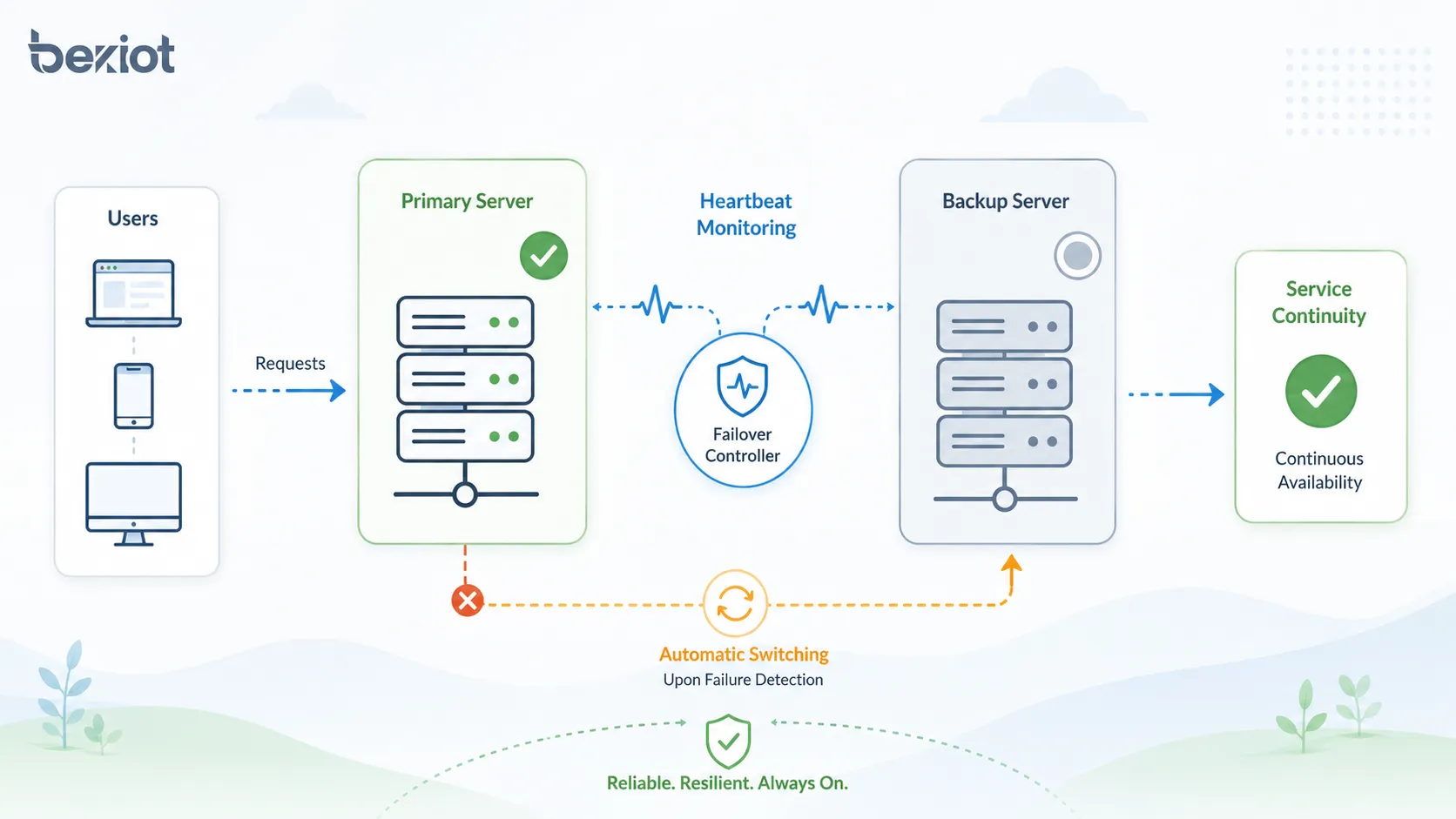
Failover depends on failure detection. The system must know when the primary component is unhealthy. Detection may use heartbeat signals, health checks, link monitoring, service probes, database replication status, application response checks, or network reachability tests.
Good detection should be fast enough to reduce downtime but not so sensitive that it triggers unnecessary failover during a short delay or temporary packet loss. This balance is important in real-world network and application design.
How the Failover Process Works
The failover process usually includes monitoring, failure detection, decision-making, service switching, traffic redirection, recovery verification, and event logging. The details vary by system type, but the core logic is similar.
When the monitoring mechanism detects that the primary system is unavailable or unhealthy, the failover controller triggers the backup path. Users may experience a short interruption, but the service should continue through the backup component.
Monitoring and Health Checks
Health checks are used to confirm whether a service is operating correctly. A basic health check may only test whether a server responds to ping. A more advanced health check may verify whether the application can process requests, connect to the database, and return valid responses.
Application-level health checks are usually more reliable than simple network checks. A server may still respond to ping while the application running on it is frozen, overloaded, or unable to access required backend services.
Switching to Backup Resources
After failure is confirmed, the system switches operation to the backup resource. This may involve changing routing tables, updating DNS records, moving a virtual IP address, promoting a database replica, activating a standby server, or redirecting traffic through a load balancer.
The switching method should match the business requirement. Some systems can tolerate a few minutes of interruption, while critical systems may require near-instant failover with minimal user impact.
Service Verification After Switching
After failover, the backup service should be verified. The system should confirm that users can connect, transactions can continue, data is available, and dependent services are functioning correctly.
Verification is important because switching traffic to a backup component does not automatically guarantee normal operation. The backup must be properly synchronized, correctly configured, and capable of handling the workload.
Main Types of Failover
Failover can be designed in different ways depending on system criticality, budget, performance requirements, and recovery objectives. The most common models include active-passive, active-active, manual failover, automatic failover, local failover, and geographic failover.
Active-Passive Failover
In active-passive failover, one system actively handles production traffic while another system waits in standby mode. If the active system fails, the passive system becomes active and takes over the service.
This model is relatively simple and widely used for servers, firewalls, databases, PBX systems, storage controllers, and network gateways. Its main advantage is clear role separation. Its limitation is that standby resources may be underused during normal operation.
Active-Active Failover
In active-active failover, two or more systems handle traffic at the same time. If one system fails, the remaining systems continue serving users and absorb the additional load.
This model can improve resource utilization and scalability, but it requires careful design. Load balancing, data synchronization, session handling, conflict control, and capacity planning become more complex.
Manual and Automatic Failover
Manual failover requires an operator or administrator to trigger the switch. It provides human control and may be useful during maintenance, planned migration, or sensitive system changes.
Automatic failover is triggered by system rules. It is faster and more suitable for high-availability environments, but it must be carefully configured to avoid false failover, split-brain conditions, or repeated switching between nodes.
Local and Geographic Failover
Local failover happens within the same site, rack, data center, or network zone. It protects against local server, link, power module, or device failure.
Geographic failover switches service to another data center, cloud region, or remote site. It protects against larger failures such as data center outage, regional network disruption, power loss, fire, flood, or major infrastructure incident.
Key Features of a Reliable Design
A good failover system should not only switch quickly. It should switch safely, consistently, and predictably. The most important features include monitoring, redundancy, synchronization, traffic control, logging, and recovery planning.
Redundant Components
Redundancy means having backup components available before failure occurs. These components may include servers, power supplies, network links, routers, switches, storage paths, databases, application instances, and cloud regions.
Redundancy must be meaningful. A backup server connected to the same failed power source or single network switch may not provide real resilience. Designers should avoid hidden single points of failure.
Heartbeat and Status Monitoring
Heartbeat signals help systems check whether the primary node is alive. If the standby node stops receiving heartbeat messages within a defined period, it may assume that the primary node has failed.
Heartbeat design should account for network delay, packet loss, and management link reliability. Poor heartbeat configuration can cause split-brain problems, where two nodes both believe they should be active.
Data Synchronization
Many failover systems require data synchronization between primary and backup nodes. This may involve database replication, file synchronization, storage mirroring, configuration backup, or state sharing.
Synchronization affects recovery quality. If the backup has old data, failover may restore service but lose recent transactions. If synchronization is too slow, recovery point objectives may not be met.
Automatic Traffic Redirection
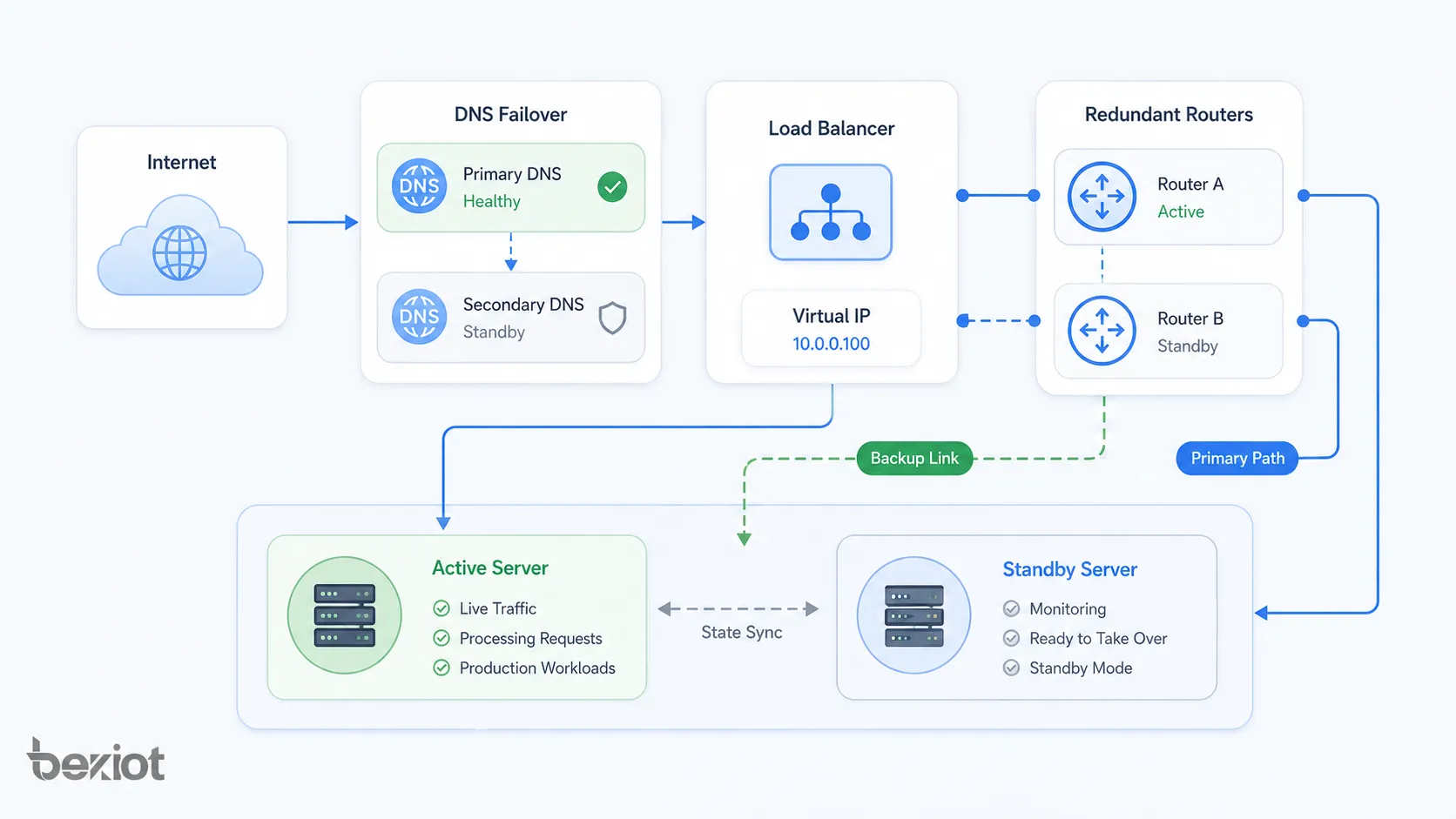
Traffic redirection allows users or systems to reach the backup service after failover. This may be done through load balancers, virtual IP addresses, routing protocols, DNS failover, SD-WAN policies, or application gateways.
The redirection method should match the expected recovery time. DNS-based failover may be simple but can be slower due to caching. Load balancer or virtual IP failover can be faster in local high-availability environments.
Network Architecture Patterns
Failover architecture can be applied at different layers of a network and system stack. It may protect physical links, routing paths, server clusters, databases, cloud regions, or application services.
Server-Level Failover
Server-level failover uses two or more servers to provide the same service. If one server fails, another server takes over. This is common for application servers, web servers, file servers, communication servers, and management platforms.
Server-level failover may use clustering software, virtualization platforms, load balancers, container orchestration, or high-availability services. Configuration consistency between servers is essential.
Network Link Failover
Network link failover uses backup network paths when the primary connection fails. Examples include dual WAN, backup fiber links, LTE or 5G backup, redundant ISP connections, and SD-WAN link switching.
This is important for branch offices, remote sites, retail chains, industrial facilities, and cloud-connected systems. If the main link fails, the backup link keeps communication available, although bandwidth or latency may change.
Router and Firewall Failover
Routers and firewalls often support high-availability pairs. One device may be active while another is standby, or both may share load depending on the design. A virtual gateway address is often used so clients do not need to know which physical device is active.
Firewall failover should synchronize session state where possible. Without session synchronization, existing connections may drop during failover even if new connections continue normally.
Database Failover
Database failover protects data services by switching from a failed primary database to a replica or standby database. It is used in enterprise applications, e-commerce platforms, financial systems, cloud services, and critical operational platforms.
Database failover requires careful handling of replication lag, transaction consistency, write conflicts, and application reconnection. Poorly designed database failover can cause data loss or application errors.
Cloud and Multi-Region Failover
Cloud failover can switch services between zones, regions, or cloud providers. This protects against local infrastructure failure and supports disaster recovery strategies.
Multi-region failover may require global traffic management, replicated databases, object storage synchronization, identity service availability, and tested recovery procedures. The design should match recovery time and recovery point objectives.
Failover Metrics and Planning Goals
Failover planning is often guided by availability and recovery metrics. These metrics help organizations decide how much redundancy is needed and how much downtime or data loss is acceptable.
| Metric | Meaning | Why It Matters |
|---|---|---|
| RTO | Recovery Time Objective | Maximum acceptable time to restore service after failure |
| RPO | Recovery Point Objective | Maximum acceptable amount of data loss measured by time |
| MTTR | Mean Time to Repair | Average time required to restore a failed component |
| MTBF | Mean Time Between Failures | Average operating time between failures |
| Availability | Percentage of time a service is operational | Shows overall service uptime performance |
Recovery Time Objective
Recovery Time Objective defines how quickly a service must be restored after failure. A non-critical internal reporting tool may tolerate hours of downtime, while a payment system, emergency platform, or production control system may require recovery within seconds or minutes.
Lower RTO usually requires more investment in automation, redundancy, monitoring, and infrastructure. The design should match business impact rather than assume every system needs the same level of protection.
Recovery Point Objective
Recovery Point Objective defines how much data loss is acceptable. If an organization can only tolerate a few seconds of lost data, it may need near-real-time replication. If it can tolerate several hours, scheduled backup may be enough.
RPO is especially important for databases, file systems, transaction platforms, customer records, and operational logs. Failover without data planning can restore service but still create unacceptable business loss.
Benefits for Business and Operations
Failover provides value because downtime affects revenue, safety, productivity, customer trust, and operational continuity. A well-designed failover strategy helps organizations maintain service during unexpected faults and planned maintenance.
Higher Service Availability
The main benefit is improved availability. When a primary component fails, the backup component continues service. This reduces downtime and helps users keep working.
High availability is important for online services, communication systems, healthcare platforms, transportation networks, industrial automation, financial systems, and public-facing applications.
Reduced Operational Risk
Failover reduces the risk that one component failure will stop the entire system. This is especially important for systems with single points of failure, such as one internet link, one server, one database, or one gateway.
By adding backup paths and automated recovery logic, organizations can reduce the impact of hardware faults, network outages, software crashes, and maintenance interruptions.
Better Maintenance Flexibility
Failover can support planned maintenance. Administrators can move service from one node to another, update the primary system, test changes, and then switch back when work is complete.
This reduces the need for long maintenance windows. It also makes upgrades safer because service can remain available through backup resources.
Improved User Confidence
Users may not see the failover process directly, but they notice when services remain available. Reliable systems improve customer trust, employee productivity, and confidence in digital infrastructure.
For critical communication, industrial, and business platforms, availability is not only a technical metric. It is part of the service experience.
Applications Across Different Systems
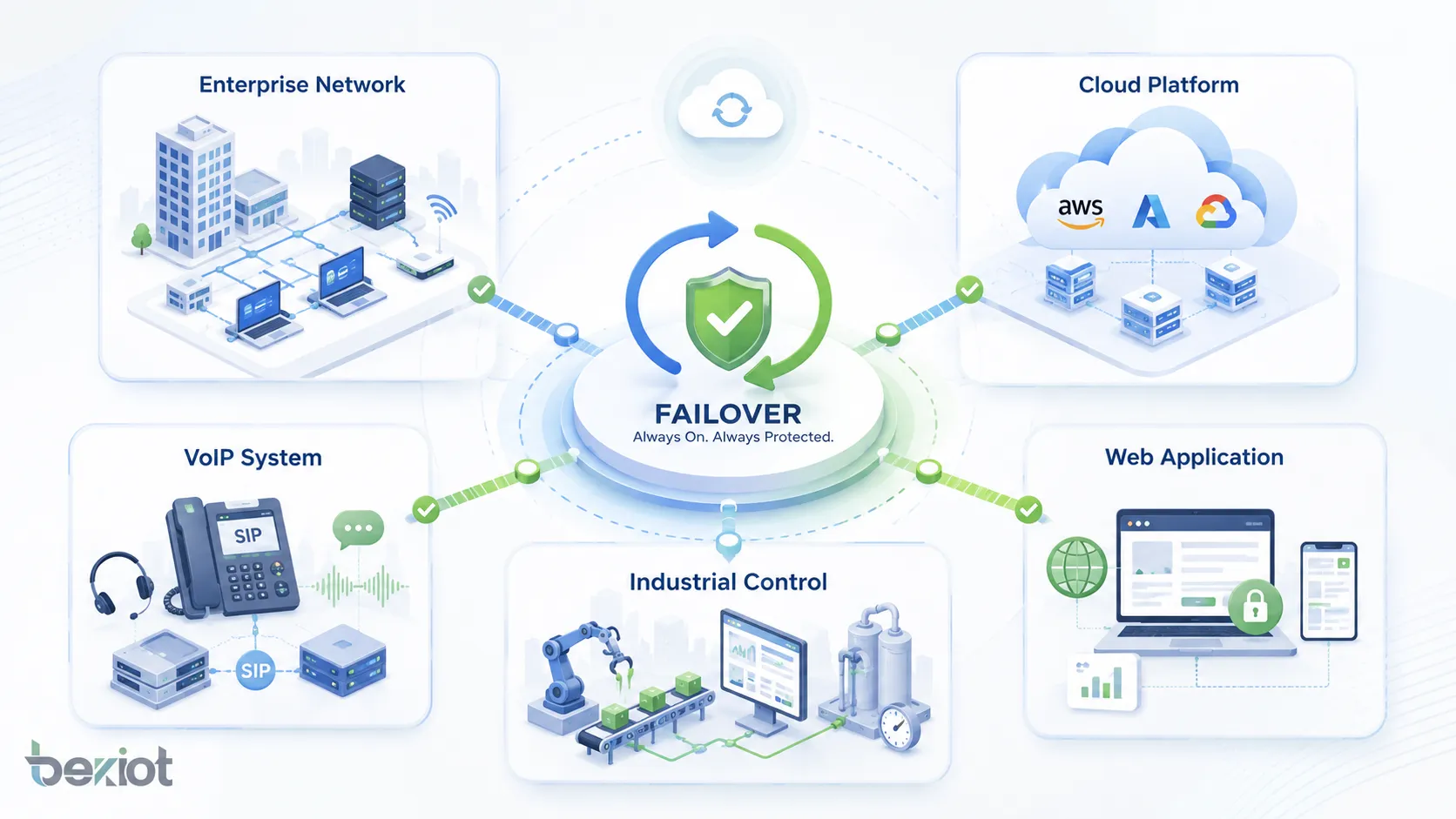
Failover is used wherever continuity matters. The exact design depends on the system type, but the goal remains the same: avoid service interruption when something fails.
Enterprise Networks
Enterprise networks use failover for internet links, firewalls, routers, switches, VPN tunnels, wireless controllers, and branch office connectivity. If one path fails, traffic can move to another path.
In multi-branch organizations, failover helps keep remote offices connected to cloud services, data centers, communication systems, and business applications.
Data Centers and Cloud Platforms
Data centers use failover for servers, storage, databases, virtualization clusters, power systems, cooling systems, and network fabrics. Cloud platforms use availability zones, region failover, load balancers, auto-scaling groups, and managed database replicas.
These designs help applications survive hardware failure, host failure, rack failure, or even regional service disruption when properly planned.
VoIP and Communication Systems
VoIP and SIP systems may use failover for SIP servers, PBX platforms, gateways, SBCs, SIP trunks, DNS SRV records, media servers, and network links. If one server or trunk fails, calls may route through a backup path.
This is important for business communication because failed voice services can affect customer contact, internal coordination, emergency calls, and service operations.
Industrial and Operational Technology
Industrial environments may use failover for SCADA servers, control networks, monitoring platforms, HMI stations, historians, industrial gateways, and communication links. The objective is to keep production, monitoring, and safety-related operations available.
Industrial failover design must consider deterministic communication, device compatibility, environmental conditions, and safe operating procedures. Automatic switching should not create unsafe machine behavior.
Web Applications and Online Services
Web applications use failover through load balancers, replicated application servers, database replicas, CDN services, DNS failover, and multi-region deployment. These methods help websites and APIs remain available during server or network failure.
For e-commerce, banking, SaaS, streaming, and customer portals, failover can protect revenue and user experience during unexpected outages.
Common Challenges and Risks
Failover improves resilience, but poor design can create new problems. The backup system must be tested, updated, synchronized, and sized properly. Otherwise, failover may fail when it is needed most.
False Failover
False failover happens when the system switches to backup even though the primary service is not truly failed. This may be caused by temporary packet loss, slow response, overloaded monitoring, or overly aggressive thresholds.
False failover can interrupt users unnecessarily. Health checks should be designed to confirm real service failure before switching.
Split-Brain Condition
A split-brain condition occurs when two nodes both believe they are the active primary. This can happen when heartbeat communication fails but both systems are still running.
Split-brain is dangerous in database, storage, and clustered systems because it can cause data corruption or conflicting writes. Quorum mechanisms, fencing, and proper cluster design help reduce this risk.
Backup Capacity Problems
A backup resource must have enough capacity to handle the workload after failover. If the backup is too small, service may technically remain online but perform poorly.
Capacity planning should consider peak load, growth, degraded-mode operation, and whether multiple failures could happen at the same time.
Untested Recovery Plans
A failover design that has never been tested is not reliable. Configuration drift, expired certificates, outdated backups, firewall changes, DNS caching, missing licenses, or old software versions can prevent successful recovery.
Regular failover drills are necessary. Testing should include both planned failover and unplanned failure scenarios where possible.
Best Practices for Reliable Deployment
Failover should be designed as part of a broader high-availability and disaster recovery strategy. It should include architecture planning, monitoring, documentation, testing, and continuous improvement.
Identify Critical Services First
Not every system needs the same level of failover. Organizations should identify which services are critical, how downtime affects operations, and what recovery objectives are required.
This helps prioritize investment. Critical systems may need automated failover and geographic redundancy, while less critical systems may only need backup and manual recovery.
Remove Hidden Single Points of Failure
Failover can be weakened by hidden dependencies. A backup server may depend on the same storage, power supply, network switch, DNS service, or authentication system as the primary server.
Architecture review should identify these dependencies. True resilience requires redundancy across the full service path, not only the visible application layer.
Keep Configuration Synchronized
Primary and backup systems should use consistent configuration. Differences in software version, firewall rules, certificates, routing policies, user data, or application settings can cause failover failure.
Configuration management tools, templates, backups, and change control help keep systems aligned. After any major change, failover readiness should be rechecked.
Test Failover Regularly
Regular testing confirms whether failover works under real conditions. Tests should verify detection time, switching time, data consistency, application behavior, user access, logging, and failback procedure.
Testing should be documented. Each test should record what was tested, what happened, what failed, and what improvements are needed.
Failback and Recovery After Failover
Failover is only one part of the recovery process. After the primary system is repaired, the organization must decide whether and how to move service back. This process is called failback.
When to Fail Back
Failback should not happen too quickly. The original primary system should be fully repaired, tested, synchronized, and verified before traffic is moved back. If failback is rushed, the system may fail again and create another interruption.
Some organizations choose to keep the backup system active until the next maintenance window. This allows a controlled return rather than an immediate switch.
Data and State Synchronization
Before failback, data created during backup operation must be synchronized back to the original primary system. This is especially important for databases, files, transactions, user sessions, and configuration changes.
Without proper synchronization, failback can cause data loss, outdated records, or inconsistent service behavior.
Post-Incident Review
After a failover event, teams should review what happened. The review should include cause of failure, detection time, switching result, user impact, backup performance, communication process, and improvement actions.
This turns failover from a one-time recovery event into a continuous reliability improvement process.
FAQ
What is failover?
Failover is a reliability mechanism that switches services, traffic, workloads, or operations from a failed primary component to a backup component. It is used to reduce downtime and maintain service continuity.
What is the difference between failover and backup?
Backup stores data or configuration for recovery. Failover switches active service to another resource when failure occurs. Backup helps restore information, while failover helps keep the service running.
What is active-passive failover?
Active-passive failover uses one active system and one standby system. The standby system takes over only when the active system fails or is taken offline for maintenance.
What is active-active failover?
Active-active failover uses multiple systems that handle traffic at the same time. If one system fails, the remaining systems continue serving users and take on the additional workload.
Where is failover commonly used?
Failover is commonly used in enterprise networks, cloud platforms, data centers, databases, web applications, VoIP systems, firewalls, routers, storage systems, and industrial control platforms.
How can failover be tested?
Failover can be tested by simulating primary system failure, disconnecting network paths in a controlled way, shutting down test nodes, triggering maintenance failover, checking service switching, verifying data consistency, and reviewing logs after recovery.







