


Whitelist control is a security and access management method that allows only approved users, devices, phone numbers, IP addresses, applications, domains, commands, or services to interact with a system. Anything not included in the approved list is blocked, rejected, ignored, or sent for further verification. In modern security language, the term “allowlist” is often used as an alternative, but many systems and product interfaces still use “whitelist.”
This approach is used in network security, VoIP systems, access control, endpoint protection, email filtering, application management, industrial control, cloud platforms, firewall policy, API access, and enterprise communication systems. Its main purpose is to reduce unwanted access by changing the default rule from “allow unless blocked” to “block unless approved.”
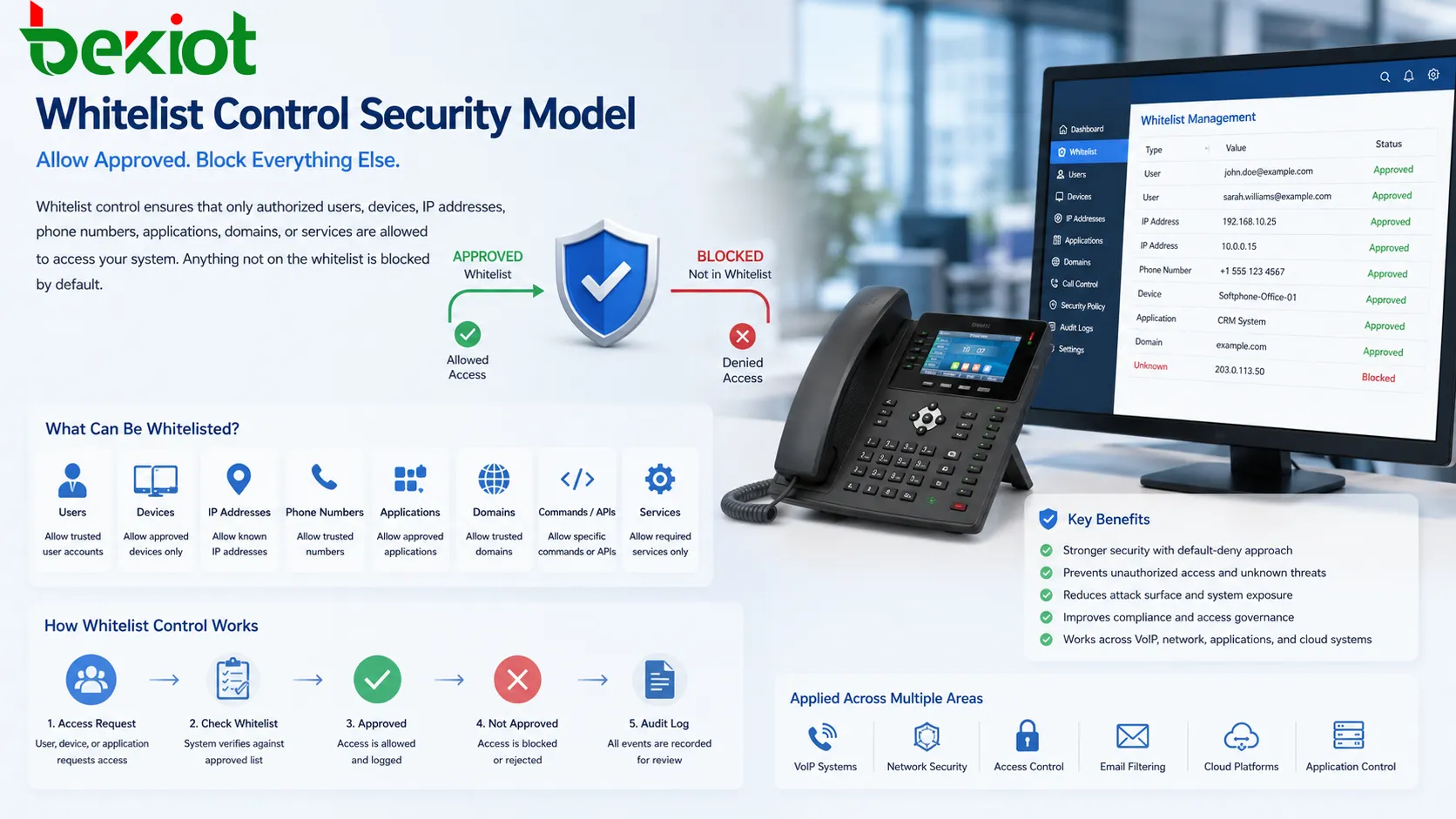
A Security Model Based on Approval
Many traditional security controls focus on blocking known threats. For example, a blacklist may block known malicious IP addresses, spam domains, suspicious phone numbers, or dangerous applications. This can be useful, but it depends on knowing the bad item in advance. New threats, unknown sources, and unrecognized access attempts may still get through.
Whitelist control works from the opposite direction. Instead of trying to identify every possible unwanted source, the system defines what is allowed. If a request does not match the approved list, the system denies it by default. This makes the protection more restrictive and easier to reason about in environments where access should be tightly controlled.
This is why approval-based control is common in critical systems. A factory controller may only accept commands from specific management stations. A SIP trunk may only accept signaling from known carrier IP addresses. An email gateway may only accept trusted senders for certain workflows. A server may only allow remote login from approved administrator networks.
How the Access Decision Works
Identity or Attribute Matching
The system first checks the identity or attribute of the incoming request. This may be a username, certificate, device ID, MAC address, IP address, phone number, SIP URI, domain name, application hash, API key, port, or digital signature.
The selected attribute depends on the system type. A firewall may check IP addresses and ports. A VoIP platform may check caller numbers or SIP source addresses. An endpoint security system may check application signatures. An access control system may check card IDs or user accounts.
Approved List Lookup
After identifying the request, the system compares it with the approved list. If it matches an approved entry, access may be granted according to the configured permission. If it does not match, the request is denied, quarantined, logged, or sent to an administrator for review.
In some systems, the list is simple. In others, it may include conditions such as time of day, user role, device health, location, network segment, service type, or risk level. This makes the control more flexible while still following an allow-only principle.
Policy Enforcement
Once the decision is made, the system enforces the policy. It may allow a connection, permit a call, run an application, accept an email, open a door, process an API request, or route a packet. If the request is not approved, it may be blocked before reaching the protected service.
Good enforcement should be consistent. If one pathway checks the approved list but another bypasses it, the control becomes weak. All relevant access paths should follow the same policy logic.
Logging and Review
Logs are important because blocked attempts can reveal misconfiguration, outdated records, user mistakes, or possible attacks. A denied request is not always malicious. It may come from a new employee, a replaced device, a changed IP address, or an application update.
Reviewing logs helps administrators keep the list accurate and avoid accidental service interruption. It also supports audit requirements in regulated environments.
The strength of whitelist control comes from default denial. The system does not need to know every bad actor; it only needs to know what is trusted enough to pass.
Common Types of Approved Lists
User-Based Rules
User-based rules allow only selected accounts or roles to access a service. This is common in admin portals, business applications, cloud platforms, CRM systems, PBX management interfaces, and internal tools.
User-based control should be combined with strong authentication, role-based permissions, password policy, and multi-factor authentication. A user account on the list should still prove that it is being used by the right person.
IP Address Rules
IP-based rules allow access only from approved network addresses or address ranges. This is widely used for firewalls, VPN access, SIP trunks, database administration, remote management, API endpoints, and partner connections.
IP rules are simple and useful, but they must be maintained. If a provider changes its IP range or an office changes internet service, access may fail until the list is updated.
Device Approval
Device allowlisting limits access to approved hardware, endpoints, terminals, phones, laptops, cameras, sensors, or industrial controllers. Device identity may be based on MAC address, serial number, certificate, device profile, or endpoint management status.
This helps prevent unknown devices from joining sensitive networks. However, device identity can sometimes be spoofed if not supported by stronger authentication methods.
Application Control
Application allowlisting permits only approved software to run. It may check application signatures, file hashes, publisher certificates, installation paths, or policy groups.
This is useful for industrial workstations, kiosks, point-of-sale systems, security consoles, and servers where the software environment should remain stable and tightly controlled.
Number and Caller Approval
Communication systems may allow calls, messages, or access requests only from approved phone numbers, extensions, SIP accounts, or caller identities. This can reduce nuisance calls, toll fraud, unauthorized remote access, and unwanted signaling traffic.
Caller-based rules should be used carefully because caller ID can be spoofed in some networks. For stronger protection, they should be combined with trunk authentication, source IP checks, certificates, or platform-level security controls.
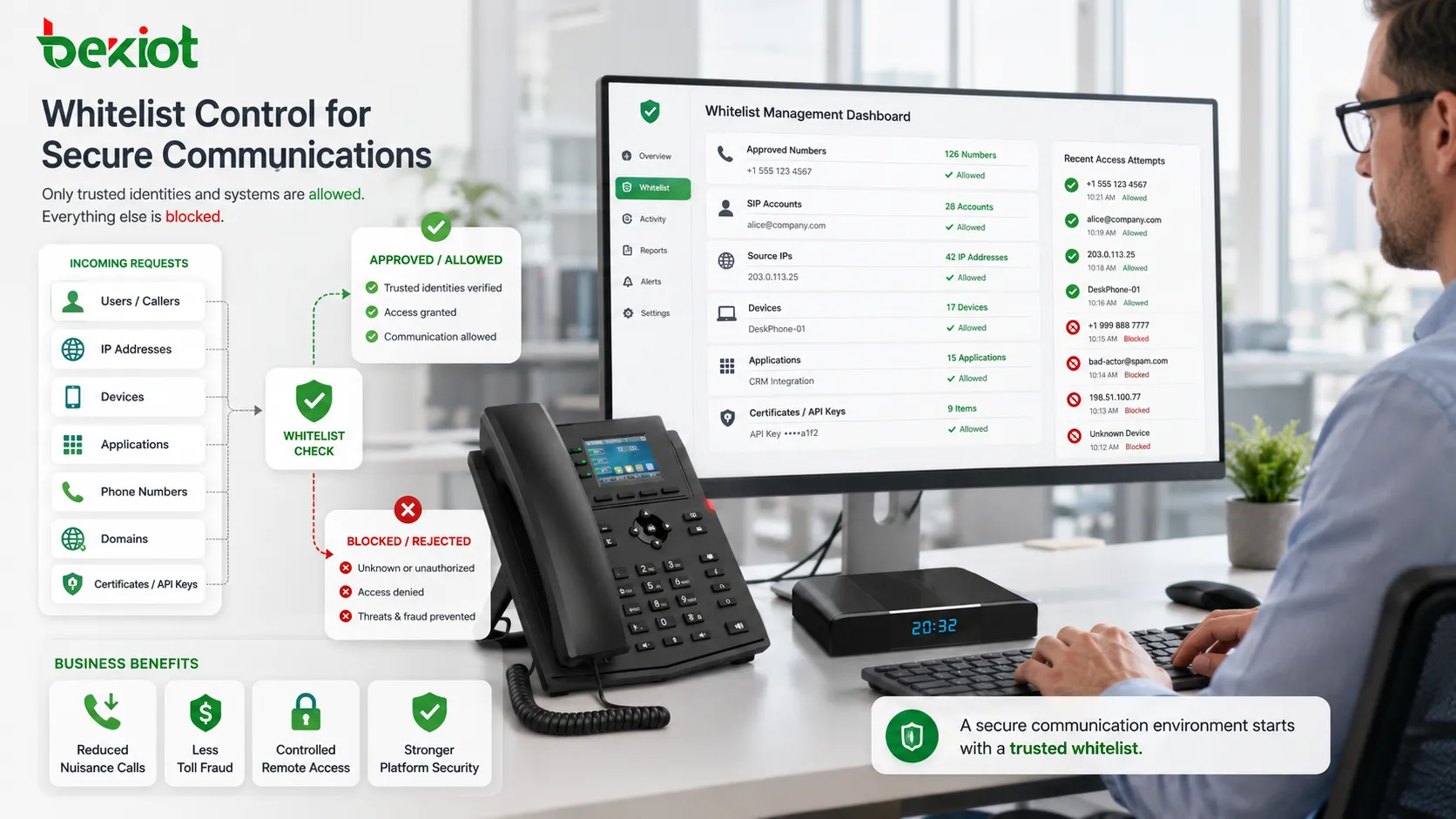
Key Features in a Well-Designed System
Default Deny Behavior
The most important feature is default denial. If a request does not match the approved list, it should not be allowed automatically. This reduces exposure to unknown users, unknown devices, and unapproved access paths.
Default deny is powerful, but it requires careful planning. If the list is incomplete, legitimate users or services may be blocked.
Granular Policy Scope
A strong system should allow different lists for different services, departments, network zones, user roles, or applications. One global list may be too broad and may allow more access than necessary.
For example, an administrator network may be allowed to reach server management ports, while ordinary office users are not. A SIP carrier IP range may be allowed to reach the PBX, while other public IP addresses are blocked.
Centralized Management
Centralized management makes list maintenance easier. Administrators can add, remove, review, and audit approved entries from one interface instead of editing many devices manually.
This is useful in large environments with many firewalls, servers, endpoints, phone systems, access control devices, or cloud services.
Temporary Approval
Some systems support temporary entries. A contractor may need access for one week, a maintenance vendor may need a remote session for one hour, or a test device may be allowed during commissioning.
Temporary approval reduces the risk of forgotten access. The entry can expire automatically after the approved window ends.
Audit Trail
A complete audit trail should show who added an entry, why it was added, when it was changed, when it was used, and when it was removed. This helps with compliance, troubleshooting, and security investigation.
Without audit records, approved lists can become unmanaged over time. Old entries may remain active long after they are needed.
Benefits for Security and Operations
Reduced Attack Surface
By allowing only approved sources, whitelist control reduces the number of possible entry points into a system. Unknown devices, random internet scans, unapproved applications, and unauthorized users are blocked before they can interact with protected services.
This is especially valuable for management interfaces, remote access services, industrial systems, telephony trunks, and sensitive business applications.
Stronger Policy Enforcement
Approval-based control helps organizations enforce clear access rules. Administrators can define which users, systems, or partners are allowed rather than relying on broad network access.
This supports least-privilege security because users and systems receive only the access they actually need.
Lower Noise and Fewer Unwanted Requests
Firewalls, PBX systems, email servers, APIs, and web applications may receive many unwanted connection attempts. Approved-list filtering can reduce this noise and help systems focus on valid traffic.
For voice systems, this may help reduce unauthorized SIP attempts, suspicious registration traffic, or unwanted call sources.
Improved Compliance Control
Many compliance programs require access to be limited, justified, reviewed, and documented. A managed approved list helps demonstrate that only defined users or systems can reach sensitive resources.
Audit logs and approval workflows make it easier to support internal reviews and external audits.
More Predictable System Behavior
In controlled environments such as factories, laboratories, utilities, telecom rooms, and security operations centers, predictability matters. Allowing only approved software, devices, or network sources reduces unexpected changes.
This can improve system stability and reduce troubleshooting complexity.
Applications Across Different Systems
Network Firewalls
Firewalls use approved lists to allow traffic from trusted IP addresses, subnets, ports, or service groups. This is common for remote administration, partner access, VPN gateways, cloud services, and branch connectivity.
Firewall allowlists should be reviewed regularly because old partner networks, retired servers, and temporary rules can remain open if no one removes them.
Email Security
Email systems may use sender allowlists to reduce false positives for trusted domains, partners, or internal services. This helps important messages avoid unnecessary quarantine.
However, email allowlisting should not bypass all security checks blindly. Trusted senders can still be compromised, so attachment scanning, link protection, and authentication checks may still be needed.
VoIP and SIP Platforms
VoIP systems may approve SIP trunks, remote extensions, known carrier addresses, or trusted caller identities. This helps reduce unauthorized registration attempts, toll fraud, and SIP scanning.
For stronger protection, SIP allowlists should be combined with secure passwords, TLS where supported, firewall rules, fail2ban-style blocking, SBC policies, and call permission controls.
Application and Endpoint Protection
Endpoint security tools may allow only approved software to run. This is common for locked-down workstations, payment systems, industrial computers, public kiosks, and high-security environments.
Application control can reduce malware risk, but it must include a process for updates. If software updates change file hashes or signatures, the approved list may need revision.
Cloud and API Access
Cloud services often allow IP ranges, API keys, service accounts, certificates, or application identities to be approved. This limits who can call an API, access a dashboard, connect to a database, or manage resources.
API allowlisting should be combined with authentication, rate limits, token management, encryption, and monitoring. An approved source address alone does not prove that the request is safe.
Access Control and Building Systems
Physical access systems may use approved cards, credentials, mobile IDs, vehicle plates, or device tokens. Only listed identities can open doors, gates, barriers, elevators, or restricted areas.
These lists must be updated when employees leave, contractors finish work, cards are lost, or access zones change. Physical security depends heavily on accurate list maintenance.
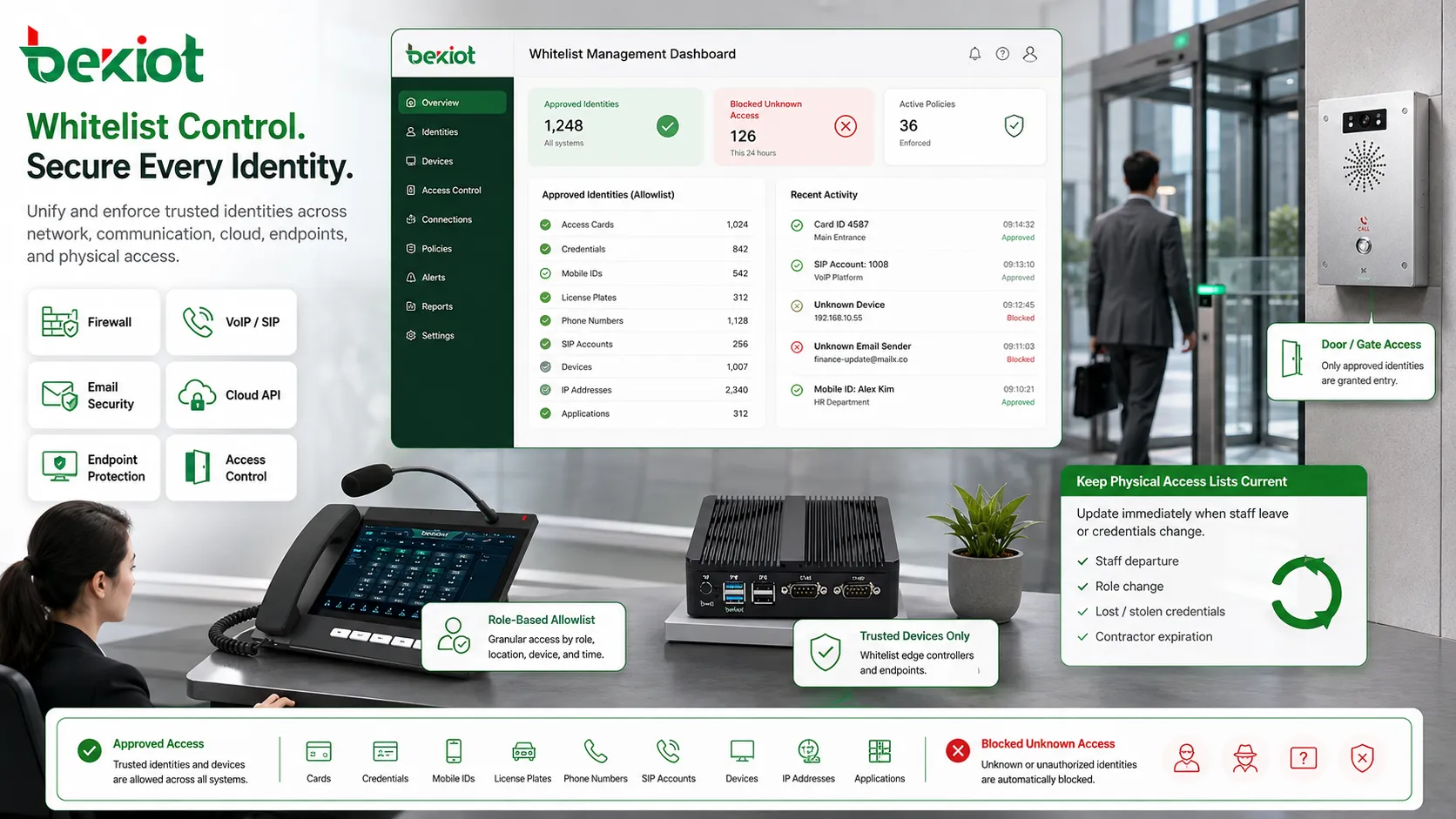
Design Considerations Before Deployment
Define What Needs Approval
Start by deciding what type of identity the system should approve. It may be users, devices, IP addresses, applications, certificates, numbers, domains, or service accounts. Choosing the wrong identity type can make the control weak or hard to maintain.
For example, IP approval may work well for fixed office networks but poorly for mobile users with changing addresses. Certificate-based approval may be better for device-level authentication.
Plan an Update Process
Approved lists must change over time. Employees join and leave, vendors rotate, cloud addresses change, devices are replaced, software updates are released, and partners migrate infrastructure.
A clear update process prevents both security gaps and business interruption. The process should define who can request changes, who approves them, who implements them, and how changes are documented.
Use Layered Controls
Whitelist control should not be the only security mechanism. It should work with authentication, encryption, logging, intrusion detection, endpoint security, network segmentation, role-based permissions, and backup access procedures.
A listed IP address or approved device can still become compromised. Layered defense reduces damage when one control fails.
Avoid Overly Broad Entries
Broad ranges such as large IP blocks, entire domains, or all users in a department may weaken the policy. The list should be as specific as practical while still supporting business needs.
Overly broad approval creates a false sense of security. The system may appear restricted while still allowing too many sources.
Prepare for Lockout Scenarios
A strict policy can accidentally block administrators, remote users, critical services, or automation tasks. Organizations should prepare a safe recovery process before enabling enforcement.
Recovery may include emergency admin access, console access, break-glass accounts, backup network paths, or temporary approval procedures. These recovery methods should be protected and audited.
Common Problems and Troubleshooting
Legitimate Users Are Blocked
This often happens when a user’s IP address changes, a device is replaced, a certificate expires, or a new application version is not listed. Check recent changes before assuming the policy is wrong.
Logs can show which attribute failed to match the approved list.
Approved Entry Does Not Work
An entry may be formatted incorrectly, applied to the wrong policy group, placed in the wrong order, or overridden by another rule. In firewall systems, NAT and routing may also affect whether traffic matches the expected rule.
Administrators should test from the actual source system rather than only reviewing the list visually.
Old Entries Accumulate
Over time, lists can become cluttered with retired users, old servers, former vendors, test devices, and temporary exceptions. This weakens security and makes troubleshooting harder.
Regular review and automatic expiration for temporary entries help prevent list sprawl.
Cloud Services Change Addresses
Some cloud platforms use dynamic or large IP ranges. If the approved list is based only on fixed IP addresses, service access may break when provider infrastructure changes.
Where possible, use provider-published ranges, service tags, DNS-based policies, certificates, or identity-based access controls.
Policy Becomes Too Restrictive
A strict list can block innovation, updates, vendor support, or legitimate workflows if it is not managed well. Users may then look for unofficial workarounds.
The policy should be secure but practical, with a responsive change process and clear ownership.
A whitelist is not a one-time configuration. It is a living access policy that must be reviewed, updated, tested, and audited throughout the system lifecycle.
Best Practices for Implementation
Start with an inventory. Identify users, systems, devices, applications, IP ranges, service accounts, numbers, domains, and vendors that genuinely need access. A poor inventory leads to either overblocking or overpermissive rules.
Apply least privilege. Approve only the required sources and only for the required services. Avoid approving broad ranges or entire groups when a narrower rule is practical.
Use staged enforcement. In critical environments, monitor first before blocking. This helps identify legitimate traffic that would be denied and reduces the risk of sudden business interruption.
Document every entry. Each approval should have a purpose, owner, creation date, review date, and expiration date where appropriate. Undocumented entries should be reviewed and removed if no owner can justify them.
Review regularly. Scheduled audits help remove stale entries, confirm business need, and keep the policy aligned with current operations.
Maintenance and Governance
Governance is what keeps whitelist control effective over time. Without ownership, the list may become outdated, inconsistent, or too permissive. A good governance model defines who owns the policy, who approves changes, who reviews logs, and who responds to blocked access issues.
For regulated environments, approval records may need to be retained. Administrators should be able to explain why an entry exists, who approved it, and whether it is still required.
For high-security systems, list changes should follow change control. Emergency additions may be allowed, but they should be reviewed afterward and removed if no longer needed.
Choosing the Right Control Method
The best method depends on the environment. For stable server access, IP-based rules may be practical. For mobile users, identity-based access may be more reliable. For application security, certificate or signature-based approval may be stronger than file path matching. For VoIP systems, a combination of source IP, SIP authentication, caller policy, and SBC control is usually better than one rule alone.
Organizations should also consider manageability. A security control that is too difficult to maintain may gradually become inaccurate. The goal is not to create the longest possible approved list, but to create a clear, justified, and maintainable trust boundary.
When implemented carefully, whitelist control can improve security, reduce unwanted access, support compliance, and make system behavior more predictable across network, communication, cloud, endpoint, and physical access environments.
FAQ
Is allowlist the same as whitelist?
In most technical contexts, yes. “Allowlist” is the newer and more neutral term, while “whitelist” is still used in many older systems, manuals, and configuration interfaces.
Can approved entries still become risky?
Yes. A trusted account, device, IP address, or application can be compromised. This is why allowlisting should be combined with authentication, monitoring, updates, and least-privilege permissions.
How often should approved lists be reviewed?
The review frequency depends on risk. Critical systems may need monthly or quarterly review, while lower-risk systems may use a longer cycle. Entries for contractors and temporary projects should have expiration dates.
What should be done before enforcing a strict policy?
Run a monitoring period, collect logs, identify legitimate traffic, prepare recovery access, notify affected teams, and test the policy on a limited scope before full enforcement.
Why are broad IP ranges discouraged?
Broad ranges may allow more systems than intended. A smaller and more specific rule reduces exposure and makes the access policy easier to justify during security review.







