


Direct Outward Dialing, commonly abbreviated as DOD, is a business telephony feature that allows internal users or extensions to place outbound calls to external numbers through a PBX, IP PBX, SIP trunk, PRI line, analog gateway, or cloud phone system. In many enterprise phone systems, DOD is closely related to outbound caller ID assignment, trunk selection, dialing permissions, number presentation, and call routing policy.
In practical terms, DOD helps a company control how outbound calls leave the organization. A sales extension may display the company’s main number, a support team may display a dedicated service number, and a branch office may display a local regional number. Instead of every extension using the same outbound identity, administrators can assign outbound numbers and rules based on users, departments, locations, or business needs.
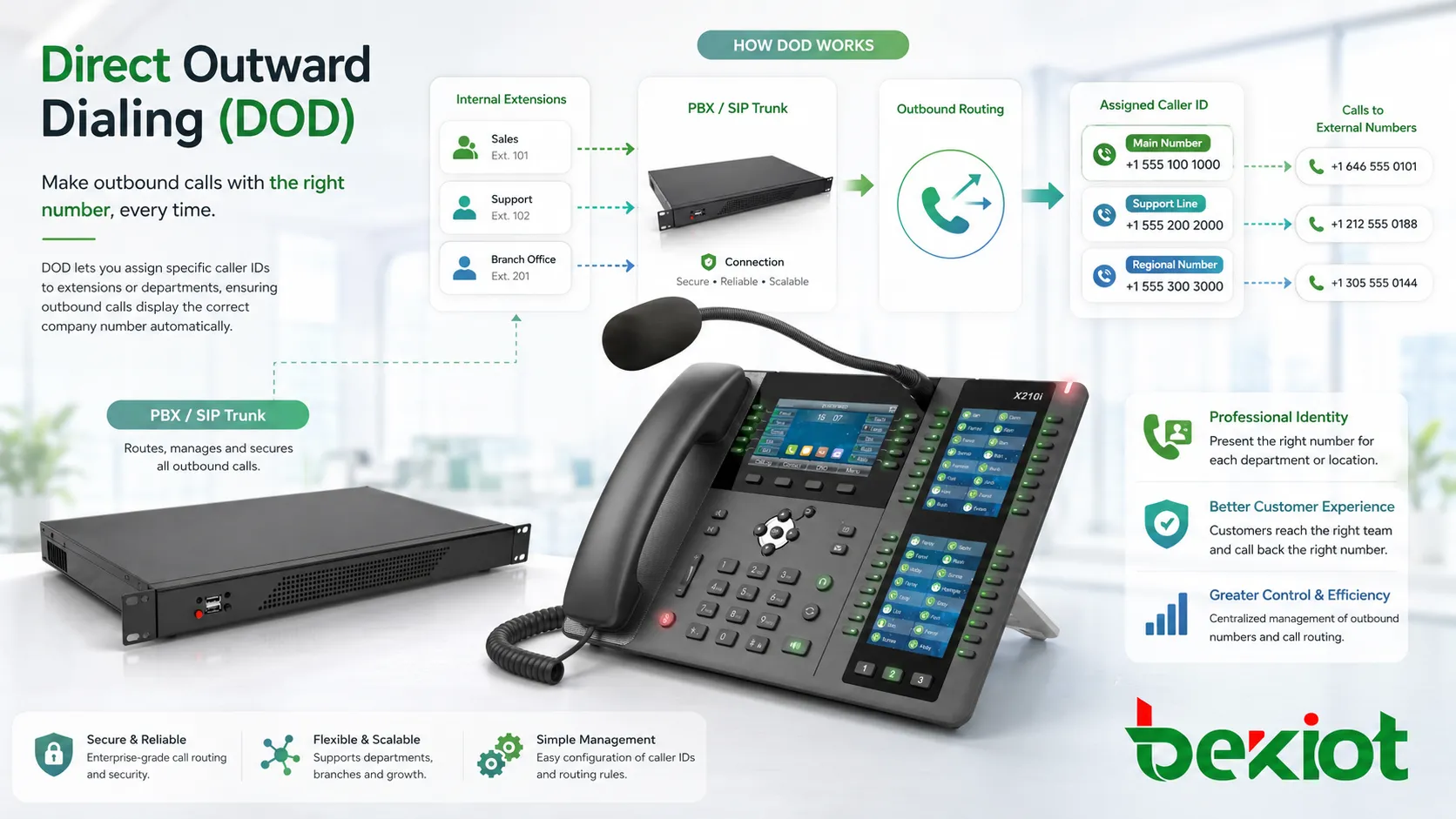
Outbound Calling as a Controlled Business Function
Business phone systems do not simply send every outbound call in the same way. A PBX must decide whether the user is allowed to call the destination, which trunk should carry the call, what caller ID should be presented, whether the dialed number needs formatting, and whether the call should be logged or recorded.
DOD is part of this outbound control layer. It gives administrators a way to define how internal users appear to the outside world when they call customers, suppliers, partners, employees, or public phone numbers. This is important because caller identity affects answer rates, customer trust, compliance, callback behavior, and brand consistency.
For example, a customer is more likely to answer a recognizable service number than an unknown random trunk number. A branch office may need to show a local number for regional customers. A contact center may need different outbound numbers for sales, billing, technical support, and appointment confirmation.
How the Call Leaves the PBX
User Dials an External Number
The process begins when an internal user dials an outside number. This may happen from a desk phone, softphone, mobile client, operator console, contact center agent interface, CRM click-to-call button, or automated outbound workflow.
The PBX checks the dialed digits and determines whether the call is external. Many systems use outbound prefixes, dial plans, country codes, number length rules, or route patterns to identify external destinations.
Dial Plan Processing
The dial plan decides how the number should be interpreted. It may add a country code, remove an access prefix, normalize local numbers, block restricted destinations, or choose a route based on number pattern.
For example, a user may dial “9” before an external number, but the PBX removes that access digit before sending the call to the carrier. International numbers may be normalized into E.164 format before routing through a SIP trunk.
Outbound Route Selection
After the number is processed, the system selects an outbound route. The route may use a SIP trunk, PRI trunk, analog line, GSM gateway, VoIP provider, carrier interconnect, or another communication gateway.
Route selection may depend on cost, destination, branch location, trunk availability, caller group, time of day, failover rule, or service policy. In multi-site organizations, calls may be sent through the nearest local trunk or a centralized carrier connection.
Caller ID Assignment
This is where DOD becomes especially important. The PBX assigns the outbound caller ID according to the user, extension, department, trunk, route, or custom rule. The selected number is then sent to the carrier or service provider as the calling party identity.
Some systems allow each extension to have its own DOD number. Others assign one number to a whole department or branch. The carrier must also allow the presented number; otherwise, the call may be rejected or the caller ID may be replaced.
Carrier Delivery
The carrier receives the call request and attempts to deliver it to the destination network. The receiving party sees the caller ID that is accepted by the carrier and supported by the route.
If the caller ID format is incorrect or not authorized, the call may fail, show the wrong number, display “anonymous,” or present the carrier’s default trunk number. Proper testing is essential after configuration.
Core Features in Phone System Configuration
Extension-Based Number Assignment
Extension-based assignment allows each user to present a specific outbound number. This is useful for employees who need direct callback numbers, such as sales representatives, account managers, executives, or branch staff.
When a customer calls back, the return call can reach the correct user or department more easily. This improves continuity and reduces unnecessary receptionist transfers.
Department-Level Identity
Some organizations prefer department-level caller ID. A support team may display one service number, while a billing team displays another. This helps customers recognize the reason for the call before answering.
Department-level identity is also easier to manage than assigning unique numbers to every employee. It is suitable when many users perform the same role and callbacks should return to a shared queue or group.
Branch and Location Matching
Multi-site companies may use local numbers for each office or region. When employees call customers in their area, the caller ID can show the nearest branch number rather than a distant headquarters number.
This can improve trust and answer rates, especially for local service, healthcare, retail, field maintenance, education, government service, and regional sales teams.
Outbound Permission Control
DOD often works together with outbound permission rules. Not every extension should be allowed to call every destination. The PBX can restrict international calls, premium-rate numbers, long-distance calls, or certain external patterns.
Permission control helps reduce toll fraud, misuse, unexpected telecom costs, and compliance risk. It also allows administrators to match calling rights to user roles.
Failover and Alternate Routing
If the primary trunk is unavailable, the PBX may send the call through another trunk. The system should decide whether the same outbound number can still be used on the backup route.
Failover improves reliability, but caller ID behavior must be tested. A backup carrier may not accept the same calling number, or it may require a different identity format.
DOD is most valuable when outbound identity, permission, route selection, and callback handling are planned together rather than configured as separate settings.
DOD Compared with DID
Direct Outward Dialing is often confused with Direct Inward Dialing. They are related to business phone numbers, but they control opposite call directions. DOD focuses on outbound calls and what number appears when a user calls out. DID focuses on inbound calls and how external callers reach internal extensions or services directly.
| Feature | Call Direction | Main Purpose | Common Example |
|---|---|---|---|
| DOD | Outbound | Controls which caller ID is presented when an extension calls outside. | A sales agent calls a customer and displays the sales department number. |
| DID | Inbound | Routes incoming external numbers directly to extensions, queues, or services. | A customer dials a direct number and reaches a specific support queue. |
| Main Number | Inbound and outbound | Represents the organization’s general public contact number. | All employees display the company reception number for outbound calls. |
| Caller ID Policy | Outbound | Defines which number can be shown for each user or route. | Executives show direct numbers while service agents show a shared hotline. |
Business Value of Outbound Number Control
Professional Caller Identity
A controlled outbound number helps the organization appear more professional. Instead of showing unknown trunk numbers or random gateway numbers, calls can display a recognized business identity.
This is important for customer-facing teams. If a caller ID looks unfamiliar, blocked, or inconsistent, customers may ignore the call or suspect spam.
Better Callback Handling
When DOD is configured correctly, callbacks can return to the right place. A direct number can return to a specific user, while a department number can return to a queue or ring group.
This improves customer experience because the customer does not need to explain the situation again to a general receptionist.
Brand and Regional Consistency
Organizations with multiple branches, service lines, or departments can present numbers that match the customer’s context. A regional customer can see a local office number, while a national support call can show a central service hotline.
This creates a more consistent communication experience and supports business identity across locations.
Cost and Route Management
DOD works with outbound routing to help control call cost. Calls may be sent through specific trunks based on destination, carrier pricing, or site location.
For example, local calls may route through a regional trunk, while international calls may use a dedicated SIP provider. Proper route planning can reduce cost while maintaining caller ID accuracy.
Security and Compliance Support
Outbound number control helps prevent unauthorized number presentation. Some organizations need to ensure that only approved users can display certain numbers, especially in finance, healthcare, government, contact centers, and regulated industries.
Clear policy also helps prevent spoofing-like behavior inside the organization, where users accidentally or intentionally display numbers they should not use.
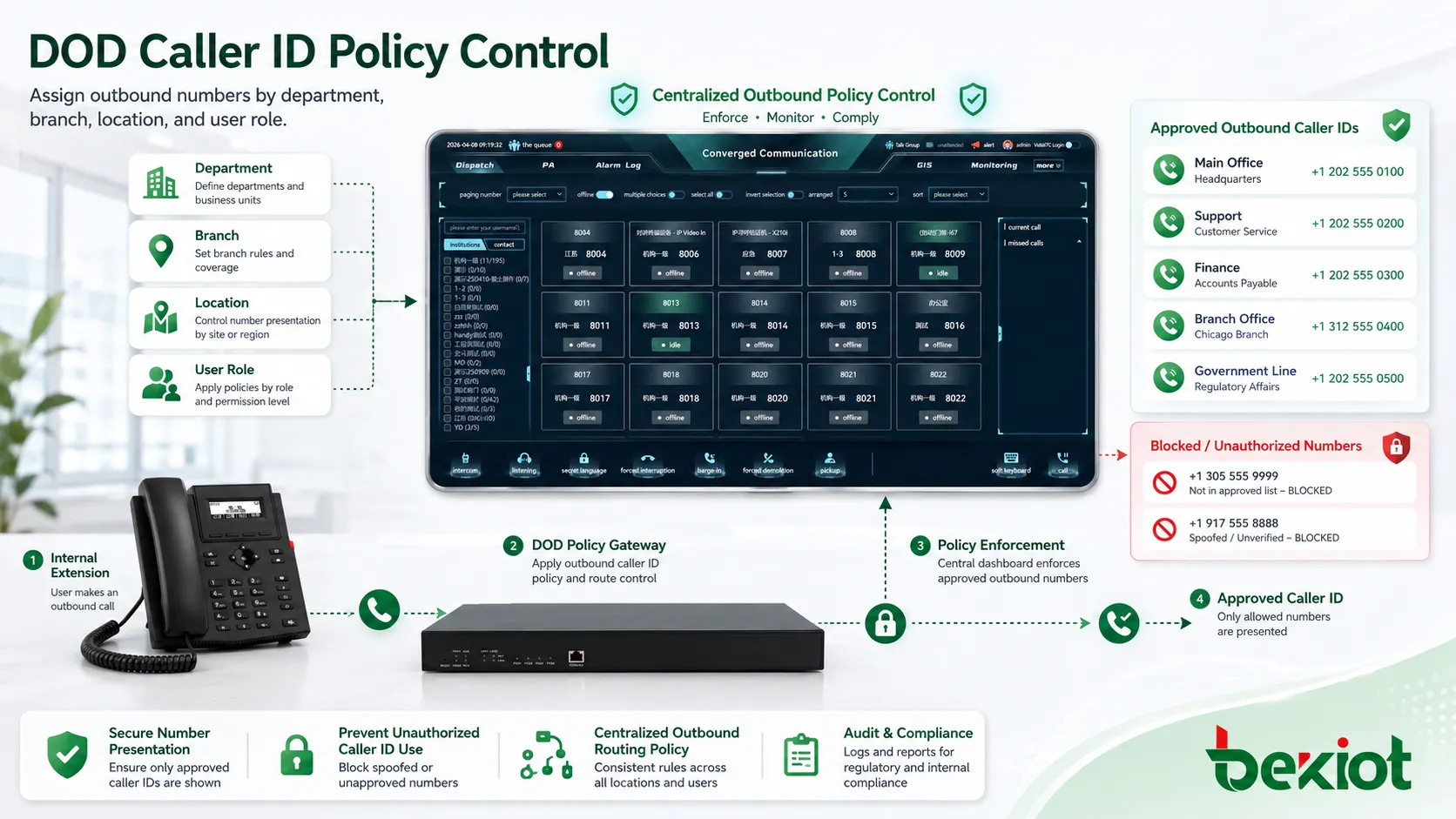
Where It Is Commonly Used
Enterprise Offices
Corporate offices use DOD so employees can place external calls through the business phone system while presenting approved company numbers. Some users may show the main reception number, while others show direct numbers.
This is useful for daily business communication, customer callbacks, supplier coordination, internal administration, and executive communication.
Contact Centers
Contact centers often need different outbound caller IDs for different campaigns, queues, regions, or service teams. Sales calls, support callbacks, appointment reminders, and billing calls may each require different number presentation.
When integrated with CRM or outbound dialer systems, DOD rules can help match the caller ID to the campaign or customer region.
Hotels and Hospitality
Hotels may use outbound dialing rules for guest rooms, front desk, reservations, concierge, administration, and service departments. Caller ID may show the main hotel number or a department-specific number depending on the call source.
Permission control is also important in hospitality because guest room phones may need restricted access to certain destination types.
Healthcare and Clinics
Healthcare organizations use outbound number control for appointment reminders, nurse stations, billing offices, pharmacy coordination, administration, and patient support. A recognizable number can improve answer rates for important calls.
Privacy and policy should be considered carefully. Caller ID should support patient communication without exposing inappropriate internal extension details.
Multi-Branch Businesses
Companies with several locations may assign outbound numbers based on branch or region. This helps local customers recognize calls from nearby offices and supports regional service identity.
Branch-based DOD also helps when calls are routed through centralized SIP trunks but still need to display local numbers.
Remote and Hybrid Work
Remote workers using softphones or mobile clients can still present company-approved caller IDs. This keeps business identity consistent even when employees work outside the office.
It also prevents employees from using personal mobile numbers for business calls when the company wants centralized call control and logging.
Configuration Areas to Review
Number Ownership
The organization should only present numbers it owns, leases, or is authorized to use. Carriers may block or rewrite unauthorized caller IDs to reduce spoofing and fraud.
Before assigning a number to an extension, confirm that the SIP trunk provider or carrier accepts that number as a valid outbound identity.
Caller ID Format
Different providers may require different number formats. Some expect E.164 format with country code, while others accept national or local formats. A number that looks correct to users may still fail if the provider expects another format.
Testing should include local, long-distance, mobile, and international destinations where relevant.
Outbound Route Permissions
Users should be assigned to the correct outbound route class. Reception may need local and national calls. Executives may need international calls. Guest phones may be restricted. Emergency numbers may need special route handling.
Permission rules should be documented and reviewed regularly to prevent misuse or service gaps.
Trunk Compatibility
Not every trunk handles outbound caller ID in the same way. SIP trunks may use headers such as From, P-Asserted-Identity, Remote-Party-ID, or other provider-specific fields. PRI and analog lines may have different limitations.
Administrators should follow provider requirements and verify caller ID on real outbound calls.
Emergency Calling Behavior
Emergency calls may require special caller ID and location handling. The number presented for emergency calling should help emergency services identify the correct site, not simply display a generic company number.
Multi-site and remote user deployments need special attention because emergency location rules may differ from ordinary outbound business calls.
Outbound caller ID should be configured for business convenience, but emergency calling and regulatory requirements must always be treated separately and carefully.
Common Problems and Troubleshooting
Wrong Number Displays
If the wrong number appears, check the extension’s DOD setting, outbound route rule, trunk caller ID override, SIP header mapping, and carrier-side number policy. A later rule may override the number configured at the extension level.
Testing should include several destination networks because caller ID may appear differently across mobile, landline, and VoIP carriers.
Outbound Calls Are Rejected
Calls may be rejected if the presented caller ID is not authorized, incorrectly formatted, blocked by the carrier, or missing required identity fields. Some providers reject calls with invalid From headers or mismatched account numbers.
Check carrier logs, PBX SIP traces, and provider documentation to identify the exact rejection reason.
Anonymous or Unknown Caller ID
If calls show as anonymous, the system may be suppressing caller ID, privacy settings may be enabled, or the trunk may not be passing the identity correctly.
Review privacy flags, caller ID presentation settings, trunk configuration, and provider rules.
Callbacks Go to the Wrong Destination
DOD controls what number is displayed, but inbound routing controls where callbacks go. If a customer calls back and reaches the wrong destination, the DID or inbound route for that number may be misconfigured.
Outbound and inbound number planning should be aligned. A number shown on outbound calls should route back to a useful destination.
Failover Route Changes the Identity
When a call uses a backup trunk, the caller ID may change if the backup provider does not allow the original number. This can create inconsistent customer experience.
Failover testing should include caller ID verification, not only call completion.
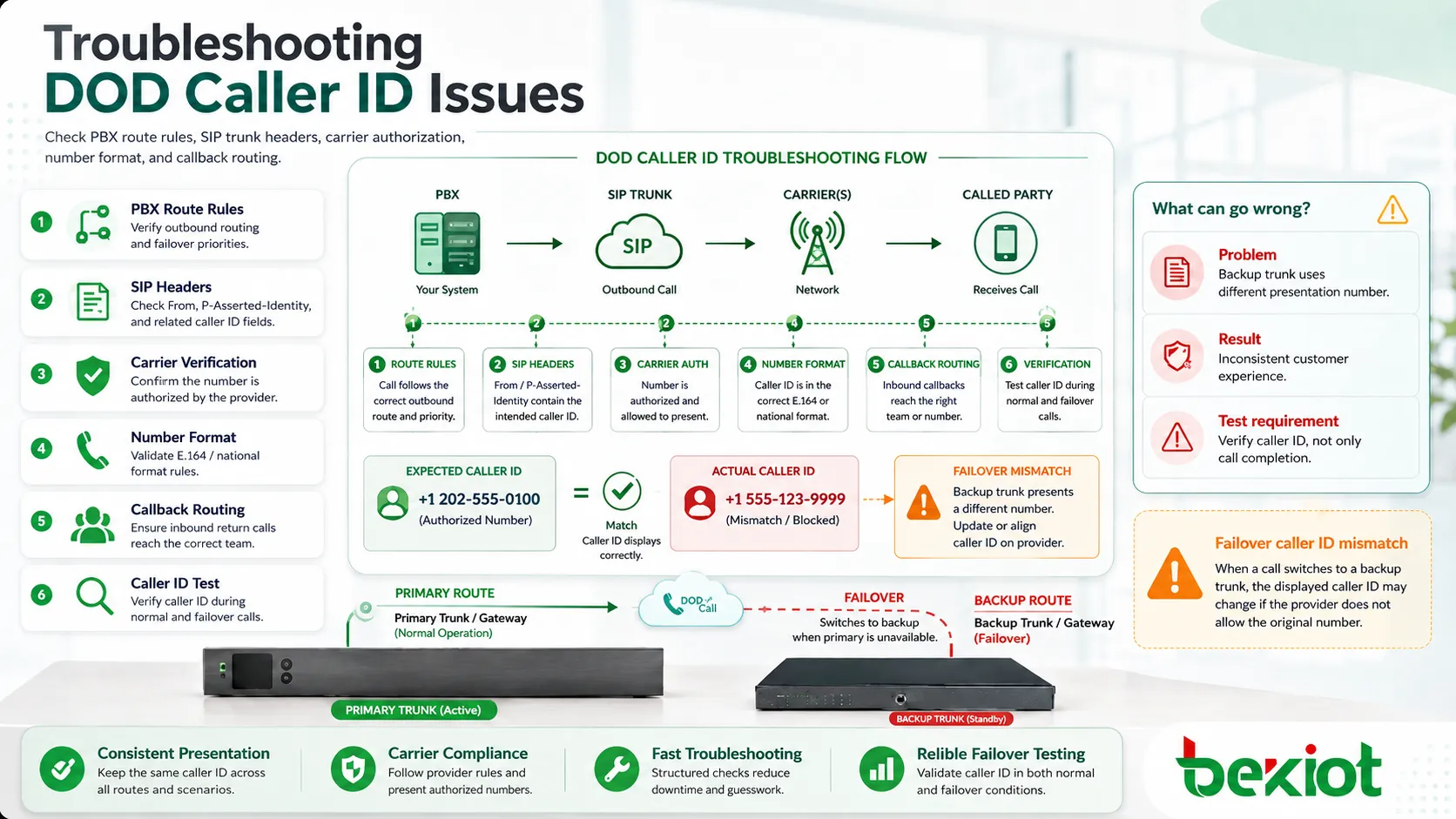
Best Practices for Deployment
Start with a number plan. Define which numbers represent the company, branches, departments, teams, and individual users. Avoid assigning numbers randomly because this makes future troubleshooting and callback handling difficult.
Use role-based policies. A receptionist, sales agent, support agent, executive, remote worker, and guest phone may each need different outbound identity and permission rules.
Confirm carrier authorization before rollout. A number may be configured in the PBX but still rejected by the provider if it is not approved for outbound presentation.
Test the full call path. Verify caller ID on mobile phones, landlines, external VoIP numbers, international destinations, and failover trunks where applicable.
Document every assignment. Keep records of extension numbers, outbound caller IDs, route classes, trunks, emergency calling rules, and inbound callback destinations.
Maintenance and Governance
DOD settings should be reviewed when employees change roles, branches open or close, numbers are ported, trunks are replaced, or departments reorganize. Outdated caller ID assignments can confuse customers and create operational problems.
Administrators should also review call logs and carrier reports. Unusual outbound patterns may indicate misconfiguration, compromised accounts, or policy abuse.
For larger systems, change control is important. Caller ID changes affect customer-facing communication, so updates should be tested and approved before going live.
FAQ
Can one extension have different outbound numbers?
Yes, some systems allow different outbound numbers based on dialed destination, selected line key, department role, CRM campaign, or outbound route. The carrier must also support the presented numbers.
Why does the PBX setting look correct but the customer sees another number?
The carrier may be rewriting caller ID, rejecting unauthorized numbers, or using a different SIP identity header than the PBX setting controls. Provider-side verification is often needed.
Does DOD determine where return calls are routed?
No. DOD controls the number displayed on outbound calls. Return calls depend on DID numbers and inbound routing rules. Both should be planned together.
Can outbound caller ID be hidden?
Many systems support caller ID blocking or privacy settings, but availability depends on PBX configuration, carrier policy, and local regulations. Some destinations may reject anonymous calls.
What should be checked after number porting?
Check outbound caller ID authorization, inbound routing, emergency location records, SIP trunk settings, department assignments, CRM records, and failover behavior after the port completes.







