


Direct Station Selection, commonly abbreviated as DSS, is a telephony feature that allows users to call, monitor, or transfer to specific extensions by pressing a dedicated programmable key. It is commonly used on business phones, operator consoles, receptionist phones, IP PBX systems, SIP phones, hotel front desks, contact centers, dispatch desks, and office communication systems.
Instead of dialing an extension number manually every time, a user can press a labeled key assigned to a person, department, room, queue, hotline, paging group, or service destination. In many phone systems, DSS keys can also show real-time status, such as idle, ringing, busy, do-not-disturb, or unavailable. This makes the feature useful not only for speed dialing, but also for call handling and team visibility.
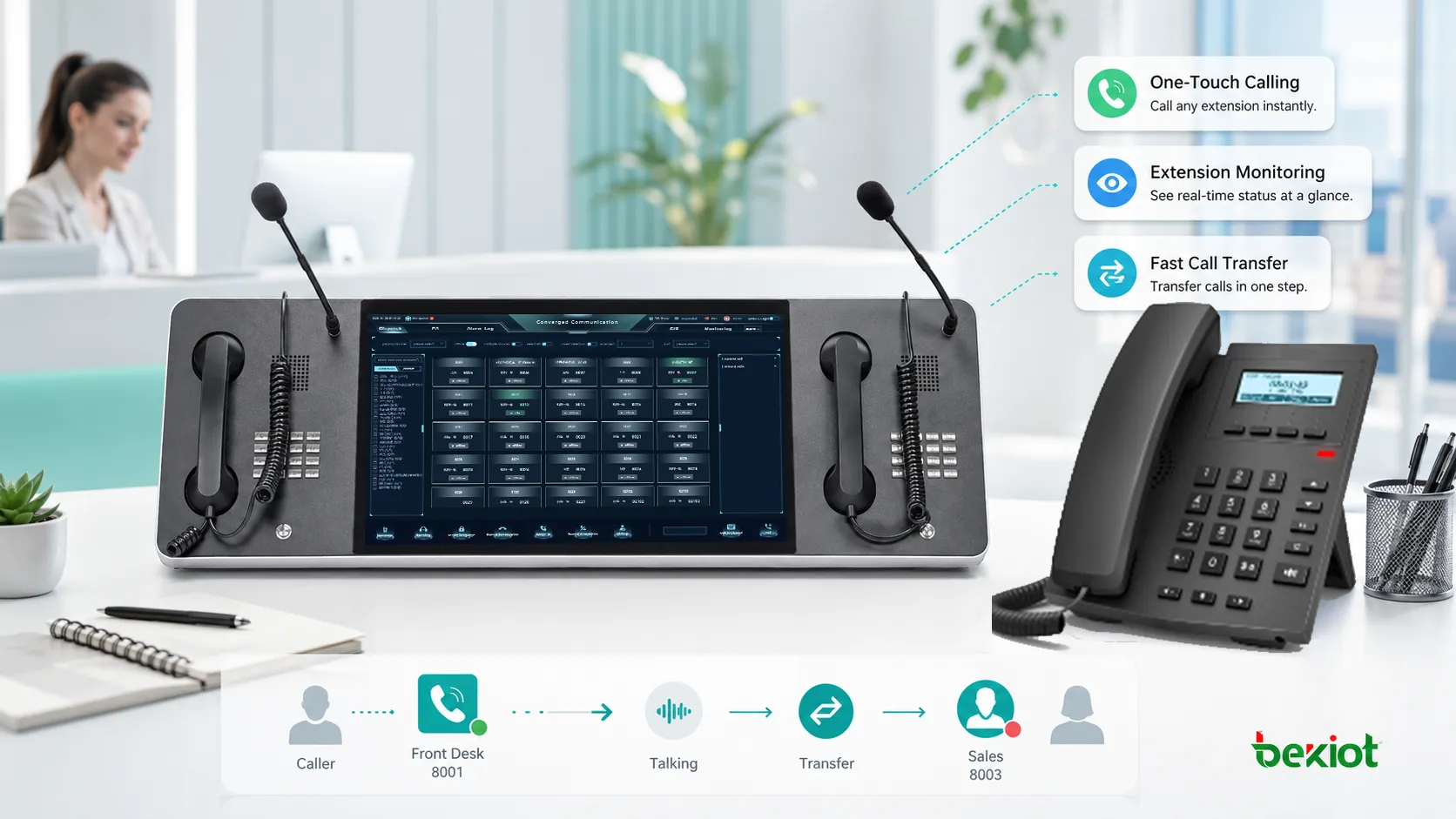
A Faster Way to Reach the Right Extension
In a busy office, users often call the same extensions repeatedly. A receptionist may contact sales, finance, warehouse, meeting rooms, managers, and service desks many times a day. A manual process requires looking up numbers, dialing extensions, waiting for call progress, and correcting mistakes when the wrong number is entered.
DSS reduces this effort by turning frequently used destinations into one-touch keys. A key labeled “Support,” “Room 301,” “Security,” or “Manager” can place the call immediately. When the key includes status indication, the user can also see whether the destination is already busy before transferring a caller.
This is why DSS is especially useful for people who manage many calls. It shortens call handling time, reduces misdialing, and gives operators a clearer view of internal availability.
How the Key-Based Workflow Works
Key Assignment
The administrator or user assigns a DSS key to a specific destination. This destination may be an internal extension, ring group, queue, voicemail box, paging group, door phone, emergency number, external number, or feature code.
On many IP phones, the assignment is managed through the phone web interface, PBX provisioning template, cloud phone portal, or centralized device management system. In larger deployments, centralized configuration is preferred because it keeps key layouts consistent across many phones.
One-Touch Calling
When the user presses the assigned key during idle state, the phone sends a call request to the configured destination. In a SIP system, this usually creates a SIP call to the assigned extension or URI. In a traditional PBX, it may dial the stored extension code through the system call control logic.
The user does not need to remember or enter the number manually. This is helpful in fast-paced environments where time and accuracy matter.
Status Monitoring
Many DSS keys work together with Busy Lamp Field, often called BLF. BLF allows the phone to display the status of monitored extensions through LED colors, screen icons, or key indicators.
For example, a green light may indicate idle, red may indicate busy, flashing may indicate ringing, and another color or icon may show unavailable or do-not-disturb. The exact behavior depends on the phone model and PBX configuration.
Assisted Transfer
DSS keys are often used during call transfer. A receptionist can answer an incoming call, check whether the target extension is available, and press the key to transfer the caller. Depending on the system, this may perform a blind transfer, attended transfer, or consultation call.
This reduces transfer errors and improves caller experience. Instead of placing callers on hold for a long time, operators can quickly identify the right destination and complete the transfer.
Core Features in Business Phone Systems
Programmable Keys
Programmable keys are the foundation of DSS. Each key can be assigned to a destination or function based on the user’s role. A receptionist may need many extension keys, while a manager may only need keys for direct team members.
Some phones include physical keys beside the screen. Others use touchscreen soft keys or expansion modules. The right layout depends on how many destinations the user needs to monitor or call regularly.
Presence and Line Status
When combined with extension status, DSS becomes more useful than simple speed dial. Users can see whether a colleague is available before calling or transferring a customer.
Status visibility improves internal coordination. It helps users avoid sending calls to busy extensions and reduces unnecessary call attempts.
Call Pickup Support
Some systems allow a user to pick up a ringing call from a DSS or BLF key. If a monitored extension is ringing, the user can press the key or a related pickup function to answer on behalf of that person.
This is valuable for assistant-manager setups, front desks, small teams, and departments where missed calls need to be reduced.
Transfer and Consultation
DSS keys can simplify both blind and attended transfers. In blind transfer, the call is sent directly to the destination. In attended transfer, the user first speaks with the destination party before completing the transfer.
Receptionists, service desks, and operators often prefer attended transfer for important calls because it confirms that the destination person is ready to receive the caller.
Expansion Module Support
Large offices may need more keys than a standard phone provides. Expansion modules add extra programmable buttons and display labels. They are commonly used by operators, receptionists, hotel front desks, dispatch assistants, and administrative teams.
Expansion modules are useful when a user must monitor dozens of extensions at once. However, the layout should be organized carefully so the user can find the right key quickly.
DSS is most valuable when the key layout reflects real call-handling habits, not simply a long list of every extension in the company.
Typical Configuration Options
| Configuration Item | What It Controls | Practical Purpose |
|---|---|---|
| Key Type | Defines whether the key works as DSS, BLF, speed dial, transfer, pickup, or feature code. | Matches the key behavior with the user’s workflow. |
| Destination Value | Stores the extension, number, SIP URI, group code, or feature code. | Ensures the key reaches the correct target. |
| Label Name | Displays a user-friendly name on the phone screen or key paper label. | Helps users identify the destination quickly. |
| Account or Line | Selects which SIP account or line the key uses for dialing. | Important for phones with multiple accounts or departments. |
| Pickup Code | Defines how a ringing monitored extension can be answered by another user. | Supports team call pickup and receptionist workflows. |
System Value for Daily Communication
Faster Call Handling
The most direct benefit is speed. Users can reach common destinations with one key instead of dialing several digits. This reduces call handling time during reception, transfer, dispatch, and internal coordination.
In busy environments, small time savings per call can become significant over a full working day.
Fewer Dialing Errors
Manual dialing can lead to wrong extensions, missed digits, or repeated attempts. DSS reduces these errors because the destination is preconfigured and labeled.
This is especially useful for new employees, temporary staff, hotel operators, and receptionists who must manage many internal destinations.
Better Transfer Accuracy
When a user can see whether an extension is busy or available, transfers become more accurate. Callers are less likely to be sent to unavailable users or wrong departments.
This improves caller experience and reduces the number of calls that bounce back to reception or voicemail.
Improved Team Visibility
Status indicators help teams understand who is on a call, who is ringing, and who may be available. This supports faster decision-making during internal communication.
For team leaders and assistants, this visibility can be more practical than checking a separate software dashboard.
Simpler Training
A well-labeled DSS layout makes phone operation easier for new users. Instead of memorizing extension lists, users can follow clear key labels and visual status indicators.
This is helpful in front desks, service counters, shared offices, and environments with rotating staff.
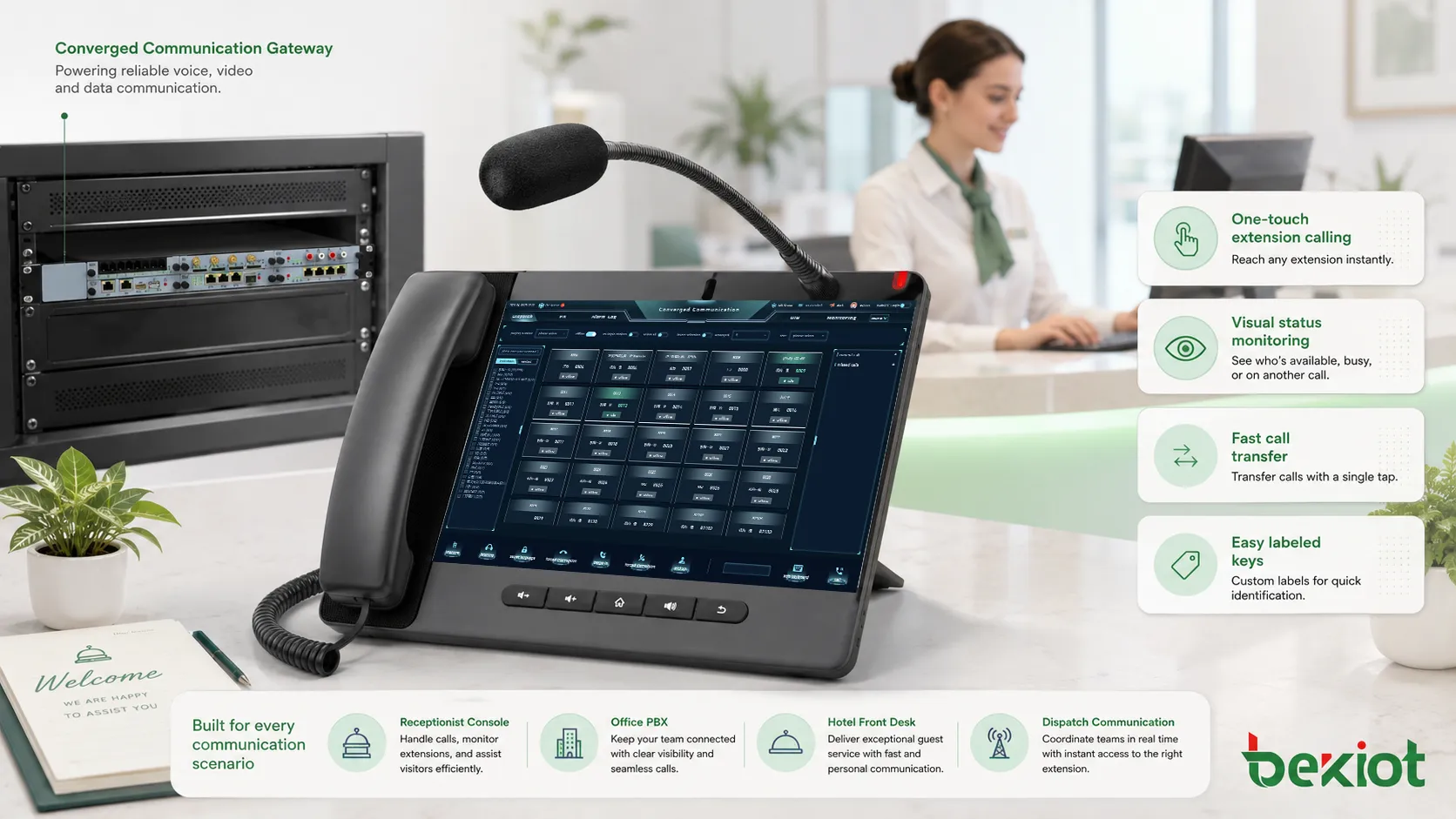
Where It Is Commonly Used
Reception and Front Desk
Receptionists use DSS keys to contact employees, transfer incoming calls, check extension status, and handle frequent destinations quickly. A front desk phone may include keys for departments, managers, meeting rooms, security, facilities, and service teams.
This reduces the need to search directories during live calls and helps the receptionist maintain a professional call flow.
Hotel and Hospitality Communication
Hotels may use DSS keys for room extensions, housekeeping, front office, restaurant, maintenance, security, guest services, and management. Operators can quickly route guest requests to the correct department.
In hospitality, clear key labeling and logical grouping are important because staff may work shifts and share the same operator phone.
Contact Centers and Service Desks
Service teams may use DSS keys to reach supervisors, escalation groups, technical specialists, queues, or internal support departments. This helps agents coordinate quickly when a customer issue needs assistance.
Some systems also allow supervisor monitoring or call pickup functions to be associated with programmable keys.
Executive Assistant Workflows
Assistants often monitor one or more executive extensions. DSS and BLF keys allow them to see call status, answer ringing calls, transfer callers, or place calls on behalf of executives.
This improves responsiveness and supports more organized call management.
Dispatch and Operations Desks
Dispatchers and operators may assign keys to field teams, control rooms, emergency contacts, radio gateways, paging groups, or facility departments. Fast one-touch access helps reduce communication delay during operations.
For operational use, key layout should be designed around priority and frequency of use, not alphabetical order alone.
Planning the Key Layout
A good key layout should match the user’s daily workflow. Frequently used contacts should be placed on the easiest keys to reach. Emergency or high-priority contacts should be clearly separated from routine destinations to avoid accidental calls.
For phones with screens, labels should be short and consistent. For physical paper labels, printed names should be updated whenever extensions change. Outdated labels are a common cause of transfer mistakes.
Large layouts should be grouped by department, floor, role, or service type. For example, a hotel console may group front desk, housekeeping, restaurant, maintenance, and security separately. A corporate reception phone may group executives, departments, meeting rooms, and support services.
SIP and PBX Considerations
Subscription and Status Updates
In many SIP systems, BLF-style status monitoring depends on SIP subscription and notification behavior. The phone subscribes to extension status, and the PBX sends status updates when the monitored extension changes state.
If status indicators do not work, the issue may be related to permissions, subscription limits, PBX settings, firewall behavior, phone firmware, or account registration.
Provisioning Templates
Centralized provisioning can push DSS key settings to many phones automatically. This is useful in larger deployments where manual configuration would be slow and inconsistent.
Templates should be managed carefully. A wrong template can overwrite user settings or assign incorrect destinations across many devices.
Pickup and Transfer Codes
Call pickup and transfer behavior may depend on PBX feature codes. The phone key may need to send a pickup prefix, transfer command, or special dialing sequence.
Administrators should test the exact behavior because different PBX systems handle pickup and transfer in different ways.
Key Limits
Phones and PBX platforms may limit the number of monitored extensions or BLF subscriptions. If too many keys are configured, status updates may fail or become delayed.
For very large monitoring needs, an operator console, soft console, or expansion module may be more suitable than overloading a standard desk phone.
DSS deployment is not only a phone-side setting. It depends on PBX permissions, SIP status updates, feature codes, provisioning, and user workflow design.
Common Problems and Fixes
Key Does Not Dial
If a key does not dial, check the key type, destination value, account selection, line registration, and PBX dialing rules. A missing prefix or wrong account can prevent the call from being placed.
Also confirm that the destination extension exists and is reachable from the user’s permission group.
Status Light Is Incorrect
Incorrect status may be caused by failed BLF subscription, wrong monitored extension, PBX permission limits, outdated phone firmware, network filtering, or feature incompatibility.
Check PBX logs and phone status pages to confirm whether subscription and notification messages are being exchanged.
Transfer Fails
Transfer failure may occur if the phone sends the wrong transfer method, if the PBX does not support the selected behavior, or if the destination is restricted. Blind and attended transfers may require different settings.
Test both transfer modes with internal and external calls because behavior may differ by call path.
Labels Become Outdated
When employees move, extensions change, or departments reorganize, key labels may become inaccurate. This can cause misdirected calls even when the technical configuration still works.
Regular review of phone layouts helps keep call handling accurate.
Best Practices for Deployment
Start with the user’s role. A receptionist, executive assistant, hotel operator, contact center supervisor, and warehouse dispatcher should not all receive the same key layout.
Use clear labels. Short names such as “Sales,” “Security,” “Room 502,” or “Support L2” are easier to read than long descriptions. Avoid labels that are too similar.
Limit the number of keys to what users can realistically manage. Too many keys may slow users down instead of helping them. Expansion modules should be organized by groups and priority.
Test call, transfer, pickup, and status behavior before deployment. A key that dials correctly may still fail during transfer or pickup if feature codes are not configured properly.
Document the layout. Keep a record of assigned keys, destinations, labels, and responsible departments so future changes can be managed consistently.
Maintenance and Optimization
DSS layouts should be reviewed when staff change roles, departments move, phone systems are upgraded, or extensions are renumbered. A feature that depends on accurate destinations becomes less useful when the directory is outdated.
Administrators should also monitor BLF subscription load. If many phones monitor many extensions, the PBX may need capacity planning. Excessive status subscriptions can create signaling load on some systems.
User feedback is valuable. If users rarely press certain keys, those keys may be replaced with more useful destinations. If users often search for a number that is not assigned, the layout may need adjustment.
Choosing the Right Setup
The right setup depends on call volume, number of monitored users, phone model, PBX support, and user workflow. A small office may need only a few speed-dial keys. A hotel front desk may need many room and department keys. A corporate reception desk may require a phone with an expansion module or software operator console.
For large environments, centralized provisioning and role-based templates are recommended. This keeps phones consistent and reduces manual configuration errors.
For high-volume operators, consider whether a physical DSS console or a software console is more efficient. Physical keys are fast and tactile, while software consoles can display more information and support search functions.
FAQ
Can a DSS key call an external number?
Yes, many systems allow a key to dial an external number if the PBX dialing rules and user permissions allow it. The number may need an outbound prefix depending on the system configuration.
Why does the key dial but the light does not show status?
Dialing and status monitoring are different functions. The key may be configured as speed dial only, or the PBX may not be sending BLF status updates for that extension.
Can the same key be used for pickup and transfer?
Some phone systems support context-based behavior, while others require separate keys or feature codes. The exact behavior depends on the phone model and PBX configuration.
How many extensions can one phone monitor?
The limit depends on phone hardware, expansion modules, firmware, and PBX subscription capacity. Large monitoring layouts should be tested before rollout.
What should be checked after moving users to new extensions?
Update key destinations, screen labels, paper labels, BLF subscriptions, pickup groups, transfer permissions, provisioning templates, and any operator console directory entries.







