


Listen-In, also written as Listen In, is a call supervision feature that allows an authorized supervisor, trainer, quality manager, dispatcher, or compliance reviewer to listen to an active voice call without directly participating in the conversation. It is commonly used in contact centers, customer service teams, technical support desks, sales departments, dispatch centers, healthcare service lines, emergency coordination rooms, and enterprise phone systems.
The purpose of Listen-In is usually quality assurance, live coaching preparation, training evaluation, operational safety, incident review, and service improvement. However, because it involves monitoring live conversations, it must be used with strong privacy controls, clear internal policies, appropriate caller notices, role-based permissions, and audit records. A system that supports Listen-In should help organizations improve communication quality without turning supervision into uncontrolled surveillance.
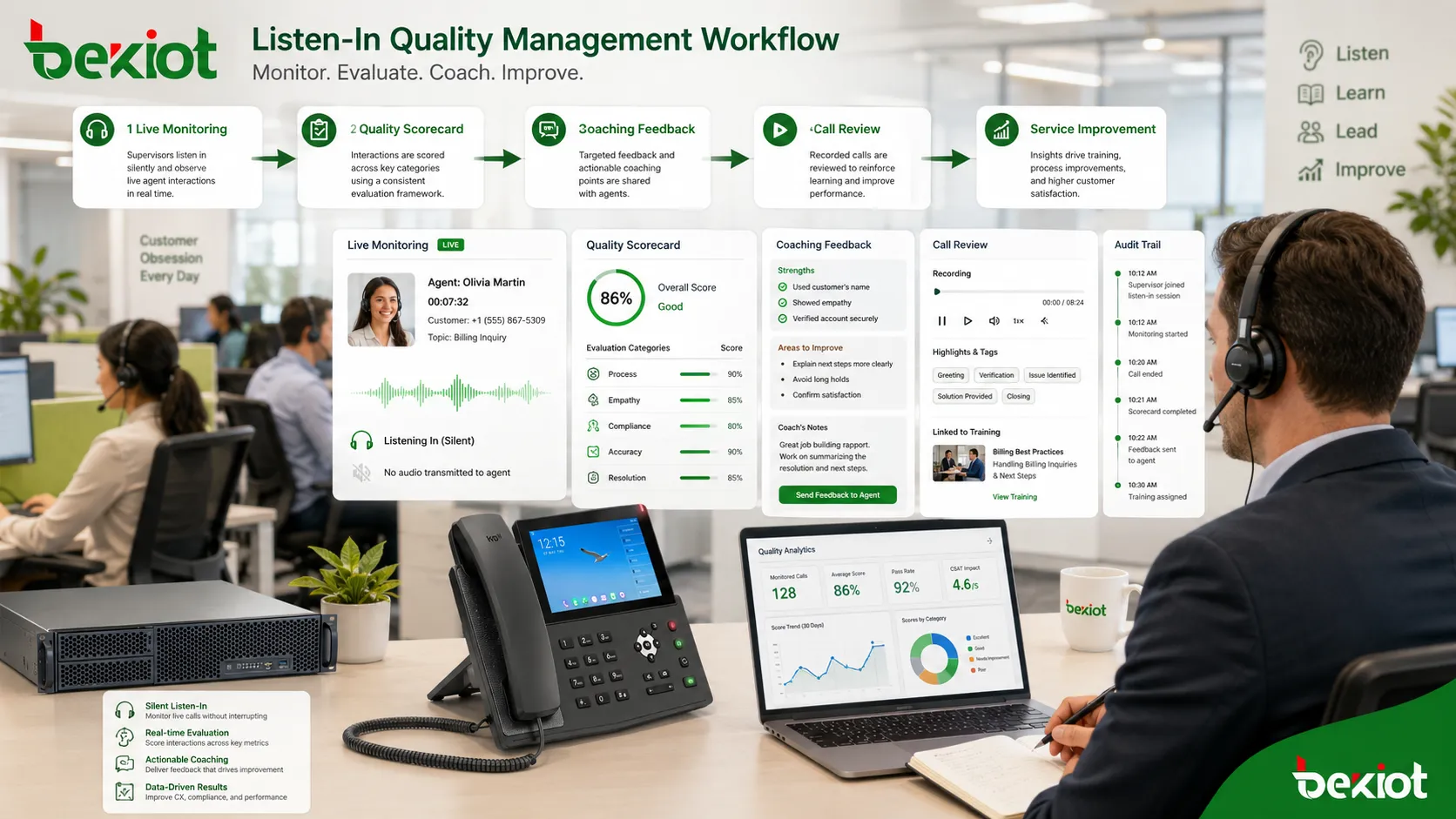
A Quiet Supervision Mode for Live Calls
In many communication workflows, supervisors need to understand what is happening during a call before deciding whether action is required. They may need to assess a new agent’s performance, check whether a service script is followed, evaluate a complaint, monitor a high-risk interaction, or confirm that an operational procedure is being handled correctly.
Listen-In provides this observation layer. The supervisor can hear the conversation between the agent and the caller, but normally does not speak to either party. This is different from whisper coaching, where the supervisor speaks privately to the agent, and different from barge-in, where the supervisor becomes audible to both sides.
Because the feature is silent from the call participants’ perspective, governance matters. Organizations should define when monitoring is allowed, who can use it, whether callers are notified, whether employees are informed, how logs are stored, and how misuse is prevented.
How the Monitoring Path Works
Authorized User Selection
The process usually begins when an authorized user opens a supervisor console, PBX panel, contact center dashboard, dispatch interface, or call management platform. The system displays active calls according to the supervisor’s permissions, team assignment, queue scope, or department role.
The supervisor selects a call and chooses the monitoring mode. In a well-designed system, Listen-In should only be available to users who have a legitimate operational reason and the correct permission level.
Audio Stream Duplication
When the feature is activated, the communication platform creates an additional audio path for the supervisor. The original caller and agent continue their conversation normally, while the supervisor receives a listen-only copy of the audio stream.
The system may deliver this audio through a desk phone, softphone, web console, headset, recording platform, or dispatch terminal. The caller and agent usually do not hear the supervisor because the supervisor’s microphone is not mixed into the live conversation.
Call State Awareness
The platform tracks the state of the monitored call. It may show whether the call is ringing, answered, on hold, transferred, parked, conferenced, recorded, or ended. This helps supervisors understand the context before drawing conclusions from what they hear.
State awareness is important because a call may change during monitoring. If the agent transfers the caller, places the caller on hold, or joins a conference, the monitoring session may continue, stop, or require the supervisor to rejoin depending on system design.
Audit Logging
Every monitoring action should be logged. A useful audit log may include the supervisor identity, monitored extension, call ID, queue, start time, end time, monitoring mode, and whether the session changed to whisper or barge-in.
Audit logs support accountability. They help organizations prove that live monitoring is used for approved business purposes and help investigate complaints or misuse.
Key Features for Responsible Use
Role-Based Access
Role-based access control limits Listen-In to authorized users. A team leader may monitor only their own queue, a trainer may monitor trainees, and a compliance officer may monitor selected regulated call types. Ordinary users should not be able to monitor calls casually.
Access should be reviewed when staff change roles, leave the organization, or move to another department. Old permissions are a common source of privacy risk.
Queue and Team Scope
Scope control defines which calls a supervisor can see and monitor. Instead of giving all supervisors access to every call, the system can restrict visibility by queue, department, campaign, site, language group, or business unit.
This prevents excessive access and helps keep monitoring aligned with real management responsibility.
Mode Separation
Listen-In should be clearly separated from whisper coaching and barge-in. These modes serve different purposes and have different privacy implications. Silent listening observes the call. Whisper privately guides the agent. Barge-in allows direct participation.
Clear mode separation prevents accidental intervention. A supervisor intending only to listen should not accidentally become audible to the caller.
Notification and Policy Support
Some organizations use caller announcements such as “calls may be monitored or recorded for quality and training purposes.” Internal employee policies may also explain when supervisors can monitor calls and how the data will be used.
The exact wording and requirement depend on local laws, industry rules, contract terms, and organizational policy. The system should support the organization’s chosen compliance approach.
Recording Awareness
Listen-In may be used with or without call recording. If the monitored call is recorded, the recording policy should define whether only the customer-agent conversation is stored or whether supervisor monitoring metadata is also logged.
Recording settings should not be assumed. Administrators should test what is captured, where it is stored, how long it is retained, and who can access it.
Silent monitoring should never be treated as an invisible shortcut. It needs the same discipline as any other customer, employee, or operational data process.
Supervision Modes Compared
| Mode | Supervisor Audio | Typical Purpose | Control Requirement |
|---|---|---|---|
| Listen-In | The supervisor hears the call but does not speak. | Quality review, live observation, training assessment, compliance check. | Role-based access, audit logs, monitoring policy, caller or employee notice where required. |
| Whisper | Only the agent hears the supervisor. | Live coaching, process reminders, new agent support, complex case guidance. | Clear permission control and agent training to avoid distraction. |
| Barge-In | Both the caller and agent hear the supervisor. | Escalation, urgent correction, complaint handling, supervisor assistance. | Higher authorization because the supervisor joins the customer-facing conversation. |
| Call Takeover | The supervisor becomes the primary handler. | High-risk cases, sensitive disputes, expert intervention, emergency handling. | Strict policy, clear handover, and complete event logging. |
Where It Fits in Quality Management
Listen-In is most effective when it is part of a structured quality program. A supervisor can observe live calls, compare performance with service standards, identify coaching needs, and later provide feedback to the agent. This connects live monitoring with training rather than using it as a random control mechanism.
In contact centers, monitoring may be linked with scorecards, call recordings, customer satisfaction results, speech analytics, queue performance, and agent coaching plans. This helps organizations evaluate not only whether a call sounded good, but whether it met process, accuracy, empathy, compliance, and resolution standards.
For new employees, Listen-In can help trainers understand how agents perform under real conditions. For experienced staff, it can support quality calibration, process improvement, and handling of unusual cases. For supervisors, it provides direct evidence rather than relying only on call reports or customer complaints.
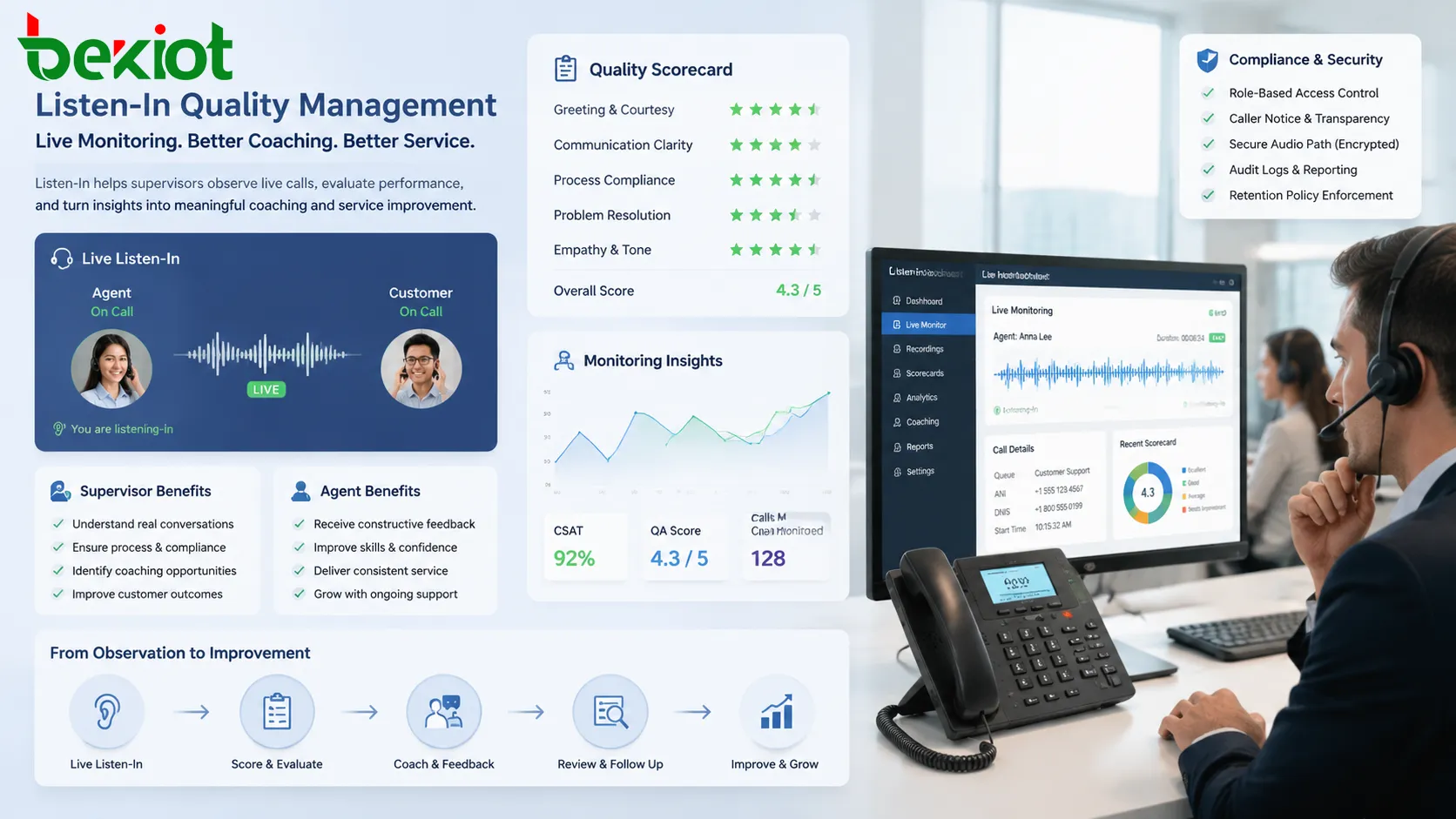
Compliant Use Principles
Clear Business Purpose
Organizations should define why live monitoring is used. Acceptable purposes may include training, quality assurance, compliance verification, safety response, operational control, or incident investigation. Monitoring should not be enabled without a clear reason.
A documented purpose helps prevent overuse and helps employees understand how the feature supports service quality or safety rather than arbitrary surveillance.
Transparency for Callers and Staff
Transparency is a core principle. Callers may need to be informed that calls may be monitored or recorded, depending on jurisdiction and call type. Employees should also understand that work calls may be monitored under defined policies.
Notices should be clear and practical. A policy hidden in an internal document is less useful than a well-communicated monitoring procedure combined with training and access controls.
Proportional Monitoring
Monitoring should match the risk and purpose. A high-risk regulated service line may require more frequent review than a low-risk internal support line. New agent training may justify temporary monitoring that is reduced after the employee becomes experienced.
Proportional use helps avoid excessive privacy intrusion and keeps supervision focused on real business needs.
Limited Access and Retention
Only authorized users should be able to monitor live calls or view monitoring records. If audio recordings or monitoring logs are stored, retention should be limited to what the business, legal, or compliance purpose requires.
Longer retention increases data risk. A good policy defines who can access records, how long they are kept, how they are protected, and when they are deleted.
Documented Escalation Rules
Supervisors should know when to remain silent, when to whisper, when to barge in, and when to take over the call. Without clear rules, different supervisors may intervene inconsistently.
Escalation rules are especially important for complaints, safety calls, financial discussions, healthcare-related calls, emergency dispatch, and emotionally sensitive conversations.
Appropriate Business Scenarios
New Agent Training
During onboarding, trainers may listen to live calls to evaluate whether new agents follow scripts, verify customer information correctly, use the knowledge base, and handle objections appropriately. This provides real-world insight that classroom training cannot fully reproduce.
The goal should be coaching and improvement. If the agent needs immediate help, the supervisor may move from Listen-In to whisper coaching if the platform and policy allow it.
Quality Assurance Reviews
Quality teams may monitor selected live calls to evaluate service tone, accuracy, process compliance, problem-solving, and customer experience. This can be used alongside recorded call review for a more complete picture.
Live review is useful because supervisors can see how the call is handled in real time, including hold behavior, transfer decisions, and agent response under pressure.
Compliance-Sensitive Conversations
Some departments need to ensure that agents provide required disclosures, avoid unauthorized promises, follow identity verification steps, or handle data correctly. Listen-In can help confirm that sensitive call types follow approved procedures.
Examples may include finance, insurance, healthcare administration, legal intake, public service hotlines, or regulated support lines. These use cases should be supported by clear policy and documentation.
Escalation Preparation
Before joining a difficult call, a supervisor may listen briefly to understand the issue. This helps avoid entering the conversation without context and prevents the caller from having to repeat the entire story.
If direct intervention becomes necessary, the supervisor can switch to barge-in or takeover according to the organization’s escalation policy.
Dispatch and Safety Operations
In dispatch centers, transportation control rooms, industrial operations, or security desks, authorized monitoring can help supervisors understand live operational communication and support time-sensitive decisions.
These environments often require clear command responsibility. Monitoring should support situational awareness without interfering with the operator’s communication flow.
Technical Controls to Evaluate
Permission Granularity
A strong system should allow different permission levels. For example, one supervisor may only listen to calls in a specific queue, while a senior manager may access several teams. A compliance reviewer may have review access but not intervention permissions.
Granular permissions reduce the risk of excessive access and make the system easier to govern.
Visible Monitoring State
Administrators should decide whether agents can see when they are being monitored. Some organizations prefer visible indicators to support transparency. Others may rely on policy notices and supervisor logs.
The choice depends on local rules, company culture, union agreements, and compliance requirements. The platform should support the chosen approach consistently.
Audit Trail
Audit trails should record who monitored which call, when the session started, when it ended, and which mode was used. If the supervisor changes from listen-only to whisper or barge-in, that change should also be logged.
Audit records make it easier to investigate disputes and demonstrate that monitoring is controlled rather than informal.
Secure Media Path
Because the supervisor receives live audio, the media path should be protected. This may include secure SIP, encrypted media, VPN access, secure web consoles, authenticated sessions, and controlled endpoint access.
Remote supervisors should not monitor calls over insecure devices or unmanaged networks if the calls contain sensitive customer or operational information.
Integration with Recording and Reporting
Listen-In may connect with call recording, quality scorecards, agent evaluation tools, CRM systems, workforce management, and contact center analytics. Integration helps turn observation into useful coaching and reporting.
However, integration also increases data handling responsibility. More connected systems mean more places where sensitive information may be stored or accessed.
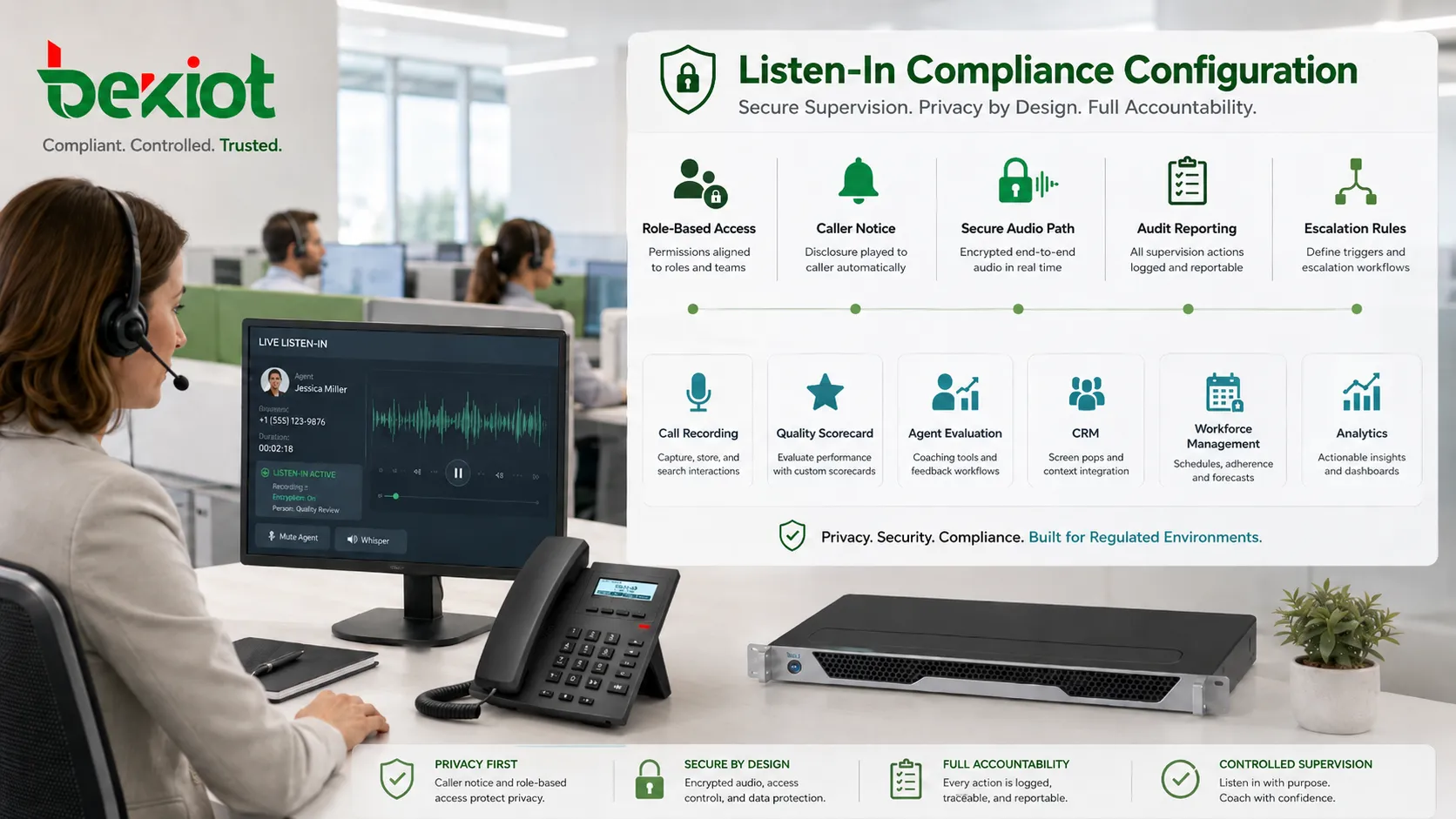
Risks of Poor Governance
Privacy Complaints
If callers or employees feel that monitoring is hidden, excessive, or unrelated to legitimate business needs, the organization may face complaints and loss of trust. Privacy expectations should be addressed before the feature is widely used.
Clear policy, notification, and access limits help reduce this risk.
Unauthorized Monitoring
If too many users have monitoring rights, the feature can be misused. Unauthorized listening may expose customer information, employee conversations, or sensitive operational details.
Regular permission reviews and audit reports help detect and prevent misuse.
Agent Distraction or Anxiety
Even silent monitoring can affect agent confidence if employees believe they are being watched constantly without explanation. This may reduce morale and create tension between supervisors and staff.
Monitoring should be presented as part of coaching and quality improvement, not as a hidden disciplinary tool.
Incomplete Records
If the system does not log monitoring sessions, the organization may have difficulty proving who accessed calls and why. This creates risk during audits, disputes, or internal investigations.
Logging should be enabled before the feature is used in production.
Implementation Checklist
Before enabling Listen-In, define the business purpose and approved use cases. Decide whether it will be used for training, quality assurance, compliance, safety, escalation, or all of these purposes.
Review legal and privacy requirements for the regions where callers and employees are located. This is especially important for cross-border teams, remote agents, regulated industries, and customer-facing departments.
Configure access by role and scope. Supervisors should only see calls they are allowed to monitor. Remove broad administrative access unless it is truly needed.
Enable audit logging and review it regularly. Monitoring activity should be visible to administrators or compliance owners who are responsible for governance.
Train supervisors on when to listen, when to stop listening, when to escalate, and how to give feedback after the call. Poor supervisor behavior can undermine even a technically secure system.
The safest deployment combines technology controls with human rules: permissions, notices, audit trails, supervisor training, and a clear reason for every monitoring activity.
Maintenance and Policy Review
Monitoring policies should be reviewed periodically. Business needs change, laws may change, departments reorganize, and new communication channels may be added. A policy written for voice calls may not automatically cover video calls, chat, screen sharing, or AI-assisted conversations.
Permissions should also be audited. Former supervisors, temporary trainers, contractors, or employees who changed roles should not keep monitoring rights without a current need.
Technical testing is important after PBX upgrades, contact center platform changes, SIP trunk changes, remote work changes, or recording system updates. A feature that worked correctly before may behave differently after a platform change.
Choosing the Right Setup
The right configuration depends on organization size, call sensitivity, industry, jurisdiction, and supervision workflow. A small support team may need simple supervisor monitoring with basic logs. A regulated contact center may need strict role-based permissions, consent prompts, call recording integration, encryption, retention control, and compliance reporting.
For sensitive environments, the system should support least-privilege access. Supervisors should not have more monitoring power than their role requires. Compliance teams should be able to review activity without giving every manager broad access.
The best setup is one that helps improve service quality while respecting the privacy of callers and employees. Technical capability alone is not enough; the organization must use it responsibly.
FAQ
Can Listen-In be enabled only for certain queues?
Yes. Many systems allow monitoring access to be limited by queue, team, department, site, campaign, or supervisor group. This is better than giving broad system-wide access.
Should agents be told that live monitoring may occur?
In many organizations, employees are informed through workplace policies, training, employment documents, or system notices. The exact requirement depends on local law, employment rules, and company policy.
Can a supervisor switch from listening to speaking during a call?
Some platforms allow switching to whisper or barge-in mode. This should be controlled by permission rules and used only when the situation requires real-time guidance or intervention.
Does Listen-In always mean the call is recorded?
No. Monitoring and recording are different functions. A call may be monitored without being recorded, recorded without live monitoring, or both monitored and recorded depending on system configuration.
What should be reviewed before using it with remote supervisors?
Review secure login, device management, network encryption, headset privacy, workspace confidentiality, audit logging, data access policy, and whether remote monitoring is covered by the organization’s monitoring policy.







