Traversal using Relays around NAT, usually shortened to TURN, is a protocol used to keep real-time communication working when two endpoints cannot reach each other directly across the public internet. In practical terms, TURN provides a relay service. Instead of sending media or data straight from one peer to another, each side sends traffic to a TURN server, and the server forwards that traffic to the other side.
That relay behavior becomes important in modern IP communications because many networks sit behind NAT devices, firewalls, or restrictive routing policies. In friendly network conditions, direct connectivity may still be possible. In stricter environments, however, applications need a fallback path that is predictable, controllable, and compatible with real-world enterprise and carrier networks. TURN fills that role and is widely associated with WebRTC, browser calling, interactive audio and video, and other forms of real-time communication.
Why TURN Exists
Why direct peer-to-peer connectivity often fails
On paper, peer-to-peer communication sounds simple: two devices discover each other, exchange addresses, and begin sending traffic. In reality, NAT changes local private addresses into public-facing mappings, and many firewalls allow outbound sessions while blocking unsolicited inbound traffic. That means the address a device believes it has is often not the address the outside world can actually use.
In lighter NAT scenarios, a direct path can still be established with the help of other traversal techniques. But some network types are much less cooperative. Symmetric NAT behavior, strict firewall rules, enterprise security policies, hotel or campus networks, and mobile carrier environments can all make direct media delivery unreliable or impossible. When that happens, a relay is often the only dependable option.
TURN is therefore not merely a convenience feature. It is the reliability layer that prevents calls, meetings, screen-sharing sessions, and browser-based conversations from failing just because the network path is restrictive.
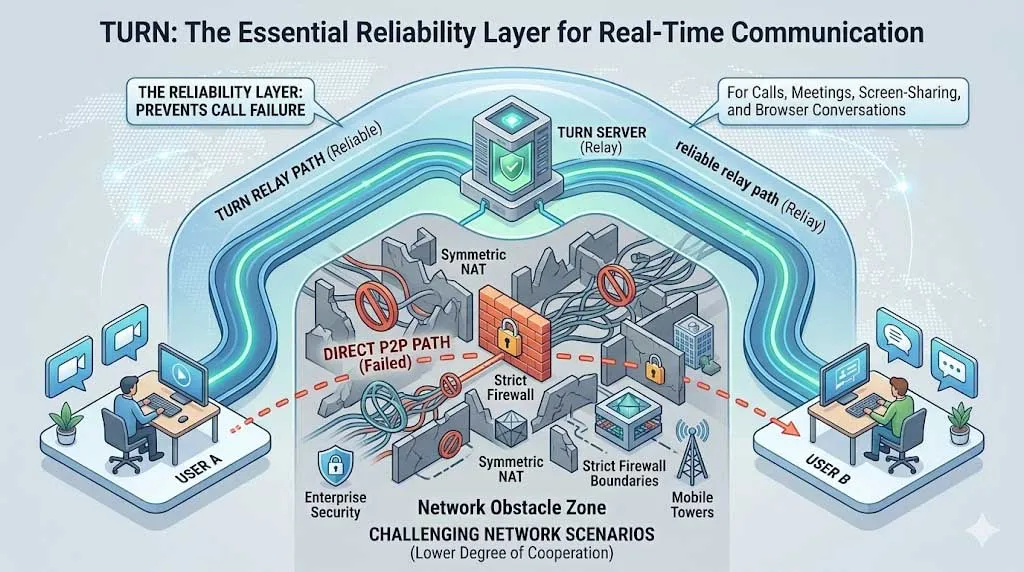
TURN provides a relay path when direct peer-to-peer connectivity cannot be established across NAT or firewall boundaries.
Where TURN fits compared with STUN and ICE
TURN is often mentioned together with STUN and ICE, and the three are related but not identical. STUN is typically used to discover how a device appears from the public internet. ICE is the broader connectivity framework that gathers possible paths, tests them, and selects the best one. TURN is the relay option inside that broader decision process.
In other words, TURN is usually not the first path an application prefers. Direct paths are often more efficient. But when ICE determines that host and server-reflexive candidates are not sufficient, a relayed candidate obtained from a TURN server allows the session to continue. This is why TURN is frequently described as the fallback that protects call completion and session reliability.
In many real-world deployments, TURN is the difference between “best effort” connectivity and a communication service that works consistently across homes, enterprises, campuses, mobile networks, and managed security environments.
How TURN Works
Step 1: The client creates an allocation on the TURN server
The basic TURN workflow starts when a client contacts a TURN server and requests an allocation. Once the allocation is created, the server reserves relay resources for that client and provides a relay address that other peers can use. One of the useful characteristics of TURN is that a client can communicate with multiple peers through a single relay address, which simplifies how sessions are maintained on the network side.
This stage is controlled by the client, not by the remote peer. The client authenticates to the TURN server, establishes the allocation, and keeps that allocation alive as long as the session continues. In practical deployment terms, this means the application or platform operator can manage relay policy, credentials, server placement, and capacity planning in a controlled way rather than relying on unpredictable network behavior.
Because relay resources consume bandwidth and processing on the server, TURN is usually operated as an infrastructure service rather than an incidental utility. Organizations deploying browser communications, cloud calling, or large real-time platforms normally size TURN capacity carefully based on expected concurrent sessions and traffic profiles.
Step 2: Permissions and channel bindings control the relay path
TURN does not behave like a completely open packet forwarder. After creating an allocation, the client authorizes communication toward specific peers. This is done through permissions and, optionally, channel bindings. Permissions define which peer addresses are allowed to exchange traffic through the allocation. Channel bindings can then optimize packet handling between the client and the relay for ongoing traffic flows.
That design helps TURN remain structured and secure. Instead of allowing arbitrary forwarding, the server works within a defined session context. This matters in production environments because relay infrastructure sits on the public internet and must be protected against misuse, spoofing, and uncontrolled resource consumption.
From an operational perspective, these control steps are invisible to most end users. They happen behind the scenes inside the application, browser stack, communication client, or media engine. The user only notices the result: the session connects even when the network path is restrictive.
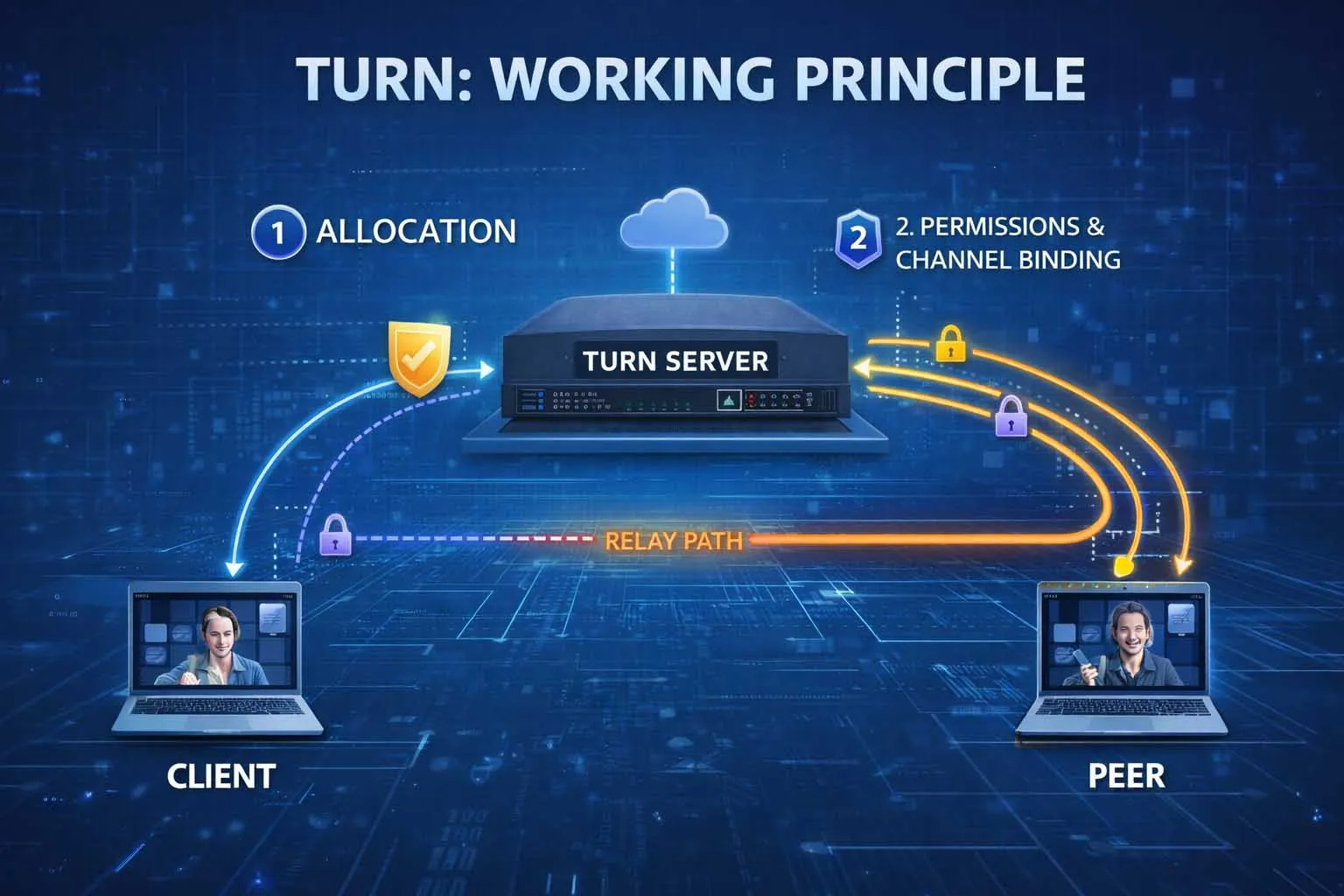
A TURN session typically involves allocation, peer permissions, and optional channel binding before media flows through the relay.
Step 3: Media or data is relayed through the server
Once the relay path is ready, traffic no longer depends on direct peer reachability. Each endpoint sends packets to the TURN server, and the server forwards them to the other side. In WebRTC, SIP-related media handling, or browser collaboration platforms, that traffic may include voice, video, or data channel content depending on the application design.
The tradeoff is straightforward. TURN improves reachability and reliability, but it adds relay overhead. Traffic must traverse an additional hop, so latency, bandwidth usage, and server load are higher than in a successful direct path. For this reason, communication platforms normally prefer direct connectivity when possible and use TURN when network conditions require it.
That tradeoff is usually acceptable because a slightly less efficient session is far better than a failed one. In customer support, healthcare, education, conferencing, and field response workflows, service continuity often matters more than achieving the absolute shortest network path.
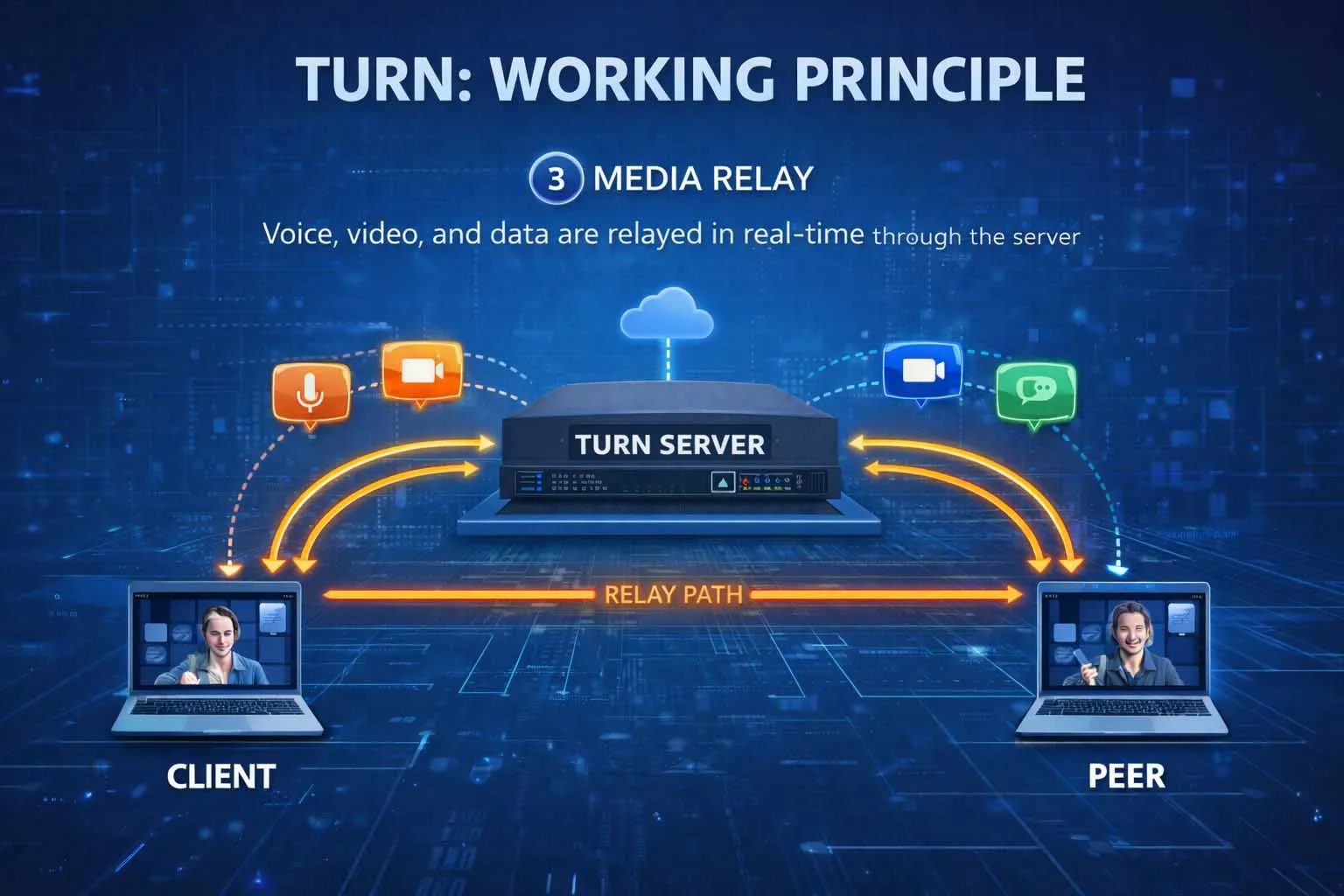
TURN can relay real-time voice, video, and data traffic for collaboration, support, and browser-based communication services.
Common Uses of TURN
WebRTC calling, meetings, and browser communications
The most visible use of TURN today is in WebRTC environments. Browsers and web applications use ICE to evaluate available connectivity paths, and TURN is the relay option that keeps sessions working when direct routes cannot be established. This is especially important for one-to-one video calls, voice conversations, customer support widgets, screen-sharing sessions, and browser-based conferencing.
For service providers, TURN reduces failed call attempts caused by network asymmetry or restrictive policies. For users, it reduces the frustrating experience of a call that rings but never establishes media, or a meeting where signaling works but audio and video do not. In that sense, TURN supports not only connectivity, but also user confidence in the communication platform.
Browser-first communications are one of the reasons TURN remains strategically important. Users may connect from homes, offices, public Wi-Fi, campuses, mobile networks, or managed corporate environments, and the application cannot assume favorable network behavior in every case.
VoIP platforms, SIP media traversal, and unified communications
Although TURN is often introduced through WebRTC, its value extends more broadly into IP voice and media delivery. Cloud calling platforms, softphone environments, web-based operator consoles, embedded communication clients, and unified communications services may all rely on relay behavior when endpoint media cannot be established directly.
In mixed environments where browsers, mobile apps, desktop clients, and managed voice services coexist, TURN helps normalize connectivity behavior. It becomes part of the infrastructure layer that supports session establishment across branches, home offices, remote workers, and external participants.
For vendors and platform operators, TURN can also simplify support and troubleshooting. Instead of depending entirely on unpredictable peer-to-peer paths, they can monitor relay usage, understand where direct connectivity is failing, and use that information to improve user experience or refine deployment policy.
Typical Application Scenarios
Contact centers, telehealth, and customer-facing communications
Any service that depends on reliable browser or app-based communication can benefit from TURN. Contact centers use it to support voice and video sessions between customers and agents, especially when one side is joining from a locked-down enterprise network or a residential broadband environment with difficult NAT behavior. Telehealth platforms use it to reduce session failure risk during remote consultations, where continuity and accessibility are essential.
TURN is equally useful in financial consultations, insurance claim interviews, remote technical support, and online identity verification sessions. In all of these cases, the organization typically has little control over the user’s local network, so relay infrastructure provides a practical way to protect service availability.
Education, collaboration, and distributed operations
Online classrooms, internal collaboration tools, field support platforms, and remote teamwork systems also benefit from TURN. Teachers and students may join from different ISPs and device types. Project teams may move between office networks, home routers, and mobile connections. Distributed operations may involve technicians, supervisors, and experts connecting from multiple environments during live troubleshooting or visual assistance sessions.
In these scenarios, TURN improves consistency. The platform does not have to assume that every participant has a clean peer-to-peer path. Instead, it can use relayed connectivity whenever required and keep the communication session stable enough for practical work.
This is particularly important for organizations that treat communication as part of a business process rather than a consumer convenience. When the session supports service delivery, coordination, diagnostics, or decision-making, resilience matters as much as media quality.
TURN is often invisible in a successful session, but its operational value is highest exactly when the surrounding network environment is least cooperative.
Deployment and Design Considerations
Performance, relay cost, and server placement
Because TURN relays traffic, it consumes infrastructure resources in a way that STUN does not. Operators therefore need to think about bandwidth, concurrency, geographic distribution, and failover design. A poorly placed relay can increase latency unnecessarily, while an undersized relay pool can create congestion during peak usage.
For global services, TURN servers are often distributed regionally so that users can reach a nearby relay. For enterprise or regulated deployments, operators may prefer controlled relay locations that align with security, policy, or data handling requirements. In both cases, relay planning is part of service architecture, not an afterthought.
It is also important to recognize the cost model. TURN improves reachability, but it does so by carrying live media through provider infrastructure. The more minutes, participants, and media streams a platform relays, the more critical capacity planning becomes.
Security, credentials, and transport selection
TURN servers are exposed infrastructure and should be deployed with disciplined security controls. Authentication, credential management, certificate validation where applicable, transport choices, and abuse prevention all matter. In many implementations, operators use temporary or tightly managed credentials rather than static public access.
Transport selection is another design consideration. TURN can operate over UDP and TCP, and the protocol also supports secure transport layers between client and server. The appropriate choice depends on the application, firewall conditions, performance goals, and security requirements of the deployment.
From a platform perspective, the right TURN design is usually a balance. The goal is not simply to relay everything, but to provide a reliable, secure fallback path that integrates cleanly with the broader connectivity framework and supports a predictable user experience.
TURN, STUN, and ICE in One View
For readers who want a simple framework, the relationship can be summarized as follows:
STUN helps a client learn how it appears from outside the local network.
ICE gathers candidate paths, tests connectivity, and selects the best available route.
TURN provides a relayed path when direct communication is not possible or not reliable enough.
That is why TURN is so often discussed as a fallback technology but deployed as essential infrastructure. In modern real-time communications, fallback connectivity is not a luxury. It is part of what makes the service production-ready.
Conclusion
TURN is a relay-based NAT traversal protocol that enables real-time sessions to continue when direct peer-to-peer communication fails. It is closely associated with ICE, commonly used in WebRTC environments, and widely relevant to cloud calling, browser communications, online collaboration, customer engagement, and other interactive IP services.
Its value is practical rather than theoretical. TURN does not exist to replace direct communication when direct communication works well. It exists to ensure that voice, video, and data sessions still connect when NAT behavior, firewall policy, or network complexity would otherwise block them. For any platform that depends on reliable real-time communication, TURN is a foundational part of resilient service design.
FAQ
Is TURN the same as STUN?
No. STUN and TURN are related but serve different purposes. STUN helps an endpoint discover its public-facing address behavior, while TURN provides a relay service when a direct path cannot be established or maintained reliably.
Does TURN replace ICE?
No. ICE is the broader connectivity framework that gathers and evaluates connection candidates. TURN is one of the tools ICE can use when a relayed candidate is needed.
Why is TURN often described as a fallback?
Because relaying traffic through a server adds overhead compared with a successful direct path. Platforms usually prefer direct connectivity first, then use TURN when network conditions make direct media delivery impractical.
Is TURN only used for WebRTC?
No. WebRTC is one of the most common contexts in which TURN is discussed, but relay-based NAT traversal is also relevant to wider real-time IP communication environments, including browser media platforms, soft clients, and other interactive communication services.
Why do operators pay so much attention to TURN server sizing?
Because TURN carries live session traffic. As relay usage increases, server bandwidth, processing, session capacity, and geographic placement all become important to service quality and reliability.