


WebSocket is a network communication protocol designed for persistent, two-way data exchange between a client and a server. It is commonly used when an application needs real-time updates, low-latency interaction, and continuous message delivery without repeatedly opening new HTTP requests.
In traditional web communication, the client usually sends a request and waits for the server to respond. WebSocket changes this pattern. After an initial handshake, both sides can send messages whenever needed over the same connection. This makes it useful for chat systems, live dashboards, online games, financial tickers, collaborative editing, IoT monitoring, customer service consoles, notification systems, and command platforms.
From Repeated Requests to Persistent Conversation
Many web applications need fresh data. A stock price changes, a new chat message arrives, an alarm is triggered, a device status changes, or a user edits a shared document. If the browser uses only ordinary request-response communication, it may need to ask the server again and again to check whether something changed.
This repeated polling creates delay and unnecessary network traffic. The server may receive many requests that return no new data. The client may still miss the exact moment when an event occurs.
A persistent communication channel solves this problem. Once the connection is established, the server can push data to the client immediately, and the client can also send messages back without starting a new request each time.
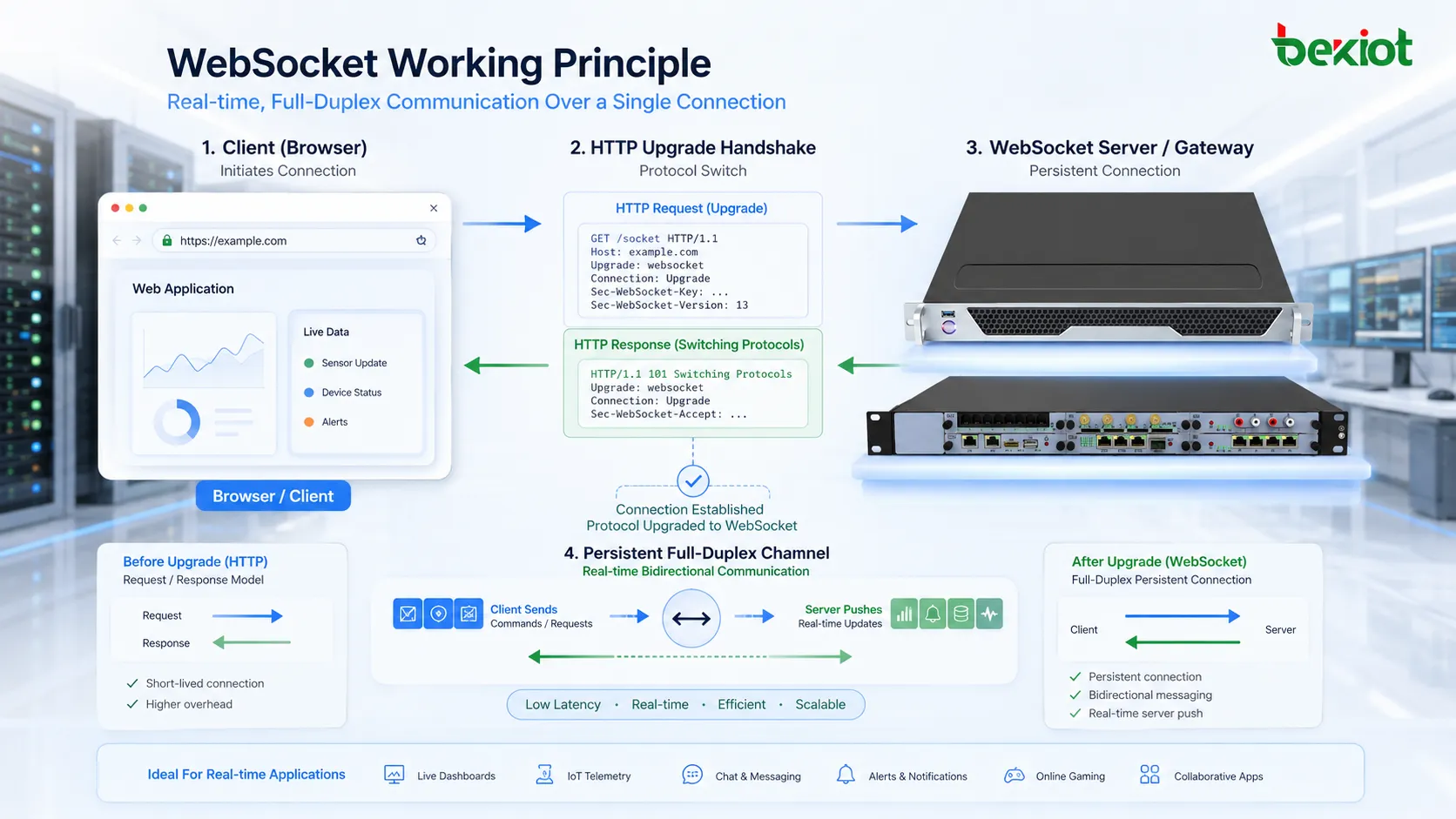
Initial Handshake
HTTP Upgrade Request
The connection usually starts as an HTTP request. The client asks the server to upgrade the connection from ordinary HTTP communication to the WebSocket protocol. This request includes specific headers that indicate the client wants a protocol switch.
The server checks whether it supports the upgrade and whether the request is valid. If accepted, the server replies with a switching response, and the connection changes into a WebSocket channel.
Protocol Switch
After the upgrade succeeds, the connection no longer behaves like a normal HTTP request-response exchange. It becomes a long-lived channel where both sides can send frames independently.
This step is important because it allows WebSocket to work naturally with existing web infrastructure. It starts through an HTTP-compatible entry point but then supports continuous communication.
Secure and Non-Secure Modes
WebSocket can operate in non-secure and secure forms. The non-secure scheme is usually written as ws, while the secure encrypted version is written as wss. For modern web applications, secure WebSocket over TLS is commonly preferred, especially when user data, authentication tokens, business messages, or operational events are involved.
The secure version protects traffic against eavesdropping and helps align real-time communication with HTTPS-based web security practices.
Full-Duplex Message Flow
The core principle is full-duplex communication. This means the client and server can send messages independently over the same open connection. The client does not need to ask first before the server sends new information.
This is different from ordinary HTTP, where the server usually sends a response only after receiving a request. In a WebSocket session, a server can push a warning, status change, chat message, notification, or command result as soon as the event happens.
This two-way flow is the reason the protocol is widely used in real-time systems. It reduces delay, decreases repeated connection overhead, and makes application behavior feel more immediate.
Frame-Based Communication
Text Frames
Text frames carry readable message data, often in formats such as JSON. Many browser-based applications use text frames because they are easy to generate, parse, debug, and integrate with web application logic.
For example, a chat message may be sent as a JSON object containing user ID, room ID, message content, and timestamp.
Binary Frames
Binary frames carry non-text data. They may be used for compact protocol messages, audio data, game data, device telemetry, file fragments, or custom application payloads.
Binary transmission can reduce overhead when the application does not need human-readable text format.
Control Frames
Control frames help manage the connection. They include actions such as ping, pong, and close. Ping and pong can help detect whether the other side is still reachable. Close frames help terminate the connection in a controlled way.
These control functions are important for long-lived sessions because network conditions can change while the connection remains open.
Why Latency Becomes Lower
Latency is reduced because the connection is already open. The client and server do not need to repeatedly perform request creation, connection establishment, header exchange, and response waiting for every small update.
For real-time applications, even small delays can affect user experience. A chat message should appear immediately. A live alarm should reach the dashboard quickly. A collaborative document should reflect edits without noticeable delay.
By keeping a continuous path available, WebSocket allows event-driven updates instead of interval-based checking.
Connection Lifecycle
Opening Stage
The opening stage includes the client request, server validation, handshake response, and protocol upgrade. If the server rejects the upgrade, the channel is not created.
Applications should handle handshake failure clearly. A failed connection may be caused by server configuration, authentication failure, proxy limitations, TLS issues, wrong path, or unsupported protocol behavior.
Active Stage
During the active stage, messages can move in both directions. The application may define its own message types, event names, payload format, heartbeat interval, authentication refresh logic, and error handling.
The protocol provides the channel, but the application still needs its own business rules.
Keepalive Stage
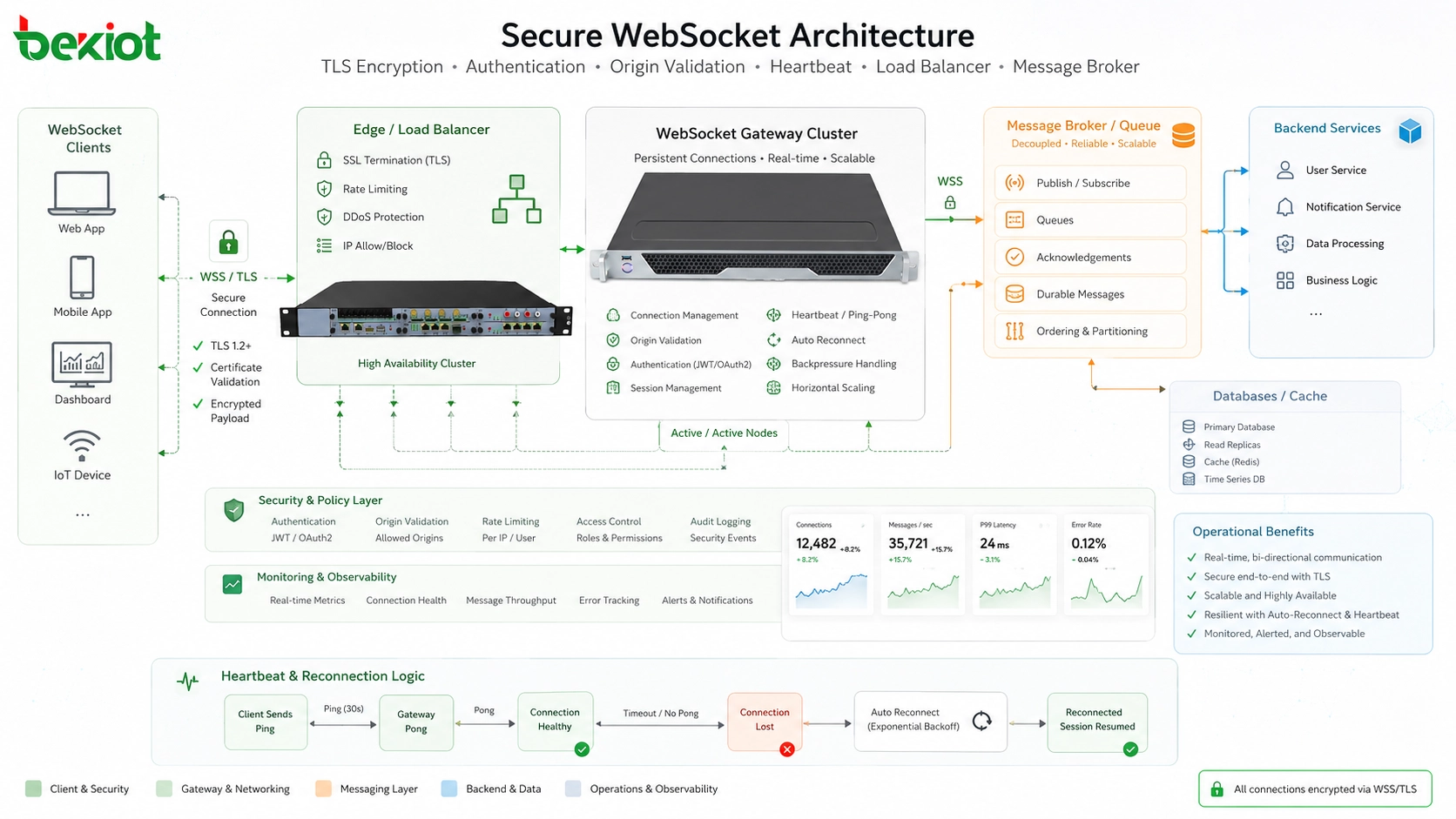
Long-lived connections may pass through proxies, gateways, firewalls, load balancers, and mobile networks. Some intermediate systems may close idle connections. Heartbeat messages help keep the channel visible and detect broken links.
A common design is to send periodic ping or application-level heartbeat messages. If no response is received after a defined time, the client can reconnect.
Closing Stage
A connection may close normally when the user leaves the page or when the server ends the session. It may also close abnormally due to network interruption, timeout, server restart, authentication expiration, or client-side failure.
Good applications should include reconnection logic, message recovery rules, and user feedback so that temporary disconnection does not silently break the workflow.
Difference from Common Alternatives
Polling is the simplest method for checking updates. The client repeatedly asks the server whether new data exists. It is easy to implement but can waste requests and create delay.
Long polling keeps a request open until the server has new data or a timeout occurs. It can reduce unnecessary empty responses, but it still relies on repeated HTTP requests.
Server-Sent Events allow the server to push events to the client over a one-way stream. This is useful for server-to-client updates but does not provide the same two-way message model.
WebSocket is better suited when both sides need to send data frequently and quickly. However, it is not always necessary. Simple pages, static content, ordinary forms, and low-frequency updates may work well with normal HTTP or other methods.
Application-Layer Message Design
After the channel is open, the application must define how messages are structured. The protocol does not automatically know whether a message is a chat event, device update, command request, alarm, or error response.
A common design uses structured JSON messages with fields such as type, action, channel, payload, timestamp, request ID, and status. This allows the server and client to route messages to the correct logic.
For larger systems, message design should include versioning. If the message format changes later, older clients and newer servers may still need to communicate safely.
Server Architecture
A WebSocket server must manage many open connections. Unlike ordinary HTTP requests that may finish quickly, these sessions can remain active for minutes or hours. This changes how capacity is planned.
The server needs connection tracking, user binding, message routing, authentication state, resource cleanup, timeout handling, and broadcast logic. If thousands or millions of clients are connected, the architecture must be designed for concurrency.
Many real systems use message queues, publish-subscribe systems, distributed session stores, load balancers, and horizontal scaling to support large numbers of real-time users.
Load Balancing and Scaling
Scaling persistent connections is different from scaling short HTTP requests. A load balancer must support protocol upgrade and keep the connection mapped to the correct backend during the session.
Some systems use sticky sessions so that a connected client stays with the same server. Other systems use shared message brokers so that messages can be delivered across multiple backend nodes.
When designing large deployments, teams should consider connection limits, memory usage, heartbeat traffic, reconnection storms, deployment restarts, and geographic distribution.
Security Considerations
Security is essential because a persistent channel can carry sensitive and interactive data. Secure deployments should use wss, validate origins, authenticate users, check permissions, limit message size, and protect against abuse.
Authentication may happen during the handshake or immediately after connection. Tokens should be handled carefully. If a token expires while the connection is open, the system should define whether to refresh, re-authenticate, or close the session.
Servers should also validate every message. A connected client should not be trusted automatically. Input validation, rate limiting, authorization checks, and audit logs are still required.
Practical Use Cases
Chat and Collaboration
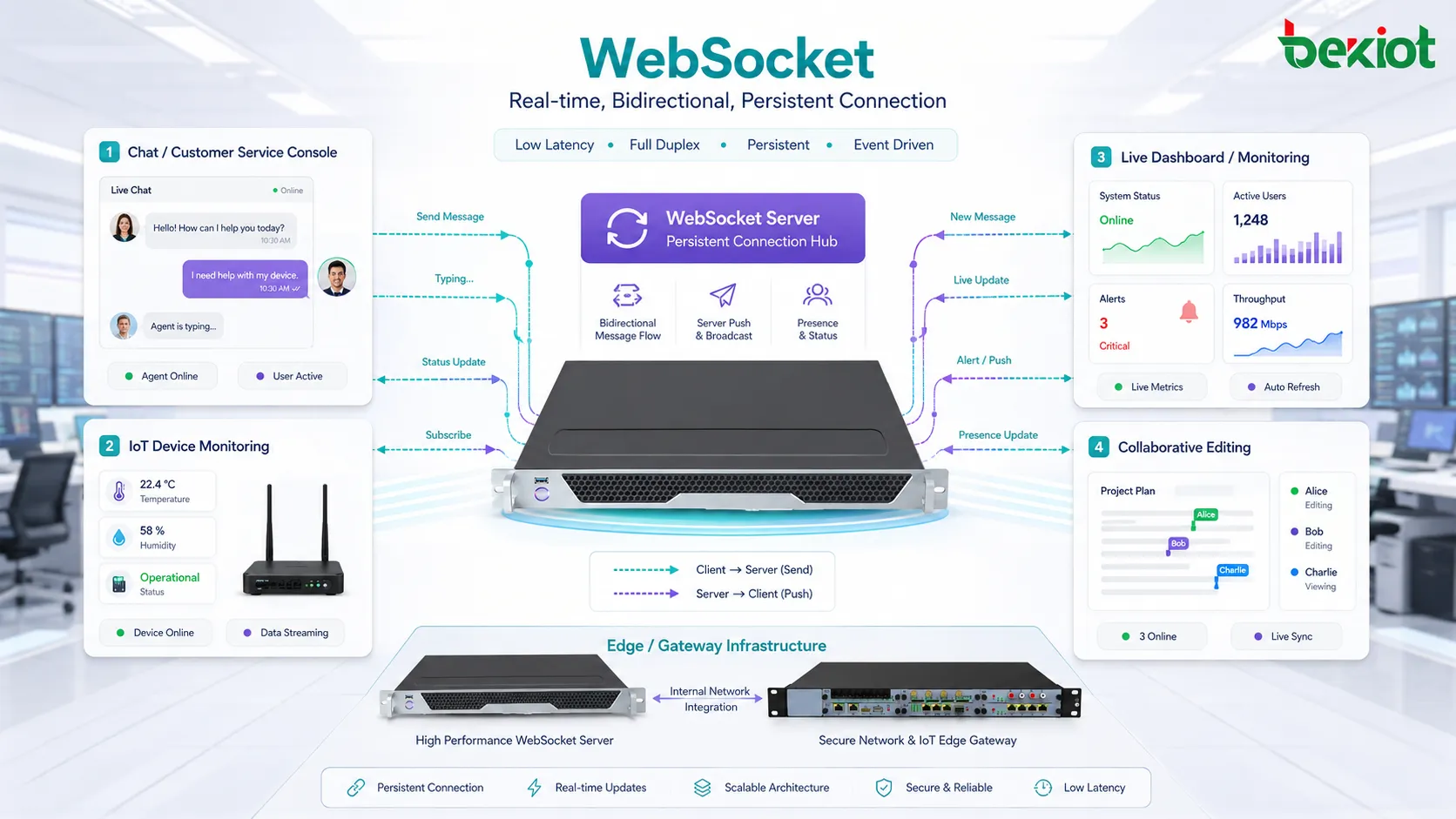
Messaging apps, team chat, customer service windows, live comments, and collaborative editors benefit from instant two-way updates. Users can send messages, receive replies, and see changes without refreshing the page.
Presence indicators, typing status, read receipts, and shared editing events are also common examples.
Live Dashboards
Operations dashboards, financial systems, monitoring platforms, logistics screens, and command centers often need real-time data. WebSocket can push alerts, charts, device status, and event updates as soon as they occur.
This reduces the delay between field events and operator awareness.
Online Games and Interactive Systems
Games and interactive applications require frequent state updates. A persistent two-way channel can support player actions, server responses, room status, scores, and event synchronization.
For extremely latency-sensitive games, other protocols may also be considered, but WebSocket is common for browser-based real-time interaction.
IoT and Device Monitoring
IoT platforms can use persistent channels to update device status, sensor values, alarms, and control messages. A dashboard can show changing device conditions without repeated refresh.
For field devices, the choice depends on power, network stability, message volume, and platform architecture.
Common Problems
A frequent problem is a failed upgrade request. This may happen when the server path is wrong, the reverse proxy does not forward upgrade headers, HTTPS and WSS are mismatched, or the backend does not support the protocol.
Another problem is unexpected disconnection. Mobile networks, idle timeout, proxy rules, firewall behavior, and server restarts can all close connections. Heartbeat and reconnection logic are necessary.
Message overload is also possible. If the server sends too many updates too quickly, the client may lag, memory may grow, and the user interface may become slow. Backpressure and throttling should be considered.
Deployment Best Practices
Use secure connections for production. WSS should be the default choice for modern web applications, especially when user identity or business data is involved.
Design a clear message schema. Include message type, request ID, error format, and version information where needed.
Add heartbeat and reconnection logic. Users should not need to refresh the page manually whenever the network changes.
Configure proxies and load balancers correctly. Upgrade headers, timeout values, and connection limits must support long-lived sessions.
Monitor connection counts, message rates, error rates, memory usage, disconnect reasons, and reconnection frequency. These indicators reveal real system health.
Industry Trend
Real-time interaction is becoming a standard expectation in many digital systems. Users expect live messages, instant alerts, active dashboards, online collaboration, and responsive control interfaces.
As cloud platforms, edge computing, IoT, online service desks, and browser-based tools continue to grow, persistent communication channels remain important. At the same time, newer protocols and transport technologies are also developing, so system architects should choose based on use case rather than trend alone.
The strongest value appears when real-time communication is connected with clear application logic, secure identity control, scalable infrastructure, and reliable user experience.
WebSocket works by upgrading an HTTP connection into a persistent two-way channel, allowing client and server to exchange messages continuously with lower delay and less repeated request overhead.
FAQ
Is WebSocket the same as HTTP?
No. It starts with an HTTP upgrade handshake, but after the upgrade succeeds, the connection follows WebSocket framing rather than normal request-response behavior.
Why does a connection fail behind a reverse proxy?
The proxy may not forward upgrade headers, may close idle sessions too quickly, may use the wrong backend path, or may not support long-lived connections correctly.
Should every real-time feature use WebSocket?
No. Simple notifications or one-way updates may work with Server-Sent Events, polling, or normal API requests. The choice should match message frequency and direction.
How can broken connections be detected?
Use ping and pong frames or application-level heartbeat messages. If responses stop arriving, the client can close the session and reconnect.
What should be logged for troubleshooting?
Log handshake failures, authentication errors, close codes, disconnect reasons, message parsing errors, heartbeat timeouts, backend node IDs, and reconnection patterns.







