


A dial plan is the call-routing logic behind the numbers users dial. It tells a PBX or SIP system how to understand, modify, allow, block, and send each call.
Dial plan is a set of rules used by PBX, IP PBX, SIP server, VoIP gateway, softswitch, and unified communication systems to control how dialed numbers are processed. It determines whether a call should go to an internal extension, external phone number, SIP trunk, emergency service, voicemail, IVR menu, hunt group, paging group, operator console, or another communication destination.
In enterprise communication systems, users may dial short extensions, local numbers, mobile numbers, international numbers, service codes, feature codes, emergency numbers, or department hotlines. The dial plan translates these different dialing behaviors into predictable call routing actions. Without a clear dial plan, a PBX or SIP platform may not know where to send a call, which trunk to use, or whether the user is allowed to place that call.
Basic Meaning of a Dial Plan
A dial plan is the numbering and routing rule set that defines how calls are handled after a user dials digits. It can include extension numbering, prefix rules, digit matching, number normalization, outbound route selection, emergency call routing, caller permission control, and special service codes.
In a traditional PBX, the dial plan may be configured through system menus and route tables. In SIP and VoIP platforms, it may also involve SIP URI processing, trunk routing, number rewriting, ENUM lookup, gateway selection, and regular expression matching.
Number Interpretation
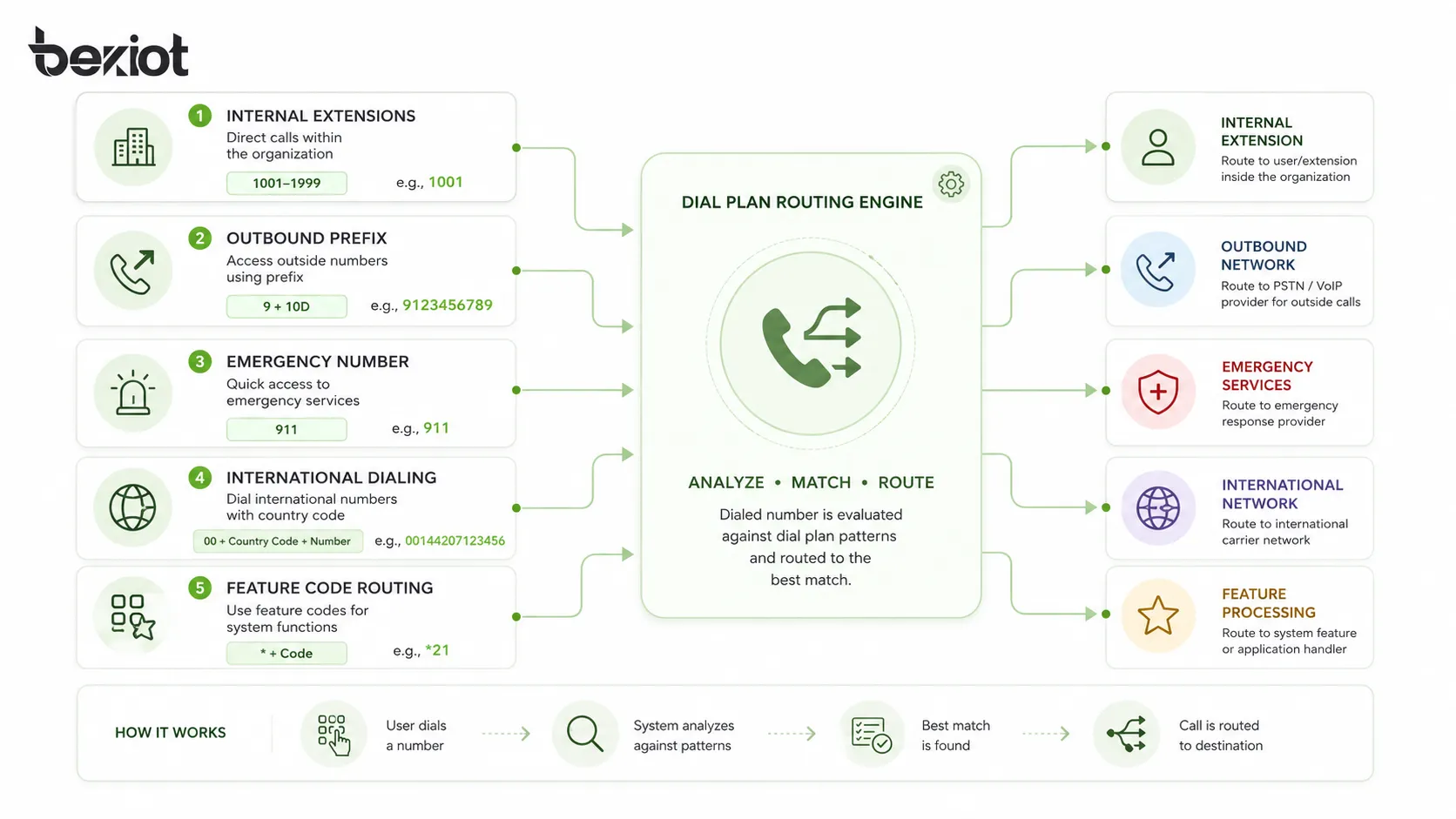
The first function of a dial plan is number interpretation. When a user dials “101,” the system may treat it as an internal extension. When a user dials “9” before a number, the system may treat it as an external call. When a user dials “911,” “112,” “999,” or another emergency number, the system must recognize it as an emergency call.
This interpretation must be consistent. If the same number pattern can mean different things, users may experience failed calls, wrong routing, or unexpected call charges. Good dial plan design removes ambiguity before the system goes live.
Routing Decision
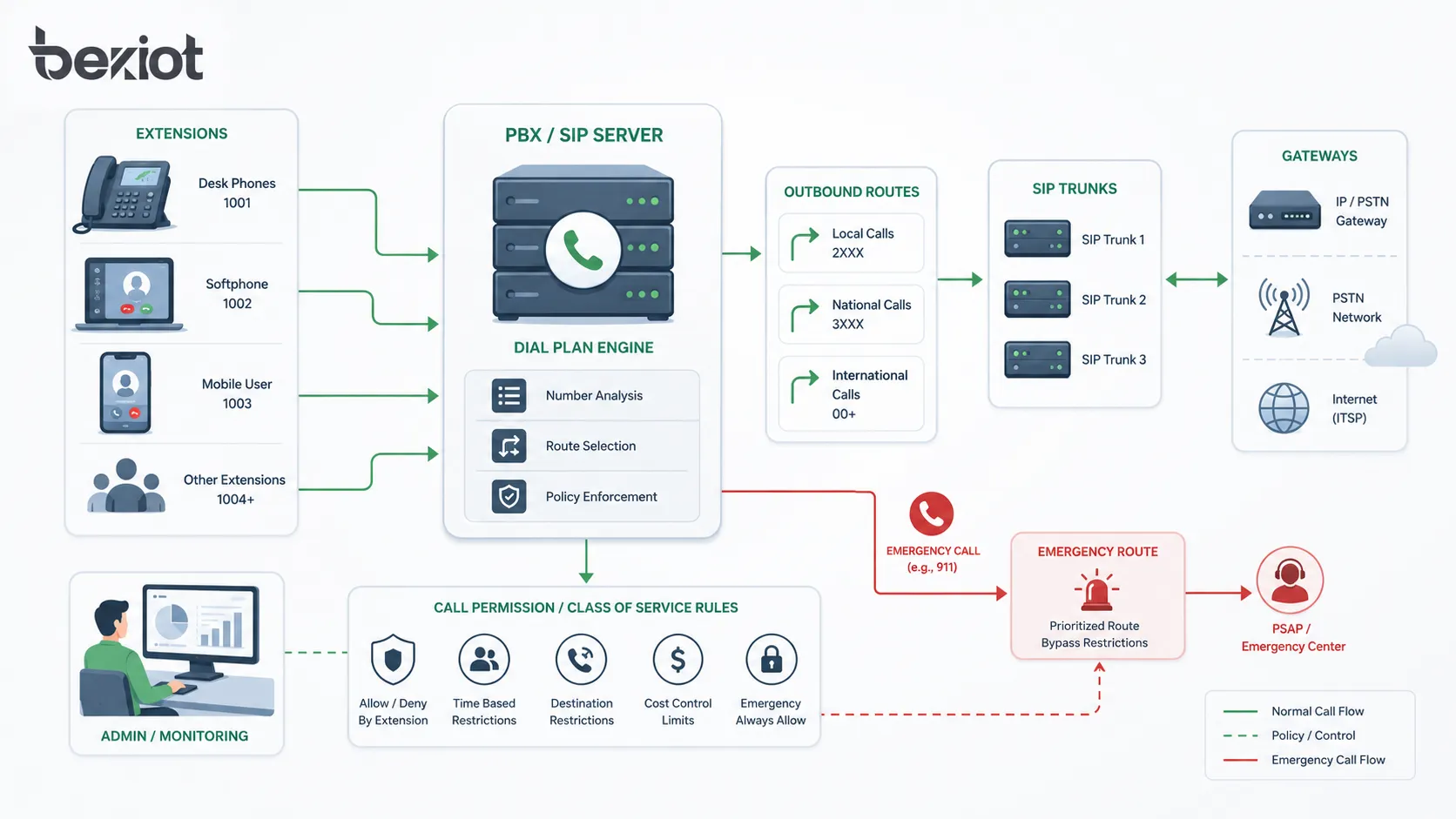
After identifying the number pattern, the dial plan decides the route. An internal call may stay inside the PBX. A local outbound call may use a SIP trunk. An international call may use a specific carrier route. A branch-to-branch call may use a private IP link or inter-site trunk.
Routing decisions can also depend on time, user group, call permission, location, trunk availability, least-cost routing rules, failover priority, or emergency service requirements. This makes the dial plan one of the most important control layers in PBX and SIP communication systems.
Why It Matters in PBX and SIP Systems
A PBX or SIP system can register users and connect endpoints, but the dial plan tells it how calls should actually move through the network. It is the logic that turns user dialing behavior into call routing, number transformation, and service access.
In small offices, the dial plan may only include three-digit extensions and one outbound trunk. In larger organizations, it may include multiple sites, departments, carriers, SIP trunks, gateways, IVR paths, emergency routes, access codes, mobile integration, and international dialing policies.
Internal Extension Calling
Internal extension calling is usually the foundation of a dial plan. The organization defines extension lengths such as 3 digits, 4 digits, or 5 digits, then assigns number ranges to users, departments, buildings, floors, or branch offices.
For example, extensions beginning with “1” may belong to headquarters, “2” may belong to a branch office, and “3” may belong to a warehouse. A structured extension plan helps users remember numbers and helps administrators manage future expansion.
Outbound Calling
Outbound calling rules define how users reach outside numbers. The dial plan may require a prefix such as “9” for external calls, or it may allow direct dialing without a prefix. It may also normalize local numbers, add area codes, insert country codes, or select the proper SIP trunk.
Outbound rules are important for cost control and security. Not every user should be allowed to dial premium-rate numbers, international numbers, or high-cost routes. The dial plan can restrict these calls by user role, extension group, time schedule, or authorization code.
Inbound Call Handling
Dial plans can also affect inbound calls. When a SIP trunk sends a DID number to the PBX, the system must decide whether to route it to an extension, IVR menu, queue, hunt group, voicemail, operator, or emergency desk.
Inbound routing often requires number normalization because carriers may deliver numbers in different formats. One trunk may send a full E.164 number, while another may send only the last four digits. The dial plan helps standardize these formats for consistent routing.
Main Components of a Dial Plan
A practical dial plan includes several connected parts. These parts define number patterns, routing rules, transformations, permissions, and fallback behavior. The exact configuration depends on the PBX or SIP platform, but the logic is similar across most systems.
Extension Numbering Plan
The extension numbering plan defines the internal numbers assigned to users, phones, departments, rooms, devices, or service points. A clear numbering plan should be easy to remember, scalable, and free from conflict with emergency numbers or feature codes.
Extension length should be chosen carefully. Three-digit extensions are easy to dial but may not provide enough capacity for large organizations. Four-digit or five-digit plans provide more room for growth and multi-site structure.
Dial Patterns
Dial patterns are the digit rules used to match dialed numbers. A dial pattern may match internal extensions, local calls, national calls, international calls, emergency numbers, short codes, voicemail access, feature codes, or service hotlines.
In many SIP and IP PBX systems, dial patterns can use wildcards or regular expressions. This allows administrators to define rules such as “all numbers beginning with 0,” “all 4-digit extensions,” or “international calls starting with 00.”
Number Normalization
Number normalization converts dialed numbers into a consistent format. For example, a user may dial a local number as “5551234,” while the SIP trunk requires “+12125551234.” The dial plan can add country code, area code, or trunk prefix before sending the call.
Normalization is especially important in multi-site and SIP trunk environments. It reduces routing errors and makes call records, caller ID, emergency location, and carrier interconnection more consistent.
Route Selection
Route selection determines where a matched call should be sent. The route may be an internal extension table, SIP trunk, analog gateway, PSTN gateway, inter-office trunk, voicemail server, IVR system, call queue, or emergency dispatch route.
Route selection can be simple or advanced. In advanced systems, least-cost routing, failover routing, carrier priority, time-based routing, and location-based routing may all be part of the dial plan.
Common Dial Plan Rules
Dial plan rules vary by organization, region, carrier, and platform. However, several rule types appear frequently in PBX and SIP systems.
| Rule Type | Purpose | Typical Example |
|---|---|---|
| Extension rule | Route internal calls | 1000-1999 route to headquarters extensions |
| Outbound prefix rule | Identify external calls | Dial 9 before outside numbers |
| Emergency rule | Ensure emergency calls route correctly | 911, 112, or local emergency number routes to emergency service |
| International rule | Control international access | Numbers starting with 00 or + require permission |
| Feature code rule | Access PBX functions | *97 for voicemail or *8 for call pickup |
| Failover rule | Use backup route if main route fails | Primary SIP trunk fails, call uses backup gateway |
Internal Number Ranges
Internal number ranges should be planned before devices are deployed. A clear range structure can help identify where a call belongs. For example, user extensions, conference rooms, analog devices, paging groups, and system services can each have separate ranges.
Good number planning prevents future conflict. If all available numbers are assigned randomly at the beginning, expansion becomes difficult later. It is better to reserve ranges for future departments, branches, devices, and services.
Access Codes and Prefixes
Many PBX systems use access codes to separate internal and external dialing. For example, dialing “9” may tell the PBX to seize an outside line. Some systems use “0” for operator, “8” for branch routing, or special prefixes for trunk groups.
Access codes should be simple and documented. Too many prefixes can confuse users. In modern SIP systems, direct dialing may be preferred, but the dial plan still needs to distinguish local, national, international, and service numbers.
Emergency Call Rules
Emergency calls must be handled with special care. The dial plan should recognize local emergency numbers and route them to the correct emergency service or response point without unnecessary delay.
Emergency call design should consider location information, caller ID, site identification, outbound trunk selection, failover, and local legal requirements. The system should not block emergency calls because of user permission restrictions or missing outbound prefixes.
Role in SIP Call Processing
In SIP systems, the dial plan works together with SIP signaling. When a user dials a number, the endpoint or PBX creates a SIP INVITE message. The system then uses dial plan rules to decide how to format the destination and where to send the request.
The destination may be a numeric phone number, SIP URI, trunk route, gateway address, or internal registration. The dial plan may also modify caller ID, called number, SIP headers, or routing domain before sending the call forward.
SIP URI and Number Translation
SIP can use addresses such as user@example.com, but many enterprise users still dial normal numbers. The dial plan bridges these two worlds by translating dialed digits into SIP destinations.
For example, dialing “2301” may route to sip:2301@pbx.example.com. Dialing an external number may route to a SIP trunk with the number formatted according to carrier requirements. This translation is essential for SIP interoperability.
Trunk Routing
SIP trunks connect the PBX to external carriers or other systems. A dial plan decides which calls should use which trunk. Local calls may use one trunk, international calls may use another, and emergency calls may use a dedicated route.
Trunk routing may also include failover. If the primary SIP trunk is unavailable, the dial plan may send calls through a backup trunk, gateway, or alternate carrier. This improves call continuity during outages.
Caller ID and Called Number Formatting
Different SIP carriers may require different number formats. Some require E.164 format such as +12125551234. Others accept national format, local format, or specific prefixes. The dial plan can rewrite numbers before sending them to the carrier.
Caller ID may also need formatting. A branch office may need to send its own DID number, while an emergency route may need to send a location-specific caller ID. Incorrect formatting can cause call rejection, wrong billing, or poor emergency identification.
System Value for PBX Management
A well-designed dial plan improves daily communication, security, cost control, user experience, and system maintenance. It gives administrators a structured way to manage how calls behave across the organization.
Better User Experience
Users should be able to dial numbers naturally. If every call requires complicated prefixes, users may make mistakes or avoid using the system. A good dial plan balances technical routing needs with simple dialing behavior.
For example, users may dial short extensions internally, full mobile numbers externally, and emergency numbers directly. The system can handle the required routing and normalization in the background.
Improved Cost Control
Dial plans can support cost control by selecting lower-cost trunks for certain destinations, blocking unauthorized international calls, limiting premium-rate calls, or routing branch calls over private IP links instead of public networks.
Least-cost routing can be useful in larger systems, but it should not compromise call quality or emergency reliability. Cost control should be balanced with service performance and operational risk.
Stronger Security
Dial plan security helps prevent toll fraud, unauthorized calling, and misuse of external trunks. Administrators can define which users may dial local, national, mobile, international, or premium numbers.
Security rules should also protect system feature codes, voicemail access, call forwarding, and external transfer functions. Poorly controlled dial plans can allow attackers or users to generate high call charges or route calls through unintended paths.
Simpler Maintenance
A structured dial plan is easier to maintain. Administrators can understand which number ranges belong to which sites, which prefixes route to which trunks, and which rules apply to which user groups.
Documentation is essential. If the dial plan exists only as undocumented configuration, future changes become risky. Every numbering range, route, prefix, and exception should be recorded clearly.
Applications in Enterprise Communication
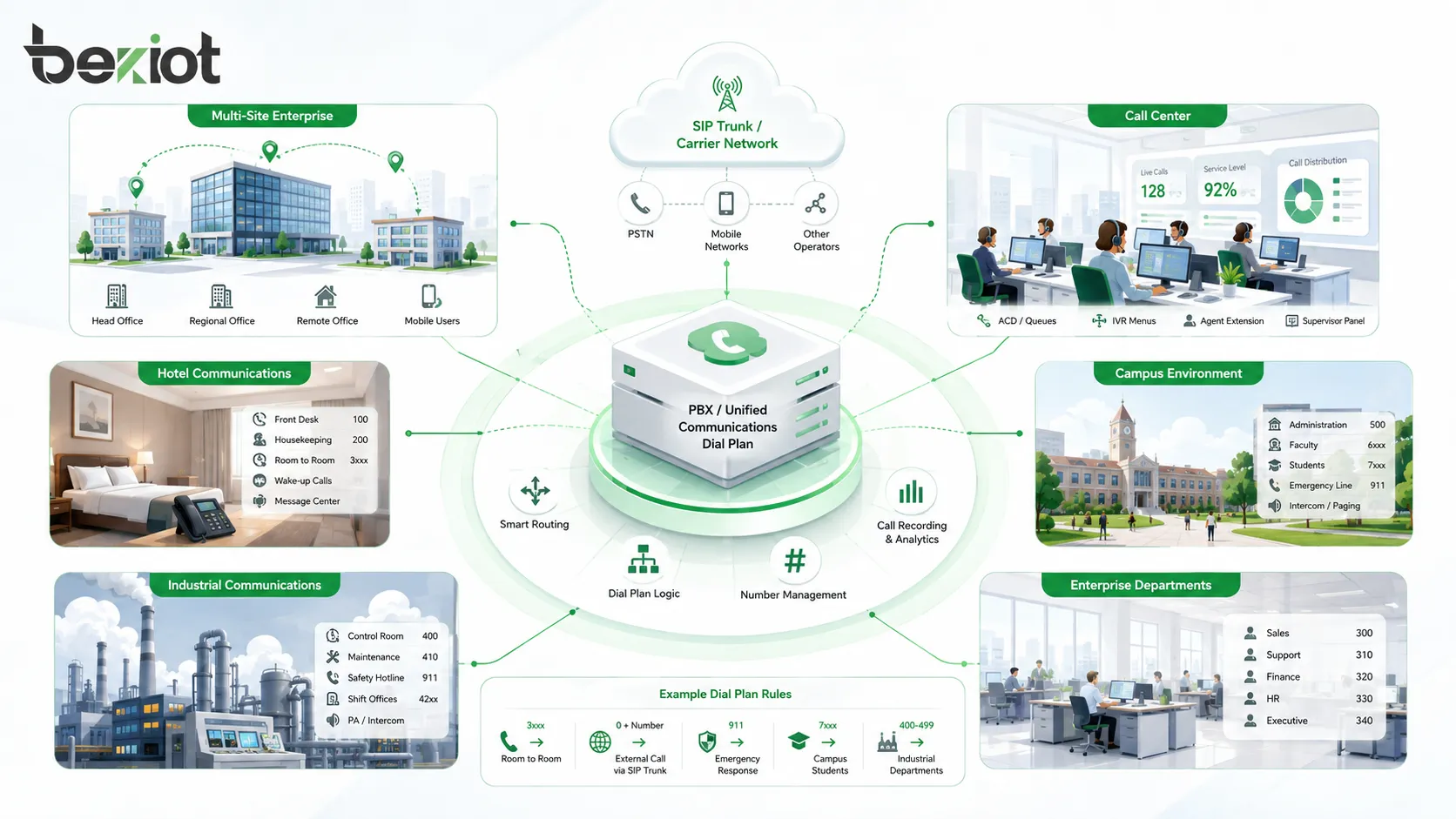
Dial plans are used in almost every PBX and SIP deployment. The design may be simple for a small office or complex for a multi-site enterprise, but the purpose remains the same: control call behavior.
Small Business PBX Systems
Small businesses usually need simple extension calling, outbound dialing, voicemail access, and call transfer. A basic dial plan may include three-digit extensions, one outbound prefix, and one SIP trunk.
Even in a small system, emergency numbers and outbound restrictions should be configured carefully. A small PBX can still create security and cost problems if international calling is left open to every extension.
Multi-Site Organizations
Multi-site organizations need a more structured dial plan. Each branch may have its own extension range, local outbound trunk, emergency route, and site-specific caller ID. Inter-site calls may be routed over private network links.
A clear numbering plan helps users call other sites without confusion. For example, the first digit or first two digits of an extension can identify the site, department, or region.
Call Centers and Service Desks
Call centers use dial plans to route inbound numbers to queues, agents, IVR menus, supervisors, and after-hours messages. Outbound rules may control caller ID, campaign routing, recording policy, and trunk selection.
Dial plan design affects customer experience. A wrong inbound rule can send customers to the wrong queue, while poor outbound formatting can cause calls to be rejected or marked as suspicious by carriers.
Hotels, Hospitals, and Campuses
Hotels, hospitals, schools, and campuses often need special dialing rules. These may include room extensions, department codes, nurse station calls, reception access, security numbers, public phones, emergency routes, and restricted outbound permissions.
In these environments, simple dialing is important because users may include guests, visitors, patients, students, or temporary staff. Emergency and service numbers should be easy to remember and route correctly.
Industrial and Infrastructure Sites
Industrial sites, transportation hubs, tunnels, ports, power plants, and utility facilities may use dial plans for control rooms, field telephones, SIP intercoms, maintenance teams, emergency points, paging access, and dispatch communication.
These systems may require priority routing, hotline dialing, group call access, emergency call handling, and integration with gateways or dispatch platforms. A clear dial plan helps maintain communication order during normal operation and incidents.
Design Principles for a Good Dial Plan
A good dial plan should be simple for users, logical for administrators, scalable for future growth, and secure against misuse. It should also match local numbering rules and carrier requirements.
Keep Numbering Logical
Logical numbering makes the system easier to use. Extension ranges can reflect sites, departments, floors, buildings, or functions. Special service numbers should be easy to remember.
However, the plan should not become too complicated. If users need to memorize too many rules, mistakes increase. The best dial plans are structured but still intuitive.
Avoid Number Conflicts
Number conflicts can create routing problems. Internal extensions should not conflict with emergency numbers, feature codes, operator access, or external dialing patterns. For example, using “911” as an internal extension would be a serious design error in regions where 911 is an emergency number.
Before assigning extension ranges, administrators should check local emergency numbers, national numbering patterns, carrier requirements, and PBX feature codes.
Plan for Expansion
A dial plan should leave room for growth. New departments, users, branch offices, devices, and services may need numbers later. If the numbering plan is too small, the organization may need disruptive renumbering in the future.
Reserved ranges are useful. They allow administrators to add future sites, service groups, paging zones, or device categories without redesigning the entire system.
Document Every Rule
Dial plan documentation should include extension ranges, outbound prefixes, emergency routes, trunk rules, number normalization, caller ID rules, permission groups, feature codes, and failover routes.
Documentation helps during troubleshooting, migration, carrier changes, audits, and staff handover. It also reduces the risk of accidental rule changes that break important call paths.
Common Configuration Mistakes
Dial plan problems can cause failed calls, wrong destinations, high phone bills, emergency call failures, user confusion, and security exposure. Many issues can be avoided through careful design and testing.
Overlapping Dial Patterns
Overlapping dial patterns occur when two or more rules match the same dialed number. The PBX may select the first matching rule, the longest matching rule, or a priority-based rule depending on platform behavior.
If administrators do not understand rule priority, calls may follow the wrong route. Testing should confirm how the system handles similar patterns and ambiguous dialing.
Poor Emergency Routing
Emergency calls should never depend on complex prefixes or optional user behavior. Users should be able to dial the local emergency number directly. The system should route the call correctly and provide proper caller location where required.
Emergency routing should also be tested after trunk changes, site moves, number changes, or PBX upgrades. This is one of the most critical parts of dial plan maintenance.
Unrestricted International Calling
Leaving international or premium-rate routes open to all users can create serious toll fraud risk. Attackers often exploit weak PBX systems to generate expensive calls.
Outbound permissions, call limits, trunk authentication, strong passwords, monitoring alerts, and route restrictions help reduce this risk.
Inconsistent Number Normalization
Inconsistent normalization can cause call failures, poor caller ID display, duplicate contact records, and carrier rejection. One route may send numbers in local format while another sends E.164 format, creating confusion.
Standardizing number format across the system improves call routing, reporting, billing, emergency identification, and integration with CRM or contact platforms.
Testing and Maintenance Tips
Dial plans should be tested before deployment and reviewed regularly after the system is in operation. Changes to carriers, trunks, branch offices, user groups, or emergency rules can all affect call routing.
Test Each Call Type
Testing should cover internal calls, local outbound calls, national calls, mobile calls, international calls, emergency calls, voicemail access, feature codes, inbound DID routing, branch-to-branch calls, and failover routes.
Each test should confirm the dialed number, routed destination, caller ID, trunk used, call quality, permission behavior, and call detail record. Testing only one or two call types is not enough for a complete dial plan.
Review Call Detail Records
Call detail records help verify how calls are actually routed. They can show dialed number, normalized number, source extension, destination, route, trunk, duration, status, and failure reason.
Regular CDR review can detect misrouted calls, unauthorized dialing, repeated failures, carrier rejection, or abnormal cost patterns. This makes CDR analysis a useful maintenance tool.
Update the Plan After System Changes
Dial plans should be updated when the organization adds sites, changes SIP trunks, migrates PBX platforms, modifies emergency requirements, adds new number ranges, or changes carrier number formats.
Every change should be documented and tested. Uncontrolled dial plan changes can affect many users quickly, so administrators should use change management procedures where possible.
FAQ
What is a dial plan?
A dial plan is a set of numbering, matching, routing, permission, and transformation rules that tells a PBX or SIP system how to handle dialed numbers. It controls internal calling, outbound routing, inbound routing, emergency calls, feature codes, and trunk selection.
Why is a dial plan important in PBX systems?
A dial plan is important because it defines how users reach extensions, outside numbers, voicemail, operators, emergency services, call queues, and other communication destinations. Without it, the PBX cannot route calls consistently.
How does a dial plan work in SIP systems?
In SIP systems, the dial plan matches the dialed digits, converts them into the required format, selects the proper SIP destination or trunk, and may rewrite caller ID or called number information before sending the SIP request.
What is number normalization in a dial plan?
Number normalization converts dialed numbers into a consistent format. For example, a local number may be converted into E.164 format with country code before being sent to a SIP trunk or carrier.
What are common dial plan mistakes?
Common mistakes include overlapping dial patterns, unclear extension ranges, poor emergency routing, unrestricted international calling, inconsistent number formatting, missing failover routes, and lack of documentation.
How should a dial plan be maintained?
A dial plan should be maintained through regular testing, call detail record review, documentation updates, emergency call verification, trunk route checks, permission audits, and controlled change management whenever the PBX or SIP system changes.







