


A speakerphone is a hands-free voice communication device or function that allows users to talk and listen without holding a handset. It combines a loudspeaker, microphone, audio processing circuit, and call control interface so that one person or a small group can communicate clearly from a desk, wall-mounted point, control station, meeting room, emergency terminal, or industrial field location.
In practical projects, speakerphones are used not only for convenience. They also support safer operation when workers need both hands free, improve access in public or shared spaces, and help communication continue in environments where picking up a handset is not practical.
A speakerphone turns a communication point into a shared voice interface, making conversations easier to access in offices, industrial areas, control rooms, emergency points, and public facilities.
Basic Meaning and Working Principle
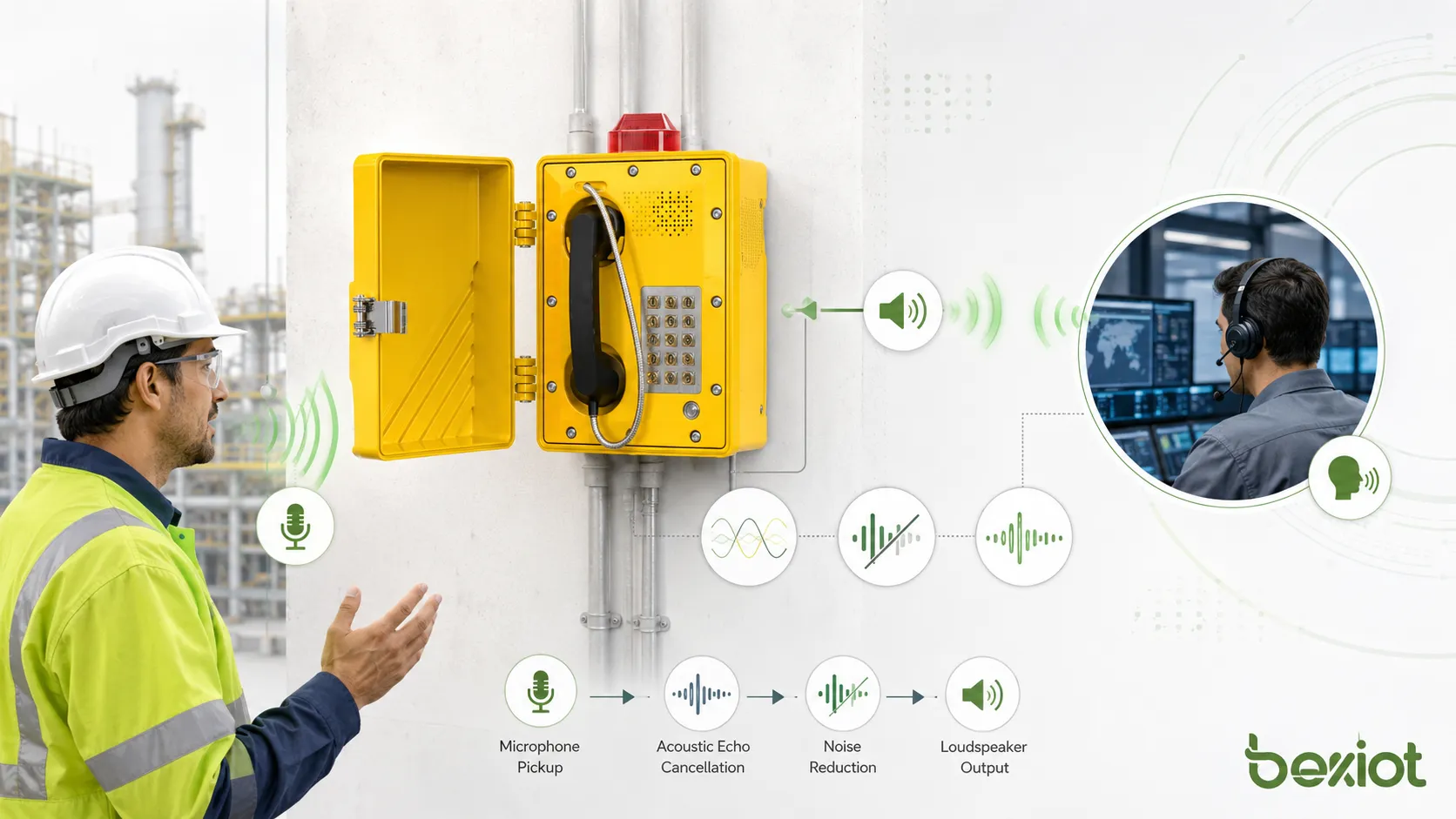
A speakerphone receives voice through a built-in or external microphone and plays the remote party’s voice through a loudspeaker. Unlike a traditional handset, the speaker and microphone are exposed to the surrounding environment, allowing users to speak from a short distance instead of holding the device close to the face.
The device may be part of a desk phone, SIP phone, intercom terminal, conference phone, emergency call station, industrial telephone, video door phone, or integrated communication panel. In modern systems, many speakerphones connect through IP networks, SIP servers, PBX systems, dispatch platforms, or unified communication platforms.
Microphone and Loudspeaker Design
The microphone captures the user’s voice and sends it to the far end. The loudspeaker plays incoming audio at a volume suitable for the local environment. In quiet offices, a small speaker may be enough. In industrial or outdoor areas, higher output power, weatherproof housing, and noise-resistant design may be required.
Speaker placement and microphone sensitivity affect real-world performance. If the speaker is too close to the microphone or the microphone picks up too much background noise, the far-end listener may hear echo, feedback, or unclear speech.
Audio Processing and Echo Control
Because the speaker and microphone operate in the same space, speakerphones need audio processing to prevent the microphone from re-capturing the speaker output. Acoustic echo cancellation, noise reduction, automatic gain control, and full-duplex audio are common technologies used to improve call quality.
Full-duplex operation allows both sides to speak and listen at the same time. This is important for natural conversation. Half-duplex systems may switch between speaking and listening, which can be acceptable in some intercom or paging scenarios but may feel less natural for meetings or command communication.
Core Features That Affect Performance
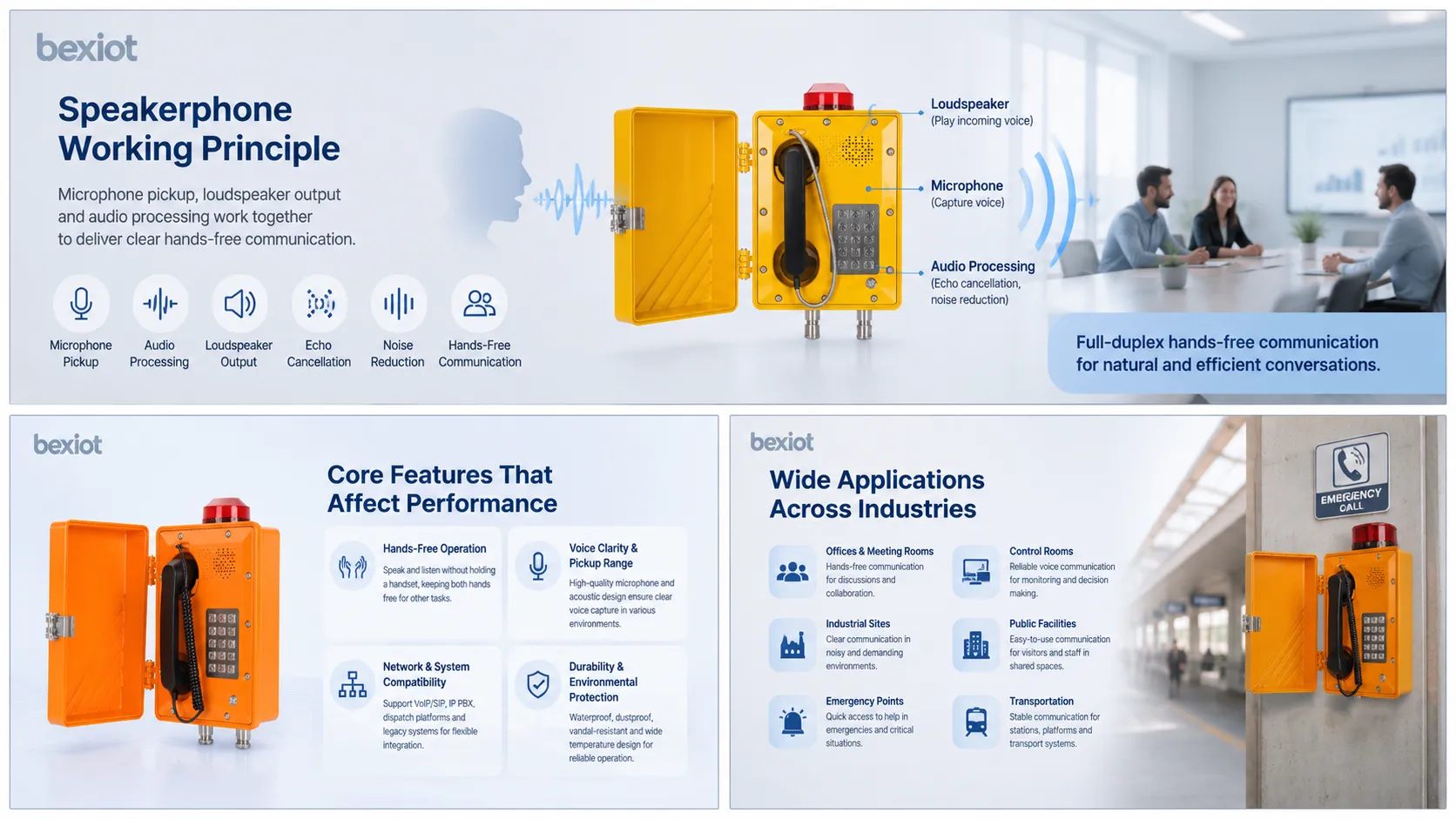
Speakerphone performance depends on more than volume. The most important features include microphone pickup range, speaker loudness, echo control, noise suppression, network compatibility, enclosure protection, installation method, and user interface design.
Hands-Free Operation
The most obvious feature is hands-free talking. Users can speak while checking screens, operating machinery, writing notes, assisting visitors, driving a workflow, or responding to an emergency. This improves convenience and can reduce communication delays.
In shared spaces, hands-free operation also allows multiple people to participate in one conversation. This is useful in meeting rooms, security desks, nurse stations, production lines, maintenance areas, and control rooms.
Voice Clarity and Pickup Range
A good speakerphone should capture speech clearly without requiring the user to stand too close. Pickup range depends on microphone quality, acoustic design, room conditions, background noise, and digital signal processing.
For office meetings, wide pickup may be useful. For industrial sites, focused pickup may be better because it reduces background noise. The best design depends on the actual deployment environment.
Network and System Compatibility
Many modern speakerphones support VoIP or SIP communication. This allows them to register with IP PBX systems, SIP servers, dispatch platforms, recording systems, and communication management platforms.
For legacy or special environments, speakerphone devices may also use analog lines, radio gateways, intercom buses, or dedicated control systems. Before deployment, compatibility with the existing communication architecture should be confirmed.
Durability and Environmental Protection
Speakerphones used in public, outdoor, industrial, or hazardous environments may require stronger protection than office devices. Important factors include waterproof rating, dust resistance, corrosion resistance, impact resistance, temperature range, anti-vandal structure, and explosion-proof certification where applicable.
For example, Becke Telcom EX-BH621 explosion-proof call station can be considered for hazardous industrial areas where hands-free emergency or operational communication must be protected by explosion-proof enclosure design. For harsh outdoor or tunnel-style environments, Becke Telcom BT27 industrial telephone can provide a rugged communication endpoint option where durability and reliable calling are important.
Deployment Benefits for Different Environments
Speakerphones are deployed because they make voice communication easier to start, easier to share, and easier to operate in real working conditions. Their value becomes clearer when the user cannot conveniently hold a handset or when several people need to hear the same conversation.
Faster Communication Access
A speakerphone reduces the steps needed to begin communication. Users can press a call button, answer a call, or activate an intercom without picking up a handset. In time-sensitive scenarios, this can make communication faster and more direct.
Fast access is useful in emergency points, production lines, parking facilities, access gates, elevators, clean areas, control rooms, and service counters. In these spaces, the user may need immediate voice connection with security, dispatch, maintenance, reception, or emergency staff.
Safer Operation in Field Work
In industrial and technical environments, workers may need to keep their hands free for tools, inspection tasks, protective equipment, or machine operation. A speakerphone allows communication while reducing the need to hold a handset or mobile device.
This benefit is especially relevant in maintenance rooms, equipment corridors, utility tunnels, chemical plants, warehouses, ports, and energy facilities. Where environmental risks are higher, the device should match the site’s safety and protection requirements.
Better Group Communication
Speakerphones support group listening and discussion. In a meeting room, several people can participate in a call. In a control room, supervisors and operators can hear the same instruction. At a service desk, staff can communicate with remote support while continuing to view documents or screens.
For group communication, acoustic design is important. Poor room acoustics, reflective surfaces, air-conditioning noise, and wrong microphone placement can reduce clarity even when the device itself has good specifications.
Reduced Wear from Handset Use
In some public or industrial installations, handsets can be damaged, removed, contaminated, or used improperly. A speakerphone-based terminal reduces reliance on a handset and may simplify daily operation.
This is useful for emergency call points, gate intercoms, help points, clean areas, and public access terminals. If the device has no exposed handset cord, there may be fewer mechanical parts to maintain.
Common Deployment Scenarios
Speakerphones are used in many environments because voice communication needs are different from place to place. Some installations focus on convenience, while others focus on safety, emergency response, ruggedness, or system integration.
Office and Meeting Rooms
In offices, speakerphones are common in conference rooms, executive desks, reception areas, shared workspaces, and hybrid meeting setups. They help teams join calls without relying on individual headsets or laptops.
For meeting rooms, important selection factors include pickup range, full-duplex audio, echo cancellation, USB or Bluetooth compatibility, SIP support, mute control, and integration with video conferencing systems.
Industrial Sites and Harsh Environments
Industrial speakerphones may be installed in workshops, production lines, substations, tunnels, ports, mines, chemical plants, power plants, and outdoor equipment areas. These locations may have dust, moisture, noise, vibration, temperature changes, and mechanical impact risks.
In these applications, the speakerphone should be selected according to enclosure rating, audio volume, microphone noise handling, mounting method, power supply, communication protocol, and emergency call requirements. In hazardous zones, explosion-proof certification and site safety rules must be checked carefully.
Emergency Call Points and Help Stations
Speakerphone-style emergency terminals allow users to call for help quickly without handling a separate receiver. A single call button can connect to a security room, control center, emergency operator, or dispatch platform.
These systems may be used in campuses, parking lots, tunnels, elevators, railway stations, public parks, industrial plants, and transportation facilities. They may also integrate with cameras, warning lights, public address systems, and event recording.
Healthcare, Clean Areas, and Service Counters
Speakerphones can support hands-free communication in nurse stations, laboratories, clean rooms, pharmacies, reception counters, and service windows. In these locations, hygiene, easy cleaning, clear speech, and simple operation may be more important than high sound pressure level.
Device surfaces, installation height, cable routing, and cleaning procedures should match the site’s hygiene and maintenance requirements. Touchless or limited-touch operation may be useful in special environments.
Control Rooms and Dispatch Centers
Control rooms may use speakerphones for coordination with field staff, emergency points, plant areas, security desks, maintenance teams, or external departments. The device may be connected to a dispatch console, SIP platform, recording system, or intercom network.
In these systems, call priority, recording, paging linkage, group call, emergency override, and status monitoring can be important. Speakerphones become part of a wider operational communication workflow.
Installation and Planning Considerations
Speakerphone deployment should be planned according to acoustic conditions, network architecture, mounting position, power supply, environmental protection, user behavior, and maintenance access. A device that works well on a desk may not perform well in a noisy industrial corridor or outdoor gate.
Choose the Right Mounting Position
The speakerphone should be installed where users can easily speak toward the microphone and hear the loudspeaker. Wall-mounted devices should be placed at a practical height. Desk devices should not be blocked by monitors, partitions, or equipment.
Avoid placing the device directly beside loud machinery, ventilation outlets, strong echo surfaces, or high-noise sources unless the equipment is designed for that environment. Proper position can improve clarity more effectively than simply increasing volume.
Check Power and Network Requirements
IP speakerphones may use PoE, DC power, or local adapters. Analog or dedicated intercom devices may use different wiring methods. Before installation, confirm cable type, power budget, network switch capacity, VLAN planning, SIP account settings, and emergency backup power requirements.
For critical communication points, network resilience should be considered. Backup power, redundant network paths, local failover, or alternative communication channels may be required depending on project risk level.
Plan for Acoustic Testing
Speakerphone quality should be tested in the real environment, not only in a quiet office. Background noise, reverberation, distance, mounting surface, and nearby equipment can all affect performance.
Commissioning should include test calls, far-end listening checks, microphone sensitivity adjustment, volume adjustment, echo testing, and confirmation of call routing. In emergency systems, test procedures should also verify call priority and response workflow.
Maintenance Tips for Stable Operation
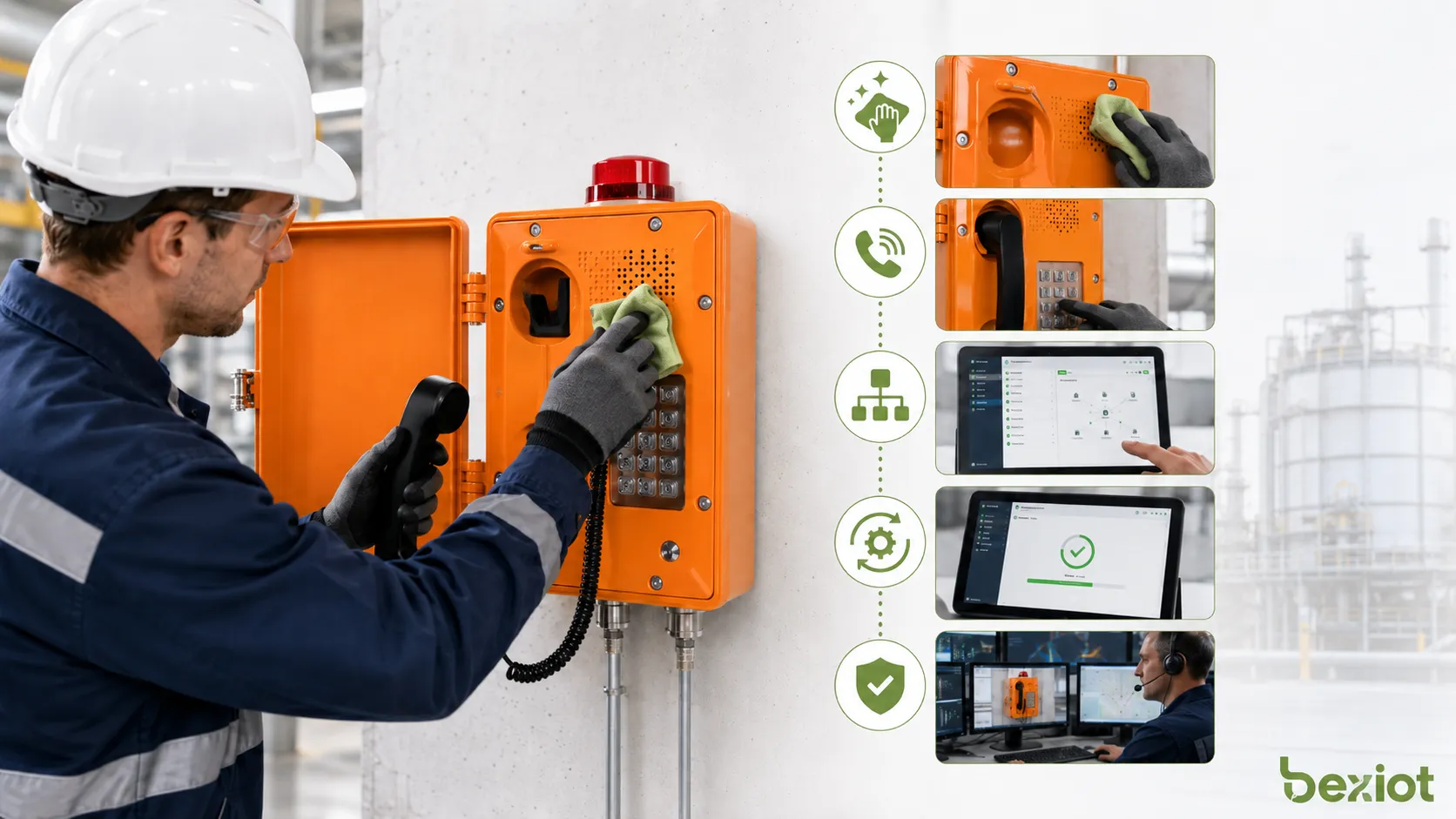
Speakerphones are often simple for users, but they still need maintenance. Dust, moisture, blocked microphone openings, damaged cables, wrong settings, outdated firmware, or network changes can reduce call quality over time.
Inspect Audio Openings and Housing
Microphone holes and speaker grilles should be kept clean. Dust, oil, paint, insects, packaging film, or cleaning residue can block audio paths and reduce clarity. Outdoor or industrial devices should also be checked for enclosure damage, loose covers, corrosion, and cable gland condition.
For harsh environments, inspection frequency should match site conditions. A device in a clean meeting room may need occasional checking, while a device in a tunnel, plant, port, or dusty workshop may need more frequent inspection.
Test Calls Regularly
Regular test calls help confirm that the speakerphone can still connect to the correct destination and that audio quality remains acceptable. Tests should include both local listening and far-end listening.
Emergency call points should be tested according to the site’s safety procedure. The test should confirm call setup, caller location identification, operator response, recording if used, and any linked actions such as camera pop-up or alarm notification.
Review Network and Configuration Changes
IP speakerphones may stop working correctly after network changes, SIP server updates, VLAN adjustments, firewall rule changes, password updates, or platform migration. Maintenance teams should record configuration details and update them when the system changes.
Important configuration items may include IP address, SIP account, server address, codec settings, DTMF mode, call button target, volume level, time server, and access password. Backups can reduce recovery time after device reset or replacement.
Update Firmware Carefully
Firmware updates may fix bugs, improve compatibility, and strengthen security. However, updates should be tested before large-scale deployment, especially in emergency or industrial systems.
After firmware update, technicians should verify call function, audio settings, account registration, button behavior, and integration with PBX, SIP server, dispatch platform, or recording system.
Selection Factors for Reliable Projects
Choosing a speakerphone should begin with the use environment. A meeting-room device, an outdoor emergency intercom, an industrial hands-free telephone, and an explosion-proof call station have very different requirements.
| Selection Factor | Why It Matters | What to Check |
|---|---|---|
| Acoustic performance | Determines speech clarity and listening comfort | Microphone range, speaker volume, echo cancellation, noise reduction |
| Environment | Device must survive the installation site | Waterproof rating, dustproof design, temperature range, corrosion resistance |
| System compatibility | Device must connect to the communication platform | SIP, analog line, PBX, dispatch platform, intercom system, recording support |
| Operation method | Users need fast and simple access | Call button, keypad, emergency button, hands-free answer, visual indicators |
| Maintenance access | Long-term operation depends on easy inspection | Labeling, mounting height, cable access, configuration backup, replaceable parts |
Match the Device to the Noise Level
Noise level is one of the most important selection factors. A low-volume desktop speakerphone may work well in a quiet office but fail in a plant room or tunnel. In noisy environments, higher speaker output, noise reduction, and proper installation position are necessary.
If workers wear hearing protection or machinery is constantly running, the design may require visual indicators, strobe lights, external horn speakers, or integration with public address systems.
Confirm Protection and Certification Needs
Outdoor and industrial installations may need waterproof, dustproof, anti-corrosion, and impact-resistant devices. Hazardous areas may require certified explosion-proof equipment, and this must match the site’s hazardous area classification.
Product selection should not be based only on appearance. The device must meet environmental, safety, electrical, and communication requirements defined by the project.
Consider Future Integration
A speakerphone may start as a simple call point but later become part of a larger communication system. It may need integration with video monitoring, access control, alarms, public address, dispatch, recording, or maintenance platforms.
For this reason, IP/SIP compatibility, remote management, status monitoring, and configuration backup can be valuable in medium and large projects.
Common Problems and How to Avoid Them
Many speakerphone issues come from poor installation rather than device failure. Echo, low volume, unclear voice, wrong call routing, and intermittent registration often result from acoustic, network, or configuration mistakes.
Echo and Feedback
Echo may occur when the microphone captures sound from the loudspeaker. Feedback may occur when audio loops through the system and becomes unstable. These problems are more likely in reflective rooms, narrow corridors, or locations with high volume settings.
To reduce echo and feedback, use proper device placement, avoid excessive volume, enable echo cancellation, reduce reflective surfaces where possible, and test the far-end audio during commissioning.
Low Speech Clarity
Low speech clarity can be caused by background noise, blocked microphone openings, poor microphone direction, low-quality codec settings, packet loss, or incorrect gain levels. In noisy sites, simply increasing speaker volume may not solve the issue.
A better approach is to improve microphone placement, use noise reduction, choose suitable codecs, check network quality, and select devices designed for the environment.
Unreliable Network Registration
IP speakerphones may show registration failures if SIP credentials, server address, DNS, VLAN, firewall, NAT traversal, or network stability is incorrect. These problems can affect call availability even when the device hardware is normal.
Maintenance teams should document network settings and verify registration status after any network or platform change. Remote monitoring can help detect problems before users need the device.
FAQ
What is a speakerphone?
A speakerphone is a hands-free voice communication device or function that uses a microphone and loudspeaker so users can talk and listen without holding a handset. It may be built into a desk phone, SIP terminal, intercom, conference phone, or emergency call station.
Where are speakerphones commonly used?
Speakerphones are commonly used in offices, meeting rooms, control rooms, emergency call points, industrial sites, public service counters, healthcare areas, transportation facilities, campuses, and building communication systems.
What is the main benefit of a speakerphone?
The main benefit is hands-free communication. Users can speak while working, checking screens, assisting others, operating equipment, or responding to emergencies. It also allows multiple people to join the same conversation more easily.
What should be checked before deploying speakerphones?
Key checks include noise level, mounting position, microphone range, speaker volume, power supply, network connection, SIP or PBX compatibility, environmental protection, emergency call routing, and maintenance access.
How should speakerphones be maintained?
Maintenance should include cleaning microphone and speaker openings, inspecting housing and cables, performing regular test calls, checking network registration, backing up configuration, reviewing firmware updates, and verifying emergency call functions where applicable.
Can speakerphones be used in hazardous or harsh industrial areas?
Yes, but the device must match the environment. Hazardous areas may require explosion-proof call stations such as Becke Telcom EX-BH621, while harsh outdoor or tunnel environments may require rugged industrial telephone options such as Becke Telcom BT27. Final selection should follow site safety and installation requirements.







