A SIP intercom is an IP-based communication endpoint that uses the Session Initiation Protocol (SIP) to set up and manage voice or video calls across a network. In practical deployments, it is often used at entrances, corridors, gates, workshops, stations, help points, and control locations where people need fast, direct communication with a guard desk, office, control room, or dispatch platform.
Compared with traditional analog intercoms, a SIP intercom is easier to integrate into modern communication architecture. It can work with SIP phones, IP PBX systems, softphones, video management platforms, and access control systems, allowing organizations to build a more unified communication and security workflow instead of operating isolated devices.
What Is a SIP Intercom?
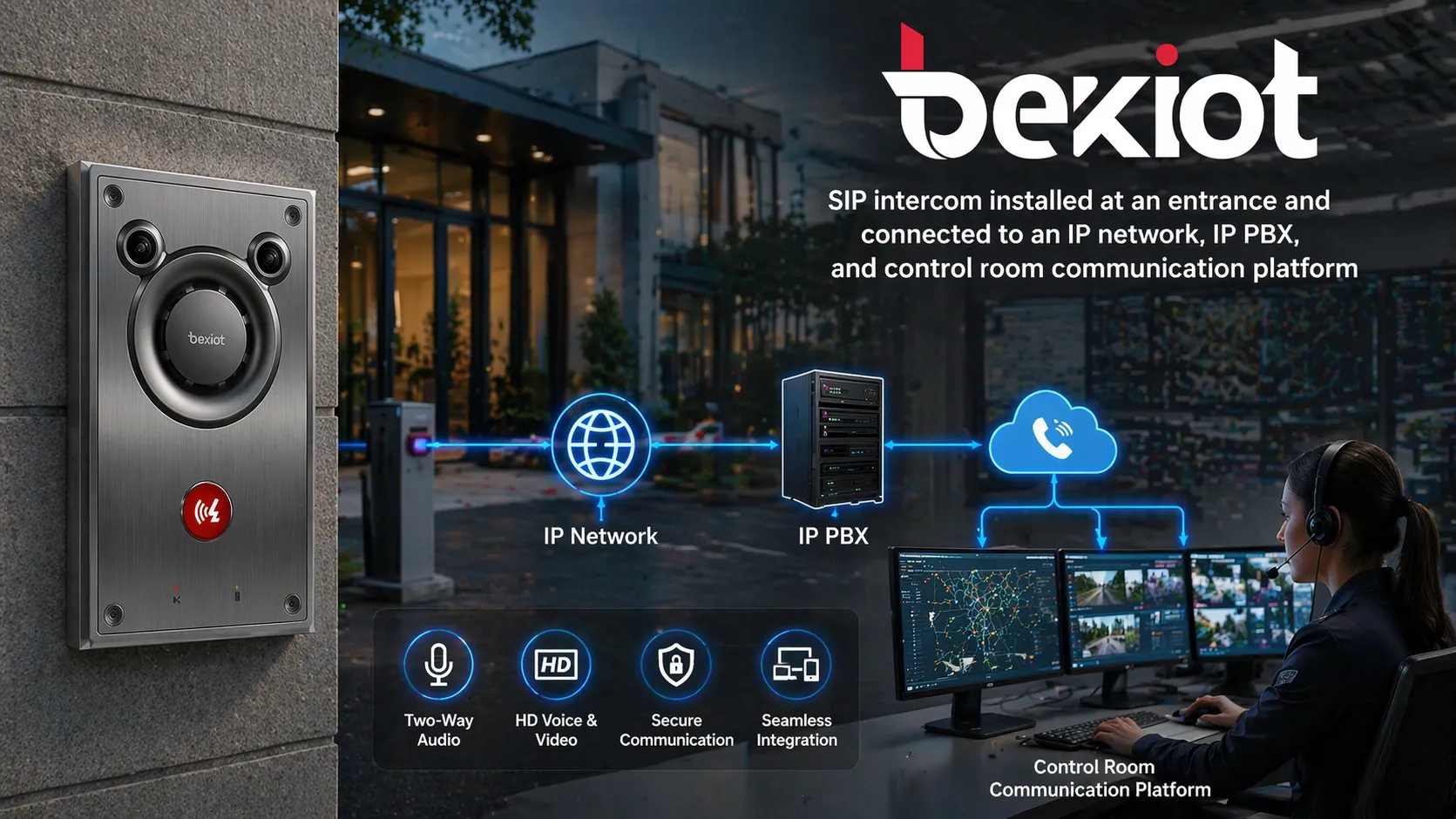
A SIP intercom is a network intercom terminal that communicates over Ethernet or other IP infrastructure and uses SIP signaling to establish sessions. That means the device can register to a SIP server such as an IP PBX, or in some deployments call SIP phones and related endpoints directly within the same IP environment. The result is a flexible intercom architecture that fits naturally into enterprise and industrial voice networks.
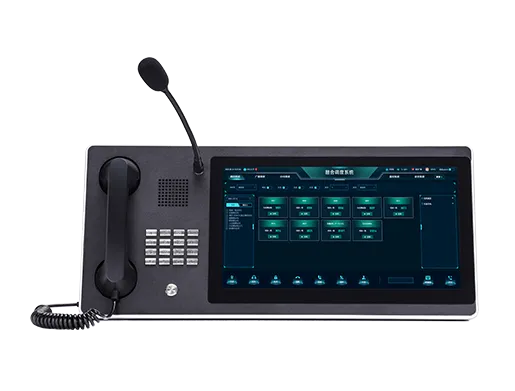
Depending on the model and deployment goal, a SIP intercom may be audio-only or audio-and-video. It may include a handset-free speakerphone design, a call button, a keypad, a camera, relay outputs for door or gate control, digital inputs for alarms, and support for monitoring, broadcasting, or event reporting. In many projects, the intercom is not treated as a standalone box. It is part of a wider system that connects communication, access management, and emergency response.
A well-designed SIP intercom is more than a calling device. It becomes a visible field endpoint for communication, verification, and coordinated response.
How Does a SIP Intercom Work?
SIP Registration and Call Setup
The intercom connects to the local IP network and is assigned network parameters just like other IP devices. It can then register with a SIP server, IP PBX, or compatible communication platform. Once registered, it can initiate a call to a predefined extension, ring group, security desk, nurse station, dispatch console, or emergency response point when a visitor or field worker presses the call button.
When the called party answers on a desk phone, soft client, indoor station, or dispatch console, the intercom opens a two-way audio path. If the device supports video, it can also send live video to the answering endpoint, giving the operator both voice contact and visual confirmation. This is especially useful at remote doors, unmanned gates, campus entrances, equipment rooms, and public assistance points.
Media, Control, and Event Linkage
After the SIP session is established, the intercom handles real-time media transmission for voice and, where supported, video. In addition to the call itself, many SIP intercoms include local control interfaces such as relay outputs, alarm inputs, or integration APIs. These functions allow the answering party or the platform to trigger actions such as unlocking a door, opening a gate, activating a strobe, starting a recording workflow, or forwarding an alarm event.
Because the device operates on IP infrastructure, it can also be linked with broader systems. A call event can be associated with video surveillance, access logs, event pop-ups, or dispatch records. In more advanced deployments, SIP intercoms may also be tied to paging, multicast audio, emergency escalation rules, or centralized monitoring so that multiple endpoints and operators can cooperate around the same incident.
Core Functions of a SIP Intercom
Instant Two-Way Communication
The most basic function of a SIP intercom is immediate point-to-point or point-to-group communication. A person at an entrance, production line, roadside help point, platform edge, or service counter can press a button and reach the correct team without searching for a phone number. This shortens response time and reduces friction during routine requests and urgent situations alike.
For organizations, this simplicity matters. One-button communication is often more reliable than asking visitors, passengers, patients, or field personnel to locate another device. In time-sensitive environments, direct contact to the right destination can improve both safety and service quality.
Video Verification and Remote Entry Control
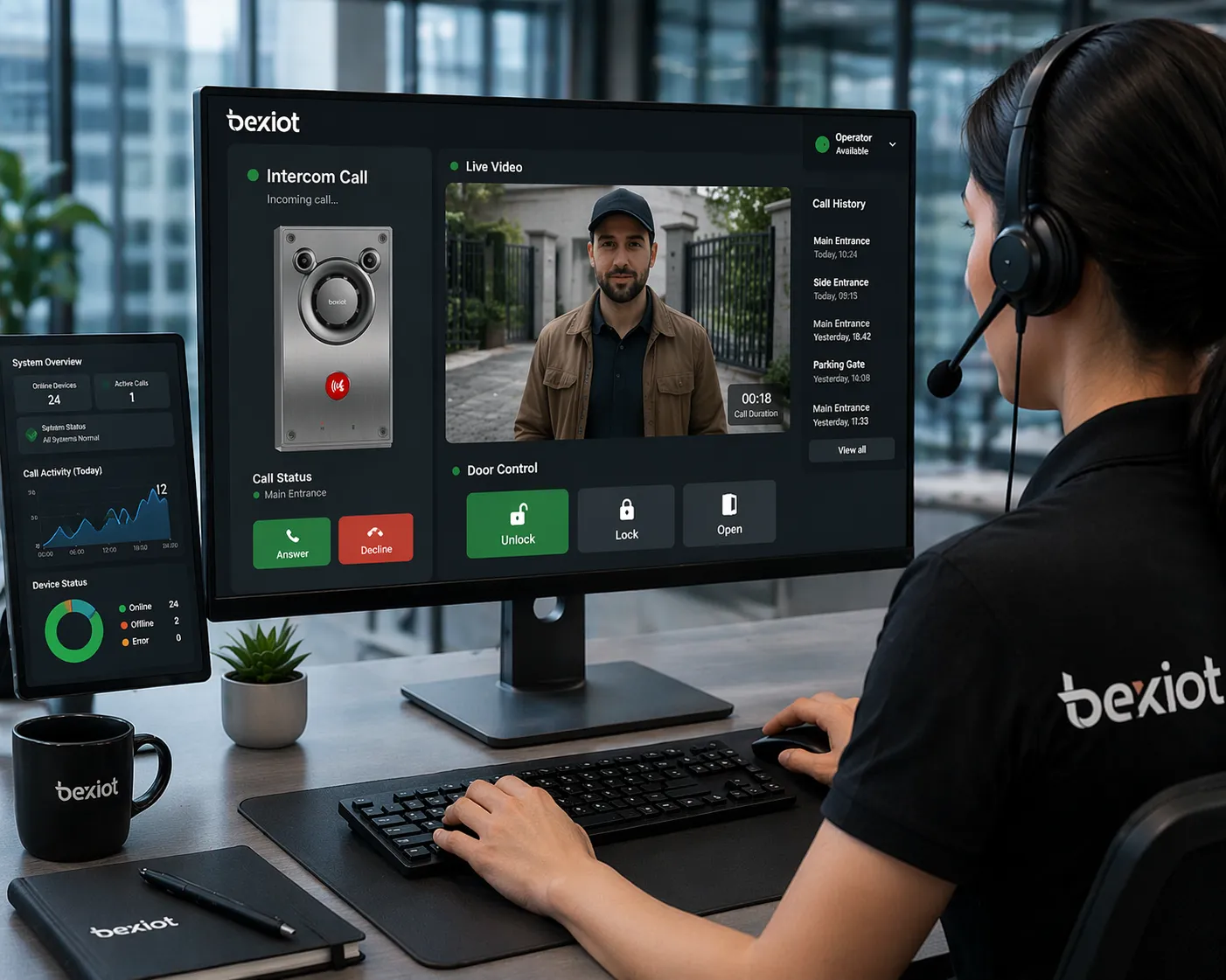
Many SIP intercom systems combine calling with video verification. The operator can see who is at the door or help point, speak with them, and then decide whether to grant access or escalate the situation. This supports a more controlled entry process than audio-only workflows, particularly in corporate offices, residential sites, logistics areas, laboratories, schools, and healthcare facilities.
When relay control is available, the SIP intercom can also support remote unlocking of doors, gates, barriers, or turnstiles. In practical terms, communication and access action happen inside the same workflow: identify, speak, decide, and release access where appropriate. This reduces the need for separate isolated systems and manual handoffs.
Integration with IP PBX and Unified Communications
One of the strongest advantages of SIP intercom technology is that it can fit into a broader SIP-based voice environment. Instead of requiring a separate proprietary intercom network, it can usually work with SIP phones, extension plans, ring groups, call routing policies, voicemail, time schedules, and operator consoles already present in an IP PBX or unified communications deployment.
This gives organizations more freedom in system planning. The intercom is no longer an isolated security endpoint. It becomes another manageable SIP device in the communication estate, which simplifies extension mapping, user training, maintenance, and expansion across multiple buildings or sites.
Alarm, Broadcast, and Workflow Linkage
In many real-world projects, a SIP intercom is used together with event inputs, local outputs, public address functions, or platform logic. A call button can trigger a priority call. A forced door condition can generate an alert. A help point can be linked with nearby cameras. A safety event can send the call to a control room first and then escalate to a wider response team if unanswered.
This is where system value becomes more obvious. A SIP intercom helps build not only communication, but also operational workflows. It creates a bridge between the field edge and the coordination layer of the organization.
The value of a SIP intercom rises sharply when it is connected to PBX logic, video visibility, access control, and dispatch response instead of being left as a standalone endpoint.
What System Value Does a SIP Intercom Create?
Higher Response Efficiency
Because SIP intercoms can route calls intelligently within an IP system, requests can be directed to the right desk, team, or group the first time. The call can follow business hours, security schedules, failover rules, or escalation logic. This reduces missed calls, manual transfers, and confusion over who should respond.
For distributed organizations, the benefit is even greater. Multiple buildings, gates, remote equipment points, and public call stations can be managed through one communication framework instead of many disconnected local systems.
Better Security and Situational Awareness
When audio, video, and access actions are combined, operators gain more context before they act. They can verify identity, assess urgency, and decide whether to open a door, dispatch a guard, contact maintenance, or trigger a broader response. In public-facing environments, this makes the interaction safer and more accountable.
In industrial or critical sites, the intercom also gives field personnel a fixed, dependable point of contact that does not rely on personal mobile coverage or ad hoc communication methods. That can be important in noisy areas, controlled zones, and infrastructure sites where communication needs to be immediate and structured.
Lower Complexity in Multi-System Environments
Traditional projects often accumulate separate subsystems for entry communication, help points, paging, desk telephony, and event notification. A SIP intercom helps reduce that fragmentation by using open IP and SIP-based communication principles. Even when multiple platforms remain in place, the intercom can often act as a more interoperable edge device than older legacy alternatives.
This does not mean every deployment becomes simple automatically. Design still matters. But from a system architecture perspective, SIP intercoms support a clearer path toward standardization, centralized administration, and scalable expansion.
Scalability from One Site to Many
A SIP intercom system can start with one entrance or one remote help point and then grow into a larger estate. New endpoints can be added to other buildings, parking areas, workshops, perimeter gates, tunnel sections, platforms, dormitories, or service counters while still using the same communication core. This makes SIP intercoms attractive for organizations that plan phased upgrades instead of one-time total replacement.
For enterprises with multiple branches or industrial zones, this scalability supports more consistent user experience and centralized management. Teams can deploy a common communication model even when the sites themselves have different security and operational needs.
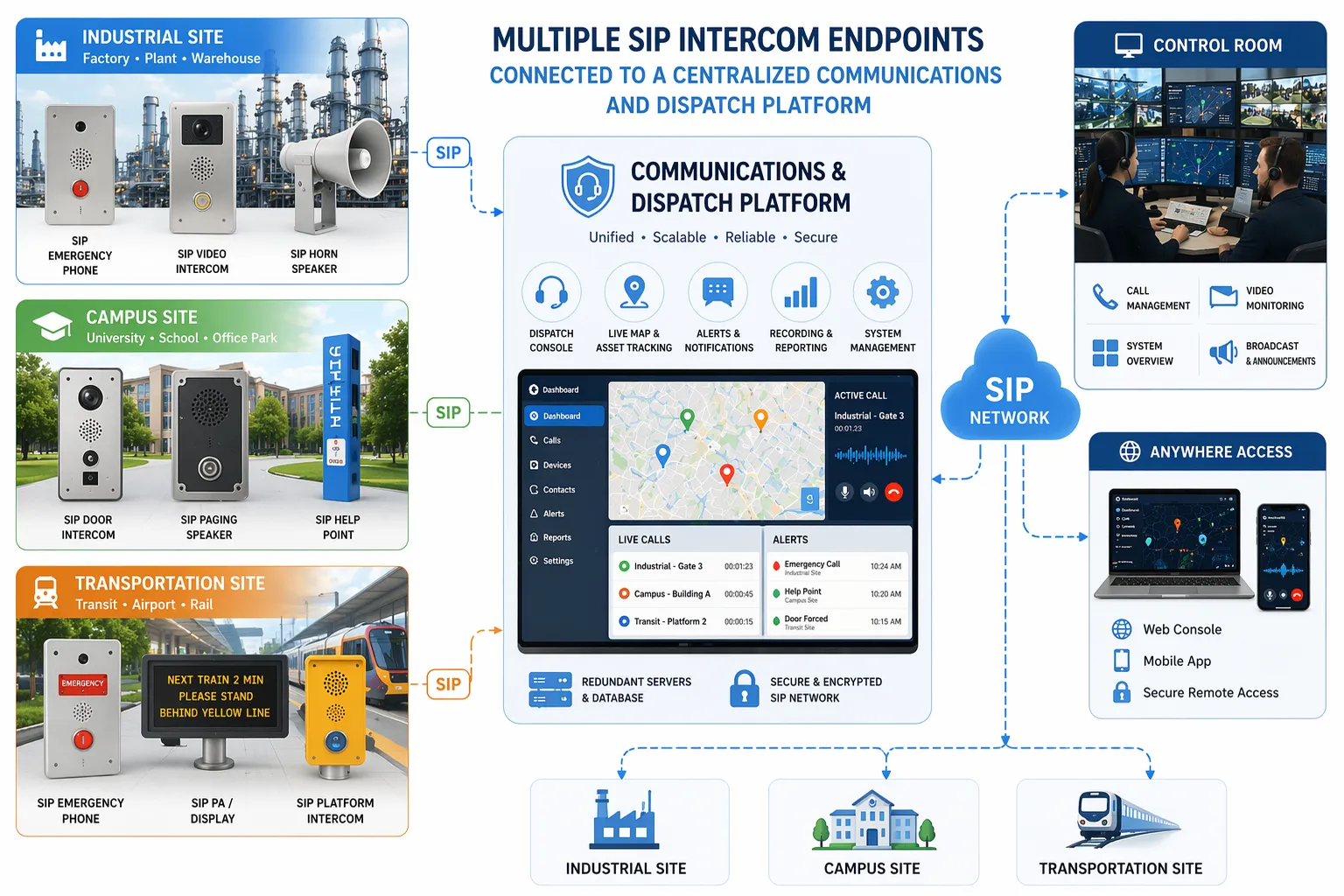
Where Are SIP Intercoms Used?
Commercial Buildings and Campuses
In office buildings, schools, residential complexes, and mixed-use campuses, SIP intercoms are often used at doors, lobbies, gates, parking entrances, delivery points, and reception boundaries. They help connect visitors with reception staff, tenants, guards, or property teams while supporting controlled access and faster service handling.
Because these environments often already use IP networking and centralized communications, SIP intercom deployment is usually a natural fit. It also supports future convergence with video, directory services, and remote management tools.
Industrial and Utility Sites
Factories, energy facilities, warehouses, ports, process plants, and utility infrastructures use SIP intercoms where workers need reliable fixed-point communication with a control room, supervisor desk, or dispatch center. In these environments, the value is not just visitor handling. It is also operational coordination, fault reporting, access communication, and emergency contact at critical points.
For harsh or high-noise deployments, organizations often select industrial-grade or explosion-protected SIP intercom variants with stronger enclosure design, high-visibility call interfaces, and better environmental resistance. The SIP layer remains important because it keeps these field devices connected to the wider communication system instead of leaving them isolated.
Transportation and Public Assistance Points
Stations, tunnels, platforms, roadside call points, parking facilities, airports, and public service areas use SIP intercoms to give passengers or the public a direct route to assistance. In these use cases, speed and clarity matter. A simple press-to-call workflow can help reduce panic, support incident reporting, and direct people to the right support team.
When integrated with a control center, the intercom can also support coordinated response with CCTV, announcements, or dispatch actions. That makes it useful not only for customer service, but also for safety management.
Healthcare and Care Environments
Hospitals, clinics, assisted living sites, and controlled medical areas can use SIP intercoms at entrances, restricted departments, pharmacy pickup points, delivery boundaries, and emergency access locations. In these scenarios, the intercom supports communication while reducing unnecessary physical contact and helping staff control entry more efficiently.
When linked with desk phones or nurse and security workflows, the intercom becomes part of a broader operational process that balances safety, access control, and responsiveness.
What Should You Consider When Choosing a SIP Intercom?
Audio Quality and Environment
Not every SIP intercom is suited for every site. In quiet indoor areas, a compact model may be enough. In outdoor or industrial environments, factors such as speaker power, microphone pickup, echo handling, noise conditions, weather exposure, and mounting method become much more important. The correct device should match the actual acoustic and environmental conditions of the site.
It is also worth reviewing whether the intercom will be used mainly for visitor calls, emergency help, gate communication, or industrial coordination. Those goals influence button layout, visibility, durability, and the required user interaction model.
Integration Requirements
Before selecting a model, it helps to define what the intercom must connect to. Some projects only need SIP calling to an IP PBX. Others require video, remote unlock, camera linkage, event inputs, API integration, multicast audio, or centralized provisioning. The right product is the one that fits the real system workflow, not just the one that can place a basic SIP call.
For larger deployments, management and compatibility become critical. Provisioning method, firmware maintenance, network security options, and interoperability with existing SIP phones, platforms, and control systems all affect long-term project success.
Deployment Scale and Future Expansion
A small standalone gate project may only need a few endpoints. A campus, transportation network, or industrial group may need dozens or hundreds. Choosing a SIP intercom should therefore include not only today’s site count, but also future expansion plans. A platform-friendly solution usually provides more room for growth, reporting, and standardized operation.
In many cases, buyers benefit from viewing the SIP intercom as part of the full communication architecture rather than as an isolated hardware purchase. That perspective usually leads to better system value over time.
Conclusion
A SIP intercom is an IP-based communication endpoint that brings voice, and often video plus control functions, into a unified network workflow. Its importance lies not only in enabling someone to press a button and talk. Its real value comes from how it connects field communication with PBX services, access control, video visibility, event handling, and centralized response.
For modern buildings, industrial facilities, transportation sites, and public service environments, SIP intercoms offer a practical path toward more connected and scalable communication infrastructure. When matched to the right environment and integrated into the right platform, they can improve response speed, operational visibility, and daily coordination across the site.
Becke Telcom provides SIP intercom and industrial communication solutions for projects that require dependable voice connectivity, system integration, and deployment flexibility. For entrance communication, emergency help points, industrial communication nodes, or multi-site unified response systems, the right SIP intercom design can deliver long-term operational value rather than just basic call functionality.
FAQ
Is a SIP intercom the same as an analog intercom?
No. An analog intercom usually depends on a dedicated analog wiring model and more limited integration. A SIP intercom works on IP networks and can be integrated more easily with IP PBX systems, SIP phones, software clients, and other network-based platforms.
Can a SIP intercom work without an IP PBX?
In some deployments, yes. Certain SIP intercoms can call SIP endpoints directly or operate in small peer-style environments. However, an IP PBX or central platform is often preferred when organizations need routing logic, group handling, scalability, centralized administration, or integration with wider communication workflows.
Does a SIP intercom always include video?
No. Some SIP intercoms are audio-only, while others include a camera and video-related functions. The right choice depends on whether the site needs visual verification, remote entry decisions, or only voice communication.
Where is a SIP intercom most useful?
SIP intercoms are widely used at doors, gates, reception points, workshops, public assistance points, platforms, campuses, healthcare entrances, and industrial field locations where fast fixed-point communication is required.