


Queue management is the process of organizing, routing, monitoring, and improving how incoming requests wait for service. In communication systems, it is most often used for phone calls, help desk requests, service hotlines, emergency support lines, visitor assistance, customer service centers, and internal dispatch workflows. The goal is to make sure each request reaches the right person or team in a controlled, fair, and measurable way.
A queue is more than a waiting line. A good queue management system decides how calls enter, how users are informed while waiting, which agent or department should answer first, what happens when the wait is too long, how calls are escalated, and how managers can evaluate service performance. For organizations that handle many calls or service requests, queue management directly affects customer experience, staff efficiency, response speed, and operational visibility.
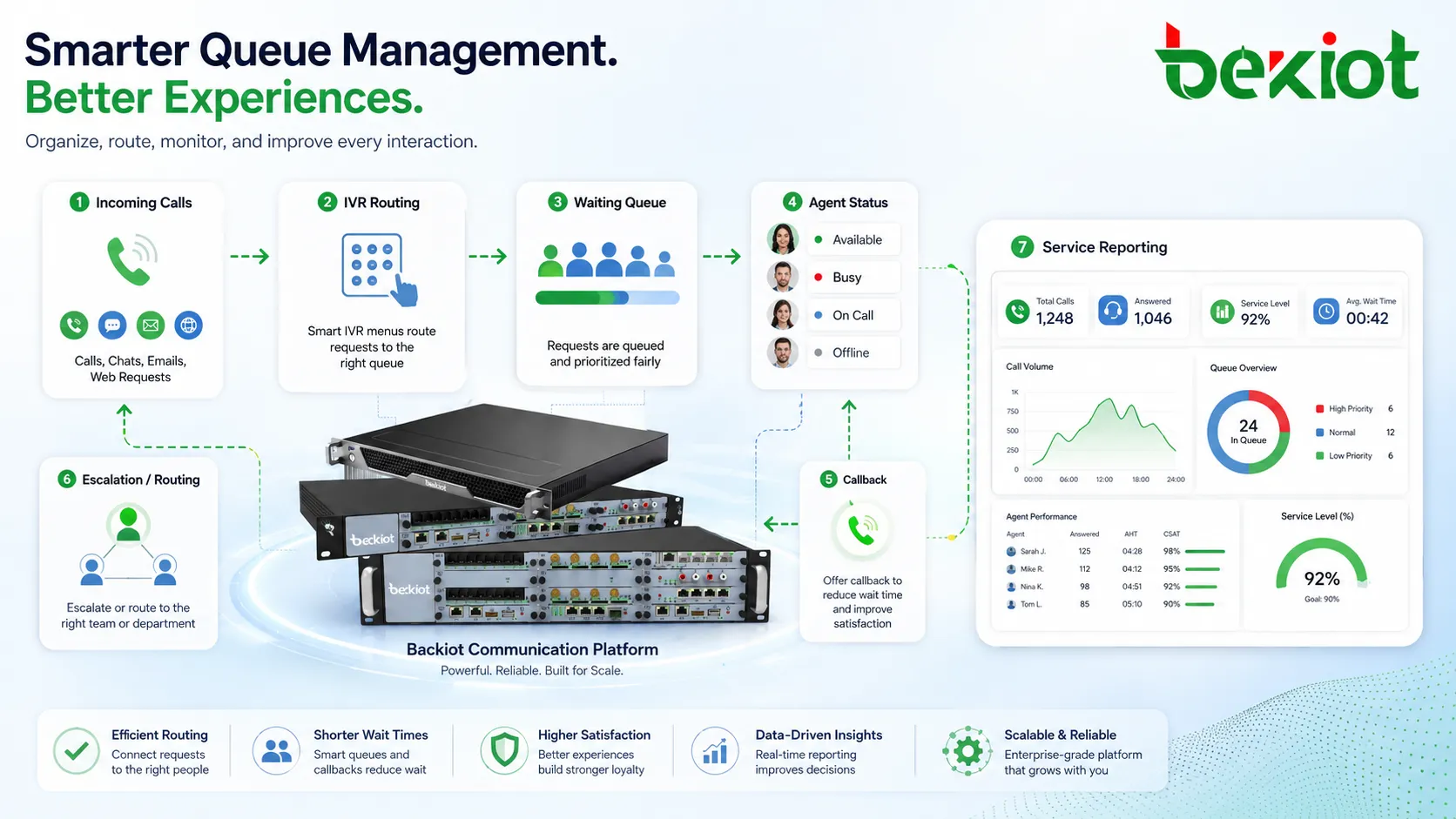
Queue Management in Simple Terms
It controls waiting, routing, and service order
In a basic phone system, multiple callers may dial the same service number at the same time. Without queue management, some calls may fail, ring randomly, or overload a small group of staff. Queue management creates a structured waiting process. Callers can be placed in order, routed by priority, played announcements, transferred to suitable agents, or offered alternatives such as callback.
This structure is especially useful when call volume changes throughout the day. A customer service team may receive many calls in the morning. A maintenance hotline may become busy after an equipment fault. A hospital, hotel, campus, factory, or municipal service center may need to handle peaks without losing every caller who cannot be answered immediately.
It is not limited to call centers
Queue management is often associated with customer service call centers, but the idea applies to many communication and service environments. It can be used for reception desks, security offices, technical support teams, dispatch centers, public service counters, healthcare appointment lines, field maintenance hotlines, transportation service desks, and emergency assistance workflows.
The same logic can also be extended beyond voice. Modern queue systems may coordinate voice calls, web chats, emails, app requests, video intercom calls, ticketing tasks, and walk-in service counters. The shared principle is the same: requests should be organized so the right resource handles the right user at the right time.
How Queue Management Works
Request entry and identification
The process starts when a user enters the system through a phone number, SIP trunk, website button, mobile app, help point, intercom, self-service terminal, or service counter. The system identifies the request source, selected option, caller number, language preference, service category, location, or priority level.
In phone-based systems, an IVR menu may ask the caller to choose sales, support, repair, billing, emergency assistance, or operator service. In internal systems, the source device may already identify the location or department. This early identification helps the system decide which queue should receive the request.
Waiting logic and service rules
Once a request enters a queue, the system applies rules. The most common rule is first-in, first-out, where the earliest request is served first. More advanced systems may use priority queues, skill-based routing, VIP handling, language-based routing, location-based routing, service-level targets, or emergency override.
While users wait, the system may play estimated wait time, queue position, service announcements, music, safety messages, or instructions. It may also offer callback, voicemail, self-service transfer, or escalation if the wait becomes too long.
Agent assignment and completion
The queue system checks which agents or service resources are available. It may consider login status, busy status, break status, skill group, call history, workload balance, and maximum ring time. When a suitable agent becomes available, the system delivers the request and removes it from the waiting queue.
After the interaction is finished, the system can record call duration, wait time, answer time, abandoned calls, transfer behavior, missed calls, agent status, and service result. These records help managers understand whether the queue design is working well.
Core Features of Queue Management
Automatic call distribution
Automatic call distribution, often called ACD, sends incoming calls to available agents according to predefined rules. It prevents all calls from ringing one phone and helps distribute workload more fairly across a team. ACD can use simple round-robin routing, longest-idle routing, least-busy routing, priority routing, or skill-based routing.
For small teams, simple distribution may be enough. For larger service centers, ACD rules should match real staff roles and customer needs. A technical support request should not be routed randomly to someone who only handles billing, and an urgent service line should not wait behind low-priority calls if the workflow requires faster response.
Skill-based and priority routing
Skill-based routing connects users to agents with the right knowledge, language, region, product responsibility, or service authority. Priority routing gives certain requests faster handling based on business rules, caller identity, incident type, contract level, emergency status, or operating schedule.
These features are useful when one organization handles different customer groups or service scenarios. A utility company may separate outage calls from general billing calls. A hotel may route guest service requests differently from vendor calls. A manufacturer may route production fault reports differently from routine administration calls.
Announcements, music, and wait-time information
Queue announcements help users understand that their request has been received and is waiting for service. This reduces uncertainty and can lower the chance of callers hanging up. The system may announce the estimated wait time, queue position, business hours, safety information, required documents, or alternative service channels.
These messages should be useful and not excessive. Long, repetitive, or unclear announcements can frustrate users. Good queue design keeps messages short, relevant, and updated according to the actual service situation.
Callback and overflow handling
Callback allows users to keep their place in line without staying on the phone. This is useful when wait times are long or when users are calling from mobile phones. Overflow handling sends requests to another team, backup agent group, voicemail, supervisor, or external service when the main queue is overloaded.
Both features improve resilience. Instead of forcing users to abandon the call, the system creates another path for service. This is valuable during peak hours, emergencies, campaigns, seasonal demand, staffing shortages, or unexpected system incidents.
Real-time monitoring and historical reports
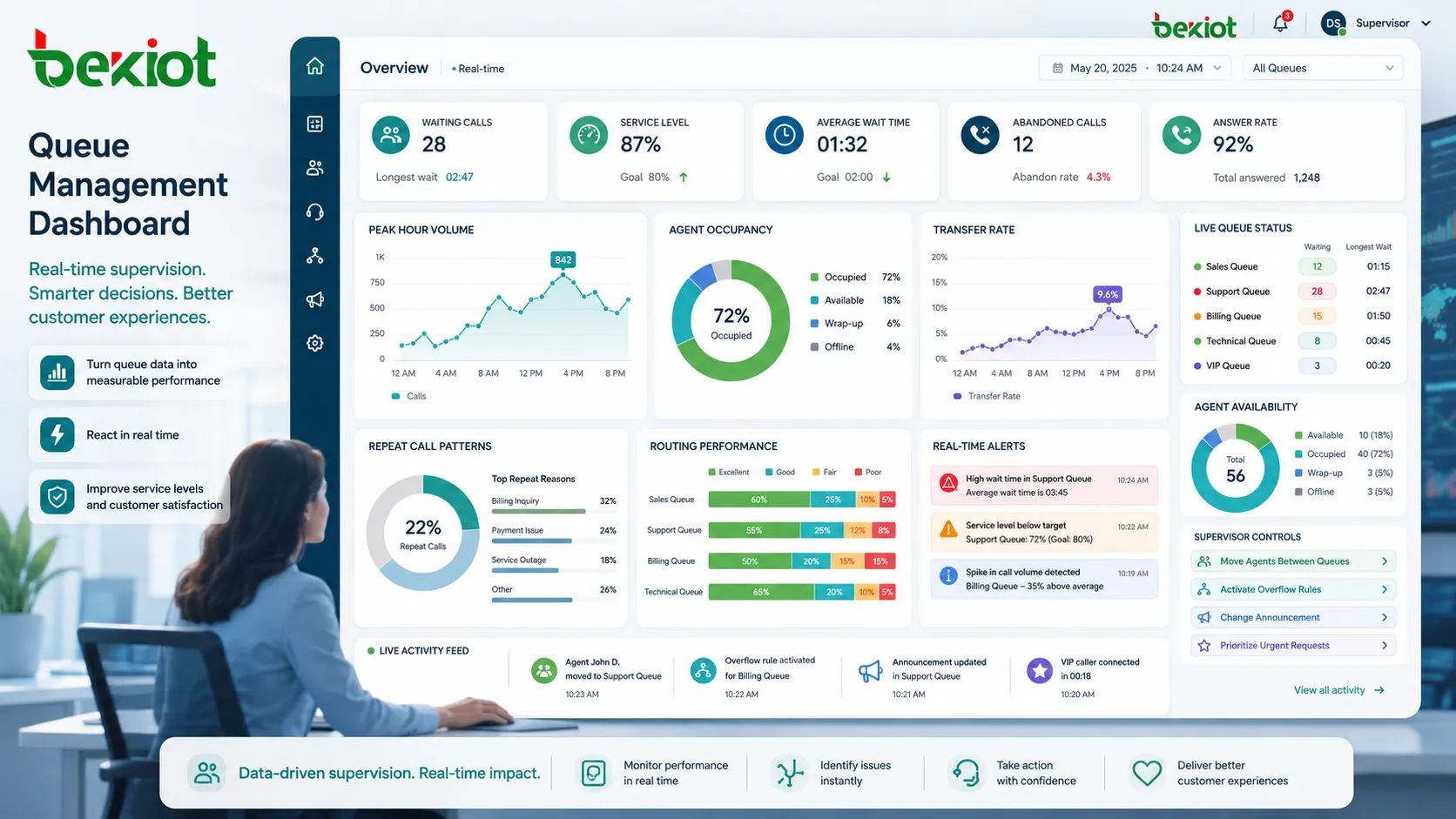
Queue management systems usually provide dashboards and reports. Supervisors can see how many calls are waiting, how long users have waited, which agents are available, which queues are overloaded, and whether service targets are being met.
Historical reports show patterns over days, weeks, or months. They help managers plan staffing, adjust routing, improve announcements, identify training needs, and redesign workflows. Without reporting, queue management becomes a hidden process rather than a measurable service tool.
Queue management is not only about making people wait. It is about controlling how waiting happens, how service resources are used, and how every request moves toward a result.
Why Organizations Use Queue Management
It improves user experience during busy periods
When users cannot be answered immediately, the next best thing is a predictable waiting experience. Queue management lets users know that their request has entered the system, explains what may happen next, and reduces the feeling of being ignored. This is important for customer service, public service, technical support, healthcare, transport, and emergency assistance lines.
A well-designed queue can reduce repeated dialing and unnecessary transfers. Users are more likely to stay connected when they understand their position, hear relevant information, or receive a callback option.
It helps teams work more efficiently
For service teams, queue management reduces chaos. Agents do not need to manually decide which ringing call to answer first. Supervisors can monitor workload and adjust resources. Departments can separate different types of requests without creating too many public phone numbers.
This improves internal efficiency because staff can focus on the requests they are qualified to handle. It also reduces the risk that important calls are missed because they arrived during a temporary workload spike.
It makes service performance measurable
Queue data turns service performance into measurable information. Managers can review average wait time, answer rate, abandonment rate, service level, peak hour volume, agent occupancy, transfer rate, and repeat call patterns. These metrics help identify whether the issue is staffing, routing design, announcement quality, process complexity, or user demand.
The value is not only reporting after the fact. Real-time visibility allows supervisors to respond during the event. They can move agents between queues, activate overflow rules, change announcements, or prioritize urgent requests when needed.
Applications in Different Environments
Customer service and contact centers
Contact centers use queue management to handle sales inquiries, after-sales service, billing questions, complaints, technical support, appointment requests, and account services. Calls can be separated by language, customer type, product line, contract level, or support category.
In these environments, queue design affects brand perception. A short wait with clear routing and useful announcements feels very different from an unclear wait with repeated transfers. Good queue management helps the organization appear more responsive and organized.
Enterprise reception and internal support
Companies use queue management for reception desks, IT help desks, facility service, HR support, internal maintenance, and security offices. Instead of depending on one receptionist or one shared phone, calls can be distributed to multiple available staff members.
Internal queues can also support hybrid work. Agents may answer from desk phones, softphones, mobile clients, or remote extensions while the system still manages queue order and reporting.
Healthcare and public services
Hospitals, clinics, municipal hotlines, social service centers, and government offices often handle high request volume. Queue management can route appointment calls, consultation requests, department inquiries, emergency assistance, and public information lines to suitable teams.
These environments require clear announcements and careful prioritization. Some users may be elderly, anxious, or unfamiliar with digital self-service. A queue should reduce confusion rather than create another barrier.
Transportation, logistics, and field operations
Transport operators, warehouses, ports, parking facilities, railway stations, airports, and logistics centers use queue management for dispatch coordination, driver assistance, gate communication, service desks, maintenance reporting, and incident handling.
In field operations, requests may come from phones, intercoms, service terminals, or control room systems. Queue management helps separate routine requests from urgent operational issues and ensures that field calls do not disappear during busy periods.
Design Considerations Before Deployment
Map the real service journey
Before configuring queues, organizations should map how users actually request service. Important questions include who is calling, why they are calling, when volume is highest, which requests are urgent, which team should answer, and what information the caller needs before reaching an agent.
A queue should follow the real service journey rather than only the internal department chart. If the menu and queue structure reflect internal office names more than user needs, callers may choose the wrong option and increase transfer volume.
Keep queue rules understandable
Complex routing can be powerful, but too much complexity makes maintenance difficult. Each queue should have a clear purpose, owner, schedule, overflow path, service target, and reporting logic. If no one understands why a call went to a certain group, troubleshooting becomes slow.
For many organizations, it is better to start with a clean design and improve it gradually. Queue rules can evolve after real call data shows where users wait too long, abandon calls, or select the wrong menu option.
Plan staffing around demand patterns
Queue management cannot solve every staffing problem by itself. If call volume is consistently higher than available staff capacity, users will still wait too long. Queue data should be used to plan shifts, cross-train agents, add backup teams, and adjust service hours.
Demand may vary by hour, day, season, campaign, outage, or public event. A good queue design gives managers enough information to match staffing with real workload instead of guessing.
Common Mistakes to Avoid
Using too many menu options
A long IVR menu can frustrate callers and increase wrong selections. Users should be able to reach the right queue quickly. If the system needs many categories, it may be better to redesign the service process or use caller data to simplify routing.
Short menus, clear wording, and logical option order can improve completion rates. The most common or urgent options should usually be easier to reach.
Letting announcements become outdated
Queue announcements are part of the service experience. If they mention old business hours, outdated promotions, wrong instructions, or unavailable services, callers lose trust. Announcement content should be reviewed regularly.
Temporary messages can be useful during outages, holidays, maintenance periods, or high-volume events. They should be removed when they are no longer relevant.
Measuring only average wait time
Average wait time is useful, but it does not tell the whole story. A queue may have an acceptable average while some users wait far too long. Managers should also review longest wait time, abandonment rate, service level, repeat calls, transfer rate, and queue distribution.
A balanced view helps identify whether the queue is fair, whether priority handling is working, and whether certain request types need a better workflow.
Conclusion
Queue management is a practical system for controlling how incoming calls, service requests, and customer interactions wait, route, escalate, and reach the right team. It improves user experience during busy periods, helps staff work more efficiently, and gives managers real-time and historical data for service improvement.
The best queue design starts with user needs and operational reality. By combining clear entry points, suitable routing rules, agent status, announcements, callback options, overflow handling, and meaningful reports, organizations can build a service process that is easier to manage, easier to measure, and more reliable under pressure.
FAQ
How many queues should a small business create?
A small business should usually start with only the queues it can staff and manage clearly. Too many queues can make callers wait longer or choose the wrong option. A simple structure can be expanded after call data proves the need.
Is callback always better than keeping callers on hold?
Callback is helpful when wait times are long, but it must be reliable. If callbacks are delayed, missed, or poorly identified, users may become more frustrated. It should be tested carefully before being promoted as a main service option.
Can queue management work with remote agents?
Yes. Many systems can include remote agents using softphones, mobile extensions, or browser-based clients. The key is to manage agent status accurately and ensure stable network and audio quality.
What is a good service level target?
There is no universal target. A sales hotline, emergency maintenance line, public service desk, and internal IT queue may need different answer-time goals. The target should reflect urgency, staffing cost, user expectations, and business impact.
Why do callers abandon a queue even when wait time is not very long?
Callers may abandon because the announcement is unclear, they are unsure the call is progressing, the music is annoying, the menu was confusing, or they do not trust that someone will answer. Perceived wait can matter as much as actual wait.
Should queue reports be reviewed daily or monthly?
Busy service teams should review key real-time and daily indicators, while managers can review deeper trends weekly or monthly. The right rhythm depends on call volume, service risk, and how quickly staffing decisions need to change.







