QoS prioritization is the practice of identifying important network traffic and giving it more predictable treatment than ordinary traffic when bandwidth, queue space, or forwarding resources become limited. In practical terms, it helps a network treat a voice call differently from a large file download, or protect an alarm message so it is not delayed behind software updates or backup traffic.
The idea sounds simple, but real QoS is not just about putting one application “first.” It is a coordinated process that usually includes classification, marking, queuing, scheduling, shaping, policing, and congestion management. When people say a network has QoS enabled, what they usually mean is that the network has been taught how to recognize different traffic types and how to behave when those traffic types compete for the same path.
QoS prioritization matters most in mixed-use environments. A modern enterprise network often carries voice, video, office applications, camera streams, device management traffic, industrial control messages, and bulk data transfers at the same time. As long as capacity is abundant, everything may appear normal. The moment a WAN link becomes busy or a shared uplink begins to queue packets, however, delay-sensitive services can quickly become unstable. That is where prioritization becomes useful.
What QoS Prioritization Really Means
It is a traffic treatment model, not a magic speed boost
A common misunderstanding is that QoS somehow creates extra bandwidth. It does not. QoS cannot make a congested 10 Mbps link behave like a 1 Gbps link. What it can do is decide which packets should wait, which packets should go first, which traffic should be limited, and which flows should be protected during contention.
That distinction matters. If a network is permanently undersized, QoS alone will not solve the problem. But if the issue is occasional congestion, temporary bursts, or mixed traffic with very different sensitivity profiles, prioritization can make the network behave much more gracefully.
In other words, QoS is often about predictability. Voice, intercom, paging, live video, and industrial signaling usually care less about raw throughput and more about steady delivery, low delay, and low jitter. File transfers and backups, by contrast, usually tolerate waiting much better.
It is about service differentiation
QoS prioritization works by dividing traffic into categories instead of treating all packets the same way. One class may be reserved for telephony, another for interactive video, another for transactional business applications, and another for best-effort traffic such as web browsing or background synchronization.
Once the classes are defined, the network can apply different behaviors to each one. A real-time voice class may receive strict priority or low-latency queuing. A video class may receive assured bandwidth. A best-effort class may simply use whatever capacity remains. A scavenger or background class may be deliberately de-prioritized so that non-urgent traffic cannot interfere with business-critical services.

QoS prioritization separates traffic into service classes so real-time and mission-critical data can receive more predictable treatment during congestion.
How QoS Prioritization Works
Classification and marking come first
Before a network can prioritize anything, it has to identify what the traffic is. That process usually begins with classification. Devices may classify packets based on IP addresses, VLANs, TCP or UDP ports, application signatures, DSCP values, or policy rules tied to users, devices, or interfaces.
After classification, packets are often marked so downstream devices know how they should be treated. In IP networks, this frequently involves DSCP markings in the IP header. Once packets carry a meaningful mark, routers, switches, wireless controllers, and other devices can apply consistent forwarding behavior along the path.
Good QoS design usually trusts markings only where trust is appropriate. A core switch may trust DSCP values from a managed IP phone or voice gateway, but it may not trust arbitrary traffic from an unmanaged endpoint. That is why access-layer policy often matters just as much as core policy.
Queues and scheduling determine what happens under load
The most visible part of prioritization appears when traffic reaches an interface that cannot transmit everything immediately. At that moment, packets must wait in queues. QoS determines how those queues are structured and how the device schedules packets out of them.
Some queues may have strict priority for delay-sensitive traffic. Others may receive weighted scheduling so that important traffic gets a guaranteed share without completely starving other services. This is the part of QoS that most directly affects call clarity, paging reliability, and application responsiveness when links become busy.
Without controlled queuing, bursty traffic can create large delays. With a sensible policy, voice packets can move quickly through the device while bulk transfers continue in the background at a controlled rate.
Policing, shaping, and congestion management refine the result
Not every traffic class should be allowed to grow without limit. Policing can enforce a cap and drop or remark traffic that exceeds a defined rate. Shaping smooths bursts by buffering and releasing packets at a controlled pace. Congestion-avoidance mechanisms help reduce queue buildup before full-scale packet loss occurs.
These tools are especially useful on WAN edges, internet handoffs, and inter-site connections where a fast local network feeds into a much slower external link. In those places, the main challenge is often not forwarding traffic inside the LAN but controlling how traffic enters the constrained segment.
When QoS is designed well, each element supports the others: classification tells the network what the traffic is, marking carries the treatment intent, queuing protects sensitive flows, and shaping or policing prevents a few aggressive sources from overwhelming the rest.
Core Features of QoS Prioritization
Low-latency treatment for real-time traffic
One of the most important QoS features is the ability to protect traffic that becomes unusable when delay or jitter rises too much. This includes VoIP, SIP intercom calls, emergency talkback, paging audio, and some industrial control exchanges. These flows usually consist of many small packets that need steady delivery more than large bandwidth reservations.
Low-latency queuing or equivalent priority treatment helps these packets cross congested points quickly. In environments with telephony, dispatch, or alarm traffic, this is often the most business-critical QoS function.
Bandwidth assurance for important applications
Not every important application needs top priority, but many need protection from starvation. ERP transactions, video meetings, remote desktop sessions, and supervisory traffic for industrial systems often benefit from assured bandwidth or weighted scheduling. This allows them to keep operating acceptably even when the network is carrying heavy background traffic.
Bandwidth assurance is particularly helpful in branch networks, remote plants, offshore sites, transport hubs, and distributed campuses where multiple services share limited uplinks. It creates a more stable user experience without treating every application like an emergency.
Traffic separation based on business intent
Modern QoS is often shaped less by pure protocol type and more by business intent. A network may distinguish interactive collaboration from surveillance backhaul, or operational technology traffic from software distribution. This makes QoS a policy tool as much as a performance tool.
In well-designed enterprise and industrial environments, prioritization reflects operational importance. Emergency communications, alarms, dispatch audio, access control, and control room coordination often receive more protection than ordinary user traffic because their failure carries a higher operational cost.
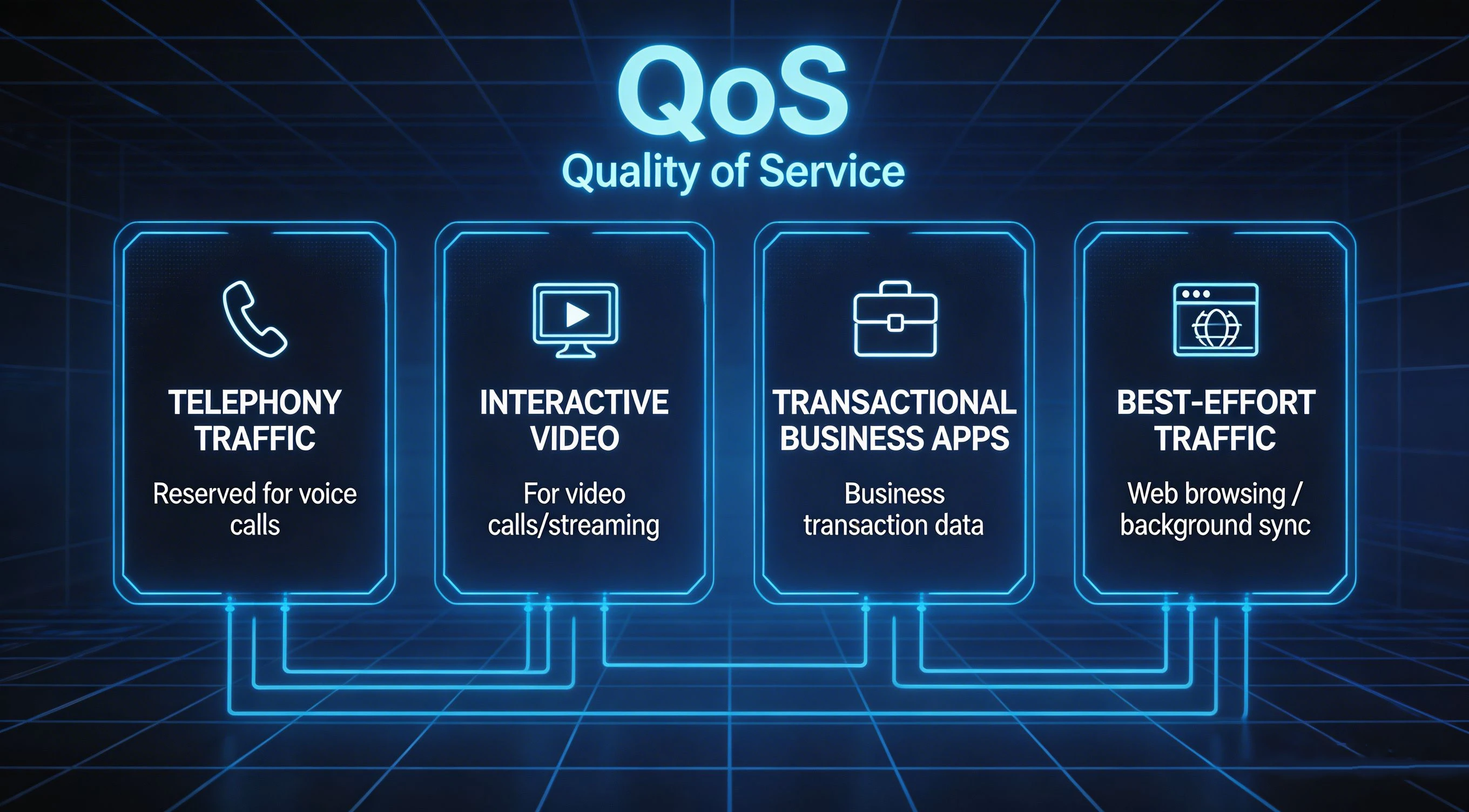
QoS policy often protects different critical services in different ways, rather than trying to place everything into a single high-priority queue.
Why QoS Prioritization Matters in Real Networks
Voice and intercom quality depend on stable delivery
Voice is one of the clearest examples of why prioritization exists. A phone call or intercom session does not need enormous bandwidth, but it reacts badly to jitter, packet loss, and excessive queue delay. When voice packets arrive too late or too unevenly, users hear clipping, gaps, robotic audio, echo side effects, or call instability.
In IP telephony, SIP signaling and RTP media may need different treatment. Media is usually more delay-sensitive, while signaling is typically lower-bandwidth but still important to call setup and control. A basic “everything voice-related gets the same policy” approach can work in small networks, but larger deployments usually benefit from more careful differentiation.
Video quality fails differently from voice
Interactive video conferencing, remote monitoring, and live supervision traffic also benefit from QoS, but their needs differ slightly. Video can consume far more bandwidth than voice and may tolerate modest delay variation differently depending on the application. A conferencing stream, a surveillance feed, and a one-way training video do not all need identical treatment.
That is why mature QoS policy usually separates real-time conversational video from high-volume streaming or recorded media distribution. Treating every video flow as top priority can make a policy unstable and crowd out more sensitive traffic.
Industrial and operational networks need predictability
In industrial environments, QoS prioritization is often less about user convenience and more about operational continuity. Traffic classes may include SCADA polling, PLC communications, HMI traffic, alarm events, dispatch audio, IP paging, video surveillance, and maintenance access. Some of these can wait. Others should not.
For example, a routine file copy should never interfere with an emergency broadcast trigger, a control room intercom session, or a fault notification path. In shared OT/IT environments, QoS helps reduce that risk by keeping routine background traffic from overrunning more sensitive operational services.
Common Applications of QoS Prioritization
Enterprise IP telephony and unified communications
QoS prioritization is widely used in enterprise voice deployments that include IP phones, softphones, SIP trunks, conferencing systems, and call control platforms. It is especially valuable on WAN links, VPN tunnels, wireless edges, and internet connections where multiple applications compete for capacity.
In these deployments, QoS often protects call signaling, RTP media, video meetings, presence updates, and directory access while keeping large downloads and background sync traffic from degrading the user experience.
VoIP and SIP call quality protection
Video meeting stability during busy periods
Call center and dispatch traffic protection
IP paging, emergency communication, and public address
Paging and emergency communication systems can be highly sensitive to bursty congestion because they often depend on timely one-to-many audio delivery. In hospitals, schools, factories, transport hubs, and municipal facilities, delayed paging can undermine the purpose of the system even if the network technically remains “up.”
QoS helps protect paging adapters, IP speakers, SIP intercom terminals, help points, control consoles, and emergency gateways so that urgent announcements and talkback sessions are less likely to be delayed by routine traffic.
Emergency announcements over shared networks
Help point and intercom session protection
Critical audio delivery in schools and campuses
Industrial plants, utilities, and transportation systems
Modern industrial networks often carry a mix of operational data and general-purpose IP traffic. QoS prioritization helps keep control, alarm, and coordination traffic stable across plant backbones, control rooms, substations, tunnel networks, utility corridors, and transport operations.
It becomes even more valuable when organizations converge previously separate systems onto common infrastructure. Once voice, video, industrial data, and maintenance traffic share the same routed network, prioritization stops being optional in many designs.
Protect control-room communication during heavy network activity
Preserve alarm and notification paths across shared WAN links
Support mixed IT/OT traffic on converged infrastructure
QoS Prioritization and Network Architecture
Policies should begin near the edge
In most networks, good QoS starts close to where traffic enters the system. Access switches, wireless controllers, security gateways, and session border devices are common points for classification and trust decisions. If traffic is identified and marked correctly at the edge, the rest of the network can apply treatment more consistently.
This is particularly important for IP phones, paging gateways, intercom terminals, industrial edge devices, and surveillance endpoints. Managed infrastructure can often trust those devices more safely than it can trust arbitrary user endpoints.
Congestion points deserve the most attention
Not every interface needs complex QoS. Prioritization matters most where oversubscription or speed mismatches are likely. That usually means WAN edges, internet exits, radio or wireless backhaul, VPN tunnels, inter-site connections, and any shared uplink feeding a lower-capacity segment.
In a well-provisioned core network with ample capacity, QoS may be relatively simple. At constrained edges, however, it often becomes essential. That is why successful QoS design focuses on real bottlenecks rather than trying to apply maximum complexity everywhere.
Best Practices for Using QoS Prioritization
Keep the number of classes practical
One of the most common mistakes in QoS design is creating too many classes. Overly detailed policies are hard to maintain, hard to troubleshoot, and often fail to reflect how the network is actually used. A smaller number of well-defined classes usually performs better than a large policy full of theoretical distinctions.
For many organizations, the most useful starting point is to separate real-time voice, interactive video, critical business or operational traffic, best-effort traffic, and background traffic. From there, the policy can be refined based on real measurement and application behavior.
Do not put everything in the priority queue
Another common error is trying to protect too many applications by marking them all as high priority. If every packet is treated as urgent, the policy loses meaning. Worse, overly broad priority treatment can starve other applications or create instability under sustained load.
Priority should usually be reserved for the traffic that is most sensitive to delay and most important to keep intact, such as voice, emergency audio, or narrow classes of real-time control traffic.
Measure, test, and adjust
QoS is not something that should be left as a one-time checkbox. Real networks change. New applications appear, codecs evolve, uplinks are replaced, traffic patterns shift, and business priorities move. A policy that worked well two years ago may be too narrow, too broad, or simply misaligned today.
That is why monitoring matters. Jitter, packet loss, interface utilization, queue drops, DSCP distribution, and application behavior should all feed back into policy refinement. Good QoS is operational, not decorative.
FAQ
Does QoS prioritization increase bandwidth?
No. QoS does not create extra bandwidth. It makes better decisions about who gets served first, who gets protected, and how congestion is handled when resources are limited.
Is QoS only for VoIP?
No. Voice is one of the most familiar use cases, but QoS is also useful for video conferencing, IP paging, industrial control traffic, surveillance backhaul, transactional business applications, and remote access services.
What is the difference between QoS and traffic shaping?
Traffic shaping is one tool within a broader QoS strategy. QoS includes classification, marking, queuing, scheduling, policing, shaping, and congestion management. Shaping mainly smooths traffic rates to reduce bursts and control how traffic enters a constrained link.
Should every network use QoS prioritization?
Not every network needs complex QoS, but many mixed-use business and industrial networks benefit from it. The more your environment combines real-time communication with ordinary data on shared paths, the more useful prioritization becomes.
Can QoS fix poor network design?
No. It can improve behavior during contention, but it cannot compensate for permanently insufficient capacity, unstable physical links, severe packet loss, or badly designed application flows. QoS works best as part of an overall network design strategy.