


HD Voice is a voice communication technology that delivers clearer, more natural, and more intelligible speech than traditional narrowband telephone audio. It is commonly used in VoIP systems, SIP phones, mobile networks, video conferencing platforms, call centers, softphones, unified communication systems, and modern business phone services.
The main idea behind HD Voice is simple: capture and transmit a wider range of human speech frequencies so that voices sound less muffled and easier to understand. Compared with older telephone audio, HD Voice can make conversations feel more natural, reduce listening fatigue, and improve communication quality in professional and everyday scenarios.
HD Voice does not only make calls sound “better.” It helps people understand speech more accurately, especially in business, remote work, customer service, and noisy communication environments.
The Basic Meaning of HD Voice
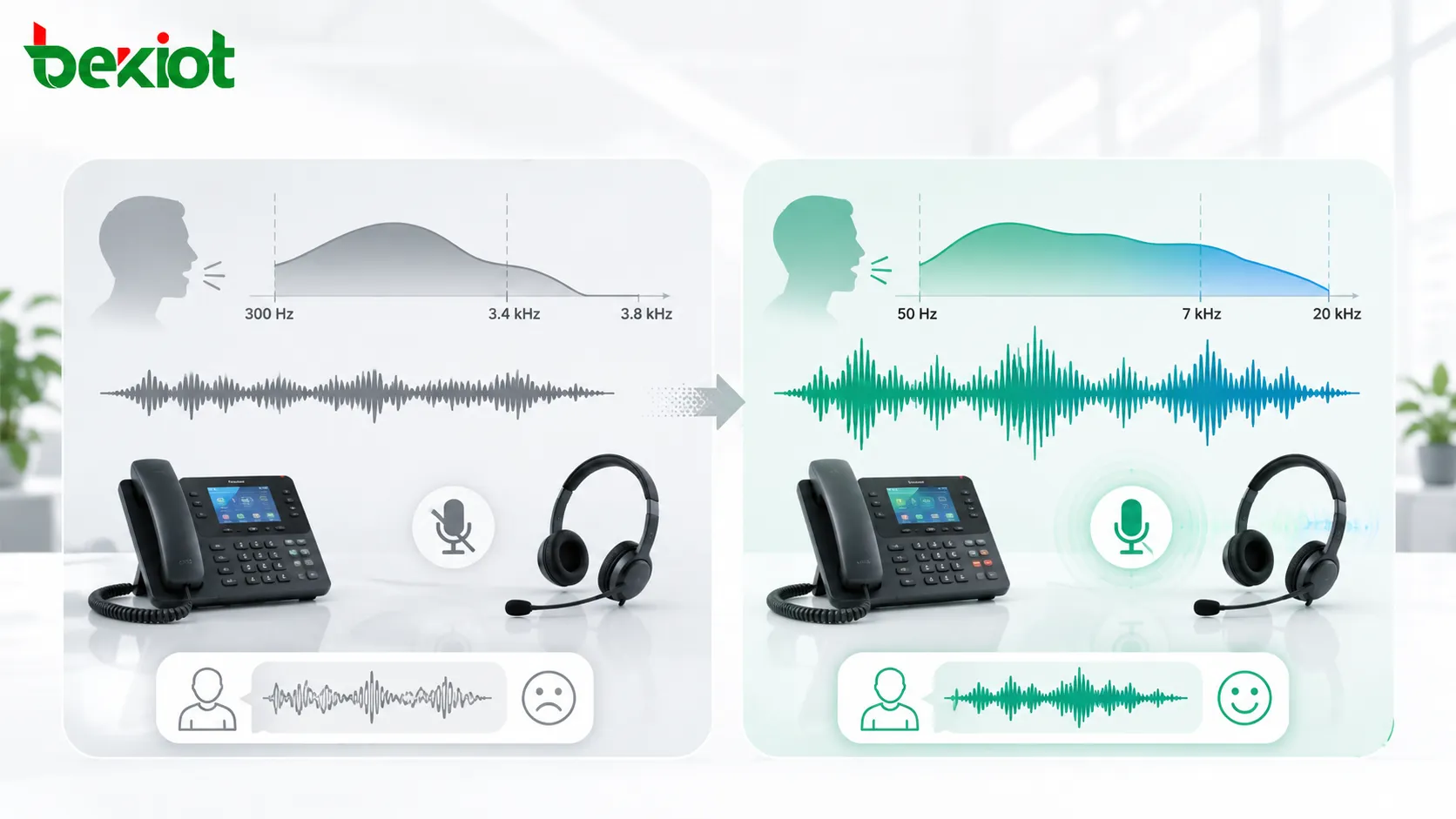
HD Voice usually refers to wideband voice transmission. Traditional telephone audio often uses a narrow frequency range of about 300 Hz to 3.4 kHz. This range is enough for basic speech, but it removes many low and high speech details that make voices sound natural.
HD Voice commonly extends the audio frequency range to around 50 Hz to 7 kHz or higher, depending on the codec and system design. This wider bandwidth captures more vocal detail, making speech clearer and more lifelike.
Narrowband and Wideband Speech
Narrowband speech is the classic sound of traditional phone calls. It is understandable but limited. Voices may sound thin, compressed, or less distinct, especially when speakers have similar tones or when background noise is present.
Wideband speech provides more audio information. Consonants, breath sounds, vocal tone, and speech edges become clearer. This helps listeners distinguish words more easily, especially during long calls or important conversations.
HD Voice and Codec Support
HD Voice depends heavily on audio codecs. A codec is the technology used to encode and decode voice signals for transmission. Common wideband or high-quality codecs include G.722, AMR-WB, Opus, EVS, and other platform-specific implementations.
For HD Voice to work properly, the endpoint, network, server, trunk, carrier, or communication platform must support a compatible wideband codec. If any part of the call path only supports narrowband audio, the call may fall back to traditional voice quality.
How It Works in Communication Systems
HD Voice works by capturing speech through a microphone, encoding it with a wideband codec, transmitting it through a compatible network, decoding it at the receiving side, and playing it through a speaker or headset capable of reproducing the wider audio range.
The full call path matters. A high-quality phone alone is not enough if the PBX, SIP trunk, carrier, conferencing platform, or remote endpoint does not support wideband audio. HD Voice is a system-level result, not only a device feature.
Audio Capture
The process begins with microphone capture. A good microphone must capture speech clearly before the codec can preserve it. Poor microphone quality, bad placement, background noise, or low input level can reduce HD Voice performance.
In professional devices, microphone design may include noise reduction, echo cancellation, automatic gain control, beamforming, or acoustic tuning. These features help deliver cleaner speech into the communication system.
Wideband Encoding
After capture, the voice signal is encoded using a wideband codec. The codec compresses the audio so it can be transmitted efficiently while preserving more speech detail than narrowband codecs.
Different codecs balance quality, bandwidth, processing load, and compatibility differently. For example, G.722 is widely used in enterprise VoIP, while Opus is common in real-time internet communication and conferencing platforms.
Network Transmission
HD Voice requires stable network performance. Packet loss, jitter, high latency, congestion, and poor wireless conditions can damage audio quality even when the codec supports wideband speech.
Quality of Service, sufficient bandwidth, reliable routing, proper jitter buffer configuration, and stable endpoint registration all help maintain consistent HD Voice performance.
Playback Quality
The receiving device must reproduce the audio clearly. A low-quality speaker, noisy room, weak headset, or poorly configured output level can reduce the listener’s experience.
For best results, HD Voice should be supported by suitable microphones, speakers, headsets, acoustic design, and network configuration.
Audio Benefits of HD Voice
HD Voice improves user experience because speech becomes easier to recognize. This benefit is especially important in environments where communication accuracy matters, such as customer support, healthcare, emergency coordination, remote meetings, education, and technical service.
Clearer Speech Intelligibility
The most important benefit is improved speech intelligibility. More speech frequencies are preserved, which helps listeners distinguish similar words and understand speakers more accurately.
This is useful when people speak with different accents, talk quickly, use technical terms, or communicate in a second language. Better intelligibility reduces the need to repeat information.
More Natural Voice Quality
HD Voice makes calls sound more natural. Voices are fuller and less muffled because the system transmits more low and high frequency details.
Natural voice quality can improve trust and comfort in business calls. It also makes long conversations less tiring because listeners do not need to work as hard to understand the speaker.
Reduced Listening Fatigue
Traditional narrowband calls can become tiring during long meetings, support calls, or remote collaboration. Limited audio bandwidth, noise, and compression artifacts can make listening more demanding.
HD Voice reduces this strain by providing cleaner and more detailed speech. This is especially helpful for call center agents, remote workers, dispatch operators, online teachers, and conference participants.
Better Performance in Noisy Conditions
HD Voice cannot remove all noise by itself, but it can help speech remain clearer when combined with good microphones, noise reduction, and proper audio processing.
In offices, service desks, transportation facilities, control rooms, and industrial support environments, clearer speech can improve operational efficiency and reduce communication mistakes.

Technical Features Behind HD Voice
HD Voice depends on several technical elements working together. These include codec negotiation, sampling rate, endpoint hardware, network quality, packet handling, echo control, and audio processing.
Higher Sampling Rate
Traditional narrowband telephone audio often uses an 8 kHz sampling rate. Wideband audio commonly uses 16 kHz or higher sampling rates, allowing the system to capture and transmit a wider frequency range.
A higher sampling rate does not automatically guarantee better sound, but it is a necessary part of wideband speech. The codec, microphone, speaker, and network must also support the wider audio path.
Wideband Codecs
Wideband codecs are central to HD Voice. They compress speech while preserving more audio detail. Common examples include G.722 for enterprise VoIP, AMR-WB for mobile networks, Opus for internet communication, and EVS for advanced mobile voice services.
Codec selection should consider compatibility. A codec that sounds excellent in one system may not work if the remote endpoint, SIP trunk, or conferencing platform does not support it.
Codec Negotiation
In SIP and VoIP systems, endpoints negotiate which codec to use during call setup. If both sides support the same HD codec and the system allows it, the call can use HD Voice. If not, the call falls back to another codec.
Codec priority settings are important. Administrators should place preferred HD codecs appropriately in the codec list while keeping compatible fallback codecs for calls that cannot support wideband audio.
Packet Loss Concealment
Packet loss can cause gaps, clicks, or robotic sound in VoIP calls. Packet loss concealment helps reduce the audible effect of missing packets by estimating or smoothing lost audio information.
This feature improves call quality, but it is not a replacement for good network design. Persistent packet loss will still reduce HD Voice performance.
Echo Cancellation and Noise Reduction
HD Voice often works together with acoustic echo cancellation and noise reduction. Echo cancellation prevents speaker audio from being picked up by the microphone and sent back to the far end. Noise reduction helps suppress background sounds.
These features are especially important in speakerphone, conference room, softphone, and hands-free communication scenarios.
| Technical Element | Role in HD Voice | Practical Checkpoint |
|---|---|---|
| Wideband codec | Preserves more speech frequency detail | Check G.722, AMR-WB, Opus, EVS, or platform-supported codecs |
| Endpoint hardware | Captures and plays wider audio clearly | Check microphone, speaker, headset, and acoustic design |
| Network quality | Maintains stable real-time audio transmission | Check latency, jitter, packet loss, QoS, and bandwidth |
| Codec negotiation | Decides whether the call uses HD audio | Check codec priority and compatibility on both sides |
| Audio processing | Improves clarity in real environments | Check echo cancellation, noise reduction, and gain control |
Applications in Modern Communication
HD Voice is used wherever speech clarity can improve user experience and operational efficiency. It is especially valuable in real-time communication systems where misunderstanding can waste time or create risk.
VoIP and SIP Phone Systems
VoIP and SIP systems commonly support HD Voice through wideband codecs such as G.722 or Opus. When properly configured, users can experience clearer extension-to-extension calls and better internal communication quality.
For external calls, HD Voice depends on the SIP trunk, carrier, remote endpoint, and codec negotiation. Internal calls may support HD Voice even when external PSTN calls fall back to narrowband quality.
Video Conferencing and Remote Work
Video conferencing platforms use HD audio to improve meeting clarity. Clear speech is essential for remote work because participants rely heavily on voice to coordinate tasks, share ideas, and make decisions.
Good microphones, headsets, stable internet connections, and proper room acoustics all help HD Voice perform better in remote meeting environments.
Call Centers and Customer Service
Call centers benefit from HD Voice because agents and customers can understand each other more easily. This can reduce repeated questions, shorten call handling time, and improve customer experience.
For customer service teams, speech clarity matters because misunderstandings can affect orders, technical support, billing, appointments, and complaint handling.
Healthcare and Telemedicine
In healthcare and telemedicine, clear voice communication supports safer consultation and better patient interaction. Doctors, nurses, patients, and remote support teams need to hear instructions and descriptions accurately.
HD Voice can improve the quality of remote consultations, but privacy, reliability, platform security, and recording policy must also be considered.
Education and Online Training
Online education depends on clear teacher-student communication. HD Voice helps learners follow explanations, pronunciation, instructions, and discussions more easily.
For language learning, the wider frequency range can be especially helpful because pronunciation detail becomes easier to hear.
Dispatch and Operational Communication
Operational teams use voice communication for coordination, instructions, status reporting, and incident response. Clearer audio helps reduce mistakes when information must be understood quickly.
In dispatch, transportation, facility management, security operations, and industrial support, HD Voice can improve communication quality when the full system path supports it.

HD Voice in SIP and VoIP Deployment
In SIP and VoIP environments, enabling HD Voice is usually a configuration and compatibility task. The system must allow wideband codecs, endpoints must support them, and the network must maintain stable real-time media quality.
Codec Priority Settings
Administrators should review codec priority on SIP phones, PBX platforms, SBCs, gateways, and trunks. If a wideband codec is supported but placed behind narrowband codecs, calls may not use HD Voice when they could.
However, narrowband codecs should not always be removed. They may be needed for compatibility with older devices, analog gateways, PSTN routes, or external carriers.
Internal Calls and External Calls
Internal calls within the same VoIP system often have the best chance of using HD Voice because endpoints and servers can be controlled by the same administrator.
External calls depend on the carrier and destination network. If the call passes through a narrowband PSTN segment, wideband audio may be lost. This is why users may hear HD quality on internal calls but not on all outside calls.
SBC and Gateway Behavior
Session Border Controllers and gateways may transcode, restrict, or reorder codecs. If these devices are not configured for wideband audio, they may force calls into narrowband mode.
Administrators should check whether transcoding is needed and whether it affects quality, CPU load, or codec availability. Avoid unnecessary transcoding when end-to-end wideband support is possible.
Bandwidth Planning
HD Voice may require more bandwidth than some narrowband codecs, depending on codec choice and packetization settings. In modern LAN and broadband environments, this is often manageable, but large deployments still need planning.
Bandwidth planning should include RTP overhead, number of concurrent calls, QoS settings, WAN links, VPN overhead, and remote worker network quality.
Limitations and Common Misunderstandings
HD Voice improves speech quality, but it is not a magic solution. It depends on the full communication path and can be affected by poor devices, bad networks, wrong codec settings, background noise, and platform limitations.
HD Voice Requires Both Ends to Support It
If only one side supports HD Voice, the call may not use HD quality. Both endpoints and the call path must support a compatible wideband codec.
This is why some calls sound clear while others sound traditional, even on the same phone. The remote device, trunk, carrier, or network may not support HD Voice for that call.
HD Voice Does Not Remove All Noise
HD Voice transmits speech with more detail, but it can also transmit more environmental sound if microphone pickup and noise control are poor. A noisy room can still produce poor call quality.
Good microphone placement, headset selection, acoustic treatment, and noise reduction remain important.
Higher Quality Is Not the Same as Higher Volume
HD Voice improves frequency range and clarity. It does not simply make audio louder. If users complain that the call is too quiet, the issue may be gain level, microphone sensitivity, speaker volume, or device configuration rather than HD Voice support.
Volume and clarity should be adjusted separately during testing.
Not Every “HD” Label Means the Same Thing
Different vendors and carriers may use the term HD Voice differently. Some refer to wideband voice, some refer to specific mobile codecs, and some use it as a general marketing term for improved audio quality.
For technical planning, check the actual codec, sampling rate, endpoint specification, and call path compatibility instead of relying only on the label.
Best Practices for Deployment
To get the best results from HD Voice, organizations should treat it as an end-to-end design requirement. Device selection, codec policy, network quality, acoustic environment, and testing all matter.
Choose Compatible Endpoints
Select phones, headsets, speakerphones, softphones, and conference devices that support wideband audio. The device should include suitable microphones and speakers, not only codec support on paper.
For shared rooms and speakerphone environments, echo cancellation and microphone pickup design are especially important.
Enable Wideband Codecs Carefully
Wideband codecs should be enabled and prioritized where appropriate. Administrators should also keep necessary fallback codecs for compatibility with legacy systems and external networks.
Codec configuration should be tested across internal calls, external calls, remote users, SIP trunks, gateways, and conferencing platforms.
Use QoS for Real-Time Voice
Quality of Service helps prioritize real-time voice traffic on busy networks. This reduces the impact of congestion and improves voice stability.
QoS should be applied consistently across switches, routers, WAN links, wireless networks, and VPN paths where possible. Poor network quality can ruin HD Voice even when codecs are correctly configured.
Test with Real Users
Technical tests are useful, but user listening tests are also important. Real users can identify muffled sound, echo, delay, background noise, or inconsistent quality that may not be obvious from configuration screens.
Testing should include different call types, different endpoints, quiet and noisy environments, internal and external calls, and remote worker scenarios.
Maintenance and Troubleshooting Tips
HD Voice performance should be reviewed when users report poor call quality. The issue may be codec fallback, endpoint hardware, network problems, acoustic conditions, or system configuration.
Check the Active Codec
The first troubleshooting step is to check which codec was actually used during the call. A phone may support HD Voice but still negotiate a narrowband codec due to system rules or remote endpoint limitations.
SIP traces, call statistics, endpoint status pages, and PBX logs can help confirm active codec selection.
Review Packet Loss and Jitter
Packet loss and jitter can make HD Voice sound choppy, robotic, or unstable. Network monitoring tools can help identify whether media packets are being delayed or lost.
If the network is the problem, adjusting QoS, reducing congestion, improving Wi-Fi coverage, or changing routing paths may help.
Inspect Microphones and Headsets
Audio quality starts at the microphone. A damaged headset, blocked microphone hole, wrong input device, low-quality laptop microphone, or poor room microphone placement can make HD Voice perform badly.
Testing with another headset or endpoint can quickly reveal whether the issue is device-related.
Check Transcoding Points
Transcoding can reduce quality and add processing load. If a call passes through an SBC, gateway, recorder, or conference bridge, check whether the media path changes codec unexpectedly.
Where possible, allow compatible wideband codecs end to end to preserve quality and reduce unnecessary processing.
FAQ
Why do internal calls sound clearer than external calls?
Internal calls often stay within one controlled VoIP system, so both endpoints may use the same wideband codec. External calls may pass through carriers, gateways, or PSTN segments that force the call back to narrowband audio.
Can HD Voice work over Wi-Fi?
Yes, if the Wi-Fi network is stable and has low packet loss, low jitter, and enough capacity. Poor Wi-Fi coverage or interference can reduce quality even when the device supports HD Voice.
Does HD Voice require special phones?
The phone or softphone must support wideband codecs and have suitable audio hardware. Older narrowband-only phones cannot deliver true HD Voice even if the PBX supports it.
Can HD Voice increase bandwidth usage?
It can, depending on the codec and packetization settings. Some wideband codecs use more bandwidth than narrowband codecs, while modern codecs can provide high quality efficiently. Network planning should consider concurrent calls and RTP overhead.
Why does HD Voice sometimes sound worse in a noisy room?
Wideband audio captures more detail, and that may include background noise if the microphone and noise reduction are poor. Good microphone placement, headset use, and acoustic control are still necessary.
How can administrators confirm that a call used HD Voice?
They can check the active codec in SIP traces, PBX call statistics, endpoint call status, SBC logs, or media session reports. A wideband codec such as G.722, Opus, AMR-WB, or EVS usually indicates HD Voice capability for that call path.







