Blacklist control is a security and management mechanism used to block, deny, restrict, or filter specific users, phone numbers, IP addresses, devices, domains, email senders, applications, accounts, keywords, or behaviors. It helps systems prevent unwanted access, reduce abuse, stop repeated spam, limit malicious traffic, and protect normal users from known risks.
In practical systems, blacklist control is used in cybersecurity, PBX and VoIP platforms, email services, access control systems, websites, mobile apps, firewalls, routers, payment systems, social platforms, customer service systems, and enterprise management platforms. Its purpose is simple: if a source is known to be unsafe, unwanted, or unauthorized, the system can reject it automatically.
Blacklist control is a defensive filtering method. It does not try to approve everything good; it blocks what has already been identified as unwanted or risky.
Basic Meaning of Blacklist Control
Blacklist control works by maintaining a list of blocked objects. These objects may be identifiers such as phone numbers, usernames, IP addresses, MAC addresses, email addresses, domains, device IDs, account IDs, file hashes, application names, or URL patterns.
When a request, call, login, message, connection, or transaction enters the system, the system checks whether its source or related identifier appears on the blacklist. If there is a match, the system applies the configured action, such as rejecting the request, blocking the call, denying login, marking the message as spam, or triggering an alert.
Blacklist as a Deny List
A blacklist is also called a deny list or block list. The system allows normal activity by default, but denies entries that match the list. This makes blacklist control useful when most activity should be allowed and only known unwanted sources need to be restricted.
For example, a phone system may accept normal inbound calls but block repeated nuisance numbers. A firewall may allow regular traffic but deny IP addresses known for attacks. An email service may accept messages but reject senders listed for spam abuse.
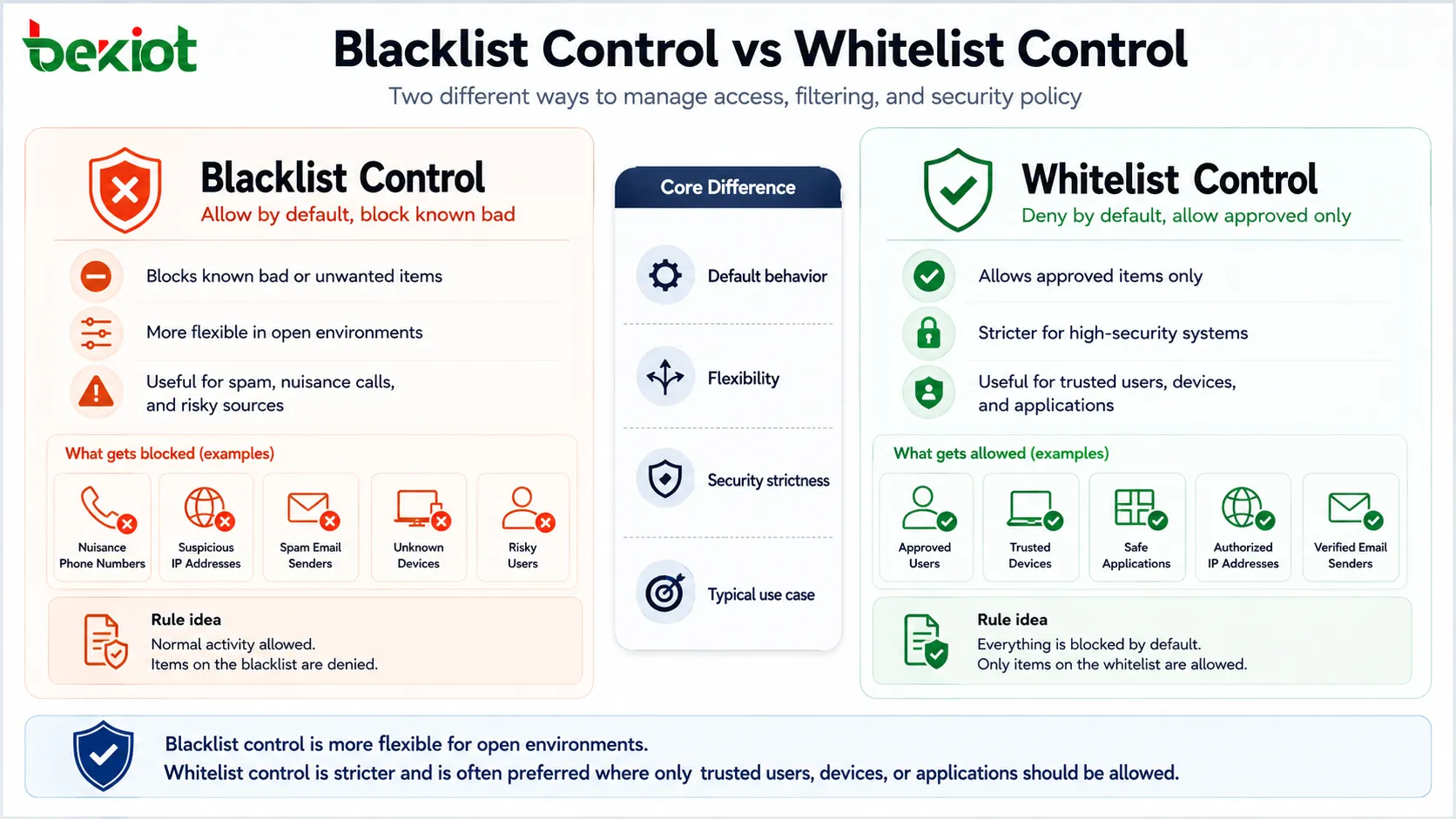
Difference from Whitelist Control
Blacklist control blocks known bad or unwanted items. Whitelist control does the opposite: it only allows approved items and blocks everything else by default.
Blacklist control is usually more flexible and easier to use in open environments. Whitelist control is stricter and often used in high-security systems where only trusted users, devices, or applications should be allowed.
How Blacklist Control Works
The working process usually includes list creation, request detection, identifier matching, policy decision, action execution, and log recording. Depending on the system, this process may happen in real time within milliseconds.
For example, when an incoming call reaches a PBX, the system can check the caller number against a blocked number list. When a user attempts login, the platform can check the IP address, account status, or device fingerprint. When an email arrives, the mail server can check sender reputation and blacklist databases.
Creating the Block List
The blacklist can be created manually by administrators, automatically by the system, imported from threat intelligence sources, synchronized from external databases, or generated from user reports.
Manual blacklists are useful for known nuisance callers, banned users, internal policy violations, or specific blocked devices. Automated blacklists are useful for repeated failed logins, spam behavior, brute-force attacks, abnormal traffic, and suspicious system events.
Matching Rules
Blacklist matching may be exact or pattern-based. Exact matching blocks a specific item, such as one phone number, one email address, or one IP address. Pattern-based matching blocks a range, prefix, domain group, subnet, keyword, or rule expression.
Pattern-based rules are powerful but should be used carefully. A broad rule may block legitimate users by mistake. For example, blocking an entire IP range may stop attackers, but it may also block normal users from the same network.
Blocking Actions
After a blacklist match, the system applies the configured action. This may include reject, drop, quarantine, mark as spam, send to voicemail, require additional verification, deny access, disconnect, rate-limit, or generate an alarm.
The action should match the risk level. A confirmed malicious source may be blocked completely. A suspicious but uncertain source may be challenged, slowed down, or sent for review.
Logging and Review
Blacklist actions should be logged. Useful records include blocked object, time, source, rule name, action taken, user account, device ID, and reason. Logs help administrators review whether the blacklist is working correctly.
Review is important because blacklist rules may become outdated. A number, IP address, user account, or device may need to be removed later if the risk no longer exists or if it was blocked by mistake.
Main Features of Blacklist Control
A practical blacklist control function should be easy to manage, accurate in matching, flexible in policy, and transparent in logging. Poor blacklist design can create false blocking, user complaints, and maintenance difficulty.
Flexible Object Types
Different systems need to block different objects. A VoIP system may block caller numbers or SIP sources. A firewall may block IP addresses and ports. An email gateway may block domains and sender addresses. An access system may block cards, users, or devices.
A flexible blacklist function should support the identifiers that matter most to the application. It should also allow administrators to define whether the rule applies globally, by user, by group, by department, by device, or by system zone.
Real-Time Filtering
Many blacklist systems work in real time. This means the decision happens immediately when the request arrives. Real-time filtering is important for call blocking, login protection, web access control, firewall defense, and spam prevention.
If blacklist checking is delayed, the system may allow unwanted activity before the rule takes effect. For security-related applications, fast matching and immediate response are essential.
Rule Priority
Rule priority determines what happens when multiple rules apply. For example, a user may be on an allowed list, but their IP address may appear on a blocked list. The system must decide which rule has priority.
Clear rule priority prevents unpredictable behavior. Administrators should understand whether whitelist rules override blacklist rules, whether user-level rules override global rules, and how exceptions are handled.
Import and Synchronization
Some systems support importing blacklist entries from CSV files, APIs, directory systems, threat feeds, spam databases, fraud databases, or central management platforms. This is useful when many entries must be updated regularly.
Synchronization helps keep distributed systems consistent. For example, several branch firewalls or communication servers may need to share the same blocked source list.
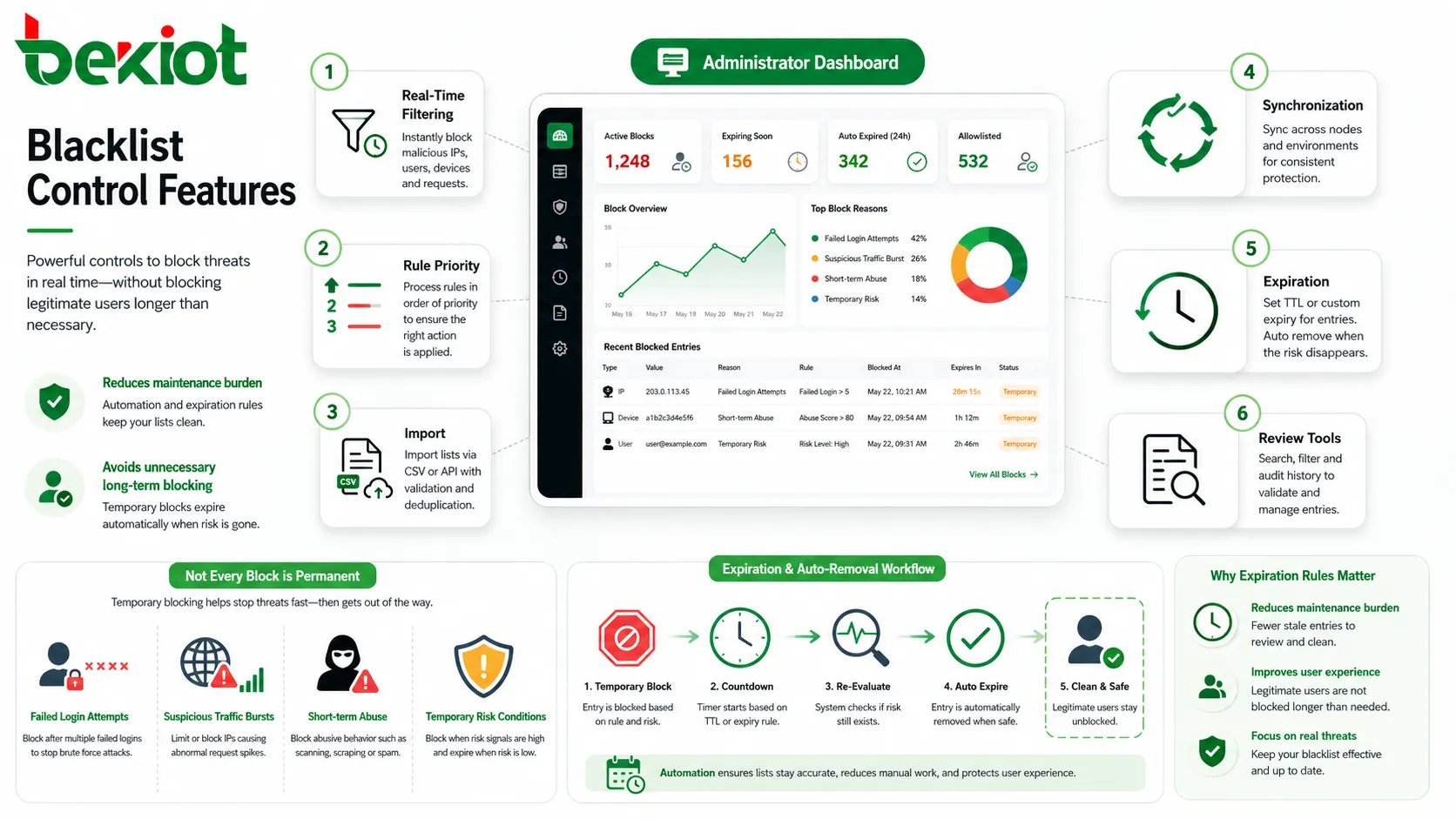
Expiration and Auto-Removal
Not every blacklist entry should last forever. Temporary blocking can be useful for repeated failed login attempts, suspicious traffic bursts, short-term abuse, or temporary risk conditions.
Expiration rules reduce long-term maintenance burden and lower the chance of blocking legitimate users after the original problem has disappeared.
System Value and Practical Benefits
Blacklist control provides value by reducing unwanted traffic, preventing repeated abuse, improving operational efficiency, and protecting users from known risks. It is often one layer in a wider security and management strategy.
Reducing Spam and Harassment
In communication systems, blacklist control can block nuisance callers, robocalls, spam messages, repeated harassment numbers, and unwanted contacts. This improves user experience and reduces unnecessary interruptions.
For customer-facing organizations, blacklist control can also help protect service teams from repeated abusive calls or known fraudulent sources.
Improving Security Defense
In network and application security, blacklists can block known malicious IP addresses, suspicious domains, compromised accounts, harmful URLs, malware signatures, and brute-force sources.
This reduces attack exposure. However, blacklist control should not be the only security method because new attackers may not appear on the list yet. It should work together with authentication, monitoring, anomaly detection, patching, and access control.
Lowering System Load
Blocking unwanted traffic early can reduce system load. Firewalls, gateways, mail servers, PBX systems, web servers, and application platforms can avoid spending resources processing requests that should clearly be denied.
This is useful during spam campaigns, scanning activity, repeated login attacks, or high-volume nuisance traffic. Early rejection helps preserve resources for legitimate users.
Supporting Policy Enforcement
Organizations can use blacklist control to enforce internal rules. For example, a company may block access to unsafe domains, restrict certain applications, deny banned devices, or prevent calls to prohibited destinations.
Policy enforcement helps standardize behavior across users and departments. It also gives administrators a practical tool for applying security and compliance requirements.
Common Application Scenarios
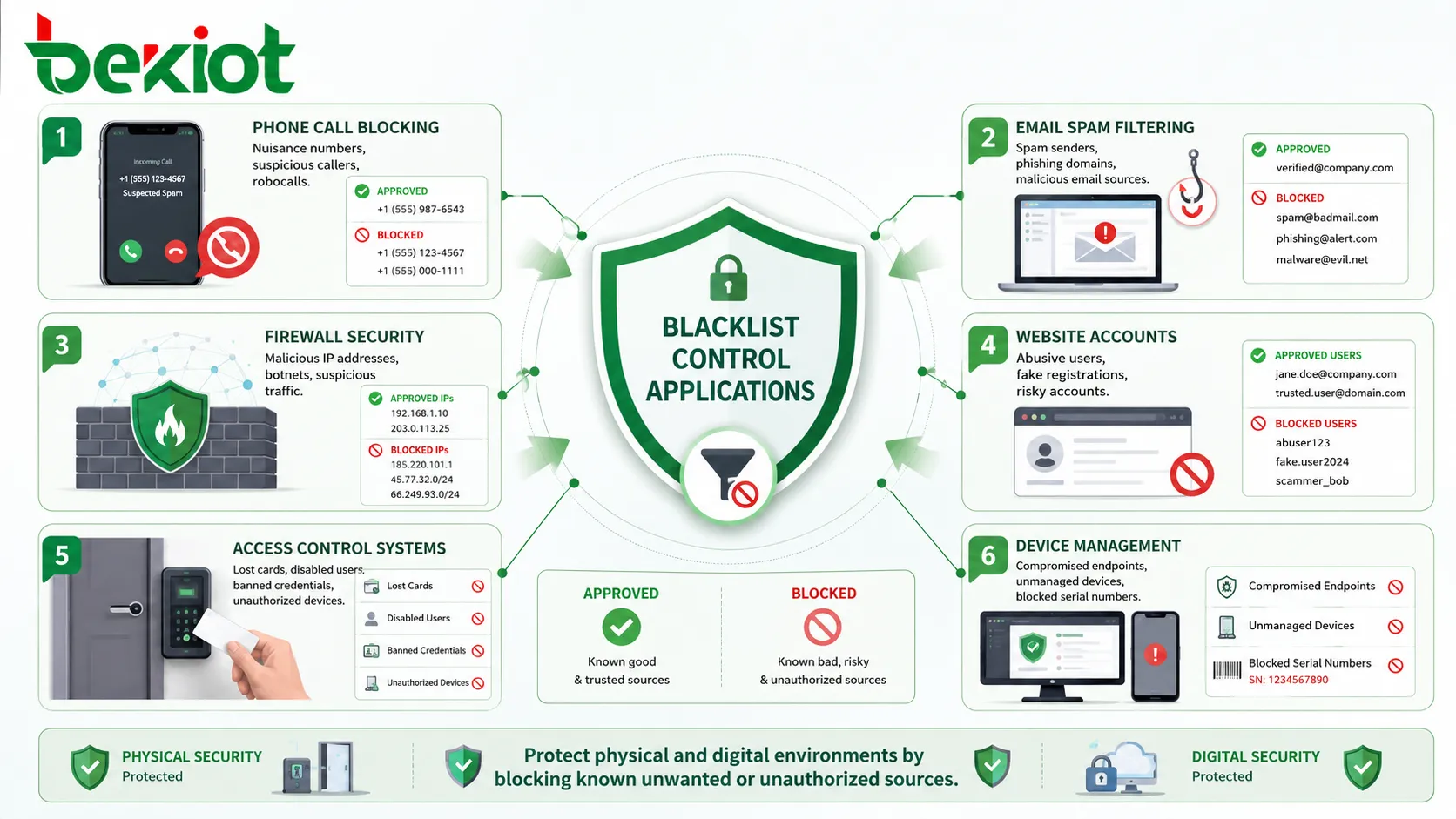
Blacklist control appears in many systems because unwanted access, abuse, and risk can happen in many forms. The exact rule object changes by system, but the control logic remains similar.
Phone Systems and Call Blocking
PBX, SIP, VoIP, and mobile systems can use blacklist control to block specific caller numbers, anonymous callers, suspicious SIP sources, or known nuisance numbers. The system may reject the call, play a busy tone, disconnect, or route the call to voicemail.
This is useful for reducing robocalls, harassment, spam calls, and repeated unwanted contact. Business phone systems may also use call blacklists to protect reception desks, support teams, or public service lines.
Email and Messaging Platforms
Email systems use blacklists to block spam senders, malicious domains, phishing sources, infected attachments, and suspicious URLs. Messaging platforms may block abusive users, spam accounts, or prohibited content sources.
Because spam tactics change frequently, email blacklist control often combines internal rules with reputation databases, content filtering, machine learning, and user reports.
Network Firewalls and Security Gateways
Firewalls, routers, WAF systems, and security gateways use blacklists to deny traffic from known malicious IP addresses, botnets, attack sources, or unauthorized regions.
Network blacklist rules can reduce scanning, intrusion attempts, DDoS-related traffic, and access from high-risk sources. They should be reviewed carefully to avoid blocking legitimate business traffic.
Websites and User Accounts
Web platforms can blacklist user accounts, IP addresses, device fingerprints, email domains, or payment identifiers. This helps prevent repeated abuse, fake registrations, fraud, scraping, spam comments, and policy violations.
Modern platforms often combine blacklist control with rate limiting, CAPTCHA, risk scoring, multi-factor authentication, and behavior analysis.
Access Control and Device Management
Access control systems may blacklist lost cards, disabled users, banned credentials, or unauthorized devices. Device management systems may block compromised endpoints, unmanaged devices, or serial numbers that should not connect.
This helps protect physical and digital environments. A lost access card should be blocked quickly so it cannot be used by someone else.
Blacklist Control Compared with Related Methods
Blacklist control is only one method of access and risk management. It is often used together with whitelists, graylists, allow rules, rate limits, reputation scores, and behavior analysis.
| Method | Main Logic | Typical Use |
|---|---|---|
| Blacklist | Block known unwanted or risky items | Spam calls, malicious IPs, banned accounts, unsafe domains |
| Whitelist | Allow only approved items | High-security access, trusted devices, approved applications |
| Graylist | Temporarily delay or challenge uncertain items | Email filtering, anti-spam, suspicious login behavior |
| Rate Limiting | Limit how often an action can happen | Login attempts, API calls, message sending, web requests |
| Reputation Scoring | Evaluate risk based on historical behavior | Security gateways, fraud systems, email filtering, web platforms |
When Blacklist Control Works Best
Blacklist control works best when unwanted sources can be clearly identified. Examples include known spam numbers, repeated failed login IP addresses, banned user accounts, malicious domains, and stolen access cards.
It is also effective when administrators need a fast response to a known problem. Adding a confirmed source to the blacklist can immediately reduce repeated incidents.
When It Is Not Enough
Blacklist control is less effective against new threats that have not been identified yet. Attackers can change IP addresses, phone numbers, domains, accounts, or device identifiers to avoid detection.
For this reason, blacklist control should be combined with proactive security methods such as anomaly detection, authentication, behavior monitoring, threat intelligence, and regular policy review.
Configuration and Management Strategy
Good blacklist control depends on careful configuration. A blacklist that is too broad may block legitimate users. A blacklist that is too narrow may miss repeated abuse. The goal is to block known risks while keeping normal service available.
Define What Should Be Blocked
The first step is defining the object type. In a phone system, this may be caller numbers or SIP source IPs. In a firewall, it may be IP addresses or domains. In an application, it may be accounts, emails, tokens, or device IDs.
The blocked object should be specific enough to avoid unnecessary impact. Blocking one malicious account is safer than blocking an entire organization unless there is a clear reason.
Use Reason Codes
Reason codes help administrators understand why an entry was added. Common reasons may include spam, fraud, abuse, harassment, malware, brute force, policy violation, lost credential, or temporary investigation.
Reason codes make future review easier. Without them, old blacklist entries may remain forever because no one remembers why they were created.
Review Entries Regularly
Blacklist entries should be reviewed periodically. Some entries may no longer be needed, while others may need to remain permanent. Temporary blocks should expire automatically where appropriate.
Regular review reduces false blocking and keeps the list manageable. It also helps identify repeated risk patterns.
Document Rule Scope
Blacklist rules may apply globally or only to selected users, groups, services, departments, zones, or locations. Scope should be documented clearly.
For example, a number blocked for one user may not need to be blocked for the entire company. A domain blocked for guest Wi-Fi may not need to be blocked for internal security analysis teams.
Security and Operational Considerations
Blacklist control can improve security, but it must be managed carefully. Poor configuration can cause service disruption, false positives, or user frustration.
False Positives
A false positive happens when a legitimate user, number, IP address, or device is blocked by mistake. This can affect customers, employees, partners, or internal systems.
To reduce false positives, administrators should use precise rules, test changes, monitor block logs, and provide an appeal or correction process where needed.
Bypass and Evasion
Blocked users or attackers may try to bypass blacklist control by changing phone numbers, IP addresses, accounts, domains, devices, or network paths.
This is why blacklist control should not be the only protection. It should be supported by identity verification, behavior analysis, rate limiting, and security monitoring.
Privacy and Compliance
Blacklist records may contain personal data such as phone numbers, email addresses, usernames, IP addresses, and device identifiers. These records should be protected and used according to privacy and compliance requirements.
Access to blacklist management should be limited to authorized users. Exported lists should be handled carefully because they may reveal sensitive security or customer information.
Common Mistakes to Avoid
One common mistake is creating overly broad blacklist rules. Blocking an entire country, network range, domain, or number prefix may stop some abuse but can also block legitimate traffic.
Another mistake is never reviewing old entries. A blacklist that grows without maintenance can become inaccurate and difficult to manage.
A third mistake is treating blacklist control as complete security. It is useful for known risks, but unknown threats still require monitoring, authentication, patching, detection, and response planning.
Best Practices for Long-Term Use
Blacklist control should be treated as a managed policy function. It needs clear ownership, review cycles, logging, and integration with wider security or communication workflows.
Keep Rules Specific
Specific rules reduce unintended impact. Block the exact number, account, IP, device, or domain when possible. Use broader rules only when there is enough evidence and business approval.
Specificity makes troubleshooting easier and reduces complaints from legitimate users.
Combine Manual and Automatic Controls
Manual entries are useful for confirmed cases. Automatic blocking is useful for repeated failed attempts, attack patterns, spam behavior, or temporary suspicious activity.
The best approach often combines both. Automatic rules handle fast-moving events, while administrators review serious or long-term blocks.
Monitor Block Logs
Block logs show how often rules are triggered and whether they are effective. A rule that never triggers may be outdated. A rule that triggers too often may need deeper investigation.
Monitoring also helps identify false positives and repeated attacks. It turns blacklist control from a static list into an active management tool.
Use Expiration for Temporary Risks
Temporary blocks should have expiration times. This is useful for suspicious login attempts, short-term abuse, testing events, or uncertain risk cases.
Expiration prevents the blacklist from growing endlessly and reduces the chance of blocking legitimate activity long after the original risk is gone.
FAQ
Can blacklist control block only part of a service?
Yes. Some systems can block only selected actions, such as login, calling, messaging, file upload, API access, or payment attempts. This is useful when a complete account ban is not necessary.
How can administrators know whether a blacklist rule is too broad?
They should review block logs, user complaints, affected traffic volume, source diversity, and business impact. If many legitimate users are blocked, the rule should be narrowed or replaced with a more precise condition.
Should blacklist entries have expiration dates?
Temporary or uncertain entries should usually have expiration dates. Permanent entries may be appropriate for confirmed fraud, stolen credentials, banned users, or long-term policy violations.
Can blacklist control be automated?
Yes. Systems can automatically add entries after repeated failed logins, spam behavior, attack patterns, abnormal traffic, or policy violations. Automated blocking should include safeguards to reduce false positives.
What should be logged when something is blocked?
Useful logs include blocked identifier, rule name, time, source, destination, action, reason, user account, system module, and administrator if the entry was manually created.
How should blacklist data be protected?
Blacklist data should be access-controlled, logged, backed up where necessary, and handled according to privacy policy. Exports should be encrypted or masked if they contain phone numbers, emails, IP addresses, or account identifiers.