


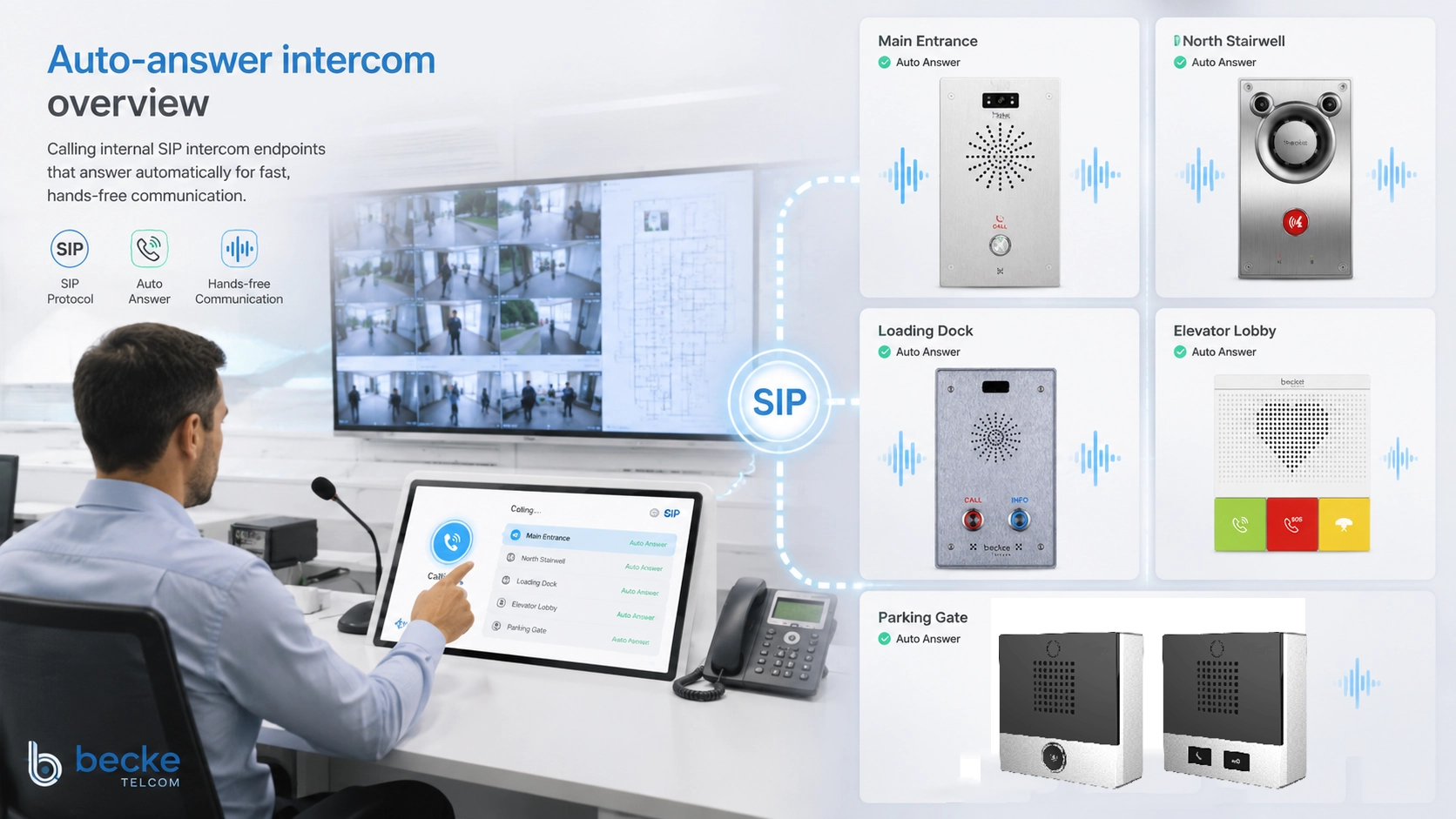
Auto-answer intercom is a communication feature that allows an intercom endpoint, IP phone, SIP terminal, help point, or internal extension to answer an incoming call automatically without requiring a person to press an answer button. When a call reaches the configured device, the system opens the audio path immediately or after a short tone, allowing fast hands-free communication between users, rooms, workstations, service points, or control centers.
In practical terms, auto-answer intercom is designed for speed. It is useful when a caller needs to speak to someone quickly, when a device is installed in a public or restricted location, when hands-free answering is required, or when an internal team needs instant voice contact without normal telephone ringing and manual pickup. It is commonly used in offices, control rooms, schools, hospitals, factories, warehouses, parking areas, elevators, security points, laboratories, transportation sites, and emergency help stations.
Auto-answer intercom is especially common in SIP-based communication systems. A dispatcher, reception desk, security guard, nurse station, control room operator, or authorized extension can call an intercom device, and the receiving endpoint answers automatically according to its configuration. This enables fast internal extension calling, room-to-room communication, emergency assistance, access control verification, and operational coordination.
What Is Auto-Answer Intercom?
Definition and Core Meaning
Auto-answer intercom is an intercom calling mode in which the receiving endpoint answers automatically when it receives an authorized call. Unlike a normal phone call, where the user must hear ringing and manually pick up, an auto-answer intercom call can connect immediately. This creates a faster and more direct communication experience.
The core meaning of auto-answer intercom is instant internal voice connection. It allows selected extensions, operators, or system users to reach a location quickly. Depending on system settings, the intercom may play an alert tone before opening the microphone and speaker, answer in hands-free mode, or allow one-way or two-way audio.
Auto-answer does not mean that every incoming call must be answered automatically. In a well-designed system, this behavior should be controlled by permissions, trusted caller lists, device settings, call groups, access rules, and privacy policies. The feature is most useful when it is applied to the right endpoints and workflows.
Auto-answer intercom changes internal calling from “ring and wait” into “connect and talk,” making it useful for fast operational communication.
Why Auto-Answer Intercom Matters
Auto-answer intercom matters because some communication scenarios cannot depend on manual answering. In a security office, the operator may need to speak to a gate intercom immediately. In a hospital corridor, a nurse station may need to reach a room or service point quickly. In a factory, a supervisor may need to call a production station where workers cannot easily press a button. In an emergency help point, the user may press a call button and expect direct connection to assistance.
The feature reduces delay and improves response speed. A normal internal call may ring for several seconds or go unanswered if the device is not actively monitored. Auto-answer intercom can open communication instantly when the call is from an authorized source.
It also supports hands-free operation. This is valuable in areas where users may be wearing gloves, carrying tools, handling patients, monitoring screens, driving, or working in environments where touching a phone is inconvenient.
How Auto-Answer Intercom Works
Call Initiation from an Authorized Extension
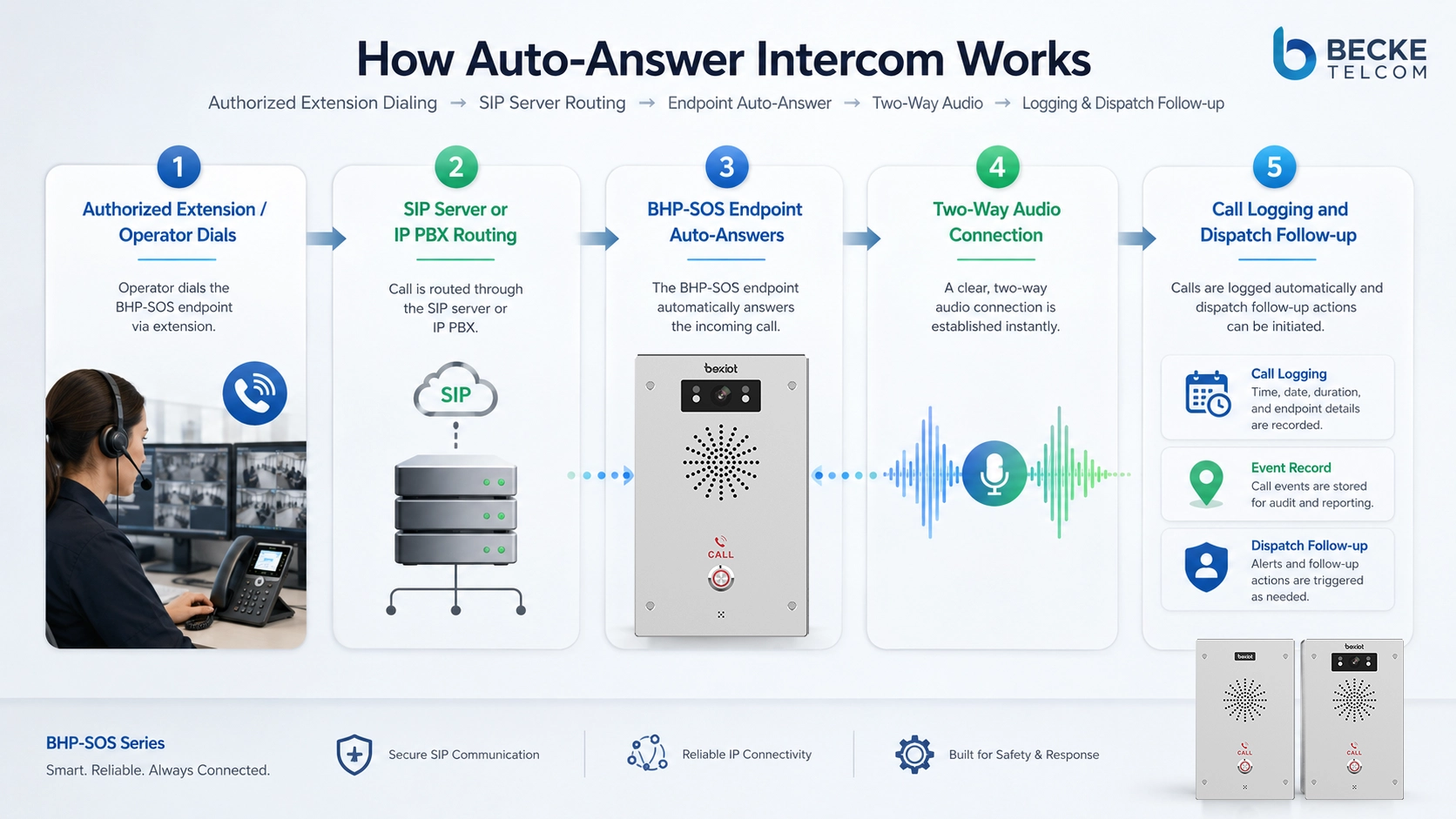
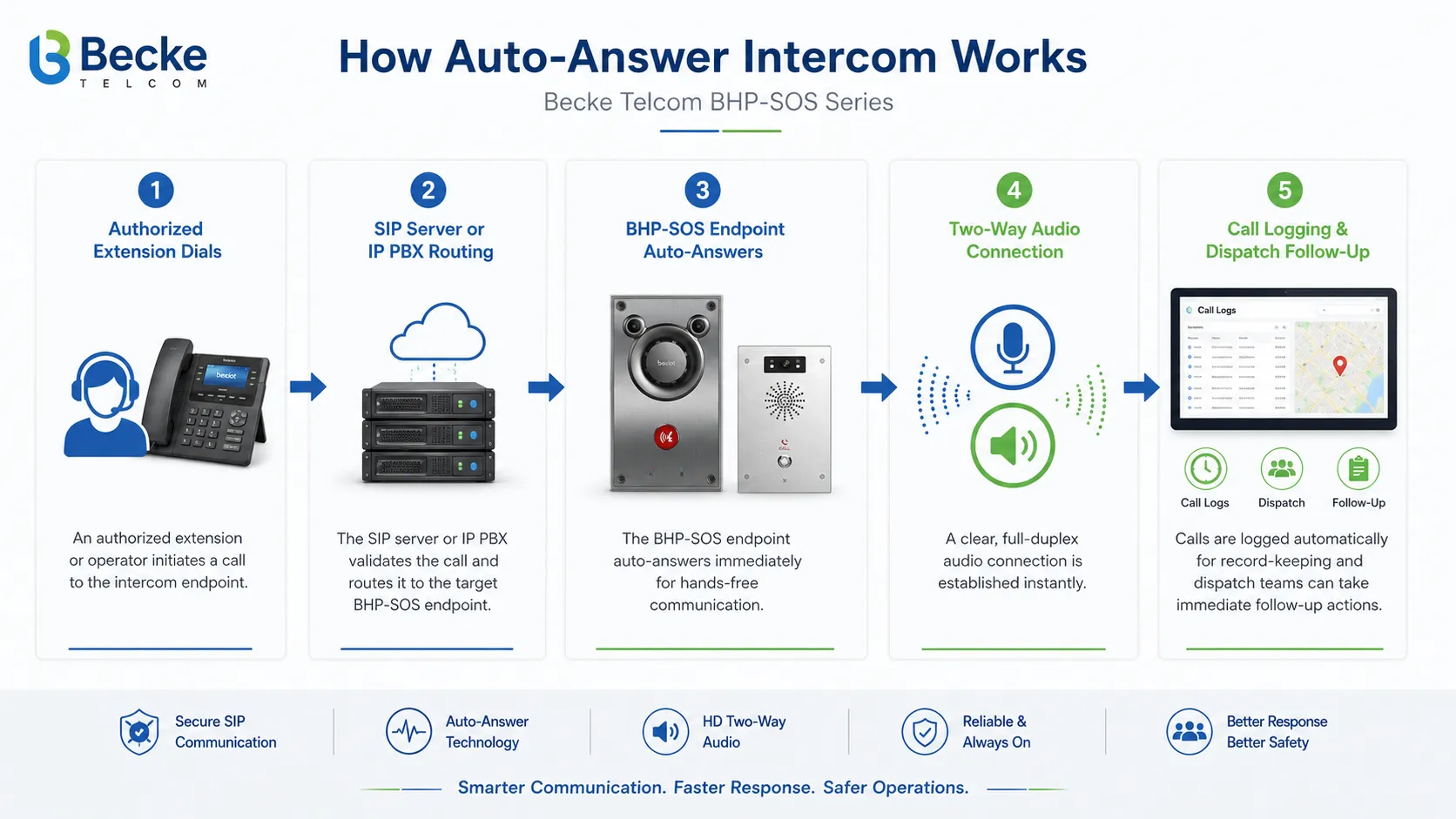
The process begins when a caller dials an internal extension, intercom number, speed-dial key, call group, or SIP address. The caller may be a receptionist, dispatcher, security guard, nurse station, supervisor, duty room, or another authorized endpoint. The system checks the destination and routes the call through the IP PBX, SIP server, intercom platform, or communication controller.
In many SIP systems, auto-answer behavior can be controlled through endpoint configuration and signaling headers. The receiving endpoint may be programmed to answer calls from certain sources automatically, while normal external calls or unauthorized calls still ring normally or are rejected.
This separation is important because auto-answer should serve operational needs without creating privacy or security risk. Only trusted call paths should be allowed to trigger automatic answering.
Endpoint Auto-Answer Activation
When the receiving endpoint detects an authorized auto-answer call, it activates the speaker, microphone, or selected audio path. Some devices answer immediately, while others play a short tone first to notify people nearby that the call is starting. The tone is useful because it gives a clear audio cue before live communication begins.
Depending on the intercom design, the call may open in full-duplex mode, half-duplex mode, or push-to-talk style. Full-duplex allows both parties to speak naturally at the same time. Half-duplex allows one side to speak at a time and is sometimes used in noisy or controlled environments.
Endpoint configuration may also define volume, microphone sensitivity, speaker behavior, call duration limit, accepted caller list, and whether auto-answer is enabled all day or only during certain operating modes.
Audio Path and Media Handling
After the call is answered, audio media flows between the caller and the intercom endpoint. In SIP-based systems, the signaling layer controls the call setup, while RTP or SRTP may carry the audio media. The quality of the call depends on codec support, network stability, endpoint audio design, echo control, noise conditions, and speaker placement.
For internal extension calling, the media path may stay within the local network. For multi-site systems, audio may travel across WAN links, VPNs, cloud platforms, or communication gateways. Quality of Service, VLAN planning, jitter control, and bandwidth management can help maintain stable voice.
Auto-answer intercom is most effective when the audio is clear enough for quick instruction and confirmation. If the environment is noisy, the system may need louder speakers, noise reduction, directional microphones, or integration with visual indicators.
Call End, Logging, and Follow-Up
Once the conversation is complete, either side may end the call. The system may record call logs showing caller, callee, time, duration, call result, and device status. In security, healthcare, emergency, or industrial environments, call records may support incident review and service accountability.
Some systems can also integrate auto-answer intercom calls with recording, video pop-up, access control, alarm events, or dispatch workflows. For example, when a help point calls a control room, the system may display the location, open related camera video, and log the event.
In advanced deployments, auto-answer is not just a device setting. It becomes part of a wider communication workflow that connects voice, location, alarms, video, and response procedures.
Auto-answer intercom works best when device settings, caller permissions, audio quality, and operational procedures are planned together.
Main Features of Auto-Answer Intercom
Instant Hands-Free Answering
Instant hands-free answering is the main feature of auto-answer intercom. The receiving device answers automatically, allowing the caller to speak without waiting for a person to pick up. This is useful in areas where users may not be standing next to the device or cannot easily operate buttons.
Hands-free answering is common in service desks, warehouse stations, clean areas, security posts, parking entrances, emergency points, and internal office zones. It supports faster response and reduces missed calls.
The feature should be configured with care. In private offices or sensitive areas, automatic answering may need user consent, caller restrictions, or audible notification.
Fast Internal Extension Calling
Auto-answer intercom is often used for fast internal extension calling. A user can dial a short extension, press a speed-dial key, or select a contact from a dispatch console to reach another location immediately. This reduces the delay of normal call setup and manual answering.
Internal extension calling can be organized by room, floor, gate, department, production line, ward, control point, help station, or security zone. Clear extension naming and numbering help users reach the correct endpoint quickly.
In large facilities, auto-answer intercom can become part of the daily communication routine between operations, security, maintenance, reception, and field teams.
One-Way and Two-Way Audio Options
Some systems support different audio modes. One-way audio allows the caller to make an announcement or listen depending on configuration. Two-way audio allows both sides to talk. The right mode depends on the application and privacy requirements.
Two-way auto-answer intercom is useful for conversation and confirmation. One-way calling may be used for paging-style announcements, room monitoring with strict authorization, or controlled operational instructions. However, listening functions should be governed carefully to avoid privacy concerns.
The system should make audio behavior clear to both administrators and users. Unexpected microphone activation can create trust issues if not managed transparently.
Permission-Based Auto-Answer
Permission-based auto-answer restricts who can trigger automatic answering. For example, calls from a control room, guard desk, nurse station, or dispatcher may auto-answer, while calls from ordinary extensions may ring normally.
This prevents abuse and reduces privacy risk. It also helps the system match real operational roles. A security operator may need instant access to gate intercoms, while ordinary staff should not be able to open those devices automatically.
Permissions may be based on extension numbers, SIP accounts, caller groups, time schedules, call routes, or access policies.
Pre-Answer Tone and Visual Indicator
A pre-answer tone is a short sound played before the intercom opens. It informs nearby users that an intercom call is starting. Some devices may also include LED indicators or screen prompts to show call status.
These indicators improve transparency and reduce surprise. They are especially useful in offices, rooms, healthcare areas, schools, and public environments where people should know when audio communication is active.
For emergency and help point applications, clear visual and audio indicators can reassure users that the call has connected.
Speed Dial and Call Button Support
Many auto-answer intercom deployments use speed-dial keys or call buttons. A user can press one button to reach a control room, reception desk, duty station, or emergency contact. The receiving side may answer manually or automatically depending on workflow.
Call buttons are useful for help points, elevators, parking entrances, laboratories, production areas, and public assistance stations. They reduce the need for users to remember extension numbers.
In emergency-oriented systems, button design, labeling, lighting, and location are just as important as the communication feature itself.
Becke Telcom BHP-SOS Series IntercomRecommended Product Scenario:
Becke Telcom BHP-SOS Series Fits
In projects that need fast internal extension calling, emergency help points, public assistance terminals, or control-room-connected intercom stations, the Becke Telcom BHP-SOS series intercom can be considered as a suitable product direction. It is especially relevant where users need a fixed-position intercom endpoint that can connect quickly to security, reception, dispatch, or duty personnel.
Becke Telcom BHP-SOS series intercom can be deployed at gates, corridors, parking areas, campuses, industrial entrances, station zones, public help points, service counters, or facility emergency contact locations. When connected to a compatible SIP communication system, it can support direct calling to internal extensions and help create a clear call path between the field point and the responsible operator.
For auto-answer intercom applications, the product selection should focus on the whole workflow: call button behavior, SIP registration, target extension routing, audio clarity, installation environment, power method, network connection, device status monitoring, and whether the control room requires call logging or recording.
Product Recommendation Logic
Becke Telcom BHP-SOS series is best positioned not as a general office phone replacement, but as a purpose-built intercom endpoint for fixed assistance and operational communication points. If the project needs a user to press a button and reach a control room quickly, an SOS-style intercom is usually more intuitive than a standard desk phone.
For example, in a campus security project, BHP-SOS series intercom stations can be placed at outdoor help locations or building entrances. In a parking facility, they can be installed near payment areas, barriers, elevator lobbies, or emergency assistance points. In an industrial site, they can provide quick contact between field areas and the control room.
When designing the call flow, the intercom can be configured to call a security desk, dispatcher, reception extension, duty phone, or call group. The receiving operator can then answer, speak to the user, confirm the location, and coordinate response.
Deployment Notes for BHP-SOS Intercom Projects
Before selecting a BHP-SOS series intercom, project teams should confirm the actual installation environment and feature requirements. Important factors include indoor or outdoor placement, network availability, power supply, mounting method, audio coverage, noise level, vandal-resistance requirement, camera or video requirement if applicable, and compatibility with the target SIP platform.
The system designer should also define whether calls from the BHP-SOS endpoint ring a single extension, a hunt group, a dispatch console, or an emergency call queue. If the receiving side uses auto-answer, the system should make sure that only appropriate incoming calls trigger automatic connection.
This product recommendation works best when the intercom terminal, SIP server, internal extension plan, control room workflow, and maintenance process are designed as one system rather than as separate devices.
Benefits of Auto-Answer Intercom
Faster Response
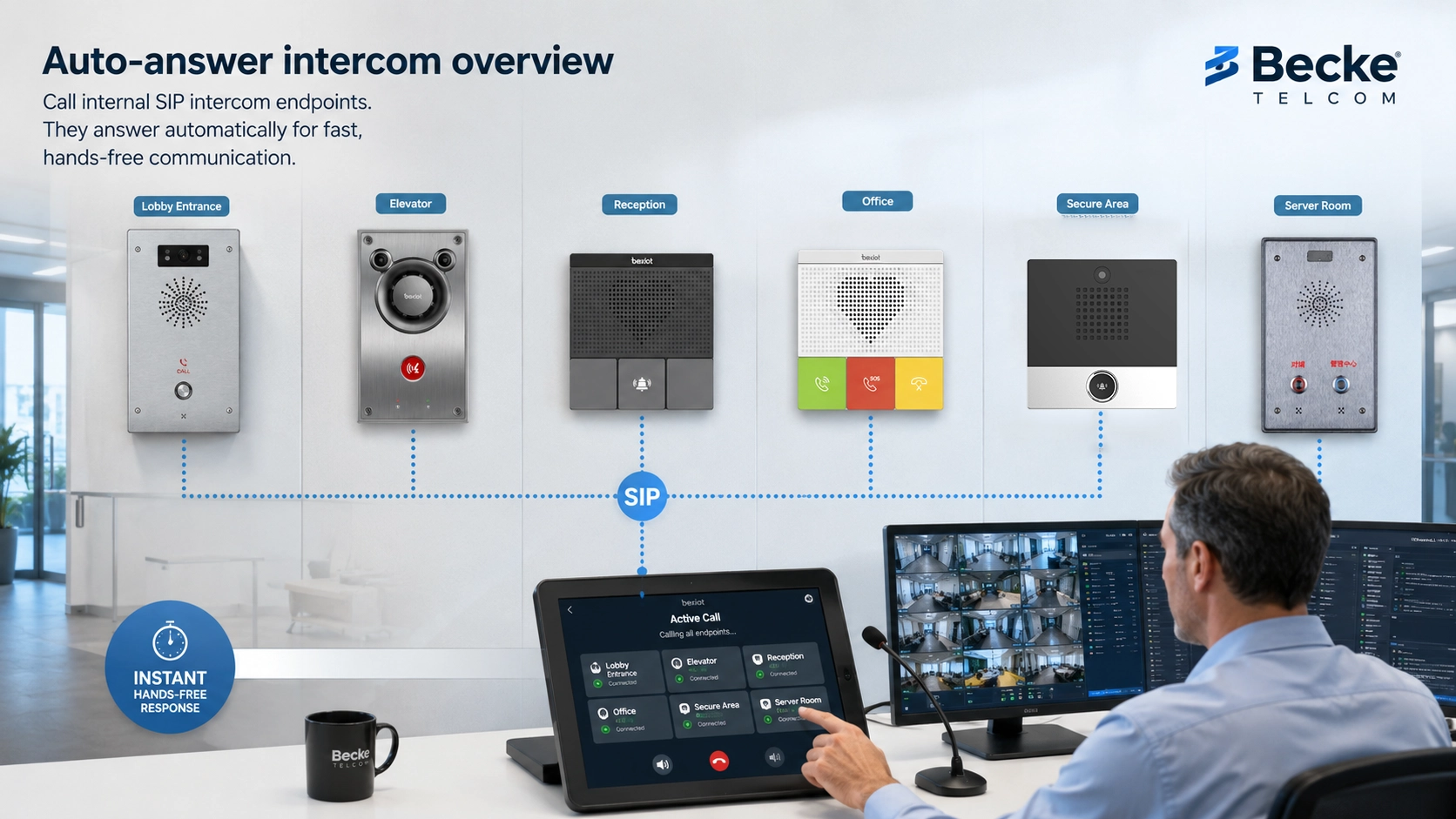
The most direct benefit of auto-answer intercom is faster response. The call connects without waiting for manual pickup, so the caller can speak immediately. This is valuable when seconds matter or when users need quick confirmation.
In security, healthcare, industrial, campus, and public facility environments, faster voice connection can reduce uncertainty. Operators can ask what happened, confirm location, give instructions, or dispatch assistance more quickly.
Fast response is especially useful when auto-answer intercom is combined with speed dialing, call buttons, emergency groups, or dispatch consoles.
Reduced Missed Calls
Auto-answer reduces missed calls at endpoints that may not be staffed continuously. A wall intercom in a warehouse or corridor may not have someone standing beside it. A device in a service point may need to receive instructions even if the nearby worker is moving around.
By answering automatically, the endpoint ensures that the audio path is opened when an authorized call arrives. This improves reachability and reduces repeated calling.
For public help points, the feature can also reassure users because the system connects directly instead of ringing with no visible response.
Hands-Free Operation
Hands-free operation is useful when users cannot easily touch a device. Workers may wear gloves, carry materials, operate machinery, or stand in a restricted area. Medical staff may need to avoid touching devices during care tasks. Security users may need to speak while watching monitors or controlling access.
Auto-answer intercom lets communication happen through speaker and microphone without a handset. This supports practical daily workflows and reduces friction.
Hands-free communication should still be supported by good acoustic design. Microphone pickup, speaker volume, echo control, and device placement all affect usability.
Improved Operational Coordination
Auto-answer intercom improves coordination by creating direct voice links between locations. A supervisor can call a production station, a guard can call a gate terminal, a nurse station can contact a room point, or a control center can reach a field intercom.
This directness reduces the time spent searching for people or waiting for call pickup. It also helps teams share instructions quickly during routine operations or incidents.
In larger facilities, auto-answer intercom can be part of a broader internal communication plan that includes paging, dispatching, video, access control, and alarm workflows.
Better Emergency Assistance
In emergency help point applications, users may be under stress and may not understand complicated operation. A call button plus automatic connection to an operator creates a simple workflow: press, connect, speak, receive help.
This is why auto-answer-style intercom logic is common in SOS stations, public assistance points, elevator phones, parking help terminals, campus help points, and emergency call stations.
The system should be designed with clear signage, reliable routing, audible feedback, and backup procedures so that users know the call has been placed and help is being contacted.
Applications of Auto-Answer Intercom
Office and Internal Extension Calling
Offices use auto-answer intercom for fast communication between reception, meeting rooms, executive offices, warehouse desks, service counters, and internal departments. Instead of placing a normal phone call and waiting for pickup, authorized users can connect quickly for short instructions or announcements.
This is useful for reception-to-room communication, assistant-to-office calls, internal service desks, and shared workspaces. However, privacy should be considered carefully. Auto-answer should not be enabled for every personal desk phone without consent or policy.
A better approach is to enable auto-answer for shared intercom endpoints, service points, or specific operational locations.
Security and Access Control
Security teams use auto-answer intercom at gates, doors, barriers, parking entrances, loading docks, visitor entrances, and restricted areas. A guard or control room can quickly speak to a person at the access point, verify the purpose of entry, and coordinate door or barrier control.
When integrated with access control and video, the operator can hear the visitor, see the camera view, and unlock the door if authorized. The intercom call becomes part of the access decision workflow.
Auto-answer can also be useful for internal guard-to-intercom communication, allowing security staff to contact fixed points without waiting.
Hospitals and Healthcare Facilities
Healthcare facilities may use auto-answer intercom between nurse stations, patient support areas, laboratories, clean rooms, service corridors, pharmacy rooms, and restricted zones. Fast voice communication can support coordination between departments and staff.
In clinical environments, privacy and noise control are important. Auto-answer should be configured only where it supports the workflow and does not create unwanted audio exposure. A pre-answer tone or visual indicator may be appropriate in some locations.
For emergency assistance points, a simple call button can connect users to a nurse station, security desk, or duty room.
Factories and Warehouses
Factories and warehouses often require hands-free communication. Workers may be on production lines, in loading areas, near machinery, or moving materials. Auto-answer intercom allows supervisors, maintenance teams, and control rooms to reach fixed workstations quickly.
The environment may be noisy, so the intercom endpoint must provide clear audio and suitable volume. In some zones, visual indicators or paging integration may be needed to attract attention.
Auto-answer intercom can support production coordination, maintenance requests, safety communication, dock management, and internal logistics.
Schools, Campuses, and Public Facilities
Schools and campuses can use auto-answer intercom for classroom-to-office communication, security help points, building entrances, dormitory assistance, parking help stations, and facility management points. Public facilities can use it for visitor support, emergency contact, and service assistance.
In these environments, the system should be easy for non-technical users. Clear labels, simple call buttons, audible feedback, and reliable routing are important.
Auto-answer behavior should be limited to approved locations and operators so that privacy and user comfort are protected.
Transportation and Parking Facilities
Transportation sites and parking facilities use intercoms at ticket machines, parking barriers, platforms, elevators, help points, service entrances, and control rooms. Users may need immediate assistance when equipment fails, payment is blocked, or safety concerns arise.
Auto-answer intercom can connect the call quickly to the operator or dispatcher. If video or location information is integrated, the operator can understand the situation faster.
For public areas, rugged design, clear signage, weather protection, and reliable network connectivity should be considered during deployment.
Technical Features and System Architecture
SIP and IP PBX Integration
Many auto-answer intercom systems are based on SIP. SIP allows the intercom endpoint to register to an IP PBX, SIP server, hosted voice platform, or communication system. Once registered, the device can receive internal extension calls and participate in the organization’s call routing plan.
SIP integration makes the system flexible. A control room can call the intercom by extension number. The intercom can call a hunt group or emergency queue. Calls can be transferred, recorded, routed, or linked with other SIP endpoints depending on system capability.
For reliable operation, administrators should check SIP account settings, codec support, NAT traversal, network reachability, and endpoint registration status.
Codec and Audio Quality
Audio quality depends on codec selection, microphone design, speaker quality, echo cancellation, noise suppression, network stability, and installation location. Common voice codecs in SIP environments may include G.711, G.722, G.729, Opus, or other supported codecs depending on the system.
For auto-answer intercom, intelligibility is more important than high-fidelity sound. Users need to understand short instructions quickly. In noisy sites, speaker power, microphone pickup, and acoustic placement may matter more than codec choice alone.
Testing should be performed in the actual installation environment, not only on a desk during configuration.
Network and Power Requirements
IP intercom systems require reliable network and power. Devices may use Ethernet, PoE, local power adapters, or other power methods depending on product design. PoE can simplify installation because network and power are delivered through one cable.
Network design should consider VLANs, Quality of Service, switch power budget, cable distance, surge protection, and backup power for critical endpoints. If the device is used for emergency assistance, the network and server path should also be reliable.
An auto-answer feature cannot help if the endpoint is offline, unregistered, or without power.
Call Permissions and Security
Security controls are important because auto-answer opens audio automatically. The system should restrict which extensions can call auto-answer endpoints, which devices can trigger automatic answering, and whether calls are logged or recorded.
Administrators should also secure SIP accounts with strong credentials, restrict management access, update firmware, use trusted networks, and disable unused services. In sensitive environments, signaling and media encryption may be considered where supported.
A secure design prevents the intercom from becoming an unauthorized listening or calling point.
Integration With Video, Alarms, and Dispatch
Auto-answer intercom can be more powerful when integrated with video, alarms, access control, and dispatch systems. A call from a help point may trigger a camera pop-up. A door intercom may connect with access control. An emergency call may appear on a dispatch console with location information.
This integration helps operators understand the situation quickly. They can hear the caller, see the area, identify the device location, and take action from one interface.
Integration planning should define event triggers, call routing, operator roles, recording policy, and fallback procedures.
Deployment Considerations
Decide Where Auto-Answer Is Appropriate
Auto-answer should be applied only where it supports a clear operational purpose. Good locations include shared service points, public help points, security intercoms, industrial stations, nurse stations, access points, duty rooms, and dispatch-connected endpoints.
It may not be appropriate for private offices, personal phones, sensitive rooms, or areas where people expect a normal ringing call. Privacy, consent, and workplace policy should be considered.
The best deployment is selective. Enable auto-answer where speed and hands-free communication are valuable, and use normal ringing where privacy matters more.
Define Caller Permissions
Caller permissions should be defined before launch. Administrators should decide which extensions, groups, or operator consoles can trigger auto-answer. Ordinary users may not need this ability.
Permission design reduces misuse and keeps the feature aligned with real responsibilities. For example, security desks may call gate intercoms automatically, but general office phones may not.
Permissions should be reviewed when staff roles, extension numbers, or system layouts change.
Plan Extension Numbering and Naming
Extension numbering and naming help users find the right intercom quickly. Names such as “Gate 1 Intercom,” “Parking Help Point B2,” “Warehouse Dock 3,” or “Nurse Station Corridor” are easier to understand than generic device names.
Speed-dial keys, phone directories, dispatch maps, and call group labels should match the physical location. This helps operators respond faster and reduces wrong calls.
Clear naming is especially important in campuses, hospitals, factories, parking facilities, and transportation sites with many endpoints.
Test Audio in Real Conditions
Auto-answer intercom should be tested in the real environment. Administrators should check whether users can hear clearly, whether the microphone picks up speech, whether echo occurs, whether background noise affects understanding, and whether volume is suitable.
Testing should include both quiet and noisy periods. A warehouse may sound different during loading hours. A parking entrance may have traffic noise. A hospital corridor may require lower volume during night hours.
Real-condition testing prevents communication failure after installation.
Prepare Fallback Procedures
If an intercom endpoint is offline, busy, damaged, or unreachable, users should still have a fallback path. This may include alternate extensions, mobile duty numbers, backup help points, visual signage, or regular maintenance checks.
For emergency assistance points, fallback planning is especially important. The system should not depend on a single unmonitored call route.
Fallback procedures should be documented and tested as part of the communication plan.
Auto-answer intercom deployment should balance speed, privacy, caller permissions, audio quality, endpoint reliability, and emergency fallback.
Common Challenges
Privacy Concerns
Privacy is one of the most common concerns with auto-answer intercom. If users do not know that a device can answer automatically, they may feel uncomfortable or surprised when the audio path opens.
Privacy risk can be reduced through caller restrictions, pre-answer tones, visible indicators, clear policy, limited deployment locations, and transparent user communication. Auto-answer should not be enabled casually on personal devices.
The system should make communication faster without making users feel monitored unexpectedly.
Wrong Caller Permissions
If too many users can trigger auto-answer, the feature may be misused or become disruptive. If too few users have permission, the feature may not support real operations.
Permissions should match job roles. Security staff, dispatchers, supervisors, or duty personnel may need access, while ordinary users may not.
Regular permission review helps keep the system safe and useful.
Poor Audio in Noisy Areas
Noisy environments can reduce the usefulness of auto-answer intercom. If the speaker is too quiet or the microphone picks up too much background noise, users may not understand the call.
Solutions may include better endpoint placement, higher speaker output, directional microphones, noise reduction, acoustic shielding, visual indicators, or use of paging integration.
Audio design should be part of the project plan, not an afterthought.
Network or Registration Failure
IP intercoms depend on network connectivity and server registration. If a switch fails, PoE power is lost, SIP registration drops, or network routing changes, the device may not receive calls.
Monitoring can help identify offline endpoints before users need them. Critical intercoms should be included in device health checks and maintenance routines.
A reliable auto-answer system requires reliable network and power infrastructure.
Overuse of Auto-Answer
Auto-answer should not replace every normal call. If it is used too widely, users may feel interrupted and lose control over their communication. It may also create noise in shared spaces.
The feature is most effective for short, operational, location-based communication. For longer conversations, private discussions, or non-urgent contact, normal calling may be more appropriate.
Good system design uses auto-answer as a targeted tool, not a universal default.
Maintenance and Operation Tips
Review Device Status Regularly
Auto-answer intercom endpoints should be checked regularly for registration status, network reachability, power condition, firmware version, and call success. If a device is offline, the problem should be resolved before it affects operations.
Systems with many intercoms should use centralized monitoring where possible. Device names and locations should be clear so technicians can find the correct endpoint quickly.
Regular status review improves reliability and reduces silent failures.
Test Call Paths
Call paths should be tested periodically. Testing should confirm that the correct extension calls the correct device, auto-answer works as expected, audio is clear, and call logs are generated.
Testing should also include emergency call buttons, speed-dial keys, fallback routes, hunt groups, and operator consoles. If routing changes are made, test calls should be repeated.
A working configuration today may fail later if extensions, network settings, or server rules change.
Update Firmware and Security Settings
Intercom firmware should be maintained according to the manufacturer’s recommendations and project policy. Updates may improve SIP compatibility, audio performance, security, stability, and device management.
Security settings should also be reviewed. Default passwords should be changed, unused services should be disabled, management interfaces should be restricted, and SIP credentials should be protected.
Maintenance protects both communication reliability and system security.
Check Physical Condition
Intercom endpoints may be installed in public, industrial, or outdoor locations. Physical condition should be inspected regularly. Technicians should check buttons, speaker grilles, microphones, mounting brackets, labels, cable entries, covers, and signs of damage.
Dirt, water, impact, loose wiring, blocked microphones, or damaged buttons can reduce communication quality. Public help points and emergency intercoms should receive special attention.
A good communication system depends on both software configuration and physical device condition.
Review Logs and Usage
Call logs and usage reports can show how often auto-answer intercom endpoints are used, which devices receive calls, whether calls fail, and whether certain locations need better support.
Reviewing logs helps identify patterns. A help point with frequent calls may need better signage or staff attention. A device with failed calls may have a network or configuration issue.
Usage review turns intercom operation into a measurable service rather than a hidden feature.
Auto-Answer Intercom Versus Similar Features
Auto-Answer Intercom Versus Normal Phone Call
A normal phone call rings and waits for the receiving user to answer. Auto-answer intercom answers automatically when the call meets the configured conditions. This makes auto-answer faster but less private.
Normal calling is better for personal or non-urgent communication. Auto-answer intercom is better for shared endpoints, operational locations, help points, and fast internal contact.
Both methods can exist in the same communication system.
Auto-Answer Intercom Versus Paging
Paging usually sends a one-way announcement to one or more zones. Auto-answer intercom creates a call connection with a specific endpoint or location. Paging is better for broadcasting information, while intercom is better for conversation or confirmation.
Some systems combine both. A dispatcher may page a zone first, then call an intercom endpoint for two-way communication.
The right choice depends on whether the workflow needs one-way notification or two-way voice interaction.
Auto-Answer Intercom Versus Push-to-Talk
Push-to-talk communication requires a user to press a button while speaking. Auto-answer intercom answers an incoming call automatically and may support hands-free conversation. Push-to-talk is common in radio and group communication, while auto-answer intercom is common in fixed endpoint calling.
Push-to-talk is useful for group coordination and controlled speaking turns. Auto-answer intercom is useful for reaching a specific location quickly.
In some industrial or dispatch systems, both methods may be used together.
Auto-Answer Intercom Versus Hotline Calling
Hotline calling automatically dials a preset destination when the user lifts a handset or presses a button. Auto-answer intercom focuses on how the receiving endpoint answers. A system may use both: a help point calls a preset control room number, and the control room or intercom endpoint uses auto-answer behavior in another part of the workflow.
Hotline calling simplifies call initiation. Auto-answer simplifies call reception.
Together, they can create very fast point-to-point communication paths.
Conclusion
Auto-answer intercom is a fast internal communication feature that allows selected intercom endpoints or extensions to answer authorized calls automatically. It is used to reduce waiting time, support hands-free communication, improve response speed, and create direct voice links between control rooms, service points, help stations, access points, and operational locations.
Its main features include instant hands-free answering, fast extension calling, permission-based access, one-way or two-way audio options, pre-answer tones, call button support, SIP integration, call logging, and possible integration with video, alarms, access control, and dispatch systems. These features make it useful in offices, hospitals, factories, warehouses, schools, campuses, parking facilities, transportation sites, and security environments.
For projects that need fixed SOS help points or public assistance intercoms, Becke Telcom BHP-SOS series intercom can be considered as a product direction, especially when the workflow requires a simple call button, fast connection to a security desk or dispatch extension, and integration with a SIP-based communication system. To achieve a reliable result, project teams should plan caller permissions, extension routing, audio quality, endpoint monitoring, physical installation, privacy rules, and fallback procedures together.
FAQ
What is auto-answer intercom in simple terms?
Auto-answer intercom is a feature that allows an intercom device or extension to answer an incoming call automatically without someone pressing an answer button.
It is used for fast hands-free communication between internal extensions, help points, security desks, control rooms, and service locations.
How does auto-answer intercom support fast internal extension calling?
Users can dial an internal extension, speed-dial key, or intercom number, and the receiving endpoint answers automatically if the call is authorized.
This reduces ringing delay and allows the caller to speak to the location almost immediately.
Where is auto-answer intercom commonly used?
It is commonly used in offices, hospitals, factories, warehouses, schools, campuses, parking facilities, transportation sites, access control points, public help points, and security control rooms.
It is most useful where fast response or hands-free operation is needed.
Is auto-answer intercom safe for privacy?
It can be safe when configured properly. The system should restrict which callers can trigger auto-answer, provide tones or indicators where needed, and avoid enabling automatic answering in private areas without policy or consent.
Auto-answer should be used selectively for operational endpoints rather than as a universal default.
How can BHP-SOS series intercom be used in this type of system?
Becke Telcom BHP-SOS series intercom can be used as a fixed SOS help point or assistance terminal connected to a SIP-based communication system.
It can call a security desk, dispatcher, reception extension, duty phone, or call group, helping users reach assistance quickly from public, industrial, campus, parking, or facility locations.
What should be checked before deploying auto-answer intercom?
Project teams should check caller permissions, extension numbering, SIP compatibility, network reliability, power supply, endpoint audio quality, privacy policy, call logs, fallback routing, and the physical installation environment.
The feature works best when technical configuration and operational procedures are planned together.







