


In industrial plants, tunnels, outdoor corridors, utility stations, parking areas, warehouses, campuses, and public facilities, equipment often has to work in places where floor space is limited, traffic flow is busy, cleaning is frequent, and maintenance access must remain convenient. A wall-mounted enclosure gives the device a fixed, protected, visible, and serviceable location without occupying the working ground.
When installation space becomes part of system reliability
Equipment deployment is not only a matter of selecting the right terminal, controller, switch, communication unit, power module, or field interface. The installation form also affects long-term reliability. If equipment is placed on the floor, left on a table, hidden behind other devices, or installed without protection, it may be exposed to impact, dust, water, vibration, accidental operation, cable pulling, or unauthorized access.
A wall-mounted enclosure provides a controlled installation point. It can house electrical components, communication devices, network modules, emergency terminals, control interfaces, alarm modules, power distribution units, or environmental monitoring devices. The enclosure creates a physical boundary between the device and the surrounding environment while keeping the equipment available for use, inspection, and maintenance.
The value becomes clearer in sites where equipment cannot be installed freely. A production aisle must remain clear. A tunnel walkway cannot be blocked. A control room wall may need visible emergency access. A public facility may need devices at a standard height. A utility cabinet may need to be close to cables but away from ground water. In these cases, the wall is not just a mounting surface; it becomes part of the deployment strategy.
Good wall-mounted deployment reduces disorder. Instead of allowing devices, cables, and accessories to spread across the site, the enclosure gives the system a defined boundary. The device is easier to locate, cables are easier to trace, and the installation point can be documented in drawings, inspection lists, and maintenance procedures.
How the mounting form changes field deployment
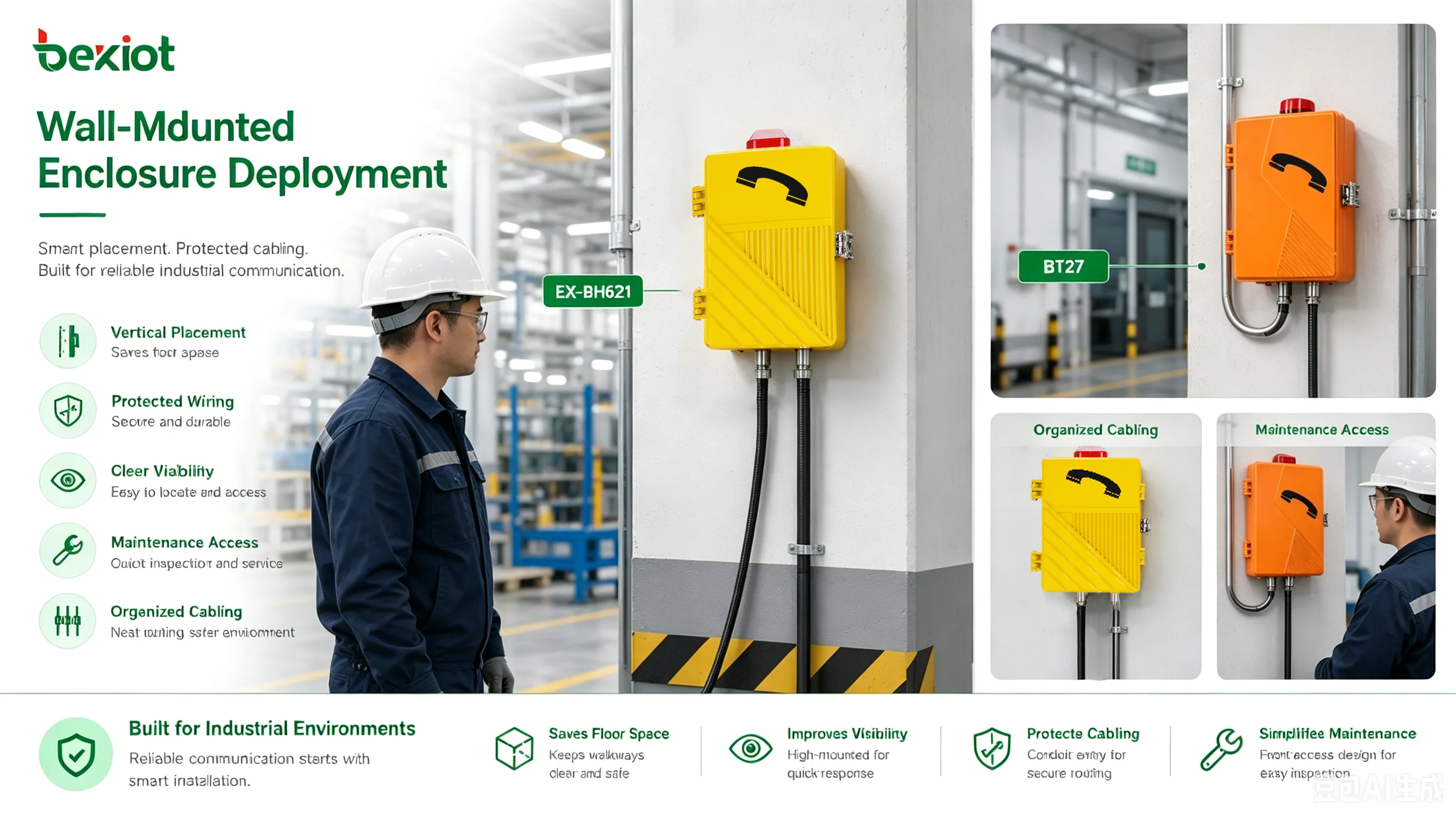
The most direct change is the movement from ground occupation to vertical placement. By using walls, columns, equipment frames, control panels, structural supports, or dedicated mounting brackets, the enclosure saves usable floor area. This is especially useful in narrow corridors, crowded workshops, machine rooms, platforms, guard posts, loading areas, and outdoor service points.
Vertical placement also improves visibility. A wall-mounted device can be installed at eye level or hand level according to its function. Operators can identify it quickly, users can reach it more easily, and maintenance personnel can inspect the status without moving other objects. For emergency communication, intercom, alarm, or control applications, visibility can directly affect response speed.
The mounting form also affects cable management. Cables can enter from the top, bottom, side, or rear depending on enclosure design and site conditions. A well-planned installation reduces exposed cable length, protects connectors, and makes cable routes more predictable. In field environments, cable strain and poor routing often cause more trouble than the device itself.
Another difference is maintenance posture. Wall-mounted equipment can often be opened, inspected, cleaned, and serviced without removing it from the site. The technician can stand in front of the enclosure, check internal wiring, replace modules, review labels, and close the box again. This reduces the time required for routine service and lowers the chance of secondary damage during maintenance.
Space-saving value in crowded environments
Space saving is one of the main deployment advantages. In many facilities, ground space has higher operational value than wall space. A walkway must remain clear for people, carts, forklifts, cleaning equipment, medical beds, inspection teams, or emergency evacuation. A floor-standing cabinet may be difficult to place, while a wall-mounted enclosure can use vertical space that would otherwise remain unused.
This advantage is not limited to small sites. Large industrial plants, utility tunnels, logistics hubs, stations, hospitals, campuses, and commercial buildings all contain areas where equipment needs to be installed close to the point of use but cannot block the flow of work. Wall-mounted enclosures allow devices to be distributed across the site without creating obstacles.
For communication equipment, this can be especially important. A phone, intercom, paging station, emergency button, alarm interface, or network access box often needs to be close to the user. If the device is far away because there is no floor space nearby, the system becomes less useful. Wall mounting solves this by placing the device near the work position, entrance, machine, platform, gate, or service area.
Space saving also supports phased deployment. A facility may begin with a few installed points and later add more. Wall-mounted enclosures are easier to distribute in separate zones than large centralized cabinets. Each enclosure can serve a local area, which helps reduce cable distance and simplifies future expansion.
Protection against site conditions
A field device may face dust, moisture, chemical vapor, mechanical impact, vibration, heat, cold, sunlight, cleaning water, accidental contact, insects, or unauthorized operation. A wall-mounted enclosure can reduce direct exposure and provide a more suitable operating environment for the equipment inside.
Protection requirements vary by field. An indoor office enclosure may need only basic cable organization and access control. A workshop enclosure may need stronger mechanical protection and dust resistance. An outdoor unit may need sealing, drainage, UV resistance, corrosion resistance, and temperature considerations. A hazardous-area installation may require specially certified equipment and installation methods according to the actual risk zone and applicable regulations.
The enclosure should match the environment rather than be selected only by size. If water spray is expected, sealing and cable entry must be considered. If impact is likely, the shell material and mounting strength matter. If corrosion is possible, coating, stainless steel, gasket quality, and screw material should be reviewed. If heat builds up inside, ventilation, heat dissipation, or component derating may be necessary.
Protection also includes user safety. An enclosure can separate users from internal wiring, terminals, power modules, and sharp mounting components. It can also help prevent accidental disconnection or contact with live parts. In public or semi-public areas, lockable doors and tamper-resistant structures can reduce misuse and unauthorized adjustment.
Cleaner cable routing and easier identification
Cable disorder is a common source of maintenance difficulty. When devices are installed without a defined enclosure, cables may hang loosely, cross walking paths, bend sharply, or become mixed with unrelated lines. Over time, this makes troubleshooting harder and increases the risk of accidental pulling or wrong disconnection.
A wall-mounted enclosure provides a place to organize cable entry, cable glands, terminals, labels, grounding points, and spare wire length. Technicians can follow a structured route from the field cable to the device connection. This is useful for network cables, power cables, signal lines, speaker lines, alarm contacts, control wires, fiber jumpers, and grounding conductors.
Clear identification reduces service time. Each enclosure can be labeled by area, system, device number, circuit, network segment, or maintenance responsibility. Inside the box, terminals and cable cores can be labeled according to drawings. When a fault occurs, the team can quickly find the right point instead of searching through unmarked wiring.
This advantage becomes stronger in multi-system environments. A site may contain communication, security, access control, fire alarm, monitoring, automation, lighting, and power systems. If each field device is installed and labeled consistently, cross-system maintenance becomes more manageable. If everything is scattered, even small changes can become risky.
Access height and human operation
Wall-mounted installations must consider the people who will use or maintain the equipment. A device installed too high may be visible but difficult to operate. A device installed too low may be easy to hit, expose cables to damage, or become inconvenient for standing users. The correct height depends on function, user group, environment, and local project requirements.
For operator-facing devices, hand reach and viewing angle are important. Buttons, handsets, screens, microphones, card readers, indicator lights, and labels should be placed where users can interact with them naturally. For maintenance-only devices, the height should support safe opening, inspection, and cable testing.
In emergency communication points, accessibility becomes more important. Users should find the device quickly, understand its purpose, and operate it without complex steps. A wall-mounted intercom, emergency call station, or alarm box should not be hidden behind equipment, installed in a confusing corner, or blocked by stored materials.
Human operation also affects enclosure door design. The door should open in a direction that does not hit nearby obstacles. The technician should have enough space to use tools. If internal components need frequent service, the enclosure should not require complicated disassembly. A protective box that is difficult to access may discourage proper maintenance.
Deployment advantages across project stages
During design, wall-mounted enclosures make device positions easier to plan. The engineer can mark each installation point on layout drawings, define cable routes, estimate material quantity, and coordinate with architecture, electrical, network, security, and process teams. This reduces conflicts during construction.
During installation, the enclosure provides a repeatable mounting method. Workers can install brackets, drill mounting points, route cables, terminate connections, and fix the equipment according to drawings. A standardized installation process is easier to inspect than improvised placement.
During commissioning, the enclosure helps technicians locate each node and test it in sequence. They can verify power, network, grounding, signal, device status, call function, alarm contact, or communication path at the local box. If a problem appears, the boundary between field wiring and internal equipment is clearer.
During operation, the enclosure supports routine inspection. Maintenance staff can check whether the door is closed, seals are intact, cables are secure, indicators are normal, labels are readable, and internal temperature or moisture conditions are acceptable. These simple checks help prevent small installation problems from becoming service failures.
During expansion, wall-mounted points can often be added without redesigning the whole room or site. A new enclosure can be installed near a new workstation, gate, machine, corridor, or service area. This modular deployment advantage is one reason wall-mounted solutions are common in distributed systems.
Types of environments and matching priorities
Not all wall-mounted enclosures are selected for the same reason. Some sites care most about space saving. Some care about weather resistance. Some care about impact protection. Some care about hygiene and cleaning. Some care about visibility and quick public access. The application field determines the priority.
| Application environment | Main deployment priority | Typical enclosure concern | Common equipment inside or attached |
|---|---|---|---|
| Industrial workshop | Protection and local accessibility | Dust, vibration, impact, cable strain, maintenance access | Industrial phones, intercoms, control interfaces, network nodes |
| Outdoor facility | Weather resistance and secure mounting | Rain, sunlight, corrosion, temperature, sealing, drainage | Emergency call devices, monitoring units, field communication terminals |
| Hazardous area | Certified equipment and controlled installation | Explosion risk, grounding, cable entry, zone compliance | Explosion-proof communication terminals and signaling devices |
| Public building | Visibility and user-friendly access | Tampering, clear labeling, safe height, neat appearance | Help points, intercom panels, access control interfaces |
| Utility and infrastructure site | Reliability and remote maintenance | Environmental exposure, stable wiring, identification, inspection route | Communication boxes, alarm interfaces, network and power modules |
This comparison shows why selection should not start with enclosure dimensions only. The same size box may work well in an office corridor but fail in a humid outdoor area. A strong metal enclosure may protect equipment in a workshop but may not meet requirements for corrosion, sealing, or hazardous-area installation. The environment defines the real specification.
Application priority should also include the consequence of failure. A box used for non-critical monitoring may tolerate slower maintenance. A box used for emergency communication or process safety support requires stricter positioning, labeling, protection, and test routines. The higher the consequence of failure, the more carefully the installation should be planned.
Industrial communication points
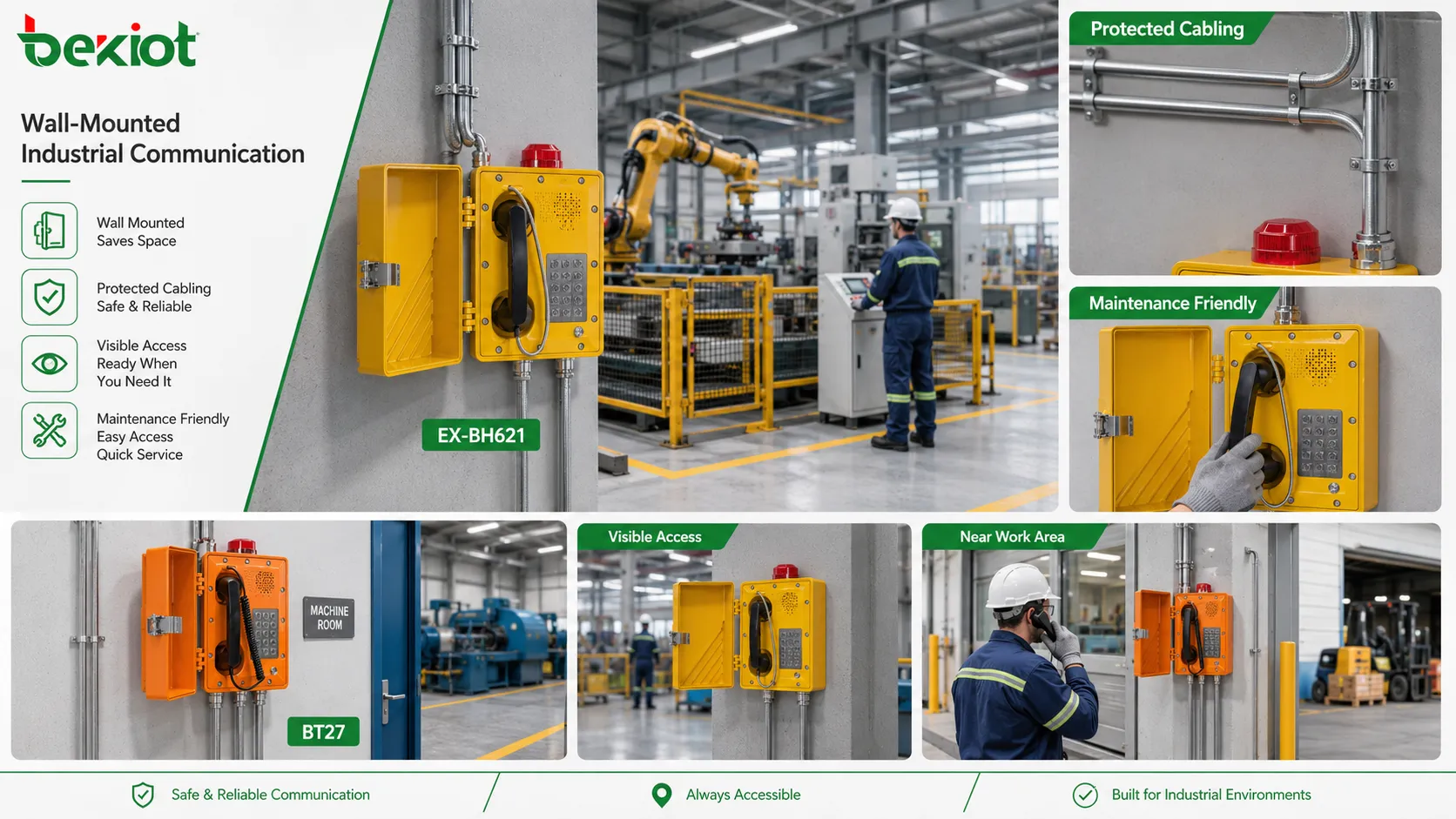
Industrial facilities often need communication points near production lines, loading areas, machine rooms, storage zones, chemical handling areas, maintenance corridors, control stations, and outdoor yards. These locations are not always suitable for desktop telephones or floor-standing cabinets. Wall-mounted enclosures and wall-mounted terminals make communication available closer to the work area.
In noisy or harsh environments, the installation must consider impact, cable protection, cleaning, visibility, and ease of use. A communication terminal should be placed where workers can reach it quickly but where it is not easily damaged by vehicles, moving equipment, or materials. The enclosure or housing should also support stable wiring and safe access for service teams.
For hazardous-area communication, equipment selection must follow the actual site classification and applicable certification requirements. A device such as the Becke Telcom EX-BH621 explosion-proof telephone may be considered in projects where voice communication is required in areas with potential explosive atmospheres, provided that the certification, installation method, and environmental conditions match the project requirements.
For general industrial locations that need rugged wall-accessible communication, an industrial telephone such as the Becke Telcom BT27 can be planned as part of a local voice communication point. In this type of deployment, the wall-mounted position helps keep the device visible, reduces floor occupation, and supports fixed cabling in the work zone.
Emergency call and help point deployment
Emergency communication requires a different deployment logic from ordinary equipment. The device must be easy to find, easy to operate, and reliable when an incident occurs. A wall-mounted enclosure or integrated wall-mounted call point can provide a fixed emergency location in corridors, gates, platforms, parking areas, campuses, hospitals, warehouses, tunnels, public buildings, and industrial sites.
Visibility is critical. If a person needs help, the emergency point should not be hidden behind furniture, machinery, signage, or stored materials. The installation height, color contrast, label clarity, lighting condition, and access path should all support fast recognition. In some projects, the wall-mounted point may also be integrated with flashing lights, cameras, speakers, or alarm contacts.
A wall-mounted intercom such as the Becke Telcom BHP-SOS series can be used as an example of this type of deployment thinking. The purpose is not only to provide a call button, but to create a fixed response point where users can request help, security staff can identify the location, and the service team can coordinate follow-up.
Emergency call points should also be included in regular testing. A device may look ready from the outside but fail because of cable damage, power loss, network interruption, blocked audio, or incorrect routing. The enclosure and installation position should make testing convenient so that maintenance teams can verify the device without special disassembly.
Security, access control, and public facility use
Public and semi-public facilities often use wall-mounted enclosures for access control panels, intercom stations, visitor help points, alarm interfaces, guard communication, elevator assistance, parking assistance, and service request terminals. These devices must be visible and accessible, but they also need protection from misuse and environmental wear.
In access control areas, the enclosure may support card readers, door controllers, call buttons, indicator lights, or communication modules. Wall mounting allows the device to be located close to doors, gates, turnstiles, entrances, and reception points. The installation should avoid obstructing passage while still being easy to reach.
In security applications, the enclosure should support both user access and maintenance control. Users may need to press a button or speak through an intercom, while technicians may need to open the box for wiring, testing, or replacement. These two needs should not conflict. A strong external structure with controlled internal access helps balance usability and protection.
For public facilities, appearance may also matter. The enclosure should look orderly and intentional rather than temporary. Neat wall-mounted deployment can improve the perceived professionalism of a building, station, campus, office park, hospital, or commercial center. Poorly installed boxes, exposed cables, and inconsistent heights can make even a good system look unreliable.
Utility, transport, and infrastructure fields
Utility and infrastructure projects often include distributed devices across large physical areas. Power substations, water treatment plants, pumping stations, tunnels, bridges, highway service areas, railway stations, metro platforms, ports, airports, and energy sites may all need local communication, monitoring, control, or alarm interfaces.
In these fields, wall-mounted enclosures help place equipment close to the field process without requiring large cabinets everywhere. A small local enclosure can support a communication terminal, junction module, network device, power interface, or alarm contact at the exact point where it is needed. This reduces long exposed cable runs and improves local serviceability.
Transport environments also require careful positioning. Devices may be installed along platforms, service corridors, ticketing areas, parking zones, tunnel entrances, maintenance rooms, and emergency exits. Wall-mounted deployment helps keep walkways clear and supports repeated installation standards across many locations.
Infrastructure sites often face difficult weather and maintenance conditions. An enclosure installed in a remote pump station or outdoor utility yard must remain functional between inspection visits. Strong mounting, good sealing, proper grounding, clear labeling, and reliable cable entry are not small details; they directly affect whether the system remains serviceable over time.
Commercial buildings and campus environments
Commercial buildings, office parks, hotels, campuses, hospitals, residential complexes, and logistics parks use wall-mounted enclosures for communication, service, emergency, security, access, and facility management functions. These environments usually care about both function and appearance.
In a hotel, wall-mounted service communication points may support front desk contact, engineering support, parking assistance, or emergency help. In a campus, they may support security calls, dormitory communication, gate control, or public help points. In a hospital, they may support duty rooms, corridors, emergency entrances, service desks, and restricted areas.
The advantage is that each point can be located close to the user or staff workflow. A help point near a parking exit is more useful than one hidden in an office. A maintenance communication point near an equipment room is more practical than one in a distant control area. Wall-mounted deployment helps align equipment position with real movement paths.
Because these environments often contain visitors, patients, students, tenants, or customers, clear identification is important. The enclosure should make the device purpose understandable. If users cannot tell whether a box is for emergency help, access control, staff use, or maintenance, the design may fail at the human level even if the electronics work.Material, sealing, and structural considerations
The enclosure material should match the environment. Common options may include painted steel, stainless steel, aluminum alloy, engineering plastic, or other materials depending on the application. Each material has different behavior in terms of strength, corrosion resistance, weight, cost, appearance, and processing method.
Steel enclosures can provide strong mechanical protection but may need proper coating to resist corrosion. Stainless steel is often used where corrosion, cleaning, or hygiene is a concern. Aluminum may reduce weight and offer corrosion resistance in some environments. Plastic enclosures may work well in lighter applications but must be evaluated for impact, UV exposure, heat, and chemical resistance.
Sealing is another critical factor. Gaskets, cable glands, door structure, screw points, drainage design, and installation orientation all affect moisture protection. Even a well-rated enclosure can fail if the cable entry is poorly installed or if the door gasket is damaged during maintenance. The protection level of the complete installation matters more than the label on the box alone.
Structural strength includes more than the shell thickness. The mounting wall must support the load. The screws, anchors, brackets, and reinforcement plates should match the enclosure weight and site vibration. If users may pull a handset, press buttons frequently, or interact physically with the device, the mounting structure must handle repeated force.
Thermal and electrical planning
An enclosure protects equipment, but it can also trap heat. Power supplies, network switches, communication modules, amplifiers, controllers, and charging circuits may generate heat during operation. If the enclosure is sealed and exposed to sunlight or high ambient temperature, internal temperature can rise beyond the device’s comfortable operating range.
Thermal planning should consider device heat output, enclosure volume, material, ventilation, sunlight exposure, duty cycle, and surrounding airflow. Some installations may need passive heat dissipation, sunshade, ventilation filters, heat sinks, or active cooling. Others may require component derating or a larger enclosure to reduce heat concentration.
Electrical planning includes power input, grounding, surge protection, overcurrent protection, separation between power and signal wiring, and safe terminal arrangement. Wall-mounted enclosures often become local wiring hubs, so internal layout should prevent confusion. Power cables and communication cables should be routed cleanly according to project requirements.
Grounding and bonding are especially important in industrial, outdoor, and hazardous environments. A protective enclosure should not create a floating metal body or an uncertain electrical path. The grounding design should be checked according to site rules, device requirements, and local standards.
Maintenance access and lifecycle management
A wall-mounted enclosure should be designed for the full lifecycle, not only for installation day. Maintenance staff may need to open the box, inspect wiring, replace a terminal, check a fuse, clean dust, update a device, test a communication path, or read a label. If access is difficult, maintenance quality will decline over time.
Door opening direction, internal component layout, spare cable length, terminal spacing, label placement, and tool access all affect maintainability. A compact enclosure may look efficient, but if the technician cannot reach terminals safely, the design is poor. A slightly larger enclosure may reduce future service time and error risk.
Lifecycle management also includes spare parts and replacement. Devices may be upgraded, network standards may change, cables may be replaced, and new modules may be added. The enclosure should allow reasonable flexibility where future change is expected. Overly tight installation leaves no room for adaptation.
Inspection routines should be defined. Maintenance teams can check enclosure integrity, seal condition, corrosion, cable glands, grounding, labels, device status, internal moisture, and unauthorized changes. For emergency or safety-related communication points, functional testing should be included, not only visual inspection.
Common mistakes in field installation
One common mistake is selecting the enclosure only by external size. Size matters, but it is not the whole specification. The design must consider cable bending radius, internal heat, terminal access, grounding space, future expansion, and service tools. A box that barely fits the device may become difficult to maintain.
Another mistake is ignoring the installation surface. A strong enclosure installed on a weak wall, thin panel, corroded frame, or vibrating structure may loosen over time. The mounting surface and fasteners should be treated as part of the system, not as construction details left for the last moment.
Poor cable entry is also frequent. If cable glands are not sealed, if cables enter from a water-collecting direction, if there is no strain relief, or if cables are bent too sharply, the enclosure may fail even when the shell is well made. Cable entry should be planned before installation, not improvised on site.
Another mistake is placing the enclosure where it is technically convenient but operationally inconvenient. A communication point may be installed near an available cable route but far from the users who need it. An emergency call point may be installed in a visible drawing location but hidden behind real site equipment. Field verification is necessary.
Finally, many projects fail to update documentation after installation changes. If an enclosure is moved, a cable is rerouted, or a device is replaced, drawings and labels should be updated. Otherwise, future maintenance teams may trust outdated information and waste time during troubleshooting.
How to evaluate deployment quality
A good wall-mounted deployment can be evaluated through several practical questions. Is the device located where users or technicians actually need it? Is the enclosure protected against expected environmental conditions? Is the mounting structure strong enough? Are cables organized and labeled? Can the device be serviced without unnecessary disassembly?
The design should also be checked against failure scenarios. What happens if water reaches the cable entry? What happens if a worker bumps the enclosure? What happens if the device needs replacement? What happens if the site adds another cable later? These questions reveal whether the deployment is robust or only visually complete.
Operational testing should include both function and access. For communication devices, the team should test call quality, button operation, audio path, network status, power stability, and routing behavior. For alarm or control devices, the team should test signal triggering, indication, logging, and response path. For network nodes, link status and management access should be verified.
Long-term quality depends on maintainability. If the enclosure remains clean, sealed, labeled, accessible, and mechanically stable after months of operation, the deployment is likely successful. If it becomes blocked, unlabeled, loose, wet, overheated, or difficult to open, the original design needs improvement.
Closing Thoughts
Wall-mounted enclosures provide practical deployment advantages by saving floor space, protecting equipment, improving visibility, organizing cables, simplifying maintenance, and supporting distributed installation across different site areas. Their value is strongest where equipment must be close to users or field processes while remaining protected and serviceable.
Application fields include industrial workshops, outdoor facilities, hazardous areas, emergency help points, transport corridors, utility stations, public buildings, commercial properties, campuses, hospitals, and security environments. In communication-related projects, products such as EX-BH621 explosion-proof telephones, BT27 industrial telephones, and BHP-SOS wall-mounted intercom devices can be considered as examples of field terminals that benefit from careful wall-accessible deployment planning.
The key is to treat the enclosure as part of the engineering system, not as a simple box. Material, sealing, mounting strength, cable entry, thermal behavior, grounding, user access, maintenance space, and documentation all determine whether the installation remains reliable over time.
FAQ
Are wall-mounted enclosures only used for electrical equipment?
No. They can be used for electrical components, communication devices, network modules, emergency call points, control interfaces, access systems, alarm terminals, monitoring units, and other field equipment that requires protected installation and fixed access.
What is the biggest advantage compared with floor-standing cabinets?
The biggest advantage is saving floor space while keeping equipment close to the point of use. Wall-mounted deployment is especially useful in corridors, workshops, platforms, service areas, equipment rooms, and public locations where ground space must remain clear.
How should the installation height be selected?
The height should match the function. User-operated devices should be easy to see and reach. Maintenance-only boxes should allow safe inspection and wiring work. Emergency devices should be visible, accessible, and not blocked by site objects.
Can the same enclosure be used indoors and outdoors?
Not always. Outdoor installations require more attention to sealing, sunlight, rain, corrosion, temperature, cable entry, drainage, and mounting strength. The enclosure and complete installation method should match the actual environment.
What should be checked during routine maintenance?
Routine checks should include door closure, seal condition, corrosion, cable glands, mounting screws, grounding, labels, internal moisture, device status, wiring condition, and functional tests for communication, alarm, or control devices where applicable.







