


Time synchronization, often implemented through Network Time Protocol or NTP, is necessary in communication systems because every call, message, alarm, recording, device status, access event, dispatch action, and system log depends on accurate time. When phones, servers, gateways, recorders, cameras, dispatch consoles, and monitoring platforms use different clocks, the entire communication workflow becomes harder to trust, troubleshoot, and manage.
In a communication system, time is not only displayed on the screen. It is the reference line that connects signaling, media, logs, recordings, alarms, reports, and operational decisions.
The Basic Role of Time Synchronization
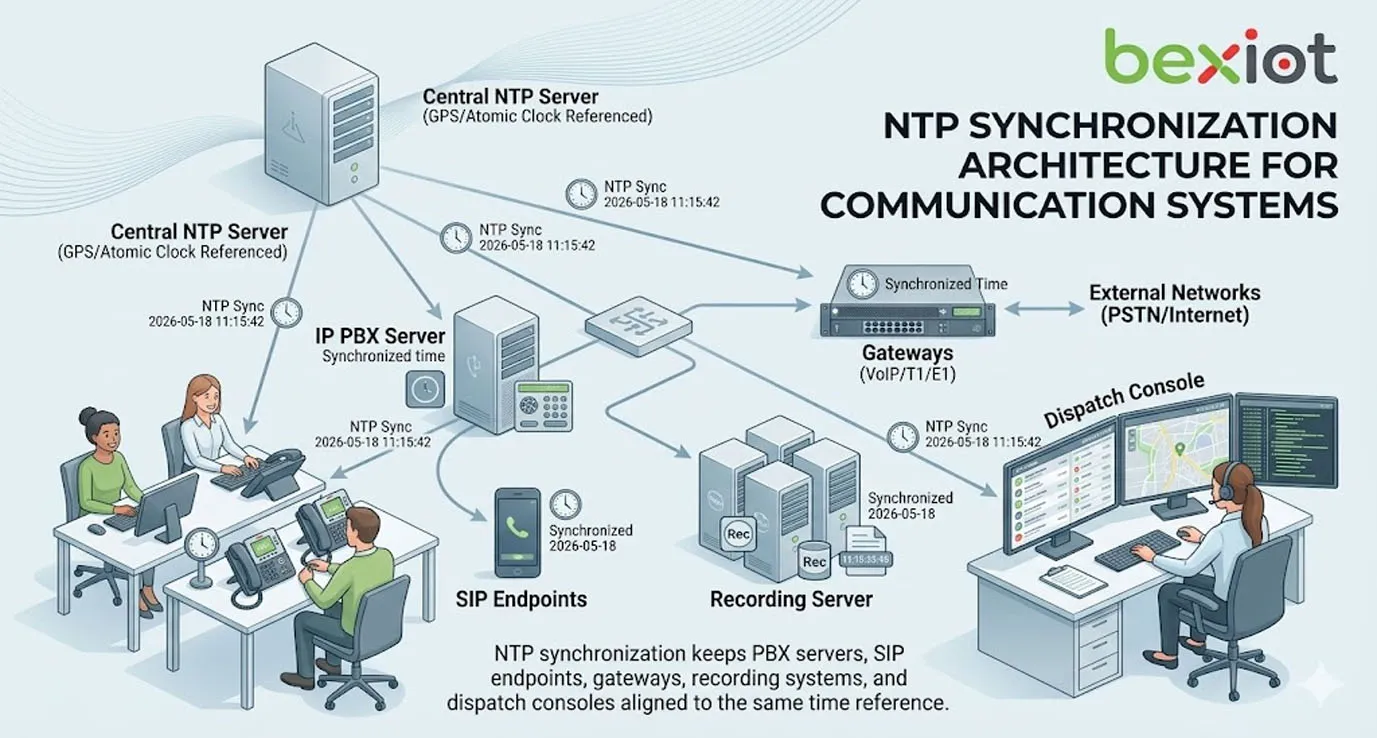
Time synchronization keeps multiple devices and systems aligned to the same time source. In most IP-based communication environments, NTP is used to synchronize clocks across servers, endpoints, switches, gateways, PBX platforms, recording systems, monitoring tools, and management platforms.
Without synchronization, each device may run on its own internal clock. Over time, these clocks drift. One server may be several minutes ahead, a gateway may be behind, and an endpoint may show the wrong date. This creates confusion when administrators review events or when systems depend on accurate timestamps.
What NTP Does
NTP allows network devices to request accurate time from one or more time servers. These servers may be public internet NTP servers, private enterprise NTP servers, GPS-based time sources, data center time servers, or dedicated timing appliances.
After receiving time information, each device adjusts its internal clock. The goal is to keep all connected systems close enough in time so that logs, events, and services can be correlated accurately.
Why Communication Systems Are Sensitive to Time
Communication systems contain many moving parts. A single voice call may involve a SIP phone, PBX server, SIP trunk, SBC, gateway, recording server, call detail record system, monitoring platform, and sometimes a dispatch console. If these systems disagree on time, one call can appear as several unrelated events.
Accurate time helps administrators understand the exact order of call setup, ringing, answering, recording, transferring, forwarding, failure, and release. This is essential for both daily operation and incident review.
Accurate Call Logs and Event Records
Call logs and event records are among the most direct reasons communication systems need time synchronization. Call detail records, SIP logs, alarm logs, system operation logs, registration logs, and device status records all rely on timestamps.
If timestamps are wrong, the record may still exist, but its value is reduced. Engineers may not know which event happened first, whether a call failure happened before or after a trunk error, or whether an alarm was acknowledged within the required response time.
Call Detail Records
Call Detail Records, often called CDRs, store information such as caller number, called number, call start time, answer time, end time, duration, route, trunk, and call result. These records are used for billing, reporting, auditing, quality review, and troubleshooting.
If the PBX clock is wrong, CDRs may show incorrect call duration or call time. If different communication nodes have different clocks, one system may show that a call ended before another system says it started. This makes reporting unreliable.
System Logs
System logs are used to diagnose faults, restarts, registration failures, trunk errors, timeout events, security warnings, and configuration changes. Logs from different devices must be compared during troubleshooting.
For example, a SIP phone may show registration failure at one time, while the PBX shows authentication rejection at another. If clocks are not synchronized, engineers may waste time matching unrelated log entries.
Alarm and Dispatch Records
In command and dispatch systems, accurate event time is critical. Operators may need to know when an alarm occurred, when it was acknowledged, when a call was made, when field staff responded, and when the event was closed.
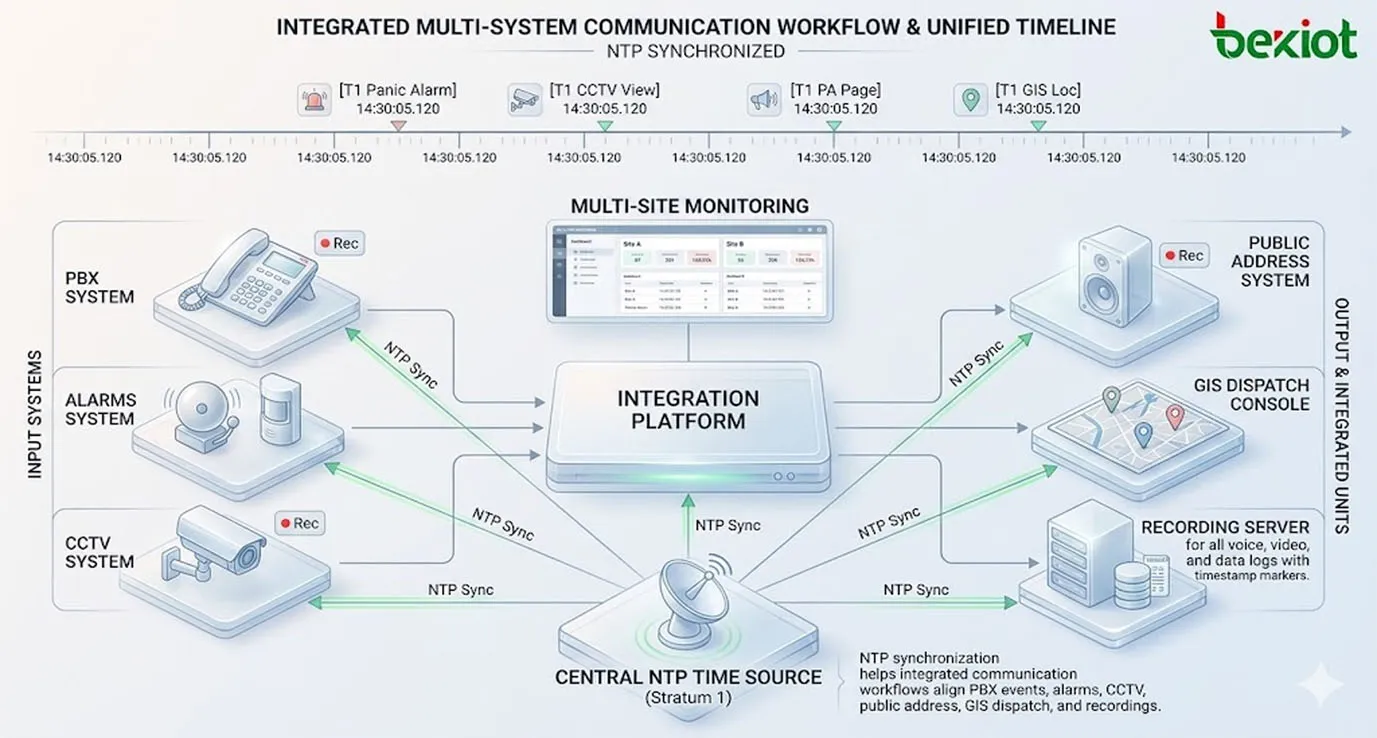
For projects using an integrated platform such as Becke Telcom BK-RCS converged communication system, time synchronization helps align voice dispatch, video linkage, alarm events, broadcast actions, GIS operations, and incident records into one consistent timeline.
Recording, Playback, and Evidence Review
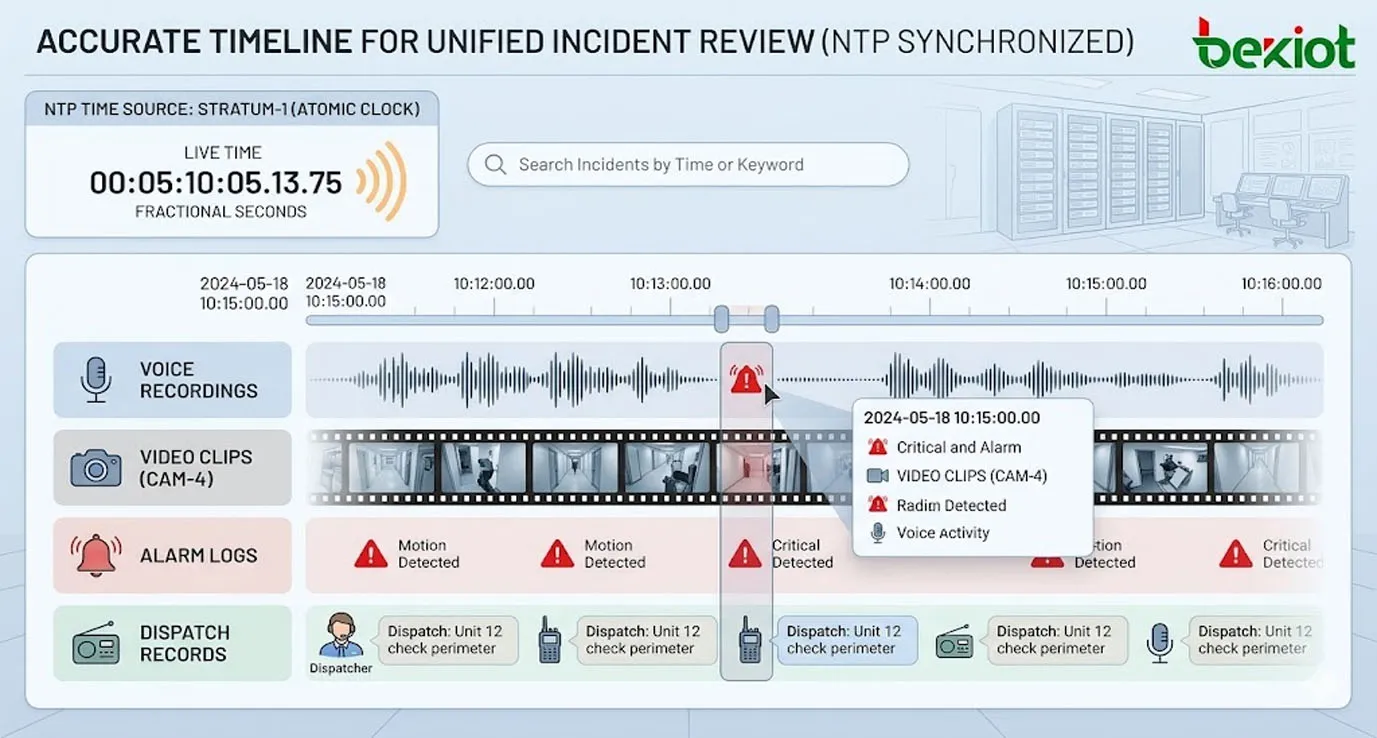
Communication recording systems depend heavily on accurate time. Voice recordings, video clips, intercom records, radio dispatch records, meeting recordings, and emergency call recordings are often searched by time, user, channel, device, or incident.
If system clocks are inconsistent, users may search the wrong time period, miss important recordings, or misunderstand the event sequence. In serious incidents, this can affect investigation quality and accountability.
Finding the Right Recording
Recording systems usually index files by start time, end time, channel, extension, call ID, or event ID. If the clock is wrong, the recording may be stored under the wrong timestamp.
This becomes a real problem when operators need to find an emergency call, customer complaint, security event, or dispatch conversation quickly. Accurate time makes search and playback more reliable.
Synchronizing Audio, Video, and Logs
Modern communication workflows often combine audio, video, alarms, access control, and operator logs. For example, a control room may need to compare an emergency call recording with a CCTV clip and an alarm event.
Time synchronization allows these records to line up correctly. Without it, audio may appear before video, alarms may appear late, and the true order of events may become unclear.
Supporting Audit and Compliance
Some industries need communication records for compliance, service review, incident investigation, or legal evidence. Accurate timestamps help prove when a call occurred, when a user took action, and how long a response took.
Wrong timestamps can weaken the reliability of records. Even if the content is correct, inaccurate time may create questions during audits or investigations.
SIP Security and Certificate Validation
Time synchronization is also important for communication security. Modern SIP and VoIP systems may use TLS certificates, HTTPS management interfaces, secure APIs, VPN connections, authentication tokens, and encrypted communication channels.
Many security mechanisms depend on time. If a device clock is wrong, certificates may appear expired or not yet valid. Tokens may be rejected. Secure sessions may fail. This can cause service interruption even when the network and credentials are otherwise correct.
TLS and HTTPS Certificates
TLS certificates include validity periods. If a SIP phone, PBX server, gateway, or browser has the wrong time, it may reject a valid certificate because the local device believes the certificate is expired or not yet active.
This can affect SIP over TLS, secure web login, provisioning servers, remote management portals, and encrypted API connections. Correct time reduces avoidable certificate-related failures.
Authentication Tokens
Some systems use time-based authentication tokens, signed requests, session timeouts, or temporary credentials. If clocks drift too far apart, authentication may fail.
This is common in cloud-connected systems, API integrations, device management platforms, single sign-on environments, and security monitoring tools. Time alignment helps keep authentication predictable.
Security Event Correlation
Security teams often compare logs from firewalls, PBX servers, SIP trunks, endpoints, VPNs, authentication systems, and monitoring platforms. Accurate timestamps help identify suspicious activity and attack timelines.
If a failed login, unusual SIP registration, trunk call attempt, and firewall block all happen near the same time, synchronized logs help security teams see the connection between them.
Reliable Troubleshooting and Fault Analysis
When communication systems fail, engineers need to reconstruct what happened. Time synchronization makes this possible. It allows logs from multiple systems to be arranged in the correct sequence.
Without accurate time, troubleshooting becomes guesswork. Engineers may misread cause and effect, blame the wrong device, or overlook the true root cause.
Call Failure Investigation
A failed call may involve several systems. The phone sends a request, the PBX processes it, the SIP trunk responds, the gateway may translate it, and the far-end network may reject it. Each system records part of the story.
Accurate timestamps allow engineers to compare SIP traces, PBX logs, trunk logs, and endpoint events. This helps determine whether the failure came from authentication, routing, codec negotiation, timeout, network loss, or carrier rejection.
Registration and Device Offline Events
SIP endpoints, gateways, intercoms, and IP phones may register periodically with a server. If a device goes offline, the system records the event. The device may also keep local logs showing network loss or power restart.
When clocks are synchronized, engineers can compare server-side and device-side records accurately. This helps identify whether the issue was caused by power failure, network interruption, server restart, or endpoint malfunction.
Root Cause Analysis
Root cause analysis depends on event sequence. If a trunk failure happened first and call failures followed, the trunk may be the cause. If device registration failed before the trunk error, the issue may be local network or endpoint-related.
Time synchronization allows teams to build an accurate timeline. This reduces repeated faults and helps maintenance teams solve the real problem instead of only clearing symptoms.
Coordination Across Multi-System Workflows
Communication systems are no longer isolated voice platforms. They often integrate with video surveillance, access control, public address, emergency alarms, dispatch systems, GIS maps, recording platforms, and maintenance dashboards.
When these systems work together, time must be consistent. A dispatch event, camera pop-up, alarm trigger, broadcast message, and call record must all align if the platform is expected to provide a reliable operational picture.
Emergency Communication
Emergency communication workflows require fast and traceable coordination. If an emergency button is pressed, the system may trigger a call, open a video feed, create an alarm record, start recording, and notify operators.
Time synchronization ensures that each step is recorded in the correct order. This helps supervisors review response speed and confirm whether procedures were followed.
Public Address and Scheduled Broadcast
Public address systems may use scheduled announcements, timed bells, shift-change messages, warning broadcasts, or evacuation instructions. These functions require accurate system time.
If the clock is wrong, announcements may play early, late, or at the wrong time zone. In schools, factories, stations, campuses, and industrial sites, this can create confusion.
Multi-Site Communication
Multi-site organizations may operate communication servers, branch gateways, remote phones, cloud services, and centralized monitoring platforms across different locations. Time synchronization keeps all sites working from the same reference.
This is especially important when reviewing inter-site calls, branch outages, regional alarms, and distributed dispatch records. Time zone handling should also be configured correctly so reports remain understandable.
Technical Features of NTP Synchronization
NTP is designed to distribute accurate time across IP networks. It works through a hierarchy of time sources and clients. Devices can synchronize with one or more NTP servers to improve accuracy and resilience.
Time Server Hierarchy
NTP uses a stratum model. A highly accurate reference source, such as GPS or an atomic clock, is considered a top-level time source. Servers that synchronize from it then provide time to other devices.
In enterprise communication systems, organizations often deploy internal NTP servers. Endpoints and servers synchronize with the internal source instead of relying directly on public internet servers.
Multiple NTP Sources
Using more than one NTP source improves reliability. If one server becomes unavailable or inaccurate, devices can use another source. This reduces the risk of time drift caused by a single failed server.
For critical communication systems, NTP redundancy should be part of infrastructure planning. The NTP server should not become a hidden single point of failure.
Gradual Clock Adjustment
Many systems adjust time gradually rather than suddenly jumping the clock forward or backward. Gradual adjustment helps avoid problems with logs, scheduled tasks, recordings, and active sessions.
Large time changes should be handled carefully, especially on production communication servers. Sudden clock jumps may affect certificates, call records, scheduled broadcasts, and database entries.
Deployment Considerations
Deploying time synchronization is not difficult, but it should be planned. Administrators should define time sources, network access rules, device configuration, monitoring methods, and fallback behavior.
Use Internal NTP for Critical Systems
For enterprise and industrial communication systems, using internal NTP servers is often better than allowing every device to reach public internet time sources. Internal NTP improves control, reduces dependency on external access, and supports private networks.
Public NTP can still be used by the internal server as an upstream reference where allowed. The key is that endpoints and application servers should have a stable and reachable time source.
Configure Time Zone Correctly
NTP normally synchronizes time in a universal reference, while devices display local time according to time zone settings. If the time zone is wrong, the clock may appear incorrect even when NTP synchronization is working.
Communication platforms should use consistent time zone policies. Reports, recordings, logs, and web interfaces should clearly show local time or UTC where appropriate.
Protect NTP Access
NTP should be reachable by authorized devices, but it should not be left unmanaged. Firewalls, access control lists, network segmentation, and monitoring can help protect time services.
In security-sensitive environments, administrators should avoid unknown time sources and should monitor for unusual time drift or failed synchronization events.
Monitor Synchronization Status
Time synchronization should be monitored like any other infrastructure service. Devices should report whether they are synchronized, which server they use, how much drift exists, and whether synchronization has failed.
Monitoring is important because time drift may not be obvious until an incident occurs. Early detection prevents log confusion and security issues later.
Common Problems Caused by Poor Time Synchronization
Poor time synchronization can cause practical problems across daily operation, security, reporting, and maintenance. Some problems are subtle and may only appear during troubleshooting or audit review.
Wrong Call Duration
If start and end times are inconsistent, call duration reports may be wrong. This affects billing, quality reports, workload analysis, and service statistics.
In multi-server systems, call duration may be calculated from records generated by different nodes. Time drift between those nodes can create inaccurate results.
Recording Search Failure
Users often search recordings by time. If the recording server and PBX use different clocks, the expected recording may not appear in the search range.
This creates delays during incident review. Operators may think a recording is missing when it is actually stored under a shifted timestamp.
Certificate and Login Errors
Incorrect time can cause secure login failures, certificate warnings, API rejection, or SIP TLS connection problems. These issues may look like network or password problems at first.
Checking system time should be a basic troubleshooting step when secure connections fail unexpectedly.
Unreliable Reports
Daily reports, monthly statistics, alarm response reports, attendance-related communication logs, and system usage analytics depend on correct timestamps.
If devices use different clocks, reports may become inaccurate. This can affect management decisions and compliance review.
Best Practices for Communication System Timing
Time synchronization should be treated as a basic infrastructure requirement, not an optional setting. Good timing design improves system reliability, security, and maintainability.
Standardize NTP Configuration
All communication servers, gateways, endpoints, recording systems, dispatch consoles, and monitoring platforms should use a standardized NTP configuration. This reduces inconsistent device behavior.
For large deployments, provisioning templates or configuration management tools can help apply the same time settings across many devices.
Use Redundant Time Sources
Critical systems should use at least two reliable NTP sources. These may be internal time servers synchronized to GPS, data center time services, or approved upstream providers.
Redundancy helps maintain synchronization even if one server fails or becomes unreachable.
Review Time After Maintenance
After firmware upgrades, server migration, device replacement, factory reset, or network changes, time settings should be checked. Devices may lose NTP configuration or revert to default time settings.
This is especially important for SIP phones, gateways, recording servers, and embedded communication terminals that may rely on templates or manual configuration.
Test Logs and Recordings Together
Commissioning should include a practical test: place a call, generate an alarm, create a recording, review the log, and confirm that all timestamps match.
This test is more useful than simply checking whether the clock display looks correct. It confirms that the full workflow is time-aligned.
FAQ
Can communication devices use public NTP servers?
They can, but enterprise and industrial systems often prefer internal NTP servers for stability, access control, and private-network operation. Public NTP may be suitable as an upstream source for internal servers when internet access is allowed.
What happens if a communication server clock jumps backward?
A backward time jump can confuse logs, scheduled tasks, databases, certificates, and recording indexes. Production systems should avoid sudden manual time changes where possible and use controlled synchronization methods.
Is NTP accurate enough for voice communication systems?
For most PBX, SIP, recording, logging, dispatch, and alarm workflows, NTP is accurate enough. Applications requiring sub-millisecond precision, such as some professional media or telecom timing cases, may require PTP or dedicated timing solutions.
Should NTP traffic be allowed through firewalls?
Yes, but only according to policy. Devices should be allowed to reach approved NTP servers. Unrestricted access to unknown external time sources should be avoided in managed communication networks.
How can administrators check whether NTP is working?
Administrators can check device time status, NTP peer information, synchronization state, offset, drift, server reachability, and system logs. A practical workflow test should also confirm that calls, alarms, recordings, and reports show consistent timestamps.
Does time synchronization matter for offline or isolated networks?
Yes. Isolated networks still need consistent internal time. They may use a local NTP server, GPS clock, or dedicated timing source so that logs, alarms, recordings, and device events remain aligned even without internet access.







