


In IP voice, real-time audio is not transmitted as one continuous sound. A microphone captures speech, the system encodes it, divides it into packets, sends those packets across the network, and then the receiving side decodes and plays them out again. The problem is that network packets do not always arrive at the same rhythm in which they were sent. Some packets arrive early, some arrive late, some arrive out of order, and some may not arrive in time for playback. This timing variation is known as jitter.
A jitter buffer is the mechanism used to reduce the audible impact of this timing variation. It temporarily stores incoming audio packets, arranges them according to sequence and timestamp information, waits for a controlled amount of time, and then sends the audio to the decoder and speaker at a steadier playback rhythm. In VoIP calls, IP paging, dispatch systems, intercoms, emergency phones, video conferencing, SIP trunks, and real-time communication platforms, the jitter buffer plays a central role in keeping voice understandable when the network is not perfectly stable.
Why real-time audio needs buffering
Real-time voice communication is highly sensitive to timing. When someone speaks, the listener expects the sound to arrive continuously and naturally. If audio arrives in uneven bursts, the listener may hear gaps, broken syllables, robotic sound, clicks, or short silences. Even if all packets eventually reach the receiving device, packets that arrive too late may no longer be useful because their correct playback moment has already passed.
Unlike file transfer, real-time audio cannot simply wait until all data is received. A downloaded file can be delayed and still remain complete. A voice call cannot wait several seconds for missing packets without making conversation impossible. This is why real-time systems must make quick decisions: wait briefly, play smoothly, discard late packets, conceal missing audio, or adjust playback timing.
The jitter buffer provides that short waiting space. It absorbs small timing variations before they reach the listener. If packets arrive slightly late, the buffer may still have enough stored audio to keep playback continuous. If packets arrive out of order, the buffer may place them back into the correct sequence. If packets arrive too late, the system may discard them and use packet loss concealment.
The core challenge is balance. A larger buffer can absorb more jitter, but it adds delay. A smaller buffer keeps delay low, but it may not handle unstable networks well. A good jitter buffer is not simply large or small; it is tuned to the communication scenario and often adapts to changing network conditions.
How a jitter buffer works
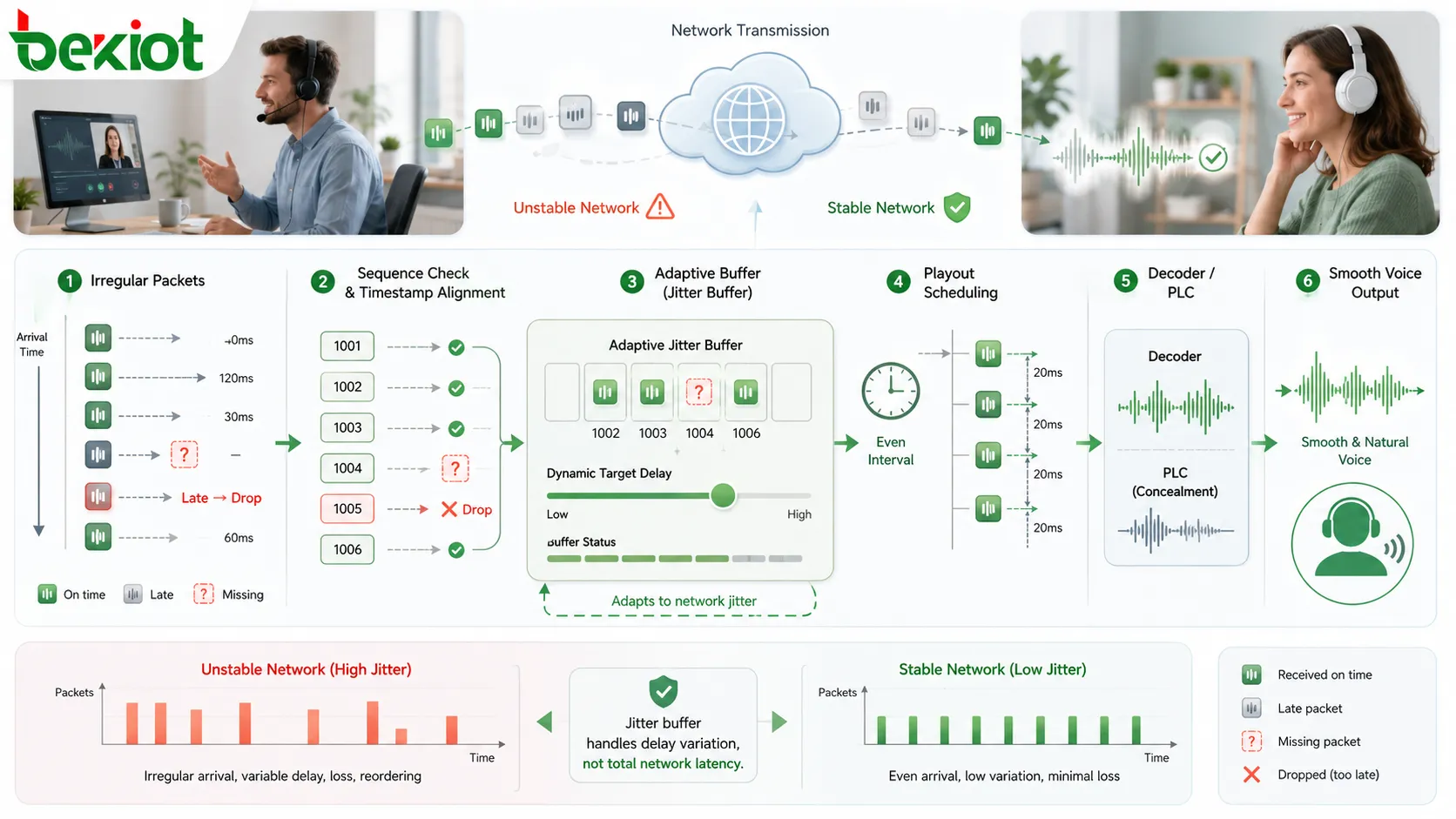
A jitter buffer usually sits on the receiving side of a real-time audio path. Packets arrive from the network and enter the buffer before they are decoded and played. The buffer checks packet sequence, timestamp, arrival time, and expected playback time. It then decides whether each packet should wait, be reordered, be played, be discarded, or be replaced by concealment audio.
In a stable network, packets arrive at nearly regular intervals. The jitter buffer can remain small because it does not need to wait long for late packets. In an unstable network, packets may arrive with wider timing variation. The buffer may need to hold more audio for a short period so that playback remains smooth.
The buffer does not remove network delay. It manages delay variation. If the network consistently adds 80 milliseconds of delay, that is latency. If the delay changes from 30 milliseconds to 120 milliseconds from packet to packet, that variation is jitter. The jitter buffer is designed mainly to handle the variation, not to make the network faster.
A simplified process includes packet reception, sequence checking, timestamp alignment, temporary storage, playout scheduling, packet decoding, and audio output. If a packet is missing at the moment it should be played, the system may use packet loss concealment to reduce the audible gap. If a packet arrives after its playback deadline, it may be discarded even though it technically arrived.
This is why jitter buffer behavior is closely tied to codec, packetization interval, RTP timing, endpoint clock stability, and network quality. The user only hears smoother or choppier audio, but behind that experience the system is constantly making timing decisions.
Fixed jitter buffer
A fixed jitter buffer uses a predefined buffer size or delay. For example, the receiver may always hold a certain amount of audio before playback. This makes the behavior simple and predictable. Fixed buffers are easier to configure, easier to test, and may work well in stable networks where jitter stays within a known range.
The advantage of a fixed buffer is consistency. If the network environment is controlled, such as a small local area network with stable switches and limited congestion, a fixed setting may be sufficient. It can also be useful in systems where administrators want predictable latency and do not want the buffer to change dynamically.
The weakness is lack of flexibility. If the fixed buffer is too small, late packets will often miss their playback deadline, causing gaps or concealment artifacts. If it is too large, every call or audio stream will have unnecessary delay, even when the network is stable. This can make two-way communication feel slow.
Fixed jitter buffers are therefore best suited for predictable environments or one-way audio scenarios where latency is less critical. For highly variable networks, mobile communication, wide-area VoIP, wireless audio, and internet-based conferencing, fixed buffers may not respond well enough to changing conditions.
Adaptive jitter buffer
An adaptive jitter buffer changes its behavior according to network conditions. It continuously observes packet arrival variation and adjusts its target buffer level. When the network becomes unstable, it may increase buffering slightly to avoid audio gaps. When the network becomes stable again, it may reduce buffering to lower delay.
This approach is especially valuable in real-world IP communication because networks are rarely constant. A call may start on a stable link and later encounter congestion. A wireless device may move between access points. A remote worker may share bandwidth with video, file transfer, or other applications. Adaptive buffering gives the system a better chance of maintaining audio continuity.
The challenge is that adaptation must be smooth. If the buffer changes too aggressively, users may hear speed changes, artifacts, or unstable delay. If it changes too slowly, the audio may break before the buffer reacts. A well-designed adaptive buffer uses timing history, packet delay trends, late-packet statistics, and playback control to make gradual decisions.
Adaptive jitter buffers are commonly preferred in VoIP phones, softphones, WebRTC audio, conferencing platforms, mobile communication, dispatch terminals, intercom systems, and other real-time systems where network conditions may vary. They are more complex than fixed buffers, but they usually provide better practical performance.
The relationship between buffer size and delay
The most important trade-off in jitter buffer design is buffer size versus delay. A larger buffer gives more time for late packets to arrive. This can reduce choppy audio and packet drop caused by timing variation. However, every extra millisecond in the buffer adds to end-to-end delay.
For two-way voice calls, delay affects conversation flow. If the delay is too high, people may talk over each other or pause awkwardly. Dispatch communication, intercom calls, emergency phones, and contact center conversations require relatively prompt response. In these cases, a very large buffer may make the audio smooth but the conversation unnatural.
For one-way audio, such as IP paging, public address announcements, streaming instructions, or scheduled broadcasts, slightly more buffering may be acceptable. Since the listener does not need to respond instantly, smooth playback may be more important than ultra-low latency. However, emergency announcements still require timely delivery, so excessive buffering should be avoided.
The best buffer size depends on application type, network stability, codec, packetization interval, user expectation, and risk level. There is no universal best value. A system should choose the smallest buffer that can handle normal jitter while preserving acceptable interaction delay.
Packet reordering and late packet handling
Packets may arrive out of order because of routing changes, network queuing, wireless retransmission behavior, or intermediate processing. A jitter buffer can use sequence numbers and timestamps to place packets into the correct playback order if they arrive before their playout deadline.
Reordering is useful only within a limited time window. If a delayed packet arrives after the system has already played that part of the audio, it cannot be inserted without disrupting playback. The receiver may discard it. This is why the buffer must decide not only whether a packet arrived, but whether it arrived in time.
Late packet handling is one of the key features of a jitter buffer. A packet that is only slightly late may still be playable. A packet that is too late becomes functionally lost. The system may then use packet loss concealment, silence insertion, comfort noise, or codec-specific recovery behavior to hide the missing audio.
Good late-packet handling reduces audible damage. Poor handling may produce repeated sounds, clicks, clipped syllables, or unnatural gaps. In high-quality communication systems, the receiver must make fast and consistent decisions so that audio remains as natural as possible.
Packet loss concealment support
A jitter buffer often works together with packet loss concealment, commonly called PLC. When an expected packet is missing or arrives too late, PLC attempts to reduce the audible effect. It may generate replacement audio based on previous speech, synthesize a short continuation, repeat a suitable waveform segment, insert comfort noise, or use codec-specific concealment methods.
PLC cannot perfectly recover the original missing speech. It is a concealment method, not a true reconstruction of lost information. However, for short gaps, it can make the audio much smoother than abrupt silence. In many voice applications, listeners may not notice occasional well-concealed losses.
The jitter buffer helps determine when PLC should be used. If it waits too long for missing packets, delay increases. If it gives up too quickly, concealment may be used unnecessarily. The buffer and PLC must work together so that the system chooses the least harmful option.
PLC is especially important in wireless, mobile, internet, and wide-area communication where occasional packet loss is realistic. It is also useful in IP paging, intercom, dispatch, SIP trunking, and conferencing systems because it preserves speech continuity during brief network disturbance.
Codec and packetization influence buffer behavior
The audio codec affects how the jitter buffer performs. A codec determines how audio is encoded, how much data is placed into each packet, how often packets are sent, how much bandwidth is required, and how missing packets may be concealed. Different codecs have different tolerance for jitter and packet loss.
Packetization interval is also important. If audio is packetized every 10 milliseconds, each packet contains a short slice of speech. If audio is packetized every 20 or 30 milliseconds, each packet contains more speech. Longer packets reduce packet overhead, but losing one packet removes a longer audio segment. Shorter packets may reduce the audible size of each loss but increase packet rate and processing load.
The jitter buffer must understand the timing relationship between packets. If packetization intervals are inconsistent or timestamps are wrong, the buffer may schedule playback incorrectly. Codec configuration, RTP timestamps, and endpoint behavior must align.
Some codecs include better built-in PLC and can perform more gracefully under loss. Others may sound worse when packets are missing. Codec choice should therefore consider network conditions, latency requirements, bandwidth, processing capacity, and the communication scenario.
For interactive communication, a low-latency codec setting may be preferred. For one-way announcements, a slightly more tolerant buffering strategy may be acceptable. For emergency communication, intelligibility and reliability should guide codec and buffer decisions.
RTP timing and jitter measurement
In many VoIP and real-time media systems, RTP provides packet sequence and timestamp information. These fields help the receiver understand the intended media timing. The jitter buffer uses this information to decide packet order and playback timing.
Jitter measurement is useful for quality monitoring. Interarrival jitter estimates how much packet spacing varies during transmission. This measurement does not directly tell the user what the call sounds like, but it helps engineers understand whether timing variation is present on the media path.
RTCP reports and extended reports may provide additional quality information, such as packet loss, jitter, delay, and buffer-related metrics. These reports can help administrators diagnose call quality problems. For example, if users report choppy audio and the system also shows high jitter, the team can focus on network timing, QoS, congestion, wireless conditions, or routing issues.
Jitter metrics should be interpreted with context. A short spike may be hidden by the buffer. Constant high jitter may cause delay growth or packet drops. A low jitter value does not guarantee perfect audio if packet loss, echo, codec mismatch, or source distortion is present. Jitter is one important metric among several voice quality indicators.
Audio quality advantages
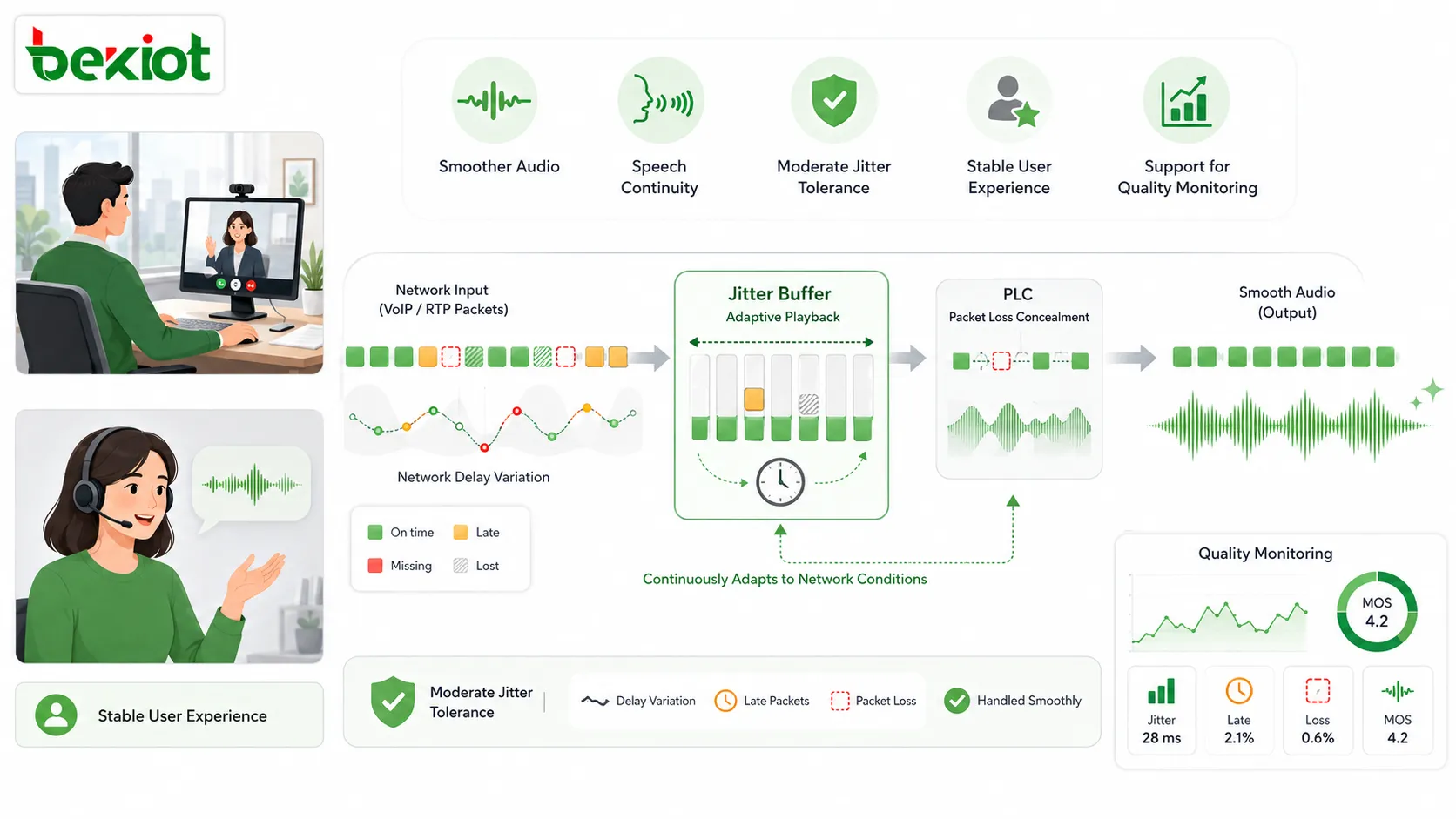
The first practical advantage of a jitter buffer is smoother audio. By absorbing packet timing variation, the buffer reduces the chance that users hear broken words, uneven speech, short gaps, or unstable playback. This improves the perceived quality of VoIP calls, intercom conversations, and conferencing audio.
The second advantage is better speech continuity. In real-time communication, the listener must follow meaning quickly. If syllables disappear or speech rhythm is irregular, the listener may misunderstand. The jitter buffer helps maintain a more continuous audio stream so that the conversation remains easier to follow.
The third advantage is reduced sensitivity to moderate network variation. A network does not need to be perfect for communication to remain usable. The buffer gives the receiver a small amount of tolerance. This is important in practical deployments where traffic load, routing, wireless conditions, and endpoint behavior may change.
The fourth advantage is more stable user experience. Without jitter buffering, audio quality may change sharply when packet arrival becomes uneven. With buffering and adaptive playback, the system can smooth many short-term variations. Users experience fewer sudden audio failures.
The fifth advantage is better support for quality monitoring. When jitter buffer behavior is measured and logged, administrators can understand whether the system is compensating for network instability. This supports troubleshooting and long-term improvement.
Application in VoIP phone systems
VoIP phone systems are one of the most common application areas for jitter buffers. SIP phones, softphones, IP PBX platforms, voice gateways, and SIP trunks all rely on packetized audio. If packet arrival varies, call quality can degrade. A jitter buffer helps keep conversations usable.
In office environments, jitter buffers reduce complaints such as broken voice, robotic sound, missing words, and unstable audio. This is especially important in multi-branch systems, remote work setups, VPN voice paths, wireless phones, and public internet connections. Even when the network is mostly stable, short congestion periods may occur.
For SIP phones, jitter buffer settings may be fixed, adaptive, or controlled by the device firmware. Some systems allow administrators to configure minimum and maximum buffer values. Others manage the buffer automatically. The best approach depends on the network environment and user expectations.
VoIP systems should still use good network design. VLAN separation, QoS, stable switching, proper routing, and bandwidth planning reduce jitter before it reaches endpoints. The jitter buffer improves resilience, but it should not be treated as a substitute for network engineering.
Application in IP paging and public address
IP paging systems use packet networks to deliver announcements to speakers, amplifiers, paging adapters, and broadcast zones. A jitter buffer in the receiving endpoint can help announcements play smoothly even when packets do not arrive at perfectly regular intervals.
One-way paging often allows slightly more buffering than two-way calls because there is no immediate conversational response. This can help improve announcement smoothness. However, paging systems used for emergency alerts should not introduce excessive delay. The buffer must support clarity without making urgent messages late.
In multi-zone paging, jitter buffer behavior can affect synchronization. If different speakers use different buffer sizes or experience different network paths, sound may not align perfectly across adjacent areas. This can create echo or staggered announcements. System design should consider endpoint consistency and network layout.
IP paging may use multicast, unicast, SIP paging, RTP streaming, scheduled playback, or server-distributed audio. Each method may require different buffering behavior. Testing should include actual speaker endpoints and real network conditions.
Application in dispatch and emergency systems
Dispatch and emergency communication systems require clear and timely voice. A dispatcher may speak with a field worker, security gate, emergency phone, intercom terminal, maintenance team, or control room. If jitter causes broken speech, the operator may miss important details such as location, hazard type, equipment status, or requested action.
A jitter buffer helps preserve intelligibility when network timing varies. It can reduce choppy audio during field calls, improve the stability of IP intercom connections, and support clearer communication between dispatch consoles and remote endpoints.
Emergency systems must balance buffering and delay carefully. Smooth audio is important, but excessive delay can slow conversation. A dispatcher needs quick back-and-forth interaction. The jitter buffer should therefore be adaptive and suitable for real-time command communication.
For emergency phones and help points, the system should be tested under realistic network conditions. If the device connects through a remote switch, wireless bridge, VPN, or wide-area network, jitter behavior should be checked before the system is accepted. Critical communication should not rely on unverified assumptions.
Application in intercom and access communication
IP intercom systems connect door stations, gate terminals, help points, elevators, parking entrances, service desks, and security rooms. These systems often involve two-way audio and sometimes video. A jitter buffer helps keep the voice path stable when packets arrive unevenly.
In access control scenarios, clear audio affects decision-making. A guard may need to understand a visitor’s name, vehicle information, delivery purpose, or emergency request. If the audio is broken, the interaction becomes slower and less reliable.
Intercom systems are often deployed across building networks, outdoor cable routes, wireless links, cloud services, or mobile clients. These paths may introduce variable delay. The jitter buffer helps absorb some of this variation.
Latency is important in intercom communication. If the buffer is too large, the conversation may feel delayed. Users may speak over each other or wait unnecessarily. A well-designed intercom system should use adaptive buffering and suitable codec settings to maintain both clarity and responsiveness.
Application in video conferencing
Video conferencing depends heavily on audio quality. Users may tolerate occasional video degradation, but broken audio quickly makes a meeting difficult. Jitter buffers are therefore essential in real-time meeting platforms, collaboration tools, remote training, online education, telemedicine, and customer support sessions.
Conference participants may join from different networks: office LAN, home Wi-Fi, mobile data, hotel networks, or public internet. Each path has different jitter behavior. The conferencing system must handle these differences while keeping conversation natural.
Audio jitter buffers in conferencing platforms usually work with echo cancellation, noise suppression, automatic gain control, packet loss concealment, bandwidth adaptation, and codec control. These functions together help maintain a usable meeting experience under changing network conditions.
Conferencing also requires low latency. If the buffer becomes too large, conversation becomes awkward. This is why adaptive jitter buffers are important. They allow the platform to adjust protection without adding unnecessary delay when the network is stable.
Application in wireless and mobile communication
Wireless and mobile networks often create more jitter than stable wired networks. Wi-Fi interference, roaming, signal changes, channel contention, mobile movement, and cellular scheduling can all affect packet arrival timing. Jitter buffers are therefore very important for mobile voice applications.
Mobile softphones, Wi-Fi handsets, push-to-talk applications, field dispatch clients, and remote support tools all benefit from jitter buffering. When users move through different coverage areas or share wireless capacity with other traffic, the buffer helps keep speech continuous.
Adaptive buffering is especially useful here because wireless conditions can change quickly. A fixed buffer that works in one location may fail in another. A mobile device may need to increase buffering briefly during poor coverage and reduce it again when the signal improves.
However, buffering cannot fully repair poor wireless design. If coverage is weak, packet loss is high, or roaming is unstable, the audio may still break. Wireless planning, QoS, access point placement, and capacity design remain important.
Application in SIP trunks and gateways
SIP trunks and gateways connect different voice networks. A call may pass between an enterprise PBX and a carrier, between analog equipment and an IP system, between branches, or between radio and VoIP networks. Each transition may introduce timing variation.
Gateways often include jitter buffering to stabilize incoming RTP streams before converting or forwarding audio. This is important when connecting networks with different timing behavior. For example, a public internet trunk may have more jitter than a local LAN, and a gateway can help smooth the media path.
Session border controllers and media servers may also participate in jitter handling. They may anchor media, normalize RTP streams, transcode codecs, and provide quality monitoring. These functions can improve stability but may also add delay if configured poorly.
For trunking, jitter monitoring is valuable. If call quality problems occur only on external calls, the issue may be related to the trunk path rather than internal phones. Jitter, packet loss, and latency reports can help locate the problem.
Application in recording and monitoring systems
Call recording and audio monitoring systems also rely on correct packet timing. If a recorder receives RTP packets with jitter, it may need to reorder and align them before storing or playing back the recording. Otherwise, the recording may contain gaps, timing errors, or uneven audio.
In contact centers, dispatch centers, security systems, and emergency communication platforms, recordings may be used for training, investigation, compliance, or incident review. If jitter affected the live call, quality metadata can help explain why the recording sounds unclear.
A recording system that logs jitter, packet loss, codec, endpoint, and call path information provides more diagnostic value than one that stores audio alone. Administrators can review not only what was said but also how well the communication path performed.
Monitoring systems can also detect recurring jitter problems. If one branch, endpoint, Wi-Fi area, trunk, or gateway frequently reports high jitter, maintenance teams can investigate before the issue becomes severe. The jitter buffer handles symptoms; monitoring helps find causes.
Common symptoms of poor jitter buffer behavior
Poor jitter buffer behavior can appear in several ways. The most obvious symptom is choppy audio. Users may hear missing syllables, broken words, or short silence during speech. This often happens when the buffer is too small for the actual jitter level or when packet loss is severe.
Another symptom is excessive delay. The audio may sound smooth, but conversation feels slow. People may talk over each other or wait unnaturally before responding. This may happen when the buffer is too large or when adaptive buffering grows but does not shrink properly after network conditions improve.
Robotic or synthetic sound may occur when packet loss concealment is used frequently. PLC can hide brief losses, but frequent concealment becomes noticeable. Users may describe the call as metallic, artificial, underwater, or unstable.
Audio may also speed up or slow down slightly if the buffer uses time-scaling methods to adjust playout. Good algorithms make this nearly invisible. Poor algorithms may make speech sound unnatural.
In multi-speaker paging systems, poor buffer alignment may cause echo or staggered announcements between nearby speakers. This is not always caused by jitter alone; it may also involve network path differences, endpoint settings, multicast behavior, or synchronization design.
Configuration considerations
Jitter buffer configuration should begin with the application type. Two-way voice requires lower delay than one-way paging. Emergency dispatch requires both clarity and fast response. Video conferencing requires natural interaction. Recording systems require accurate timing. Each application may need different buffer behavior.
Administrators should consider minimum buffer, maximum buffer, adaptive mode, codec, packetization interval, endpoint capacity, network type, and expected jitter range. Some devices expose these settings directly. Others manage them automatically. When settings are available, changes should be tested carefully.
A very small buffer may look good in terms of latency but may fail when the network becomes busy. A very large buffer may hide jitter but make conversation uncomfortable. The correct setting is usually a balance rather than an extreme.
Configuration should also consider network quality. If a site has stable wired LAN and good QoS, a smaller buffer may work. If calls cross WAN links, Wi-Fi, VPNs, or public internet, adaptive buffering may be safer. For remote sites, quality monitoring should be enabled where possible.
After configuration, testing should include real call paths. A local test between two phones on the same switch does not prove performance across branches, trunks, wireless links, or dispatch gateways. Jitter buffer behavior should be verified under realistic network load.
Network design still matters
A jitter buffer improves audio resilience, but it cannot replace proper network design. If bandwidth is insufficient, packet loss is severe, or latency is extremely high, no buffer can fully restore natural real-time communication. The network should be designed to reduce jitter before the buffer needs to compensate.
Quality of Service is one of the most important methods. Voice packets should be classified and prioritized so that they are not delayed behind large file transfers, backups, video uploads, or other non-real-time traffic. QoS helps reduce queuing variation and improves packet timing stability.
Network segmentation can also help. Voice VLANs, appropriate routing, stable switching, and controlled broadcast traffic can reduce interference with real-time media. In wireless networks, proper coverage, roaming behavior, and capacity planning are essential.
For WAN and internet paths, administrators should monitor jitter, packet loss, and latency regularly. If problems appear at certain times of day, congestion may be the cause. If problems appear only on one route, carrier or routing issues may need investigation.
The best real-time audio design combines network quality and jitter buffer intelligence. The network reduces the problem; the buffer handles the remaining variation.
Limitations of jitter buffers
A jitter buffer has practical limits. It can absorb timing variation only within a certain range. If packets arrive too late, they are unusable. If packets are lost completely, the buffer cannot recover the original audio. If jitter remains high for a long period, the buffer may either increase delay or allow more packet drops.
The buffer also cannot fix bad source audio. If the microphone is poor, the codec is misconfigured, the speaker is distorted, or the input signal is clipped, buffering will not solve the problem. Jitter buffer technology works on packet timing, not on all audio quality issues.
It cannot eliminate latency. In fact, it intentionally adds a small amount of delay to smooth playback. The key is to add only as much delay as needed. Excessive buffering may make interactive communication worse even if the sound becomes smoother.
Jitter buffers may also behave differently across products. Two phones, softphones, gateways, or speakers may respond differently to the same network conditions. This is why interoperability and field testing are important.
For critical communication, administrators should avoid relying only on default settings. They should test, monitor, and tune the system according to the actual deployment environment.
Best practices for deployment
The first best practice is to understand the network path. Calls inside a local LAN, across branches, through VPNs, over Wi-Fi, through SIP trunks, or through public internet links may experience different jitter behavior. Buffer policy should reflect those paths.
The second best practice is to use adaptive jitter buffers where network conditions are variable. Adaptive buffering usually provides a better balance between smoothness and delay than fixed settings in real-world deployments.
The third best practice is to enable QoS and verify that voice markings are preserved across switches, routers, firewalls, and WAN links. Marking packets is not enough if intermediate devices ignore or rewrite the markings.
The fourth best practice is to monitor quality metrics. Jitter, packet loss, delay, late packets, discarded packets, buffer size changes, and call quality indicators help administrators identify hidden problems. User complaints should be correlated with technical data.
The fifth best practice is to test with actual endpoints and traffic. Lab tests are useful, but real deployment conditions reveal problems that a clean test network may hide. Testing should include busy-hour traffic, wireless movement, trunk calls, paging events, and failover scenarios where relevant.
How to evaluate a good jitter buffer design
A good jitter buffer design should preserve speech continuity while keeping delay low enough for the application. Users should hear clear and natural audio, and they should not experience excessive conversational delay. The system should adapt when the network changes and recover when conditions improve.
The first evaluation point is audio continuity. Speech should not break frequently under normal network conditions. Short disturbances should be concealed smoothly where possible. Users should not need to repeat themselves often because of missing words.
The second point is latency. The buffer should not add more delay than necessary. Interactive applications need prompt response. One-way announcements may accept slightly more delay, but emergency messages still need timely delivery.
The third point is recovery. When jitter increases temporarily, the buffer should adjust. When the network stabilizes, delay should reduce again. A buffer that grows but never recovers can make later communication unnecessarily delayed.
The fourth point is observability. Administrators should be able to see quality data or at least diagnose whether jitter is contributing to audio problems. Hidden buffer behavior is difficult to manage in critical systems.
The fifth point is scenario fit. A buffer design that works for video meetings may not be ideal for dispatch intercom. A setting suitable for IP paging may not be right for SIP trunk calls. The best design matches the communication purpose.
Closing Notes
A jitter buffer is a real-time audio mechanism that temporarily stores incoming packets and controls their playback timing to reduce the audible impact of network jitter. It is used because packet networks do not always deliver audio packets at perfectly regular intervals, and real-time voice cannot wait indefinitely for late data.
Its main features include packet storage, packet reordering, playout scheduling, fixed or adaptive buffering, late-packet handling, packet loss concealment support, codec timing coordination, RTP sequence and timestamp use, delay management, and quality monitoring. These features help convert irregular packet arrival into smoother audio playback.
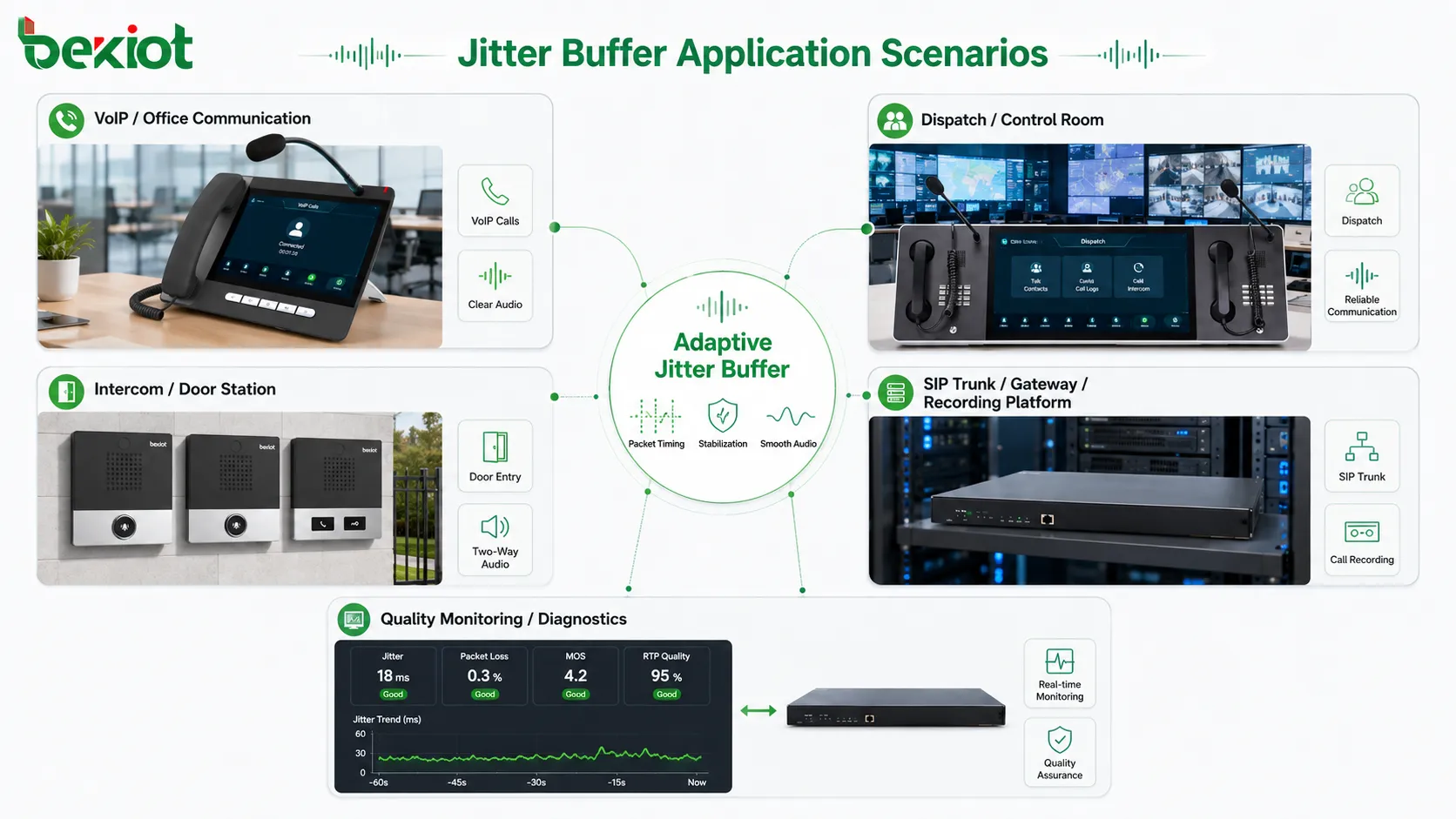
Its applications include VoIP phone systems, IP paging, public address, dispatch communication, emergency phones, intercom systems, access communication, video conferencing, wireless voice, SIP trunks, gateways, recording platforms, and quality monitoring systems. In each application, the design must balance smooth audio, low delay, intelligibility, and system reliability.
The strongest jitter buffer implementation is not an isolated setting. It works together with proper network design, QoS, codec configuration, endpoint quality, monitoring, and field testing. When these elements are aligned, the jitter buffer becomes a key foundation for stable real-time IP audio communication.
FAQ
What is a jitter buffer?
A jitter buffer is a temporary storage mechanism used in real-time audio systems. It holds incoming packets briefly, reorders them if needed, and plays them out at a steadier rhythm to reduce the effect of packet delay variation.
Does a jitter buffer remove jitter completely?
No. It does not remove jitter from the network. It absorbs and manages a certain amount of packet timing variation before playback. If jitter is excessive, audio quality may still suffer.
What is the difference between fixed and adaptive jitter buffer?
A fixed jitter buffer uses a set delay, while an adaptive jitter buffer changes its size according to network conditions. Adaptive buffers are usually better for variable networks because they can balance smoothness and delay dynamically.
Can a jitter buffer cause delay?
Yes. A jitter buffer intentionally adds a small delay so late packets have time to arrive. If the buffer is too large, conversation may feel slow. The design must balance audio smoothness and latency.
Where are jitter buffers commonly used?
They are used in VoIP calls, IP paging, intercoms, dispatch systems, emergency phones, video conferencing, wireless voice, SIP trunks, media gateways, recording systems, and other real-time IP audio applications.







