


Bulk provisioning is the process of creating, configuring, activating, or updating many users, devices, services, accounts, applications, or system resources at the same time. Instead of setting up each item manually one by one, administrators use templates, scripts, CSV files, APIs, device management platforms, or automated workflows to complete large-scale deployment more efficiently.
It is widely used in enterprise IT, telecom systems, VoIP platforms, cloud services, SaaS applications, mobile device management, IoT networks, network equipment deployment, identity management, and unified communication systems. When an organization needs to onboard hundreds or thousands of endpoints, bulk provisioning becomes essential for speed, consistency, and operational control.
Bulk provisioning is not only a faster way to configure devices or accounts. It is a structured deployment method that helps organizations standardize settings, reduce human error, and manage growth at scale.
Basic Meaning and Core Purpose
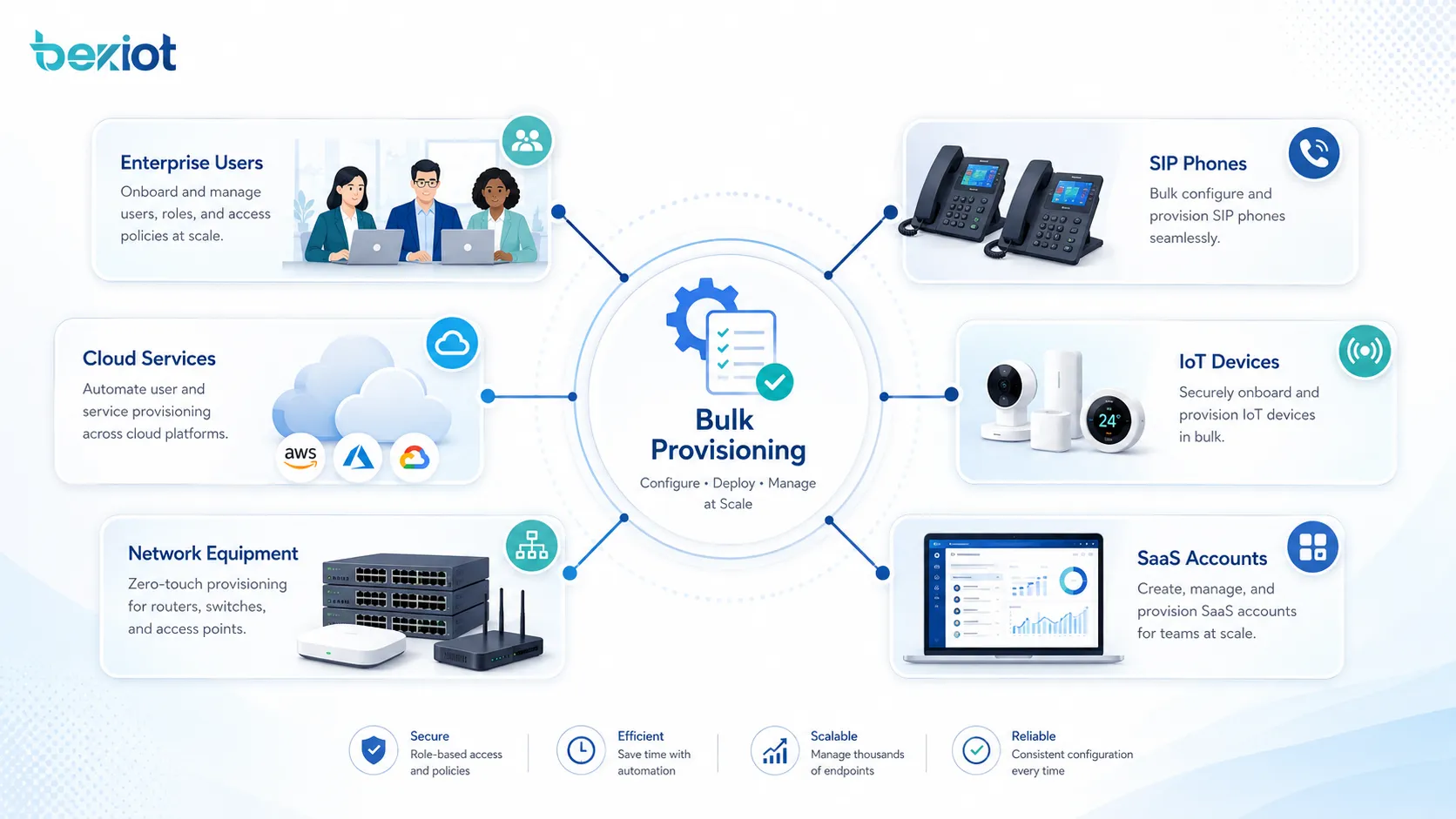
Bulk provisioning allows administrators to apply predefined settings to multiple targets in one operation. These targets may include user accounts, SIP phones, routers, switches, access points, cloud users, email accounts, software licenses, IoT devices, virtual machines, or application permissions.
The main purpose is to reduce repetitive manual work. In a small system, configuring one device manually may be acceptable. In a large project, manual setup can become slow, inconsistent, and difficult to audit. Bulk provisioning solves this by turning repeated setup tasks into a controlled and repeatable process.
Provisioning as a Deployment Workflow
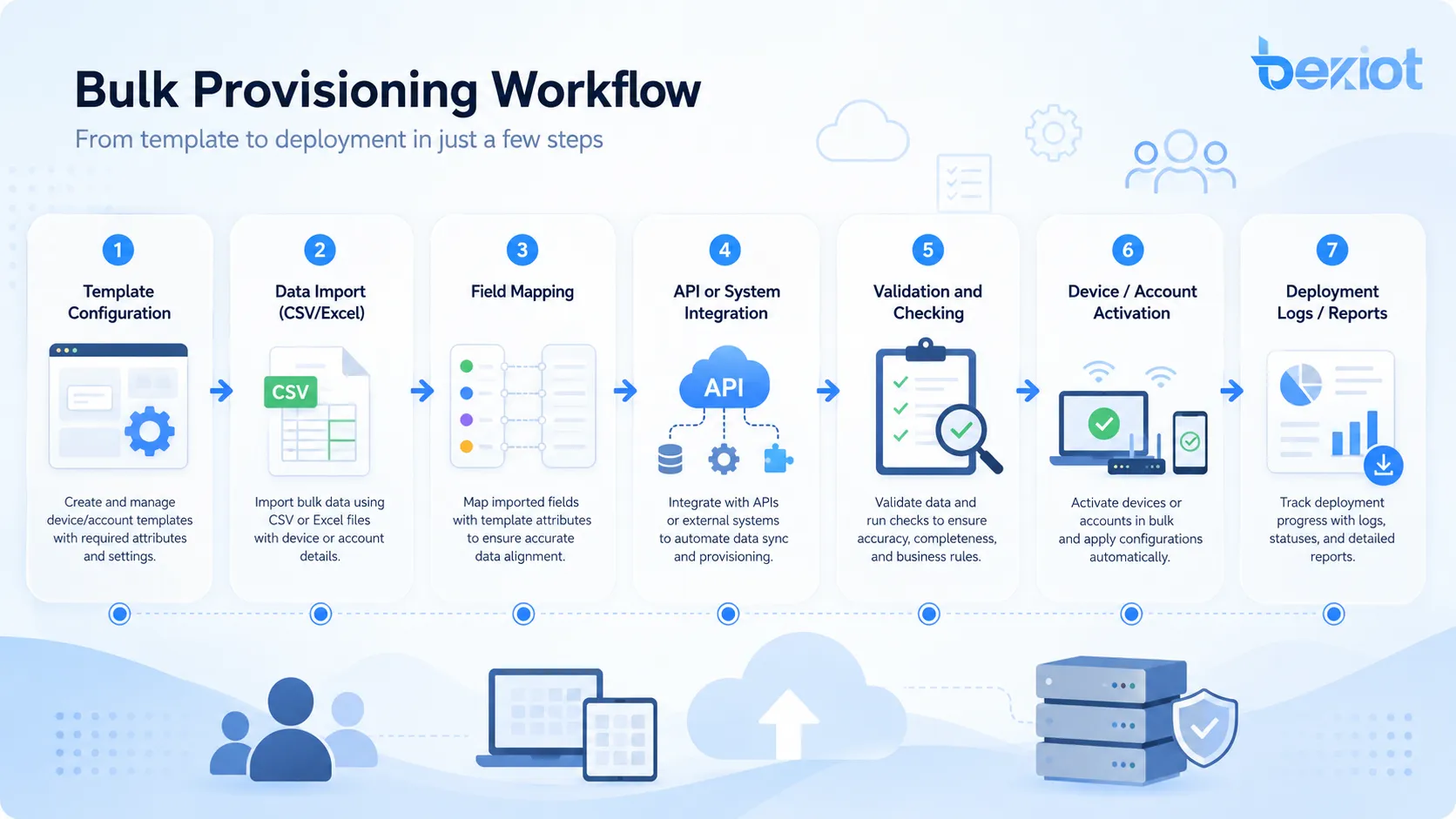
Provisioning usually includes several steps: preparing configuration data, validating the target list, applying settings, activating services, checking results, and recording logs. In more advanced environments, the workflow may also include approval, policy enforcement, automatic retry, rollback, and exception handling.
This workflow approach is important because provisioning errors can affect many users or devices at once. A strong bulk provisioning process should therefore include careful planning, testing, and verification before full deployment.
Bulk Provisioning vs Manual Configuration
Manual configuration means each account, device, or service is configured individually. This gives administrators direct control, but it is inefficient when the number of targets becomes large. It also increases the chance of inconsistent settings.
Bulk provisioning uses automation and standard templates. This makes deployment faster and more consistent. It also helps organizations maintain a clear record of what was configured, when it was configured, and which template or policy was used.
How the Process Works
The bulk provisioning process usually starts with a data source. This may be a spreadsheet, CSV file, directory service, HR system, asset database, device inventory, cloud platform, or configuration management database. The data source defines what needs to be created or configured.
After the data is prepared, the provisioning system maps each field to a target setting. For example, a user list may include name, department, email address, role, extension number, license type, and access group. A device list may include MAC address, serial number, IP address, model, location, firmware version, and configuration profile.
Template-Based Configuration
Templates are central to bulk provisioning. A template defines common settings that can be applied to many targets. These settings may include network parameters, user permissions, device profiles, service rules, security policies, language preferences, time zones, feature access, and platform connection details.
Using templates reduces configuration drift. Instead of manually entering the same values repeatedly, administrators define the standard once and apply it to many users or devices. When templates are version-controlled, it also becomes easier to track changes over time.
Data Import and Field Mapping
Many systems support data import through CSV, Excel, JSON, XML, LDAP, Active Directory, cloud directory, or API integration. Field mapping connects imported data with system fields. For example, a column named “department” may map to an access group, while a column named “device model” may map to a configuration profile.
Correct field mapping is critical. If a column is mapped incorrectly, users may receive the wrong permissions, devices may register to the wrong server, or services may be assigned incorrectly. Validation should be performed before applying changes at scale.
Activation and Verification
After the configuration is applied, the system activates the target accounts, devices, or services. Activation may include registering devices, assigning licenses, pushing settings, generating credentials, sending onboarding emails, or enabling service access.
Verification confirms that provisioning succeeded. The system may check online status, registration state, assigned policy, service availability, account login, configuration match, or error logs. Failed items should be reported clearly so administrators can correct them without repeating the entire deployment.
Main Features of Bulk Provisioning
A good bulk provisioning function should be accurate, secure, scalable, and easy to audit. It should support large deployment tasks while reducing the risk of mass configuration errors.
Batch Creation and Batch Update
Bulk provisioning can create many new accounts, devices, or services in one operation. It can also update existing records, such as changing user roles, modifying device profiles, assigning new licenses, updating network settings, or applying security policies.
Batch update is especially useful when organizations change structure, migrate platforms, deploy new services, or standardize old configurations. Instead of editing each object manually, administrators can apply controlled changes across selected groups.
Policy and Profile Management
Policies define what users or devices are allowed to do. Profiles define how devices or services should behave. In bulk provisioning, policies and profiles help ensure that similar targets receive consistent settings.
For example, employees in the same department may receive the same application access, while devices in the same site may receive the same network configuration. This improves consistency and simplifies future maintenance.
Validation Before Execution
Validation checks whether the provisioning data is complete, correctly formatted, and compatible with system rules. It may detect duplicate usernames, invalid email addresses, missing serial numbers, unsupported device models, wrong license types, or conflicting permissions.
Pre-checking data is important because bulk operations affect many targets at once. Finding errors before execution is much safer than correcting hundreds of wrong records after deployment.
Error Reporting and Retry
Even with good preparation, some provisioning tasks may fail. A device may be offline, a license may be unavailable, a user name may already exist, or a network request may time out. A good system should provide clear error reporting.
Retry functions allow administrators to correct failed items and run only the unsuccessful parts again. This avoids unnecessary reprocessing and helps large deployments finish more efficiently.
Audit Logs and Change Records
Audit logs record who performed the provisioning task, when it happened, which template was used, which targets were affected, what succeeded, and what failed. These records are important for compliance, troubleshooting, and accountability.
In enterprise environments, auditability is not optional. Bulk provisioning can change many users or devices at once, so organizations need a clear history of each operation.
System Value for IT and Operations Teams
Bulk provisioning provides value by turning large deployment work into a repeatable process. It improves efficiency, reduces manual error, shortens rollout time, and supports better lifecycle management.
Faster Deployment
Speed is one of the most direct benefits. An IT team can provision hundreds of accounts, phones, devices, or application licenses much faster than manual setup would allow. This is valuable during company onboarding, site expansion, system migration, and emergency replacement projects.
Faster deployment also improves user experience. New employees, branch offices, devices, or services can become operational sooner, reducing waiting time and business disruption.
More Consistent Configuration
Manual configuration often leads to small differences between similar users or devices. Over time, these differences can cause support issues, security gaps, and maintenance complexity. Bulk provisioning helps reduce this problem by applying standardized templates and rules.
Consistency is especially important in regulated or security-sensitive environments. When policies are applied uniformly, it becomes easier to prove compliance and manage access control.
Lower Operational Cost
By reducing repetitive manual work, bulk provisioning saves administrator time. It also reduces the number of support tickets caused by wrong settings, missed permissions, or incomplete device configuration.
For large organizations, this cost reduction can be significant. The benefit increases as the number of users, devices, applications, and sites grows.
Better Lifecycle Management
Provisioning is not only for initial setup. The same automation logic can support updates, reassignment, suspension, deactivation, and retirement. This creates a full lifecycle process for users, devices, and services.
For example, when an employee changes department, bulk provisioning rules can update access rights. When a device is moved to another site, its configuration profile can be changed. When a service is retired, access can be removed in a controlled way.
Common Application Scenarios
Bulk provisioning is used wherever many similar objects need to be created, configured, or managed. It can support both digital accounts and physical devices.
Enterprise User Account Management
Organizations use bulk provisioning to create and manage user accounts in email systems, identity platforms, collaboration tools, cloud applications, HR platforms, learning systems, and business software. User data may come from HR systems or directory services.
This helps automate onboarding and role assignment. When many employees join, leave, or transfer departments, bulk provisioning can update access rights quickly and consistently.
VoIP, SIP, and Communication Devices
Communication systems often use bulk provisioning for SIP phones, IP intercoms, video phones, softphones, conference phones, and communication endpoints. Administrators can assign extension numbers, SIP accounts, server addresses, codec settings, time zones, and feature keys in batches.
This is useful in offices, hotels, hospitals, schools, factories, and multi-site enterprises. Instead of configuring each phone manually, devices can download settings automatically from a provisioning server.
Cloud Services and SaaS Platforms
Cloud platforms and SaaS applications use bulk provisioning to assign users, licenses, permissions, groups, and application settings. This is common in productivity suites, CRM systems, ERP platforms, customer support tools, security platforms, and project management systems.
Bulk provisioning helps organizations control who can access which services. It also supports license optimization because unused or incorrect assignments can be reviewed and adjusted more easily.
Network Equipment Deployment
Routers, switches, access points, firewalls, and SD-WAN devices may be provisioned in bulk for branch offices or large network rollouts. Templates can define VLANs, SSIDs, routing settings, security rules, management addresses, and monitoring parameters.
Bulk provisioning reduces the need for on-site manual setup. In some zero-touch deployment models, a device can connect to the network, identify itself, and automatically receive the correct configuration.
IoT and Smart Device Management
IoT projects may involve thousands of sensors, gateways, meters, cameras, controllers, or smart terminals. Bulk provisioning helps register devices, assign locations, apply firmware policies, configure communication parameters, and connect devices to a cloud or local platform.
This is important because IoT systems often grow quickly. Without bulk provisioning, managing device identity, certificates, location data, and operational profiles becomes difficult.
Bulk Provisioning Methods
Different systems support different provisioning methods. The best method depends on deployment scale, security policy, device type, network environment, and management platform capability.
| Method | Typical Use | Main Advantage |
|---|---|---|
| CSV or spreadsheet import | User accounts, extensions, device lists, license assignment | Simple and easy for administrators to prepare |
| Template-based provisioning | Device profiles, department roles, site settings | Improves consistency and reduces repeated work |
| API provisioning | Cloud services, enterprise integration, automated workflows | Supports real-time automation and system-to-system integration |
| Directory-based provisioning | Identity management, employee onboarding, access control | Connects user lifecycle with HR or directory data |
| Zero-touch provisioning | Network devices, SIP phones, IoT gateways, remote equipment | Reduces on-site configuration work |
CSV Import
CSV import is one of the simplest methods. Administrators prepare a file containing user or device data, upload it to the platform, map the fields, validate the data, and run the provisioning task.
This method is useful for many business systems because it does not require advanced development. However, it depends heavily on data accuracy. Wrong columns, missing values, and duplicate records can create provisioning errors.
API-Based Automation
API-based provisioning allows one system to create or update resources in another system automatically. For example, an HR platform may trigger account creation in email, identity, SaaS, and communication systems when a new employee joins.
This method is more powerful than manual imports because it supports real-time workflows. It is also more complex, requiring authentication, error handling, logging, rate control, and integration maintenance.
Zero-Touch Provisioning
Zero-touch provisioning allows devices to receive configuration automatically after they connect to the network. The device may identify itself by serial number, MAC address, certificate, or activation code, then download the correct profile from a server.
This is common in network equipment, SIP phones, cloud-managed access points, IoT gateways, and branch office devices. It reduces the need for technicians to manually configure each unit on site.
Security and Control Considerations
Bulk provisioning can create large-scale changes quickly, which means security and control are essential. A small error in a manual task may affect one user. A small error in bulk provisioning may affect hundreds or thousands of users or devices.
Role-Based Permissions
Only authorized administrators should be allowed to perform bulk provisioning. Different roles may have different permissions, such as preparing data, approving tasks, running provisioning, viewing logs, or rolling back changes.
Role-based control helps prevent accidental or unauthorized changes. It is especially important for systems that manage user access, network security, communication endpoints, or customer data.
Data Protection
Provisioning data may contain personal information, usernames, phone numbers, email addresses, device identifiers, passwords, certificates, and access rights. This data should be protected during upload, storage, processing, and transmission.
Secure transfer, encryption, access logging, and careful file handling are important. Temporary import files should not remain exposed after deployment.
Approval and Change Control
For high-impact changes, bulk provisioning should follow an approval process. This may include review by IT, security, department owners, or project managers before execution.
Change control helps prevent accidental service disruption. It also ensures that large-scale account or device changes align with business requirements and security policies.
Common Risks and How to Avoid Them
Bulk provisioning improves efficiency, but it also creates risk if the process is poorly managed. The most common issues are bad source data, wrong templates, missing validation, incomplete testing, and weak rollback planning.
Incorrect Source Data
If the source data is wrong, the provisioning result will also be wrong. Common problems include spelling errors, duplicate IDs, incorrect departments, missing serial numbers, wrong MAC addresses, invalid emails, and outdated employee records.
To avoid this, source data should be cleaned and validated before use. Important deployments should start with a small test batch before full execution.
Wrong Template Assignment
Applying the wrong template can give users incorrect permissions or configure devices for the wrong site. This may cause service failure, security exposure, or operational confusion.
Templates should be clearly named, documented, version-controlled, and tested. Administrators should review the target list and selected template before execution.
No Rollback Plan
Bulk changes can be difficult to undo if no rollback plan exists. For important systems, administrators should know how to reverse changes, restore previous configuration, disable newly created accounts, or reapply older templates.
Backup and export functions are useful before major provisioning tasks. Change logs also help identify what must be corrected if a problem occurs.
Best Practices for Implementation
Successful bulk provisioning depends on preparation, standardization, testing, and ongoing governance. The process should be treated as part of system lifecycle management rather than a one-time setup shortcut.
Standardize Naming and Data Rules
Consistent naming rules make bulk provisioning easier. Usernames, device names, extension numbers, site codes, department labels, and group names should follow a clear structure.
Standardization also makes troubleshooting easier. When names and IDs follow predictable patterns, administrators can quickly identify where an account or device belongs.
Run Pilot Batches First
Before provisioning a large group, run a small pilot batch. This helps confirm field mapping, template behavior, permissions, activation status, and error reporting.
A pilot batch reduces the risk of large-scale mistakes. After the test succeeds, the full deployment can proceed with more confidence.
Monitor Results After Deployment
Provisioning does not end when the task completes. Administrators should review success rates, error reports, service registration, user login status, device online status, and support feedback.
Monitoring helps catch problems early. If many devices fail to register or many users cannot access a service, the team can respond before the issue becomes widespread.
Maintain Templates and Documentation
Templates should be reviewed regularly. Business rules, security policies, server addresses, firmware versions, license models, and system integrations may change over time.
Documentation should explain what each template does, when it should be used, who approved it, and what dependencies it has. This prevents confusion when new administrators manage the system later.
FAQ
What is bulk provisioning?
Bulk provisioning is the process of creating, configuring, activating, or updating many users, devices, accounts, services, or system resources at the same time through templates, imports, APIs, or automated workflows.
Why is bulk provisioning important?
Bulk provisioning is important because it reduces manual work, improves configuration consistency, speeds up deployment, lowers operational cost, and helps organizations manage large numbers of users or devices more efficiently.
What can be bulk provisioned?
Common targets include user accounts, cloud licenses, SIP phones, network devices, IoT endpoints, software permissions, email accounts, mobile devices, virtual machines, and SaaS application users.
What is the difference between bulk provisioning and zero-touch provisioning?
Bulk provisioning refers to large-scale setup or update of many objects. Zero-touch provisioning is a specific method where devices automatically receive configuration after connecting to the network, with little or no manual on-site setup.
What are the risks of bulk provisioning?
Main risks include incorrect source data, wrong template selection, unauthorized changes, security exposure, mass configuration errors, incomplete validation, and lack of rollback planning.
How can bulk provisioning be managed safely?
It can be managed safely by using clean source data, validated templates, pilot batches, role-based permissions, approval workflows, audit logs, backup plans, error reporting, and post-deployment monitoring.







