


When Unanswered Calls Need a Backup Route
Call Forwarding on No Answer, commonly abbreviated as CFNA, is a call handling feature that automatically redirects an incoming call to another destination when the original called party does not answer within a defined ring time. It is widely used in PBX systems, SIP phone systems, mobile networks, business phone platforms, call centers, hotels, healthcare facilities, schools, offices, and service teams.
Instead of letting the caller hear ringing until the call fails, CFNA sends the call to a backup destination such as voicemail, another extension, a receptionist, a ring group, a call queue, a mobile phone, an IVR menu, or an after-hours service number. This improves call coverage and helps organizations reduce missed communication.
CFNA is useful because it gives every unanswered call a second path. The caller does not need to dial again, and the organization gets another chance to answer or record the request.
Basic Meaning of CFNA
Call Forwarding on No Answer is one of several conditional call forwarding features. It only activates when the phone rings but is not answered before the no-answer timer expires. If the user answers the call, the forwarding rule does not take effect.
This makes CFNA different from unconditional forwarding, which redirects all calls immediately. It is also different from call forwarding on busy, which activates only when the called line is already occupied. CFNA is specifically designed for the situation where a user is available in the system but does not pick up in time.
What Counts as No Answer
No answer usually means that the called endpoint rings for a configured duration without being answered. The system may count this time in seconds, ring cycles, or platform-defined timer values.
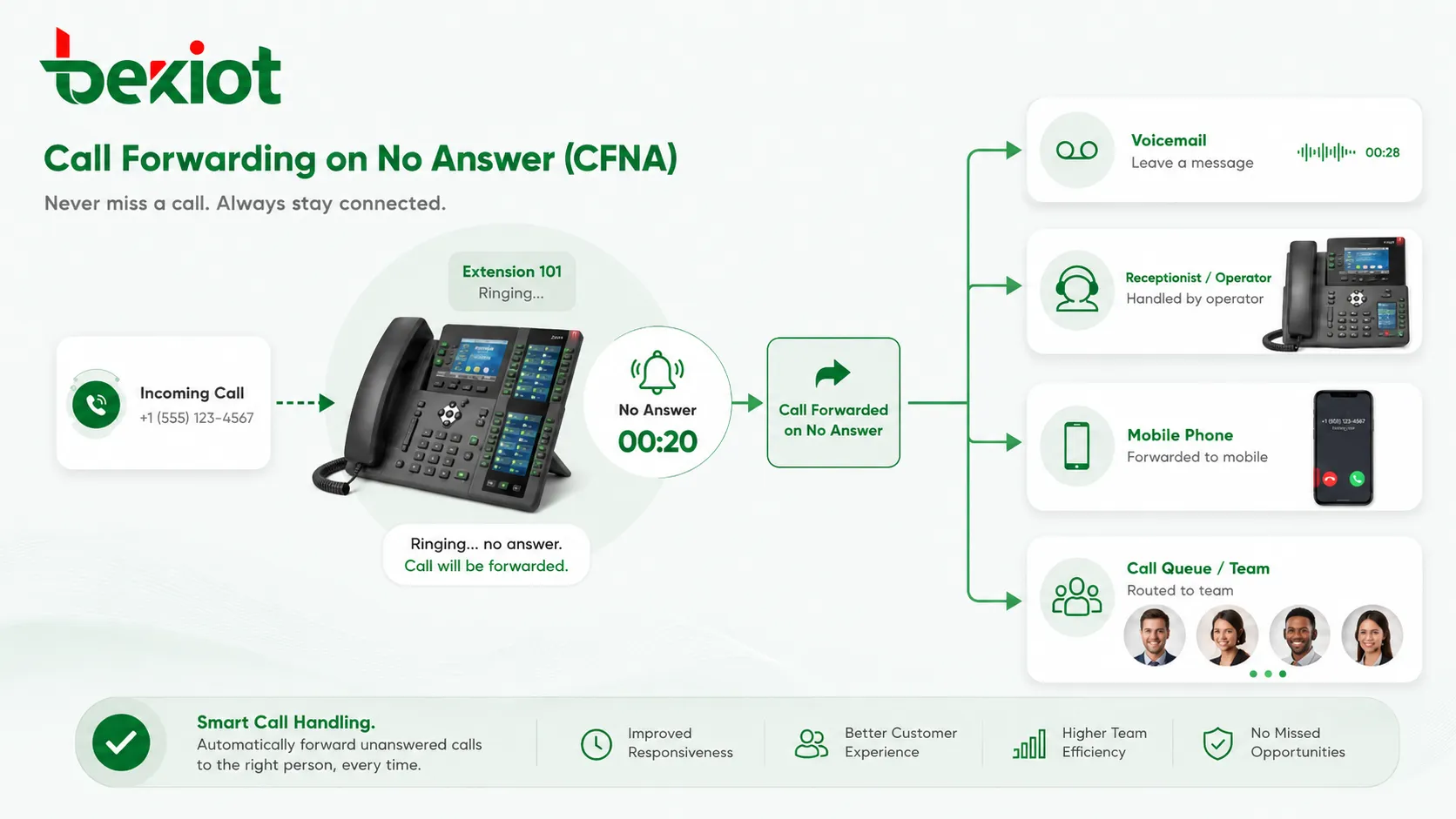
For example, a PBX may allow a phone to ring for 20 seconds. If nobody answers during that period, the system forwards the call to the configured destination. In a SIP environment, this may involve call signaling timers, endpoint responses, and server-side routing rules.
Common Forwarding Destinations
The forwarding destination can be internal or external. Internal destinations may include another extension, voicemail box, reception desk, call queue, ring group, operator console, or department hotline. External destinations may include a mobile number, remote office number, or public telephone number.
The best destination depends on the business workflow. A sales call may forward to a team queue, while a personal extension may forward to voicemail. A facility service call may forward to an on-duty mobile phone after office hours.
How CFNA Works in a Phone System
The CFNA process starts when an incoming call reaches the original destination. The phone system rings the target extension or endpoint and starts the no-answer timer. If the call is answered before the timer expires, the call connects normally. If the timer expires first, the system applies the forwarding rule.
In a PBX or SIP platform, CFNA may be configured at the user level, extension level, group level, trunk level, or inbound route level. The system checks the relevant rule and sends the call to the next destination according to the dial plan and call routing policy.
Call Arrival and Ringing
When a call arrives, the system identifies the called number or extension. It then sends ringing to the endpoint. The endpoint may be a desk phone, SIP phone, softphone, mobile client, analog phone through a gateway, or web-based communication app.
During this stage, the caller usually hears ringback tone or a platform announcement. The local phone rings until the user answers, rejects the call, becomes unavailable, or the no-answer timer reaches its limit.
No-Answer Timer
The no-answer timer determines how long the system waits before forwarding the call. A short timer can reduce caller waiting, while a longer timer gives the user more time to answer.
The timer should match the working environment. A desk worker may answer quickly, while a warehouse worker, nurse, technician, or hotel staff member may need more time to reach the phone. Setting the timer too short can forward calls unnecessarily; setting it too long can frustrate callers.
Forwarding Execution
When the no-answer condition is met, the phone system stops ringing the original endpoint and sends the call to the forwarding destination. Depending on the system, caller ID may be preserved, modified, or replaced by the forwarding extension’s identity.
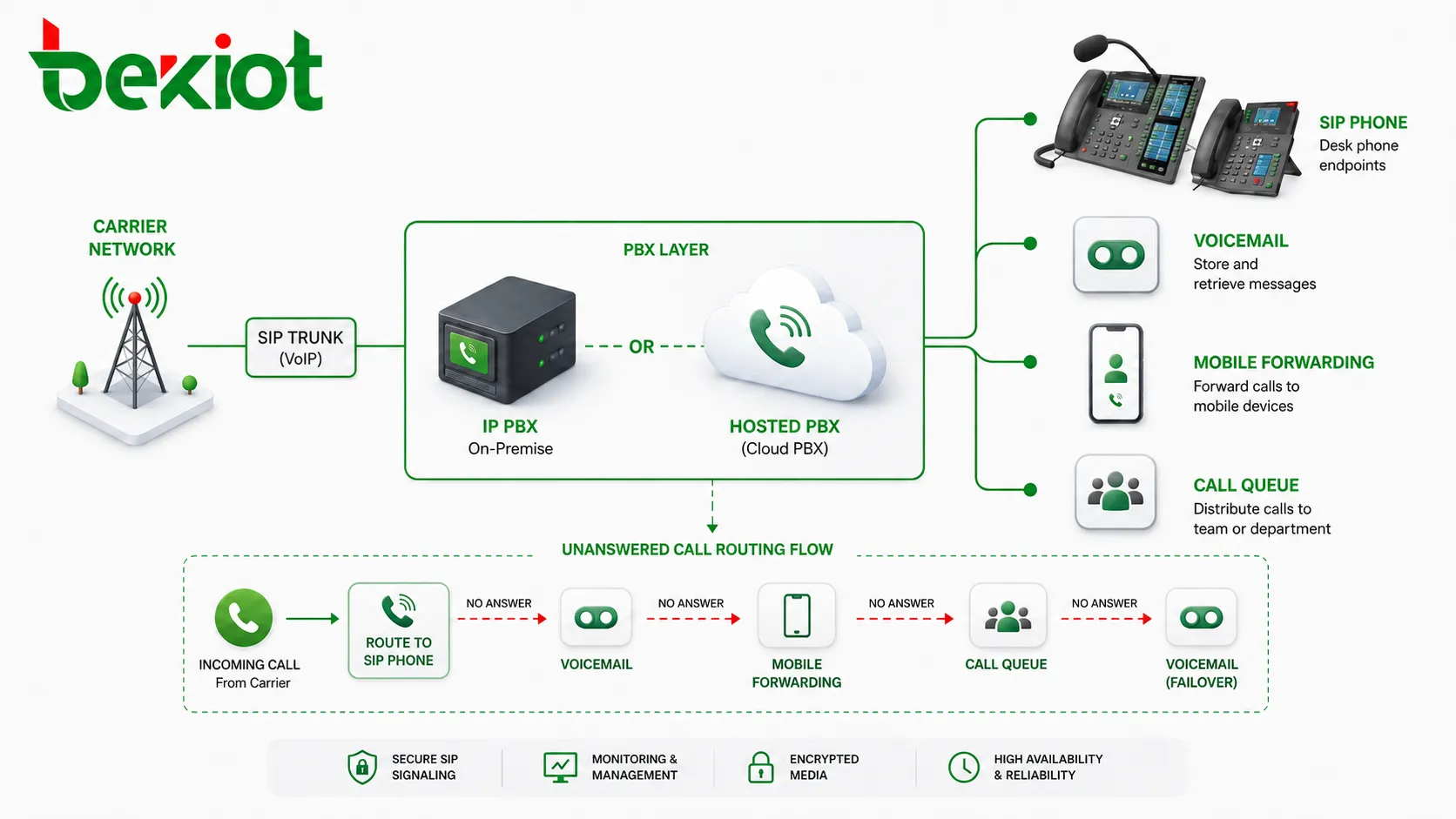
If the forwarding destination also does not answer, the system may apply another rule. This can create multi-step call routing, such as extension to receptionist, receptionist to voicemail, or department phone to after-hours mobile number.
Main Functions of CFNA
CFNA is simple in concept, but it plays an important role in daily business communication. It prevents calls from stopping at one unavailable endpoint and gives the system a controlled way to continue call handling.
Reducing Missed Calls
The most direct function is reducing missed calls. When one person does not answer, the call can still reach another destination. This is useful for customer inquiries, service requests, internal coordination, and time-sensitive communication.
For small businesses, CFNA can make a limited team appear more responsive. For larger organizations, it helps keep calls moving through departments instead of getting stuck at individual extensions.
Improving Caller Experience
Callers usually do not want to wait through long ringing with no result. CFNA improves the experience by sending the call somewhere useful after a reasonable wait time.
The forwarding destination should be chosen carefully. Sending every unanswered call to a generic voicemail may be acceptable for personal calls, but customer-facing calls may need a live backup team, queue, or receptionist.
Supporting Flexible Work
Modern work patterns often include remote workers, mobile staff, hybrid offices, and distributed teams. CFNA can forward unanswered desk phone calls to softphones, mobile numbers, or other team members.
This helps employees stay reachable without forcing callers to know where the person is working. It also supports business continuity when staff are away from desks, in meetings, traveling, or working from another site.
Creating Escalation Paths
CFNA can be part of an escalation path. A call may ring the first person, then forward to a backup user, then to a supervisor, and finally to voicemail or an after-hours service.
This structure is useful for service teams, technical support, facility management, healthcare stations, security desks, and on-call duty workflows where unanswered calls should not simply disappear.
CFNA in PBX and SIP Architecture
In PBX and SIP systems, CFNA is controlled through call routing logic. The feature may be configured directly on the endpoint, inside the PBX server, through a hosted phone platform, or by the carrier network.
The best architecture depends on who should control the forwarding rule, how calls should be billed, whether external forwarding is allowed, and how the organization manages users and extensions.
Endpoint-Based CFNA
Endpoint-based CFNA means the phone or client device handles the forwarding behavior. A SIP phone may have a local setting for forwarding unanswered calls to another number.
This method gives users local control, but it may be harder for administrators to manage centrally. If many phones are configured differently, troubleshooting and policy enforcement can become difficult.
PBX-Based CFNA
PBX-based CFNA is managed by the phone system. The PBX controls the no-answer timer, forwarding destination, caller ID behavior, and call records. This is usually better for business environments because administrators can apply consistent rules.
PBX-based control also makes it easier to combine CFNA with ring groups, queues, voicemail, time schedules, IVR menus, call recording, and reporting.
Carrier-Based CFNA
Carrier-based CFNA is handled by the telecom provider or mobile network. It is common for mobile phones and some public network services. Users may activate forwarding through network codes, carrier portals, or phone settings.
This can be useful when the device is outside the enterprise PBX, but it may offer less control over reporting, call detail records, internal extension logic, and business routing rules.
Common Setup Options
CFNA setup usually involves three key choices: the forwarding destination, the no-answer timer, and the scope of the rule. The scope defines whether the rule applies to one extension, one user, one department, or one inbound route.
| Setup Item | Purpose | Practical Consideration |
|---|---|---|
| Forwarding destination | Defines where unanswered calls go | Voicemail, extension, mobile number, queue, ring group, operator |
| No-answer timer | Controls how long the system waits | Balance caller patience with user answer time |
| Caller ID behavior | Controls what the forwarded destination sees | Original caller ID, forwarding extension, or formatted number |
| Permission control | Limits who can forward to external numbers | Prevents misuse, toll fraud, and unexpected cost |
| Failover route | Defines what happens if the forward target does not answer | Second destination, voicemail, announcement, or queue |
Setting the Forwarding Destination
The forwarding destination should match the caller’s need. For personal calls, voicemail may be enough. For customer calls, a backup person or team may be better. For urgent service calls, an on-duty phone or escalation group may be required.
Before using an external forwarding number, administrators should confirm cost, caller ID handling, privacy, recording policy, and local telecom rules. External forwarding may create additional call charges or fail if the outbound trunk blocks certain numbers.
Setting the Ring Time
The ring time should be tested in real working conditions. In many office environments, 15 to 25 seconds may be practical. In field or service environments, a longer time may be needed.
The goal is to avoid two problems: forwarding too early before the user can answer, and forwarding too late after the caller has already lost patience. Different teams may need different timer values.
Setting User-Level or Group-Level Rules
User-level CFNA applies to one extension or account. It is useful for personal backup routing. Group-level CFNA applies to a team number, ring group, queue overflow, or shared department line.
Group-level rules should be managed carefully because they affect many callers. A wrong destination or timer setting can disrupt department communication and create missed business opportunities.
Deployment Benefits
CFNA provides value because it improves call continuity without requiring callers to take extra action. It gives the organization more control over unanswered calls and creates a better path for follow-up.
Higher Answer Rate
By sending unanswered calls to another destination, CFNA increases the chance that the call will be handled. This is especially important for sales, support, reception, healthcare, hospitality, and service environments.
A higher answer rate can improve customer satisfaction and reduce the number of people who abandon calls or repeatedly dial different numbers.
Better Team Availability
CFNA allows teams to back each other up. If one user is busy away from the phone, another user or group can receive the call. This reduces dependence on a single person.
Team availability is important when staff schedules vary, employees move around the workplace, or users work across multiple devices and locations.
More Professional Call Handling
A structured no-answer route makes the phone system feel more professional. Callers receive a predictable response instead of unanswered ringing. This is especially important for public-facing numbers.
Professional handling may include forwarding to a queue, playing an announcement, routing to voicemail with a clear greeting, or sending the call to an after-hours team.
Support for Business Continuity
CFNA helps maintain communication when employees are unavailable, phones are unattended, or departments are temporarily understaffed. It can also support fallback routing during office moves, remote work, or temporary staffing changes.
Although CFNA is not a full disaster recovery feature, it is a practical part of daily call continuity planning.
Common Applications
CFNA is used in many communication environments because unanswered calls are a universal problem. The feature is useful for both individual users and shared business workflows.
Office Extensions
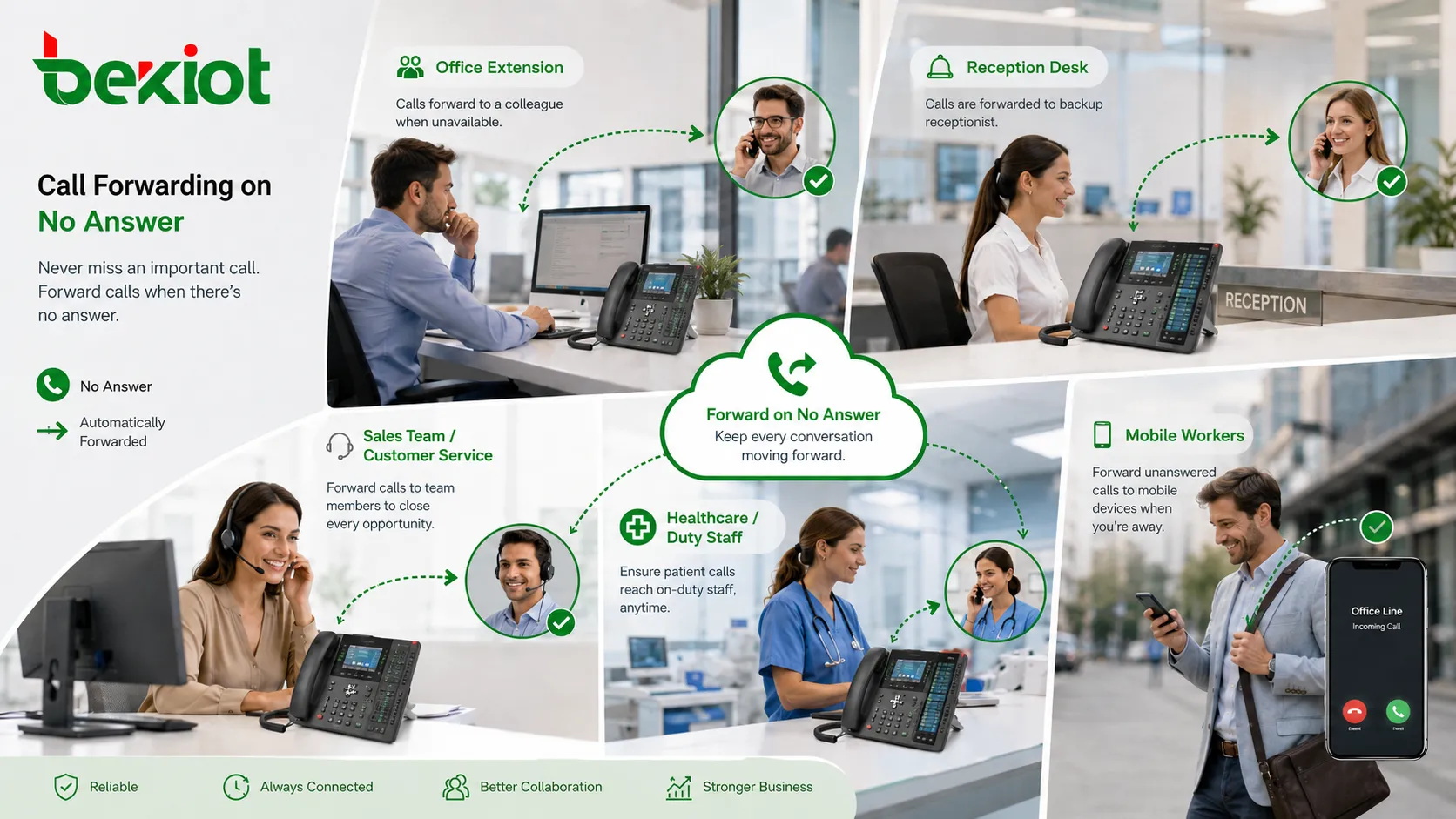
Office users often configure CFNA to send unanswered calls to voicemail, an assistant, a mobile phone, or a team member. This prevents important calls from being lost when the user is in a meeting or away from the desk.
For managers and key staff, CFNA can be part of a broader call handling strategy that includes call forwarding on busy, simultaneous ringing, and mobile softphone access.
Reception and Front Desk
Reception desks can use CFNA to forward unanswered calls to a backup receptionist, ring group, or operator queue. This helps ensure that main business numbers remain responsive.
For hotels, clinics, schools, and commercial buildings, front desk calls are often important first-contact points. A no-answer route improves the chance that callers reach someone quickly.
Sales and Customer Service
Sales and service teams can use CFNA to route missed individual calls to a department queue or shared team number. This helps prevent opportunities or support requests from being missed because one person is unavailable.
In customer-facing workflows, voicemail may not always be the best first backup. A live team destination may provide a better caller experience when staffing allows.
Healthcare and Duty Teams
Healthcare, nursing, maintenance, and on-call teams often need escalation routing. If the first staff member does not answer, the call may forward to another station, supervisor, or duty phone.
In these environments, timeout values and forwarding destinations should be tested carefully because delayed response can affect service quality and safety.
Remote and Mobile Workers
Remote workers may use CFNA to forward desk phone calls to mobile phones or softphone clients. This allows callers to use the same business number even when the user is not physically in the office.
Organizations should still control external forwarding rules to protect privacy, cost, and security. Not every user should be allowed to forward business calls to any external number without policy control.
Security and Policy Considerations
CFNA affects call routing, cost, caller privacy, and business availability. For this reason, it should be managed with clear policy rather than left completely uncontrolled.
External Forwarding Control
Forwarding calls to external numbers may create toll charges or security risks. Attackers may try to misuse forwarding rules to route calls to expensive destinations. Administrators should restrict external forwarding where needed.
Common controls include permission groups, allowed number ranges, call cost limits, administrator approval, and monitoring of unusual forwarding behavior.
Caller Privacy
Some calls may contain sensitive information. Forwarding them to personal mobile phones or external numbers may create privacy and compliance concerns. This is especially relevant for healthcare, finance, legal, government, and customer service environments.
Organizations should define which types of calls can be forwarded externally and whether call recording, notification, or consent rules apply.
Emergency Call Impact
CFNA should not interfere with emergency calling. Emergency numbers should route according to emergency call rules, not ordinary no-answer forwarding logic.
Administrators should also be careful when forwarding calls from safety-related help points, security lines, or emergency contact numbers. These routes may require special escalation and monitoring.
Setup Mistakes to Avoid
CFNA is easy to configure, but small mistakes can create missed calls, call loops, high costs, or poor caller experience. Testing is important after every rule change.
Forwarding to an Unavailable Destination
If the forwarding destination is not registered, powered on, staffed, or reachable, the call may still fail. Administrators should confirm that the backup destination is reliable.
For important call flows, a second backup route should be defined. For example, if the backup extension does not answer, the call may go to voicemail, a queue, or an operator.
Creating Call Loops
A call loop happens when one extension forwards to another extension that eventually forwards back to the original destination. This can cause repeated ringing, failed calls, or system resource waste.
PBX systems may have loop prevention, but administrators should still review call routes carefully. Complex forwarding chains should be documented and tested.
Using the Same Timer for Every Department
Different teams may need different no-answer timers. A reception desk may require a short timeout, while a maintenance worker may need more time to answer from the field.
Using one default timer across all users can reduce performance. Timer values should reflect actual work patterns.
Forgetting After-Hours Behavior
A CFNA rule that works during office hours may not be suitable after hours. If calls forward to an empty desk at night, the caller experience will still be poor.
Time-based routing can solve this problem. Calls may forward to a duty phone, voicemail, announcement, or after-hours service depending on the schedule.
Testing and Maintenance Tips
CFNA should be reviewed regularly because users, schedules, phone numbers, trunks, and business workflows change over time. A forwarding rule that was correct last year may no longer match the current team structure.
Test Real Call Paths
Testing should use real inbound and internal call scenarios. Confirm that the original phone rings, the timer expires correctly, the call forwards to the right destination, and the final destination can answer or record the call.
Tests should also confirm caller ID display, voicemail behavior, call detail records, and failover routes. For external forwarding, confirm outbound trunk permission and call quality.
Review Call Detail Records
Call detail records can show how often CFNA is triggered, where calls are forwarded, how many calls are answered after forwarding, and where calls are still abandoned.
This data helps administrators adjust timers, destinations, staffing, and call routing policies. It can also reveal misconfigured or outdated forwarding rules.
Update Forwarding Rules After Staff Changes
When employees change roles, leave the organization, move departments, or switch devices, CFNA settings should be reviewed. Calls should not forward to inactive extensions or former staff numbers.
For shared department lines, ownership should be clearly assigned so that someone is responsible for maintaining the forwarding rule.
FAQ
Can CFNA forward calls to more than one destination?
Some phone systems allow only one CFNA destination, while others can forward to a ring group, queue, or multi-step route. If multiple people need to receive the call, using a ring group or queue is usually better than creating a long forwarding chain.
Will CFNA still work if the phone is offline?
It depends on where CFNA is configured. PBX-based CFNA can often work even if the endpoint is offline because the server controls the route. Device-based CFNA may fail if the phone is powered off or disconnected.
Can callers tell that their call has been forwarded?
Usually callers only hear ringback tone, an announcement, or voicemail greeting. Whether they can identify forwarding depends on system prompts, caller ID behavior, and the destination greeting.
Does CFNA affect call recording?
It may. Recording behavior depends on the platform and rule location. Some systems record from the original call start, while others record only after the call reaches the forwarded destination. This should be verified during testing.
Can CFNA be scheduled by time of day?
Many PBX and hosted phone systems support time-based routing. CFNA can be combined with business-hour schedules so that unanswered daytime calls and after-hours calls follow different paths.
What should be checked before forwarding calls to mobile phones?
Check outbound call permission, call cost, caller ID display, privacy policy, recording requirements, mobile coverage, voicemail behavior, and whether the user is responsible for answering business calls on that mobile device.







