


Hotline dialing is a telephony feature that automatically calls a predefined destination when a user lifts the handset, presses a call button, goes off-hook, or activates a terminal. Instead of requiring the user to enter a phone number, the system connects the call to a fixed extension, operator, emergency center, service desk, dispatch position, or external number.
This function is used in emergency phones, elevator phones, door intercoms, public help points, industrial communication terminals, hotel service phones, campus assistance stations, security desks, parking systems, and unattended service areas. Its technical value comes from simplicity: the user does not need to know whom to call, what number to dial, or how the phone system is configured.
Why Automatic Calling Is Used
In many communication scenarios, manual dialing is not ideal. A passenger trapped in an elevator, a visitor at a door station, a worker in a noisy plant, a patient needing assistance, or a user at a public help point may need one-button access to the correct person. Every extra step can slow response and increase the chance of error.
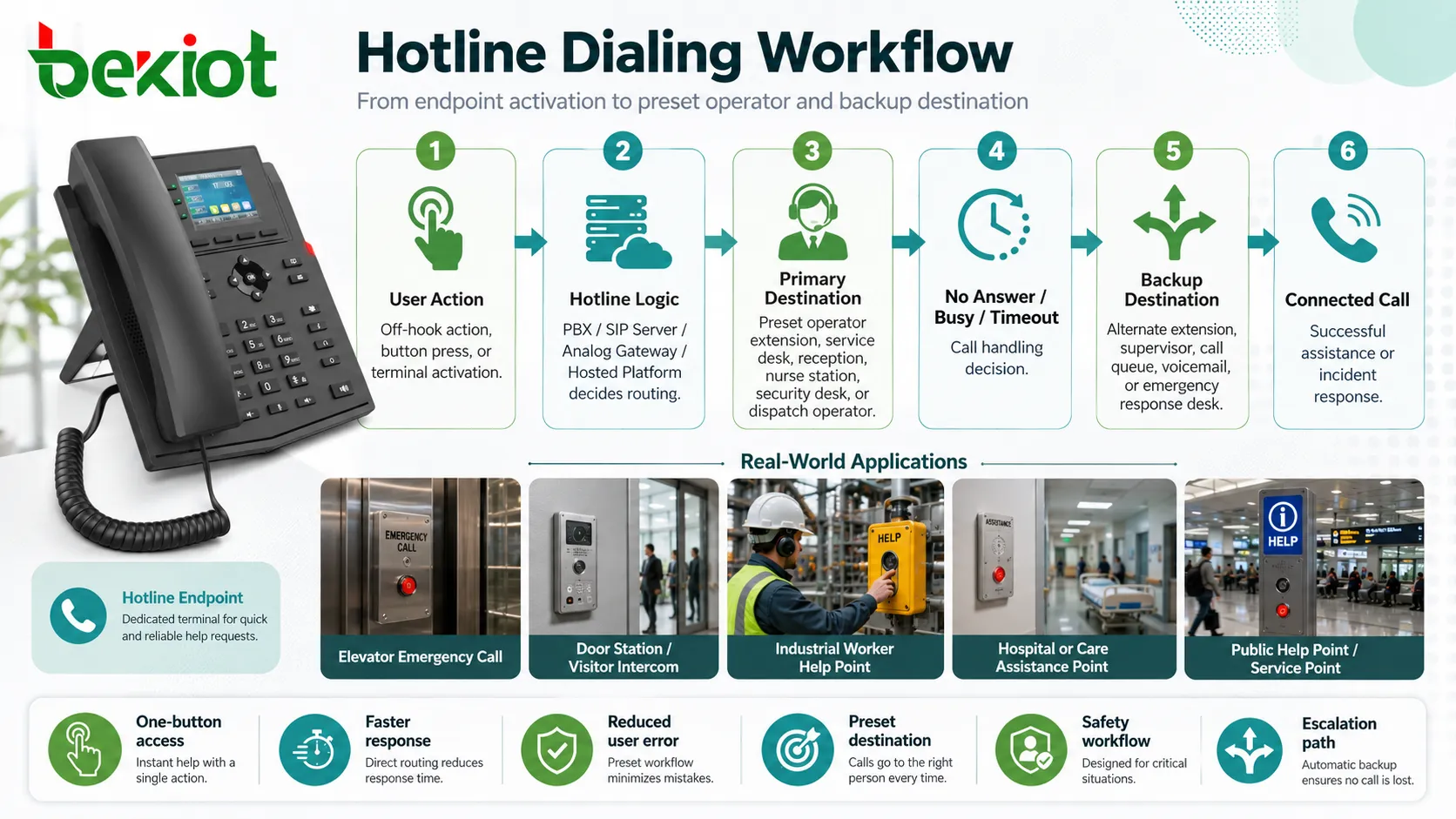
Automatic calling removes the decision from the user side and moves the routing logic into the phone system. The endpoint only needs to trigger the call. The PBX, SIP server, analog gateway, or hosted telephony platform then decides where the call should go.
This makes the feature useful wherever the call destination is predictable, time-sensitive, or safety-related. It is not only a convenience function; in emergency and service environments, it can become part of the response workflow.
Trigger Methods in Real Devices
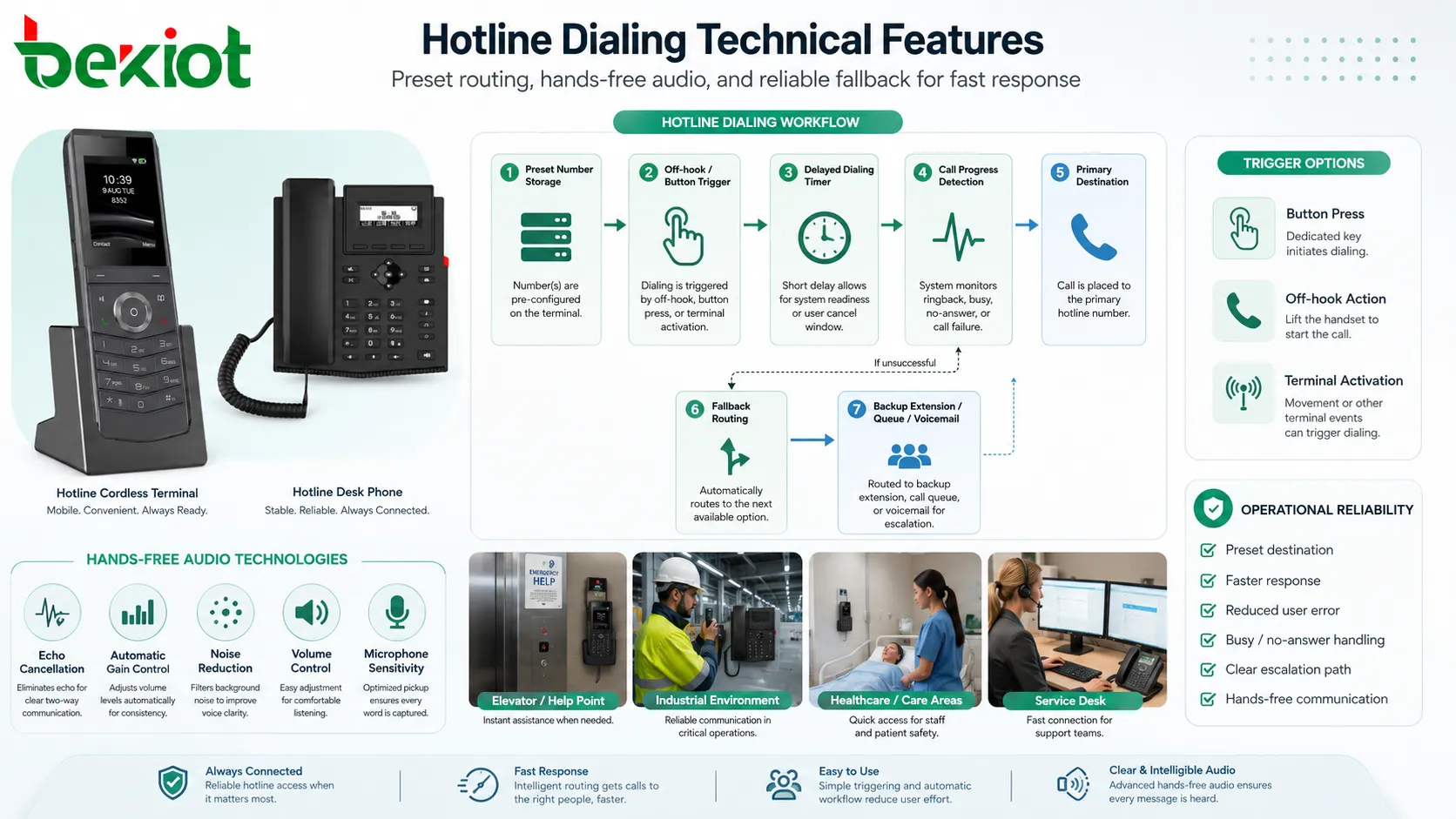
Off-Hook Activation
The most traditional method is off-hook activation. When the user lifts the handset, the phone or port detects the line state and automatically starts dialing the configured number. This is common in analog phones, elevator phones, hotel lobby phones, and service phones.
Off-hook activation is useful when the device has no keypad or when the user should not choose among multiple destinations. The endpoint behaves like a direct line to a specific service point.
Button-Based Activation
Many terminals use a call button rather than a handset. When the button is pressed, the device sends the call to the configured destination. This design is common in help points, intercom panels, parking stations, emergency pillars, access control terminals, and industrial call stations.
The button may be physical, touch-based, vandal-resistant, illuminated, weatherproof, or labeled for a specific purpose such as “Help,” “Call,” “Emergency,” “Reception,” or “Security.”
Delayed Automatic Dialing
Some systems use a short delay before dialing. This is sometimes called delayed hotline or warmline behavior. After the handset is lifted, the system waits for a few seconds. If the user dials manually during that time, the manual number is accepted. If no digits are entered, the preset number is dialed automatically.
This is useful when a phone should support both normal dialing and automatic connection. For example, an office phone may allow users to dial extensions manually but still call reception automatically if no digits are entered.
Event-Based Calling
In more integrated systems, the call can be triggered by an external event. A door contact, alarm input, sensor, relay, emergency button, access control event, or system fault may start a call automatically.
This allows communication to become part of a larger workflow. For example, an alarm input can trigger a call to a control room while also activating a siren, camera pop-up, or event log.
Call Destination Logic
Fixed Number Routing
The simplest configuration sends every triggered call to one fixed number. The destination may be an internal extension, operator group, PBX hunt group, SIP URI, emergency center, mobile number, or external PSTN number.
This design is easy to maintain and works well when there is always one responsible answering point. However, it may not be enough if the destination is unavailable, busy, or outside working hours.
Time-Based Routing
Some systems change the destination according to time schedule. During office hours, calls may go to reception. At night, they may go to security. During holidays, they may route to an external monitoring center.
Time-based routing is useful for buildings, campuses, hotels, factories, hospitals, and service sites where staffing changes throughout the day.
Priority Routing
High-priority call paths can be used for emergency devices. These calls may bypass ordinary queues, ring special operators, trigger alerts, or use dedicated trunk routes.
Priority design helps ensure that urgent calls are not blocked by routine calls. It should be tested carefully because emergency behavior must work under real system load.
Fallback Destination
A well-designed system should define what happens if the first destination does not answer. The call may overflow to another extension, ring a group, transfer to voicemail, call an external number, play an announcement, or trigger a secondary alarm.
Fallback behavior is important because a fixed destination can fail. The responsible person may be busy, the phone may be offline, the trunk may be unavailable, or the network may be down.
The strongest hotline design is not only one-touch calling. It is one-touch calling with clear destination logic, fallback routes, monitoring, and response responsibility.
Core Technical Features
Preset Number Storage
The endpoint or phone system must store the destination number. In some designs, the number is stored directly inside the phone, intercom, or analog adapter. In others, the endpoint simply goes off-hook and the PBX applies the automatic dialing rule.
Centralized configuration is easier for large deployments because administrators can change the destination without visiting every device. Local configuration may be useful for simple standalone installations.
No-Keypad Operation
Many hotline devices do not need a keypad. This reduces user confusion and prevents unauthorized dialing. It also improves durability in public, industrial, or outdoor locations because there are fewer exposed controls.
No-keypad operation is especially common in emergency stations, elevator phones, door phones, tunnel phones, parking help points, and clean public areas.
Auto-Answer at the Receiving Side
Some systems pair automatic dialing with auto-answer at the receiving terminal. For example, a dispatch console, security desk phone, or control room intercom may answer automatically so staff can hear the caller or site audio quickly.
This feature should be used carefully. Auto-answer may raise privacy concerns if the endpoint opens audio without clear user action or notification.
Call Progress Detection
The system may monitor ringing, busy tone, answer state, timeout, call failure, or disconnect events. This helps the system decide whether to continue, retry, overflow, or generate an alarm.
Call progress detection is important for unattended terminals because there may be no local user who can understand whether the call succeeded.
Speaker and Microphone Control
Hands-free hotline terminals rely on speaker and microphone performance. Echo cancellation, automatic gain control, noise reduction, volume control, and microphone sensitivity affect call quality.
In noisy or outdoor environments, audio design is critical. A call that connects successfully still fails operationally if the operator cannot understand the caller.
Integration with PBX and SIP Systems
In a PBX or IP PBX environment, automatic dialing can be configured at different layers. The endpoint may dial the number itself, or the PBX may apply a rule when a specific extension goes off-hook. The right method depends on system design, endpoint capability, and maintenance preference.
For SIP endpoints, the device may send an INVITE to a configured destination after trigger activation. In other cases, the device registers as an extension, and the PBX routes the call based on extension settings, speed dial rules, or hotline service codes.
When the call crosses SIP trunks, gateways, or external networks, number format and routing policy must be checked. A destination that works internally may fail if the system needs a prefix, country code, trunk access rule, caller ID setting, or emergency routing permission.
Analog Line and Gateway Behavior
Analog hotline phones may rely on FXS ports, PBX analog extension cards, or analog telephone adapters. When the phone goes off-hook, the port detects loop current and either provides dial tone or automatically sends the preset digits.
Some analog systems store the hotline number in the PBX rather than the phone. In this case, the analog phone may be a very simple device, while the PBX controls the dialing behavior. This is common in hotel, elevator, industrial, and public service installations.
For analog deployments, technicians should test loop current, line voltage, DTMF transmission, ringing, off-hook detection, cable resistance, and power backup. A simple hotline phone may still fail if the analog port or cable path is unstable.
Safety and Emergency Design Considerations
Clear User Action
Emergency and public devices should make the call action obvious. A user should know which button to press and whether the call has started. Visual indicators, button lighting, ringback tone, voice prompts, or status LEDs can help reduce uncertainty.
Clear feedback matters because users may be stressed, injured, or unfamiliar with the equipment.
Reliable Power
Automatic calling may be needed during a power failure, elevator fault, building incident, or outdoor emergency. The system should be supported by suitable backup power if the application requires continued operation.
Power planning may include UPS, PoE backup, battery-supported PBX, emergency power circuits, or line-powered analog service depending on architecture.
Location Identification
The receiving operator should know where the call comes from. This may be shown through caller ID, extension name, device label, SIP display name, monitoring software, call popup, or alarm integration.
Location identification is essential for elevators, campuses, tunnels, parking areas, factories, hospitals, and public help points where many similar devices may exist.
Failover Path
For critical calls, a single destination is not enough. The system should define what happens when the operator phone is busy, offline, unanswered, or unreachable.
Failover may include ringing a group, calling a second control room, using another trunk, forwarding to mobile staff, or triggering an external monitoring service.
Deployment Scenarios
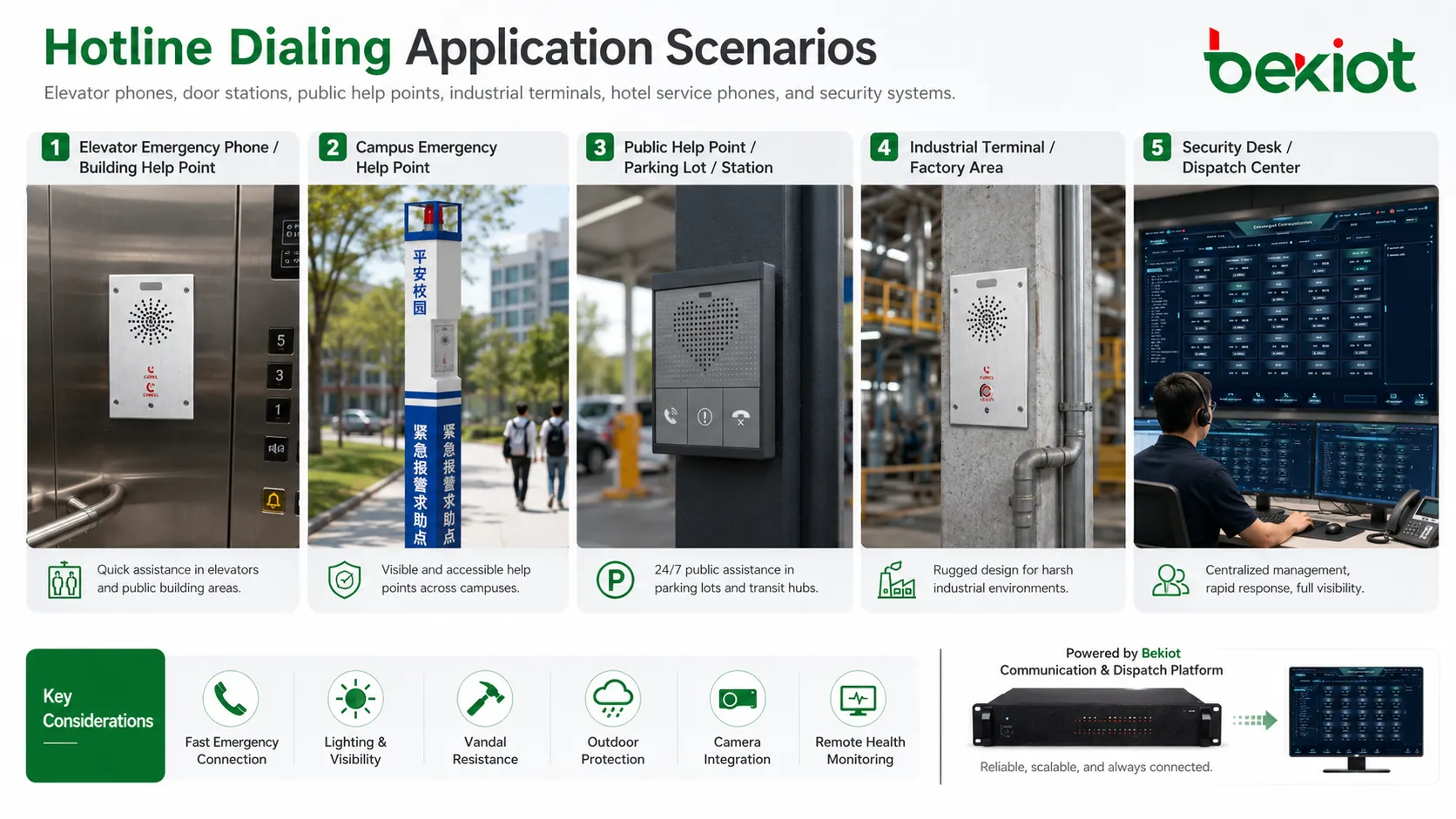
Elevator Communication
Elevator phones often use automatic calling because trapped passengers should not need to know a number. Pressing the emergency button or lifting a handset should connect them to building staff, a monitoring center, or a rescue service.
These systems should identify the elevator location and remain usable during abnormal operating conditions. Periodic testing is important because elevator emergency calls may be rare.
Door Stations and Visitor Access
Door intercoms can call reception, security, tenants, or management offices with one button. This simplifies visitor access and reduces manual dialing errors.
Advanced systems may integrate with video, access control, remote door release, mobile apps, and event logs.
Industrial Work Areas
Factories, mines, power plants, tunnels, ports, and chemical sites may use direct-call terminals in areas where workers need fast contact with control rooms or maintenance teams.
Rugged construction, loud audio, noise suppression, weather protection, and clear labeling are important in these environments.
Public Help Points
Campus paths, parking lots, stations, highways, parks, and public buildings may use help stations that automatically call security or emergency assistance.
These deployments should consider lighting, vandal resistance, outdoor protection, camera integration, and remote health monitoring.
Hotel and Service Phones
Hotels may use automatic calling for lobby phones, guest service phones, housekeeping phones, emergency phones, or direct-line phones to reception. The user simply lifts the handset or presses a labeled key.
This improves service consistency and reduces the need for guests or staff to remember extension numbers.
Configuration Details That Often Matter
Administrators should define whether the call starts immediately or after a delay. Immediate dialing is best when the device has only one purpose. Delayed dialing is better when the phone may also be used for ordinary manual calls.
The destination number should be documented and tested. If the PBX uses prefixes, trunk access codes, emergency rules, or time schedules, the stored number must match the actual routing plan.
Timeout values should be realistic. If the first destination rings for too long, callers may wait unnecessarily. If it rings for too short a time, staff may not have enough time to answer.
Caller identity should be meaningful. The receiving phone should display a name such as “Elevator 2,” “Gate A,” “Parking B1 Help Point,” or “Pump Room Phone” rather than a random extension number.
Maintenance access should be protected. Unauthorized users should not be able to change hotline destinations, disable calling, or redirect emergency calls.
Common Faults and Troubleshooting
No Call After Trigger
If lifting the handset or pressing the button does not start a call, check device power, registration status, analog line condition, trigger wiring, button input, PBX rule, and stored number configuration.
For SIP devices, confirm that the endpoint is registered and can reach the PBX. For analog devices, confirm off-hook detection and loop current.
Call Goes to the Wrong Destination
This usually indicates an incorrect stored number, wrong PBX rule, outdated extension assignment, time schedule mismatch, or call forwarding conflict.
Check the complete route rather than only the endpoint. The number may be correct locally but changed by dial plan rules later.
Call Connects but Audio Is Poor
Poor audio may come from low microphone gain, loud background noise, echo, network jitter, packet loss, analog line noise, speaker placement, or enclosure design.
Test audio from the actual installation location. A terminal that sounds fine on a desk may perform poorly in an elevator, tunnel, machine room, or street environment.
Fallback Does Not Work
Fallback failure may occur when timeout values are missing, overflow numbers are wrong, alternate trunks are blocked, or the backup destination is unavailable.
Test no-answer, busy, offline, and network-failure scenarios. Do not test only the normal successful call path.
Operator Cannot Identify the Caller
If the receiving party sees only a generic number, response may be delayed. Update extension names, SIP display names, caller ID mapping, PBX labels, or monitoring system records.
Clear location display is often more important than the device model or internal extension number.
Hotline dialing should be tested as a complete service path: trigger, route, answer, audio, identity, fallback, logging, and recovery.
Best Practices for Long-Term Use
Keep a device inventory. Each terminal should have a location, extension number, destination number, fallback route, installation date, responsible department, and maintenance contact.
Test regularly. Public, emergency, and safety-related devices may remain unused for long periods, so faults can go unnoticed unless scheduled testing is performed.
Review destination changes. If a reception desk moves, a security number changes, or a control room is reorganized, hotline destinations must be updated immediately.
Use clear labels. The device should tell users what will happen when they press the button or lift the handset. Labels such as “Press for Security” or “Lift for Reception” are better than unclear generic text.
Monitor device health where possible. SIP registration status, line faults, failed calls, power alarms, and button status can help maintenance teams detect problems before users need the device.
FAQ
Can hotline dialing work without a PBX?
Yes. Some devices can dial a stored SIP address or phone number directly through a service provider or gateway. However, PBX-based routing gives more control over schedules, fallback, logging, and group ringing.
What is the difference between immediate hotline and delayed hotline?
Immediate hotline starts the preset call as soon as the device is activated. Delayed hotline waits for a short period, allowing manual dialing first, and only dials automatically if no digits are entered.
Can one terminal call different destinations?
Yes, if it supports multiple buttons, schedules, input events, or PBX routing rules. For example, daytime calls may go to reception while night calls go to security.
Does the feature require a special phone?
Not always. Some standard phones can support it through PBX rules or device settings. Purpose-built terminals are preferred when the application needs rugged design, no keypad, loud audio, outdoor protection, or emergency labeling.
What should be checked after changing the destination number?
Test the trigger action, call route, caller ID display, answer behavior, audio quality, no-answer fallback, busy fallback, logs, and whether the new receiving team understands the response procedure.







