


In server rooms, data centers, telecom cabinets, and edge equipment rooms, engineers often describe equipment as 1U, 2U, 4U, or 6U. This “U” is not a performance indicator. It is a physical height unit used to plan how much vertical space a server, switch, gateway, storage device, or other rack-mounted equipment will occupy inside a standard cabinet.
Understanding this unit is important for project design. It helps teams estimate cabinet capacity, reserve space for future devices, organize cabling, improve airflow, and avoid installation conflicts during delivery.
The Basic Measurement Behind Rack Equipment
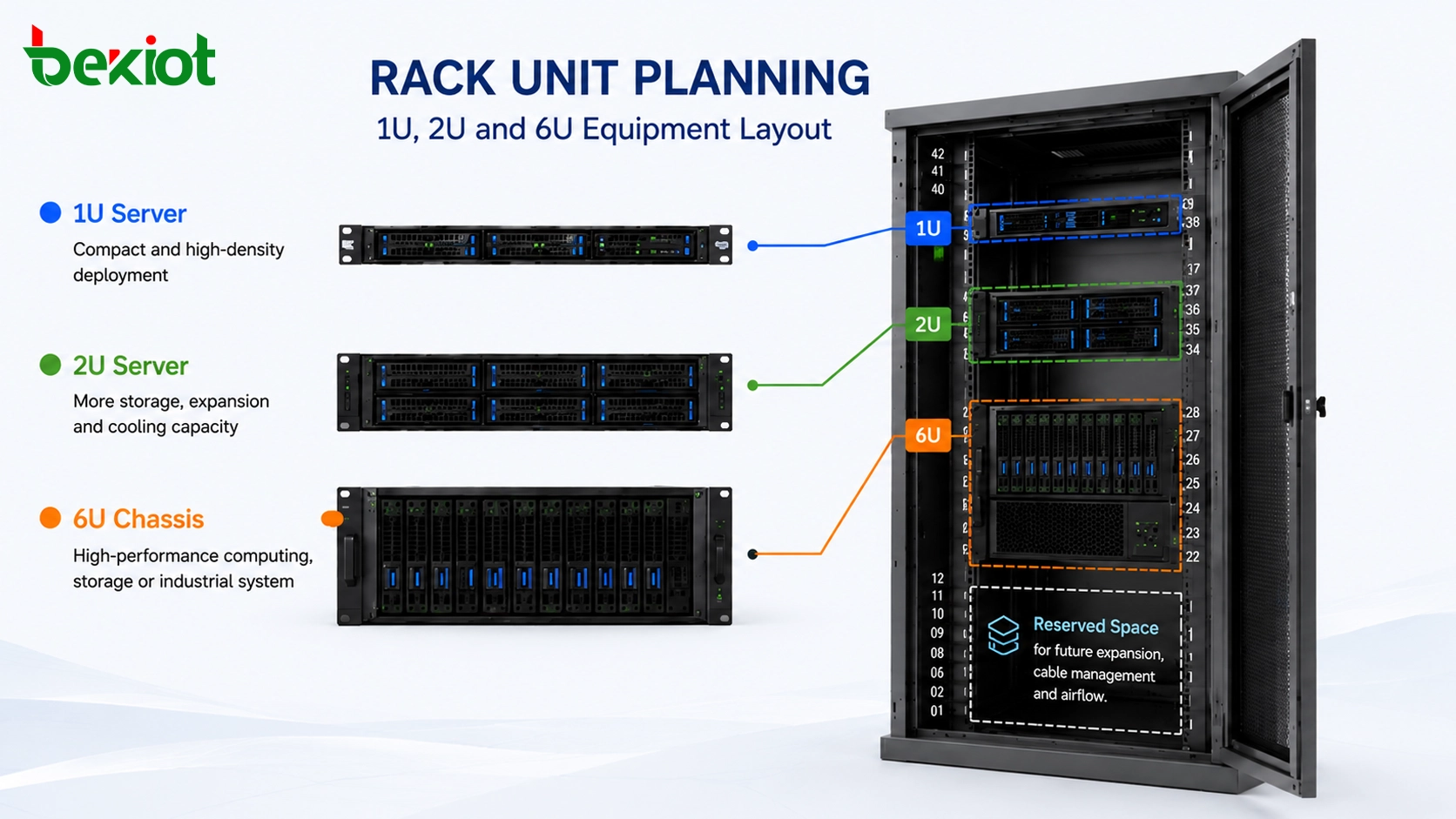
“U” stands for “Rack Unit,” a standard height measurement used for rack-mounted equipment. One rack unit equals 1.75 inches, which is about 4.45 centimeters or 44.45 millimeters. When a device is described as 1U, it occupies one rack unit of vertical height. A 2U device occupies two rack units, and a 6U device occupies six rack units.
This standard makes equipment planning much easier. Instead of measuring every server chassis manually, engineers can use the U value to quickly understand cabinet space consumption. A 1U server is usually compact and suitable for high-density deployment. A 2U server provides more internal space for disks, expansion cards, cooling, or higher-performance hardware. Larger chassis such as 4U or 6U may be used for storage, GPU computing, industrial control, media processing, or special-purpose systems.
How Cabinet Markings Help Installation Teams
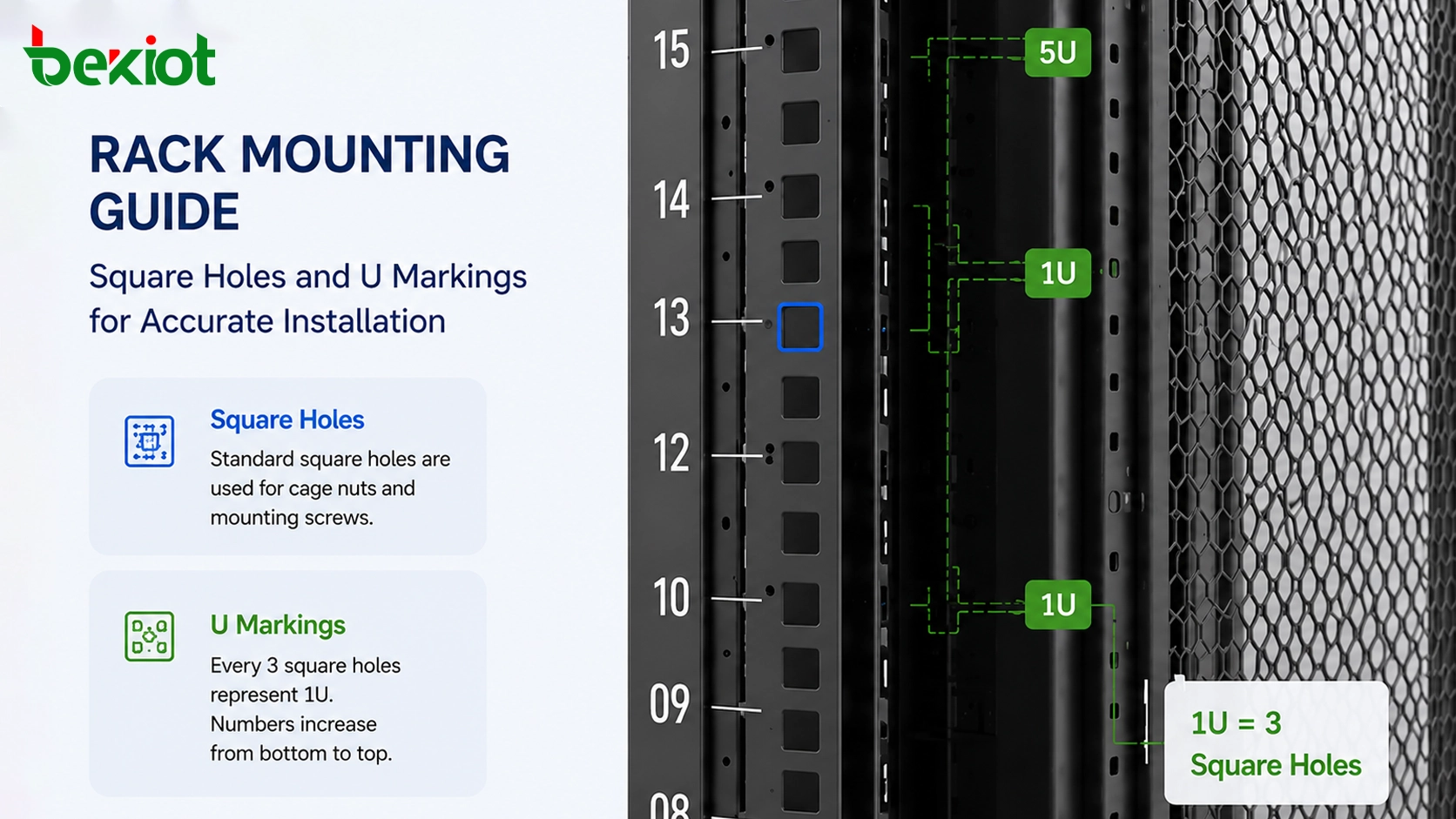
Standard server cabinets normally include vertical mounting rails with repeated square holes. These square holes are not random. They correspond to rack unit spacing, and the numbered marks beside them help installers locate the correct position for each device.
In many cabinets, every three square holes represent one rack unit. The numbering usually starts from the bottom of the cabinet and increases upward. This allows engineers and installers to follow a rack layout drawing accurately. For example, if a design specifies that a 2U server should be installed from U10 to U11, the installation team can identify the correct mounting holes without guesswork.
Common Cabinet Heights in Real Projects
The most common full-height server cabinet is 42U. This means the cabinet can theoretically contain equipment with a combined vertical height of 42 rack units. If every device were exactly 1U and no space were reserved, a 42U cabinet could hold 42 units of 1U equipment.
In practice, project teams usually reserve extra space for patch panels, cable managers, power distribution units, blanking panels, airflow paths, service access, and future expansion. Therefore, the theoretical maximum is not always the recommended deployment density.
| Cabinet Height | Typical Use | Planning Notes |
|---|---|---|
| 24U | Small server rooms, edge sites, branch offices, wall-side equipment areas | Suitable for smaller deployments where space and device quantity are limited. |
| 42U | Standard data centers, telecom rooms, enterprise equipment rooms | The most widely used cabinet height for general server and network deployment. |
| 45U / 48U | Large-capacity data rooms, high-density cabinets, projects requiring more cabling space | Provides additional vertical space for equipment, cable management, airflow, and expansion. |
Why U Planning Matters Before Procurement
When selecting servers, switches, communication gateways, storage devices, security appliances, or industrial network equipment, knowing the U height helps determine whether the equipment can be installed into the planned rack. It also helps avoid one of the most common project mistakes: buying devices first and discovering later that the cabinet space is not enough.
For a well-designed project, the equipment list should include device name, quantity, U height, installation position, power requirement, network connection, heat output, and maintenance space. This information allows the project team to calculate whether a 24U, 42U, 45U, or 48U cabinet is more suitable.
Space calculation is only the first step
Rack unit calculation tells the team how much vertical space the equipment occupies, but it does not solve every design problem. A cabinet also needs enough depth, weight capacity, power capacity, cooling capacity, and cable routing space.
For example, a 1U device may fit by height but still be unsuitable if it is too deep for the cabinet, too heavy for the mounting rails, or requires rear cabling space that was not reserved.
Future expansion should be included
Many projects grow after the first phase. More servers, switches, gateways, patch panels, recording devices, security devices, or edge computing units may be added later. If the cabinet is filled completely at the beginning, later upgrades may require a second cabinet, extra cabling, new power distribution, and more installation work.
A practical design usually reserves unused rack units for future expansion and maintenance flexibility. This makes later upgrades simpler and reduces the risk of reworking the entire cabinet layout.
Planning for Server Rooms and Communication Cabinets
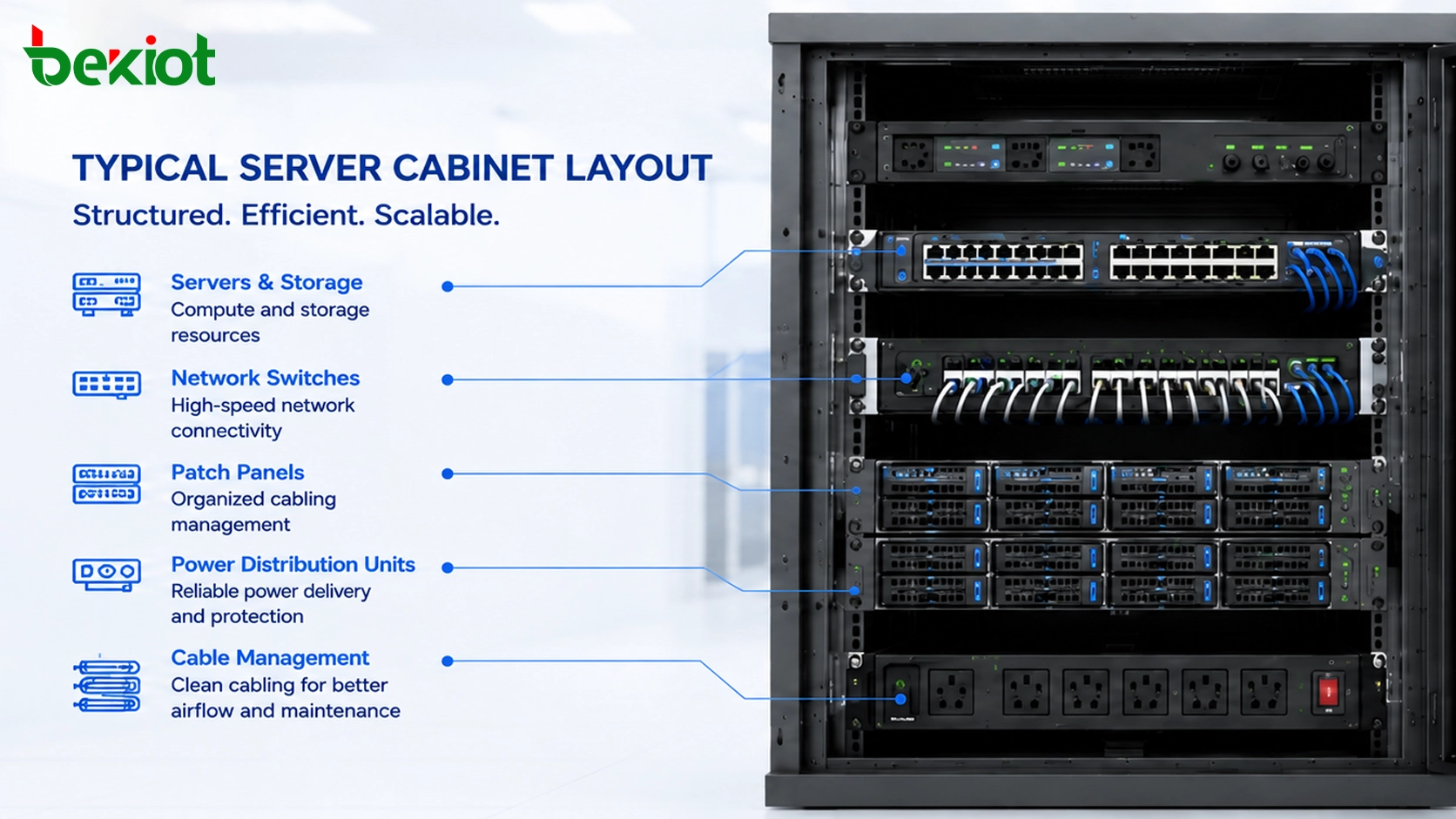
Rack unit planning is not limited to IT servers. It is also important for telecom systems, IP PBX platforms, media servers, dispatch platforms, recording servers, video gateways, RoIP gateways, network switches, routers, firewalls, and power equipment. Any rack-mounted device should be evaluated by its U height before installation.
In a communication system project, the cabinet may contain both IT equipment and communication hardware. For example, one cabinet may include servers, SIP platforms, switches, gateways, storage, patch panels, and power devices. A clear rack layout helps installers reduce wiring mistakes and gives maintenance teams a more readable system structure.
Recommended Design Workflow
A reliable cabinet plan should begin with the equipment list. Each device should be checked for U height, depth, weight, power input, cooling direction, port location, and maintenance access. After that, the engineer can create a rack elevation drawing that defines where every device will be installed.
Heavy equipment is usually placed lower in the cabinet to improve stability. Patch panels and cable managers should be positioned close to the devices they serve. Devices that require frequent operation or status checking should be placed at a comfortable viewing height where possible.
Check installation details before delivery
Before the project reaches the installation phase, the team should confirm cabinet size, rail type, mounting accessories, power distribution, grounding, cable entry direction, ventilation, and available service space around the cabinet. These details often affect whether a rack design works smoothly on site.
For projects with multiple cabinets, consistent numbering and labeling are important. Cabinet ID, U position, device name, port mapping, cable label, and power circuit label should match the final documentation.
Use blank panels and cable managers properly
Blank panels are not only for appearance. They help guide airflow and reduce hot air recirculation in front-to-back cooling designs. Cable managers keep network and power cables organized, reduce bending stress, and make future maintenance easier.
Even when the U calculation looks correct, poor cable management can make the cabinet difficult to maintain. For this reason, rack space should not be planned only around devices. Cable routes, airflow, and service access should be planned together.
Value for Project Owners and Integrators
Correct U planning reduces project risk. It helps owners estimate cabinet quantity, room space, power distribution, and future expansion capacity before purchasing equipment. It also helps system integrators prepare clearer drawings, reduce installation errors, and deliver a more professional cabinet layout.
For data center, telecom, industrial communication, security, and smart building projects, the rack unit system provides a shared language between designers, equipment suppliers, installers, and maintenance teams. When everyone understands the meaning of 1U, 2U, 6U, and 42U, planning becomes more accurate and communication becomes simpler.
The best cabinet design is not simply the one that fills every rack unit. It is the one that balances equipment density, heat dissipation, cabling, power, maintenance, and long-term scalability.
FAQ
Is 1U always better because it saves cabinet space?
Not always. A 1U device saves vertical space, but a 2U or larger chassis may provide better cooling, more drive bays, more expansion slots, or easier maintenance. The right choice depends on performance, density, and service requirements.
Can different brands of rack equipment fit in the same cabinet?
Usually yes, if they follow standard rack dimensions and the cabinet depth, rail type, load capacity, and mounting accessories are compatible. However, device depth and rear cabling space should always be checked before procurement.
Should network switches be installed at the top or middle of a cabinet?
It depends on the cabling design. Top-of-rack switching is common in data centers, while middle or upper placement may be easier for small equipment rooms. The best position should reduce cable length and keep maintenance convenient.
How much unused rack space should be reserved?
There is no fixed rule for every project, but leaving space for cable managers, blank panels, future devices, and airflow is usually better than filling the cabinet completely in the first phase.
Does U height include equipment feet or desktop brackets?
Rack unit height normally refers to rack-mounted installation size. Desktop feet, wall brackets, or non-rack accessories may not follow the same measurement, so the rack-mount kit and installation drawing should be checked separately.







