


In a paging, public address, intercom, or enterprise voice system, “plan page numbers” can be understood as the planned numbering rules used to activate different paging functions. These numbers may represent a ingle paging zone, a group of speakers, a department, a building, an emergency broadcast group, an all-call function, or a scheduled paging task. Instead of asking users to search through complicated menus, the system allows them to dial a defined number or code to send an announcement to the right destination.
This type of paging number plan is important because paging systems are used in real spaces: factories, campuses, hospitals, hotels, office buildings, warehouses, transport sites, security centers, public facilities, and industrial parks. If numbering is confusing, announcements may be sent to the wrong area, emergency messages may be delayed, or operators may need extra time to confirm which code to use. A well-designed paging number plan turns paging operation into a clear, repeatable, and manageable communication process.
What plan page numbers mean in paging systems
Not document page numbers
In this article, plan page numbers do not refer to printed document page numbers or web page pagination. They refer to planned paging access numbers inside a communication system. A paging number may be an extension code, short dial code, feature code, SIP paging number, group number, zone code, emergency paging code, or all-call access number.
For example, one number may page the warehouse, another may page the office floor, another may page the outdoor yard, and another may page the entire facility. The number becomes a shortcut between the user’s action and the system’s paging target.
One number maps to one paging action
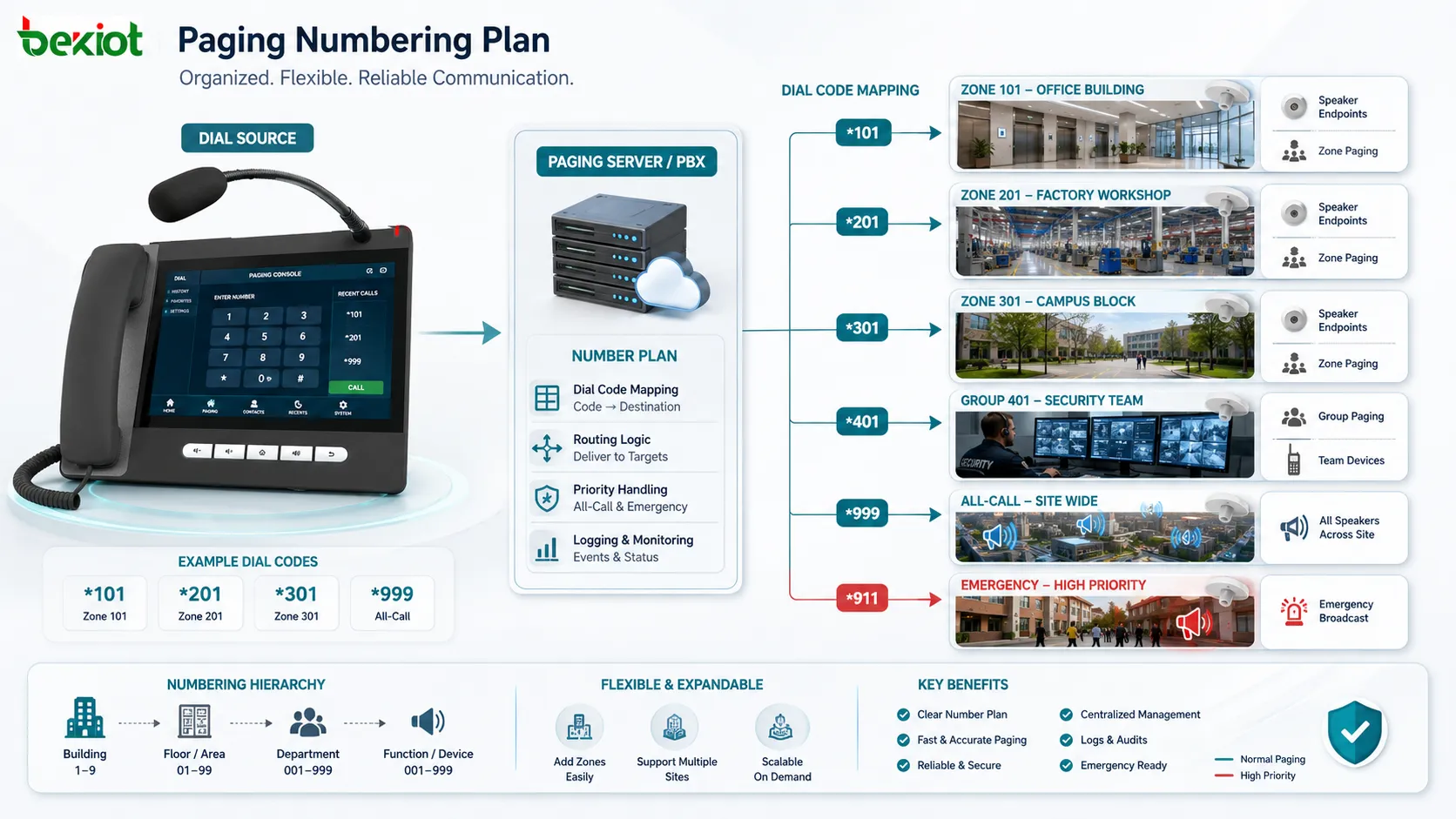
The central idea is mapping. A planned paging number should map clearly to a paging action. The action may be “page Building A,” “page maintenance team,” “page all speakers,” “play emergency evacuation message,” or “call the security group through intercom paging.” When the mapping is clear, users can act quickly without guessing.
Mapping should be stable and documented. If a number changes without notice, operators may send messages to the wrong zone. If two numbers are too similar, users may dial incorrectly. If the number list is not maintained, old zones may remain in the system even after site changes. Number planning is therefore both a technical and operational task.
Part of the communication architecture
Plan page numbers are not isolated settings. They are connected with the system’s extension plan, paging groups, public address zones, SIP routing, PBX features, access permissions, priority levels, emergency workflows, and operation procedures. A good numbering plan helps the whole communication architecture remain orderly.
In small systems, paging numbers may be simple. In large sites, they need careful structure. Numbers may be grouped by building, floor, department, function, emergency level, or device type. The goal is to make paging codes easy to remember, easy to expand, and easy to troubleshoot.
Main functions of plan page numbers
Simplifying paging operation
The first function is simplification. Users can dial a short number instead of selecting several options on a screen. A receptionist, guard, dispatcher, warehouse supervisor, nurse station, school office, or control room operator can page the right area quickly through a known code.
This is useful in urgent or repetitive communication. If staff must announce loading instructions many times each day, a simple warehouse paging number is more efficient than manually choosing speakers one by one. If security staff need to page all guards, a group number reduces delay.
Connecting numbers with zones
Paging systems often divide a facility into zones. A zone may be a floor, corridor, workshop, gate, warehouse area, parking lot, classroom building, hospital ward, public hall, platform, tunnel section, or outdoor yard. Plan page numbers allow each zone to have a clear access code.
Zone numbers prevent unnecessary disturbance. A message for the loading dock does not need to reach office workers. A message for one classroom building does not need to interrupt the whole campus. Users can choose the smallest effective paging scope by dialing the correct number.
Supporting group paging
Not every paging target is a physical zone. Some targets are operational groups, such as maintenance, security, housekeeping, emergency response, drivers, warehouse staff, engineering, or service desk personnel. A group paging number can reach a set of endpoints associated with that team.
Group paging helps users contact people by responsibility rather than by location. For example, a maintenance number may page several workshops and duty phones. A security number may page guard posts and patrol devices. This improves response because the system reaches the role that should handle the task.
Providing all-call access
A paging number plan may include an all-call number. This number sends the announcement to all configured paging endpoints or all emergency coverage areas. It is useful for site-wide announcements, fire drills, evacuation instructions, severe weather notices, or major operational changes.
All-call access should be controlled carefully. Because it affects many areas, not every user should be allowed to dial it. The number should be easy for authorized users to remember, but protected through permission, priority, or dispatch console control where necessary.
Supporting emergency paging
Emergency paging numbers are used for urgent messages. They may trigger higher priority, override background music, bypass local volume reduction, start recording, notify supervisors, or activate predefined emergency zones. This makes the number more than a normal paging shortcut.
Emergency numbers should be designed with safety procedures. A fire evacuation number, lockdown number, hazardous area warning number, or medical emergency announcement number may need different coverage and priority. These codes should be tested and included in staff training.
Linking with scheduled or automated paging
Some systems use planned paging numbers together with scheduled tasks or automated rules. A schedule may play a bell, shift notice, break reminder, public message, or recorded instruction to a defined paging group. The number plan helps identify which group or zone the schedule should use.
Automation reduces manual work, but it requires accurate numbering. If a scheduled message points to the wrong zone number, it may play in the wrong place every day. Number planning is therefore important for both manual and automatic paging.
Controlling permission and priority
Paging numbers can be connected with user permissions. Some users may page only their department. Some may page a building. Dispatchers may page the whole site. Emergency commanders may use priority paging. This prevents misuse and protects important communication channels.
Priority also matters. A normal paging number may be blocked when another announcement is active, while an emergency number may override lower-priority audio. The number plan should make this difference clear in both configuration and user documentation.
System values of a clear paging number plan
Faster communication
A clear plan reduces the time needed to send an announcement. Users do not need to search for zones, ask another operator, or remember complex procedures. They dial the planned number and speak. This is especially valuable during emergencies, shift changes, service coordination, and field response.
Speed also improves daily efficiency. Small delays repeated many times each day create operational waste. A well-planned paging number structure helps routine announcements become faster and more consistent.
Lower risk of wrong paging
Wrong paging can create confusion. A message may be sent to the wrong floor, wrong workshop, wrong department, or whole site by mistake. This may disturb people, delay response, or weaken trust in the paging system. Number planning reduces this risk by making codes logical and distinguishable.
For example, numbers can be grouped by building or function. Emergency numbers can be separated from routine numbers. All-call codes can be protected from accidental dialing. A logical structure helps users make fewer mistakes.
Better operation standardization
Paging number planning supports standard operation. Staff can be trained to use the same codes and same message process. Operators can follow a documented list rather than relying on memory or informal habits. This improves consistency across shifts and departments.
Standardization is important when several people share the paging role. A school office, hospital control desk, factory duty room, or property service center may have different operators at different times. A clear number plan keeps the operation stable even when people change.
Easier expansion
Facilities change. New buildings are added, departments move, warehouses expand, outdoor areas are created, and emergency zones are revised. A planned numbering structure makes expansion easier. New paging zones can be added without disturbing the existing logic.
If numbers were assigned randomly at the beginning, expansion becomes difficult. Engineers may run out of suitable numbers or create confusing exceptions. A scalable plan leaves space for future zones, groups, and functions.
Improved troubleshooting
When a paging problem occurs, the number plan helps maintenance staff locate the issue. If number 620 pages the warehouse group, engineers can check that group, its endpoints, its route, and its permissions. Without a clear plan, troubleshooting becomes slower.
Records also become easier to review. Logs can show which paging number was dialed, who dialed it, which zone was targeted, and whether the announcement succeeded. This supports both maintenance and management review.
Stronger emergency readiness
Emergency communication depends on fast and correct action. If staff do not know which paging number to use, response may be delayed. A well-designed emergency paging number plan gives authorized users a clear path to activate the correct announcement scope.
Emergency readiness also requires testing. The planned numbers should be verified regularly to ensure they still reach the correct areas, use the correct priority, and produce clear audio. Number planning and emergency drills should work together.
Application scenarios
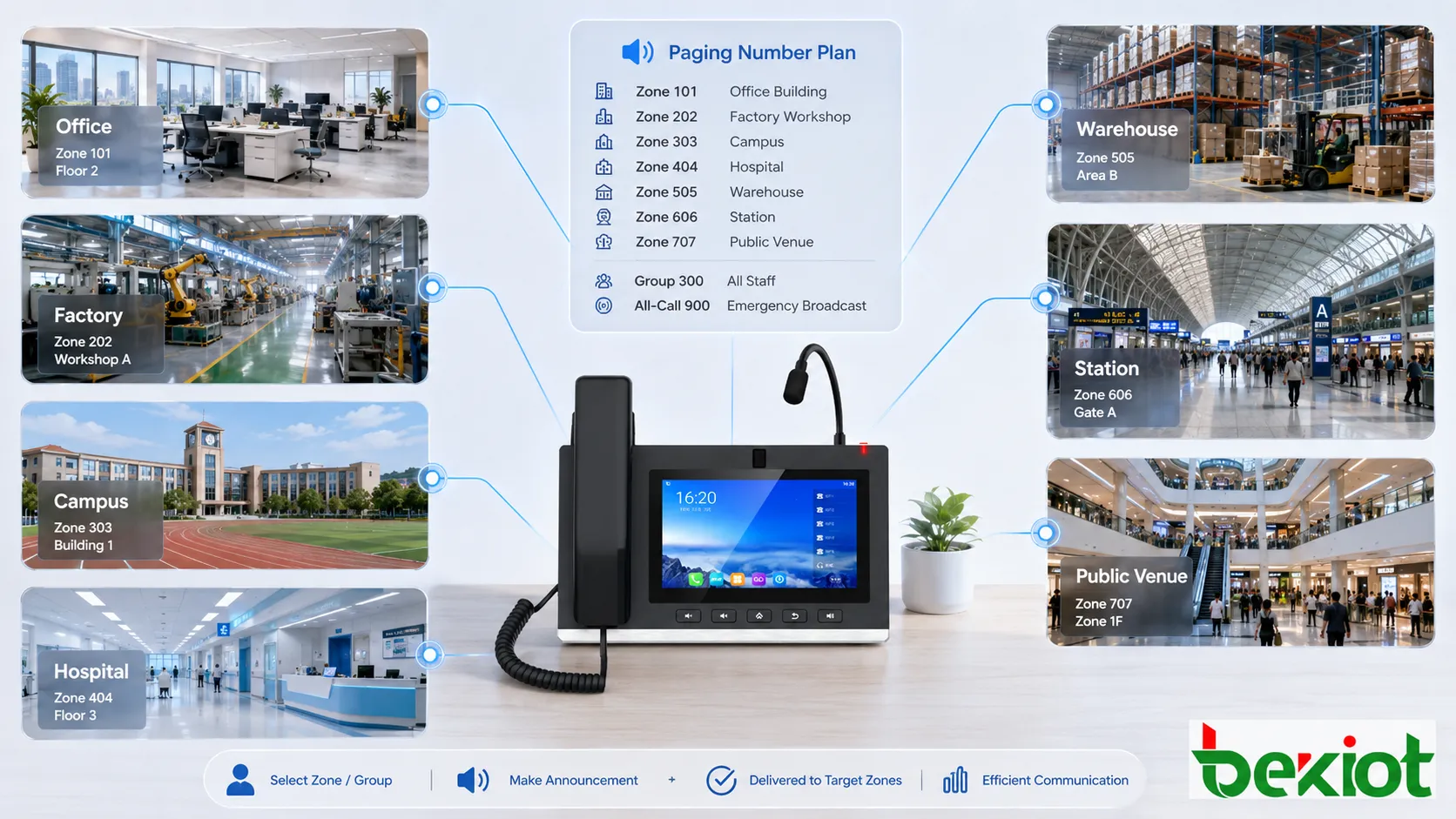
Office buildings and commercial facilities
In office buildings, hotels, shopping centers, and commercial complexes, paging numbers can be assigned to lobbies, parking areas, service desks, security rooms, floors, meeting areas, and emergency zones. Facility staff can use these numbers for maintenance notices, visitor guidance, lost-and-found announcements, service calls, and emergency instructions.
A clear number plan helps avoid disturbing the whole building for a local message. A parking notice can go to the parking area. A lobby notice can go to the lobby. A fire drill message can use the emergency all-call number. This improves both communication accuracy and user comfort.
Factories and industrial sites
Industrial sites often include workshops, control rooms, warehouses, outdoor yards, loading docks, utility areas, safety zones, and maintenance teams. Paging numbers can be planned by production line, area, department, or emergency function.
For example, one number may page the maintenance group, another may page the warehouse, another may page the outdoor yard, and another may activate plant-wide emergency paging. This helps operators send instructions to the correct people quickly in noisy and distributed environments.
Schools and campuses
Schools and campuses use paging numbers for classrooms, office areas, dormitories, sports fields, libraries, canteens, security posts, and emergency announcements. A number plan helps administrators send routine messages without interrupting the entire campus unnecessarily.
Emergency codes are also important. Lockdown, evacuation, fire drill, or weather warning messages may need predefined paging numbers with higher priority. Staff should be trained to use these numbers correctly under pressure.
Hospitals and healthcare facilities
Hospitals need controlled paging because different areas have different sensitivity. Public waiting areas, nurse stations, wards, operating support areas, laboratories, pharmacies, and emergency departments should not always receive the same announcements.
A planned paging number structure allows routine messages to reach the correct department while emergency messages remain available for broader coverage. Permission control is important because healthcare environments must balance urgent communication with patient comfort.
Warehouses and logistics centers
Warehouses and logistics sites use paging numbers for loading docks, picking areas, storage zones, vehicle gates, dispatch offices, packaging lines, and driver waiting areas. Supervisors can page specific areas instead of sending staff to search for workers physically.
Group numbers are useful for forklift teams, drivers, warehouse supervisors, and maintenance staff. This improves coordination during loading, dispatch changes, safety alerts, and peak operation periods.
Transportation and public venues
Stations, airports, parking facilities, tunnels, ports, stadiums, and exhibition centers need paging numbers for public areas, platforms, gates, service counters, staff zones, control rooms, and emergency areas. The number plan supports both public guidance and internal coordination.
In large venues, wrong paging can confuse crowds. A planned number structure helps operators select the right area quickly. It also supports emergency workflows when site-wide or zone-specific announcements are required.
Design principles for plan page numbers
Use a logical numbering structure
Numbers should be easy to understand. A logical structure may group numbers by building, floor, department, function, or priority. For example, one range can be used for building zones, another for department groups, and another for emergency functions.
Random numbers should be avoided where possible. They may work at first but become hard to remember and difficult to expand. A logical plan helps both users and engineers.
Keep routine and emergency numbers separate
Emergency paging numbers should be clearly separated from routine paging numbers. This prevents accidental activation and makes training easier. Emergency numbers may also require special permission and priority settings.
The difference should be visible in documentation and system configuration. Users should know which numbers are for daily announcements and which numbers are reserved for safety response.
Make names match real locations
The number plan should use names that match the real site. A code that appears as “Zone 17” may be less useful than “Warehouse Loading Dock.” Operators think in terms of places and responsibilities, not only technical IDs.
Consistent naming should be used across the PBX, paging server, dispatch console, floor plan, maintenance record, and training document. This reduces misunderstanding during operation.
Control who can use each number
Not every user should be able to dial every paging number. Local staff may only need local zones. Receptionists may need public areas. Security staff may need emergency zones. Administrators may manage all groups. Permission control protects the system from misuse.
Access rules should be reviewed regularly. When staff roles change, paging permissions should be updated. Old permissions may create operational or safety risks.
Leave space for future expansion
A good plan reserves number ranges for future buildings, zones, groups, and emergency functions. This makes expansion easier and avoids forcing the organization to renumber existing paging codes later.
Expansion planning is especially important for campuses, industrial parks, hospitals, logistics centers, and multi-building facilities. These sites often grow over time.
Configuration and maintenance techniques
Document every paging number
Every paging number should be documented with its target, permission, priority, audio path, related zone, endpoint list, and emergency role if applicable. Documentation should be accessible to administrators and operators.
Without documentation, troubleshooting becomes difficult. Users may rely on old paper lists, informal memory, or outdated labels. A central numbering document prevents confusion.
Test numbers after configuration changes
Whenever zones, speakers, endpoints, PBX routes, SIP groups, or permissions change, the related paging numbers should be tested. A configuration change in one system may affect paging behavior in another system.
Testing should verify that the correct area receives the announcement, the volume is suitable, the audio is clear, and unauthorized users cannot activate restricted numbers. Emergency numbers should be tested according to site procedures.
Review logs and failed attempts
System logs can show which paging numbers are used frequently, which are rarely used, and which attempts fail. Failed attempts may indicate wrong user permissions, outdated numbers, training problems, or route errors.
Log review helps improve the number plan. If users repeatedly dial the wrong code, the number may be confusing or training may be insufficient. If a number is never used, it may be unnecessary or poorly documented.
Update the plan after site changes
Paging number plans should follow the physical site. When departments move, buildings expand, speakers are added, or zones are renamed, the number plan should be updated. Old numbers should be removed or redirected carefully.
Site changes that are not reflected in the paging system create long-term risk. During an emergency, an outdated code may send instructions to the wrong area or miss the affected zone.
Train users by role
Different users need different parts of the number plan. A receptionist may need public announcements. A security operator may need emergency and all-call codes. A warehouse supervisor may need logistics zones. Training should match role, not overwhelm every user with every number.
Role-based training makes the system easier to use. Users remember the numbers that matter to their work and understand when to use them.
Common problems and optimization
Too many similar numbers
If paging numbers are too similar, users may dial the wrong code. This is especially risky when routine and emergency codes look alike. Similar numbers may also be difficult to remember under pressure.
Optimization includes separating number ranges, using clear labels, reducing unnecessary codes, and providing quick reference lists for operators. Emergency numbers should be distinct and controlled.
Unclear difference between zones and groups
Some systems mix physical zones and staff groups without clear naming. For example, “Maintenance” may refer to a workshop area or a maintenance team. This can cause wrong paging.
The plan should distinguish location-based zones from role-based groups. Names and codes should make the difference obvious.
All-call is used too often
If users do not know the correct zone number, they may use all-call for convenience. This disturbs unrelated areas and reduces the authority of site-wide announcements. It can also create alarm fatigue.
Better zone number planning and training can reduce overuse. Users should be encouraged to page the smallest effective area.
Old numbers remain after changes
Outdated paging numbers may remain in the system after departments move or devices are removed. Users may dial them and believe the message was delivered, even though the target group is no longer valid.
Regular audits should remove or update old numbers. If a number is retired, users should be informed. Critical codes should not be changed casually without communication.
No permission control
If every user can dial all paging numbers, the system may be misused. Accidental announcements, unauthorized emergency paging, and unnecessary all-call broadcasts may occur.
Permission control should be part of the number plan. User roles, department rights, emergency authority, and administrative access should be defined clearly.
Evaluation standards
Clarity:A good paging number plan should be easy to understand. Users should know what each number does, and administrators should be able to explain the structure. The plan should not depend on one person’s memory.
Accuracy:Each number should reach the correct target. Zone numbers, group numbers, emergency numbers, and all-call numbers should be tested regularly. Accuracy is the foundation of paging reliability.
Usability:The plan should be practical for real users. Numbers should be short enough for daily use, logical enough to remember, and documented enough for occasional users. Complicated code structures may fail in urgent situations.
Scalability:The plan should allow future expansion. New zones, groups, buildings, and functions should be added without destroying the existing structure. Scalability reduces long-term maintenance problems.
Control:The plan should support permission, priority, and audit control. Important paging functions should be protected, emergency numbers should be traceable, and routine users should only access the numbers they need.
Closing Notes
Plan page numbers, in the context of paging systems, refer to the planned numbering structure used to activate paging zones, groups, all-call functions, emergency broadcasts, scheduled announcements, and other paging actions. They help users turn a simple dial code or paging number into a controlled announcement action.
Their main functions include simplifying paging operation, connecting numbers with zones, supporting group paging, providing all-call access, enabling emergency paging, linking with scheduled tasks, and controlling permission and priority. These functions make paging systems easier to use and more reliable in daily and emergency communication.
Their application value appears in office buildings, factories, campuses, hospitals, warehouses, transport facilities, public venues, commercial buildings, and industrial sites. A good paging number plan improves communication speed, reduces wrong paging, supports expansion, standardizes operation, and strengthens emergency readiness.
The best design uses logical numbering, clear naming, role-based permission, separate emergency ranges, documented mappings, regular testing, and ongoing updates after site changes. When planned carefully, paging numbers become an important foundation for accurate and efficient paging communication.
FAQ
What are plan page numbers in a paging system?
They are planned paging access numbers or dial codes used to activate specific paging zones, groups, all-call functions, emergency broadcasts, or scheduled paging actions.
Are plan page numbers the same as document page numbers?
No. In this context, they refer to paging system numbers, not printed page numbers or web page pagination.
Why is paging number planning important?
It helps users send announcements to the correct area quickly, reduces wrong paging, supports permission control, simplifies training, and makes the system easier to maintain.
Can one paging number reach multiple speakers?
Yes. A paging number can be mapped to a group or zone containing multiple speakers, phones, intercom terminals, amplifiers, or other paging endpoints.
How should emergency paging numbers be managed?
Emergency numbers should be clearly separated from routine numbers, protected by permission, tested regularly, documented carefully, and included in staff training and emergency procedures.







